Page 3 of 598
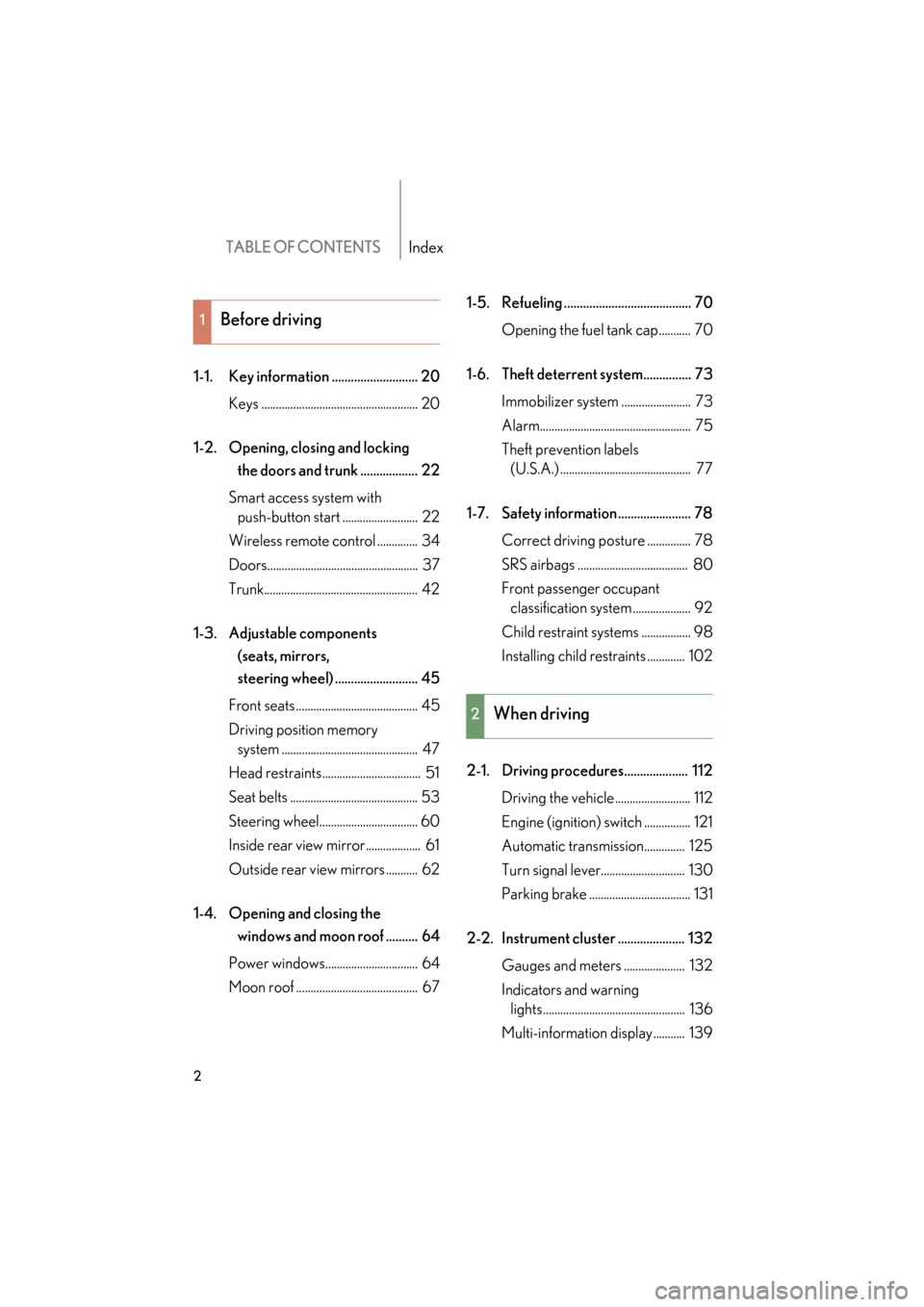
TABLE OF CONTENTSIndex
2
GS_G_U
June 19, 2008 12:54 pm
1-1. Key information ........................... 20Keys ...................................................... 20
1-2. Opening, closing and locking the doors and trunk .................. 22
Smart access system with push-button start .......................... 22
Wireless remote control .............. 34
Doors.................................................... 37
Trunk..................................................... 42
1-3. Adjustable components (seats, mirrors,
steering wheel) .......................... 45
Front seats .......................................... 45
Driving position memory system ............................................... 47
Head restraints.................................. 51
Seat belts ............................................ 53
Steering wheel.................................. 60
Inside rear view mirror................... 61
Outside rear view mirrors ........... 62
1-4. Opening and closing the windows and moon roof .......... 64
Power windows................................ 64
Moon roof .......................................... 67 1-5. Refueling ........................................ 70
Opening the fuel tank cap........... 70
1-6. Theft deterrent system............... 73 Immobilizer system ........................ 73
Alarm.................................................... 75
Theft prevention labels (U.S.A.) ............................................. 77
1-7. Safety information ....................... 78 Correct driving posture ............... 78
SRS airbags ...................................... 80
Front passenger occupant classification system .................... 92
Child restraint systems ................. 98
Installing child restraints ............. 102
2-1. Driving procedures.................... 112 Driving the vehicle .......................... 112
Engine (ignition) switch ................ 121
Automatic transmission.............. 125
Turn signal lever............................. 130
Parking brake ................................... 131
2-2. Instrument cluster ..................... 132 Gauges and meters ..................... 132
Indicators and warning lights................................................. 136
Multi-information display........... 139
1Before driving
2When driving
GS_U_G.book Page 2 Thursday, June 19, 2008 12:54 PM
Page 31 of 598

30
1-2. Opening, closing and locking the doors and trunk
GS_G_U
June 19, 2008 12:54 pm
●Gripping the door handle when wearing a glove may not unlock the door.
●If the wireless remote control is used to lock the doors when the electronic key
is near the vehicle, there is a possibility that the door may not be unlocked by the
smart access system with push-button star t. (Use the wireless remote control to
unlock the doors.)
●A sudden approach to the effective range or door handle operation may pre-
vent the doors from being unlocked. In this case, return the door handle to the
original position and check that the doors unlock before pulling the door handle
again.
■When the vehicle is not driven for extended periods
To prevent theft of the vehicle, do not leave the electronic key within 6 ft. (2 m) of
the vehicle.
■Security feature
If a door is not opened within approximately 60 seconds after the vehicle is
unlocked, the theft deterrent system automatically locks the vehicle again.
■Alarms and warning indicators
A combination of exterior and interior alarms as well as warnings displayed on the
multi-information display are used to prevent theft of the vehicle and unforeseeable
accidents resulting from erroneous operation. Take appropriate measures in
response to any warning indications on the multi-information display. ( →P. 5 0 8 )
The following table describes circumstances and correction procedures when only
alarms are sounded.
GS_U_G.book Page 30 Thursday, June 19, 2008 12:54 PM
Page 112 of 598

When driving2
111
GS_G_U
June 19, 2008 12:54 pm
2-1. Driving procedures ........ 112Driving the vehicle................... 112
Engine (ignition) switch .......... 121
Automatic transmission ........ 125
Turn signal lever ....................... 130
Parking brake ............................ 131
2-2. Instrument cluster .......... 132 Gauges and meters ................ 132
Indicators and warning lights ......................................... 136
Multi-information display ..... 139 2-3. Operating the lights and
windshield wipers ........ 142
Headlight switch ..................... 142
Fog light switch ........................ 145
Windshield wipers and washer ..................................... 146
Headlight cleaner switch ..... 149
2-4. Using other driving systems .......................... 150
Cruise control.......................... 150
Dynamic radar cruise control ..................................... 153
Intuitive parking assist ........... 164
Rear view monitor system ....................................... 179
AVS (Adaptive Variable Suspension System) ............ 183
Driving assist systems ............ 184
PCS (Pre-Collision System) ................................... 190
2-5. Driving information........ 194 Cargo and luggage ................ 194
Vehicle load limits ................... 198
Winter driving tips .................. 199
Trailer towing .......................... 204
Dinghy towing......................... 205
GS_U_G.book Page 111 Thursday, June 19, 2008 12:54 PM
Page 120 of 598

119
2-1. Driving procedures
2
When driving
GS_G_U
June 19, 2008 12:54 pm
NOTICE
■While driving the vehicle
Do not use the accelerator pedal or depress accelerator and brake pedals together
to hold the vehicle on a hill.
■When parking the vehicle
Always put the shift lever in “P”. Failure to do so may cause the vehicle to move or
the vehicle may accelerate suddenly if the accelerator pedal is accidentally
depressed.
■Avoiding damage to vehicle parts
●Do not turn the steering wheel fully in either direction and hold it there for a long
time.
Doing so may damage the power steering motor.
●When driving over bumps in the road, drive as slowly as possible to avoid damag-
ing the wheels, underside of the vehicle, etc.
■If you hear a squealing or scraping noise (brake pad wear limit indicators)
Have your Lexus dealer check and replace the brake pads as soon as possible.
The rotor damage can result if the pads are not replaced when needed.
Front brake only: Moderate levels of the brake pad and disc wear allow enhanced
front braking power. As a result, the discs may wear more quickly than conventional
brake discs. Therefore, when replacing the brake pads, Lexus recommends that you
also have the thickness of the discs measured.
It is dangerous to drive the vehicle when the wear limits of the brake pads and/or
that of the brake discs are exceeded.
GS_U_G.book Page 119 Thursday, June 19, 2008 12:54 PM
Page 131 of 598
130
2-1. Driving procedures
GS_G_U
June 19, 2008 12:54 pm
Turn signal lever
■Turn signals can be operated when
The “ENGINE START STOP” switch is in IGNITION ON mode.
■If the indicators flash faster than usual
Check that a light bulb in the front or rear turn signal lights has not burned out.
Left turn
Right turn
Move and hold the lever part-
way to signal a lane change
The left hand signal will flash
until you release the lever.
Move and hold the lever part-
way to signal a lane change
The right hand signal will flash
until you release the lever.
GS_U_G.book Page 130 Thursday, June 19, 2008 12:54 PM
Page 137 of 598
136
2-2. Instrument cluster
GS_G_U
June 19, 2008 12:54 pm
Indicators and warning lights
The indicator and warning lights on the instrument cluster and center
panel inform the driver of the status of the vehicle’s various systems.
Instrument cluster
The units used on the speedometer and some indicators may differ depend-
ing on the target region.
Center panel
GS_U_G.book Page 136 Thursday, June 19, 2008 12:54 PM
Page 138 of 598
137
2-2. Instrument cluster
2
When driving
GS_G_U
June 19, 2008 12:54 pm
■Indicators
The indicators inform the driver of the operating state of the vehi-
cle’s various systems.
Turn signal indicator
(→ P. 1 3 0 )
(if equipped)
Damping mode indicator
(→ P. 1 8 3 )
Headlight high beam indi-
cator ( →P. 1 4 2 )Shift position and shift
range indicators
(→ P. 1 2 7 )
(U.S.A.)
Headlight indicator
(→ P. 1 4 2 )MCruise control indicator
(→ P. 1 5 3 )
(Canada)
Tail light indicator
(→ P. 1 4 2 )
(if equipped)
Intuitive parking assist
indicator ( →P. 1 6 5 )
Fog light indicator
(→ P. 1 4 5 ) Slip indicator ( →P. 1 8 5 )
(if equipped)
“AFS OFF” indicator
(→ P. 1 4 3 ) “VSC OFF” indicator
(→ P. 1 8 6 )
“ECT SNOW” indicator
(→ P. 1 2 6 )“A I R B A G O N ” a n d “A I R
BAG OFF” indicators
(→ P. 9 2 )
“ECT PWR” indicator
(→ P. 1 2 6 )
*
*
*
GS_U_G.book Page 137 Thursday, June 19, 2008 12:54 PM
Page 293 of 598
292
3-4. Using the hands-free system (for cellular phone)
GS_G_U
June 19, 2008 12:54 pm
Status display
You can check such indicators as signal strength and battery charge on
the “Telephone” screen. Connection status
Battery charge
Call area
Signal strength
IndicatorsConditions
Connection status
Blue: Good
Ye l l o w : B a d
: Not connected
Battery charge: Full
: Low
Call area“Rm”: Roaming area
“Hm”: Home area
Signal strength
: Good
: Bad
: Not connected
GS_U_G.book Page 292 Thursday, June 19, 2008 12:54 PM


