Page 183 of 459
Interior features3
181
ES350_U_(L/O_0708)
3-1. Using the air conditioning system and
defogger ........................ 182
Automatic air conditioning
system ...................................... 182
Rear window and outside rear view mirror
defoggers ............................... 189
3-2. Using the audio system ........................... 190
Audio system type................... 190
Using the radio......................... 192
Using the CD player .............. 199
Playing back MP3 and
WMA discs........................... 205
Optimal use of the audio system ...................................... 213
Using the AUX adapter ........ 216
Using the steering wheel audio switches ....................... 217
3-3. Using the hands-free phone system
(for cellular phone) ...... 219
Hands-free phone system
features
(for cellular phone) .............. 219
Using the hands-free phone
system
(for cellular phone) ............. 222
Making a phone call ............. 230
Setting a cellular phone ....... 234
Security and system setup ....................................... 238 Using the phone book ........... 241
3-4. Using the interior lights ............................. 247
Interior lights list ..................... 247
• Front interior lights............. 249
• Personal lights ..................... 249
3-5. Using the storage features ........................ 250
List of storage features......... 250
• Glove box .............................. 250
• Console box .......................... 251
• Overhead console.............. 253
• Cup holders .......................... 254
• Auxiliary box ........................ 256
3-6. Other interior features ........................ 257
Sun visors ................................. 257
Vanity mirror ........................... 258
Clock ......................................... 259
Ashtray ..................................... 260
Cigarette lighter ...................... 261
Power outlet ............................ 262
Seat heaters and ventilators ............................. 263
Armrest .................................... 265
Rear sunshade ........................ 266
Extended trunk....................... 268
Floor mat .................................. 269
Trunk features ......................... 270
Garage door opener ............ 272
Compass.................................... 277
Page 184 of 459
182
ES350_U_(L/O_0708)
3-1. Using the air conditioning system and defogger
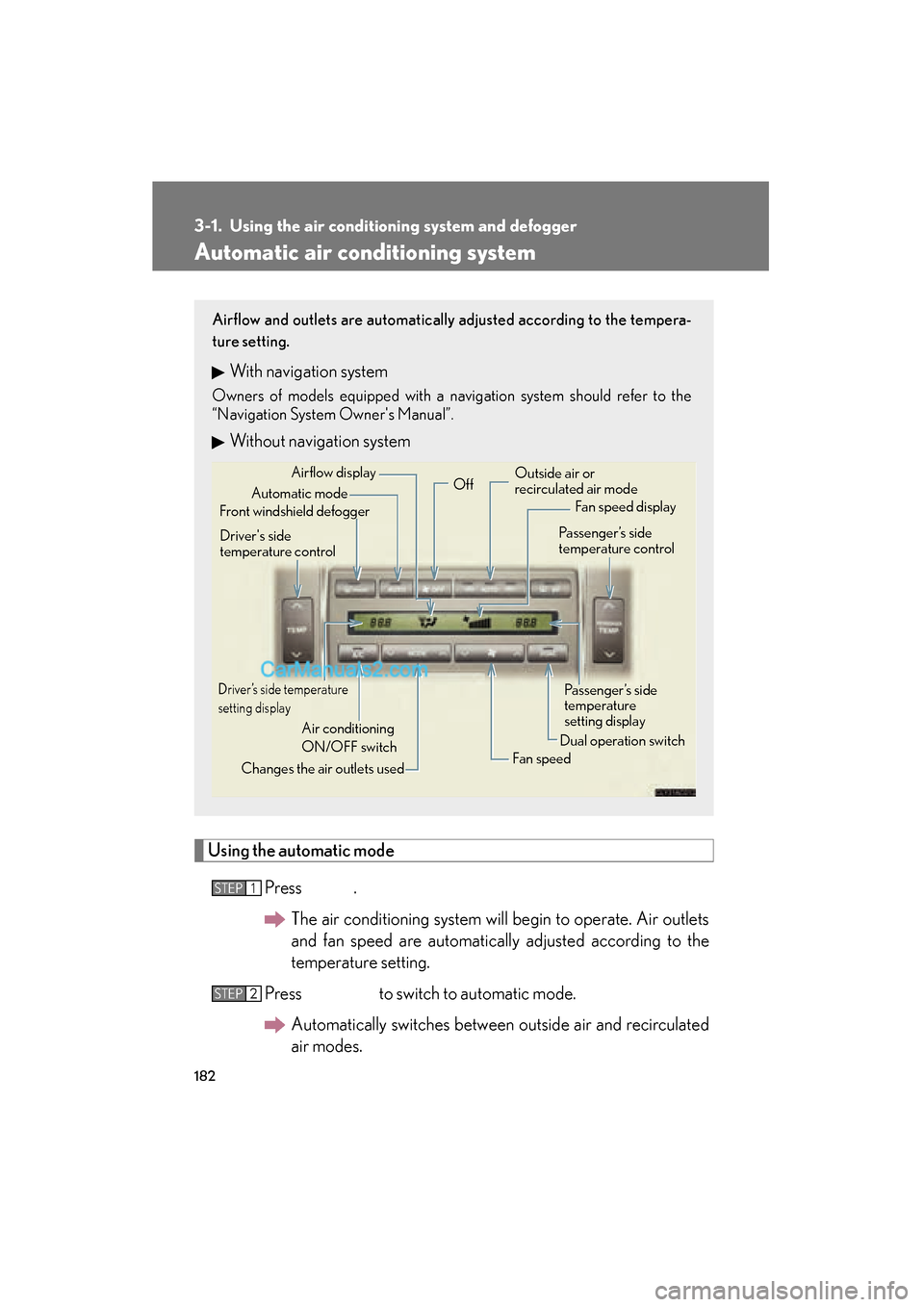
Automatic air conditioning system
Using the automatic modePress .The air conditioning system will begin to operate. Air outlets
and fan speed are automatically adjusted according to the
temperature setting.
Press to switch to automatic mode. Automatically switches between outside air and recirculated
air modes.
Airflow and outlets are automatically adjusted according to the tempera-
ture setting.
With navigation system
Owners of models equipped with a navigation system should refer to the
“Navigation System Owner's Manual”.
Without navigation system
Automatic mode
Driver’s side temperature
setting display
Changes the air outlets used Off
Fan speed
Airflow display
Fan speed display
Passenger’s side
temperature
setting display
Driver's side
temperature control
Air conditioning
ON/OFF switch Outside air or
recirculated air mode
Front windshield defogger Passenger’s side
temperature control
Dual operation switch
STEP1
STEP2
Page 186 of 459
184
3-1. Using the air conditioning system and defogger
ES350_U_(L/O_0708)■
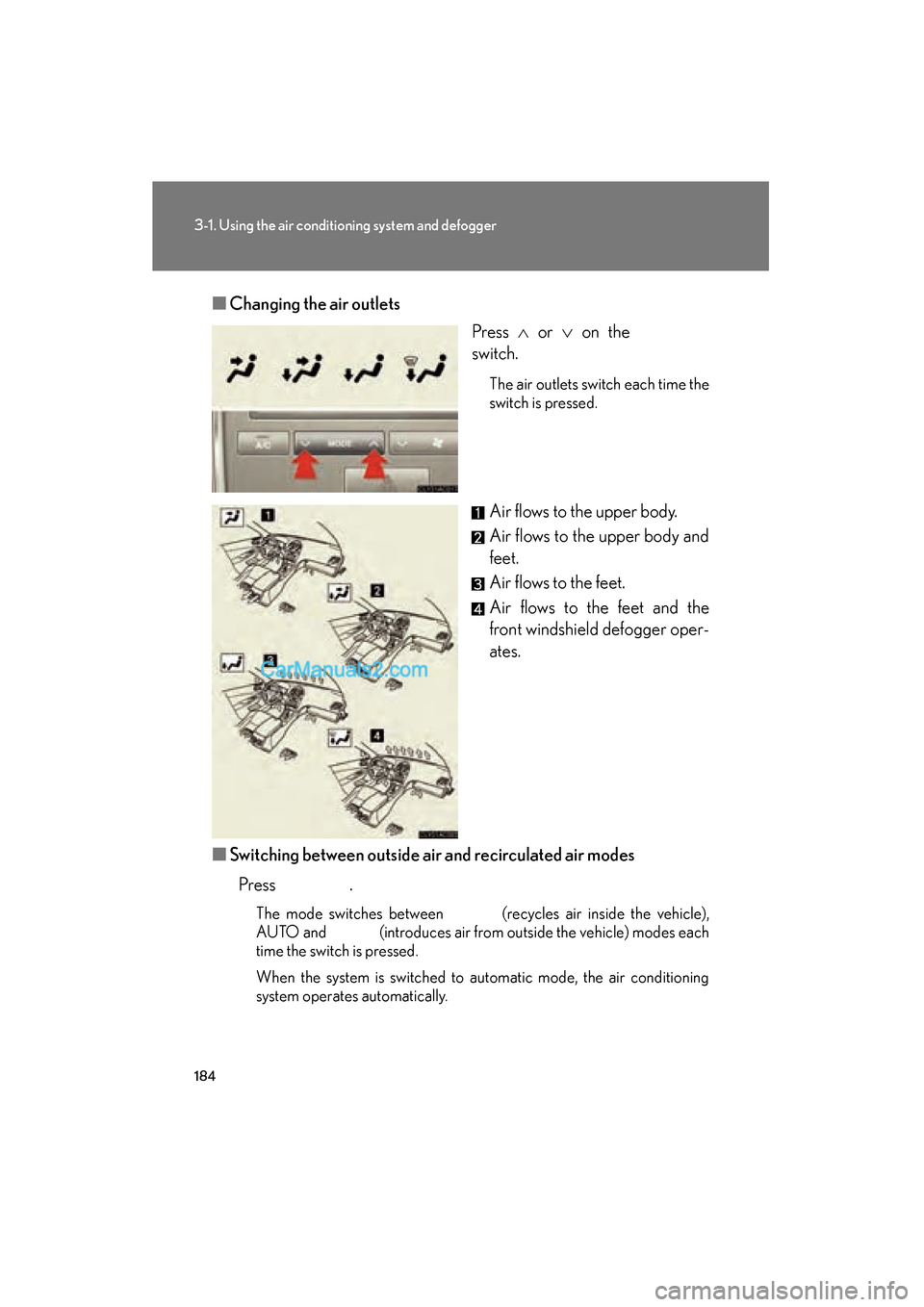
Changing the air outlets
Press ∧ or ∨ on the
switch.
The air outlets switch each time the
switch is pressed.
Air flows to the upper body.
Air flows to the upper body and
feet.
Air flows to the feet.
Air flows to the feet and the
front windshield defogger oper-
ates.
■ Switching between outside air and recirculated air modes
Press .
The mode switches between (recycles air inside the vehicle),
AUTO and (introduces air from outside the vehicle) modes each
time the switch is pressed.
When the system is switched to automatic mode, the air conditioning
system operates automatically.
Page 187 of 459
185
3-1. Using the air conditioning system and defogger
3
Interior features
ES350_U_(L/O_0708)
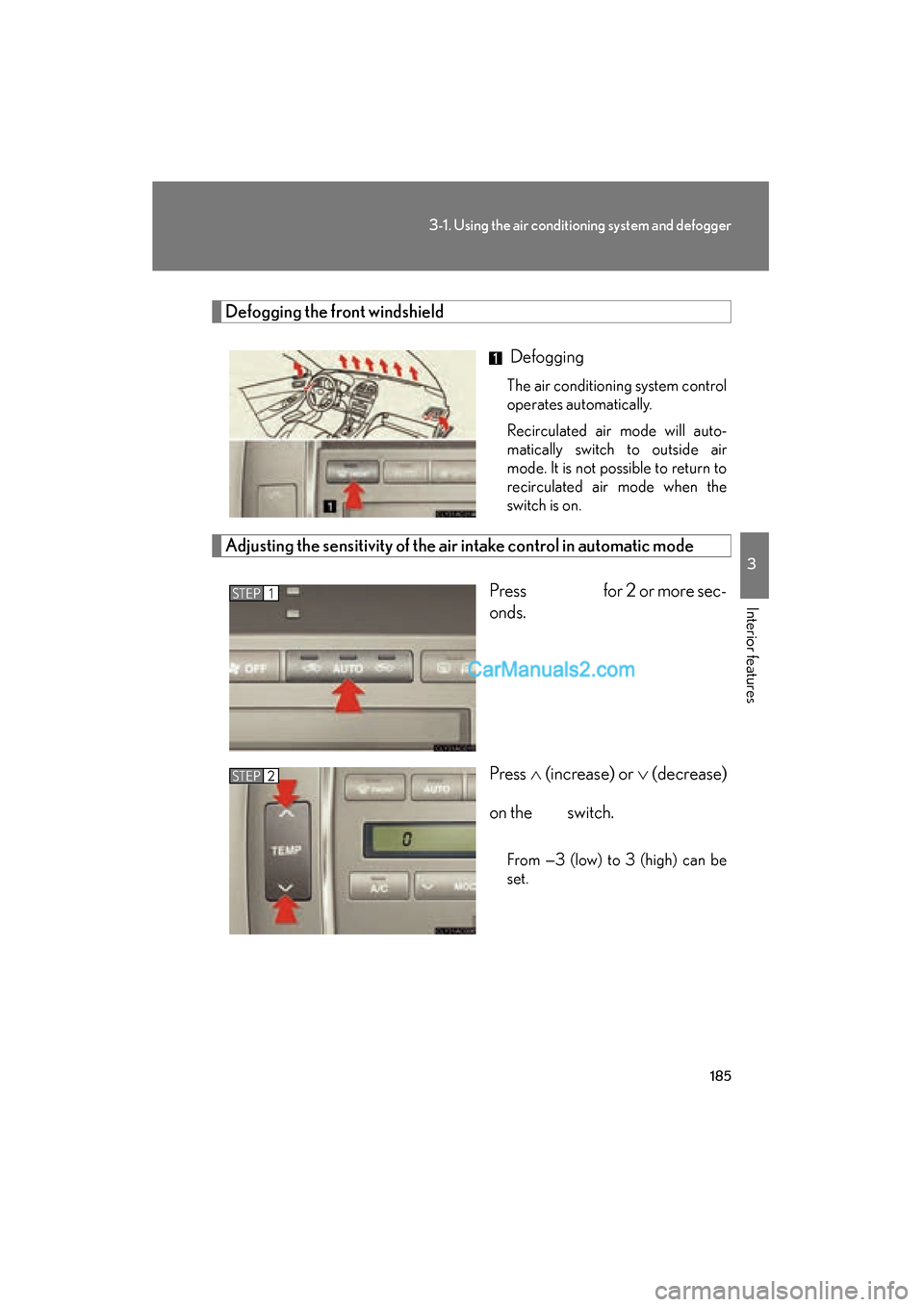
Defogging the front windshield
Defogging
The air conditioning system control
operates automatically.
Recirculated air mode will auto-
matically switch to outside air
mode. It is not possible to return to
recirculated air mode when the
switch is on.
Adjusting the sensitivity of the air intake control in automatic mode
Press for 2 or more sec-
onds.
Press ∧ (increase) or ∨ (decrease)
on the switch.
From —3 (low) to 3 (high) can be
set.
STEP1
STEP2
Page 189 of 459

187
3-1. Using the air conditioning system and defogger
3
Interior features
ES350_U_(L/O_0708)
■Using the automatic mode
Fan speed is adjusted automatically in accordance with the temperature setting and
ambient conditions. As a result, the following may occur.
●The system may switch automatically to recirculated mode when the coolest
temperature setting is selected in summer.
●Immediately after the switch is pressed, the fan may stop for a while until warm
or cool air is ready to flow.
●Cool air may flow to the area around the upper body when the heater is on.
■Using the system in recirculated air mode
The windows will fog up more easily if the recirculated air mode is used for an
extended period.
■Window defogger feature
Recirculated air mode may automatically switch to
(outside air) mode in sit-
uations where the windows need to be defogged.
■Outside air temperature approaches 32 °F (0 °C).
The air conditioning system may not operate even when
is pressed.
■When the indicator light on flashes
Press
and turn off the air conditioning system before turning it on once
more. There may be a problem in the air conditioning system if the indicator light
continues to flash. Turn the air conditioning system off and have it inspected by your
Lexus dealer.
■Automatic mode for air intake control
In automatic mode, the system detects exhaust gas and other pollutants and auto-
matically switches between outside air and recirculated air modes.
CAUTION
■To prevent the windshield from fogging up
Do not use during cool air operation in extremely humid weather. The dif-
ference between the temperature of the outside air and that of the windshield can
cause the outer surface of the windshield to fog up, blocking your vision.
Page 191 of 459
189
3-1. Using the air conditioning system and defogger
3
Interior features
ES350_U_(L/O_0708)
Rear window and outside rear view mirror defoggers
CAUTION
■When the outside rear view mirror defoggers are on
Do not touch the outside surface of the rear view mirror, as it can become very hot
and burn you.
These features are used to defog the rear window, and to remove rain-
drops, dew and frost from the outside rear view mirrors.
Without navigation system ON/OFF
The defoggers will automatically
turn off after 15 to 60 minutes.
The operation time changes
according to the ambient tem-
perature and vehicle speed.
With navigation systemON/OFF
The defoggers will automatically
turn off after 15 to 60 minutes.
The operation time changes
according to the ambient tem-
perature and vehicle speed.
Page 221 of 459

219
3
Interior features
ES350_U_(L/O_0708)
3-3. Using the hands-free phone system (for cellular phone)
Hands-free phone system features (for cellular phone) (if equipped)
■Conditions affecting operation
The hands-free phone system may not operate normally in the following situations:
●The cellular phone is turned off, or located outside the service area.
●The cellular phone has a low battery.
●The cellular phone is not connected to the system.
●The cellular phone is behind the seat or in the glove box, or metal material cov-
ers or touches the phone.
■When transferring ownership of the vehicle
Be sure to initialize the system to prevent the personal data from being improperly
accessed.
■Required profiles for the cellular phone
●HFP (Hands Free Profile) Ver. 1.0
●OPP (Object Push Profile) Ver. 1.1
■Trademark owned by Bluetooth SIG. Inc.
This system supports Bluetooth®, which allows you to make or receive calls
without using cables to connect a cellular phone and the system, and with-
out operating the cellular phone.
TitlePa g e
Using the hands-free phone system (for cellular
phone)P. 222
Making a phone callP. 2 3 0
Setting a cellular phoneP. 2 3 4
Security and system setupP. 2 3 8
Using the phone bookP. 2 4 1
Page 277 of 459

275
3-6. Other interior features
3
Interior features
ES350_U_(L/O_0708)Test the operation of the HomeLink
by pressing the newly pro-
grammed button. Check to see if the gate/device operates cor-
re c t l y.
Repeat the steps above to program another device for each of
the remaining HomeLink
buttons.
■ Programming other devices
To program other devices such as home security systems, home door
locks or lighting, contact your authorized Lexus dealer for assistance.
■ Reprogramming a button
The individual HomeLink
buttons cannot be erased but can be
reprogrammed. To reprogram a button, follow the “Basic program-
ming” instructions.
Operating the HomeLink
Press the appropriate HomeLink button. The HomeLink indicator
light on the HomeLink transceiver should turn on.
The HomeLink continues to send a signal for up to 20 seconds as long as
the button is pressed.
Erasing the entire HomeLink memory (all three programs)
Press and hold down the 2 outside
buttons for 20 seconds until the
indicator light flashes.
If you sell your vehicle, be sure to
erase the programs stored in the
HomeLink
memory.
STEP5
STEP6