2008 KIA Sedona heating
[x] Cancel search: heatingPage 158 of 339
3 149
Features of your vehicle
Manual operation
The heating and cooling system can be
controlled manually as well by pushing
buttons other than the AUTO button. In
this case, the system works sequentially
according to the order of buttons select-
ed.
When pressing any button except AUTO
button while automatic operation, the
functions of the buttons not selected will
be controlled automatically.
Press the AUTO button in order to con-
vert to full automatic control of the sys-
tem.
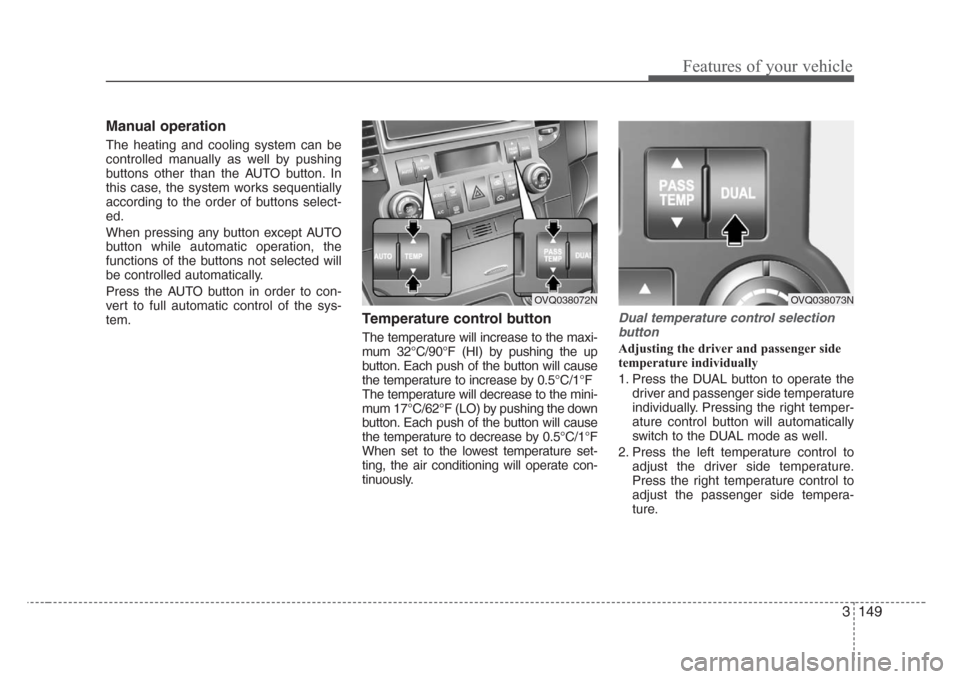
Temperature control button
The temperature will increase to the maxi-
mum 32°C/90°F (HI) by pushing the up
button. Each push of the button will cause
the temperature to increase by 0.5°C/1°F
The temperature will decrease to the mini-
mum 17°C/62°F (LO) by pushing the down
button. Each push of the button will cause
the temperature to decrease by 0.5°C/1°F
When set to the lowest temperature set-
ting, the air conditioning will operate con-
tinuously.
Dual temperature control selection
button
Adjusting the driver and passenger side
temperature individually
1. Press the DUAL button to operate the
driver and passenger side temperature
individually. Pressing the right temper-
ature control button will automatically
switch to the DUAL mode as well.
2. Press the left temperature control to
adjust the driver side temperature.
Press the right temperature control to
adjust the passenger side tempera-
ture.
OVQ038072NOVQ038073N
Page 160 of 339
3 151
Features of your vehicle
Recirculated air position
The indicator light on the but-
ton is illuminated when the
recirculated air position is
selected.
With the recirculated air posi-
tion selected, air from pas-
senger compartment will be
drawn through the heating
system and heated or cooled
according to the function
selected.
Outside (fresh) air position
The indicator light on the but-
ton is illumimated when the
outside (fresh) air position is
selected.
With the outside (fresh) air
position selected, air enters
the vehicle from outside and
is heated or cooled according
to the function selected.
✽
NOTICE
It should be noted that prolonged oper-
ation of the heating in recirculated air
position will cause fogging of the wind-
shield and side windows and the air
within the passenger compartment will
become stale.
In addition, prolonged use of the air
conditioning with the “recirculated air
position” selected, will result in exces-
sively dry air in the passenger compart-
ment.
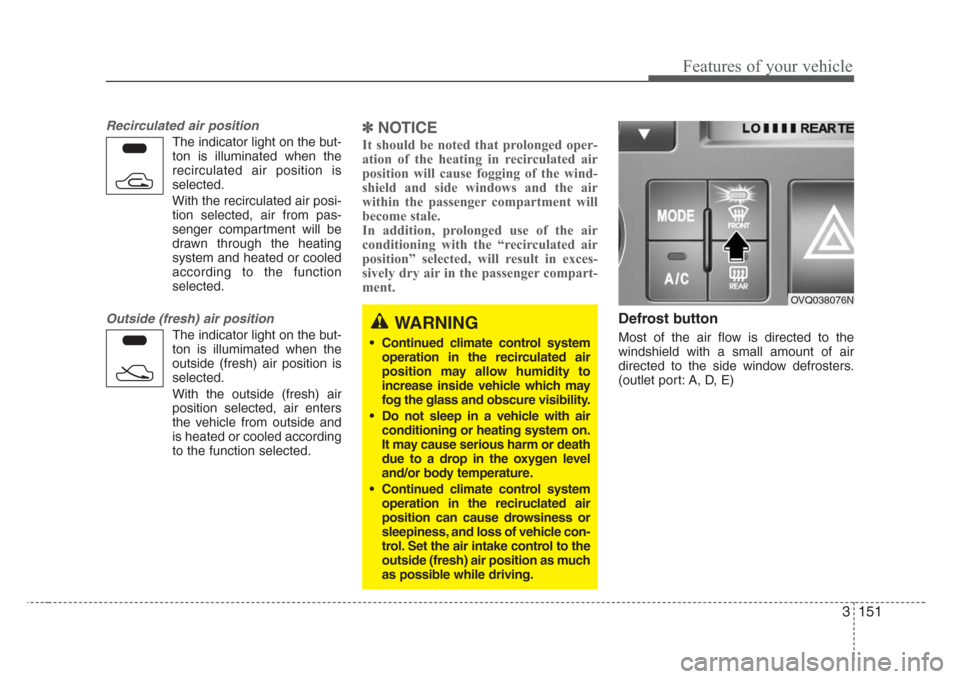
Defrost button
Most of the air flow is directed to the
windshield with a small amount of air
directed to the side window defrosters.
(outlet port: A, D, E)
WARNING
• Continued climate control system
operation in the recirculated air
position may allow humidity to
increase inside vehicle which may
fog the glass and obscure visibility.
• Do not sleep in a vehicle with air
conditioning or heating system on.
It may cause serious harm or death
due to a drop in the oxygen level
and/or body temperature.
• Continued climate control system
operation in the reciruclated air
position can cause drowsiness or
sleepiness, and loss of vehicle con-
trol. Set the air intake control to the
outside (fresh) air position as much
as possible while driving.
OVQ038076N
Page 164 of 339
3 155
Features of your vehicle
Heating and ventilation (rear)
Temperature, fan speed and mode of the
rear climate control system can be con-
trolled independently regardless of the
front climate control system operation.
However, the front climate control system
should be operated together for rear air
conditioning;
1. Set the front fan speed to the desired
position.
2. Push the air conditioning button.
3. Set the rear temperature, fan speed
and mode to the desired position.
Rear fan speed control
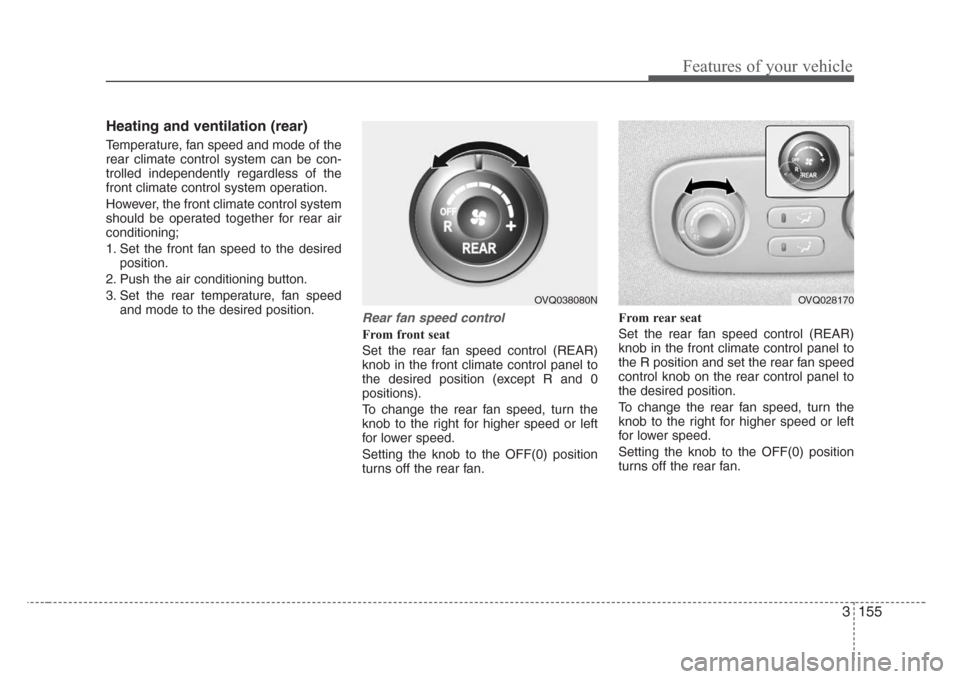
From front seat
Set the rear fan speed control (REAR)
knob in the front climate control panel to
the desired position (except R and 0
positions).
To change the rear fan speed, turn the
knob to the right for higher speed or left
for lower speed.
Setting the knob to the OFF(0) position
turns off the rear fan.From rear seat
Set the rear fan speed control (REAR)
knob in the front climate control panel to
the R position and set the rear fan speed
control knob on the rear control panel to
the desired position.
To change the rear fan speed, turn the
knob to the right for higher speed or left
for lower speed.
Setting the knob to the OFF(0) position
turns off the rear fan.
OVQ028170OVQ038080N
Page 166 of 339
3 157
Features of your vehicle
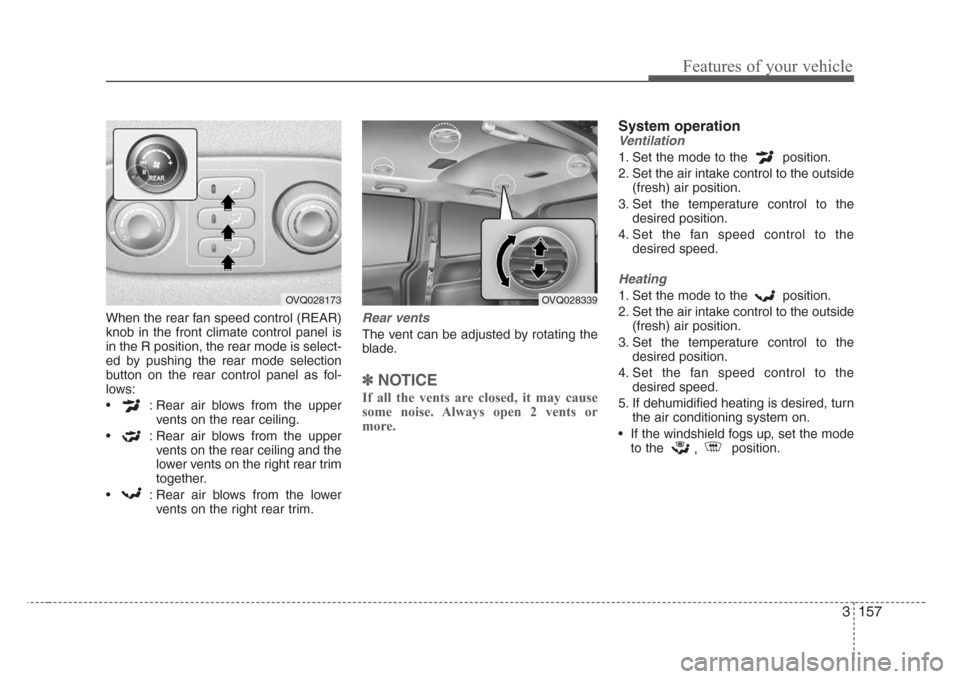
When the rear fan speed control (REAR)
knob in the front climate control panel is
in the R position, the rear mode is select-
ed by pushing the rear mode selection
button on the rear control panel as fol-
lows:
• : Rear air blows from the upper
vents on the rear ceiling.
• : Rear air blows from the upper
vents on the rear ceiling and the
lower vents on the right rear trim
together.
• : Rear air blows from the lower
vents on the right rear trim.Rear vents
The vent can be adjusted by rotating the
blade.
✽
NOTICE
If all the vents are closed, it may cause
some noise. Always open 2 vents or
more.
System operation
Ventilation
1. Set the mode to the position.
2. Set the air intake control to the outside
(fresh) air position.
3. Set the temperature control to the
desired position.
4. Set the fan speed control to the
desired speed.
Heating
1. Set the mode to the position.
2. Set the air intake control to the outside
(fresh) air position.
3. Set the temperature control to the
desired position.
4. Set the fan speed control to the
desired speed.
5. If dehumidified heating is desired, turn
the air conditioning system on.
• If the windshield fogs up, set the mode
to the
,position.OVQ028173OVQ028339
Page 167 of 339
Features of your vehicle
158 3
Air conditioning
All Kia Air Conditioning Systems are
filled with environmentally friendly
R-134a refrigerant which is not damag-
ing to the ozone layer.
1. Start the engine. Push the air condi-
tioning button.
2. Set the mode to the position.
3. Set the air intake control to the outside
air or recirculated air position.
4. Set the temperature control to the
desired position.
5. Set the fan speed control to the
desired speed.
6. Adjust the fan speed control and tem-
perature control to maintain maximum
comfort.
• When maximum cooling is desired, set
the temperature control to the minimum
LO (17°C/62°F) and set the air intake
to the recirculated air position, then set
the fan speed control to the highest
speed.Air conditioning system operation tips
• If the vehicle has been parked in direct
sunlight during hot weather, open the
windows for a short time to let the hot
air inside the vehicle escape.
• To help reduce moisture inside of win-
dows on rainy humid days, decrease
the humidity inside the vehicle by oper-
ating the air conditioning system.
• During air conditioning system opera-
tion, you may occasionally notice a
slight change in engine speed as the
air conditioning compressor cycles on.
This is a normal system operation
characteristics.
• Use the air conditioning system every
month if only for a few minutes to
ensure maximum system perfor-
mance.
• When using the air conditioning sys-
tem, you may notice clear water drip-
ping (or even puddling) on the ground
under the passenger side of the vehi-
cle. This is a normal system operation
characteristics.
• Operating the air conditioning system
in the recirculated air position does
provide maximum cooling, however,
continual operation in this mode may
cause the air inside the vehicle to
become stale.CAUTION
• When using the air conditioning
system, monitor the temperature
gauge closely while driving up
hills or in heavy traffic when out-
side temperatures are high. Air
conditioning system operation
may cause engine overheating.
Continue to use the blower fan
but turn the air conditioning sys-
tem off if the temperature gauge
indicates engine overheating.
• When opening the windows in
humid weather air conditioning
may create water droplets inside
the vehicle. Since excessive
water droplets may cause dam-
age to electrical equipment, air
conditioning should only be run
with the windows closed.
Page 181 of 339

Features of your vehicle
172 3
Cigarette lighter (if equipped)
To operate the cigarette lighter, press it in
and release it. When it is heated, it auto-
matically pops out ready for use.
If the engine is not running, the ignition
switch must be in the ACC or ON position
for the lighter to operate.
Ashtray (if equipped)
To use the ashtray, press the cover and
release it.
To remove the ashtray to empty or clean
it, lift it upward and pull it out.
INTERIOR FEATURES
1VQA21851VQA2186
CAUTION
• Do not hold the lighter in after it is
already heated because it will
overheat.
• Only a genuine Kia lighter should
be used in the cigarette lighter
socket. The use of plug-in acces-
sories (shavers, hand-held vacu-
ums, and coffee pots, for exam-
ple) may damage the socket or
cause electrical failure.
• If the lighter does not pop out
within 30 seconds, remove it to
prevent overheating.
WARNING- Ashtray use
• Do not use the vehicle’s ashtrays
as waste receptacles.
• Putting lit cigarettes or matches
in an ashtray with other com-
bustible materials may cause a
fire.
Page 196 of 339
3187
Features of your vehicle
6. CD EJECT Button
When the button is pressed with a CD
loaded, the CD will eject.
Forcing to eject : To force to eject a CD,
press this button for more than 3 sec-
onds.
(Do this only when a CD is jammed and
you can not eject it in the normal way -
e.g.) in case that you have inserted 2
CDs by mistake)
7 . RANDOM (RDM) Button
With random, you can listen to the tracks
in random, rather than sequential order.
To use random, do the following:
Press the RDM button to listen to record-
ed tracks in random sequence. Press
RDM again to cancel or turn the power
OFF then ON. The unit defaults to playing
tracks in sequential order.
✽
NOTICE
• To assure proper operation of the unit,
keep the vehicle interior temperature
within a normal range by using the
vehicle's air conditioning or heating
system.
• When replacing the fuse, replace it
with a fuse having the correct capaci-
ty.
• All stored bookmarks are all erased
when the car battery is disconnected
or power to the vehicle is lost. If this
occurs, the bookmarks will have to be
reset.
• This equipment is designed to be used
only in a 12 volt DC battery system
with negative ground.
• This unit is made of precision parts.
Do not attempt to disassemble or
adjust any parts.
• When driving your vehicle, be sure to
keep the volume of the unit set low
enough to allow you to hear sounds
coming from the outside.
• Do not expose this equipment (includ-
ing the speakers and CD) to water or
excessive moisture.
✽
NOTICE
• Do not insert warped or poor quality
discs into the CD player as damage to
the unit may occur.
• Do not insert anything like coins into
the player slot as damage to the unit
may occur.
• Do not place beverages close to the
audio system. The playback mecha-
nism may be damaged if you spill
them.
• Do not strike or allow anything to
impact the audio system, damage to
the system mechanisms could occur.
• Off-road or rough surface driving
may cause the compact disc to skip.
Do not use the compact disc when
driving in such conditions as damage
to the compact disc face could occur.
• Do not attempt to grab or pull the
compact disc out while the disc is
being pulled into the audio unit by the
self-loading mechanism. Damage to
the audio unit and compact disc could
occur.
• Avoid using recorded compact discs in
your audio unit. Original compact
discs are recommended for best
results.
Page 203 of 339
Features of your vehicle
194 3
10. CD SCAN Button
• To playback the first 10 seconds of
each track, press the CD SCAN button
more than 0.8 seconds.
• To playback the first 10 seconds of
each track in the selected folder, press
the CD SCAN button within 0.8 sec-
onds. (MP3 CD only)
• Press the CD SCAN button again with-
in 10 sec. when you have reached the
desired track.
11. FILE SEARCH Knob
(TUNE Select Knob)
• You can skip the track (file) by turning
the FILE SEARCH knob clockwise or
counterclockwise.
After selecting the desired track (file),
press the FILE SEARCH knob to play-
back the track (file).
If you do not press the FILE SEARCH
knob within five seconds, the search
will stop.
12. FOLDER SEARCH (FLDR)
Button
• You can move through the folder by
pushing the FLDR button to up ( )
and down( ).
• After moving the desired folder, press
the FILE SEARCH knob to play back in
the selected folder. If you do not press
the FILE SEARCH knob within 5 sec-
onds, the folder searching function will
be released. It can not be operated in a
single folder.
13. INFO Button
While playing CD(MP3), If this button is
pressed repeatedly, the played file infor-
mation will be displayed in the following
order.
FILE NAME
➟ SONG TITLE ➟ ARTIST
NAME
➟ ALBUM TITLE ➟ FOLDER
NAME
➟ TOTAL FILE ➟ MARK
ADDRESS
➟ FILE NAME
“NO DATA” wil be displayed in case that
there is no information on the selected
item.
✽
NOTICE
• To assure proper operation of the unit,
keep the vehicle interior temperature
within a normal range by using the
vehicle's air conditioning or heating
system.
• When replacing the fuse, replace it
with a fuse having the correct capacity.
• All stored bookmarks are all erased
when the car battery is disconnected
or power to the vehicle is lost. If this
occurs, the bookmarks will have to be
reset.
• This equipment is designed to be used
only in a 12 volt DC battery system
with negative ground.
• This unit is made of precision parts.
Do not attempt to disassemble or
adjust any parts.
• When driving your vehicle, be sure to
keep the volume of the unit set low
enough to allow you to hear sounds
coming from the outside.
• Do not expose this equipment (includ-
ing the speakers and tape) to water or
excessive moisture.