Page 130 of 219
Driving your vehicle
24 4
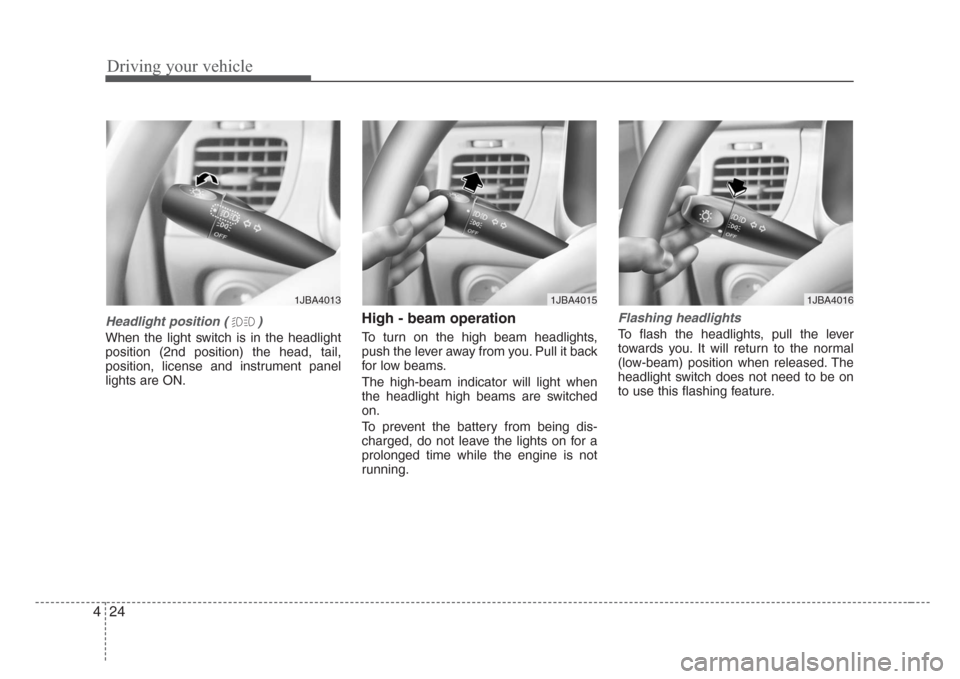
Headlight position ( )
When the light switch is in the headlight
position (2nd position) the head, tail,
position, license and instrument panel
lights are ON.
High - beam operation
To turn on the high beam headlights,
push the lever away from you. Pull it back
for low beams.
The high-beam indicator will light when
the headlight high beams are switched
on.
To prevent the battery from being dis-
charged, do not leave the lights on for a
prolonged time while the engine is not
running.
Flashing headlights
To flash the headlights, pull the lever
towards you. It will return to the normal
(low-beam) position when released. The
headlight switch does not need to be on
to use this flashing feature.
1JBA40161JBA40131JBA4015
Page 133 of 219
427
Driving your vehicle
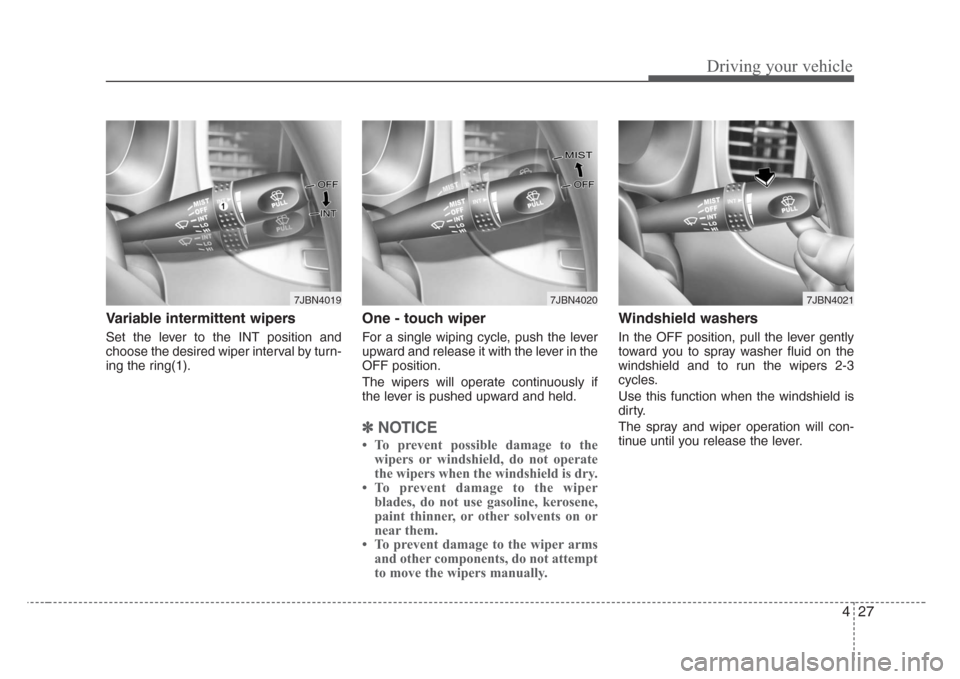
Variable intermittent wipers
Set the lever to the INT position and
choose the desired wiper interval by turn-
ing the ring(1).
One - touch wiper
For a single wiping cycle, push the lever
upward and release it with the lever in the
OFF position.
The wipers will operate continuously if
the lever is pushed upward and held.
✽
NOTICE
• To prevent possible damage to the
wipers or windshield, do not operate
the wipers when the windshield is dry.
• To prevent damage to the wiper
blades, do not use gasoline, kerosene,
paint thinner, or other solvents on or
near them.
• To prevent damage to the wiper arms
and other components, do not attempt
to move the wipers manually.
Windshield washers
In the OFF position, pull the lever gently
toward you to spray washer fluid on the
windshield and to run the wipers 2-3
cycles.
Use this function when the windshield is
dirty.
The spray and wiper operation will con-
tinue until you release the lever.
7JBN40197JBN40207JBN4021
Page 139 of 219
433
Driving your vehicle
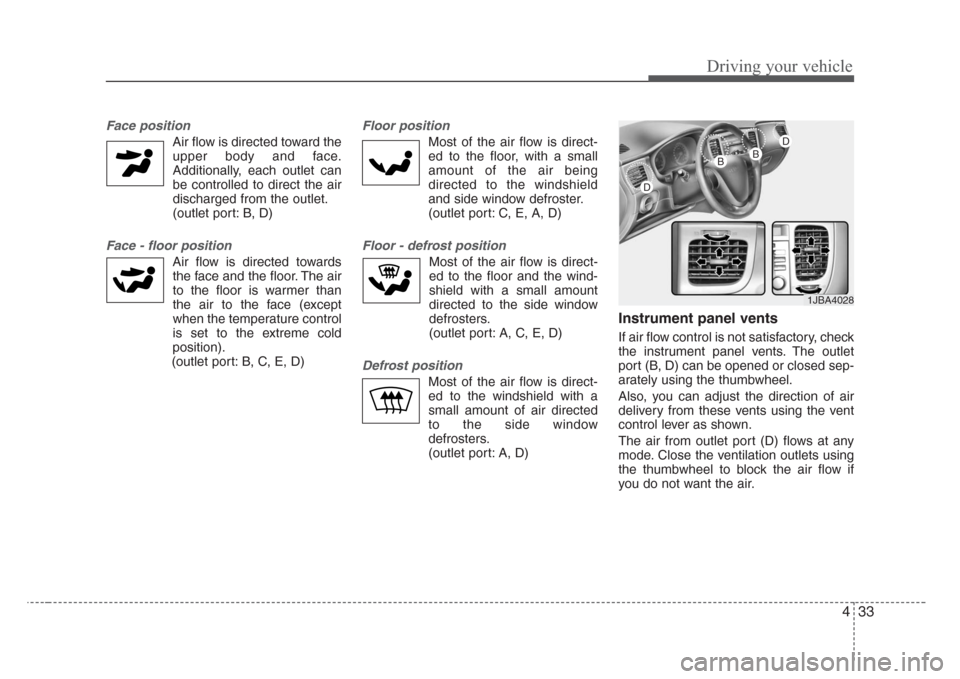
Face position
Air flow is directed toward the
upper body and face.
Additionally, each outlet can
be controlled to direct the air
discharged from the outlet.
(outlet port: B, D)
Face - floor position
Air flow is directed towards
the face and the floor. The air
to the floor is warmer than
the air to the face (except
when the temperature control
is set to the extreme cold
position).
(outlet port: B, C, E, D)
Floor position
Most of the air flow is direct-
ed to the floor, with a small
amount of the air being
directed to the windshield
and side window defroster.
(outlet port: C, E, A, D)
Floor - defrost position
Most of the air flow is direct-
ed to the floor and the wind-
shield with a small amount
directed to the side window
defrosters.
(outlet port: A, C, E, D)
Defrost position
Most of the air flow is direct-
ed to the windshield with a
small amount of air directed
to the side window
defrosters.
(outlet port: A, D)
Instrument panel vents
If air flow control is not satisfactory, check
the instrument panel vents. The outlet
port (B, D) can be opened or closed sep-
arately using the thumbwheel.
Also, you can adjust the direction of air
delivery from these vents using the vent
control lever as shown.
The air from outlet port (D) flows at any
mode. Close the ventilation outlets using
the thumbwheel to block the air flow if
you do not want the air.
1JBA4028
D
BB
D
Page 144 of 219
5
Fuel requirements / 5-2
Emission control system / 5-2
Before driving / 5-4
Suggestions for economical operation / 5-5
Special driving conditions / 5-6
Trailer towing / 5-9
Overloading / 5-9
Label information / 5-10
Driving tips
Page 149 of 219

Driving tips
6 5
SPECIAL DRIVING CONDITIONS
Hazardous driving conditions
When hazardous driving conditions are
encountered such as water, snow, ice,
mud, sand, or similar hazards, follow
these suggestions:
• Drive cautiously and allow extra dis-
tance for braking.
• Avoid sudden movements in braking or
steering.
• When braking with non-ABS brakes
pump the brake pedal with a light up-
and-down motion until the vehicle is
stopped.• If stalled in snow, mud, or sand, use
second gear. Accelerate slowly to
avoid spinning the drive wheels.
• Use sand, rock salt, tire chains, or
other non-slip material under the drive
wheels to provide traction when stalled
in ice, snow, or mud.
Rocking the vehicle
If it is necessary to rock the vehicle to
free it from snow, sand, or mud, first turn
the steering wheel right and left to clear
the area around your front wheels. Then,
shift back and forth between 1 (First) and
R (Reverse) in vehicles equipped with a
manual transaxle or R (Reverse) and any
forward gear in vehicles equipped with
an automatic transaxle. Do not race the
engine, and spin the wheels as little as
possible. If you are still stuck after a few
tries, have the vehicle pulled out by a tow
vehicle to avoid engine overheating and
possible damage to the transaxle.
✽
NOTICE
Prolonged rocking may cause engine
over-heating, transaxle damage or fail-
ure, and tire damage.
CAUTION-ABS
Do not pump the brake pedal on a
vehicle equipped with ABS.
WARNING - Downshifting
Downshifting with an automatic
transaxle, while driving on slippery
surfaces can cause an accident.
The sudden change in tire speed
could cause the tires to skid. Be
careful when downshifting on slip-
pery surfaces.
WARNING- Spinning tires
Do not spin the wheels,especially
at speeds more than 56 km/h (35
mph). Spinning the wheels at high
speeds when the vehicle is station-
ary could cause a tire to overheat,
explode and injure bystanders.
Page 152 of 219
59
Driving tips
TRAILER TOWING
We do not recommend using this
vehicle for trailer towing.
OVERLOADING
CAUTION-Vehicle weight
The gross axle weight rating
(GAWR) and the gross vehicle
weight rating (GVWR) for your vehi-
cle are on the manufacturer's label
attached to the driver's door.
Exceeding these ratings can cause
an accident or vehicle damage. You
can calculate the weight of your
load by weighing the items (and
people) before putting them in the
vehicle. Be careful not to overload
your vehicle.
Page 155 of 219
6
Road warning / 6-2
Overheating / 6-2
Emergency starting / 6-3
Electrical circuit protection / 6-6
Towing / 6-12
If you have a flat tire / 6-17
In case of an emergency
Page 156 of 219

In case of an emergency
2 6
ROAD WARNING
Hazard warning flasher
The hazard warning flasher serves as a
warning to other drivers to exercise
extreme caution when approaching,
overtaking, or passing your vehicle. It
should be used whenever emergency
repairs are being made or when the vehi-
cle is stopped near the edge of a road-
way.
Depress the flasher switch with the igni-
tion switch in any position. The flasher
switch is located in the center console
switch panel. All turn signal lights will
flash simultaneously.• The hazard warning flasher operates
whether your vehicle is running or not.
• The turn signals do not work when the
hazard flasher is on.
• Care must be taken when using the
hazard warning flasher while the vehi-
cle is being towed.If your temperature gauge indicates over-
heating, if you experience a loss of
power, or if you hear a loud knocking or
pinging noise, the engine has probably
overheated. Should any of these symp-
toms occur, use the following procedure:
1. Turn on the hazard warning flasher,
then drive to the nearest safe location
and stop your vehicle; set the automat-
ic transaxle in P (Park), or shift the
manual transaxle to N (Neutral) and
apply the parking brake.
2. Make sure the air conditioner is off.
3. If coolant or steam is boiling out of the
radiator, stop the engine and call an
authorized Kia dealer for assistance.
If coolant is not boiling out, allow the
engine to idle and open the hood to
permit the engine to cool gradually.
If the temperature does not go down
with the engine idling, stop the engine
and allow sufficient time for it to cool.
1JBN6001
OVERHEATING