Page 97 of 399

Far End Audio Performance
²
Audio quality is maximized under:
²low-to-medium blower setting,
²low-to-medium vehicle speed,
²low road noise,
²smooth road surface,
²fully closed windows, and
²dry weather condition.
²operation from driver seat.
²Performance, such as audio clarity, echo, and loudness
to a large degree rely on the phone and network, and
not the UConnectŸ system.
²Echo at far end can sometime be reduced by lowering
the in-vehicle audio volume.
²In a convertible vehicle, system performance may be
compromised with the convertible top down.
Bluetooth Communication Link
Cellular phones have been found to lose connection to
the UConnectŸ system. When this happens, the connec-
tion can generally be re-established by switching the
phone off/on. Your cell phone is recommended to remain
in Bluetooth9on9mode.
Power-Up
After switching the ignition key from OFF to either ON
or ACC position, or after a language change, you must
wait at least five (5) seconds prior to using the system.
UNDERSTANDING THE FEATURES OF YOUR VEHICLE 97
3
Page 102 of 399
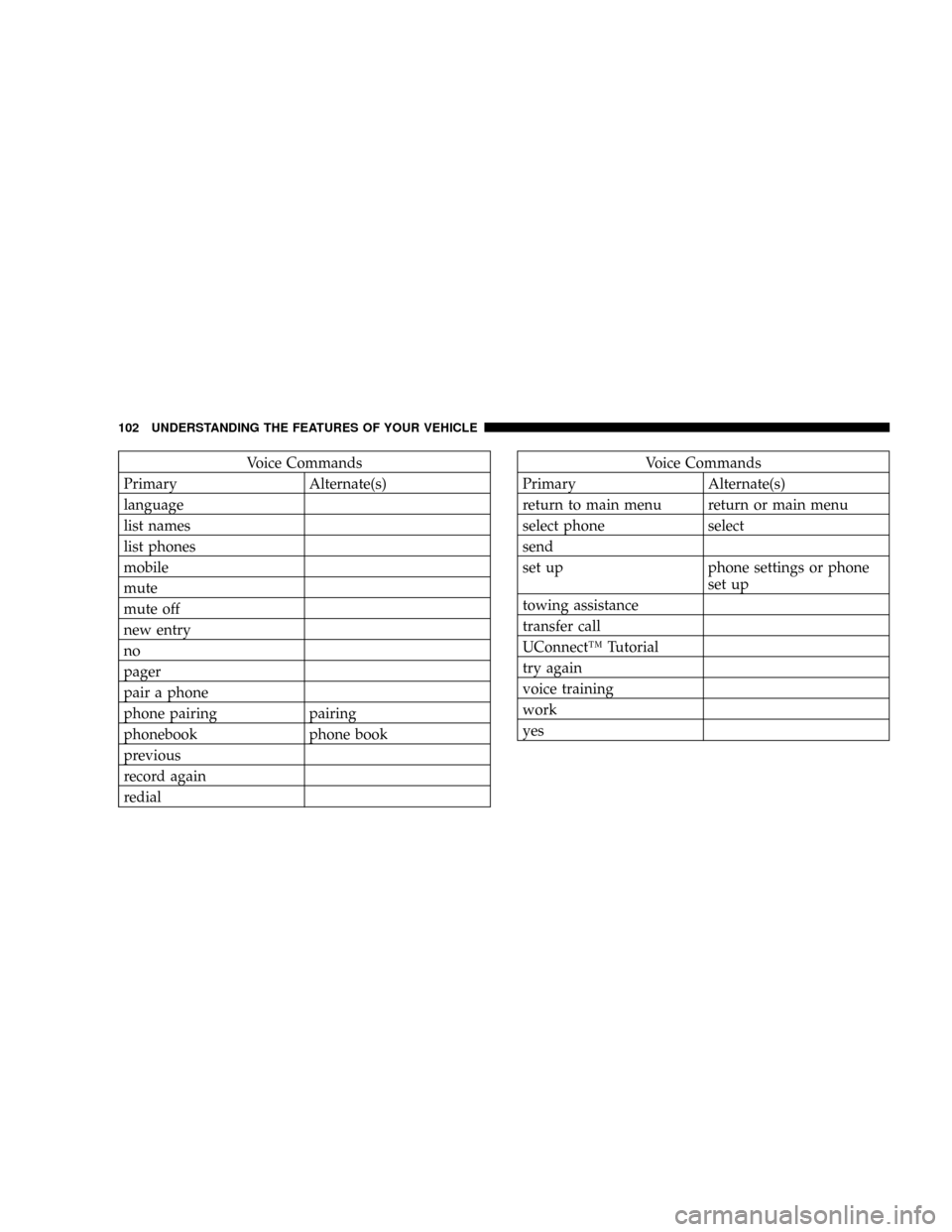
Voice Commands
Primary Alternate(s)
language
list names
list phones
mobile
mute
mute off
new entry
no
pager
pair a phone
phone pairing pairing
phonebook phone book
previous
record again
redialVoice Commands
Primary Alternate(s)
return to main menu return or main menu
select phone select
send
set up phone settings or phone
set up
towing assistance
transfer call
UConnectŸ Tutorial
try again
voice training
work
yes
102 UNDERSTANDING THE FEATURES OF YOUR VEHICLE
Page 144 of 399
the rear windows open, open the front and rear windows
together to minimize the buffeting. If the buffeting occurs
with the sunroof open, adjust the sunroof opening to
minimize the buffeting or open any window.
Sunroof Maintenance
Use only a non-abrasive cleaner and a soft cloth to clean
the glass panel.
Ignition Off Operation
The sunroof will also operate up to 45 seconds after the
ignition has been turned off. The sunroof operation will
be canceled if either of the front doors are opened during
the 45 second time period.
ELECTRICAL POWER OUTLETS Ð IF EQUIPPED
There is a standard 12-Volt power outlet in the instru-
ment panel and a 115 Volt (150 Watts Maximum) power
outlet in the center console on certain models for added
convenience. These outlets can power cell phones, elec-
tronics and other low power devices.
NOTE:Due to overload protection the inverter will shut
down if the power rating is exceeded.
144 UNDERSTANDING THE FEATURES OF YOUR VEHICLE
Page 146 of 399
Electrical Outlet Use With Engine Off
CAUTION!
²Many accessories that can be plugged in draw
power from the vehicle's battery, even when not in
use (i.e. cellular phones, etc.). Eventually, if
plugged in long enough, the vehicle's battery will
discharge sufficiently to degrade battery life
and/or prevent engine starting.
²Accessories that draw higher power (i.e. coolers,
vacuum cleaners, lights, etc.); will degrade the
battery even more quickly. Only use these inter-
mittently and with greater caution.
²After the use of high power draw accessories, or
long periods of the vehicle not being started (with
accessories still plugged in), the vehicle must be
driven a sufficient length of time to allow the
generator to recharge the vehicle's battery.
Power Outlet 115 Volts (150 Watt)
146 UNDERSTANDING THE FEATURES OF YOUR VEHICLE
Page 147 of 399
CONSOLE FEATURES
WARNING!
Do not operate this vehicle with the console compart-
ment lid in the open position. Cell phones, music
players, and other hand held electronic devices
should be stowed while driving. Use of these devices
while driving can cause an accident due to distrac-
tion, resulting in death or injury.
The floor console's sliding armrest moves forward 3
inches to accommodate shorter drivers. The armrest lid
also includes a unique flip pocket for storing a phone or
an MP3 player. The bin inside the console can hold up to
10 CD jewel cases or other items securely out of sight.NOTE:The flip pocket and console lid features are
intended to be used in the upright or open position only
while the vehicle is parked. While driving, all handheld
devices should be properly stowed, and the flip pocket
and the console lid should be closed.
Floor Console
UNDERSTANDING THE FEATURES OF YOUR VEHICLE 147
3
Page 156 of 399

NAM Reception.......................181
NFM Reception........................181
mElectronic Digital Clock..................182
NClock Setting Procedure.................182
mSales Code REF Ð AM/FM/CD (Single Disc)
Radio With Optional Satellite Radio And Hands
Free Phone Capability...................183
NOperating Instructions - Radio Mode.......183
NOperation Instructions - CD Mode.........187
NOperation Instructions - Auxiliary Mode.....189
NOperating Instructions - Hands Free Phone Ð
If Equipped.........................190
NOperating Instructions - Satellite Radio Ð
If Equipped.........................190mSales Code RAQ ± AM/FM/CD (6-Disc) Radio
With Optional Satellite Radio, Hands Free Phone,
And Vehicle Entertainment Systems (VES)
Capabilities...........................190
NOperating Instructions - Radio Mode.......191
NOperation Instructions - (CD Mode For CD
Audio Play).........................196
NLoad/Eject Button (CD Mode For CD Audio
Play)..............................197
NNotes On Playing MP3 Files.............199
NOperation Instructions - (CD Mode For MP3
Audio Play).........................202
NLoad/Eject Button (CD Mode For MP3 Play) . . 202
mSales Code REC Ð AM/FM/CD (6±Disc) Radio
With Navigation System..................204
156 UNDERSTANDING YOUR INSTRUMENT PANEL
Page 157 of 399

NOperating Instructions Ð Satellite Radio
(If Equipped)........................205
NREC Setting The Clock.................205
NAudio Clock Display...................207
mSatellite Radio Ð If Equipped..............208
NSystem Activation.....................208
NElectronic Serial Number/Sirius Identification
Number (ESN/SID)....................209
NSelecting Satellite Mode In REF, And RAQ,
Radios.............................209
NSelecting a Channel....................210
NStoring And Selecting Pre-Set Channels......210
NUsing The PTY (Program Type) Button
(If Equipped)........................211
NPTY Button9Scan9.....................211NPTY Button9Seek9.....................211
NSatellite Antenna......................211
NReception Quality.....................212
mRemote Sound System Controls Ð If Equipped . . 212
NRadio Operation......................213
NCD Player..........................213
mCD/DVD Disc Maintenance...............214
mRadio Operation And Cellular Phones........214
mClimate Controls.......................214
NClimate Controls......................214
NAir Conditioning.....................218
NAir Filtration System ± If Equipped........219
NOperating Tips.......................220
UNDERSTANDING YOUR INSTRUMENT PANEL 157
4
Page 183 of 399
SALES CODE REF Ð AM/FM/CD (SINGLE DISC)
RADIO WITH OPTIONAL SATELLITE RADIO AND
HANDS FREE PHONE CAPABILITY
NOTE:The radio sales code is located on the lower right
side of your radio faceplate.
Operating Instructions - Radio Mode
NOTE:The ignition switch must be in the ON or ACC
position to operate the radio.
Power Switch/Volume Control (Rotary)
Press the ON/VOL control to turn the radio ON. Press
the ON/VOL a second time to turn OFF the radio.
Electronic Volume Control
The electronic volume control turns continuously (360
degrees) in either direction without stopping. Turning the
volume control to the right increases the volume and to
the left decreases it.
When the audio system is turned on, the sound will be
set at the same volume level as last played.
For your convenience, the volume can be turned down,
but not up, when the audio system is off and the ignition
is ON.
REF Radio
UNDERSTANDING YOUR INSTRUMENT PANEL 183
4