2008 Hyundai Tiburon cruise control
[x] Cancel search: cruise controlPage 12 of 268

YOUR VEHICLE AT A GLANCEB255A02GK-AATINDICATOR SYMBOLS ON THE INSTRUMENT PANEL* More detailed explanations of these items will be found beginning on page 1-48.
Malfunction Indicator LightSRS (Airbag) Warning Light
Tail Gate Open Warning Light
Low Fuel Level Warning LightDoor Ajar Warning Light and ChimeABS Service Reminder Indicator (SRI) (If installed)Turn Signal Indicator LightsHigh Beam Indicator Light
Low Oil Pressure Warning Light
Parking Brake/ Low Brake Fluid Level Warning Light
Charging System Warning LightCRUISE Indicator Light (If installed)
Seat Belt Reminder Light and Chime
CRUISE SET Indicator Light (If installed)
Electronic Stability Control (ESC)
Indicator Lights (If installed)
TPMS (Tire Pressure Monitoring System) Malfunction
IndicatorLow Tire Pressure Telltale
F10
Page 13 of 268

FEATURES OF YOUR HYUNDAI
1
Fuel Recommendations ................................................ 1-2
Breaking in Your New Hyundai ..................................... 1-3
Keys.............................................................................. 1-3
Door (Theft-Alarm System) .................................... 1-4, 1-6
Power Windows ............................................................ 1-9
Seats...........................................................................1-10
Seat Belts....................................................................1-16
Child Restraint System ...............................................1-22
Supplemental Restraint (AIRBAG) System (SRS) .....1-30
Instrument Cluster and Indicator Lights...................... 1-46
Warning and Indicator Lights......................................1-48
Multi-Function Light Switch .........................................1-58
Windshield Wiper/Washer...........................................1-60
Sunroof.......................................................................1-66
Mirror...........................................................................1-70
Hood Release .............................................................1-73
Cruise Control.............................................................1-79
Audio Remote Control Switch .....................................1-83
Heating and Cooling Control .......................................1-84
Stereo Sound System...............................................1-102
Antenna.....................................................................1-104
Audio System............................................................1-105
1
Page 59 of 268

1
FEATURES OF YOUR HYUNDAI
47
1. Speedometer
2. Turn Signal Indicator Light
3. Odometer/Trip Odometer
4. Automatic Transaxle Position Indicator Light (If installed)
5. Coolant Temperature Gauge
6. Trip Computer (if installed)
7. Fuel Gauge
8. Tachometer
9. Electronic Stability Control (ESC) Indicator Light (If installed)
10. Low Tire Pressure Telltale
11. TPMS (Tire Pressure Monitoring System) Malfunction Indicator
12. Trip Odometer Reset Knob
13. Charging System Warning Light14. SRS (AIRBAG) Warning Light
15. Seat Belt Warning Light
16. High Beam Indicator Light
17. Low Oil Pressure Warning Light
18. Malfunction Indicator Light (MIL)
19. Low Fuel Warning Light
20. Parking Brake/Low Brake Fluid Level Warning Light
21. Trip Computer Reset Knob (If installed)
22. CRUISE Indicator Light (If installed)
23. CRUISE SET Indicator Light (If installed)
24. Tail Gate Open Warning Light
25. Door Ajar Warning Light
26. ABS Service Reminder Indicator (SRI)
Page 63 of 268
1
FEATURES OF YOUR HYUNDAI
51
The brake fluid level warning light indicates that
the brake fluid level in the brake master cylinder
is low and hydraulic brake fluid conforming to
DOT 3 or DOT 4 specifications should be
added. After adding fluid, if no other trouble is
found, the car should be immediately and care-
fully driven to a Hyundai dealer for inspection.
If further trouble is experienced, the vehicle
should not be driven at all but taken to a dealer
by a professional towing service.
Your Hyundai is equipped with dual-diagonal
braking systems. This means you still have
braking on two wheels even if one of the dual
systems should fail. With only one of the dual
systems working, more than normal pedal travel
and greater pedal pressure are required to stop
the car. Also, the car will not stop in as short a
distance with only half of the brake system
working. If the brakes fail while you are driving,
shift to a lower gear for additional engine braking
and stop the car as soon as it is safe to do so.
B260Q01E-GAT
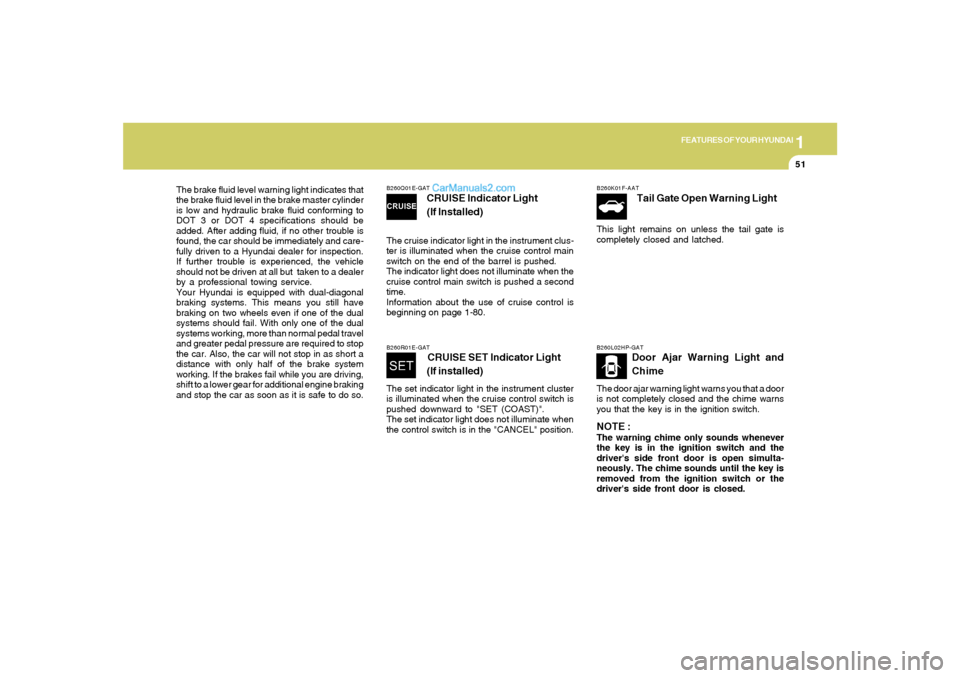
CRUISE Indicator Light
(If Installed)
The cruise indicator light in the instrument clus-
ter is illuminated when the cruise control main
switch on the end of the barrel is pushed.
The indicator light does not illuminate when the
cruise control main switch is pushed a second
time.
Information about the use of cruise control is
beginning on page 1-80.B260R01E-GAT
CRUISE SET Indicator Light
(If installed)
The set indicator light in the instrument cluster
is illuminated when the cruise control switch is
pushed downward to "SET (COAST)".
The set indicator light does not illuminate when
the control switch is in the "CANCEL" position.
B260K01F-AAT
Tail Gate Open Warning Light
This light remains on unless the tail gate is
completely closed and latched.B260L02HP-GAT
Door Ajar Warning Light and
Chime
The door ajar warning light warns you that a door
is not completely closed and the chime warns
you that the key is in the ignition switch.NOTE :The warning chime only sounds whenever
the key is in the ignition switch and the
driver's side front door is open simulta-
neously. The chime sounds until the key is
removed from the ignition switch or the
driver's side front door is closed.
Page 91 of 268
1
FEATURES OF YOUR HYUNDAI
79
B990A03Y-AATFloor Mat AnchorWhen using a floor mat on the front floor carpet,
make sure it attaches to the floor mat anchor in
your vehicle. This keeps the floor mat from
sliding forward.
B570A01N
!
WARNING:
Avoid eye injury. Do not overstretch. Al-
ways keep face and body out of recoil path.
Do not use when strap has visible signs of
wear or damage.
!
WARNING:
o Make sure the floor mat is properly placed
on the floor carpet. If the floor mat slips
and interferes with the movement of the
pedals during driving, it may cause an
accident.
o Don't put an additional floor mat on the
top of the anchored mat, otherwise the
additional mat may slide forward and
interfere with the movement of the ped-
als.
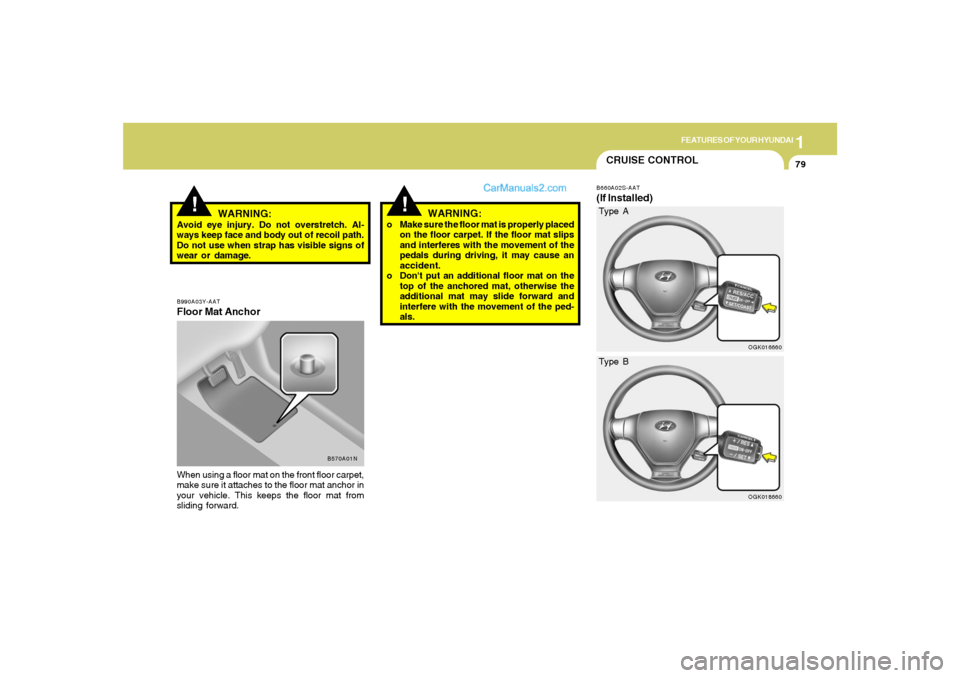
CRUISE CONTROLB660A02S-AAT(If Installed)
OGK016660OGK018660
Type A
Type B
Page 92 of 268
1FEATURES OF YOUR HYUNDAI80
!
WARNING:
To avoid accidental cruise control engage-
ment, keep the cruise control main switch
off when not using the cruise control.
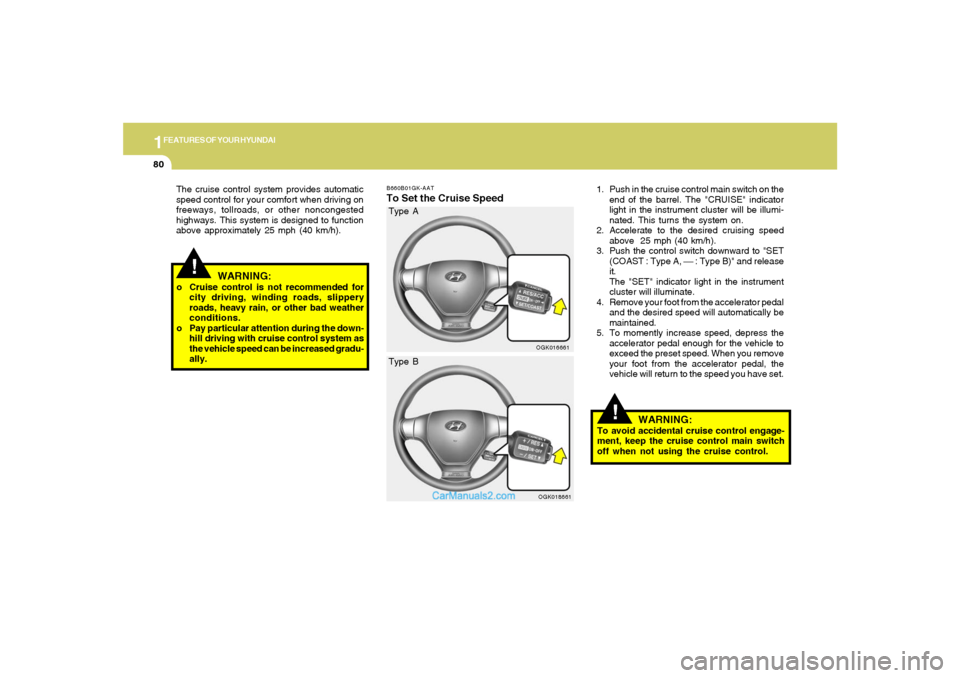
B660B01GK-AATTo Set the Cruise Speed
1. Push in the cruise control main switch on the
end of the barrel. The "CRUISE" indicator
light in the instrument cluster will be illumi-
nated. This turns the system on.
2. Accelerate to the desired cruising speed
above 25 mph (40 km/h).
3. Push the control switch downward to "SET
(COAST : Type A, ⎯ : Type B)" and release
it.
The "SET" indicator light in the instrument
cluster will illuminate.
4. Remove your foot from the accelerator pedal
and the desired speed will automatically be
maintained.
5. To momently increase speed, depress the
accelerator pedal enough for the vehicle to
exceed the preset speed. When you remove
your foot from the accelerator pedal, the
vehicle will return to the speed you have set.
OGK016661
!
WARNING:
o Cruise control is not recommended for
city driving, winding roads, slippery
roads, heavy rain, or other bad weather
conditions.
o Pay particular attention during the down-
hill driving with cruise control system as
the vehicle speed can be increased gradu-
ally. The cruise control system provides automatic
speed control for your comfort when driving on
freeways, tollroads, or other noncongested
highways. This system is designed to function
above approximately 25 mph (40 km/h).
OGK018661
Type B Type A
Page 93 of 268
1
FEATURES OF YOUR HYUNDAI
81
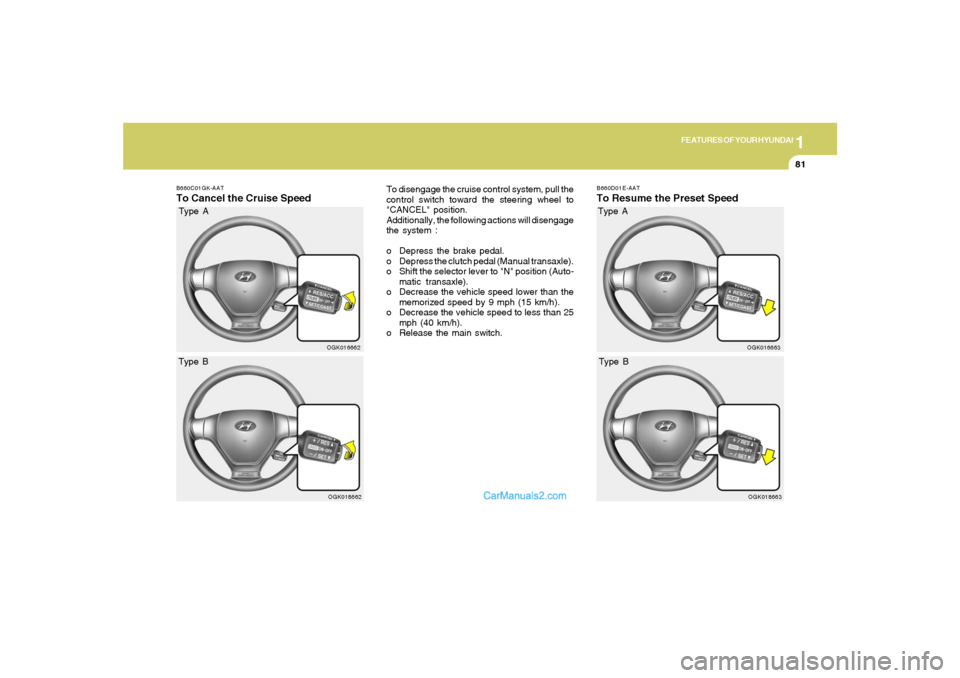
B660D01E-AATTo Resume the Preset Speed
OGK016663
B660C01GK-AATTo Cancel the Cruise Speed
To disengage the cruise control system, pull the
control switch toward the steering wheel to
"CANCEL" position.
Additionally, the following actions will disengage
the system :
o Depress the brake pedal.
o Depress the clutch pedal (Manual transaxle).
o Shift the selector lever to "N" position (Auto-
matic transaxle).
o Decrease the vehicle speed lower than the
memorized speed by 9 mph (15 km/h).
o Decrease the vehicle speed to less than 25
mph (40 km/h).
o Release the main switch.
OGK016662OGK018662
Type BType A
OGK018663
Type B Type A
Page 94 of 268
1FEATURES OF YOUR HYUNDAI82
B660E01E-AATTo Reset at a Faster Speed1. Push the control switch upward to "RE-
SUME (ACCEL : Type A, + : Type B)" position
and hold it.
2. Accelerate to desired speed and release the
control switch. While the control switch is
held, the vehicle will gradually gain speed.
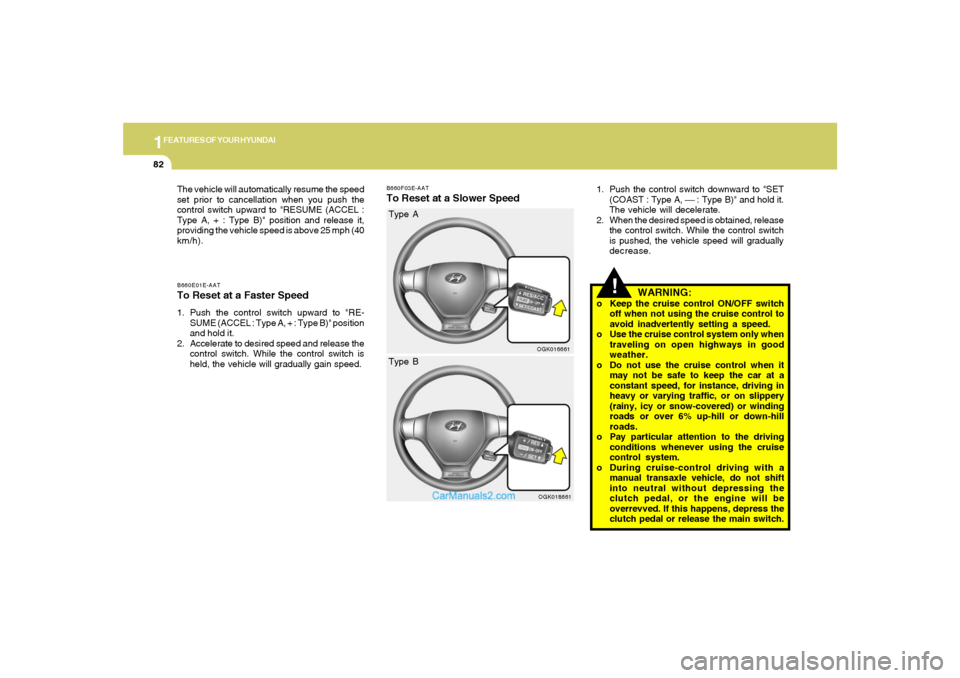
B660F03E-AATTo Reset at a Slower Speed
1. Push the control switch downward to "SET
(COAST : Type A, ⎯ : Type B)" and hold it.
The vehicle will decelerate.
2. When the desired speed is obtained, release
the control switch. While the control switch
is pushed, the vehicle speed will gradually
decrease.
OGK016661
!
WARNING:
o Keep the cruise control ON/OFF switch
off when not using the cruise control to
avoid inadvertently setting a speed.
o Use the cruise control system only when
traveling on open highways in good
weather.
o Do not use the cruise control when it
may not be safe to keep the car at a
constant speed, for instance, driving in
heavy or varying traffic, or on slippery
(rainy, icy or snow-covered) or winding
roads or over 6% up-hill or down-hill
roads.
o Pay particular attention to the driving
conditions whenever using the cruise
control system.
o During cruise-control driving with a
manual transaxle vehicle, do not shift
into neutral without depressing the
clutch pedal, or the engine will be
overrevved. If this happens, depress the
clutch pedal or release the main switch. The vehicle will automatically resume the speed
set prior to cancellation when you push the
control switch upward to "RESUME (ACCEL :
Type A, + : Type B)" position and release it,
providing the vehicle speed is above 25 mph (40
km/h).
OGK018661
Type B Type A