2008 Hyundai Santa Fe Location
[x] Cancel search: LocationPage 47 of 355
1
FEATURES OF YOUR HYUNDAI
35
!
WARNING:
o Never allow a child to stand-up or
kneel on the seat or floorboard of a
moving vehicle. During a collision or
sudden stop, the child can be violently
thrown against the vehicles interior,
resulting in serious injury.
o Never use an infant carrier or a child
safety seat that "hooks" over a
seatback, it may not provide adequate
security in an accident.
o Seat belts can become very hot, es-
pecially when the car is parked in
direct sunlight. Always check seat
belt buckles before fastening them
over a child.
o Always store or secure a child seat,
even when it is not in use. During a
collision or sudden stop, the child seat
could be thrown inside the vehicle.
B230C01CM-AATInstalling a Child Restraint Seat
with the "Tether Anchorage"
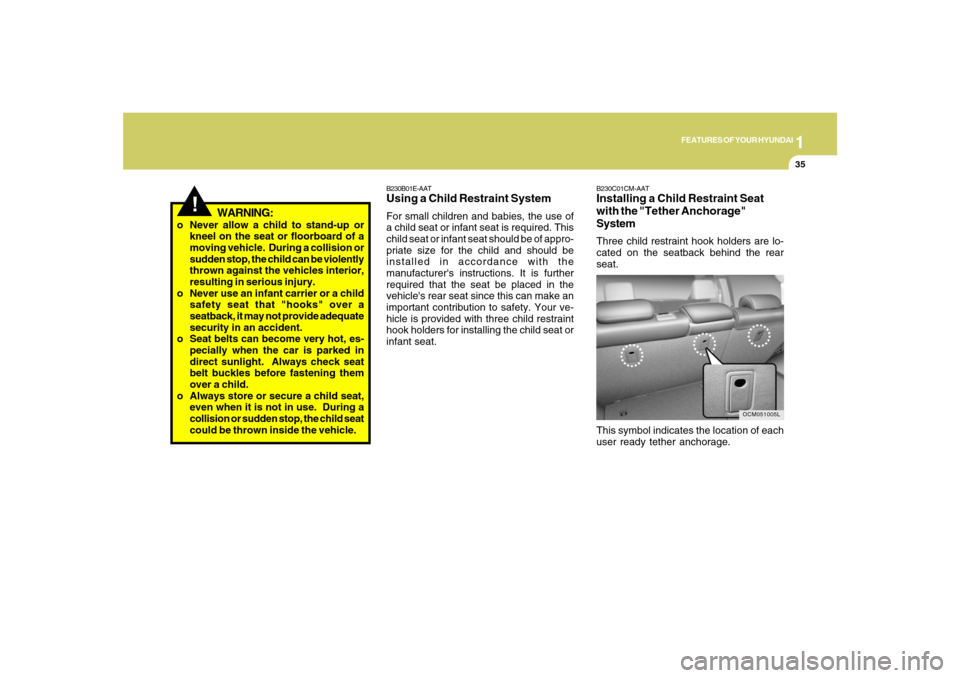
SystemThree child restraint hook holders are lo-
cated on the seatback behind the rear
seat.
This symbol indicates the location of each
user ready tether anchorage.
OCM051005L
B230B01E-AATUsing a Child Restraint SystemFor small children and babies, the use of
a child seat or infant seat is required. This
child seat or infant seat should be of appro-
priate size for the child and should be
installed in accordance with the
manufacturer's instructions. It is further
required that the seat be placed in the
vehicle's rear seat since this can make an
important contribution to safety. Your ve-
hicle is provided with three child restraint
hook holders for installing the child seat or
infant seat.
Page 49 of 355
1
FEATURES OF YOUR HYUNDAI
37
!
WARNING:
o Never mount more than one child re-
straint to a single tether or to a single
lower anchorage point. The increased
load caused by multiple seats may
cause the tethers or anchorage points
to break, causing serious injury or
death.
!
WARNING:
o A child can be seriously injured or
killed in a collision if the child restraint
is not properly anchored. Always
follow the child seat manufacturer’s
instructions for installation and use.
o Never install a child restraint using
the lower anchors at the center posi-
tion of the rear seat. In a crash, the
LATCH anchors may break if a car
seat is improperly placed in the cen-
ter position resulting in serious or
fatal injuries. Only place a LATCH or
LATCH-compatible child seat in the
left or right out-board rear seating
positions (as shown) to the appropri-
ate LATCH anchors provided.
B230D03CM-AATSecuring the Child Restraint Seat
with the "LATCH" systemSome child seat manufacturers make safety
seats that are labeled as LATCH or LATCH-
compatible child seats. These seats in-
clude two rigid or webbing mounted at-
tachments that connect to two lower an-
chors at specific seating positions in your
vehicle. This type of child seat eliminates
the need to use seat belts to attach the child
seat; the tether strap must also be attached
to the proper tether anchor point. For infor-
mation on using tether straps, refer to “In-
stalling a Child Restraint Seat with the
“Tether Anchorage” system”.
OCM051007L
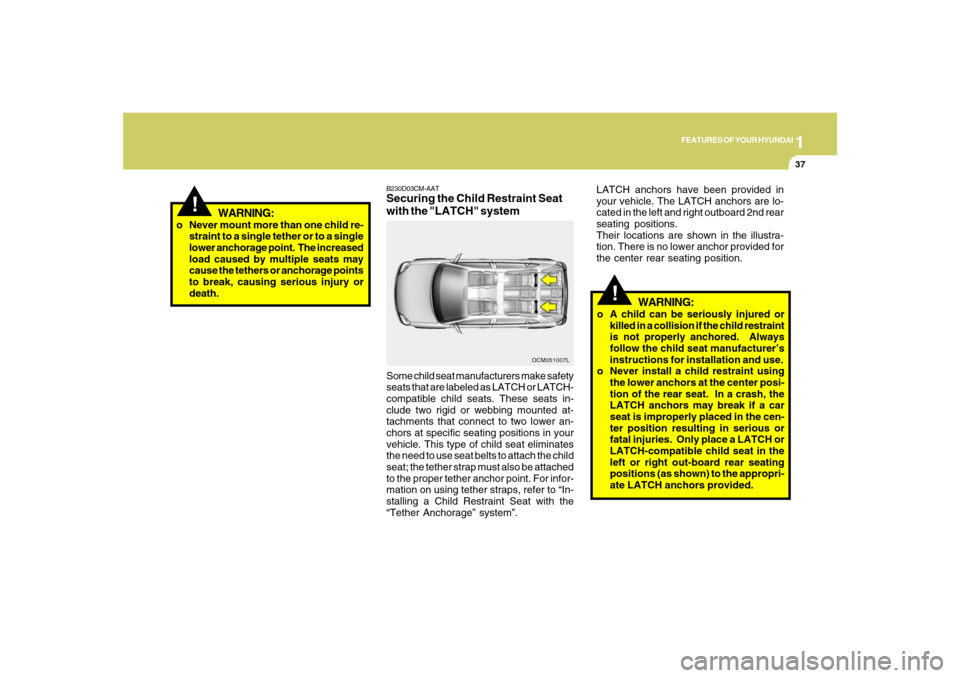
LATCH anchors have been provided in
your vehicle. The LATCH anchors are lo-
cated in the left and right outboard 2nd rear
seating positions.
Their locations are shown in the illustra-
tion. There is no lower anchor provided for
the center rear seating position.
Page 53 of 355
1
FEATURES OF YOUR HYUNDAI
41
OMG035300
Your Hyundai vehicle is equipped with
driver's and front passenger's pre-tensioner
seat belts. The purpose of the pre-tensioner
is to make sure that the seat belts fit tightly
against the occupant's body in certain fron-
tal collisions. The pre-tensioner seat belts
can be activated together with the air bags.B180B01CM-AATPre-tensioner Seat Belt
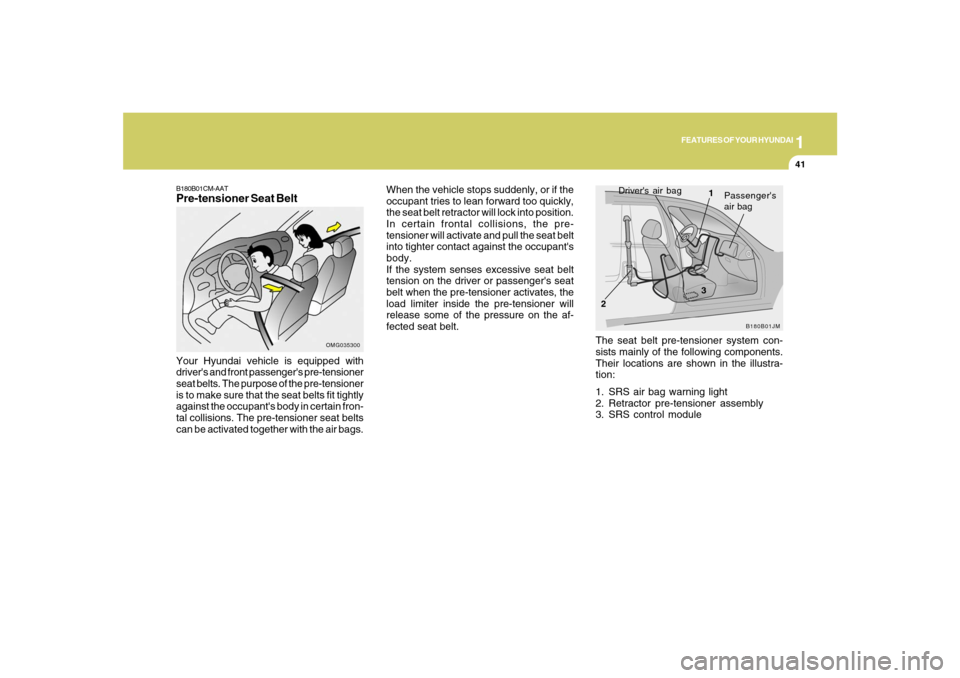
The seat belt pre-tensioner system con-
sists mainly of the following components.
Their locations are shown in the illustra-
tion:
1. SRS air bag warning light
2. Retractor pre-tensioner assembly
3. SRS control module
B180B01JM
Driver's air bag
1
2
Passenger's
air bag
3
When the vehicle stops suddenly, or if the
occupant tries to lean forward too quickly,
the seat belt retractor will lock into position.
In certain frontal collisions, the pre-
tensioner will activate and pull the seat belt
into tighter contact against the occupant's
body.
If the system senses excessive seat belt
tension on the driver or passenger's seat
belt when the pre-tensioner activates, the
load limiter inside the pre-tensioner will
release some of the pressure on the af-
fected seat belt.
Page 78 of 355
1FEATURES OF YOUR HYUNDAI66
!
B260H03A-AAT
Parking Brake/Low Brake
Fluid Level Warning Light
WARNING:
If you suspect brake trouble, have your
brakes checked by a Hyundai dealer as
soon as possible. Driving your car with
a problem in either the brake electrical
system or brake hydraulic system is
dangerous, and could result in a serious
injury or death.Warning Light OperationThe parking brake/brake fluid level warn-
ing light should illuminate when the park-
ing brake is applied and the ignition switch
is turned to "ON" or "START". After the
engine is started, the light should go out
when the parking brake is released.
If the parking brake is not applied, the
warning light should illuminate when the
ignition switch is turned to "ON" or "START",
then go out when the engine starts. If the
light illuminate at any other time, you
should slow the vehicle and bring it to a
complete stop in a safe location off the
roadway.
B260M02A-AAT
Low Fuel Level Warning
Light
OCM052208
The low fuel level warning light illuminates
when the fuel tank is approaching empty.
When it illuminates, you should add fuel as
soon as possible. Driving with the fuel
level warning light on or with the fuel level
below "E" can cause the engine to misfire
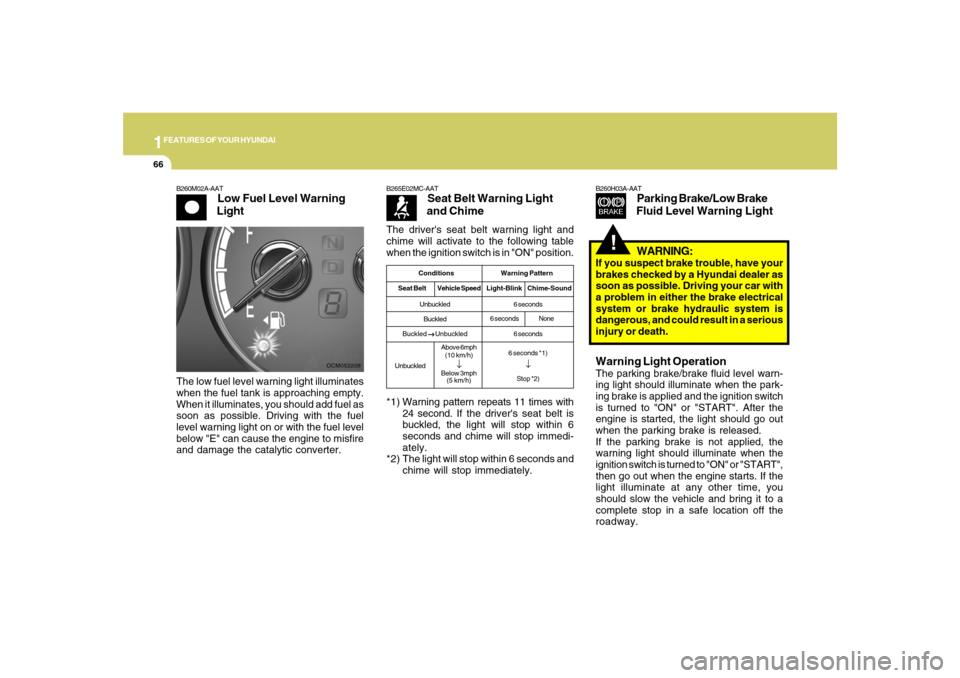
and damage the catalytic converter.The driver's seat belt warning light and
chime will activate to the following table
when the ignition switch is in "ON" position.
B265E02MC-AAT
Seat Belt Warning Light
and Chime
*1) Warning pattern repeats 11 times with
24 second. If the driver's seat belt is
buckled, the light will stop within 6
seconds and chime will stop immedi-
ately.
*2) The light will stop within 6 seconds and
chime will stop immediately.
Conditions Warning Pattern
Seat BeltVehicle SpeedLight-Blink Chime-SoundUnbuckled
Buckled
Buckled
→ →→ →
→ Unbuckled
UnbuckledAbove 6mph
(10 km/h)
↓
Below 3mph
(5 km/h)6 seconds
6 seconds
6 seconds *1)
↓Stop *2)
6 secondsNone
Page 95 of 355
1
FEATURES OF YOUR HYUNDAI
83
OCM052075N
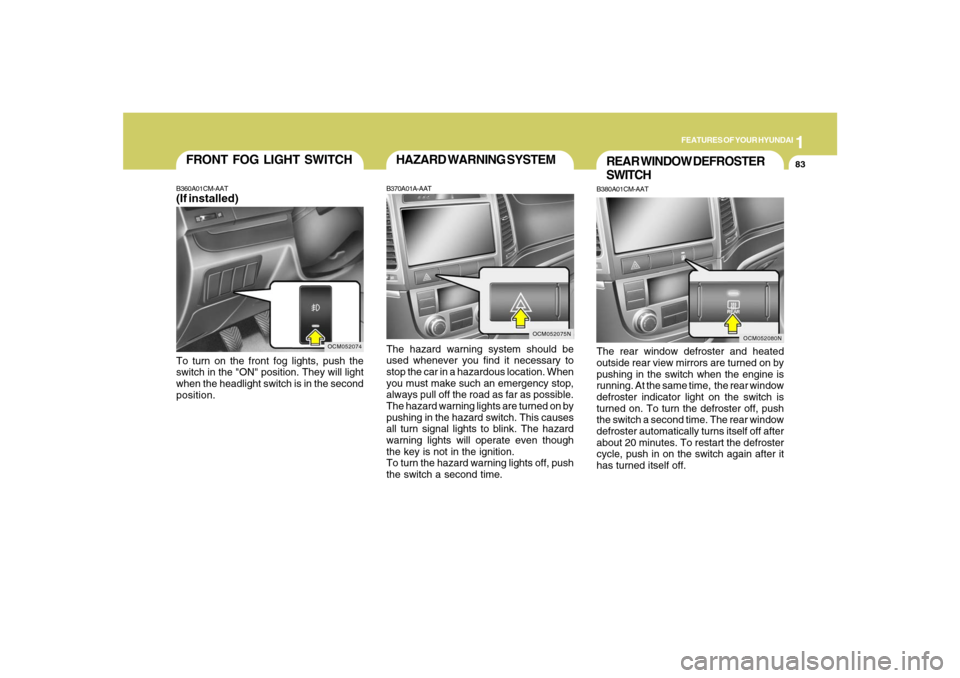
HAZARD WARNING SYSTEMB370A01A-AATThe hazard warning system should be
used whenever you find it necessary to
stop the car in a hazardous location. When
you must make such an emergency stop,
always pull off the road as far as possible.
The hazard warning lights are turned on by
pushing in the hazard switch. This causes
all turn signal lights to blink. The hazard
warning lights will operate even though
the key is not in the ignition.
To turn the hazard warning lights off, push
the switch a second time.
REAR WINDOW DEFROSTER
SWITCHB380A01CM-AATThe rear window defroster and heated
outside rear view mirrors are turned on by
pushing in the switch when the engine is
running. At the same time, the rear window
defroster indicator light on the switch is
turned on. To turn the defroster off, push
the switch a second time. The rear window
defroster automatically turns itself off after
about 20 minutes. To restart the defroster
cycle, push in on the switch again after it
has turned itself off.
OCM052080N
OCM052074
FRONT FOG LIGHT SWITCHB360A01CM-AAT(If installed)To turn on the front fog lights, push the
switch in the "ON" position. They will light
when the headlight switch is in the second
position.
Page 112 of 355
1FEATURES OF YOUR HYUNDAI
100
- The compass headings are inaccurate
in long distance driving.
If the vehicle’s compass headings become
inaccurate, the compass should be cali-
brated as follows:
1. Ensure the vehicle is not located near
large steel structures or under electric
power lines.
2. Turn on the compass by pressing the
button.
3. Press and hold the
button for more
than 6 but less than 9 seconds. The
current zone number will appear in the
display. Release then press the
but-
ton until your zone number appears in
the display.
4. Check the mirror angle by pressing and
holding the
button for more than
12seconds. Release then press the
button to “L”(for steering wheel on the
Left side of the vehicle). (if installed)
5. Press and hold the
button between 9
and 12 seconds. Release the
button
when a “C” appears in the display.
6. Drive the vehicle in 2 complete circles
at less than 5mph(8km/h) or until the
compass heading appears.
CAUTION:
Be sure the area is free of traffic, pedes-
trians, and obstructions.
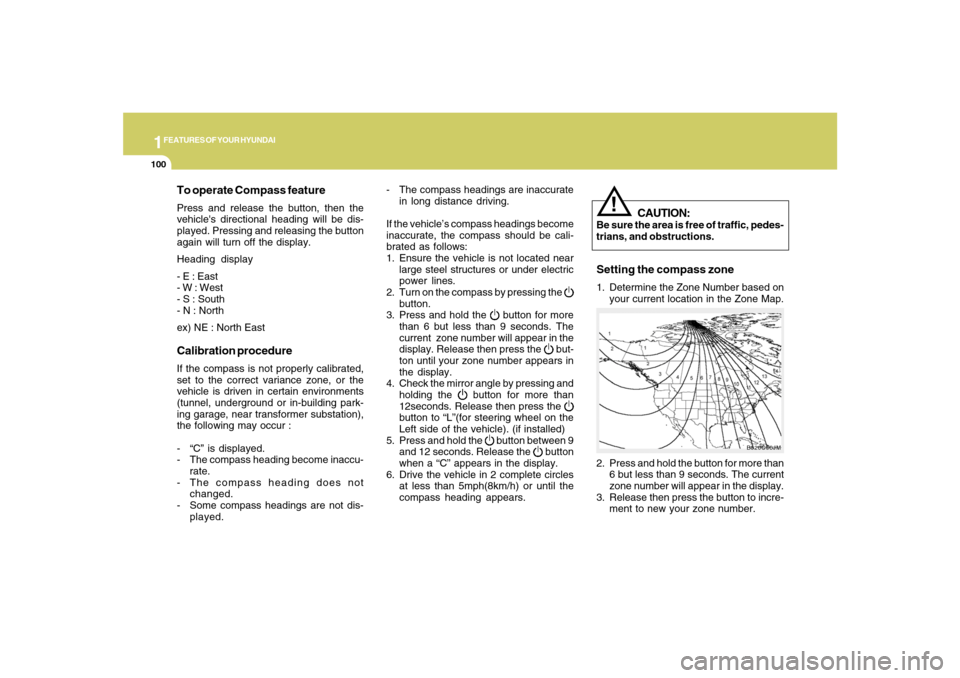
2. Press and hold the button for more than
6 but less than 9 seconds. The current
zone number will appear in the display.
3. Release then press the button to incre-
ment to new your zone number.
B520C06JM
To operate Compass featurePress and release the button, then the
vehicle's directional heading will be dis-
played. Pressing and releasing the button
again will turn off the display.
Heading display
- E : East
- W : West
- S : South
- N : North
ex) NE : North EastCalibration procedureIf the compass is not properly calibrated,
set to the correct variance zone, or the
vehicle is driven in certain environments
(tunnel, underground or in-building park-
ing garage, near transformer substation),
the following may occur :
- “C” is displayed.
- The compass heading become inaccu-
rate.
- The compass heading does not
changed.
- Some compass headings are not dis-
played.
!
Setting the compass zone1. Determine the Zone Number based on
your current location in the Zone Map.
Page 116 of 355
1FEATURES OF YOUR HYUNDAI
104
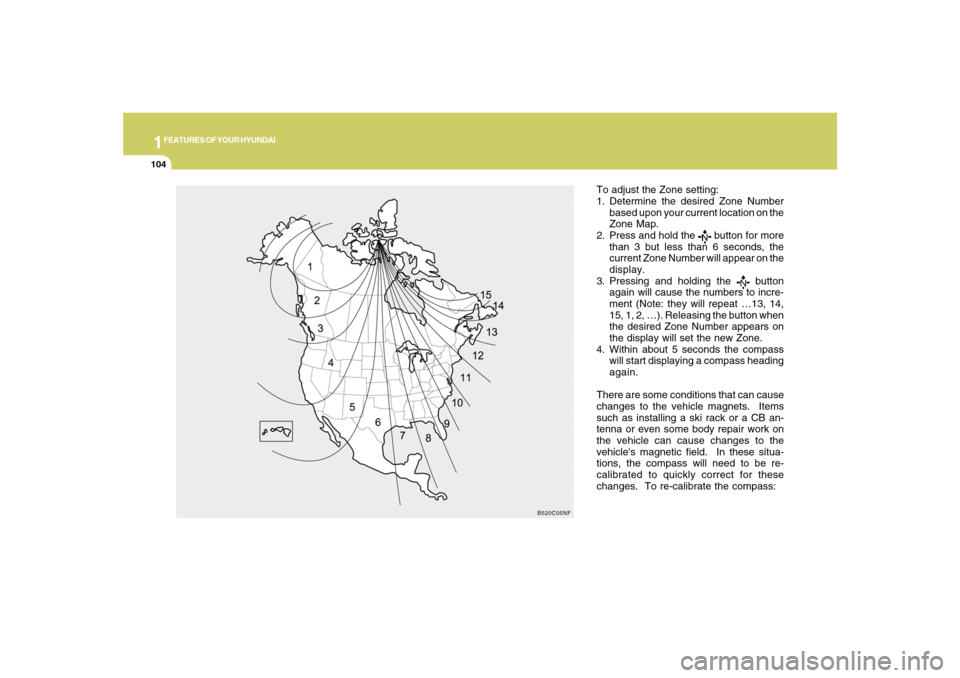
To adjust the Zone setting:
1. Determine the desired Zone Number
based upon your current location on the
Zone Map.
2. Press and hold the
button for more
than 3 but less than 6 seconds, the
current Zone Number will appear on the
display.
3. Pressing and holding the
button
again will cause the numbers to incre-
ment (Note: they will repeat …13, 14,
15, 1, 2, …). Releasing the button when
the desired Zone Number appears on
the display will set the new Zone.
4. Within about 5 seconds the compass
will start displaying a compass heading
again.
There are some conditions that can cause
changes to the vehicle magnets. Items
such as installing a ski rack or a CB an-
tenna or even some body repair work on
the vehicle can cause changes to the
vehicle's magnetic field. In these situa-
tions, the compass will need to be re-
calibrated to quickly correct for these
changes. To re-calibrate the compass:
B520C05NF
Page 118 of 355
1FEATURES OF YOUR HYUNDAI
106
Standard Programming
To train most devices, follow these instruc-
tions:
1. For first-time programming, press and
hold the two outside buttons, HomeLink
®
Channel 1 and Channel 3 Buttons, until
the indicator light begins to flash (after
20 seconds). Release both buttons. Do
not hold the buttons for longer than 30
seconds.
2. Position the end of your hand-held trans-
mitter 1-3 inches (5-14 cm) away from
the HomeLink
® buttons while keeping
the indicator light in view.
3. Simultaneously press and hold both
the HomeLink® and hand-held trans-
mitter button. DO NOT release the but-
tons until step 4 has been completed.
4. While continuing to hold the buttons the
red Indicator Status LED will flash slowly
and then rapidly after HomeLink
® suc-
cessfully trains to the frequency signal
from the hand-held transmitter. Release
both buttons.5. Press and hold the just-trained
HomeLink
® button and observe the red
Status Indicator LED. If the indicator
light stays on constantly, programming
is complete and your device should
activate when the HomeLink
® button is
pressed and released.
6. To program the remaining two
HomeLink
® buttons, follow steps 2
through 5.
Rolling Code Programming
Rolling code devices which are "code-
protected" and manufactured after 1996
may be determined by the following:
o Reference the device owner's manual
for verification.
o The handheld transmitter appears to
program the HomeLink Universal Trans-
ceiver but does not activate the device.
o Press and hold the trained HomeLink
button. The device has the rolling code
feature if the indicator light flashes rap-
idly and then turns solid after 2 seconds.
To train rolling code devices, follow these
instructions:1. At the garage door opener receiver
(motor-head unit) in the garage, locate
the "learn" or "smart" button. This can
usually be found where the hanging
antenna wire is attached to the motor-
head unit. Exact location and color of
the button may vary by garage door
opener brand. If there is difficulty locat-
ing the training button, reference the
device owner's manual or please visit
our Web site at www.homelink.com.
2. Firmly press and release the "learn" or
"smart" button (which activates the "train-
ing light").
NOTE:There are 30 seconds in which to initiate
step3.
3. Return to the vehicle and firmly press,
hold for two seconds and then release
the desired HomeLink
® button. Repeat
the "press/hold/release" sequence a
second time to complete the program-
ming. (Some devices may require you
to repeat this sequence a third time to
complete the programming.)