2008 HYUNDAI ENTOURAGE mirror
[x] Cancel search: mirrorPage 122 of 393
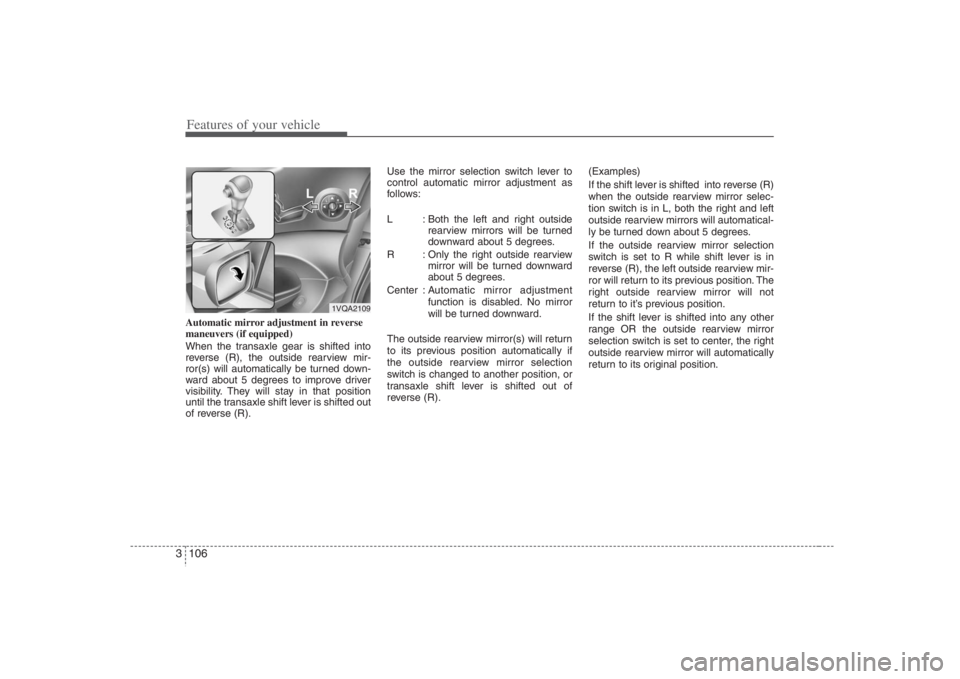
Features of your vehicle106 3Automatic mirror adjustment in reverse
maneuvers (if equipped)
When the transaxle gear is shifted into
reverse (R), the outside rearview mir-
ror(s) will automatically be turned down-
ward about 5 degrees to improve driver
visibility. They will stay in that position
until the transaxle shift lever is shifted out
of reverse (R).Use the mirror selection switch lever to
control automatic mirror adjustment as
follows:
L : Both the left and right outside
rearview mirrors will be turned
downward about 5 degrees.
R : Only the right outside rearview
mirror will be turned downward
about 5 degrees.
Center : Automatic mirror adjustment
function is disabled. No mirror
will be turned downward.
The outside rearview mirror(s) will return
to its previous position automatically if
the outside rearview mirror selection
switch is changed to another position, or
transaxle shift lever is shifted out of
reverse (R).(Examples)
If the shift lever is shifted into reverse (R)
when the outside rearview mirror selec-
tion switch is in L, both the right and left
outside rearview mirrors will automatical-
ly be turned down about 5 degrees.
If the outside rearview mirror selection
switch is set to R while shift lever is in
reverse (R), the left outside rearview mir-
ror will return to its previous position. The
right outside rearview mirror will not
return to it’s previous position.
If the shift lever is shifted into any other
range OR the outside rearview mirror
selection switch is set to center, the right
outside rearview mirror will automatically
return to its original position.
1VQA2109
Page 123 of 393
3 107
Features of your vehicle
Day/night rearview mirror Adjust the rearview mirror to center on
the view through the rear window. Make
this adjustment before you start driving.
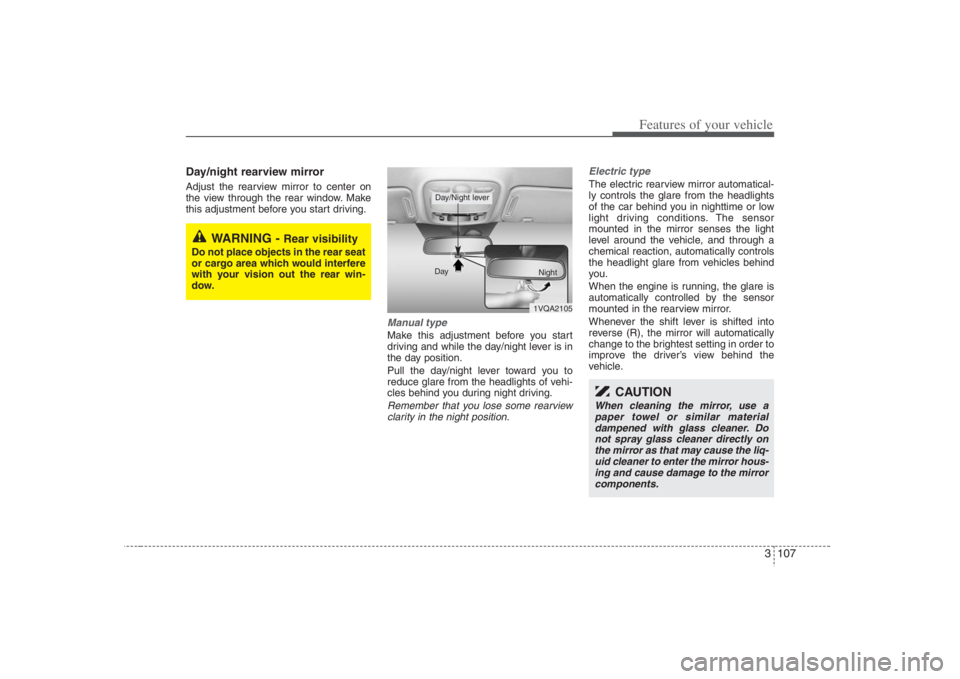
Manual type Make this adjustment before you start
driving and while the day/night lever is in
the day position.
Pull the day/night lever toward you to
reduce glare from the headlights of vehi-
cles behind you during night driving.Remember that you lose some rearview
clarity in the night position.Electric type
The electric rearview mirror automatical-
ly controls the glare from the headlights
of the car behind you in nighttime or low
light driving conditions. The sensor
mounted in the mirror senses the light
level around the vehicle, and through a
chemical reaction, automatically controls
the headlight glare from vehicles behind
you.
When the engine is running, the glare is
automatically controlled by the sensor
mounted in the rearview mirror.
Whenever the shift lever is shifted into
reverse (R), the mirror will automatically
change to the brightest setting in order to
improve the driver’s view behind the
vehicle.
WARNING -
Rear visibility
Do not place objects in the rear seat
or cargo area which would interfere
with your vision out the rear win-
dow.
1VQA2105 Day
Night
Day/Night lever
CAUTION
When cleaning the mirror, use a
paper towel or similar material
dampened with glass cleaner. Do
not spray glass cleaner directly on
the mirror as that may cause the liq-
uid cleaner to enter the mirror hous-
ing and cause damage to the mirror
components.
Page 124 of 393
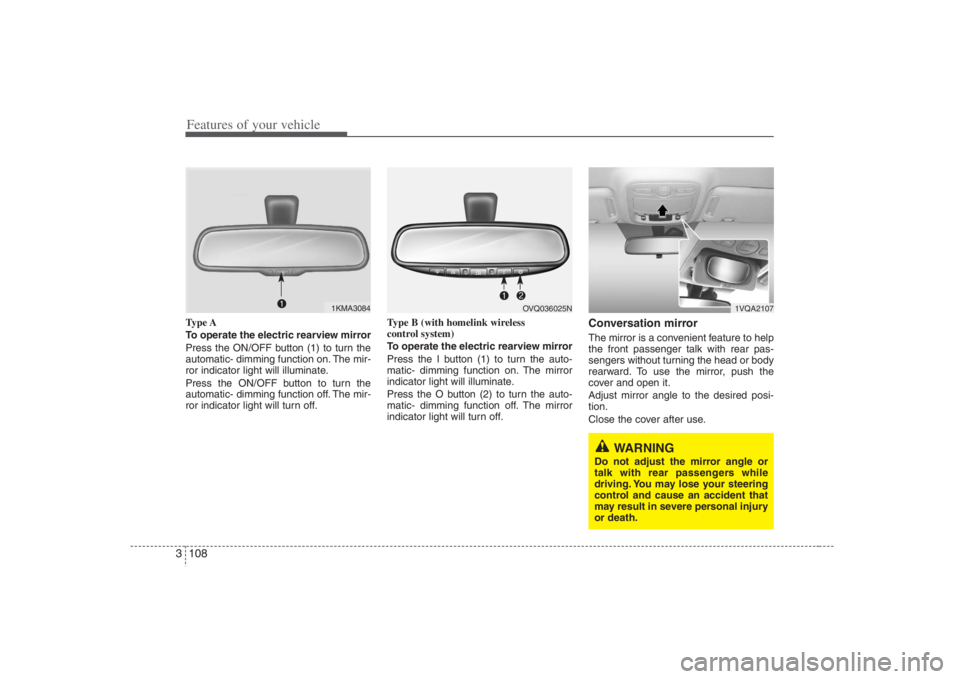
Features of your vehicle108 3Type A
To operate the electric rearview mirror
Press the ON/OFF button (1) to turn the
automatic- dimming function on. The mir-
ror indicator light will illuminate.
Press the ON/OFF button to turn the
automatic- dimming function off. The mir-
ror indicator light will turn off.Type B (with homelink wireless
control system)
To operate the electric rearview mirror
Press the I button (1) to turn the auto-
matic- dimming function on. The mirror
indicator light will illuminate.
Press the O button (2) to turn the auto-
matic- dimming function off. The mirror
indicator light will turn off.
Conversation mirrorThe mirror is a convenient feature to help
the front passenger talk with rear pas-
sengers without turning the head or body
rearward. To use the mirror, push the
cover and open it.
Adjust mirror angle to the desired posi-
tion.
Close the cover after use.
1KMA3084
1VQA2107
WARNING
Do not adjust the mirror angle or
talk with rear passengers while
driving. You may lose your steering
control and cause an accident that
may result in severe personal injury
or death.
OVQ036025N
Page 152 of 393
Features of your vehicle136 3The defroster heats the window to
remove frost, fog and thin ice from the
interior and exterior of the rear window
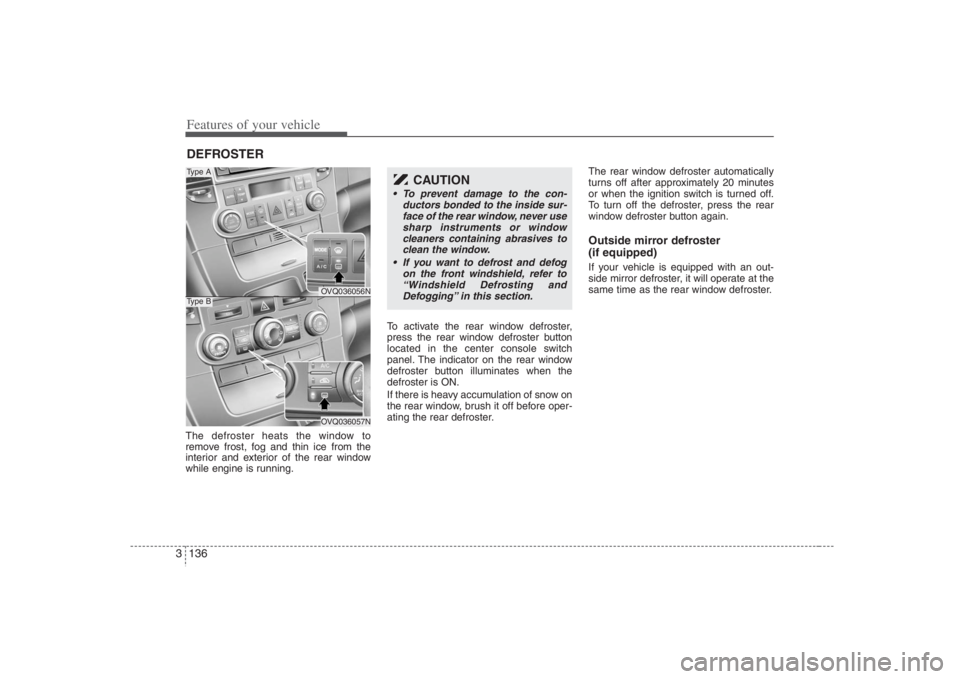
while engine is running.To activate the rear window defroster,
press the rear window defroster button
located in the center console switch
panel. The indicator on the rear window
defroster button illuminates when the
defroster is ON.
If there is heavy accumulation of snow on
the rear window, brush it off before oper-
ating the rear defroster.The rear window defroster automatically
turns off after approximately 20 minutes
or when the ignition switch is turned off.
To turn off the defroster, press the rear
window defroster button again.
Outside mirror defroster
(if equipped)If your vehicle is equipped with an out-
side mirror defroster, it will operate at the
same time as the rear window defroster.
DEFROSTER
OVQ036056NOVQ036057N
Type AType B
CAUTION
To prevent damage to the con-
ductors bonded to the inside sur-
face of the rear window, never use
sharp instruments or window
cleaners containing abrasives to
clean the window.
If you want to defrost and defog
on the front windshield, refer to
“Windshield Defrosting and
Defogging” in this section.
Page 179 of 393

3 163
Features of your vehicle
Automatic climate control systemTo defog inside windshield 1. Select desired fan speed.
2. Select desired temperature.
3. Press the defrost button ( ).
4. The outside (fresh) air position will be
selected automatically.
If the outside (fresh) air position are not
selected automatically, adjust the corre-
sponding button manually.
To defrost outside windshield 1. Set fan speed to the highest (extreme
right) position.
2. Set temperature to the extreme hot
(HI) position.
3. Press the defrost button ( ).
4. The outside (fresh) air position will be
selected automatically. For maximum defrosting, set the tem-
perature control to the extreme highest
temperature setting and the fan speed
control to the highest speed.
If warm air to the floor is desired while
defrosting or defogging, set the mode
to the floor-defrost position.
Before driving, clear all snow and ice
from the windshield, rear window, out-
side rear view mirrors, and all side win-
dows.
Clear all snow and ice from the hood
and air inlet in the cowl grill to improve
heater and defroster efficiency and to
reduce the probability of fogging up
inside of the windshield.
OVQ036304N
WARNING
Do not use the or position
during cooling operation in
extremely humid weather. The dif-
ference between the temperature of
the outside air and that of the wind-
shield could cause the outer sur-
face of the windshield to fog up,
causing loss of visibility. In this
case, set the mode selection knob
to the position and fan speed
control knob to the lower speed.
OVQ036083N
Page 183 of 393
3 167
Features of your vehicle
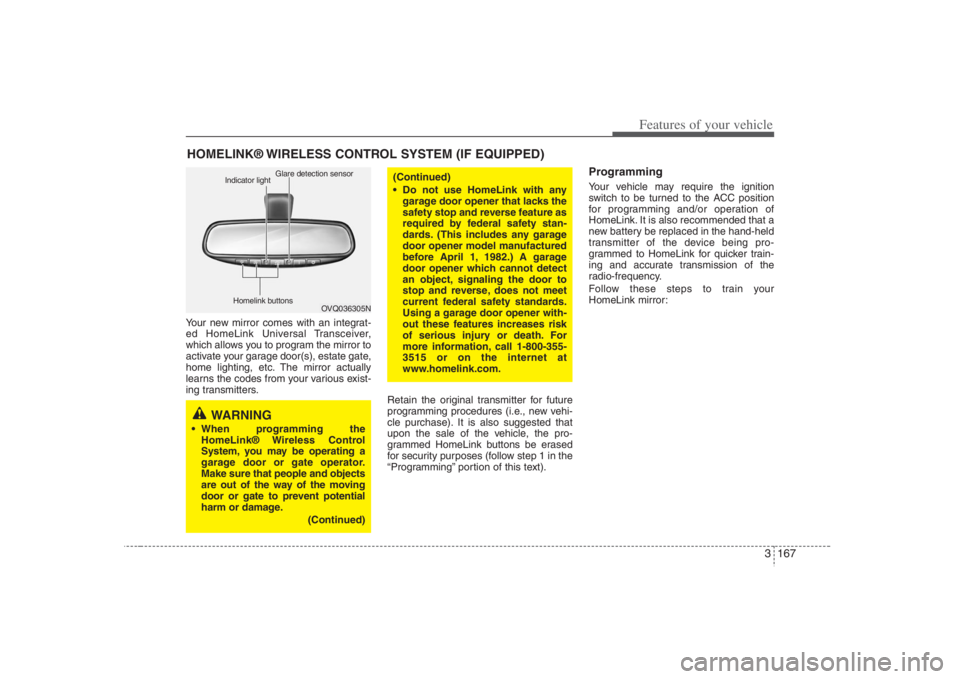
Your new mirror comes with an integrat-
ed HomeLink Universal Transceiver,
which allows you to program the mirror to
activate your garage door(s), estate gate,
home lighting, etc. The mirror actually
learns the codes from your various exist-
ing transmitters.
Retain the original transmitter for future
programming procedures (i.e., new vehi-
cle purchase). It is also suggested that
upon the sale of the vehicle, the pro-
grammed HomeLink buttons be erased
for security purposes (follow step 1 in the
“Programming” portion of this text).
ProgrammingYour vehicle may require the ignition
switch to be turned to the ACC position
for programming and/or operation of
HomeLink. It is also recommended that a
new battery be replaced in the hand-held
transmitter of the device being pro-
grammed to HomeLink for quicker train-
ing and accurate transmission of the
radio-frequency.
Follow these steps to train your
HomeLink mirror:
HOMELINK® WIRELESS CONTROL SYSTEM (IF EQUIPPED)
WARNING
When programming the
HomeLink® Wireless Control
System, you may be operating a
garage door or gate operator.
Make sure that people and objects
are out of the way of the moving
door or gate to prevent potential
harm or damage.
(Continued)
(Continued)
Do not use HomeLink with any
garage door opener that lacks the
safety stop and reverse feature as
required by federal safety stan-
dards. (This includes any garage
door opener model manufactured
before April 1, 1982.) A garage
door opener which cannot detect
an object, signaling the door to
stop and reverse, does not meet
current federal safety standards.
Using a garage door opener with-
out these features increases risk
of serious injury or death. For
more information, call 1-800-355-
3515 or on the internet at
www.homelink.com.
OVQ036305N Glare detection sensor
Indicator light
Homelink buttons
Page 184 of 393
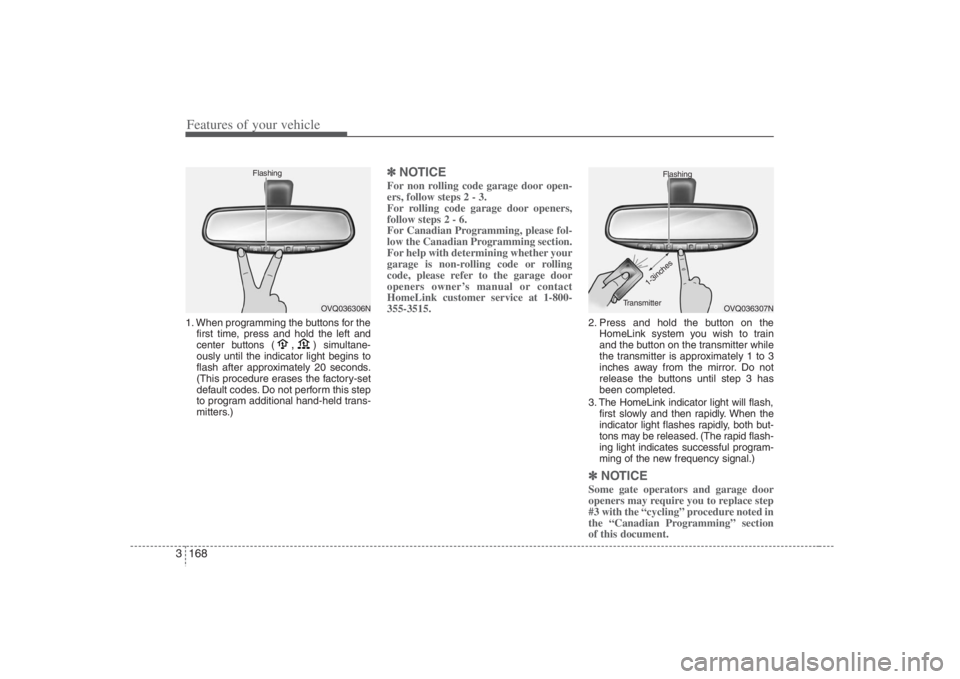
Features of your vehicle168 31. When programming the buttons for the
first time, press and hold
the left and
center buttons (
,
)simultane-
ously until the indicator light begins to
flash after approximately 20 seconds.
(This procedure erases the factory-set
default codes. Do not perform this step
to program additional hand-held trans-
mitters.)
✽ ✽
NOTICEFor non rolling code garage door open-
ers, follow steps 2 - 3.
For rolling code garage door openers,
follow steps 2 - 6.
For Canadian Programming, please fol-
low the Canadian Programming section.
For help with determining whether your
garage is non-rolling code or rolling
code, please refer to the garage door
openers owner’s manual or contact
HomeLink customer service at 1-800-
355-3515.
2. Press and hold the button on the
HomeLink system you wish to train
and the button on the transmitter while
the transmitter is approximately 1 to 3
inches away from the mirror. Do not
release the buttons until step 3 has
been completed.
3. The HomeLink indicator light will flash,
first slowly and then rapidly. When the
indicator light flashes rapidly, both but-
tons may be released. (The rapid flash-
ing light indicates successful program-
ming of the new frequency signal.)✽ ✽
NOTICESome gate operators and garage door
openers may require you to replace step
#3 with the “cycling” procedure noted in
the “Canadian Programming” section
of this document.
OVQ036306N Flashing
OVQ036307N Flashing
1-3inches
Transmitter
Page 192 of 393
Features of your vehicle176 3Rear✽
✽
NOTICEDo not hang heavy bags as they may
damage the holder.
Clothes hanger (if equipped) Sunvisor
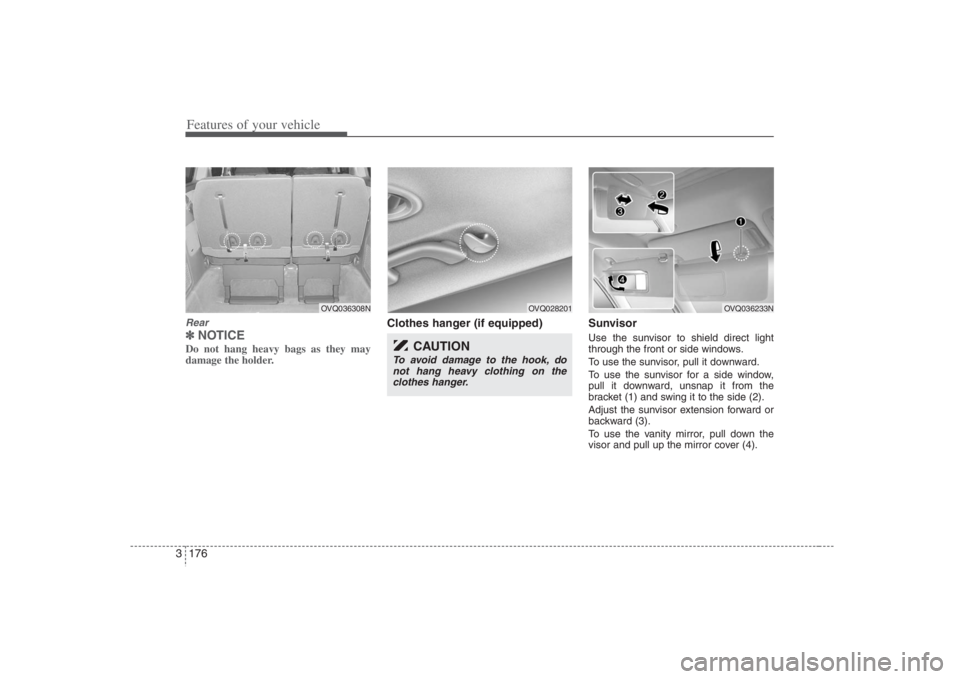
Use the sunvisor to shield direct light
through the front or side windows.
To use the sunvisor, pull it downward.
To use the sunvisor for a side window,
pull it downward, unsnap it from the
bracket (1) and swing it to the side (2).
Adjust the sunvisor extension forward or
backward (3).
To use the vanity mirror, pull down the
visor and pull up the mirror cover (4).
OVQ036308N
OVQ028201
CAUTION
To avoid damage to the hook, do
not hang heavy clothing on the
clothes hanger.
OVQ036233N