2008 HYUNDAI ENTOURAGE clock
[x] Cancel search: clockPage 207 of 393

3191
Knowing your vehicle
7. AUDIO CONTROL / TUNE Select
Button
7-1. AUDIOPressing the changes the BASS, MID-
RANGE, TREBLE, FADER and BAL-
ANCE TUNE mode.
The mode selected is shown on the dis-
play.
After selecting each mode, rotate the
Audio control knob clockwise or counter-
clockwise.BASS ControlTo increase the BASS, rotate the knob
clockwise, while to decrease the BASS,
rotate the knob counterclockwise.MID-RANGE ControlTo increase the MID-RANGE, rotate the
knob clockwise, while to decrease the
MID-RANGE, rotate the knob counter-
clockwise.TREBLE ControlTo increase the TREBLE, rotate the knob
clockwise, while to decrease the TRE-
BLE, rotate the knob counterclockwise.FADER ControlTurn the control knob clockwise to
emphasize rear speaker sound (frontspeaker sound will be attenuated). When
the control knob is turned counterclock-
wise, front speaker sound will be empha-
sized (rear speaker sound will be attenu-
ated).
BALANCE ControlRotate the knob clockwise to emphasize
right speaker sound (left speaker sound
will be attenuated). When the control
knob is turned counter clockwise, left
speaker sound will be emphasized (right
speaker sound will be attenuated).7-2. TUNE Select KnobRotate the knob clockwise to increase
the frequency and turn the knob counter-
clockwise to reduce the frequency.✽ ✽
NOTICE• Do not place beverages close to the
audio system. The playback mecha-
nism may be damaged if you spill
them.
• Do not strike or allow anything to
impact the audio system, damage to
the system mechanisms could occur.
Page 211 of 393

3195
Knowing your vehicle
10. CD SCAN Button To playback the first 10 seconds of
each track, press the CD SCAN button
more than 0.8 seconds.
To playback the first 10 seconds of
each track in the selected folder, press
the CD SCAN button within 0.8 sec-
onds. (MP3 CD only)
Press the CD SCAN button again with-
in 10 sec. when you have reached the
desired track.11. FILE SEARCH Knob
(TUNE Select Knob) You can skip the track (file) by turning
the FILE SEARCH knob clockwise or
counterclockwise.
After selecting the desired track (file),
press the FILE SEARCH knob to play-
back the track (file).
If you do not press the FILE SEARCH
knob within five seconds, the search
will stop.
12. FOLDER SEARCH (FLDR)
Button You can move through the folder by
pushing the FLDR button to up ( )
and down( ).
After moving the desired folder, press
the FILE SEARCH knob to play back in
the selected folder. If you do not press
the FILE SEARCH knob within 5 sec-
onds, the folder searching function will
be released. It can not be operated in a
single folder.13. INFO ButtonWhile playing CD(MP3), If this button is
pressed repeatedly, the played file infor-
mation will be displayed in the following
order.
FILE NAME
➟
SONG TITLE
➟
ARTIST
NAME
➟
ALBUM TITLE
➟
FOLDER
NAME
➟
TOTAL FILE
➟
MARK
ADDRESS
➟ FILE NAME
“NO DATA” wil be displayed in case that
there is no information on the selected
item.
✽ ✽
NOTICE• To assure proper operation of the unit,
keep the vehicle interior temperature
within a normal range by using the
vehicle's air conditioning or heating
system.
• When replacing the fuse, replace it
with a fuse having the correct capacity.
• All stored bookmarks are all erased
when the car battery is disconnected
or power to the vehicle is lost. If this
occurs, the bookmarks will have to be
reset.
• This equipment is designed to be used
only in a 12 volt DC battery system
with negative ground.
• This unit is made of precision parts.
Do not attempt to disassemble or
adjust any parts.
• When driving your vehicle, be sure to
keep the volume of the unit set low
enough to allow you to hear sounds
coming from the outside.
• Do not expose this equipment (includ-
ing the speakers and tape) to water or
excessive moisture.
Page 214 of 393
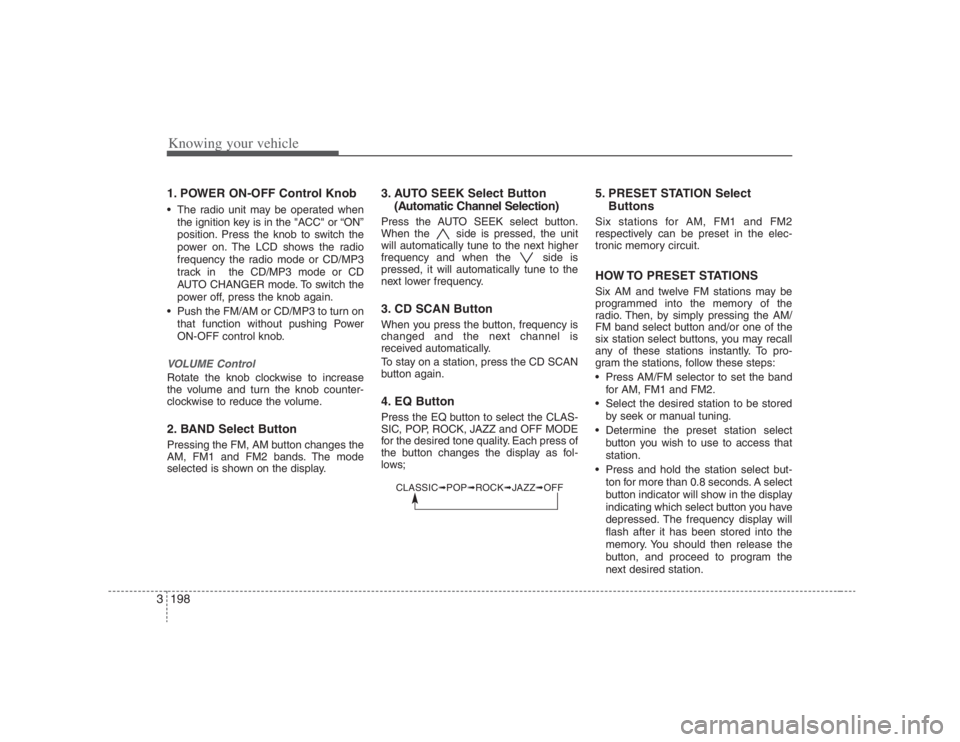
Knowing your vehicle198 31. POWER ON-OFF Control Knob The radio unit may be operated when
the ignition key is in the "ACC" or “ON”
position. Press the knob to switch the
power on. The LCD shows the radio
frequency the radio mode or CD/MP3
track in the CD/MP3 mode or CD
AUTO CHANGER mode. To switch the
power off, press the knob again.
Push the FM/AM or CD/MP3 to turn on
that function without pushing Power
ON-OFF control knob.VOLUME ControlRotate the knob clockwise to increase
the volume and turn the knob counter-
clockwise to reduce the volume.2. BAND Select ButtonPressing the FM, AM button changes the
AM, FM1 and FM2 bands. The mode
selected is shown on the display.
3. AUTO SEEK Select Button
(Automatic Channel Selection)Press the AUTO SEEK select button.
When the side is pressed, the unit
will automatically tune to the next higher
frequency and when the side is
pressed, it will automatically tune to the
next lower frequency.3. CD SCAN ButtonWhen you press the button, frequency is
changed and the next channel is
received automatically.
To stay on a station, press the CD SCAN
button again.4. EQ ButtonPress the EQ button to select the CLAS-
SIC, POP, ROCK, JAZZ and OFF MODE
for the desired tone quality. Each press of
the button changes the display as fol-
lows;
5. PRESET STATION Select
ButtonsSix stations for AM, FM1 and FM2
respectively can be preset in the elec-
tronic memory circuit.HOW TO PRESET STATIONSSix AM and twelve FM stations may be
programmed into the memory of the
radio. Then, by simply pressing the AM/
FM band select button and/or one of the
six station select buttons, you may recall
any of these stations instantly. To pro-
gram the stations, follow these steps:
Press AM/FM selector to set the band
for AM, FM1 and FM2.
Select the desired station to be stored
by seek or manual tuning.
Determine the preset station select
button you wish to use to access that
station.
Press and hold the station select but-
ton for more than 0.8 seconds. A select
button indicator will show in the display
indicating which select button you have
depressed. The frequency display will
flash after it has been stored into the
memory. You should then release the
button, and proceed to program the
next desired station.
CLASSIC➟POP➟ROCK➟JAZZ➟OFF
Page 215 of 393
3199
Knowing your vehicle
A total of 18 stations can be pro-
grammed by selecting one AM and two
FM station per button.
When completed, any preset station
may be recalled by selecting AM, FM1
or FM2 band and the appropriate sta-
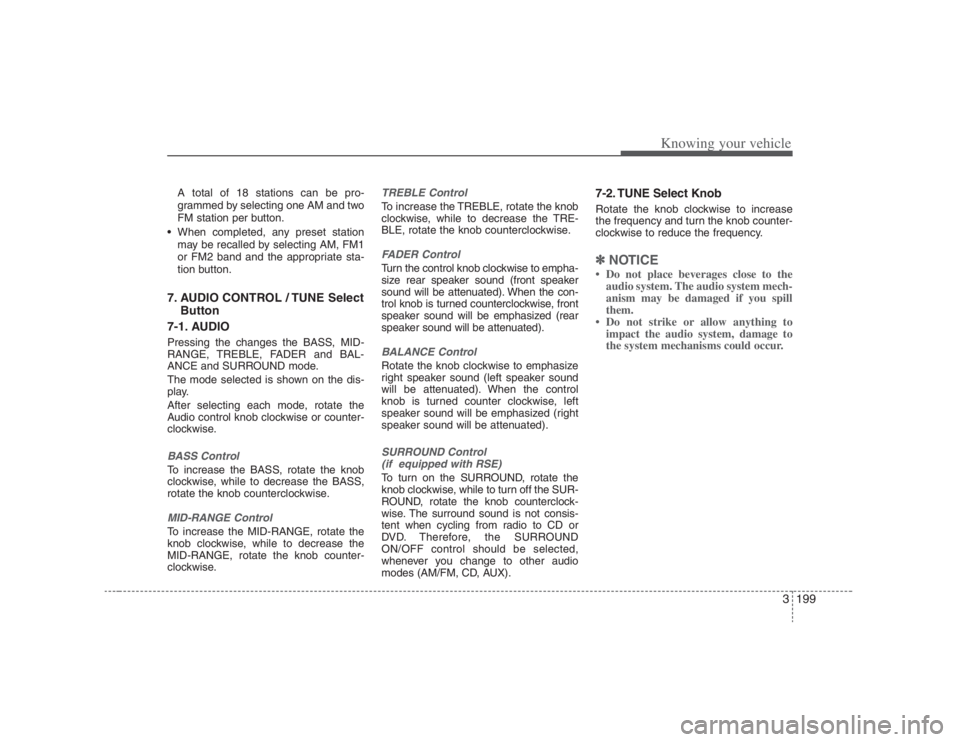
tion button.7. AUDIO CONTROL / TUNE Select
Button
7-1. AUDIOPressing the changes the BASS, MID-
RANGE, TREBLE, FADER and BAL-
ANCE and SURROUND mode.
The mode selected is shown on the dis-
play.
After selecting each mode, rotate the
Audio control knob clockwise or counter-
clockwise.BASS ControlTo increase the BASS, rotate the knob
clockwise, while to decrease the BASS,
rotate the knob counterclockwise.MID-RANGE ControlTo increase the MID-RANGE, rotate the
knob clockwise, while to decrease the
MID-RANGE, rotate the knob counter-
clockwise.
TREBLE ControlTo increase the TREBLE, rotate the knob
clockwise, while to decrease the TRE-
BLE, rotate the knob counterclockwise.FADER ControlTurn the control knob clockwise to empha-
size rear speaker sound (front speaker
sound will be attenuated). When the con-
trol knob is turned counterclockwise, front
speaker sound will be emphasized (rear
speaker sound will be attenuated).BALANCE ControlRotate the knob clockwise to emphasize
right speaker sound (left speaker sound
will be attenuated). When the control
knob is turned counter clockwise, left
speaker sound will be emphasized (right
speaker sound will be attenuated).SURROUND Control
(if equipped with RSE)To turn on the SURROUND, rotate the
knob clockwise, while to turn off the SUR-
ROUND, rotate the knob counterclock-
wise. The surround sound is not consis-
tent when cycling from radio to CD or
DVD. Therefore, the SURROUND
ON/OFF control should be selected,
whenever you change to other audio
modes (AM/FM, CD, AUX).
7-2. TUNE Select KnobRotate the knob clockwise to increase
the frequency and turn the knob counter-
clockwise to reduce the frequency.✽ ✽
NOTICE• Do not place beverages close to the
audio system. The audio system mech-
anism may be damaged if you spill
them.
• Do not strike or allow anything to
impact the audio system, damage to
the system mechanisms could occur.
Page 220 of 393

Knowing your vehicle204 312. DISC UP/DOWN Button By pressing "DISC "/"DISC "
while CD changer is playing you can
move backward or forward to the next
disc and playback automatically
begins.
If any of the slots do not contain a CD,
your car audio will skip the empty slot
and play only those that contain a CD.
When switching CD’s, the LCD dis-
plays the selected CD’s number.13. FILE SEARCH Knob
(TUNE Select Knob) You can skip the track (file) by turning
the FILE SEARCH knob clockwise or
counterclockwise.
After selecting the desired track (file),
press the FILE SEARCH knob to play-
back the track (file).
If you do not press the FILE SEARCH
knob within five seconds, the search
will stop.
14. FOLDER SEARCH (FLDR)
Button You can move through the folder by
pushing the FLDR button to up ( )
and down( ).
After moving the desired folder, press
the FILE SEARCH knob to play back in
the selected folder. If you do not press
the FILE SEARCH knob within 5 sec-
onds, the folder searching function will
be released. It can not be operated in a
single folder.15. INFO ButtonWhile playing CD(MP3), If this button is
pressed repeatedly, the played file infor-
mation will be displayed in the following
order.
FILE NAME
➟
SONG TITLE
➟
ARTIST
NAME
➟
ALBUM TITLE
➟
FOLDER
NAME
➟
TOTAL FILE
➟
MARK
ADDRESS
➟ FILE NAME
“NO DATA” wil be displayed in case that
there is no information on the selected
item.
✽ ✽
NOTICE• To assure proper operation of the unit,
keep the vehicle interior temperature
within a normal range by using the
vehicle's air conditioning or heating
system.
• When replacing the fuse, replace it
with a fuse having the correct capaci-
ty.
• Stored bookmarks are all erased when
the car battery is disconnected or
power to the vehicle is lost. If this
occurs, the bookmarks will have to be
reset.
• This equipment is designed to be used
only in a 12 volt DC battery system
with negative ground.
• This unit is made of precision parts.
Do not attempt to disassemble or
adjust any parts.
• When driving your vehicle, be sure to
keep the volume of the unit set low
enough to allow you to hear sounds
coming from the outside.
• Do not expose this equipment (includ-
ing the speakers and tape) to water or
excessive moisture.
Page 298 of 393
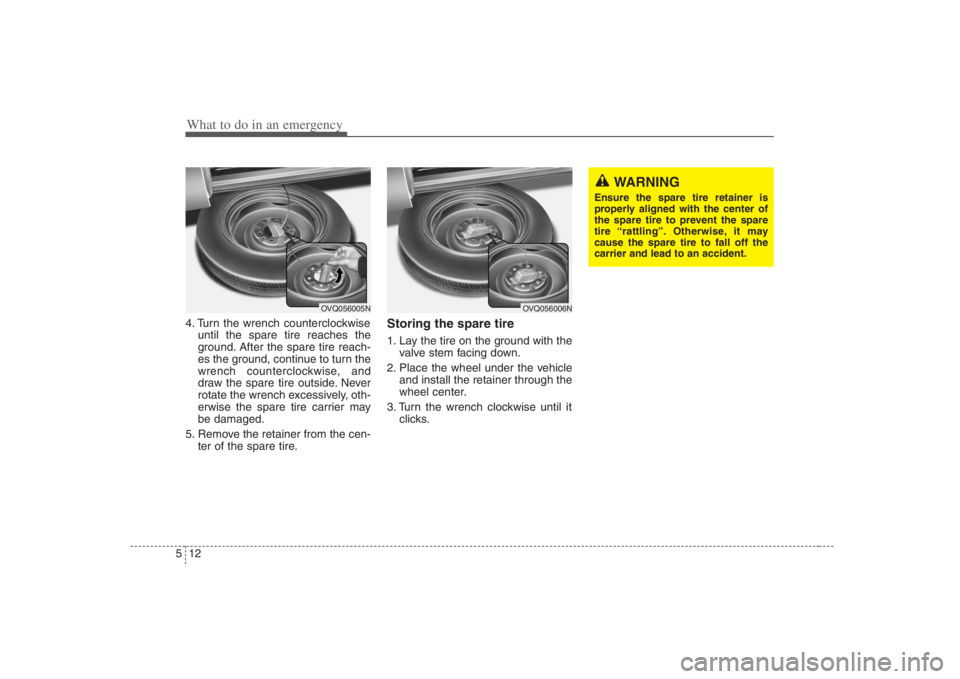
What to do in an emergency12 54. Turn the wrench counterclockwise
until the spare tire reaches the
ground. After the spare tire reach-
es the ground, continue to turn the
wrench counterclockwise, and
draw the spare tire outside. Never
rotate the wrench excessively, oth-
erwise the spare tire carrier may
be damaged.
5. Remove the retainer from the cen-
ter of the spare tire.
Storing the spare tire 1. Lay the tire on the ground with the
valve stem facing down.
2. Place the wheel under the vehicle
and install the retainer through the
wheel center.
3. Turn the wrench clockwise until it
clicks.
WARNING
Ensure the spare tire retainer is
properly aligned with the center of
the spare tire to prevent the spare
tire “rattling”. Otherwise, it may
cause the spare tire to fall off the
carrier and lead to an accident.
OVQ056005N
OVQ056006N
Page 300 of 393
What to do in an emergency14 5 Do not take this vehicle through an
automatic car wash while the com-
pact spare tire is installed.
Do not use tire chains on the com-
pact spare tire. Because of the
smaller size, a tire chain will not fit
properly. This could damage the
vehicle and result in loss of the
chain.
The compact spare tire should not
be installed on the front axle if the
vehicle must be driven in snow or
on ice.
Do not use the compact spare tire
on any other vehicle because this
tire has been designed especially
for your vehicle.
The compact spare tire’s tread life
is shorter than a regular tire.
Inspect your compact spare tire
regularly and replace worn com-
pact spare tires with the same size
and design, mounted on the same
wheel.
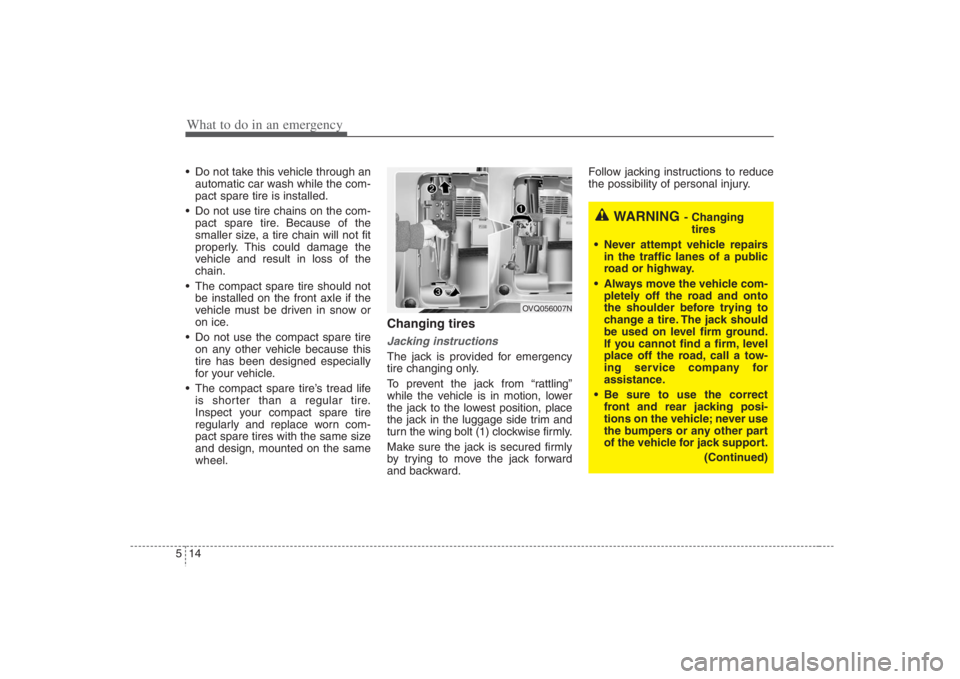
Changing tires Jacking instructions The jack is provided for emergency
tire changing only.
To prevent the jack from “rattling”
while the vehicle is in motion, lower
the jack to the lowest position, place
the jack in the luggage side trim and
turn the wing bolt (1) clockwise firmly.
Make sure the jack is secured firmly
by trying to move the jack forward
and backward.Follow jacking instructions to reduce
the possibility of personal injury.
WARNING
- Changing
tires
Never attempt vehicle repairs
in the traffic lanes of a public
road or highway.
Always move the vehicle com-
pletely off the road and onto
the shoulder before trying to
change a tire. The jack should
be used on level firm ground.
If you cannot find a firm, level
place off the road, call a tow-
ing service company for
assistance.
Be sure to use the correct
front and rear jacking posi-
tions on the vehicle; never use
the bumpers or any other part
of the vehicle for jack support.
(Continued)
OVQ056007N
Page 302 of 393

What to do in an emergency16 5
6. Loosen the wheel lug nuts coun-
terclockwise one turn each, but do
not remove any nut until the tire
has been raised off the ground.7. Place the jack at the front or rear
jacking position closest to the tire
you are changing. Place the jack
at the designated locations under
the frame. The jacking positions
are plates welded to the frame
with two tabs and a raised dot to
index with the jack.
WARNING
- Jack location
To reduce the possibility of
injury, be sure to use only the
jack provided with the vehicle
and in the correct jack position;
never use any other part of the
vehicle for jack support.
OEP056027
OEP056028
WARNING
- Changing a tire
To prevent vehicle movement
while changing a tire, always
set the parking brake fully, and
always block the wheel diago-
nally opposite the wheel being
changed.
We recommend that the
wheels of the vehicle be
chocked, and that no person
remain in a vehicle that is
being jacked.