2008 Hyundai Elantra clock
[x] Cancel search: clockPage 171 of 360

Features of your vehicle98 41. POWER ON-OFF Control KnobThe radio unit may be operated when the
ignition key is in the “ACC”or “ON” posi-
tion. Press the knob to switch the power
on. The LCD shows the radio frequency
in radio mode or displays the CD track in
CD mode. To switch the power off, press
the knob again.VOLUME ControlRotate the knob clockwise to increase
the volume and turn the knob counter-
clockwise to reduce the volume.AVC(Auto Volume Control) FeatureAs the Vehicle runs faster, Vehicle run-
ning noise also becomes louder.
To offset this noise, the unit has *AVC
feature that increases its volume level
automatically when vehicle's speed gets
faster.
2. BAND Select ButtonsFM Selection Button Pressing the button changes the
FM1 and FM2 bands.AM Selection ButtonPressing the button selects the
AM band. AM mode is displayed on LCD.3. TUNE/MODE Select KnobRotate the knob clockwise to increase
the frequency and turn the knob counter-
clockwise to reduce the frequency.Mode Select KnobPressing the MODE knob changes the
BASS, MIDDLE, TREBLE, FADER and
BALANCE mode.
The mode selected is shown on the dis-
play.
After selecting the each mode, rotate the
mode select knob clockwise or counter-
clockwise.BASS ControlTo increase the BASS, rotate the knob
clockwise, while to decrease the BASS,
rotate the knob counterclockwise.
MIDDLE ControlTo increase the MIDDLE, rotate the knob
clockwise, while to decrease the MID-
DLE, rotate the knob counterclockwise.TREBLE ControlTo increase the TREBLE, rotate the knob
clockwise, while to decrease the TRE-
BLE, rotate the knob counterclockwise.FADER ControlRotate the control knob clockwise to
emphasize rear speaker sound (front
speaker sound will be attenuated). When
the control knob is turned counterclock-
wise, front speaker sound will be empha-
sized (rear speaker sound will be attenu-
ated).BALANCE ControlRotate the knob clockwise to emphasize
right speaker sound (left speaker sound
will be attenuated). When the control
knob is turned counterclockwise, left
speaker sound will be emphasized (right
speaker sound will be attenuated).
AMFM
Page 177 of 360
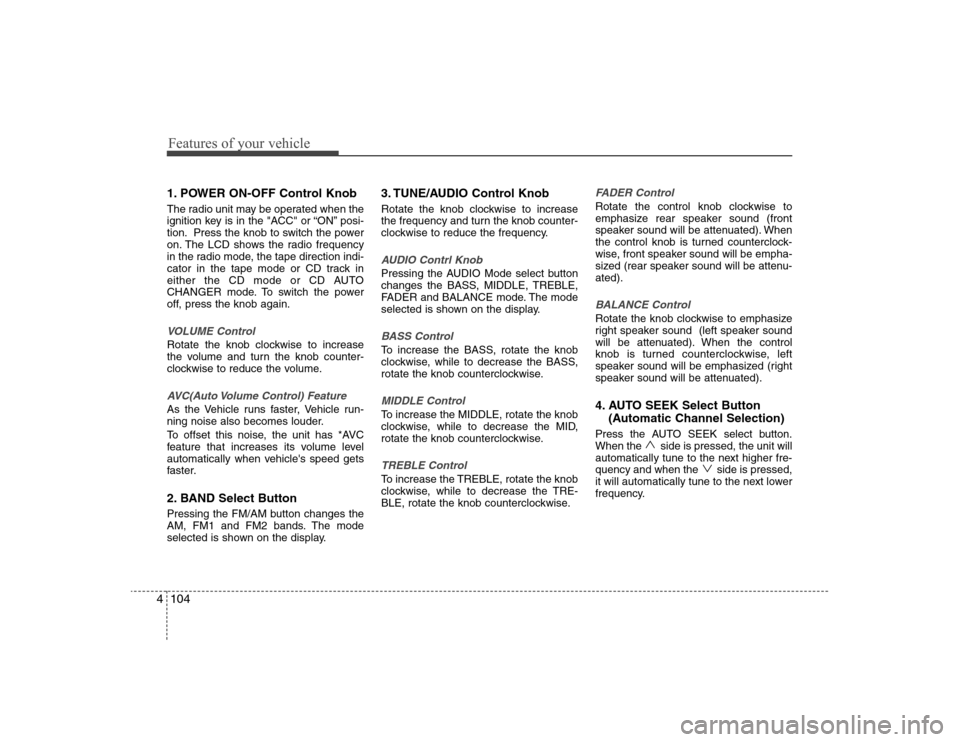
Features of your vehicle104 41. POWER ON-OFF Control KnobThe radio unit may be operated when the
ignition key is in the "ACC" or “ON” posi-
tion. Press the knob to switch the power
on. The LCD shows the radio frequency
in the radio mode, the tape direction indi-
cator in the tape mode or CD track in
either the CD mode or CD AUTO
CHANGER mode. To switch the power
off, press the knob again.VOLUME ControlRotate the knob clockwise to increase
the volume and turn the knob counter-
clockwise to reduce the volume.AVC(Auto Volume Control) FeatureAs the Vehicle runs faster, Vehicle run-
ning noise also becomes louder.
To offset this noise, the unit has *AVC
feature that increases its volume level
automatically when vehicle's speed gets
faster.2. BAND Select ButtonPressing the FM/AM button changes the
AM, FM1 and FM2 bands. The mode
selected is shown on the display.
3. TUNE/AUDIO Control KnobRotate the knob clockwise to increase
the frequency and turn the knob counter-
clockwise to reduce the frequency.AUDIO Contrl KnobPressing the AUDIO Mode select button
changes the BASS, MIDDLE, TREBLE,
FADER and BALANCE mode. The mode
selected is shown on the display.BASS ControlTo increase the BASS, rotate the knob
clockwise, while to decrease the BASS,
rotate the knob counterclockwise.MIDDLE ControlTo increase the MIDDLE, rotate the knob
clockwise, while to decrease the MID,
rotate the knob counterclockwise.TREBLE ControlTo increase the TREBLE, rotate the knob
clockwise, while to decrease the TRE-
BLE, rotate the knob counterclockwise.
FADER ControlRotate the control knob clockwise to
emphasize rear speaker sound (front
speaker sound will be attenuated). When
the control knob is turned counterclock-
wise, front speaker sound will be empha-
sized (rear speaker sound will be attenu-
ated).BALANCE ControlRotate the knob clockwise to emphasize
right speaker sound (left speaker sound
will be attenuated). When the control
knob is turned counterclockwise, left
speaker sound will be emphasized (right
speaker sound will be attenuated).4. AUTO SEEK Select Button
(Automatic Channel Selection)Press the AUTO SEEK select button.
When the side is pressed, the unit will
automatically tune to the next higher fre-
quency and when the side is pressed,
it will automatically tune to the next lower
frequency.
Page 178 of 360
4105
Features of your vehicle
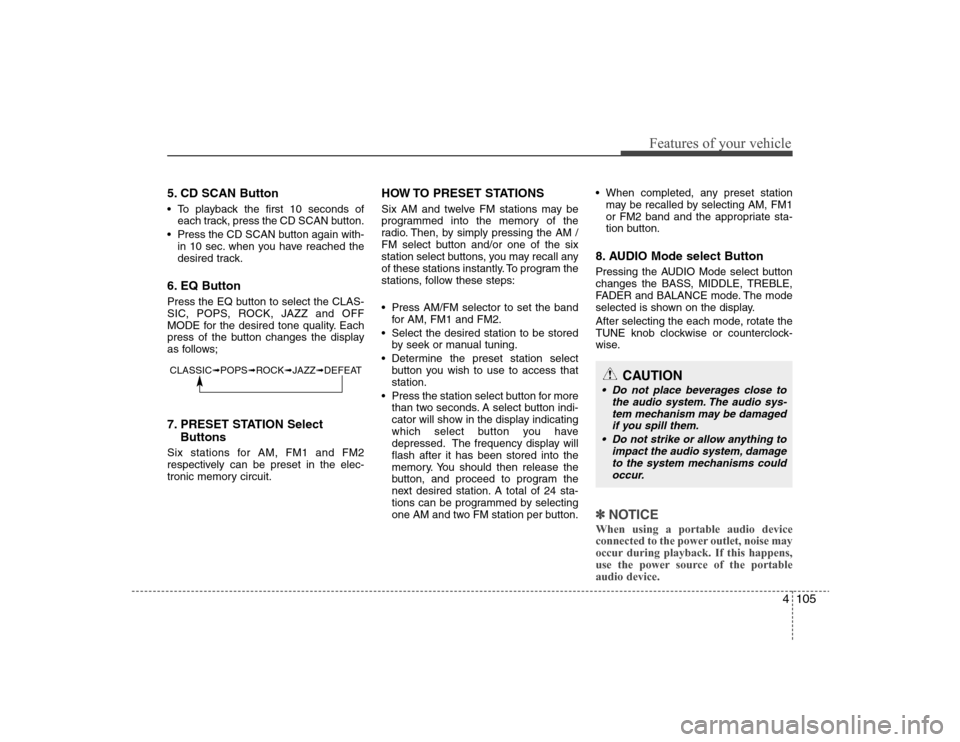
5. CD SCAN Button To playback the first 10 seconds of
each track, press the CD SCAN button.
Press the CD SCAN button again with-
in 10 sec. when you have reached the
desired track.6. EQ ButtonPress the EQ button to select the CLAS-
SIC, POPS, ROCK, JAZZ and OFF
MODE for the desired tone quality. Each
press of the button changes the display
as follows;7. PRESET STATION Select
ButtonsSix stations for AM, FM1 and FM2
respectively can be preset in the elec-
tronic memory circuit.
HOW TO PRESET STATIONSSix AM and twelve FM stations may be
programmed into the memory of the
radio. Then, by simply pressing the AM /
FM select button and/or one of the six
station select buttons, you may recall any
of these stations instantly. To program the
stations, follow these steps:
Press AM/FM selector to set the band
for AM, FM1 and FM2.
Select the desired station to be stored
by seek or manual tuning.
Determine the preset station select
button you wish to use to access that
station.
Press the station select button for more
than two seconds. A select button indi-
cator will show in the display indicating
which select button you have
depressed. The frequency display will
flash after it has been stored into the
memory. You should then release the
button, and proceed to program the
next desired station. A total of 24 sta-
tions can be programmed by selecting
one AM and two FM station per button. When completed, any preset station
may be recalled by selecting AM, FM1
or FM2 band and the appropriate sta-
tion button.
8. AUDIO Mode select ButtonPressing the AUDIO Mode select button
changes the BASS, MIDDLE, TREBLE,
FADER and BALANCE mode. The mode
selected is shown on the display.
After selecting the each mode, rotate the
TUNE knob clockwise or counterclock-
wise.✽ ✽
NOTICEWhen using a portable audio device
connected to the power outlet, noise may
occur during playback. If this happens,
use the power source of the portable
audio device.
CLASSIC➟POPS➟ROCK➟JAZZ➟DEFEAT
CAUTION
Do not place beverages close to
the audio system. The audio sys-
tem mechanism may be damaged
if you spill them.
Do not strike or allow anything to
impact the audio system, damage
to the system mechanisms could
occur.
Page 184 of 360
4111
Features of your vehicle
✽ ✽
NOTICETracks stored on Mark Memory will be
automatically erased after you eject CDs
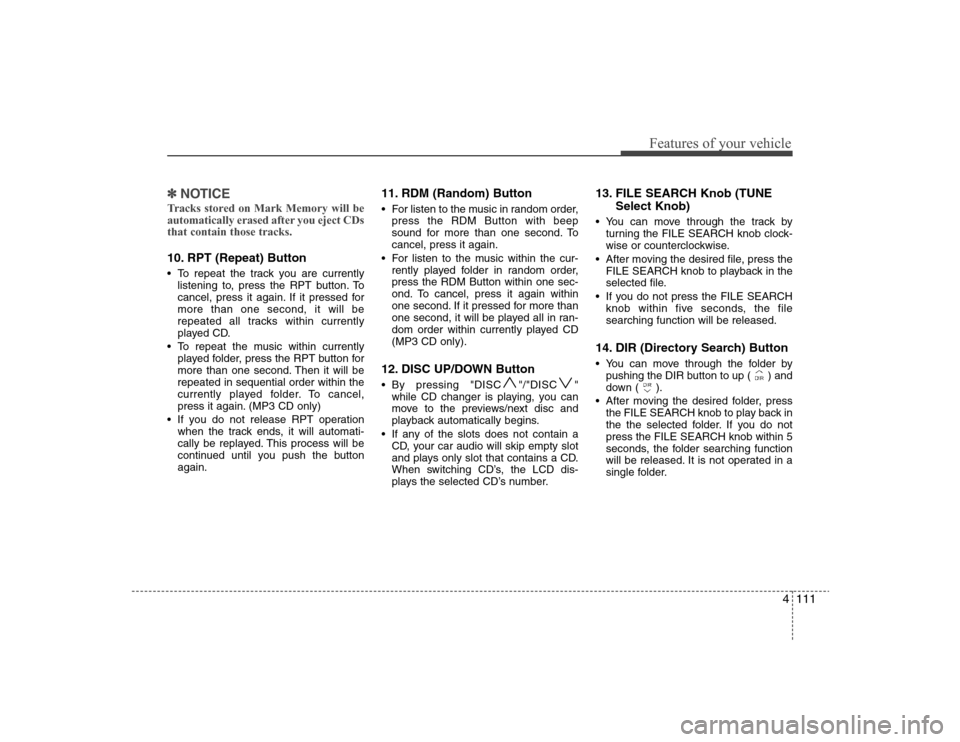
that contain those tracks.10. RPT (Repeat) Button To repeat the track you are currently
listening to, press the RPT button. To
cancel, press it again. If it pressed for
more than one second, it will be
repeated all tracks within currently
played CD.
To repeat the music within currently
played folder, press the RPT button for
more than one second. Then it will be
repeated in sequential order within the
currently played folder. To cancel,
press it again. (MP3 CD only)
If you do not release RPT operation
when the track ends, it will automati-
cally be replayed. This process will be
continued until you push the button
again.
11. RDM (Random) Button For listen to the music in random order,
press the RDM Button with beep
sound for more than one second. To
cancel, press it again.
For listen to the music within the cur-
rently played folder in random order,
press the RDM Button within one sec-
ond. To cancel, press it again within
one second. If it pressed for more than
one second, it will be played all in ran-
dom order within currently played CD
(MP3 CD only).12. DISC UP/DOWN Button By pressing "DISC "/"DISC "
while CD changer is playing, you can
move to the previews/next disc and
playback automatically begins.
If any of the slots does not contain a
CD, your car audio will skip empty slot
and plays only slot that contains a CD.
When switching CD’s, the LCD dis-
plays the selected CD’s number.
13. FILE SEARCH Knob (TUNE
Select Knob) You can move through the track by
turning the FILE SEARCH knob clock-
wise or counterclockwise.
After moving the desired file, press the
FILE SEARCH knob to playback in the
selected file.
If you do not press the FILE SEARCH
knob within five seconds, the file
searching function will be released.14. DIR (Directory Search) Button You can move through the folder by
pushing the DIR button to up ( ) and
down ( ).
After moving the desired folder, press
the FILE SEARCH knob to play back in
the the selected folder. If you do not
press the FILE SEARCH knob within 5
seconds, the folder searching function
will be released. It is not operated in a
single folder.
Page 187 of 360

Features of your vehicle114 41. Power Button and Volume
Control Used for turning on/off the audio sys-
tem.
Press this button when using the audio
system to turn off the power.
Turn the volume control clockwise to
increase volume and counterclock-
wise, to decrease. (The volume level is
displayed when adjusting the volume.)2. Automatic Channel Seek
Button (SEEK)Press this button to automatically find
and tune to next available channel.
(Press [ ] to automatically seek next
available channel in higher frequencies
and [ ] in lower frequencies.)✽ ✽
NOTICEIf the channel is not received well, use
the manual control (4).
3. Preset Memory ButtonPress this button and hold for less than
0.8 seconds to easily listen to the channel
memorized to the button. Also, when you
are listening to the channel other than the
channel memorized to the button using
TUNE or SEEK, press the button you
wish to memorize current channel to and
hold for more than 0.8 seconds until it
beeps to memorize the channel.4. Manual Channel Select &
Sound Quality Control When listening to a radio channel,
rotate this control to manually adjust
the frequency. Turn this control to the
right to increase the frequency and left,
to decrease.
This selects all functions related with
audio quality.
When listening to the audio system,
press this button to select following
sound qualities in respective order.
- BASS MIDDLE TREBLE
FADER BALANCE
EQUALIZER Current State
Rotate the control to adjust the sound
mode when adjusting sound quality.
5. SCAN ButtonPress this button to tune to all available
channels for 5 seconds each. (LCD will
display "SCAN") Press the button once
again to cancel scanning.6. LCD (Liquid Crystal Display)It displays the state of the system when
listening to the radio such as AM, FM1,
FM2, Stereo(ST), preset number, fre-
quency received, EQ mode (CLASSIC,
POP, ROCK, JAZZ) and SCAN status.7. Radio Band (FM/AM) Selection
Button This selects FM/AM and the radio
band will change in the following order
every time you press the button.
- FM1 FM2 AM
Press this button when CD or XM is on
to automatically change to radio mode.
If the ignition switch of the automobile
is set to ACC (1st notch) or ON (2nd
notch), the system will be turned on
and automatically play the radio when
you press this button even if the power
of the audio system is off.
Page 195 of 360
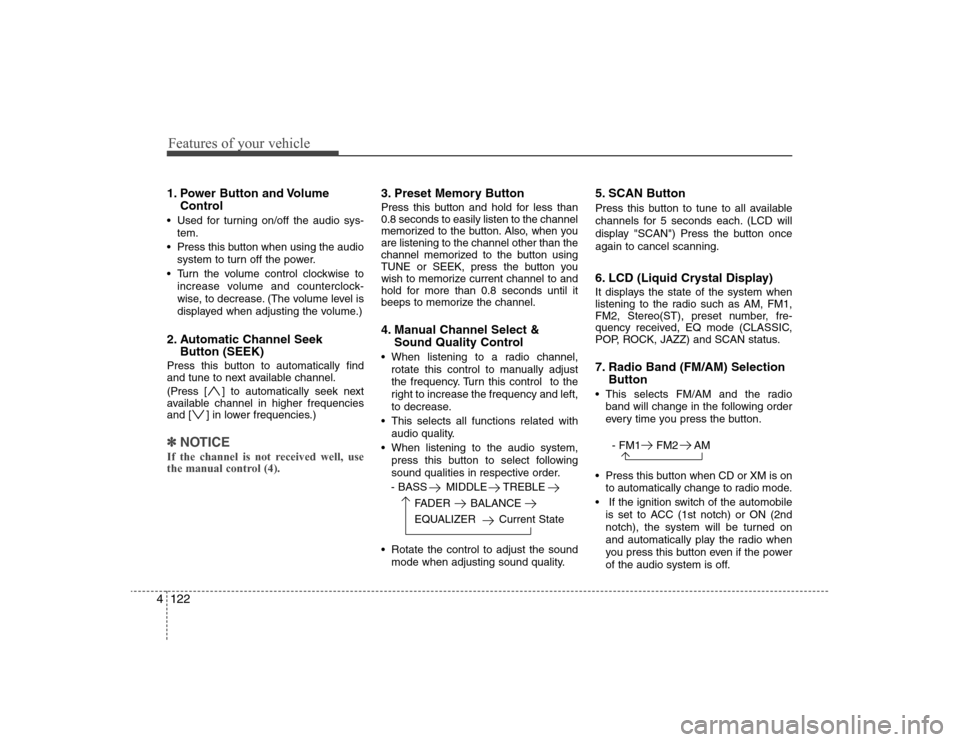
Features of your vehicle122 41. Power Button and Volume
Control Used for turning on/off the audio sys-
tem.
Press this button when using the audio
system to turn off the power.
Turn the volume control clockwise to
increase volume and counterclock-
wise, to decrease. (The volume level is
displayed when adjusting the volume.)2. Automatic Channel Seek
Button (SEEK)Press this button to automatically find
and tune to next available channel.
(Press [ ] to automatically seek next
available channel in higher frequencies
and [ ] in lower frequencies.)✽ ✽
NOTICEIf the channel is not received well, use
the manual control (4).
3. Preset Memory ButtonPress this button and hold for less than
0.8 seconds to easily listen to the channel
memorized to the button. Also, when you
are listening to the channel other than the
channel memorized to the button using
TUNE or SEEK, press the button you
wish to memorize current channel to and
hold for more than 0.8 seconds until it
beeps to memorize the channel.4. Manual Channel Select &
Sound Quality Control When listening to a radio channel,
rotate this control to manually adjust
the frequency. Turn this control to the
right to increase the frequency and left,
to decrease.
This selects all functions related with
audio quality.
When listening to the audio system,
press this button to select following
sound qualities in respective order.
- BASS MIDDLE TREBLE
FADER BALANCE
EQUALIZER Current State
Rotate the control to adjust the sound
mode when adjusting sound quality.
5. SCAN ButtonPress this button to tune to all available
channels for 5 seconds each. (LCD will
display "SCAN") Press the button once
again to cancel scanning.6. LCD (Liquid Crystal Display)It displays the state of the system when
listening to the radio such as AM, FM1,
FM2, Stereo(ST), preset number, fre-
quency received, EQ mode (CLASSIC,
POP, ROCK, JAZZ) and SCAN status.7. Radio Band (FM/AM) Selection
Button This selects FM/AM and the radio
band will change in the following order
every time you press the button.
- FM1 FM2 AM
Press this button when CD or XM is on
to automatically change to radio mode.
If the ignition switch of the automobile
is set to ACC (1st notch) or ON (2nd
notch), the system will be turned on
and automatically play the radio when
you press this button even if the power
of the audio system is off.
Page 266 of 360
613
What to do in an emergency
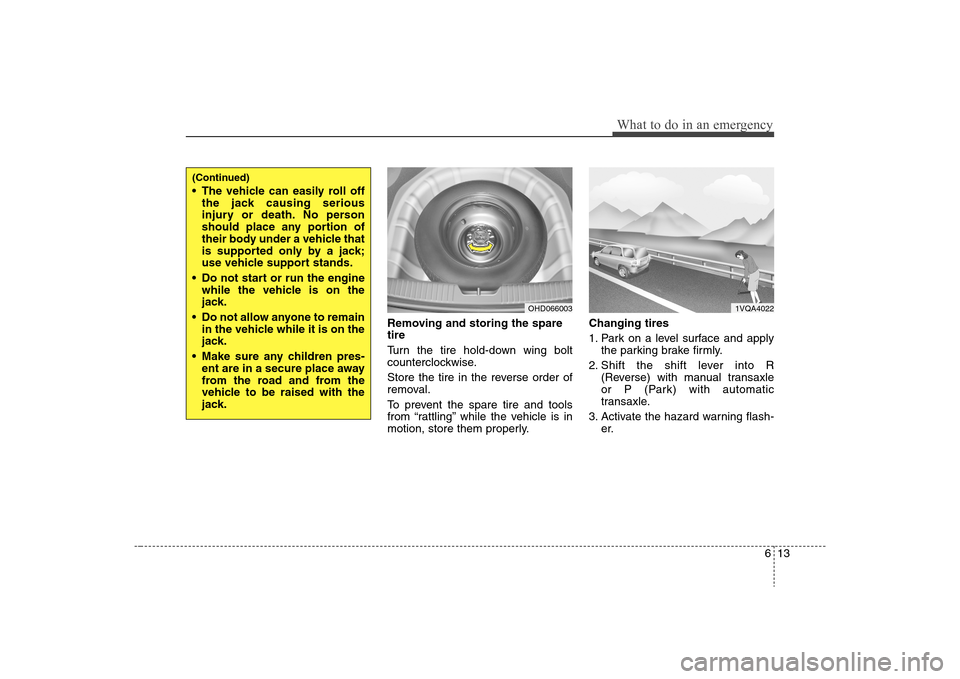
Removing and storing the spare
tire
Turn the tire hold-down wing bolt
counterclockwise.
Store the tire in the reverse order of
removal.
To prevent the spare tire and tools
from “rattling” while the vehicle is in
motion, store them properly.Changing tires
1. Park on a level surface and apply
the parking brake firmly.
2. Shift the shift lever into R
(Reverse) with manual transaxle
or P (Park) with automatic
transaxle.
3. Activate the hazard warning flash-
er.
OHD066003
(Continued) The vehicle can easily roll off
the jack causing serious
injury or death. No person
should place any portion of
their body under a vehicle that
is supported only by a jack;
use vehicle support stands.
Do not start or run the engine
while the vehicle is on the
jack.
Do not allow anyone to remain
in the vehicle while it is on the
jack.
Make sure any children pres-
ent are in a secure place away
from the road and from the
vehicle to be raised with the
jack.
1VQA4022
Page 267 of 360
What to do in an emergency14 64. Remove the wheel lug nut wrench,
jack, jack handle, and spare tire
from the vehicle.
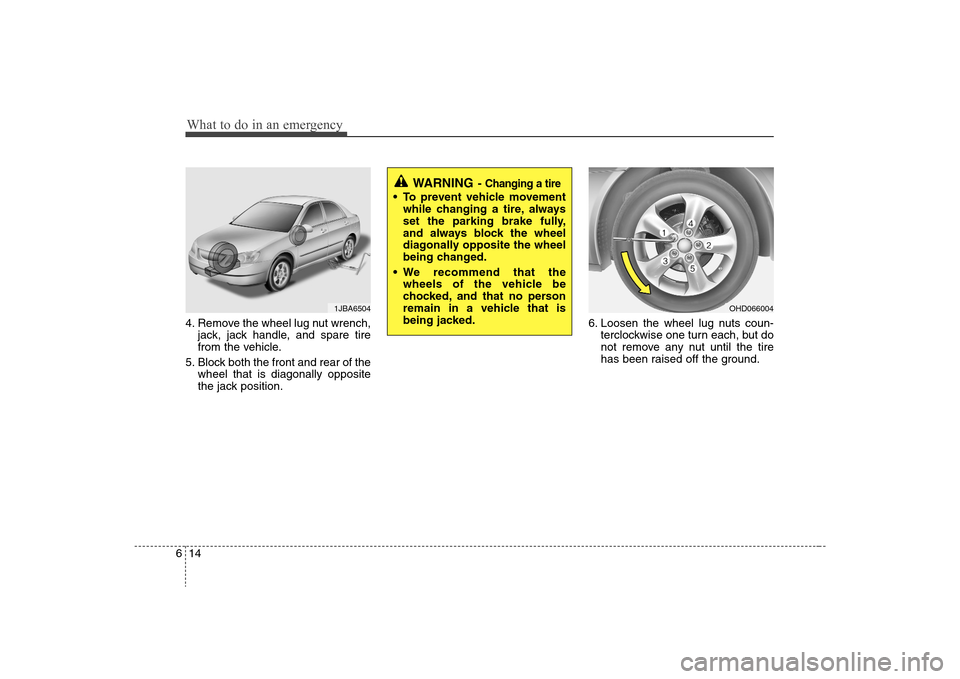
5. Block both the front and rear of the
wheel that is diagonally opposite
the jack position.6. Loosen the wheel lug nuts coun-
terclockwise one turn each, but do
not remove any nut until the tire
has been raised off the ground.
1JBA6504
OHD066004
WARNING
- Changing a tire
To prevent vehicle movement
while changing a tire, always
set the parking brake fully,
and always block the wheel
diagonally opposite the wheel
being changed.
We recommend that the
wheels of the vehicle be
chocked, and that no person
remain in a vehicle that is
being jacked.