2008 Hyundai Azera clock
[x] Cancel search: clockPage 11 of 345
F9
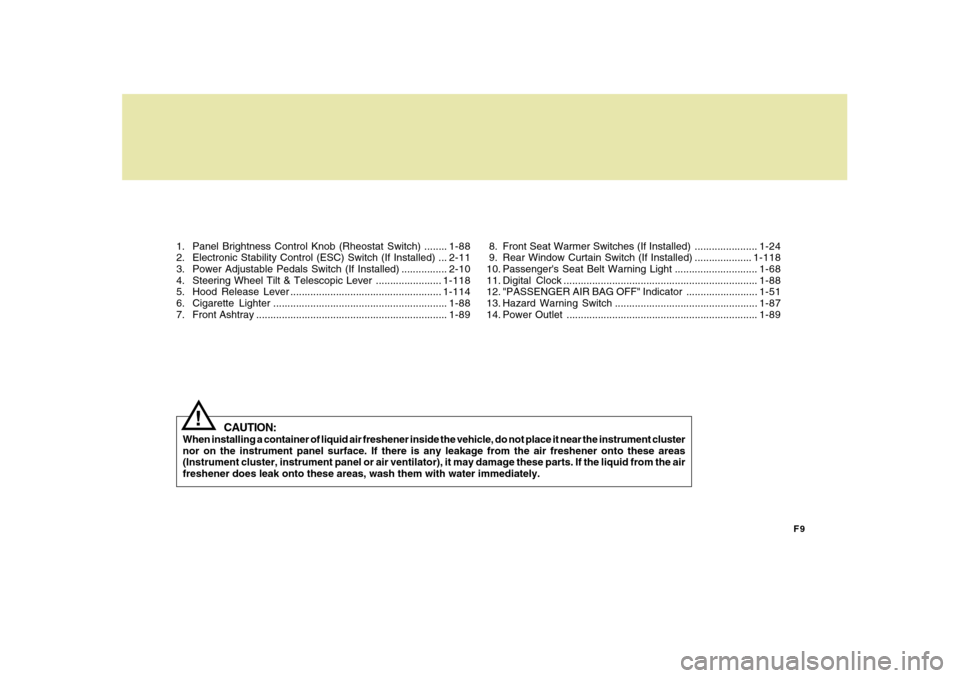
1. Panel Brightness Control Knob (Rheostat Switch) ........1-88
2. Electronic Stability Control (ESC) Switch (If Installed) ...2-11
3. Power Adjustable Pedals Switch (If Installed) ................2-10
4. Steering Wheel Tilt & Telescopic Lever .......................1-118
5. Hood Release Lever .....................................................1-114
6. Cigarette Lighter .............................................................1-88
7. Front Ashtray ...................................................................1-89
CAUTION:
When installing a container of liquid air freshener inside the vehicle, do not place it near the instrument cluster
nor on the instrument panel surface. If there is any leakage from the air freshener onto these areas
(Instrument cluster, instrument panel or air ventilator), it may damage these parts. If the liquid from the air
freshener does leak onto these areas, wash them with water immediately.
!
8. Front Seat Warmer Switches (If Installed) ......................1-24
9. Rear Window Curtain Switch (If Installed) ....................1-118
10. Passenger's Seat Belt Warning Light .............................1-68
11. Digital Clock ....................................................................1-88
12. "PASSENGER AIR BAG OFF" Indicator .........................1-51
13. Hazard Warning Switch ..................................................1-87
14. Power Outlet ...................................................................1-89
Page 102 of 345
1FEATURES OF YOUR HYUNDAI88
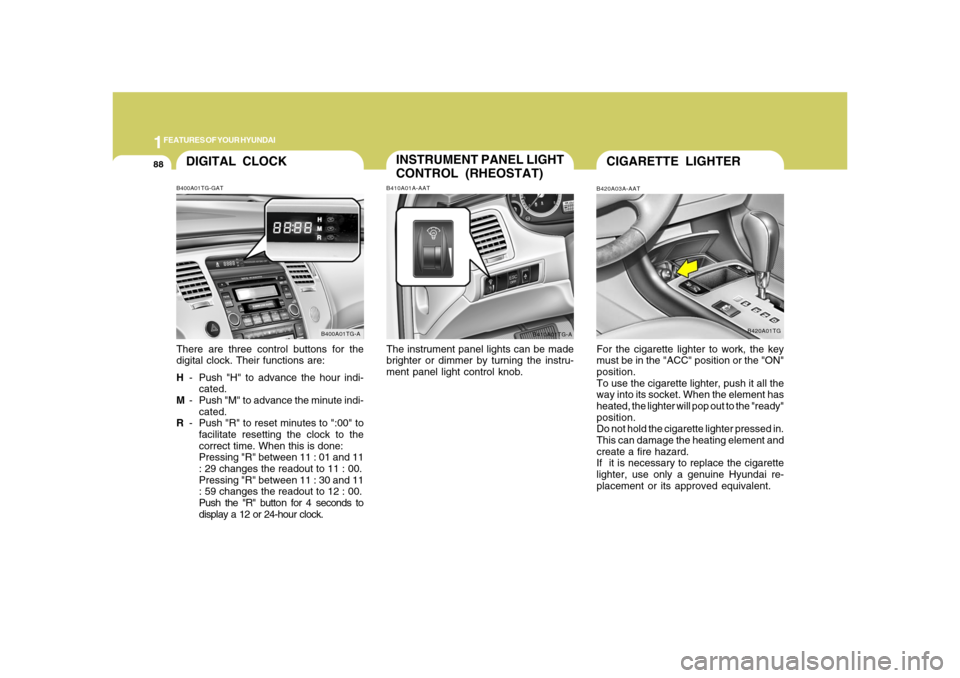
DIGITAL CLOCKB400A01TG-GATThere are three control buttons for the
digital clock. Their functions are:
H- Push "H" to advance the hour indi-
cated.
M- Push "M" to advance the minute indi-
cated.
R- Push "R" to reset minutes to ":00" to
facilitate resetting the clock to the
correct time. When this is done:
Pressing "R" between 11 : 01 and 11
: 29 changes the readout to 11 : 00.
Pressing "R" between 11 : 30 and 11
: 59 changes the readout to 12 : 00.
Push the "R" button for 4 seconds to
display a 12 or 24-hour clock.
B400A01TG-A
INSTRUMENT PANEL LIGHT
CONTROL (RHEOSTAT)B410A01A-AATThe instrument panel lights can be made
brighter or dimmer by turning the instru-
ment panel light control knob.
B410A01TG-A
CIGARETTE LIGHTERB420A03A-AATFor the cigarette lighter to work, the key
must be in the "ACC" position or the "ON"
position.
To use the cigarette lighter, push it all the
way into its socket. When the element has
heated, the lighter will pop out to the "ready"
position.
Do not hold the cigarette lighter pressed in.
This can damage the heating element and
create a fire hazard.
If it is necessary to replace the cigarette
lighter, use only a genuine Hyundai re-
placement or its approved equivalent.
B420A01TG
Page 108 of 345
1FEATURES OF YOUR HYUNDAI94
!
CAUTION:
o Do not open the sunroof in severely
cold temperatures or when it is cov-
ered with ice or snow.
o Periodically remove any dirt that may
have accumulated on the guide rails.
o Do not press any sunroof control but-
ton longer than necessary. Damage
to the motor or system components
could occur.
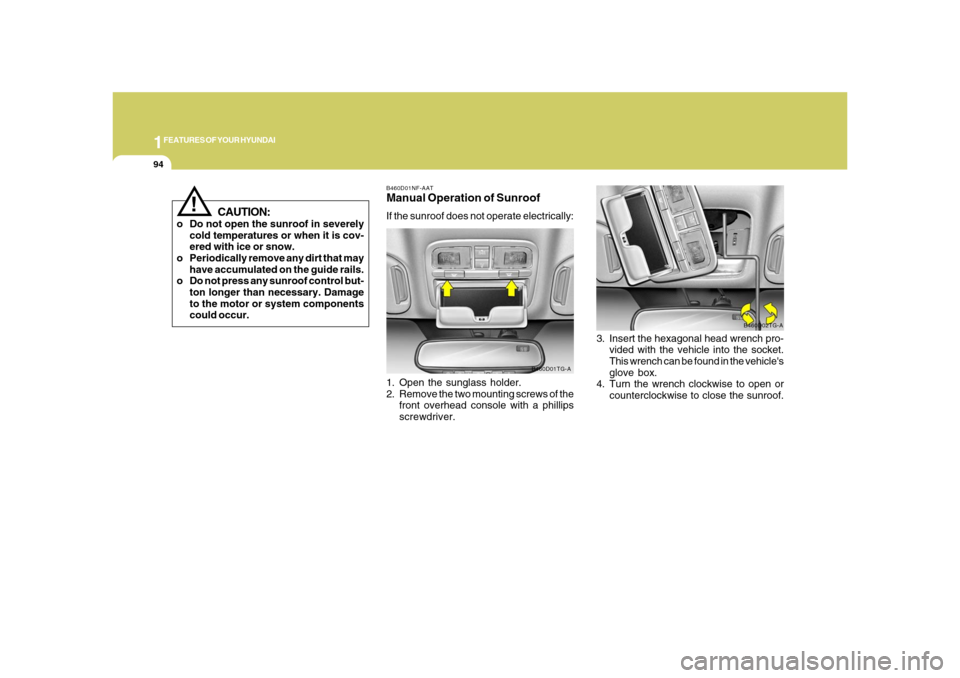
B460D01NF-AATManual Operation of SunroofIf the sunroof does not operate electrically:
1. Open the sunglass holder.
2. Remove the two mounting screws of the
front overhead console with a phillips
screwdriver.
B460D01TG-A
3. Insert the hexagonal head wrench pro-
vided with the vehicle into the socket.
This wrench can be found in the vehicle's
glove box.
4. Turn the wrench clockwise to open or
counterclockwise to close the sunroof.
B460D02TG-A
Page 125 of 345
1
FEATURES OF YOUR HYUNDAI
111
!
CAUTION:
To prevent damage to the goods or the
vehicle, care should be taken when car-
rying fragile or bulky objects in the lug-
gage compartment.
!
WARNING:
Avoid eye injury. DO NOT overstretch.
The luggage net ALWAYS keep your
face and body out of its recoil path. DO
NOT use when the luggage net straps
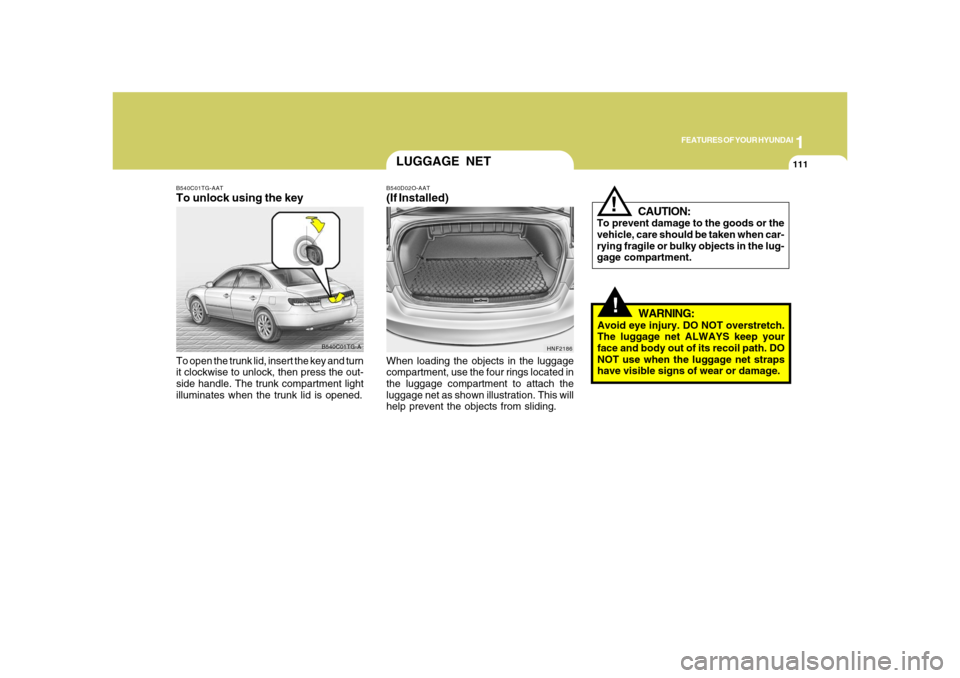
have visible signs of wear or damage. When loading the objects in the luggage
compartment, use the four rings located in
the luggage compartment to attach the
luggage net as shown illustration. This will
help prevent the objects from sliding.
HNF2186
LUGGAGE NETB540D02O-AAT(If Installed)
B540C01TG-A B540C01TG-AAT
To unlock using the keyTo open the trunk lid, insert the key and turn
it clockwise to unlock, then press the out-
side handle. The trunk compartment light
illuminates when the trunk lid is opened.
Page 152 of 345
1FEATURES OF YOUR HYUNDAI
138
M445B01TG-AAT1. POWER ON-OFF Control Knobo The radio unit may be operated when
the ignition key is in the "ACC" or "ON"
position. Press the knob to switch the
power on. The display shows the radio
frequency in the radio mode or CD/MP3
track in either the CD/MP3 mode. To
switch the power off, press the knob
again.
o Push the FM/AM or CD/MP3 to turn on
that function without pushing Power
ON-OFF control knob.VOLUME ControlRotate the knob clockwise to increase the
volume and turn the knob counterclock-
wise to reduce the volume.2. BAND SelectorPressing the band selector FM/AM changes
the AM, FM1 and FM2 bands.
The mode selected is shown on the dis-
play.
3. TUNE (Manual) Select KnobRotate the knob clockwise to increase the
frequency and turn the knob counterclock-
wise to reduce the frequency.4. SEEK Select Button
(Automatic Channel Selection)Press the SEEK select button. When the
(
) side is pressed, the unit will
automatically tune to the next higher
frequency and when the (
) side is
pressed, it will automatically tune to the
next lower frequency.
5. SCAN ButtonWhen you press the button, frequency is
changed and the next channel is received
automatically. To stay on a station, press
the SCAN button again.
6. EQUALIZER (EQ) ButtonPress the EQ button to select the CLAS-
SIC, POPS, ROCK, JAZZ and DEFEAT
MODE for the desired tone quality. Each
press of the button changes the display as
follows;7. Adjustment Mode
Select (A.MODE) ButtonPressing the A.MODE button changes the
BASS, MIDDLE, TREBLE, FADER and
BALANCE mode. The mode selected is
shown on the display. After selecting the
each mode, rotate the VOLUME control
knob clockwise or counterclockwise.BASS ControlTo increase the bass, rotate the knob clock-
wise, while to decrease the bass, rotate the
knob counterclockwise. CLASSIC → POPS → ROCK → JAZZ →DEFEAT
Page 153 of 345
1
FEATURES OF YOUR HYUNDAI
139139
MIDDLE ControlTo increase the MIDDLE, rotate the knob
clockwise, while to decrease the MIDDLE,
rotate the knob counterclockwise.TREBLE ControlTo increase the TREBLE, rotate the knob
clockwise, while to decrease the TREBLE,
rotate the knob counterclockwise.FADER ControlTurn the control knob clockwise to empha-
size rear speaker sound (front speaker
sound will be attenuated).
When the control knob is turned counter-
clockwise, front speaker sound will be
emphasized (rear speaker sound will be
attenuated).BALANCE ControlRotate the knob clockwise to emphasize
right speaker sound (Left speaker sound
will be attenuated).
When the control knob is turned counter-
clockwise, left speaker sound will be em-
phasized (Right speaker sound will be
attenuated).
CAUTION:
o Do not place beverages close to the
audio system. The playback mecha-
nism may be damaged if you spill
them.
o Do not impact on the audio system, or
the playback mechanism could be
damaged.
!
8. PRESET STATION Select ButtonsSix (6) stations for AM, FM1 and FM2
respectively can be preset in the electronic
memory circuit.HOW TO PRESET STATIONSSix AM and twelve FM stations may be
programmed into the memory of the radio.
Then, by simply pressing the band select
button and/or one of the six station select
buttons, you may recall any of these sta-
tions instantly.
To program the stations, follow these steps:
o Press band selector to set the band for
AM, FM1 and FM2.
o Select the desired station to be stored
by seek or manual tuning.
o Determine the preset station select
button you wish to use to access that
station.
o Press the station select button for more
than two seconds. Beep sound will be
heard while depressing the button. You
should then release the button, and
proceed to program the next desired
station. A total of 18 stations can be
programmed by selecting one AM and
two FM station per button.o When completed, any preset station
may be recalled by selecting AM, FM1
or FM2 band and the appropriate sta-
tion button.
Page 156 of 345
1FEATURES OF YOUR HYUNDAI
142
o Press the MARK button to bookmark the
desired track for more than one second.
This will display the "
" symbol on the
LCD for five seconds with sequential
number. To play the bookmarked tracks,
press the MARK button within a second.
o Press the MARK button to erase the
bookmarked tracks for more than one
second. This will erase the bookmark
with beep sound.
7. PAGE UP/DOWN ButtonPress the button and you can check the file
title more than 16 characters on MP3 CD.
The button doesn't work on file title less
than 16 characters.8. EQUALIZER (EQ) ButtonPress the EQ button to select the CLAS-
SIC, POPS, ROCK, JAZZ and DEFEAT
MODE for the desired tone quality. Each
press of the button changes the display as
follows;
9. CD EJECT ButtonWhen the (
)button is pressed with a CD
loaded, the CD will eject. Forcing to eject
: To force to eject a CD, press this button for
more than 3 seconds. (Do this only when
a CD is jammed and you can not eject it in
the normal way - e.g.) in case that you have
inserted 2 CDs by mistake)
10. SCAN Buttono To playback the first 10 seconds of each
track, press the button with the beep
sound for more than one second. Press
the button again when reached the
desired track.
o To playback the first 10 seconds of each
track in the selected folder, press the
button within one second. If it pressed
for more than one second, it will play-
back the first seconds of each track in
the all folder with beep sound. Press the
button again within one second when
reached the desired track, the search-
ing function is released and the track
you desired will be played in the se-
lected folder. (MP3 CD only)
11. FILE SEARCH Knob (TUNE Se-
lect Knob)o You can skip the track by turning the
FILE SEARCH knob to counterclock-
wise or clockwise.
After selecting the desired track, press the
FILE SEARCH knob to playback the track.
If you do not press the FILE SEARCH knob
within 5 seconds, the file searching func-
tion will be released.12. CHANGE DIRECTORY(DIR) But-
tono You can move through the folder by
pushing the DIR button to up (
) and
down (
).
After moving the desired folder, press the
FILE SEARCH knob to playback the first
file in the selected folder.
If you do not press the FILE SEARCH knob
within 5 seconds, the folder searching
function will be released.
It is not operated in single folder.
CLASSIC → POPS → ROCK → JAZZ →DEFEAT
Page 159 of 345
1
FEATURES OF YOUR HYUNDAI
145145
7. Adjustment Mode Select
(A.MODE) ButtonPressing the A.MODE button changes the
BASS, MIDDLE, TREBLE, FADER and
BALANCE mode. The mode selected is
shown on the display. After selecting the
each mode, rotate the VOLUME control
knob clockwise or counterclockwise.
BASS Control
To increase the BASS, rotate the knob
clockwise, while to decrease the BASS,
rotate the knob counterclockwise.
M455B01TG-AAT1. POWER ON-OFF Control Knobo The radio unit may be operated when
the ignition key is in the "ACC" or "ON"
position. Press the knob to switch the
power on. The display shows the radio
frequency in the radio mode, the tape
direction Indicator in the tape mode or
CD/MP3 track in either the CD/MP3
mode. To switch the power off, press the
knob again.
o Push the FM/AM, TAPE or CD/MP3 to
turn on that function without pushing
Power ON-OFF control knob.VOLUME ControlRotate the knob clockwise to increase the
volume and turn the knob counterclock-
wise to reduce the volume.2. BAND SelectorPressing the band selector FM/AM changes
the AM, FM1 and FM2 bands.
The mode selected is shown on the dis-
play.
3. TUNE (Manual) Select KnobRotate the knob clockwise to increase the
frequency and turn the knob counterclock-
wise to reduce the frequency.4. SEEK Select Button
(Automatic Channel Selection)Press the SEEK select button. When the
(
) side is pressed, the unit will
automatically tune to the next higher
frequency and when the (
) side is
pressed, it will automatically tune to the
next lower frequency.
5. SCAN ButtonWhen you press the button, frequency is
changed and the next channel is received
automatically. To stay on a station, press
the SCAN button again.
6. EQUALIZER (EQ) ButtonPress the EQ button to select the CLAS-
SIC, POPS, ROCK, JAZZ and DEFEAT
MODE for the desired tone quality. Each
press of the button changes the display as
follows;
CLASSIC → POPS → ROCK → JAZZ →DEFEAT