Page 195 of 345
1
FEATURES OF YOUR HYUNDAI
181181
NOTE:o To assure proper operation of the
unit, keep the vehicle interior tem-
perature within a normal range by
using the vehicle’s air conditioning or
heating system.
o When replacing the fuse, replace it
with a fuse having the correct capac-
ity.
o The bookmarks are all erased when
the car battery is disconnected or
power off. Therefore, all data will have
to be set again if this should occur.
o This equipment is designed to be used
only in a 12 volt DC battery system
with negative ground.
o This unit is made of precision parts.
Do not attempt to disassemble or
adjust any parts.
o When driving your vehicle, be sure to
keep the volume of the unit set low
enough to allow you to hear sounds
coming from the outside.
o Do not expose this equipment (includ-
ing the speakers and tape) to water or
excessive moisture.
CAUTION:
o Do not insert warped or poor quality
discs into the CD player as damage to
the unit may occur.
o Do not insert anything like coins into
the player slot as damage to the unit
may occur.
o Do not place beverages close to the
audio system. The playback mecha-
nism may be damaged if you spill
them.
o Do not impact on the audio system, or
the playback mechanism could be
damaged.
o Driving on the off-roads or other vi-
brations may skip your compact disc.
Do not use the audio system on off-
roads as the discs could be scratched
and damaged.
o Do not grip or pull out the disc with
your hand while the disc is being pulled
into the unit by the self loading mecha-
nism. These can cause disc scratch-
ing to occur or trouble in the compact
disc player.
!
o Avoid using home-made CD-Record-
able or CD-Rewritable discs as the
player may not operate properly. When
using the compact disc player, genu-
ine CDs are recommended.
Page 205 of 345
 button while
playing an MP3 file to display the next
available folder name and [DIR
](Direc-
tory Down) b](/manual-img/35/14485/w960_14485-204.png "Hyundai Azera 2008 Owners Manual 1
FEATURES OF YOUR HYUNDAI
191191
13. Directory Name Search ButtonPress [DIR
](Directory Up) button while
playing an MP3 file to display the next
available folder name and [DIR
](Direc-
tory Down) b")
1
FEATURES OF YOUR HYUNDAI
191191
13. Directory Name Search ButtonPress [DIR
](Directory Up) button while
playing an MP3 file to display the next
available folder name and [DIR
](Direc-
tory Down) button, the previous folder name.
Find the folder you searched for and press
7 to play the songs inside the folder from
the top of the list. (If you do not take any
action after searching for the folder for 5 or
more seconds, this search will be can-
celed.)
14. Mark / Memory ButtonYou can choose only the songs you want
to listen to and play them in respective
order. (Refer to the operation method.)
Press again to cancel.
15. Disc Load /All Load ButtonWhen you press [LOAD] button, one of the
empty slots of the CD changer will be
opened in the order of (1), (2), (3), (4), (5).
Insert the CD when the word "INSERT" on
LCD and the light of the deck flicker then
the deck will be closed you will be able to
play and listen to the corresponding CD.
Also, you can load all 6 CDs to all empty
slots of the changer when you press the
[LOAD] button for more than 0.8 seconds
in respective order. In this case the CD you
loaded last will be played. If you do not load
CD for 10 seconds after pressing the
[LOAD] button, or press the [LOAD] button
once again, the loading will be canceled.
In this case, the display for empty disc slots
will go off, and it will be displayed again
when the slot is loaded with a disc.NOTE:o Insert CD only when the word "IN-
SERT" on the LCD and the light of the
deck flicker. (Insert CDs one by one in
respective order.)
o In other cases, the CD will not be
inserted (CD DOOR will be closed),
and if you try to insert CD by force it
may cause damage to the audio sys-
tem.o The disc player takes up to six discs.
Do not try to load more than six.
NOTE:o To assure proper operation of the
unit, keep the vehicle interior tem-
perature within a normal range by
using the vehicle’s air conditioning or
heating system.
o When replacing the fuse, replace it
with a fuse having the correct capac-
ity.
o All stored bookmarks are all erased
when the car battery is disconnected
or power to the vehicle is lost. If this
occurs, the bookmarks will have to be
reset.
o Do not add any oil to the rotating parts.
Keep magnets, screwdrivers and
other metallic objects away from the
tape mechanism and head.
Page 277 of 345
6
Engine Compartment .................................................... 6-2
General Checks ............................................................ 6-3
Maintenance Precautions ............................................. 6-4
Checking the Engine Oil ............................................... 6-4
Checking and Changing the Engine Coolant ................ 6-6
Changing the Air Cleaner Filter ..................................... 6-8
Windshield Wiper Blades .............................................. 6-8
Checking the Transaxle Fluid (Automatic)..................6-12
Checking the Brakes ..................................................6-14
Air Conditioning Care..................................................6-16
Changing the Climate Control Air Filter .......................6-16
Checking Parking Brake Pedal ...................................6-18
Checking and Replacing Fuses..................................6-18
Checking the Battery..................................................6-21
Power Steering Fluid Level .........................................6-23
Replacement of Light Bulbs ........................................6-24
Bulb Wattages.............................................................6-32
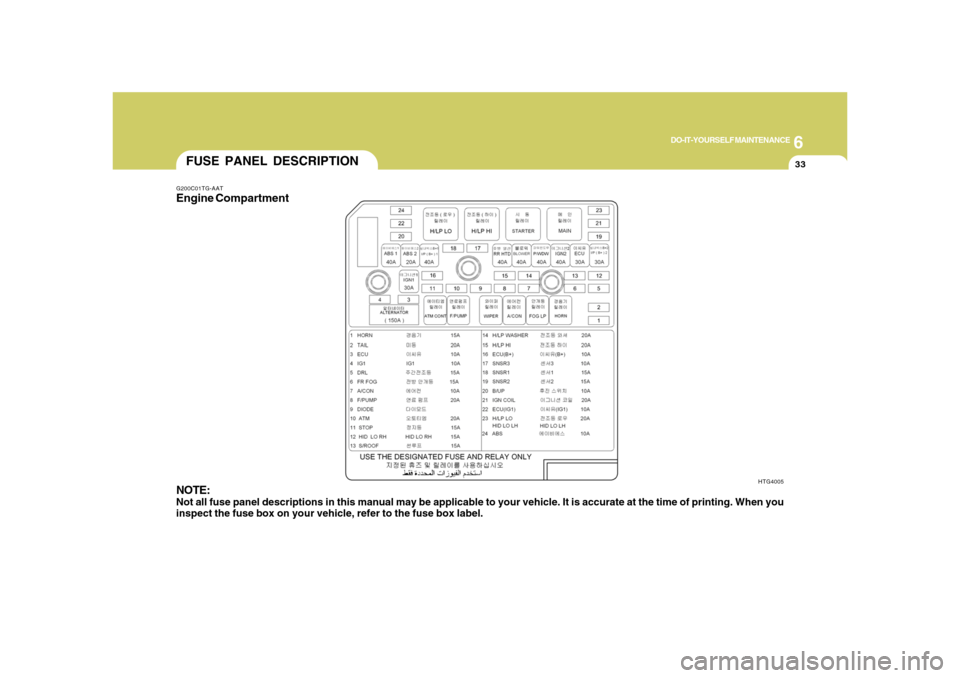
Fuse Panel Description...............................................6-33
DO-IT-YOURSELF MAINTENANCE
6
Page 278 of 345
6
DO-IT-YOURSELF MAINTENANCE
2
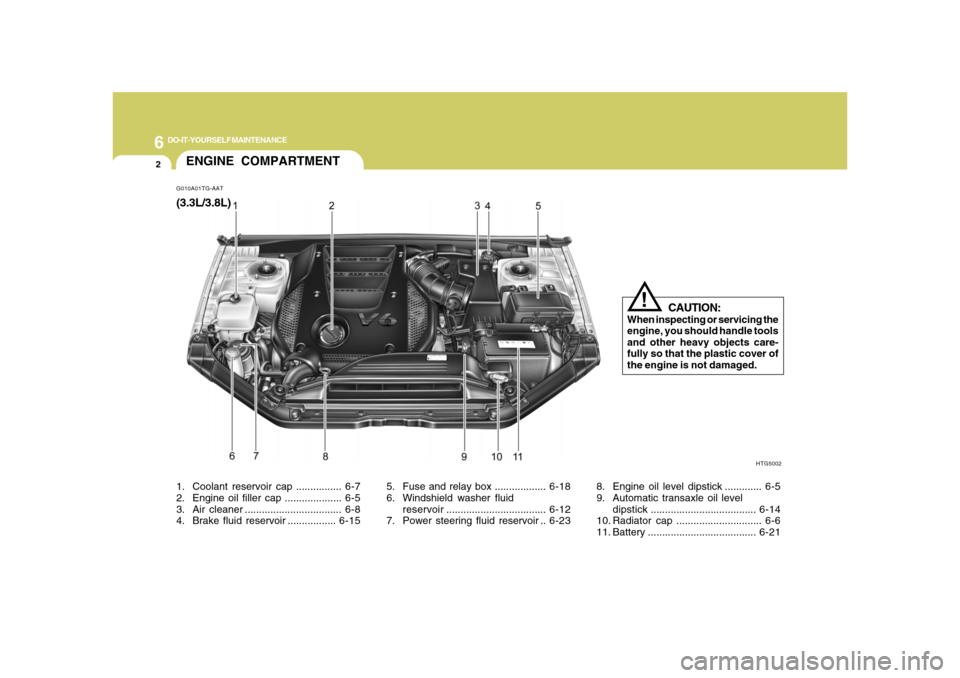
G010A01TG-AATENGINE COMPARTMENT
HTG5002
CAUTION:
When inspecting or servicing the
engine, you should handle tools
and other heavy objects care-
fully so that the plastic cover of
the engine is not damaged.
!
1. Coolant reservoir cap ................ 6-7
2. Engine oil filler cap .................... 6-5
3. Air cleaner .................................. 6-8
4. Brake fluid reservoir .................6-155. Fuse and relay box ..................6-18
6. Windshield washer fluid
reservoir...................................6-12
7. Power steering fluid reservoir ..6-238. Engine oil level dipstick ............. 6-5
9. Automatic transaxle oil level
dipstick.....................................6-14
10. Radiator cap .............................. 6-6
11. Battery ......................................6-21(3.3L/3.8L)
Page 294 of 345
6
DO-IT-YOURSELF MAINTENANCE
18
!
CAUTION:
When replacing a fusible link, never use
anything but a new fusible link with the
same or lower amperage rating. Never
use a piece of wire or a higher-rated
fusible link. This could result in serious
damage and create a fire hazard. The parking brake pedal should be
checked periodically for proper stroke. If
you feel loose in the parking brake pedal
when the parking brake is engaged, have
your parking brake adjusted by an autho-
rized Hyundai dealer.
CHECKING PARKING
BRAKE PEDALG185A01TG-GAT
CAUTION:
If the parking brake pedal is not adjusted
properly, the vehicle may roll backwards
when parking on a steep hill.
!
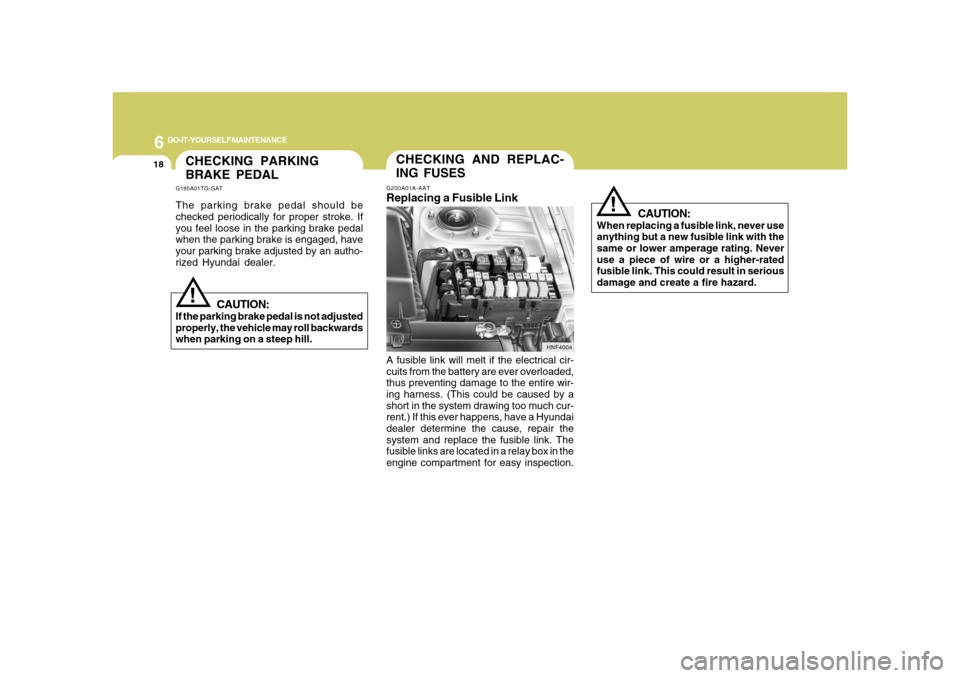
G200A01A-AATReplacing a Fusible LinkA fusible link will melt if the electrical cir-
cuits from the battery are ever overloaded,
thus preventing damage to the entire wir-
ing harness. (This could be caused by a
short in the system drawing too much cur-
rent.) If this ever happens, have a Hyundai
dealer determine the cause, repair the
system and replace the fusible link. The
fusible links are located in a relay box in the
engine compartment for easy inspection.
HNF4004
CHECKING AND REPLAC-
ING FUSES
Page 295 of 345
6
DO-IT-YOURSELF MAINTENANCE
19
G200B01NF-AATReplacing Accessory Fuse
G200B01TG-A
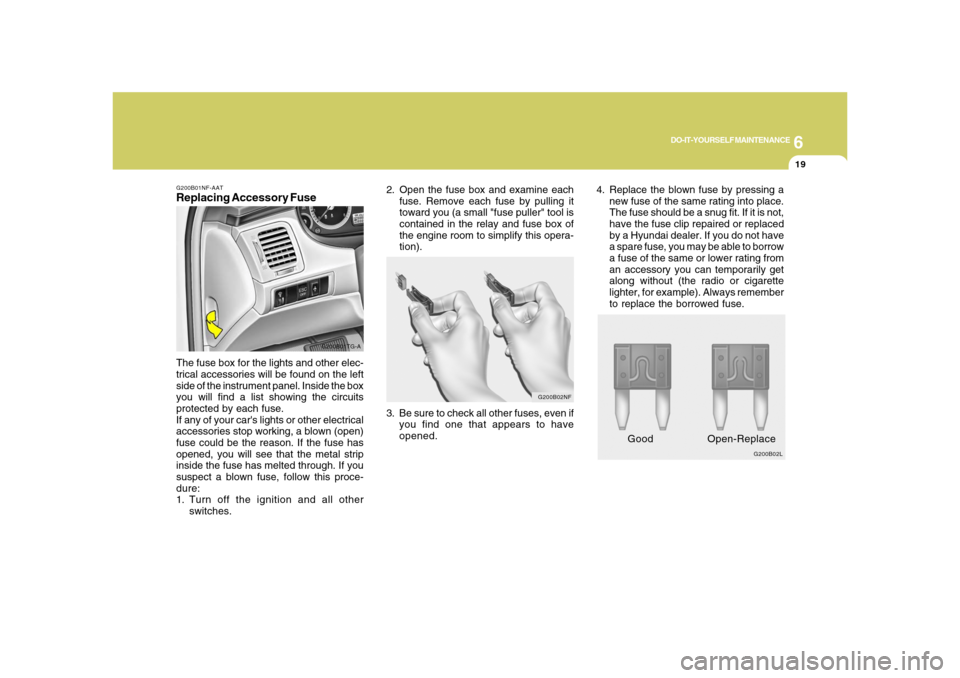
The fuse box for the lights and other elec-
trical accessories will be found on the left
side of the instrument panel. Inside the box
you will find a list showing the circuits
protected by each fuse.
If any of your car's lights or other electrical
accessories stop working, a blown (open)
fuse could be the reason. If the fuse has
opened, you will see that the metal strip
inside the fuse has melted through. If you
suspect a blown fuse, follow this proce-
dure:
1. Turn off the ignition and all other
switches.
G200B02L
Good Open-Replace
3. Be sure to check all other fuses, even if
you find one that appears to have
opened.
G200B02NF
2. Open the fuse box and examine each
fuse. Remove each fuse by pulling it
toward you (a small "fuse puller" tool is
contained in the relay and fuse box of
the engine room to simplify this opera-
tion).4. Replace the blown fuse by pressing a
new fuse of the same rating into place.
The fuse should be a snug fit. If it is not,
have the fuse clip repaired or replaced
by a Hyundai dealer. If you do not have
a spare fuse, you may be able to borrow
a fuse of the same or lower rating from
an accessory you can temporarily get
along without (the radio or cigarette
lighter, for example). Always remember
to replace the borrowed fuse.
Page 296 of 345
6
DO-IT-YOURSELF MAINTENANCE
20
!
CAUTION:
An open fuse indicates that there is a
problem in the electrical circuit. If you
replace a fuse and it blows as soon as the
accessory is turned on, the problem is
serious and should be referred to a
Hyundai dealer for diagnosis and repair.
Never replace a fuse with anything ex-
cept a fuse with the same or a lower
amperage rating. A higher capacity fuse
could cause damage and create a fire
hazard.NOTE:See page 6-33 for the fuse panel descrip-
tions.
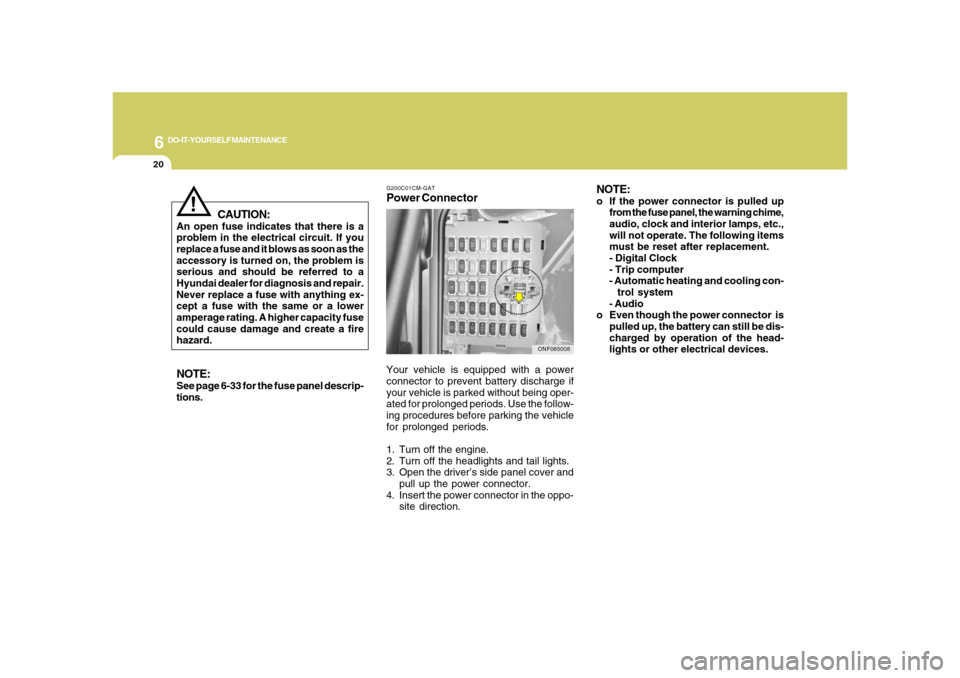
G200C01CM-GATPower ConnectorNOTE:
o If the power connector is pulled up
from the fuse panel, the warning chime,
audio, clock and interior lamps, etc.,
will not operate. The following items
must be reset after replacement.
- Digital Clock
- Trip computer
- Automatic heating and cooling con-
trol system
- Audio
o Even though the power connector is
pulled up, the battery can still be dis-
charged by operation of the head-
lights or other electrical devices.
Your vehicle is equipped with a power
connector to prevent battery discharge if
your vehicle is parked without being oper-
ated for prolonged periods. Use the follow-
ing procedures before parking the vehicle
for prolonged periods.
1. Turn off the engine.
2. Turn off the headlights and tail lights.
3. Open the driver’s side panel cover and
pull up the power connector.
4. Insert the power connector in the oppo-
site direction.
ONF065008
Page 309 of 345
6
DO-IT-YOURSELF MAINTENANCE
33
FUSE PANEL DESCRIPTIONG200C01TG-AATEngine Compartment
NOTE:Not all fuse panel descriptions in this manual may be applicable to your vehicle. It is accurate at the time of printing. When you
inspect the fuse box on your vehicle, refer to the fuse box label.
HTG4005