2008 Hyundai Azera direction
[x] Cancel search: directionPage 150 of 345
1FEATURES OF YOUR HYUNDAI
136
!
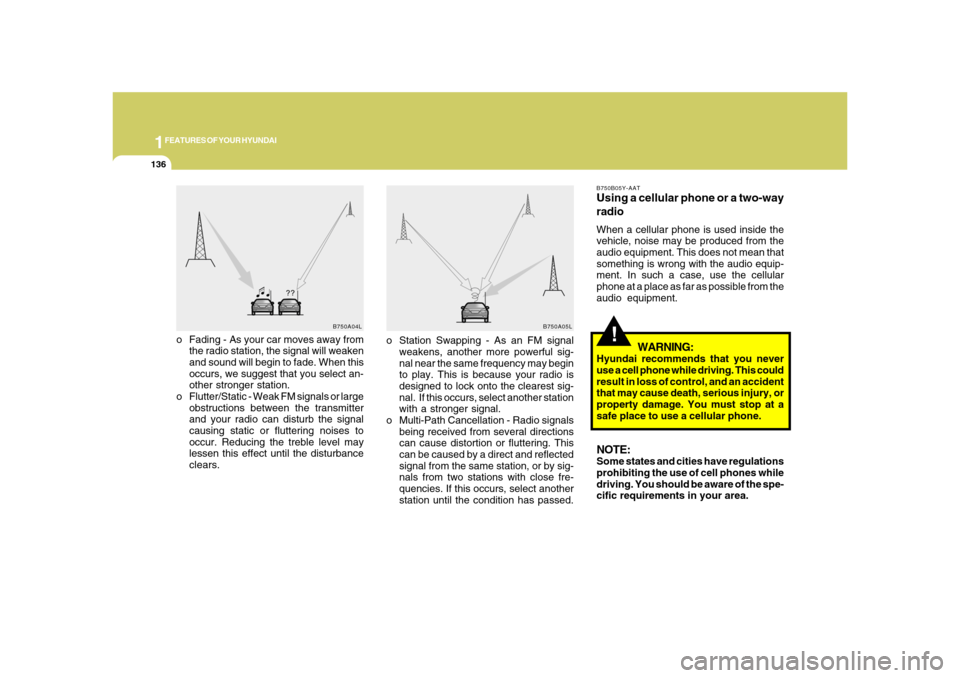
o Fading - As your car moves away from
the radio station, the signal will weaken
and sound will begin to fade. When this
occurs, we suggest that you select an-
other stronger station.
o Flutter/Static - Weak FM signals or large
obstructions between the transmitter
and your radio can disturb the signal
causing static or fluttering noises to
occur. Reducing the treble level may
lessen this effect until the disturbance
clears.
B750B05Y-AATUsing a cellular phone or a two-way
radioWhen a cellular phone is used inside the
vehicle, noise may be produced from the
audio equipment. This does not mean that
something is wrong with the audio equip-
ment. In such a case, use the cellular
phone at a place as far as possible from the
audio equipment.
WARNING:
Hyundai recommends that you never
use a cell phone while driving. This could
result in loss of control, and an accident
that may cause death, serious injury, or
property damage. You must stop at a
safe place to use a cellular phone.NOTE:Some states and cities have regulations
prohibiting the use of cell phones while
driving. You should be aware of the spe-
cific requirements in your area.
B750A04L
B750A05L
o Station Swapping - As an FM signal
weakens, another more powerful sig-
nal near the same frequency may begin
to play. This is because your radio is
designed to lock onto the clearest sig-
nal. If this occurs, select another station
with a stronger signal.
o Multi-Path Cancellation - Radio signals
being received from several directions
can cause distortion or fluttering. This
can be caused by a direct and reflected
signal from the same station, or by sig-
nals from two stations with close fre-
quencies. If this occurs, select another
station until the condition has passed.
Page 159 of 345
1
FEATURES OF YOUR HYUNDAI
145145
7. Adjustment Mode Select
(A.MODE) ButtonPressing the A.MODE button changes the
BASS, MIDDLE, TREBLE, FADER and
BALANCE mode. The mode selected is
shown on the display. After selecting the
each mode, rotate the VOLUME control
knob clockwise or counterclockwise.
BASS Control
To increase the BASS, rotate the knob
clockwise, while to decrease the BASS,
rotate the knob counterclockwise.
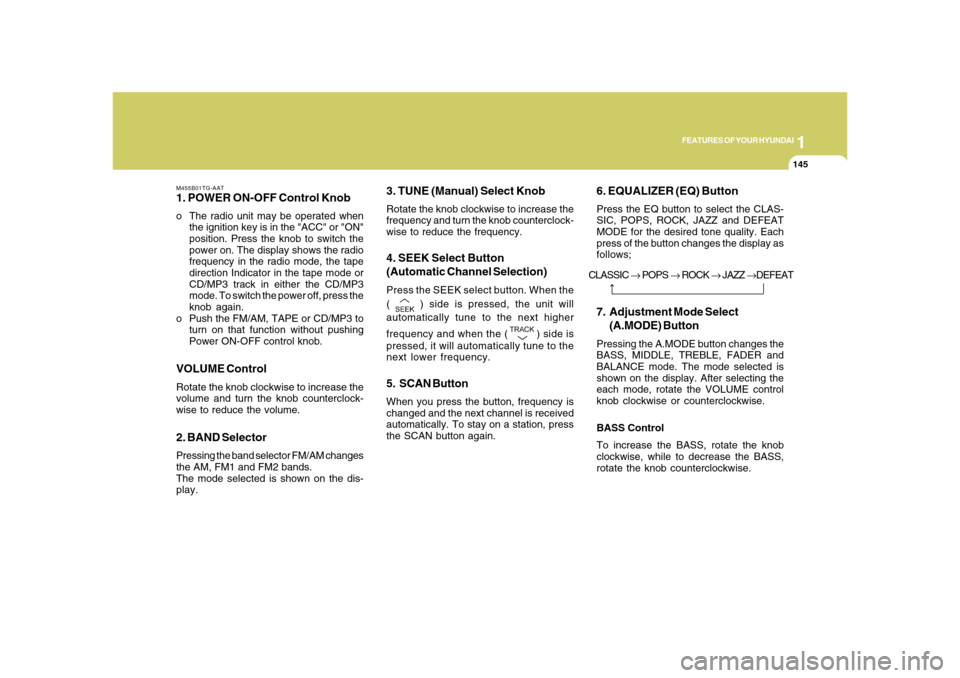
M455B01TG-AAT1. POWER ON-OFF Control Knobo The radio unit may be operated when
the ignition key is in the "ACC" or "ON"
position. Press the knob to switch the
power on. The display shows the radio
frequency in the radio mode, the tape
direction Indicator in the tape mode or
CD/MP3 track in either the CD/MP3
mode. To switch the power off, press the
knob again.
o Push the FM/AM, TAPE or CD/MP3 to
turn on that function without pushing
Power ON-OFF control knob.VOLUME ControlRotate the knob clockwise to increase the
volume and turn the knob counterclock-
wise to reduce the volume.2. BAND SelectorPressing the band selector FM/AM changes
the AM, FM1 and FM2 bands.
The mode selected is shown on the dis-
play.
3. TUNE (Manual) Select KnobRotate the knob clockwise to increase the
frequency and turn the knob counterclock-
wise to reduce the frequency.4. SEEK Select Button
(Automatic Channel Selection)Press the SEEK select button. When the
(
) side is pressed, the unit will
automatically tune to the next higher
frequency and when the (
) side is
pressed, it will automatically tune to the
next lower frequency.
5. SCAN ButtonWhen you press the button, frequency is
changed and the next channel is received
automatically. To stay on a station, press
the SCAN button again.
6. EQUALIZER (EQ) ButtonPress the EQ button to select the CLAS-
SIC, POPS, ROCK, JAZZ and DEFEAT
MODE for the desired tone quality. Each
press of the button changes the display as
follows;
CLASSIC → POPS → ROCK → JAZZ →DEFEAT
Page 162 of 345
1FEATURES OF YOUR HYUNDAI
148
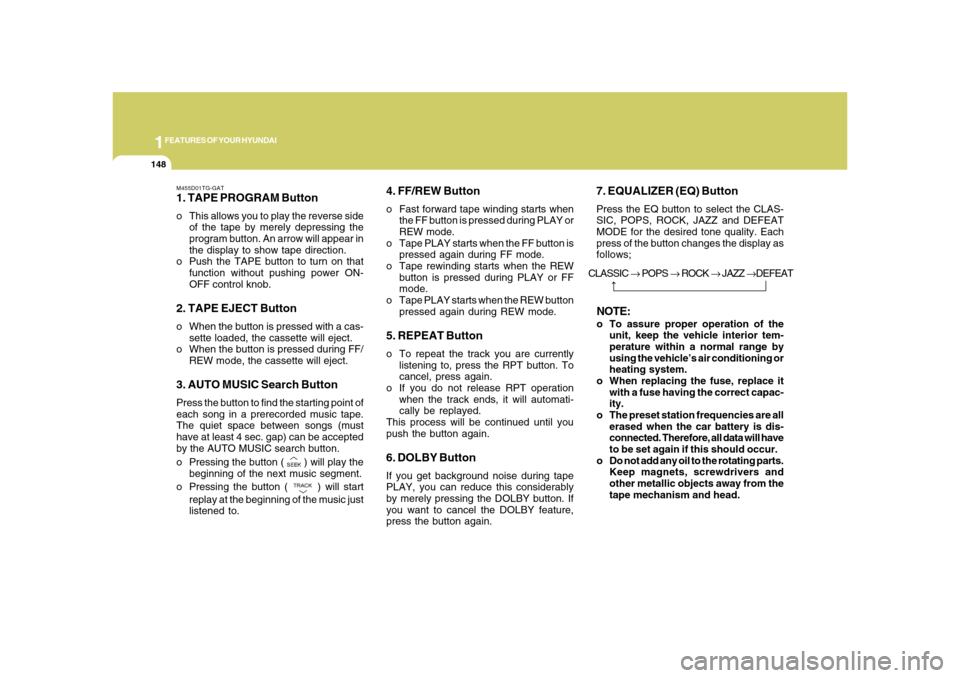
M455D01TG-GAT1. TAPE PROGRAM Buttono This allows you to play the reverse side
of the tape by merely depressing the
program button. An arrow will appear in
the display to show tape direction.
o Push the TAPE button to turn on that
function without pushing power ON-
OFF control knob.2. TAPE EJECT Buttono When the button is pressed with a cas-
sette loaded, the cassette will eject.
o When the button is pressed during FF/
REW mode, the cassette will eject.3. AUTO MUSIC Search ButtonPress the button to find the starting point of
each song in a prerecorded music tape.
The quiet space between songs (must
have at least 4 sec. gap) can be accepted
by the AUTO MUSIC search button.
o Pressing the button (
) will play the
beginning of the next music segment.
o Pressing the button (
) will start
replay at the beginning of the music just
listened to.
4. FF/REW Buttono Fast forward tape winding starts when
the FF button is pressed during PLAY or
REW mode.
o Tape PLAY starts when the FF button is
pressed again during FF mode.
o Tape rewinding starts when the REW
button is pressed during PLAY or FF
mode.
o Tape PLAY starts when the REW button
pressed again during REW mode.5. REPEAT Buttono To repeat the track you are currently
listening to, press the RPT button. To
cancel, press again.
o If you do not release RPT operation
when the track ends, it will automati-
cally be replayed.
This process will be continued until you
push the button again.6. DOLBY ButtonIf you get background noise during tape
PLAY, you can reduce this considerably
by merely pressing the DOLBY button. If
you want to cancel the DOLBY feature,
press the button again.
7. EQUALIZER (EQ) ButtonPress the EQ button to select the CLAS-
SIC, POPS, ROCK, JAZZ and DEFEAT
MODE for the desired tone quality. Each
press of the button changes the display as
follows;NOTE:o To assure proper operation of the
unit, keep the vehicle interior tem-
perature within a normal range by
using the vehicle’s air conditioning or
heating system.
o When replacing the fuse, replace it
with a fuse having the correct capac-
ity.
o The preset station frequencies are all
erased when the car battery is dis-
connected. Therefore, all data will have
to be set again if this should occur.
o Do not add any oil to the rotating parts.
Keep magnets, screwdrivers and
other metallic objects away from the
tape mechanism and head. CLASSIC → POPS → ROCK → JAZZ →DEFEAT
Page 169 of 345
1
FEATURES OF YOUR HYUNDAI
155155
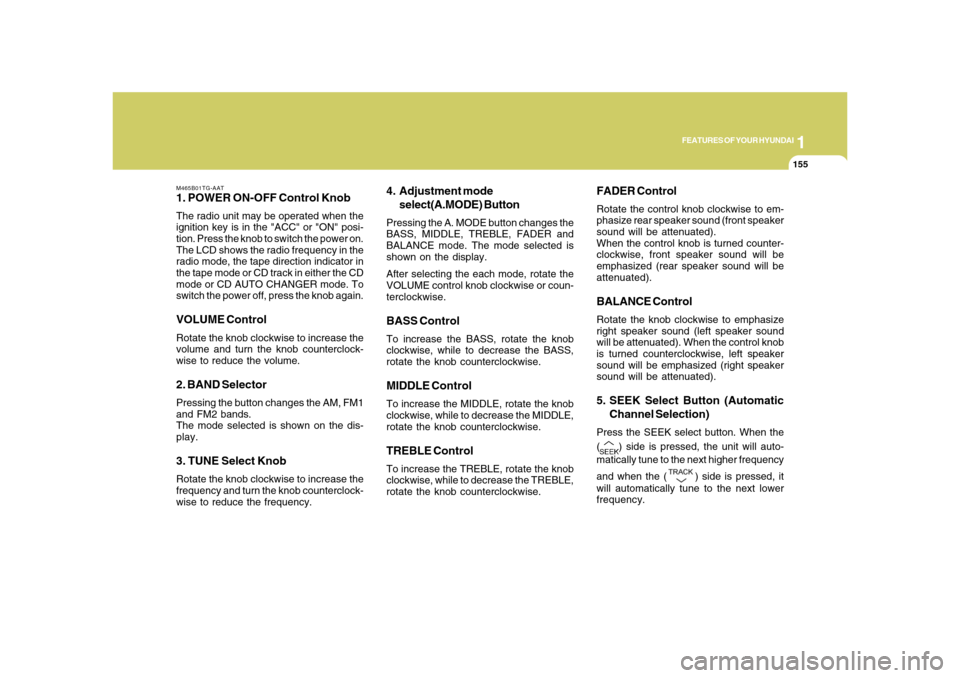
M465B01TG-AAT1. POWER ON-OFF Control KnobThe radio unit may be operated when the
ignition key is in the "ACC" or "ON" posi-
tion. Press the knob to switch the power on.
The LCD shows the radio frequency in the
radio mode, the tape direction indicator in
the tape mode or CD track in either the CD
mode or CD AUTO CHANGER mode. To
switch the power off, press the knob again.VOLUME ControlRotate the knob clockwise to increase the
volume and turn the knob counterclock-
wise to reduce the volume.2. BAND SelectorPressing the button changes the AM, FM1
and FM2 bands.
The mode selected is shown on the dis-
play.3. TUNE Select KnobRotate the knob clockwise to increase the
frequency and turn the knob counterclock-
wise to reduce the frequency.
4. Adjustment mode
select(A.MODE) ButtonPressing the A. MODE button changes the
BASS, MIDDLE, TREBLE, FADER and
BALANCE mode. The mode selected is
shown on the display.
After selecting the each mode, rotate the
VOLUME control knob clockwise or coun-
terclockwise.BASS ControlTo increase the BASS, rotate the knob
clockwise, while to decrease the BASS,
rotate the knob counterclockwise.MIDDLE ControlTo increase the MIDDLE, rotate the knob
clockwise, while to decrease the MIDDLE,
rotate the knob counterclockwise.TREBLE ControlTo increase the TREBLE, rotate the knob
clockwise, while to decrease the TREBLE,
rotate the knob counterclockwise.
FADER ControlRotate the control knob clockwise to em-
phasize rear speaker sound (front speaker
sound will be attenuated).
When the control knob is turned counter-
clockwise, front speaker sound will be
emphasized (rear speaker sound will be
attenuated).BALANCE ControlRotate the knob clockwise to emphasize
right speaker sound (left speaker sound
will be attenuated). When the control knob
is turned counterclockwise, left speaker
sound will be emphasized (right speaker
sound will be attenuated).5. SEEK Select Button (Automatic
Channel Selection)Press the SEEK select button. When the
(
) side is pressed, the unit will auto-
matically tune to the next higher frequency
and when the (
) side is pressed, it
will automatically tune to the next lower
frequency.
Page 172 of 345
1FEATURES OF YOUR HYUNDAI
158
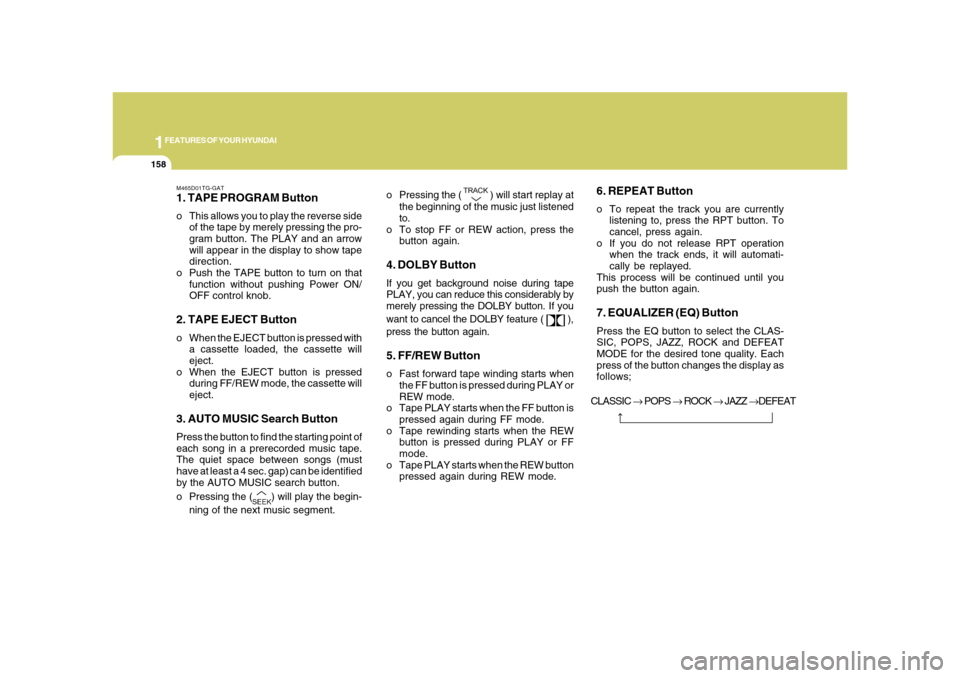
M465D01TG-GAT1. TAPE PROGRAM Buttono This allows you to play the reverse side
of the tape by merely pressing the pro-
gram button. The PLAY and an arrow
will appear in the display to show tape
direction.
o Push the TAPE button to turn on that
function without pushing Power ON/
OFF control knob.2. TAPE EJECT Buttono When the EJECT button is pressed with
a cassette loaded, the cassette will
eject.
o When the EJECT button is pressed
during FF/REW mode, the cassette will
eject.3. AUTO MUSIC Search ButtonPress the button to find the starting point of
each song in a prerecorded music tape.
The quiet space between songs (must
have at least a 4 sec. gap) can be identified
by the AUTO MUSIC search button.
o Pressing the (
) will play the begin-
ning of the next music segment.o Pressing the (
) will start replay at
the beginning of the music just listened
to.
o To stop FF or REW action, press the
button again.
4. DOLBY ButtonIf you get background noise during tape
PLAY, you can reduce this considerably by
merely pressing the DOLBY button. If you
want to cancel the DOLBY feature (
),
press the button again.
5. FF/REW Buttono Fast forward tape winding starts when
the FF button is pressed during PLAY or
REW mode.
o Tape PLAY starts when the FF button is
pressed again during FF mode.
o Tape rewinding starts when the REW
button is pressed during PLAY or FF
mode.
o Tape PLAY starts when the REW button
pressed again during REW mode.
6. REPEAT Buttono To repeat the track you are currently
listening to, press the RPT button. To
cancel, press again.
o If you do not release RPT operation
when the track ends, it will automati-
cally be replayed.
This process will be continued until you
push the button again.7. EQUALIZER (EQ) ButtonPress the EQ button to select the CLAS-
SIC, POPS, JAZZ, ROCK and DEFEAT
MODE for the desired tone quality. Each
press of the button changes the display as
follows;
CLASSIC → POPS → ROCK → JAZZ →DEFEAT
Page 211 of 345
1
FEATURES OF YOUR HYUNDAI
197197
B860A03L
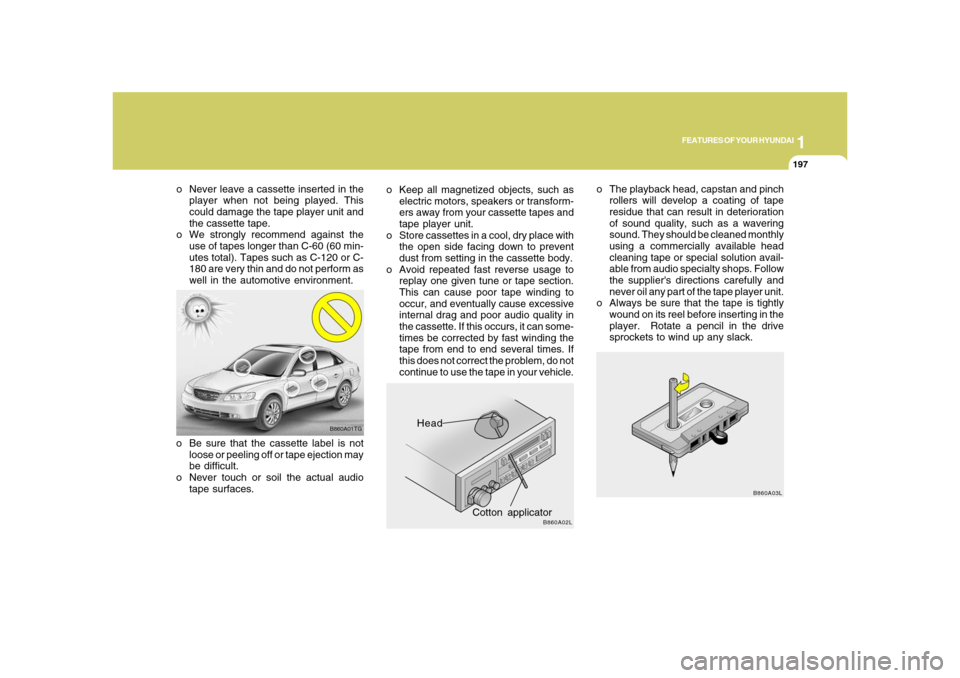
o The playback head, capstan and pinch
rollers will develop a coating of tape
residue that can result in deterioration
of sound quality, such as a wavering
sound. They should be cleaned monthly
using a commercially available head
cleaning tape or special solution avail-
able from audio specialty shops. Follow
the supplier's directions carefully and
never oil any part of the tape player unit.
o Always be sure that the tape is tightly
wound on its reel before inserting in the
player. Rotate a pencil in the drive
sprockets to wind up any slack.
Head
Cotton applicator
B860A02L
o Keep all magnetized objects, such as
electric motors, speakers or transform-
ers away from your cassette tapes and
tape player unit.
o Store cassettes in a cool, dry place with
the open side facing down to prevent
dust from setting in the cassette body.
o Avoid repeated fast reverse usage to
replay one given tune or tape section.
This can cause poor tape winding to
occur, and eventually cause excessive
internal drag and poor audio quality in
the cassette. If this occurs, it can some-
times be corrected by fast winding the
tape from end to end several times. If
this does not correct the problem, do not
continue to use the tape in your vehicle.
B860A01TG
o Be sure that the cassette label is not
loose or peeling off or tape ejection may
be difficult.
o Never touch or soil the actual audio
tape surfaces. o Never leave a cassette inserted in the
player when not being played. This
could damage the tape player unit and
the cassette tape.
o We strongly recommend against the
use of tapes longer than C-60 (60 min-
utes total). Tapes such as C-120 or C-
180 are very thin and do not perform as
well in the automotive environment.
Page 263 of 345
4
CORROSION PREVENTION AND APPEARANCE CARE4
Use a clean sponge or cloth, rinse it fre-
quently and don't damage the finish by
rubbing too hard. For stubborn spots,
dampen them frequently and remove them
a little at a time.
To clean whitewall tires, use a stiff brush or
soapy steel-wool scouring pad.
To clean plastic wheel covers, use a clean
sponge or soft cloth and water.
To clean cast aluminum alloy wheels, use
a mild soap or neutral detergent. Do not
use abrasive cleaners. Protect the bare-
metal surfaces by cleaning, polishing and
waxing. Because aluminum is subject to
corrosion, be sure to give aluminum alloy
wheels special attention in winter. If you
drive on salted roads, clean the wheels
thoroughly afterwards.
After washing, be sure to rinse thoroughly.
If soapy water dries on the finish, streaking
will result.
When the weather is warm and the humid-
ity low, you may find it necessary to rinse
each section immediately after washing to
avoid streaking.
WASHING AND WAXING
E020E01A-AATDon't Neglect the InteriorMoisture can collect under the floor mats
and carpeting to cause corrosion. Check
under the mats periodically to be sure the
carpeting is dry. Use particular care if you
carry fertilizers, cleaning materials or
chemicals in the car.
These should be carried only in proper
containers and any spills or leaks should
be cleaned up, flushed with clean water
and thoroughly dried.
E030A02A-AATWashing Your HyundaiNever wash your car when the surface is
hot from being in the sun. Always wash
your car in the shade.
Wash your car frequently. Dirt is abrasive
and can scratch the paint if it is not re-
moved. Air pollution or acid rain may dam-
age the paint and trim through chemical
action if pollutants are allowed to remain in
contact with the surface. If you live near the
ocean or in an area where road salts or
dust control chemicals are used, you
should pay particular attention to the un-
derside of the car. Start by rinsing the car
to remove dust and loose dirt. In winter, or
if you have driven through mud or muddy
water, be sure to thoroughly clean the
underside as well. Use a hard direct stream
of water to remove accumulations of mud
or corrosive materials. Use a good quality
car-washing solution and follow the
manufacturer's directions on the package.
These are available at your Hyundai dealer
or auto parts outlet. Don't use strong house-
hold detergents, gasoline, strong solvents
or abrasive cleaning powders as these
may damage the finish.
E020D02A-AATKeep Paint and Trim in Good Condi-
tionScratches or chips in the finish should be
covered with "touch-up" paint as soon as
possible to reduce the possibility of corro-
sion. If bare metal is showing through, the
attention of a qualified body and paint
shop is recommended.
Bird droppings : Bird droppings are highly
corrosive and may damage painted sur-
faces in just a few hours. Always remove
bird droppings as soon as possible.
Page 264 of 345
4
CORROSION PREVENTION AND APPEARANCE CARE
5
E030D01A-AATWhen to Wax AgainYou should polish and wax the car again
when water no longer beads on a clean
surface but spreads out over a larger area.E030C01A-AATPolishing and WaxingAlways wash and dry the car before polish-
ing or waxing or using a combination
cleaner and wax. Use a good quality com-
mercial product and follow the
manufacturer's directions on the container.
Polish and wax the bright trim pieces as
well as the paint.E030B01A-AATSpot CleaningDon't use gasoline, strong solvents or cor-
rosive cleaning agents. These can dam-
age the finish of the car. To remove road
tar, use turpentine on a clean, soft cloth. Be
gentle.
To remove dead insects or tree sap, use
warm water and mild soap or car-washing
solution. Soak the spot and rub gently. If
the paint has lost its luster, use a commer-
cial car-cleaning polish. After rinsing, dry the car using a damp
chamois or soft, absorbent cloth. The rea-
son for drying the car is to remove water
from the car so it will dry without water
spots. Don't rub, this can damage the fin-
ish.
If you find any nicks or scratches in the
paint, use touch-up paint to cover them to
prevent corrosion. To protect the paintwork
of the car against corrosion, you must
clean your Hyundai (at least once a month).
Give special attention
to the removal of salt, mud and other sub-
stances on the underside of the
splashboards of the car. Make sure that the
outlets and the underside of the doors are
open. Paint damage can be caused by
small accumulation of tar, industrial pre-
cipitation, tree resin, insects and bird drop-
pings, when not removed immediately. If
water alone is not strong enough to re-
move the accumulated dirt, use a mild car
washing solution. Be sure to rinse the
surface after washing to remove the solu-
tion. Never allow the solution to dry on the
painted surfaces.
!
CAUTION:
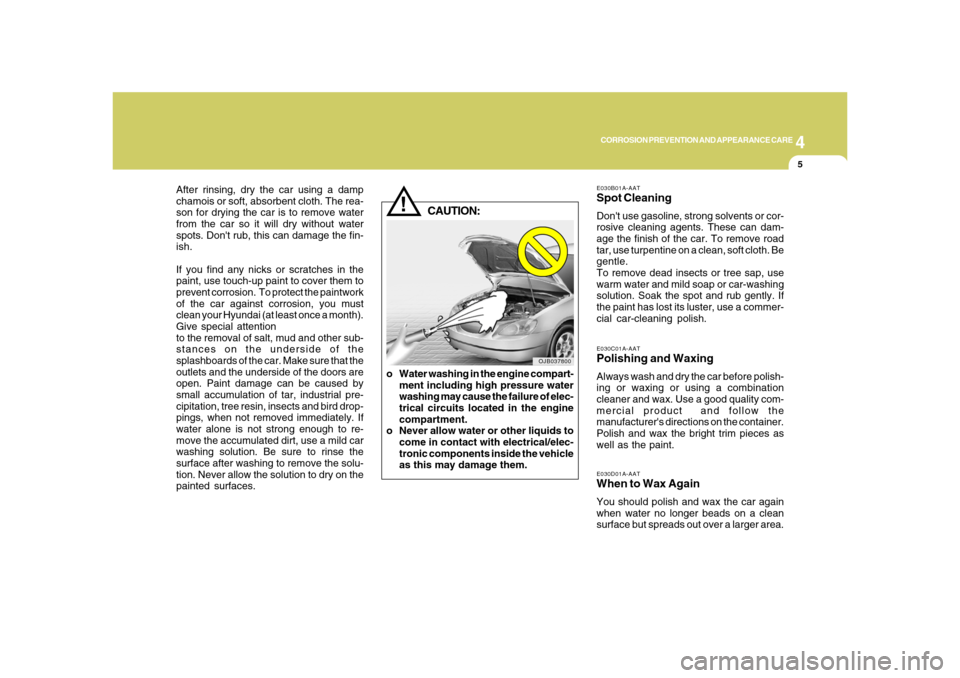
o Water washing in the engine compart-
ment including high pressure water
washing may cause the failure of elec-
trical circuits located in the engine
compartment.
o Never allow water or other liquids to
come in contact with electrical/elec-
tronic components inside the vehicle
as this may damage them.
OJB037800