2008 HUMMER H3 key
[x] Cancel search: keyPage 119 of 416

To turn on the rear camera vision feature again, press
the right mirror button briey. The green light indicator
will illuminate. The rear camera vision system is
now enabled and the display will slide out from the
mirror normally.
To manually slide out the rear camera screen for
cleaning, do the following:
1. Place the vehicle shift lever in PARK (P).
2. Turn the ignition key to the ACCESSORY or
RUN position.
3. Press and hold the right mirror button for
ve seconds. The display will slide out from
the mirror for 30 seconds; the right green LED
indicator will remain illuminated. The camera
screen will not be on when it slides out of
the mirror.
4. If additional time is required for cleaning,
repeat step 3.
To resume normal operation, press the right button
momentarily while the rear camera screen is out or wait
30 seconds for screen to slide back into the mirror.
For more information on the automatic dimming,
compass, and temperature features of the mirror, see
Automatic Dimming Rearview Mirror with Compass
and Temperature Display on page 2-41.
{CAUTION:
The Rear Vision Camera (RVC) system does
not replace driver vision. RVC does not:
Detect objects that are outside the
camera’s eld of view, below the bumper,
or underneath the vehicle.
Detect children, pedestrians, bicyclists,
or pets.
Do not back the vehicle by only looking at the
rear vision camera screen, or use the screen
during longer, higher speed backing maneuvers
or where there could be cross-traffic. Your
judged distances using the screen will differ
from actual distances.
So if you do not use proper care before backing
up, you could hit a vehicle, child, pedestrian,
bicyclist, or pet, resulting in vehicle damage,
injury, or death. Even though the vehicle has
the RVC system, always check carefully before
backing up by checking behind your vehicle.
2-45
Page 122 of 416

OnStar®System
OnStar uses several innovative technologies and live
advisors to provide you with a wide range of safety,
security, information, and convenience services.
If your airbags deploy, the system is designed to
make an automatic call to OnStar Emergency advisors
who can request emergency services be sent to
your location. If you lock your keys in the vehicle,
call OnStar at 1-888-4-ONSTAR and they can send
a signal to unlock your doors. If you need roadside
assistance, press the OnStar button and they can
contact Roadside Service for you.
OnStar service is provided to you subject to the
OnStar Terms and Conditions. You may cancel your
OnStar service at any time by contacting OnStar
as provided below. A complete OnStar Owner’s Guide
and the OnStar Terms and Conditions are included
in the vehicle’s OnStar Subscriber glove box literature.For more information, visit onstar.com or onstar.ca,
contact OnStar at 1-888-4-ONSTAR (1-888-466-7827)
or TTY 1-877-248-2080, or press the OnStar button
to speak with an OnStar advisor 24 hours a day,
7 days a week.
Not all OnStar features are available on all vehicles.
To check if your vehicle is equipped to provide the
services described below, or for a full description of
OnStar services and system limitations, see the OnStar
Owner’s Guide in your glove box or visit onstar.com.OnStar Services
For new vehicles equipped with OnStar, the Safe &
Sound Plan, or the Directions & Connections Plan
is included for one year from the date of purchase.
You can extend this plan beyond the rst year, or
upgrade to the Directions & Connections Plan.
For more information, press the OnStar button to
speak with an advisor. Some OnStar services (such
as Remote Door Unlock or Stolen Vehicle Location
Assistance) may not be available until you register
with OnStar.
2-48
Page 131 of 416

Front Seat Storage Net
Your vehicle has storage nets located on the back of
the front seats. To remove these nets, pull out on each
of the four clips located on the net.
Front Armrest Storage Area
Your vehicle has a front armrest storage area. To open,
lift the latch on the front of the armrest and pull up.
Luggage Carrier
If your vehicle has this feature, you can load cargo on
your vehicle.
The luggage carrier consists of siderails attached to
the roof. The crossrails attach into the siderails and
can be moved back and forth to accommodate various
cargo sizes.
Notice:Loading cargo on the luggage carrier
that weighs more than 250 lbs. (113 kg) or hangs
over the rear or sides of the vehicle may damage
your vehicle. Load cargo only on top of the
crossrails and tie the cargo down to the crossrail
support cargo tie-down loops, making sure to
fasten it securelyDo not exceed the maximum vehicle capacity when
loading your vehicle. For more information on vehicle
capacity and loading, seeLoading Your Vehicle
on page 4-42.
Adjusting the Crossrails
To adjust the crossrails to t your load:
1. Use the provided crossrail key to unlock the
crossrail end cap by turning it counterclockwise.
2-57
Page 132 of 416
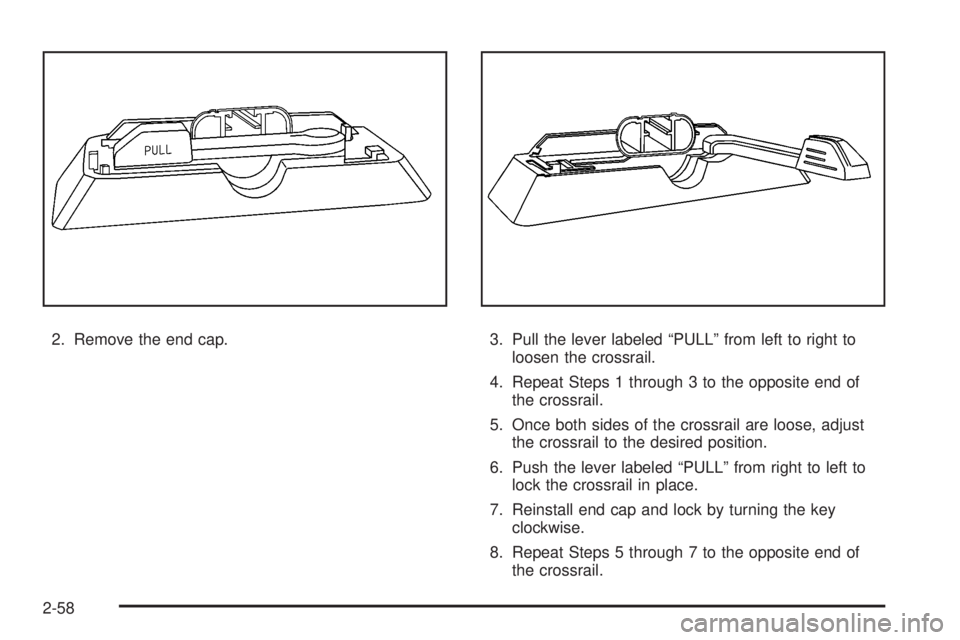
2. Remove the end cap. 3. Pull the lever labeled “PULL” from left to right to
loosen the crossrail.
4. Repeat Steps 1 through 3 to the opposite end of
the crossrail.
5. Once both sides of the crossrail are loose, adjust
the crossrail to the desired position.
6. Push the lever labeled “PULL” from right to left to
lock the crossrail in place.
7. Reinstall end cap and lock by turning the key
clockwise.
8. Repeat Steps 5 through 7 to the opposite end of
the crossrail.
2-58
Page 140 of 416

Hazard Warning Flashers
The hazard warning ashers let you warn the police and
others that you have a problem. The front and rear
turn signal lamps will ash on and off.
The hazard warning
asher button is located
towards the center of
the instrument panel.
Press the button to make the front and rear turn signal
lamps ash on and off. Press the button again to
turn the ashers off.While the hazard warning ashers are on, the turn
signals do not work.
The hazard warning ashers work no matter what
position the key is in, and even if the key is not in the
ignition switch.
Other Warning Devices
If you carry reective triangles, you can set one up at
the side of the road about 300 feet (100 m) behind your
vehicle.
Horn
To sound the horn, press the horn symbol on the
steering wheel pad.
3-6
Page 150 of 416

To disable automatic lighting, do any of the following:
Turn the headlamp control from AUTO to off
and release the control. It will return back to
the AUTO position by itself.
Turn the headlamp control from AUTO to the
parking lamp or headlamp position.
SeeAutomatic Headlamp System on page 3-17for
more information.
Vehicles rst sold in Canada with an automatic
transmission cannot turn off automatic headlamps
unless the gear position is in PARK (P) and the
headlamp switch is turned to the Off position. Vehicles
rst sold in Canada with a manual transmission can
turn off the automatic headlamps with the headlamp
control; however, the parking lamps will remain on.
;(Parking Lamps):Turn the knob to this position to
turn on the parking lamps, together with the following:
Sidemarker Lamps
Taillamps
License Plate Lamps
Instrument Panel Lights
2(Headlamps):Turn the knob to this position to turn
on the headlamps, together with the previously listed
lamps and lights.
The headlamps can be switched from low to high beam
by pushing the turn signal/multifunction lever toward
the instrument panel.
Headlamps on Reminder
A headlamp reminder chime will sound if the following
conditions are met:
The driver door is open.
Parking lamps or headlamps are manually
turned on.
The key is either not in the ignition switch, or it is in
the LOCK position of the ignition switch.
The headlamp reminder cannot be turned off if the
conditions listed above are met.
In the automatic mode, the headlamps turn off once the
ignition is in ACC.
3-16
Page 154 of 416

Dome Lamp Override
E(Dome Lamp Override):You can use the dome
override button, located below the exterior lamps control,
to set the dome and footwell lamps to come on
automatically when a door is opened, or to remain off.
To turn the lamps off, press the button into the in
position. With the button in this position, the dome lamps
will remain off when the doors are open. To return the
lamps to automatic operation, press the button again
and return it to the out position. With the button in this
position, the dome lamps will come on when you
open a door.
Exit Lighting
With exit lighting, the interior lamps will come on when
you remove the key from the ignition. The lamps will not
come on if the dome override button is pressed in.
Reading Lamps
Your vehicle has reading lamps. Press the button
located next to the lamp to turn them on or off.
These lamps will not come on with the dome lamps.
Electric Power Management
The vehicle has Electric Power Management (EPM) that
estimates the battery’s temperature and state of
charge. It then adjusts the voltage for best performance
and extended life of the battery.
When the battery’s state of charge is low, the voltage is
raised slightly to quickly put the charge back in. When
the state of charge is high, the voltage is lowered slightly
to prevent overcharging. If the vehicle has a voltmeter
gage, you may see the voltage move up or down. This is
normal. If there is a problem, an alert will be displayed.
The battery can be discharged at idle if the electrical
loads are very high. This is true for all vehicles. This is
because the generator (alternator) may not be
spinning fast enough at idle to produce all the power
that is needed for very high electrical loads.
A high electrical load occurs when several of the
following loads are on: headlamps, high beams, fog
lamps, rear window defogger, climate control fan at
high speed, heated seats, engine cooling fans, trailer
loads, and loads plugged into accessory power outlets.
Battery Run-Down Protection
This feature shuts off the dome lamp if it is left on for
more than 20 minutes when the ignition is in LOCK. This
will help prevent your battery from running down.
3-20
Page 158 of 416

\(Bi-Level):This mode directs air to the instrument
panel outlets, and the remaining air to the oor
outlets and the defroster and side window outlets.
Cooler air is directed to the upper outlets and warmer
air to the oor outlets.
[(Floor):This mode directs air to the oor outlets,
side window outlets, and defroster. Recirculation is
not available in this mode.
Defogging and Defrosting
Fog on the inside of windows is a result of high humidity
(moisture) condensing on the cool window glass. This
can be minimized if the climate control system is used
properly. There are two modes to clear fog or frost from
the windshield and side windows. Use the defog mode
to clear the windows of fog or moisture and warm the
passengers. Use the defrost mode to remove fog or frost
from the windshield more quickly. For best results, clear
all snow and ice from the windshield before defrosting.
/(Floor/Defog):This mode directs the air to the
windshield, the side window outlets, and to the
oor outlets. When this mode is selected, the system
runs the air conditioning system unless the outside
temperature is near freezing or below. Recirculation is
not available in this mode.
0(Defrost):This mode directs most of the air to the
windshield, and the side window outlets. When this
mode is selected, the system runs the air conditioning
system unless the outside temperature is near or below
freezing. Recirculation is not available in this mode.
Do not drive the vehicle until all the windows are clear.
Rear Window Defogger
The rear window defogger uses a warming grid to
remove fog or frost from the rear window when the key
is in the ignition and turned to ON/RUN.
=(Rear Defogger):Press the center of the right
knob on the control panel to turn the rear window
defogger on or off. First press of this button activates
the rear window defogger for 15 minutes and each
subsequent activation lasts seven and one-half minutes.
Notice:Do not use anything sharp on the inside of
the rear window. If you do, you could cut or damage
the warming grid, and the repairs would not be
covered by your warranty. Do not attach a temporary
vehicle license, tape, a decal or anything similar to
the defogger grid.
Outlet Adjustment
Use the air outlets located in the center and on the side
of your instrument panel to direct the airow.
Your vehicle has air outlets that allow you to adjust the
direction and amount of airow inside the vehicle.
3-24