2008 HONDA ODYSSEY change time
[x] Cancel search: change timePage 26 of 148

26Navigation System
If the system does not find an exact
match, select List when you finish
entering the name of the city. Most of
the cities and towns for that state are
listed.
Listings of cities and towns in the non-
detailed coverage area may have an
asterisk “*” next to their names. If you
select one, a pop-up box is displayed
saying; “No detailed street data...”, and
a street address cannot be entered (see
Map Coverage on page
110). Try
entering the street fi rst, and then select
the city if available.
Select View Dest. Map and use the
joystick to select an icon, approximate
area, or street you wish to choose as
your destination. Otherwise, a central
location of the city will be selected. If
you select a point of interest (POI) or
road in an unverified area, you may or
may not have routing in these areas. See
Map Overview on page
6 .Selecting the Street
By Voice Control:
After you have selected the city, or if
you say “Street” on the Find address
by screen, the display changes to the
Say street name screen. Say the street
name and the searching will begin.
To enter the street name by voice
spelling, say or select CHANGE TO
Spell Mode on the Say street name
screen, and the display will change to
the Enter street name screen. Say the street name by saying individual
letters or numbers, one at a time.
Entering a Destination
2008 Odyssey 00X31-SHJ-8101
Page 29 of 148

Navigation System29
NOTE:
If you find that your city is not listed,
it may be part of a larger
metropolitan area. Try entering the
street first.
Prior to departure, you can set areas to avoid. The system then includes
them in its calculations for the
destination you have entered. See
Edit Avoid Area on page
91.
Selecting the State or Province
The state you are in is displayed at the
top of the screen. If your desired
destination is in another state, select
Change State .
The display then changes to the Enter
state name screen. Use the voice
control system and say the name of the
state or use the on-screen keyboard to
enter the name of the state.
Selecting the City
This is helpful if the street runs through
several cities, and you know what city
includes the street. Th e city you are in is
displayed on the screen. If the city you
want is displayed on the screen, say
“Select current city .” If your desired
destination is in another city, say or
select another city.
By Voice Control:
Say “City” on the Find intersection by
screen, and the display changes to the
Say city name screen. Say the city
name and the searching will begin. To enter the city na
me by voice spelling,
say or select CHANGE TO Spell
Mode on the Say city name screen,
and the display will change to the Enter
city name screen.
Say the city name by saying individual
letters, one at a time.
Entering a Destination
2008 Odyssey 00X31-SHJ-8101
Page 31 of 148

Navigation System31
Selecting the Street
By Voice Control:
After you have selected the city, or if
you say “Street” on the Find
intersection by screen, the display
changes to the Say street name screen.
Say the street name and the searching
will begin.
To enter the street name by voice
spelling, say or select CHANGE TO
Spell Mode on the Say street name
screen, and the disp lay will change to
the Enter street name screen. Say the street name by saying individual
letters or numbers, one at a time.
After you have completed the first
name, the display
changes to the Say
intersecting street screen. Say the
name of the other intersecting street. The system has a talk back function. If
your spoken letter is not recognized, the
system will talk back to you. For
example, if you say “E” but the system
does not recognize the command, it will
ask you “Please select the number of the
input letter from the list” and the
following pop-up box will appear:
You should select a letter by saying the
number.
Alternatively, to improve voice
recognition, you can say “Echo” or
“Edward” instead of “E.”
See page
16 for a list of available words
for each letter.
Entering a Destination
2008 Odyssey 00X31-SHJ-8101
Page 48 of 148
48Navigation System
Driving to Your Destination
Changing the Routing Method
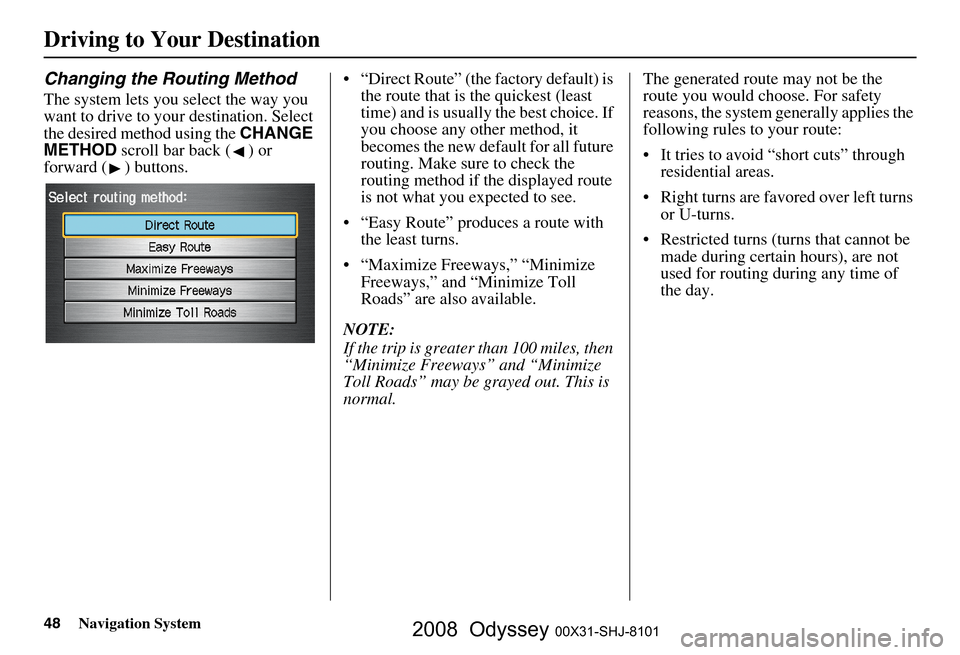
The system lets you select the way you
want to drive to your destination. Select
the desired method using the CHANGE
METHOD scroll bar back ( ) or
forward ( ) buttons. “Direct Route” (the factory default) is
the route that is the quickest (least
time) and is usually the best choice. If
you choose any other method, it
becomes the new default for all future
routing. Make sure to check the
routing method if the displayed route
is not what you expected to see.
“Easy Route” produces a route with the least turns.
“Maximize Freeways,” “Minimize Freeways,” and “Minimize Toll
Roads” are also available.
NOTE:
If the trip is greater than 100 miles, then
“Minimize Freeways” and “Minimize
Toll Roads” may be grayed out. This is
normal. The generated route may not be the
route you would choose. For safety
reasons, the system
generally applies the
following rules to your route:
It tries to avoid “short cuts” through residential areas.
Right turns are favored over left turns or U-turns.
Restricted turns (turns that cannot be made during certain hours), are not
used for routing during any time of
the day.
2008 Odyssey 00X31-SHJ-8101
Page 49 of 148
Navigation System49
Viewing the Routes
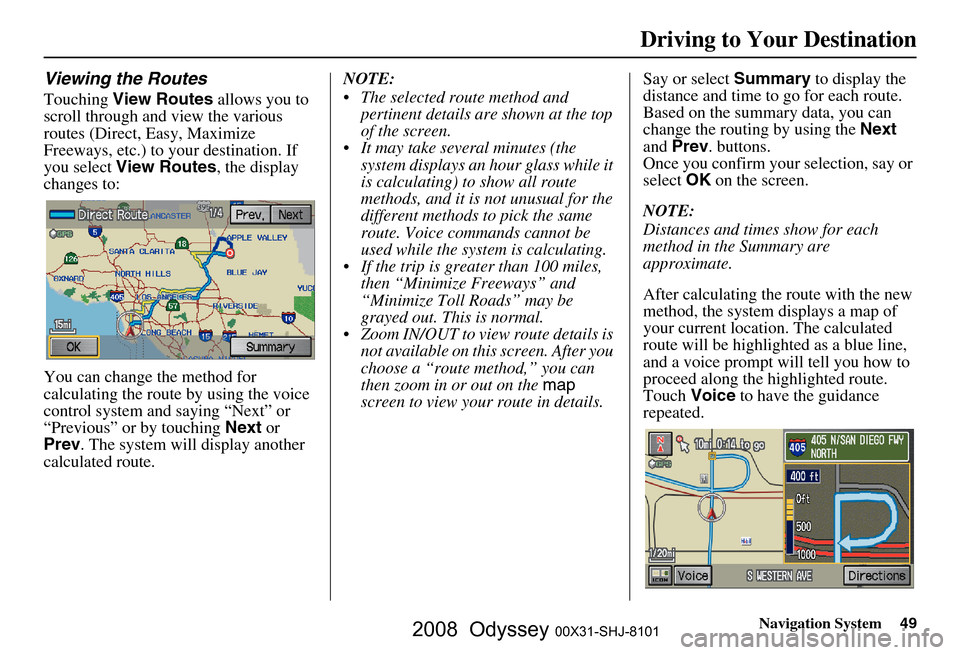
Touching View Routes allows you to
scroll through and view the various
routes (Direct, Easy, Maximize
Freeways, etc.) to your destination. If
you select View Routes , the display
changes to:
You can change the method for
calculating the route by using the voice
control system and saying “Next” or
“Previous” or by touching Next or
Prev . The system will display another
calculated route. NOTE:
The selected route method and
pertinent details are shown at the top
of the screen.
It may take several minutes (the system displays an hour glass while it
is calculating) to show all route
methods, and it is not unusual for the
different methods to pick the same
route. Voice commands cannot be
used while the system is calculating.
If the trip is greater than 100 miles, then “Minimize Freeways” and
“Minimize Toll Roads” may be
grayed out. This is normal.
Zoom IN/OUT to view route details is not available on this screen. After you
choose a “route method,” you can
then zoom in or out on the map
screen to view your route in details. Say or select
Summary to display the
distance and time to go for each route.
Based on the summary data, you can
change the routing by using the Next
and Prev . buttons.
Once you confirm your selection, say or
select OK on the screen.
NOTE:
Distances and times show for each
method in the Summary are
approximate.
After calculating the route with the new
method, the system displays a map of
your current locatio n. The calculated
route will be highlighted as a blue line,
and a voice prompt will tell you how to
proceed along the highlighted route.
Touch Voice to have the guidance
repeated.
Driving to Your Destination
2008 Odyssey 00X31-SHJ-8101
Page 50 of 148
50Navigation System
Driving to Your Destination
Viewing the Destination Map
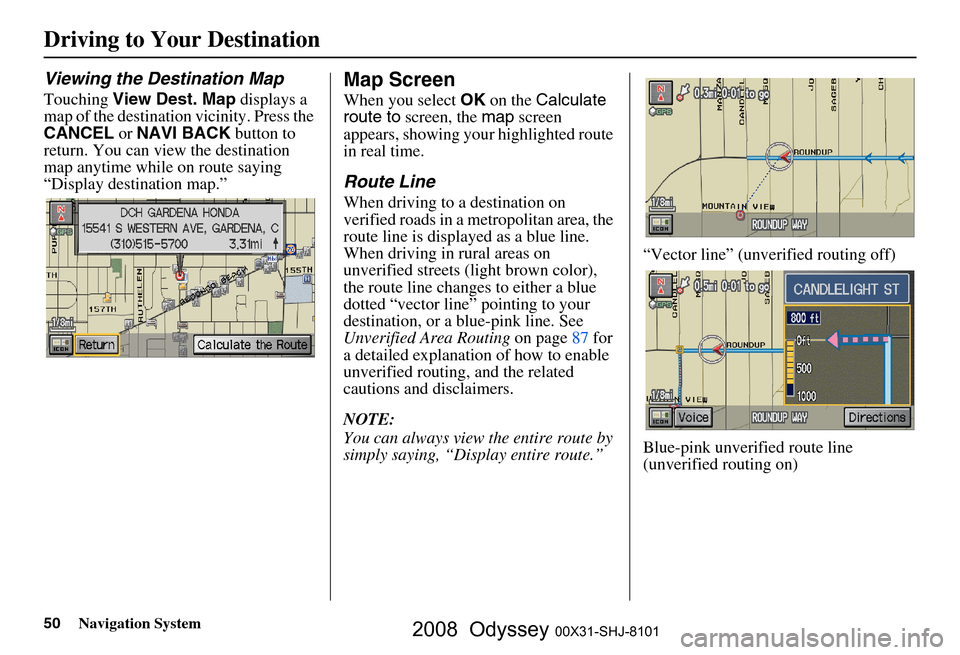
Touching View Dest. Map displays a
map of the destination vicinity. Press the
CANCEL or NAVI BACK button to
return. You can view the destination
map anytime while on route saying
“Display destination map.”
Map Screen
When you select OK on the Calculate
route to screen, the map screen
appears, showing your highlighted route
in real time.
Route Line
When driving to a destination on
verified roads in a metropolitan area, the
route line is displayed as a blue line.
When driving in rural areas on
unverified streets (light brown color),
the route line changes to either a blue
dotted “vector line” pointing to your
destination, or a blue-pink line. See
Unverified Area Routing on page
87 f or
a detailed explanatio n of how to enable
unverified routing, and the related
cautions and disclaimers.
NOTE:
You can always view the entire route by
simply saying, “Display entire route.” “Vector line” (unverified routing off)
Blue-pink unverified route line
(unverified routing on)
2008 Odyssey 00X31-SHJ-8101
Page 54 of 148
54Navigation System
Driving to Your Destination
Distance and Time to
Destination
When you select a destination, the
distance to the destination is the actual
road distance of the calculated route,
and “not as the crow flies.” When
viewing a list of destinations (points of
interest), such as restaurants, the
distance is “as the crow flies” (see Sort
by Distance to Travel on page
37 ).
The displayed time to destination may
differ from the actual travel time
because the time is calculated based on
the posted road speed data and your
current speed. If part of your route
includes unverified roads, the “distance”
and “time to go” fo r that portion is
estimated using 25 mph as an average
speed.
Direction List
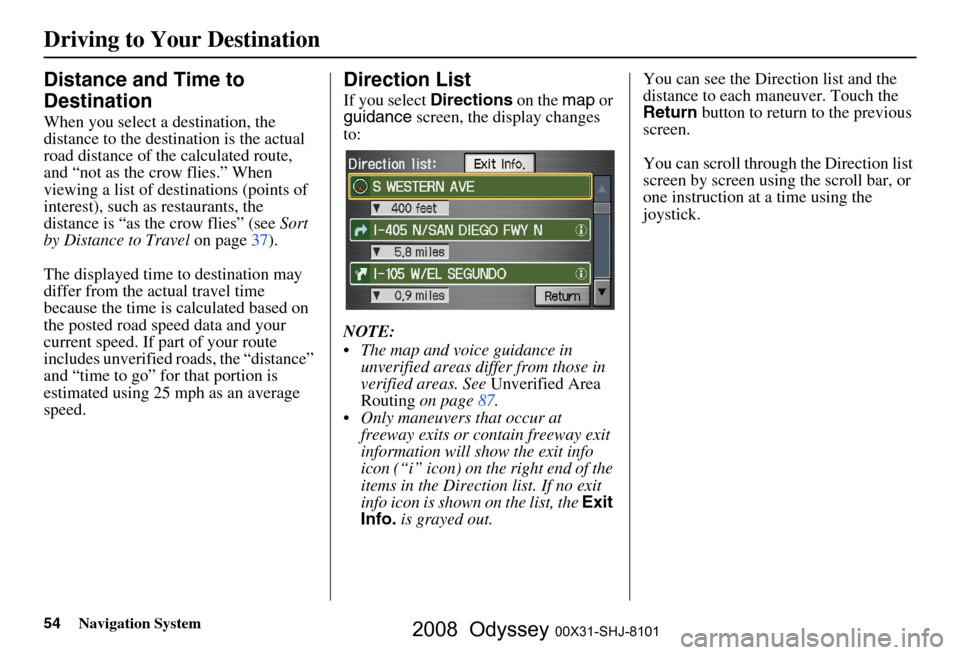
If you select Directions on the map or
guidance screen, the display changes
to:
NOTE:
The map and voice guidance in unverified areas differ from those in
verified areas. See Unverified Area
Routing on page
87.
Only maneuvers that occur at freeway exits or contain freeway exit
information will show the exit info
icon (“i” icon) on the right end of the
items in the Direction list. If no exit
info icon is shown on the list, the Exit
Info. is grayed out. You can see the Direction list and the
distance to each maneuver. Touch the
Return
button to return to the previous
screen.
You can scroll through the Direction list
screen by screen using the scroll bar, or
one instruction at a time using the
joystick.
2008 Odyssey 00X31-SHJ-8101
Page 57 of 148

Navigation System57
Map Orientation
The map can be orientated two ways:
North-up: North pointing up as you
would normally view a paper map.
Heading-up: The map constantly rotates so the road you are driving on
always points up (as you see the road
through your front windshield).
NOTE:
The red arrow in both heading symbols
always shows the direction north. Touch the Map Orientation icon on the
map
screen to switch between the
available orientation, or say “Display
heading up” or “Display north up.”
In the larger map scales (above
1 mile or 1.6 kilometer), the map is
always oriented with north facing
upward. You cannot change the
orientation.
To view other areas on the map, move
the joystick left, right, up, or down. The
map will shift in that direction. To
return the map to your current location,
press either the MAP/GUIDE, the
CANCEL , or the NAVI BACK button
on the steering wheel. The display automati
cally changes to
the map screen when you reach your
destination. Press the MENU button to
return to the Enter destination by
screen.
NOTE:
For information on the available voice commands, see Voice
Command Index on page
132 .
If you are on a route and the joystick is moved, the “Time to Destination”
and “Distance to Destination”
indications are re placed with an
indicator showing distance from the
current vehicle location.
“North Up”
“Heading Up”
Driving to Your Destination
2008 Odyssey 00X31-SHJ-8101