Page 120 of 280

You operate the disc player with the
same controls used f or the radio. To
select the disc player, press the CD
button. You will see ‘‘CD’’ in the
display. The number of the track
playing is shown in the display. The
system will continuously play a disc
until you change modes.
To load or play discs, the ignition
switch must be in the ACCESSORY
(I) or ON (II) position.The specif ications of the compatible
WMA f ile are:
The disc player can also play CD-Rs
andCD-RWscompressedinCD-
TEXT,MP3,andWMAformats.
When playing a disc in MP3 or WMA,
you will see ‘‘MP3’’ or ‘‘WMA’’ in the
display. You can see up to 99 f olders,
and select up to 255 tracks/f iles. Sampling f requency: 32/44.1/48 kHz
(MPEG1), 24, 22.05, 16 kHz
(MPEG2)
Bit rate: 32/40/48/56/64/80/96/
112/128/160/192/224/256/320 kbps
(MPEG1), 8/16/24/32/40/48/56/
64/80/96/112/128/160 kbps
(MPEG2)
Compatible with variable bit rate and
multi-session.
Maximum layers
(including ROOT): 8 layers
The specif ications of the compatible
MP3 f ile are:
Sampling f requency: 32/44.1/48 kHz
Bit rate: 48/64/80/96/128/160/192
kbps
Compatible with variable bit rate and
multi-session.
Maximum layers (including ROOT):
8 layers
NOTE:
If a f ile on an MP3 or WMA disc is
protected by digital rights
management (DRM), the audio unit
displays FORMAT, and then skips to
the next f ile.
Video CDs and DVDs will not work
in this unit.
CONT INUED
On Sport model
Playing a Disc
To Play a Disc
Features
117
�\f���—�\f���—�����y���\f����
������y���
�(�������
�\f�y�\f�
�����y
2008 Fit
Page 126 of 280

Thechartontherightexplainsthe
error messages you may see in the
display while playing a disc.
If you see an error message in the
display while playing a disc, press
the eject button. After ejecting the
disc, check it for damage or
deformation. If there is no damage,
insert the disc again.
For the additional information on
damaged discs, see page .
Theaudiosystemwilltrytoplaythe
disc. If there is still a problem, the
error message will reappear. Press
the eject button, and pull out the disc.Error Massage Cause Solution
Insert a dif f erent disc. If the new
disc plays, there is a problem with
the f irst disc. If the error message
cycle repeats and you cannot clear it,
take your vehicle to a dealer. 125
High temperature
Track/File format not
supported
Mechanical Error
Servo Error Will disappear when the temperature returns to
normal.
Current track will be skipped. The next
supported track or file plays automatically.
Press the EJECT button and pull out the disc.
Check the disc for serious damage, signs of
deformation, excessive scratches, and/or dirt
(see page125).Insert the disc again. If the code
does not disappear, or the disc cannot be
removed, consult your dealer. Do not try to
force the disc out of the player.
Disc Player Error Messages
Features
123
HEAT ERROR
FORMAT
BAD DISC
PLEASE CHECK OWNER’S
MANUAL PUSH EJECT
BAD DISC
PLEASE CHECK OWNER’SMANUAL
�\f���—�\f���—�����y���\f�����������y���
�(�������
�\f�y�\f�
�����y
2008 Fit
Page 127 of 280

When a disc is not being played,
store it in its case to protect it f rom
dust and other contamination. To
prevent warpage, keep discs out of
direct sunlight and extreme heat.
To clean a disc, use a clean sof t cloth.
Wipe across the disc f rom the center
to the outside edge.
A new disc may be rough on the
inner and outer edges. The small
plastic pieces causing this roughness
can f lake of f and f all on the
recording surf ace of the disc,
causing skipping or other problems.
Remove these pieces by rubbing the
inner and outer edges with the side
of a pencil or pen.Handle a disc by its edges; never
touch either surf ace. Do not place
stabilizer rings or labels on the disc.
These, along with contamination
f rom f inger prints, liquids, and f elt-
tip pens, can cause the disc to not
play properly, or possibly jam in the
drive.
When recording a CD-R or
CD-RW, the recording must be
closedforittobeusedbythe
system.
When using CD-R or CD-RW discs,
use only high quality discs labeled
f or audio use.
Never try to insert f oreign objects in
the disc player.
Handle your discs properly to
prevent damage and skipping.
Play only standard round discs.
Odd-shaped discs may jam in the
driveorcauseotherproblems.
General Inf ormation Protecting Discs
Protecting Your Discs
124
Do not use discs with adhesive labels.
The label can curl up and cause the
disc to jam in the unit.
�\f���—�\f���—�����y���\f�����������y���
�(�������
�\f�y�\f�
�����y
2008 Fit
Page 128 of 280
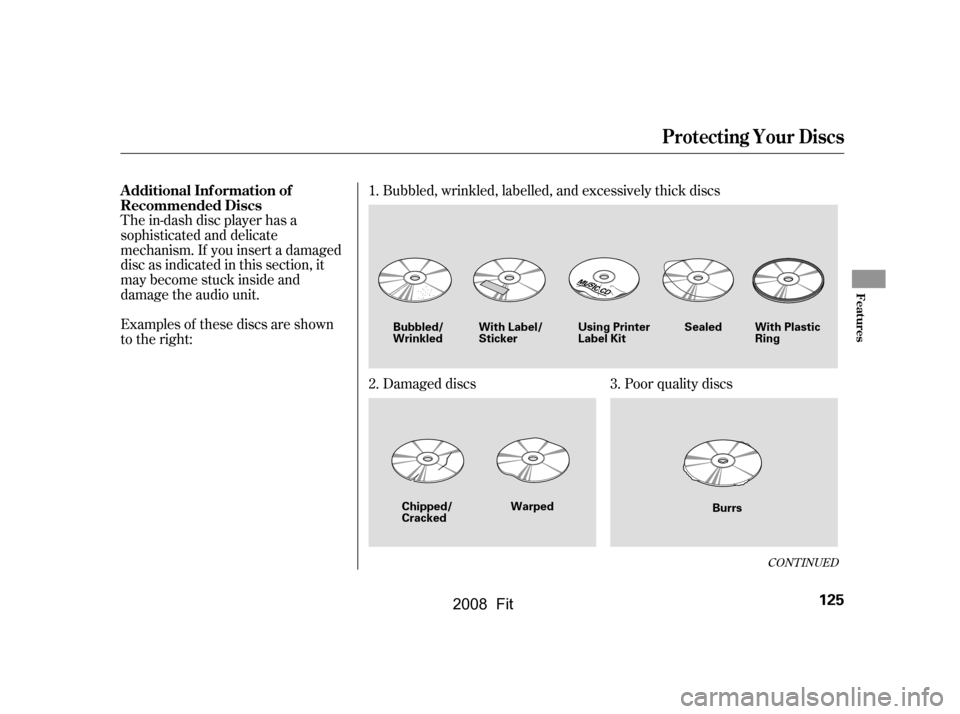
Examples of these discs are shown
to the right:
The in-dash disc player has a
sophisticated and delicate
mechanism. If you insert a damaged
disc as indicated in this section, it
maybecomestuckinsideand
damage the audio unit.Bubbled, wrinkled, labelled, and excessively thick discs
Damaged discs Poor quality discs
1.
2. 3.
CONT INUED
Additional Inf ormation of
Recommended Discs
Protecting Your Discs
Features
125
Sealed With Plastic
Ring
Bubbled/
Wrinkled
Warped Burrs
With Label/
Sticker
Using Printer
Label Kit
Chipped/
Cracked
�\f���—�\f���—�����y���\f�����������y���
�(�������
�\f�y�\f�
���\f�y
2008 Fit
Page 129 of 280
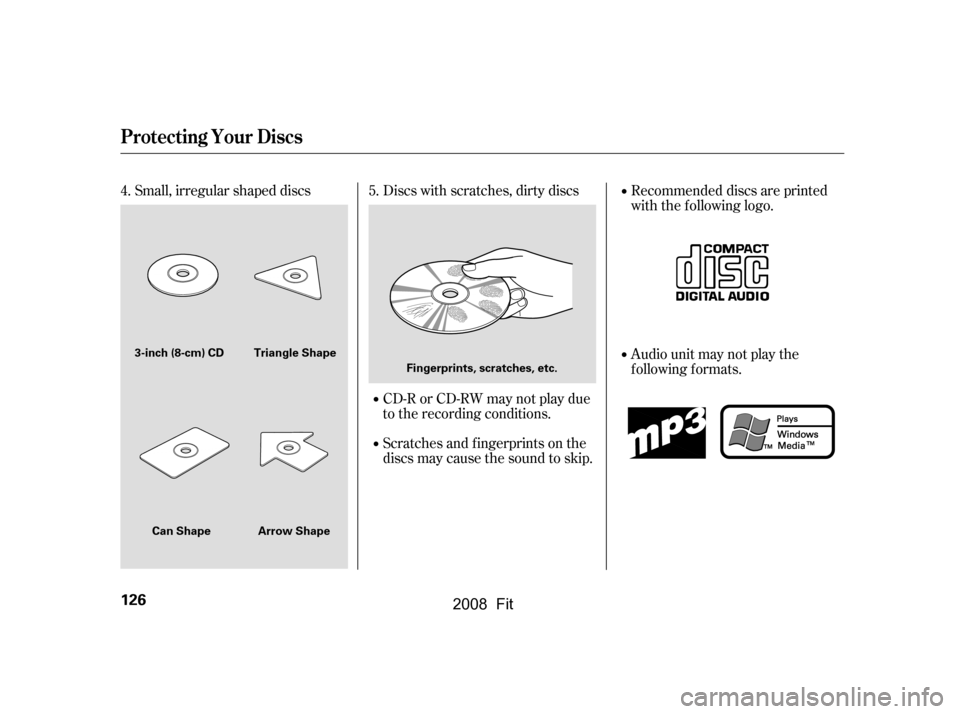
Small, irregular shaped discs Discs with scratches, dirty discsCD-R or CD-RW may not play due
to the recording conditions.
Scratches and f ingerprints on the
discs may cause the sound to skip.Recommended discs are printed
with the f ollowing logo.
Audio unit may not play the
following formats.
4. 5.
Protecting Your Discs
126
Fingerprints, scratches, etc.
3-inch (8-cm) CD Triangle Shape
Arrow Shape
Can Shape
�\f���—�\f���—�����y���\f�����������y���
�(�������
�\f�y�\f�
���
�y
2008 Fit
Page 130 of 280
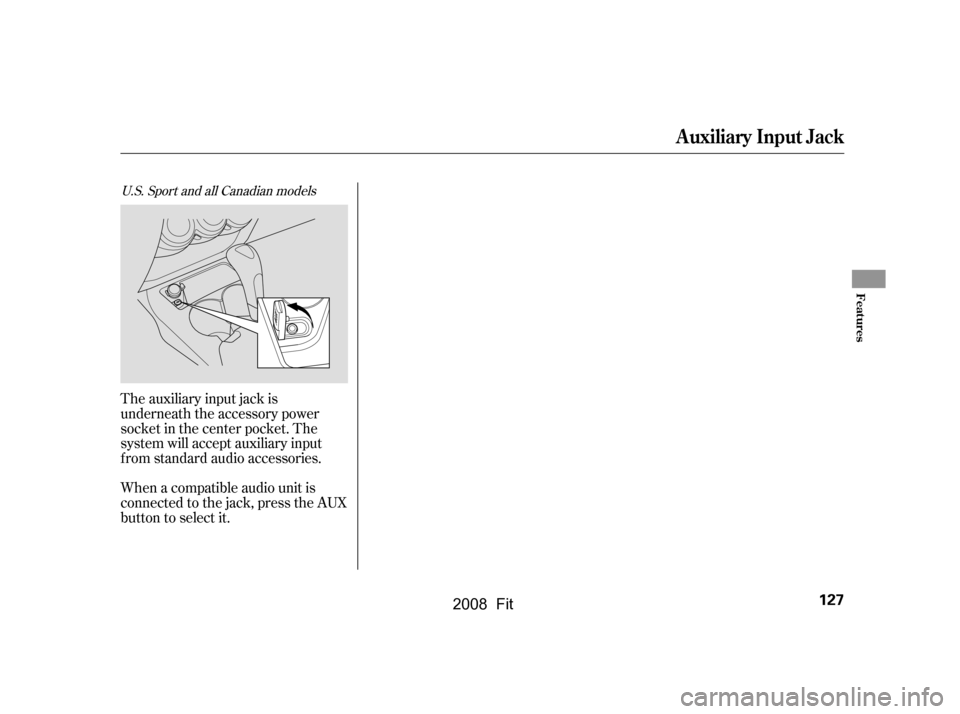
The auxiliary input jack is
underneath the accessory power
socket in the center pocket. The
system will accept auxiliary input
f rom standard audio accessories.
When a compatible audio unit is
connected to the jack, press the AUX
button to select it.
U.S. Sport and all Canadian models
Auxiliary Input Jack
Features
127
�\f���—�\f���—�����y���\f�����������y���
�(�������
�\f�y�\f�
�����y
2008 Fit
Page 131 of 280

Your vehicle’s audio system will
disable itself if it is disconnected
f rom electrical power f or any reason.
To make it work again, you must
enter a specif ic f ive-digit code in the
preset buttons. Because there are
hundreds of number combinations
possible f rom f ive digits, making the
system work without knowing the
exact code is nearly impossible.
Youshouldhavereceivedacardthat
lists your audio system’s code and
serial numbers. It is best to store this
card in a saf e place at home. In
addition, you should write the audio
system’s serial number in this owner’s
manual.
If you lose the card, you must obtain
the code number f rom a dealer. To
do this, you will need the system’s
serial number.If your vehicle’s battery is
disconnected or goes dead, or the
radio f use is removed, the audio
system will disable itself . If this
happens, you will see ‘‘ENTER
CODE’’ in the f requency display the
nexttimeyouturnonthesystem.
Use the preset buttons to enter the
code. The code is on the radio code
card included in your owner’s
manual kit. When it is entered
correctly, the radio will start playing.
If you make a mistake entering the
code, do not start over; complete the
f ive-digit sequence, then enter the
correct code. You have 10 tries to
enter the correct code. If you are
unsuccessf ul in 10 attempts, you
must then leave the system on for 1
hour bef ore trying again.
Radio T hef t Protection
128
�\f���—�\f���—�����y���\f�������\f���y���
�(�������
�\f�y�\f�
�����y
2008 Fit
Page 133 of 280
Once the security system is set,
opening any door, the tailgate, or the
hood without using the key or the
remote transmitter, will cause it to
alarm. It also alarms if the radio is
removed f rom the dashboard or the
wiring is cut.The security system will not set if
the hood, tailgate, or any door is not
f ully closed. If the system will not set,
check the door and tailgate open
indicator on the instrument panel
(see page ) to see if the doors and
tailgatearefullyclosed.Sinceitis
notpartofthemonitordisplay,
manually check the hood.
To see if the system is set
af ter you exit the vehicle, press the
LOCK button on the remote
transmitter within 5 seconds. If the
system is set, the horn will beep
once.
Do not attempt to alter this system
or add other devices to it.
The security system helps to protect
your vehicle and valuables f rom thef t.
The horn sounds and a combination
of headlights, position lights, side
marker lights and taillights f lashes if
someone attempts to break into your
vehicle or remove the audio unit.
This alarm continues f or 2 minutes,
then the system resets. To reset an
alarming system before the 2
minutes have elapsed, unlock the
driver’s door with the key or the
remote transmitter.
The alarm will also be activated if
the passenger inside the locked
vehicle turns the ignition switch on.
The security system automatically
sets 15 seconds after you lock the
doors, hood, and the tailgate. For the
system to activate, you must lock the
doorsandthetailgatefromthe
outside with the key, driver’s lock
tab, door lock master switch, or
remote transmitter. The security
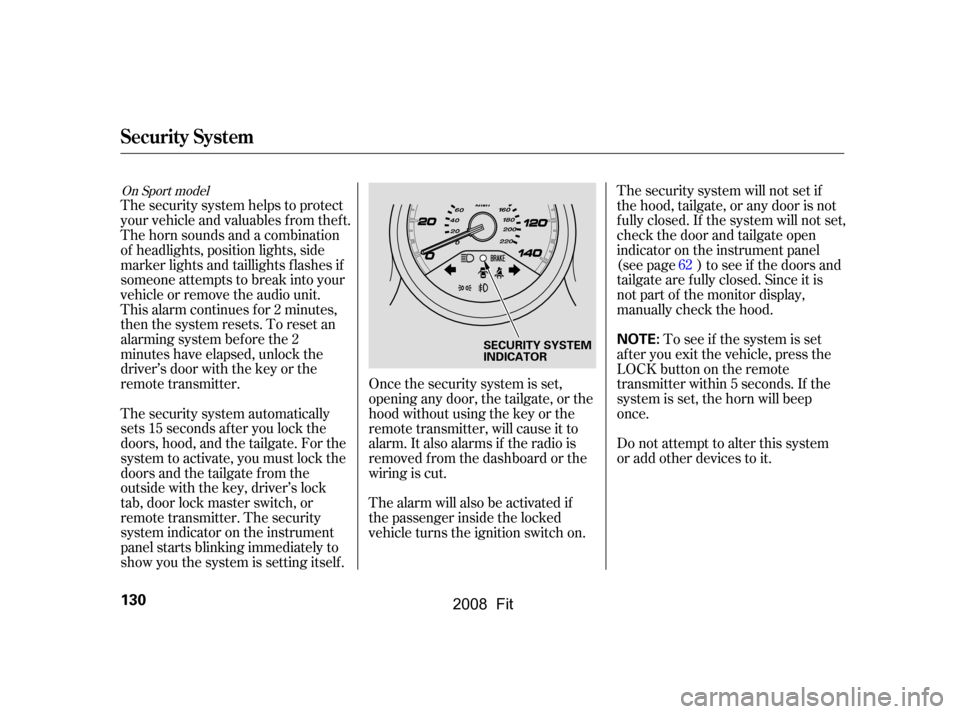
system indicator on the instrument
panel starts blinking immediately to
show you the system is setting itself . 62
On Sport model
Security System
130
NOTE:SECURITY SYSTEM
INDICATOR
�\f���—�\f���—�����y���\f�������
���y���
�(�������
�\f�y�\f�
�����y
2008 Fit