Page 79 of 373

�µ
�µ �µ
Push down on the
lever to signal a lef t turn and up to
signal a right turn. To signal a lane
change, push lightly on the lever,
and hold it. The lever will return to
center when you release it or
complete a turn.
Turning the switch to
the ‘‘ ’’ position turns on the
parking lights, taillights, instrument
panel lights, side-marker lights, and
rear license plate light.
Turning the switch to the ‘‘ ’’
position turns on the headlights. If
you leave the lights on with the key
removed f rom the ignition switch,
you will hear a reminder chime when
you open the driver’s door. With the headlight switch in the of f
or position, the high beam
headlights and the high beam
indicator come on with reduced
brightness when you turn the
ignition switch to the ON (II)
position and release the parking
brake. They remain on until you turn
the ignition switch of f , even if you
set the parking brake.
The headlights revert to normal
operation when you turn them on
with the switch.
When the light switch is in either of
these positions, the lights on
indicator comes on as a reminder.
This indicator stays on if you leave
the lights on and turn the ignition
switch to the ACCESSORY (I) or
LOCK (0) position.
Push the lever
f orward and the high beam indicator
will come on (see page ). Pull it
back to return to low beams.
To f lash the high beams, pull the
lever back lightly, then release it.
The high beams will stay on as long
as you hold the lever back. 63
Turn Signal
Headlights
Daytime Running L ights
High Beams
Turn Signals and Headlights
Inst rument s and Cont rols
75
�\f���—�\f���—�����y�
���������\f���y���
�(�,�����
�\f�y�\f�\f���\f�y
2008 CR- V
Page 81 of 373
Pushing this button also turns the
mirror heaters on or of f . For more
inf ormation, see page .
Thedefoggerwiresontheinsideof
the rear window can be accidentally
damaged. When cleaning the glass,
always wipe side-to-side.
Make sure the rear window is clear
and you have good visibility bef ore
starting to drive.
The def ogger will shut itself of f
withinabout10to30minutes
according to the outside temperature.
The rear window def ogger will clear
fog, frost, and thin ice from the
window. Push the def ogger button to
turn it on and off. The indicator in
the button comes on to show the
def ogger is on. It also shuts of f when
you turn of f the ignition switch. You
have to turn the defogger on again
when you restart the vehicle. 112
If equipped
On vehicles with automatic air
conditioning system
Rear Window Def ogger
Inst rument s and Cont rols
77
Manual A/C type is shown.
�\f���—�\f���—�����y�
�������������y���
�(�,�����
�\f�y�\f�\f�����y
2008 CR- V
Page 82 of 373
Push the lever under the steering
column all the way down.
Make any steering wheel adjustment
bef ore you start driving.
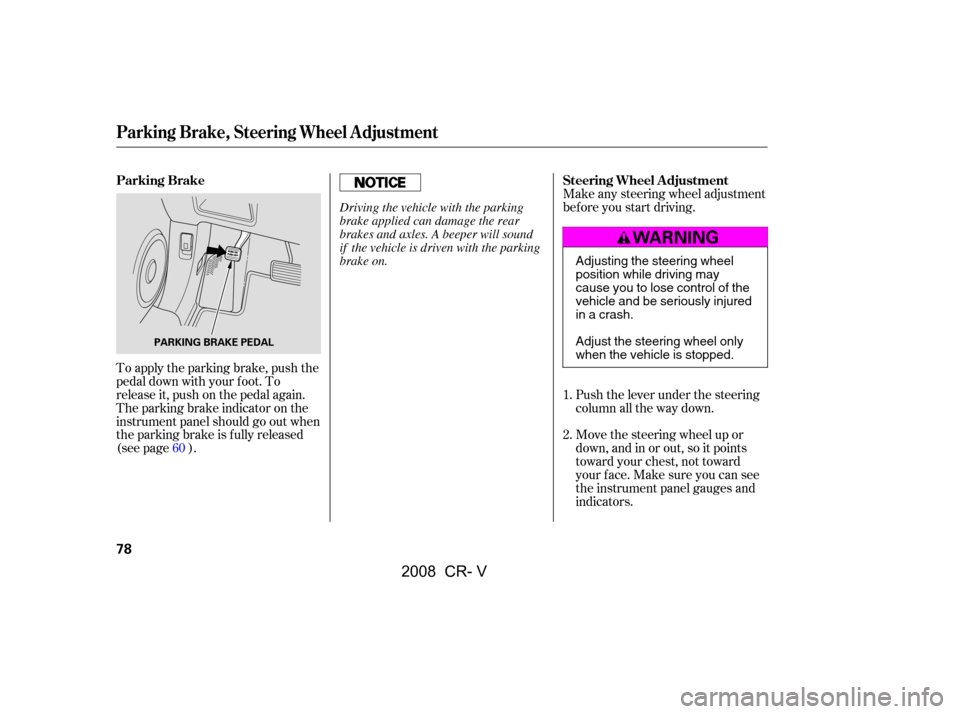
To apply the parking brake, push the
pedal down with your f oot. To
release it, push on the pedal again.
The parking brake indicator on the
instrument panel should go out when
the parking brake is fully released
(see page ). Move the steering wheel up or
down, and in or out, so it points
toward your chest, not toward
your f ace. Make sure you can see
the instrument panel gauges and
indicators.
1.
2.
60
Parking Brake Steering Wheel A djustment
Parking Brake, Steering Wheel A djustment
78
PARKING BRAKE PEDAL
Adjusting the steering wheel
position while driving may
cause you to lose control of the
vehicle and be seriously injured
inacrash.
Adjust the steering wheel only
when the vehicle is stopped.
Driving the vehicle with the parking
brake applied can damage the rear
brakes and axles. A beeper will sound
if the vehicle is driven with the parking
brake on.
�\f���—�\f���—�����y�
�����������
�y���
�(�,�����
�\f�y�\f�\f�����y
2008 CR- V
Page 87 of 373

With any door and the tailgate open
and the key in the ignition, locking
with master door lock switches is
disabled. The lock tab on the driver’s
door is not disabled if the driver’s
door is closed. Pulling the driver’s
lock tab rearward will lock all doors
and the tailgate. If you try to lock an
open driver’s door by pulling the lock
tab rearward, the lock tab on the
driver’s door pops out and unlocks
the driver’s door.When you customize the setting,
make sure your vehicle is parked
saf ely, the engine is of f , and apply
the parking brake. Make all settings
bef ore you start driving.The auto door locking f eature has
three possible settings:
The auto door locking is
deactivated all the time.
The doors and the tailgate lock
whenever you move the shif t lever
out of the Park (P) position.
The doors and the tailgate lock
when the vehicle speed reaches
9mph(15km/h).
This is the factory setting.
Your vehicle has customizable
settings f or the doors and tailgate to
automatically lock and unlock. There
are default settings for each of these
f eatures. You can turn of f or change
the settings for these features as
described on the f ollowing pages.
L ockout Prevent ionA uto Door L ocking/Unlocking A uto Door L ocking
Door L ocks
Inst rument s and Cont rols
83
�\f���—�\f���—�����y�
���������
���y���
�(�,�����
�\f�y�\f�\f�����y
2008 CR- V
Page 96 of 373
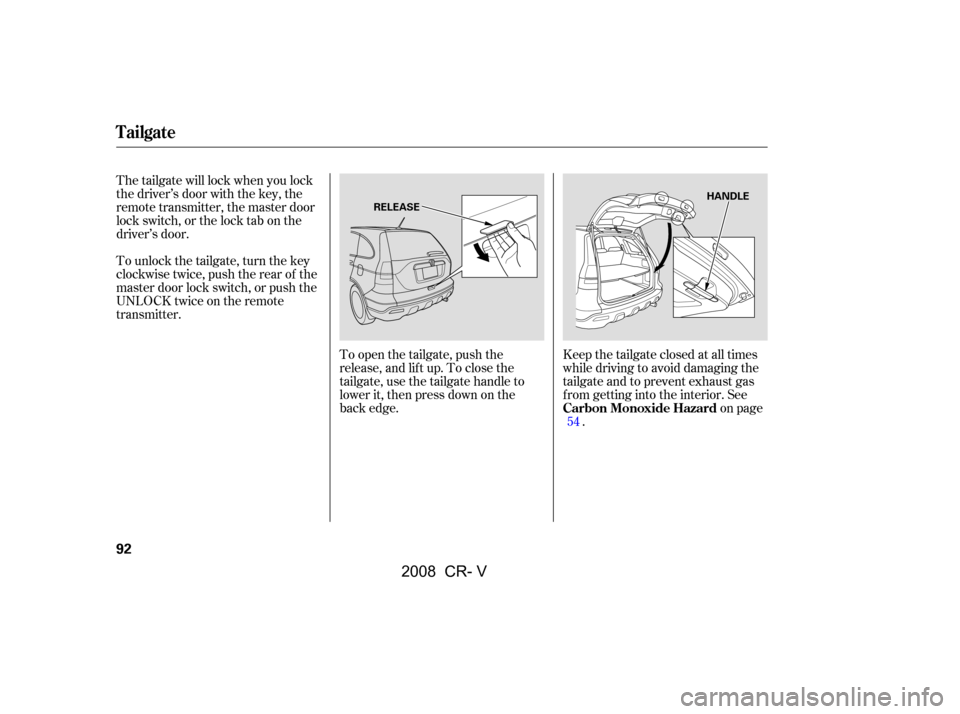
To open the tailgate, push the
release, and lift up. To close the
tailgate, use the tailgate handle to
lower it, then press down on the
back edge.Keep the tailgate closed at all times
while driving to avoid damaging the
tailgate and to prevent exhaust gas
f rom getting into the interior. See
on page
.
The tailgate will lock when you lock
the driver’s door with the key, the
remote transmitter, the master door
lock switch, or the lock tab on the
driver’s door.
To unlock the tailgate, turn the key
clockwise twice, push the rear of the
master door lock switch, or push the
UNLOCK twice on the remote
transmitter.
54
Carbon Monoxide Hazard
Tailgate
92
HANDLE
RELEASE
�\f���—�\f���—�����y�
�����������
�y���
�(�,�����
�\f�y�\f�\f�����y
2008 CR- V
Page 98 of 373
�µ
See pages f or important saf ety
inf ormation and warnings about how toproperly position the seats and seat-backs. 17 18
EX-L model only
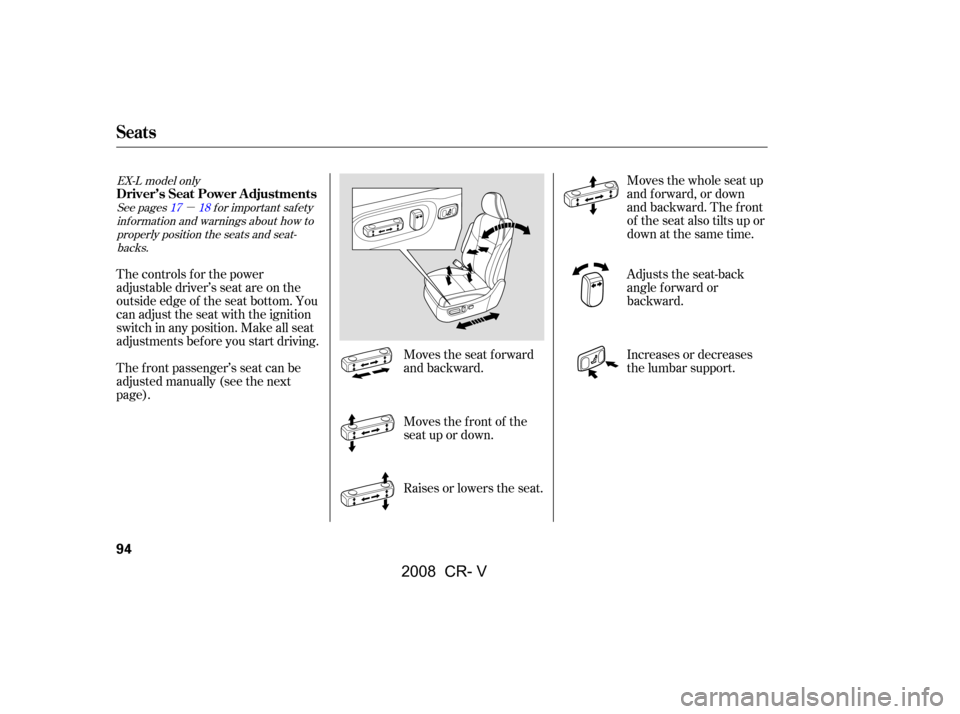
The controls f or the power
adjustable driver’s seat are on the
outside edge of the seat bottom. You
can adjust the seat with the ignition
switch in any position. Make all seat
adjustments before you start driving.
The f ront passenger’s seat can be
adjusted manually (see the next
page). Moves the seat forward
and backward.
Moves the f ront of the
seat up or down.
Raises or lowers the seat.Moves the whole seat up
and f orward, or down
and backward. The front
of the seat also tilts up or
down at the same time.
Adjusts the seat-back
angle f orward or
backward.
Increases or decreases
the lumbar support.
Seats
Driver’s Seat Power A djustments
94
�����—�����—�����y�
�������������y���
�(�,�����
���y���������y
2008 CR- V
Page 99 of 373
�µ
See pagesf or important saf ety
inf ormation and warnings about how toproperly position the seats and seat-backs. 1113
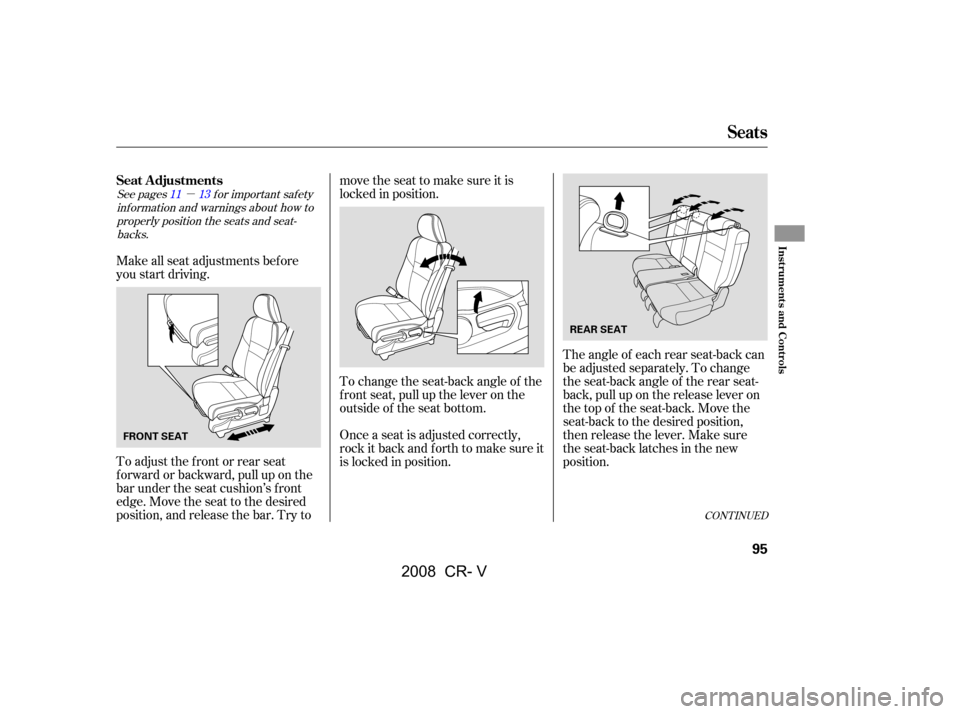
Make all seat adjustments bef ore
you start driving.
To adjust the front or rear seat
forward or backward, pull up on the
bar under the seat cushion’s f ront
edge. Move the seat to the desired
position, and release the bar. Try to movetheseattomakesureitis
locked in position.
To change the seat-back angle of the
f ront seat, pull up the lever on the
outside of the seat bottom.
Once a seat is adjusted correctly,
rock it back and f orth to make sure it
is locked in position.
The angle of each rear seat-back can
be adjusted separately. To change
the seat-back angle of the rear seat-
back, pull up on the release lever on
the top of the seat-back. Move the
seat-back to the desired position,
then release the lever. Make sure
the seat-back latches in the new
position.
CONT INUED
Seat A djustments
Seats
Inst rument s and Cont rols
95
FRONT SEAT REAR SEAT
�\f���—�\f���—�����y�
�������������y���
�(�,�����
�\f�y�\f�
�\f�\f�y
2008 CR- V
Page 101 of 373
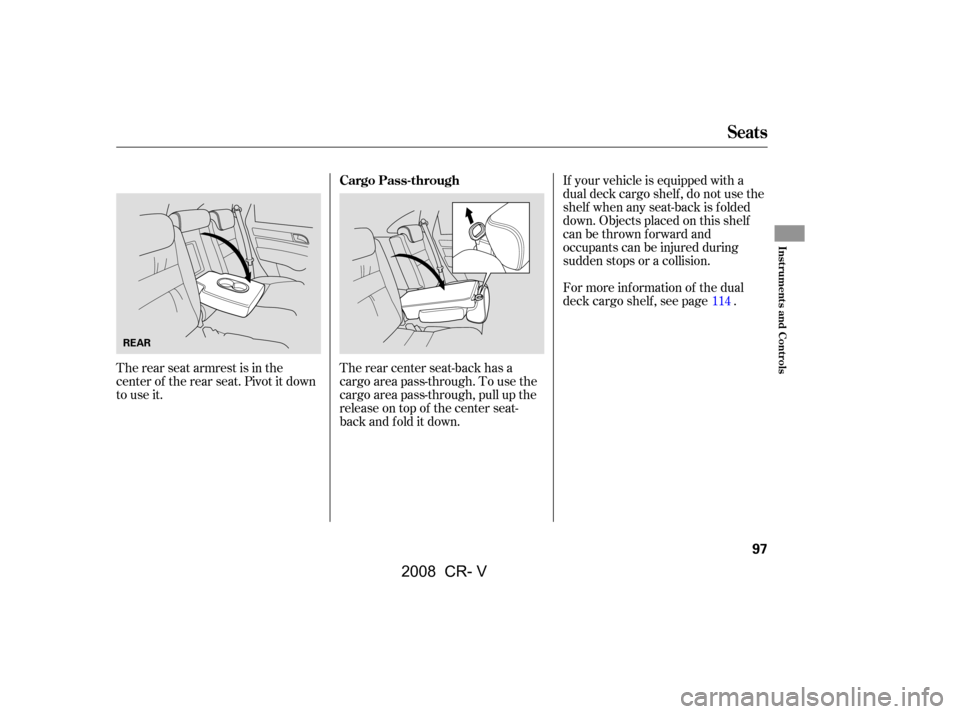
The rear seat armrest is in the
center of the rear seat. Pivot it down
to use it.If your vehicle is equipped with a
dual deck cargo shelf , do not use the
shelf when any seat-back is f olded
down. Objects placed on this shelf
canbethrownforwardand
occupants can be injured during
sudden stops or a collision.
For more inf ormation of the dual
deck cargo shelf , see page .
The rear center seat-back has a
cargo area pass-through. To use the
cargo area pass-through, pull up the
release on top of the center seat-
backandfolditdown. 114
Seats
Cargo Pass-through
Inst rument s and Cont rols
97
REAR
�\f���—�\f���—�����y�
���������
���y���
�(�,�����
�\f�y�\f�
�\f���y
2008 CR- V