Page 181 of 413
�µ�µ
If the MAIN switch is OFF, the
passenger windows cannot be raised
or lowered. Keep the MAIN switch
off whenyouhavechildreninthe
vehicle so they do not injure
themselves by operating the
windows unintentionally. To open or close the
driver’s window, push or pull the
window switch firmly down or up to
the second detent, and release it.
The window will automatically go
down or up all the way. To stop the
window, pull or push the window
switch brief ly.
If the driver’s
window senses any obstacle while it
is closing automatically, it will
reverse direction, and then stop. To
close the window, remove the
obstacle, then use the window switch
again.
Auto reverse stops sensing when the
window is almost closed. You should
always check that all passengers and
objects are away from the window
bef ore closing it.
Turn the ignition switch to the ON
(II) position to raise or lower any
window. To open a window, push the
switchdownandholdit.Releasethe
switch when you want the window to
stop. Pull back on the switch and
hold it to close the window.
The windows will operate f or up to
10 minutes af ter you turn of f the
ignition switch. Opening either f ront
door cancels this f unction.
CONT INUED
Except DX and Canadian DX-G
Except DX and Canadian DX-G
Power Windows
AUTO
AUTO REVERSE
Inst rument s and Cont rols
99
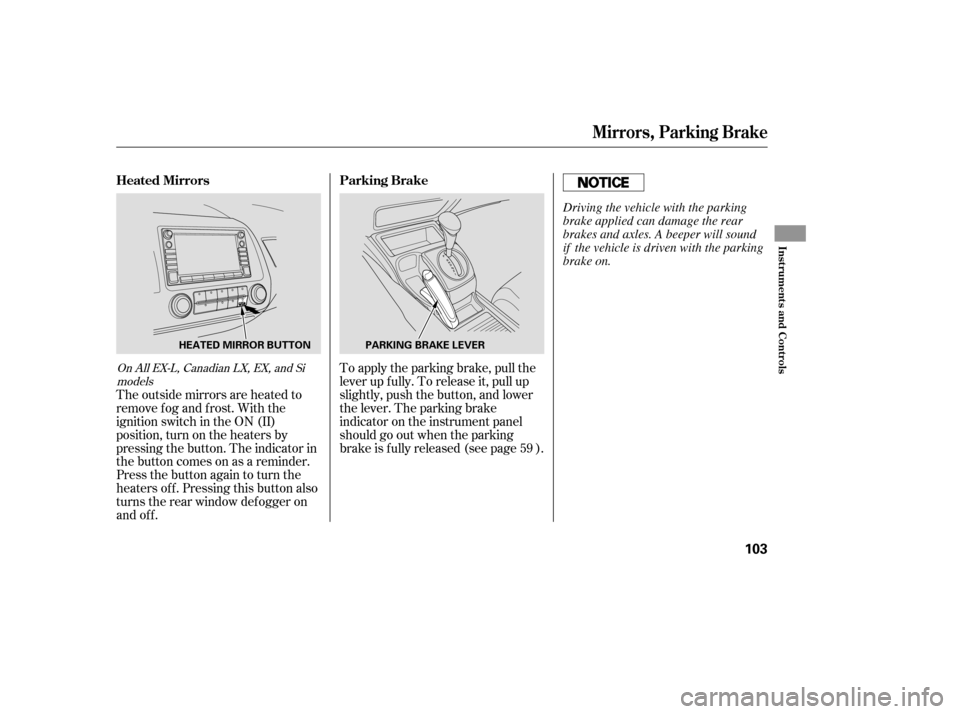
DRIVER’S WINDOW SWITCH
MAIN SWITCH
Closing a power window on
someone’s hands or fingers can
cause serious injury.
Make sure your passengers are
away from the windows before
closing them.
�����—�����—�����y���������������y���
�(�#���������y���
�����y
Page 182 of 413
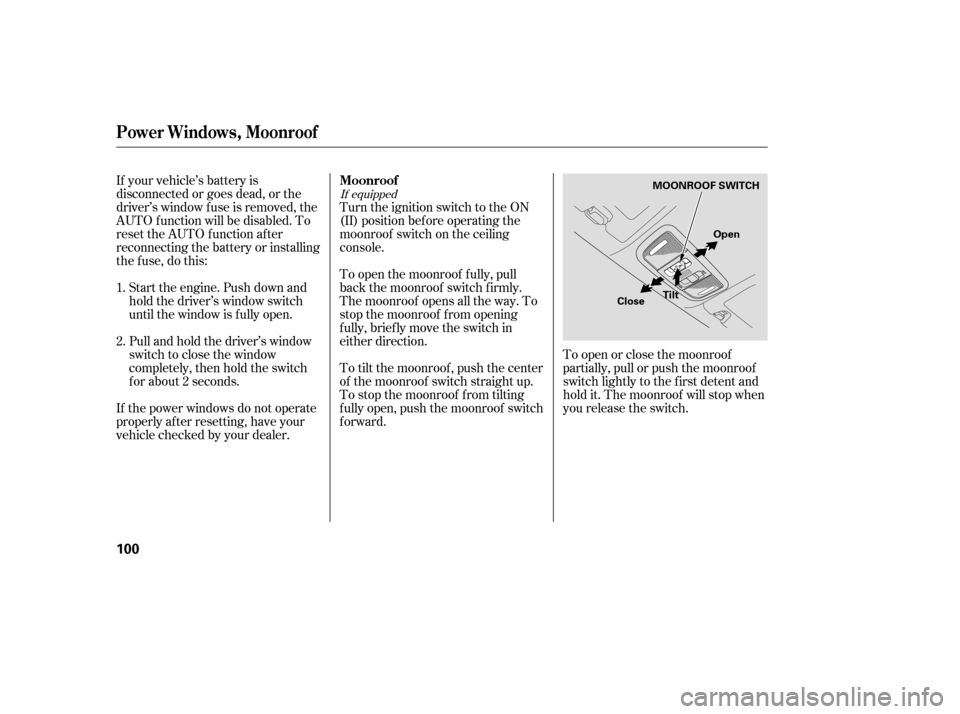
If equipped
Turn the ignition switch to the ON
(II) position bef ore operating the
moonroof switch on the ceiling
console.
To open the moonroof f ully, pull
back the moonroof switch f irmly.
The moonroof opens all the way. To
stop the moonroof f rom opening
f ully, brief ly move the switch in
either direction.
To tilt the moonroof , push the center
of the moonroof switch straight up.
To stop the moonroof f rom tilting
f ully open, push the moonroof switch
forward.To open or close the moonroof
partially, pull or push the moonroof
switch lightly to the f irst detent and
hold it. The moonroof will stop when
you release the switch.
If your vehicle’s battery is
disconnected or goes dead, or the
driver’s window f use is removed, the
AUTO f unction will be disabled. To
reset the AUTO function after
reconnecting the battery or installing
the f use, do this:
Start the engine. Push down and
hold the driver’s window switch
until the window is f ully open.
Pull and hold the driver’s window
switch to close the window
completely, then hold the switch
f or about 2 seconds.
If the power windows do not operate
properly af ter resetting, have your
vehicle checked by your dealer.
1. 2. Moonroof
Power Windows, Moonroof
100
MOONROOF SWITCH
Tilt
Close Open
�����—�����—�����y�����������
���y���
�(�#���������y���
�����y
Page 183 of 413
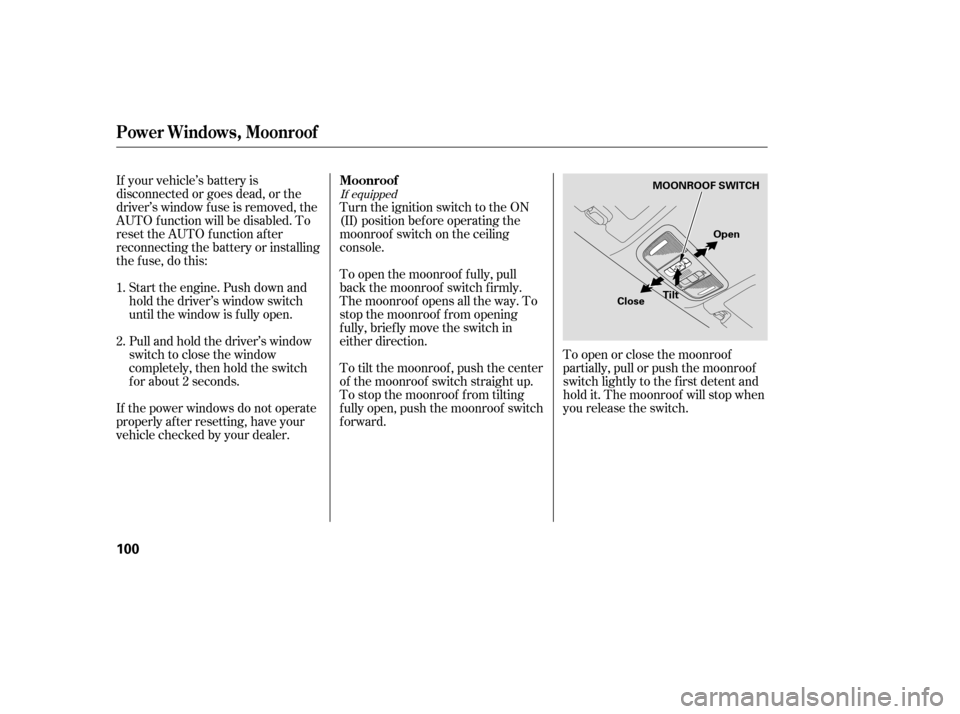
If equipped
Turn the ignition switch to the ON
(II) position bef ore operating the
moonroof switch on the ceiling
console.
To open the moonroof f ully, pull
back the moonroof switch f irmly.
The moonroof opens all the way. To
stop the moonroof f rom opening
f ully, brief ly move the switch in
either direction.
To tilt the moonroof , push the center
of the moonroof switch straight up.
To stop the moonroof f rom tilting
f ully open, push the moonroof switch
forward.To open or close the moonroof
partially, pull or push the moonroof
switch lightly to the f irst detent and
hold it. The moonroof will stop when
you release the switch.
If your vehicle’s battery is
disconnected or goes dead, or the
driver’s window f use is removed, the
AUTO f unction will be disabled. To
reset the AUTO function after
reconnecting the battery or installing
the f use, do this:
Start the engine. Push down and
hold the driver’s window switch
until the window is f ully open.
Pull and hold the driver’s window
switch to close the window
completely, then hold the switch
f or about 2 seconds.
If the power windows do not operate
properly af ter resetting, have your
vehicle checked by your dealer.
1. 2. Moonroof
Power Windows, Moonroof
100
MOONROOF SWITCH
Tilt
Close Open
�����—�����—�����y�����������
���y���
�(�#���������y���
�����y
Page 186 of 413
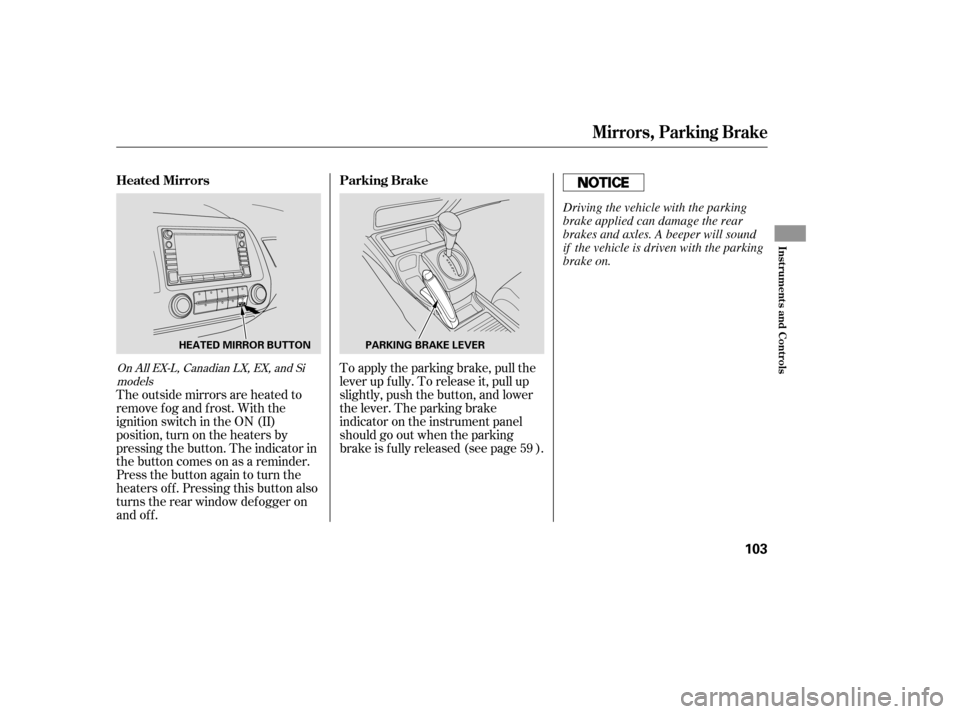
To apply the parking brake, pull the
lever up f ully. To release it, pull up
slightly, push the button, and lower
the lever. The parking brake
indicator on the instrument panel
should go out when the parking
brake is f ully released (see page ).
The outside mirrors are heated to
remove fog and frost. With the
ignition switch in the ON (II)
position, turn on the heaters by
pressing the button. The indicator in
the button comes on as a reminder.
Press the button again to turn the
heaters off. Pressing this button also
turns the rear window def ogger on
and off. 59On All EX-L, Canadian LX, EX, and Si
models
Parking Brake
Heated Mirrors
Mirrors, Parking Brake
Inst rument s and Cont rols
103
PARKING BRAKE LEVER
HEATED MIRROR BUTTON
Driving the vehicle with the parking
brake applied can damage the rear
brakes and axles. A beeper will sound
if the vehicle is driven with the parking
brake on.
�����—�����—�����y���������������y���
�(�#���������y���
�����y
Page 187 of 413
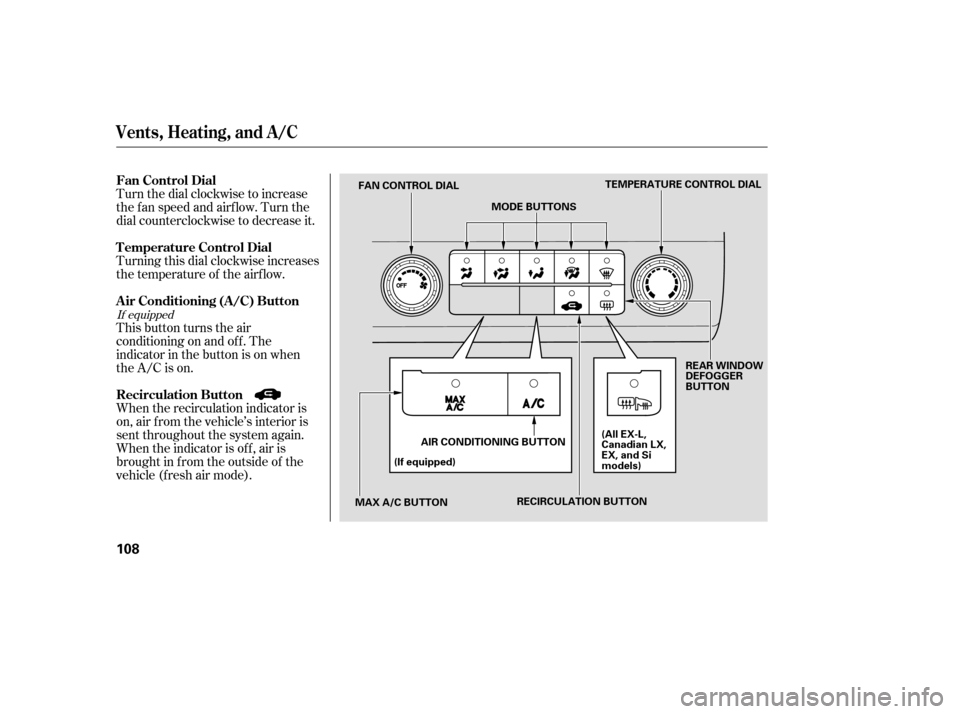
To apply the parking brake, pull the
lever up f ully. To release it, pull up
slightly, push the button, and lower
the lever. The parking brake
indicator on the instrument panel
should go out when the parking
brake is f ully released (see page ).
The outside mirrors are heated to
remove fog and frost. With the
ignition switch in the ON (II)
position, turn on the heaters by
pressing the button. The indicator in
the button comes on as a reminder.
Press the button again to turn the
heaters off. Pressing this button also
turns the rear window def ogger on
and off. 59On All EX-L, Canadian LX, EX, and Si
models
Parking Brake
Heated Mirrors
Mirrors, Parking Brake
Inst rument s and Cont rols
103
PARKING BRAKE LEVER
HEATED MIRROR BUTTON
Driving the vehicle with the parking
brake applied can damage the rear
brakes and axles. A beeper will sound
if the vehicle is driven with the parking
brake on.
�����—�����—�����y���������������y���
�(�#���������y���
�����y
Page 192 of 413
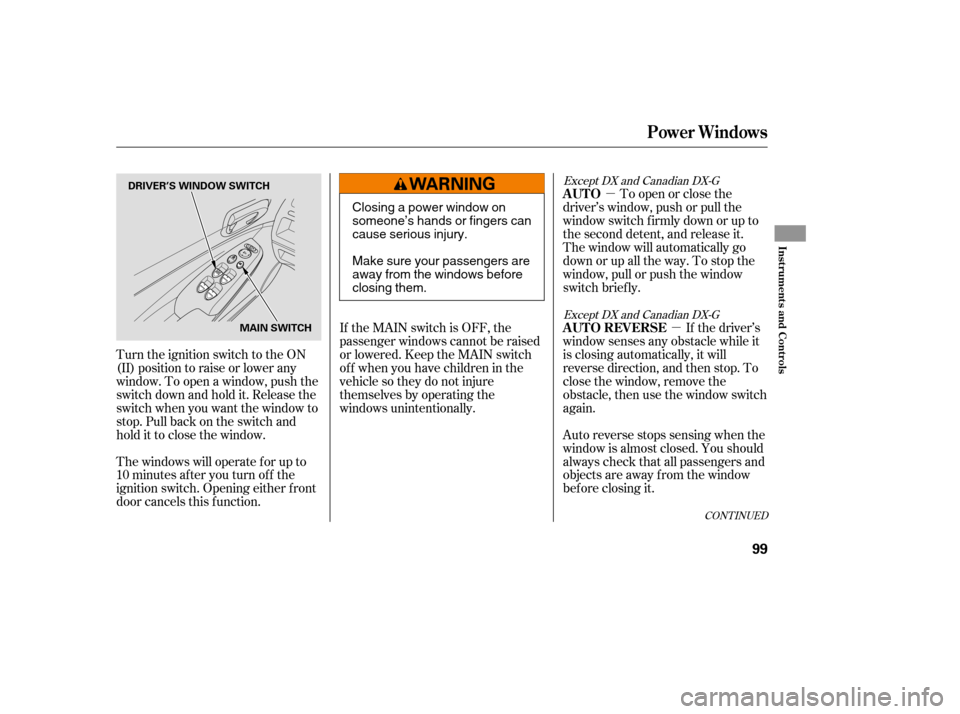
Turn the dial clockwise to increase
the fan speed and airflow. Turn the
dial counterclockwise to decrease it.
Turning this dial clockwise increases
the temperature of the airflow.
This button turns the air
conditioning on and of f . The
indicatorinthebuttonisonwhen
the A/C is on.
When the recirculation indicator is
on, air f rom the vehicle’s interior is
sent throughout the system again.
When the indicator is off, air is
brought in f rom the outside of the
vehicle (fresh air mode).
If equipped
Vents, Heating, and A/C
Air Conditioning (A/C) Button
Fan Control Dial
Recirculation Button
T emperature Control Dial
108
TEMPERATURE CONTROL DIAL
MODE BUTTONS
FAN CONTROL DIAL
MAX A/C BUTTON (If equipped)
AIR CONDITIONING BUTTON REAR WINDOW
DEFOGGER
BUTTON
(All EX-L,
Canadian LX,
EX, and Si
models)
RECIRCULATION BUTTON
�����—�����—�����y�����������
���y���
�(�#���������y���
�
���y
Page 193 of 413

The outside air intakes f or the
heating and cooling system are at
the base of the windshield. Keep this
area clear of leaves and other debris.
Thesystemshouldbeleftinfresh
air mode under almost all conditions.
Keeping the system in recirculation
mode, particularly with the A/C of f ,
can cause the windows to fog up.
Switch to recirculation mode when
driving through dusty or smoky
conditions, then return to fresh air
mode.
This button turns the rear window
def ogger of f and on (see page ).
Use the mode control buttons to
select the vents air flows from. Some
air will f low f rom the dashboard
corner vents in all modes.Air flows from the center
and corner vents in the dashboard.
Airf low is divided between
the vents in the dashboard and the
f loor vents.
Air f lows f rom the f loor
vents. When you select , the
system automatically switches to
f resh air mode.
Airf low is divided between
the f loor vents and def roster vents at
the base of the windshield.
Air f lows f rom the def roster
vents at the base of the windshield.
When you select or ,
the system automatically switches to
f resh air mode and turns on the A/C
(if equipped). The system automatically
turns on the A/C, selects , and
switches to recirculation mode. Each
indicatorinthebuttonisonwhen
the MAX A/C is turned on.
The f low-through ventilation system
draws in outside air, circulates it
through the interior, then exhausts it
through vents near the rear side
panels.
Set the temperature to the lower
limit.
Make sure the A/C is of f .
Select and fresh air mode.
Set the f an to the desired speed.
1. 2. 3.4.
74
If equipped
Vents, Heating, and A/C
Rear Window Def ogger Button
Mode Control MAX A/C Button
Ventilation
Features
109
�����—�����—�����y���������������y���
�(�#���������y���
�
���y
Page 194 of 413

The heater uses engine coolant to
warm the air. If the engine is cold, it
will be several minutes bef ore you
f eel warm air coming f rom the
system.Select .
Set the f an to the desired speed.
Adjust the warmth of the air with
the temperature control dial.
Air conditioning places an extra load
on the engine. Watch the engine
coolant temperature gauge (see page ). If it moves near the red zone,
turn of f the A/C until the gauge
reading returns to normal.
Turn on the A/C by pressing the
button. The indicator in the button
comesonwhenafanspeedis
selected.
Make sure the temperature is set to maximum cool.
Select .
If the outside air is humid, select
recirculation mode. If the outside
air is dry, select f resh air mode.
Set the f an to the desired speed.
you can
cool it down more rapidly by partially
opening the windows, turning on the
A/C, and setting the fan to
maximum speed in f resh air mode.
To cool the interior with MAX A/C: Set the f an to the desired speed.
Select MAX A/C.
The system automatically turns on
the A/C, selects , and
switches to recirculation mode.
Make sure the temperature is set
to maximum cool. Turn the fan on.
If the A/C is of f , turn it on (if
equipped).
Select and fresh air mode.
Adjust the temperature to your
pref erence.
Air conditioning, as it cools, removes
moisture from the air. When used in
combination with the heater, it
makes the interior warm and dry and
can prevent the windows f rom
f ogging up.
This setting is suitable f or all driving
conditions whenever the outside
temperature is above 32°F (0°C).
1.2.3.
3.4. 5.
1. 2. 1. 2. 3.1. 2. 3. 4.
67
If equipped If the interior is very warm,
Vents, Heating, and A/C
Using the Heater
Using the A /C Dehumidif y the Interior
110
�����—�����—�����y���������������y���
�(�#���������y���
�
���y