Page 39 of 413
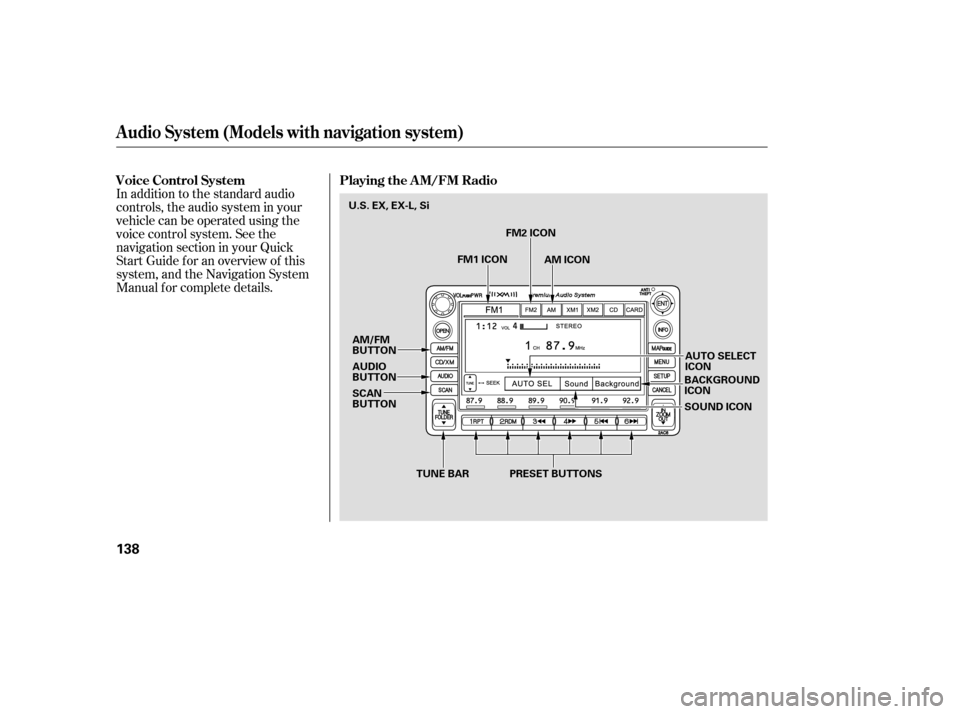
In addition to the standard audio
controls, the audio system in your
vehicle can be operated using the
voice control system. See the
navigation section in your Quick
Start Guide f or an overview of this
system, and the Navigation System
Manual f or complete details.
Voice Control System Playing the A M/FM Radio
Audio System (Models with navigation system)
138
TUNE BAR AUTO SELECT ICON
BACKGROUNDICON
SOUND ICON
AM/FM
BUTTON
AUDIO
BUTTON
SCAN
BUTTON
PRESET BUTTONS
FM2 ICON
AM ICON
FM1 ICON
U.S.EX,EX-L,Si
�����—�����—�
�
�y�
�������������y���
�(�+���������y���
�����y
Page 40 of 413

�µ�Û�Ý
�Û
�Ý
The ignition switch must be in the
ACCESSORY (I) or ON (II) position.
Turn the system on by pushing the
power/volume knob or the AM/FM
button. Adjust the volume by turning
the power/volume knob.
Pushing the AUDIO button will also
turn on the system.
You can also operate the audio
system without using the control
icons on the audio screen. Use the
control buttons on the lef t side of the
screen. The status bar appears on
the bottom of the screen each time
you operate any of the control
buttons. On the navigation screen,
you can also see audio inf ormation
by touching the AUDIO INFO icon
on the lower of the screen. The band and f requency that the
radio was last tuned to are displayed.
To change bands, press the AM/FM
button, or touch the desired band
icon (FM1, FM2, AM, XM1, or XM2).
On the FM band, STEREO will be
displayed if the station is
broadcasting in stereo. Stereo
reproduction on AM is not available.
For inf ormation on XM radio, see
page .
You can use any of f ive methods to
f ind radio stations on the selected
band: tune, seek, scan, the preset
buttons, and auto select.
Use the TUNE bar to tune
the radio to a desired f requency.
Press the side of the bar to tune
to a higher f requency, and press the side to tune to a lower
f requency.
Press and hold the or side of
the TUNE bar until you hear two
beeps to change the f requency
rapidly. Release the bar when the
display reaches the desired
f requency.
142
CONT INUED
Audio System (Models with navigation system)
T o Play the A M/FM Radio
T o Select a Station
TUNE
Features
139
�����—�����—�
�
�y�
�������������y���
�(�+���������y���
�����y
Page 41 of 413

�µ
�µ
�Û�Ý
�µ Each preset button’s f requency is
shown on the bottom of the audio
display.
If you do nothing, the system will
then scan f or the next strong station
andplayitfor10seconds.Whenit
plays a station you want to listen to,
press the SCAN button again.
Each preset button can
store one f requency on AM and two
f requencies on FM.
Select the desired band, AM or
FM. FM1 and FM2 let you store
two f requencies with each preset
button.
Usethetune,seek,orscan
function to tune the radio to a
desired station.
Pick a preset button, and hold it
until you hear a beep.
Repeat steps 1 through 3 to store a
total of six stations on AM and
twelve stations on FM.
The seek f unction
searches up and down f rom the
current f requency to f ind a station
with a strong signal. To activate it,
press and hold the or side of
the TUNE bar until you hear a beep,
then release it.
The scan f unction samples
all stations with strong signals on the
selected band. To activate it, press
the SCAN button, then release it.
You will see SCAN in the display.
The system will scan f or a station
with a strong signal. When it f inds
one, it will stop and play that station
f or about 10 seconds. 1. 2. 3. 4.
Audio System (Models with navigation system)
Preset
SEEK
SCAN
140
�����—�����—�
�
�y�
�������������y���
�(�+���������y���
�����y
Page 42 of 413

�µIf you are
traveling far from home and can no
longer receive your preset stations,
you can use the auto select feature to
find stations in the local area.
Press the AUDIO button to view the
audio control icons, then press the
AUTO SEL icon. You will see AUTO
SEL f lashing in the display, and the
system goes into scan mode f or
several seconds. It stores the
f requencies of six AM, and twelve
FM stations in the preset buttons. You will see a ‘‘0’’ displayed af ter
pressing a preset button if auto
select cannot f ind a strong station f or
every preset button.
If you do not like the stations auto
select has stored, you can store
other f requencies on the preset
buttons as previously described.
press the
AUTO SEL icon. This restores the
presets you originally set.
For inf ormation on AM/FM radio
f requencies and reception, see page .
172
To turn of f auto select,
Audio System (Models with navigation system)
AUTO SELECT
Features
141
�����—�����—�
�
�y�
�������������y���
�(�+���������y���
�����y
Page 66 of 413
�Î
�Î�Î
�Î
�Î
�Î �Î
CONT INUED: If equipped
Your Vehicle at a Glance
Your Vehicle at a Glance
3
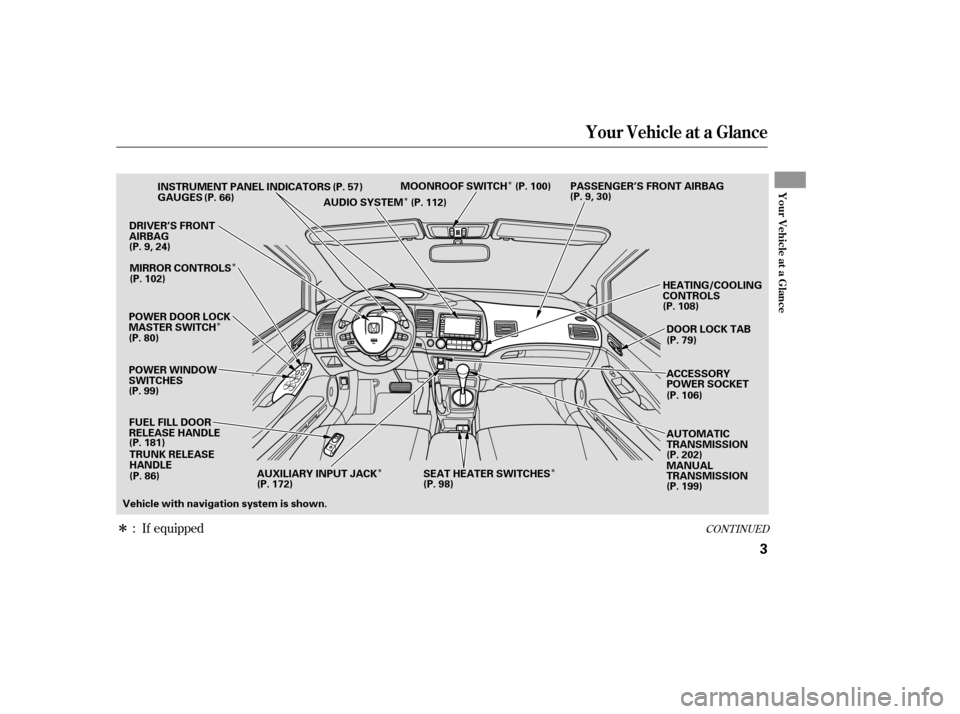
POWER WINDOW
SWITCHESGAUGES
POWER DOOR LOCK
MASTER SWITCH FUEL FILL DOOR
RELEASE HANDLE TRUNK RELEASE
HANDLE
DRIVER’S FRONT
AIRBAG
HEATING/COOLING
CONTROLS
INSTRUMENT PANEL INDICATORS
AUDIO SYSTEMMOONROOF SWITCH PASSENGER’S FRONT AIRBAG
(P. 57)
(P. 66)
(P.9,24)
(P. 80) MIRROR CONTROLS
(P. 181) (P.9,30)
(P. 108)
(P. 199)
(P. 112)
Vehicle with navigation system is shown. DOOR LOCK TAB
(P. 79)
ACCESSORY
POWER SOCKET
AUTOMATIC
TRANSMISSION
(P. 202)
MANUAL
TRANSMISSION
(P. 102)
(P. 99) (P. 86) (P. 106)
(P. 100)
AUXILIARY INPUT JACK SEAT HEATER SWITCHES
(P. 172) (P. 98)
�����—�����—�����y��������
������y���
�(�#���������y���������y
Page 67 of 413
�Î�Î
�Î
�Î
�Î
�Î
�Π��ΠOnly on vehicles equipped with navigation system. Ref er to the navigati
on system manual.
To use the horn, press the center pad of the steering wheel.
If equipped
1:2:3:
Your Vehicle at a Glance
4
HEADLIGHTS/TURN SIGNALS
STEERING WHEEL
ADJUSTMENT WINDSHIELD WIPERS/WASHERS
(P. 71)
(P. 72)
Vehicle with navigation system is shown. (P. 75)HORN
CRUISE CONTROL BUTTONSPASSENGER AIRBAG OFF
INDICATOR
(P. 30)
HAZARD WARNING BUTTON
(P. 74)
REAR WINDOW DEFOGGER
(P. 74)
HEATED MIRRORS
INSTRUMENT PANEL
BRIGHTNESS BUTTONS
(P. 73)
DISPLAY CHANGE
BUTTON
(P. 66)
SEL/RESET
BUTTON
VEHICLE STABILITY
ASSIST (VSA) SYSTEM
OFF SWITCH
REMOTE AUDIO
CONTROLS
VOICE CONTROL
SWITCHES
HOOD RELEASE HANDLE
(P. 182)
(P. 66)
(P. 211)
(P. 171)
(P. 176)(P. 103)
1 2
2
2
2
3
�����—�����—�����y��������
������y���
�(�#���������y���������y
Page 131 of 413
�Î
�Î �Î
�Î
�Î
�Î
�ΠIf equipped
:
Control L ocations
56
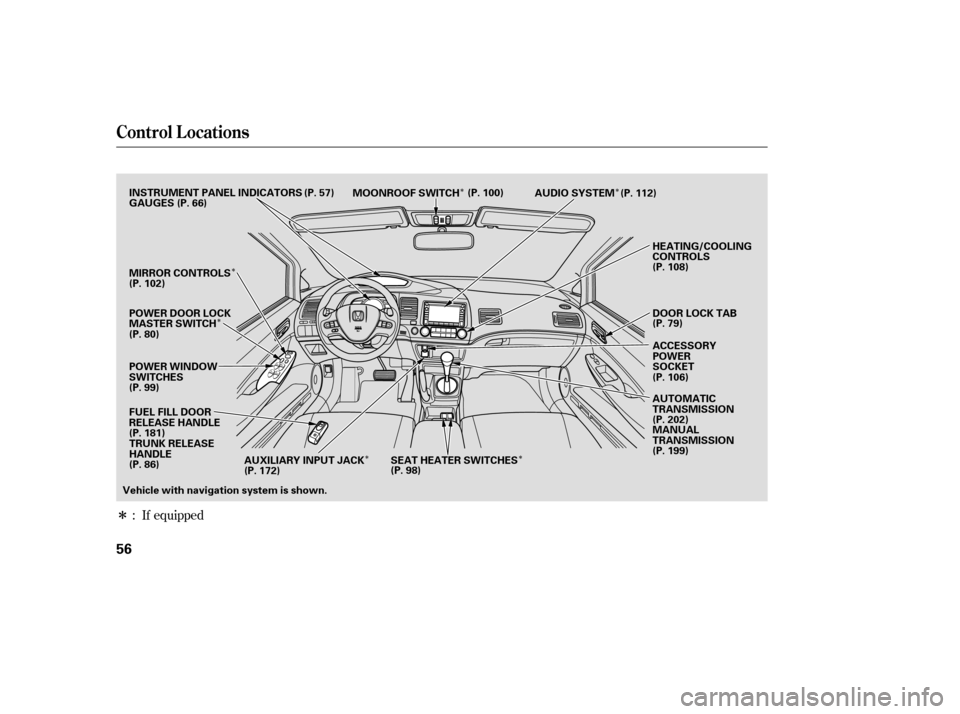
POWER WINDOW
SWITCHES AUDIO SYSTEM
HEATING/COOLING
CONTROLS
POWER DOOR LOCK
MASTER SWITCH MOONROOF SWITCH
INSTRUMENT PANEL INDICATORS
ACCESSORY
POWER
SOCKET
DOOR LOCK TAB
GAUGES
(P. 57)
(P. 66)
(P. 80) (P. 79)
MIRROR CONTROLS
(P. 108)
FUEL FILL DOOR
RELEASE HANDLE
(P. 181) TRUNK RELEASE
HANDLE
Vehicle with navigation system is shown. AUTOMATIC
TRANSMISSION
(P. 202)
MANUAL
TRANSMISSION
(P. 199)
(P. 112)
(P. 100)
(P. 102)
(P. 99) (P. 86) (P. 106)
SEAT HEATER SWITCHES
(P. 98)
AUXILIARY INPUT JACK
(P. 172)
�����—�����—�����y���������������y���
�(�#���������y�������
�y
Page 146 of 413
�Î
�Î
�Î �Î �Î
�Î
�Π��ΠOnly on vehicles equipped with navigation system. Ref er to the navigati on system manual.
To use the horn, press the center pad of the steering wheel.
If equipped
1:2:3:
Controls Near the Steering Wheel
70
HEADLIGHTS/
TURN SIGNALS
HAZARD WARNING
BUTTON
PASSENGER AIRBAG
OFF INDICATOR
SEL/RESET BUTTON WINDSHIELD
WIPERS/WASHERS
INSTRUMENT PANEL BRIGHTNESS
DISPLAY CHANGE BUTTON
REAR WINDOW
DEFOGGER
(P. 73)
(P. 66)
(P. 66)
(P. 74)
(P. 74)
(P. 30)
(P. 72)
(P. 71)
STEERING WHEEL
ADJUSTMENT HORN
(P. 75)
Vehicle with navigation system is shown. HOOD RELEASE HANDLE
(P. 182)VEHICLE STABILITY ASSIST
(VSA) SYSTEM OFF SWITCH
REMOTE AUDIO CONTROLS
VOICE CONTROL SWITCHES HEATED MIRRORS
(P. 211)
(P. 171)
(P. 103)CRUISE CONTROL
BUTTONS
(P. 176)
1
2
2 3 2
2
�����—�����—�����y��������
������y���
�(�#���������y���������y