Page 136 of 413

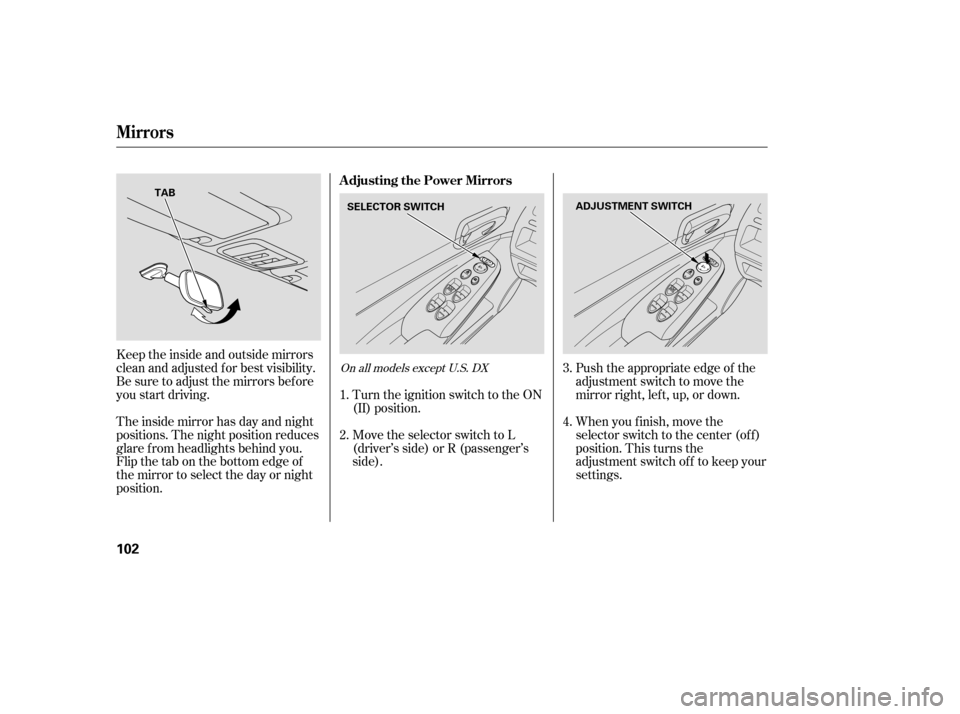
When you press the hazard warning
button, both turn signal indicators
and all turn signals on the outside of
the vehicle f lash.If this indicator comes on when the
ignition switch is turned to the ON
(II) position and the parking brake is
released, it means there is a problem
in the circuit. Have your vehicle
checked by your dealer.
This indicator comes on with the
high beam headlights. For more
inf ormation, see page .
This indicator also comes on with
reduced brightness when the
daytime running lights (DRL) are on
(see page ).This indicator reminds you that the
exterior lights are on. It comes on
when the light switch is in either the
or position. If you turn the
ignition switch to the ACCESSORY
(I) or the LOCK (0) position without
turning of f the light switch, this
indicator will remain on. A reminder
chime will also sound when you open
the driver’s door and remove the key
from the ignition switch.
The lef t or right turn signal indicator
blinks when you signal a lane change
or turn. If an indicator does not blink
or blinks rapidly, it usually means
one of the turn signal bulbs is
burned out (see pages and ).
Replace the bulb as soon as possible,
since other drivers cannot see that
you are signaling.
This indicator comes on if the trunk
lid is not closed tightly.
This indicator comes on if any door
is not closed tightly.
247
246
72
73
Turn Signal and
Hazard Warning
Indicators
Lights On Indicator
‘‘Daytime Running
Lights’’ Indicator
High Beam Indicator
Trunk-open Indicator
Door-open Indicator
Instrument Panel Indicators
Inst rument s and Cont rols
61
�����—�����—�����y���������������y���
�(�#���������y���������y
Page 146 of 413
�Î
�Î
�Î �Î �Î
�Î
�Π��ΠOnly on vehicles equipped with navigation system. Ref er to the navigati on system manual.
To use the horn, press the center pad of the steering wheel.
If equipped
1:2:3:
Controls Near the Steering Wheel
70
HEADLIGHTS/
TURN SIGNALS
HAZARD WARNING
BUTTON
PASSENGER AIRBAG
OFF INDICATOR
SEL/RESET BUTTON WINDSHIELD
WIPERS/WASHERS
INSTRUMENT PANEL BRIGHTNESS
DISPLAY CHANGE BUTTON
REAR WINDOW
DEFOGGER
(P. 73)
(P. 66)
(P. 66)
(P. 74)
(P. 74)
(P. 30)
(P. 72)
(P. 71)
STEERING WHEEL
ADJUSTMENT HORN
(P. 75)
Vehicle with navigation system is shown. HOOD RELEASE HANDLE
(P. 182)VEHICLE STABILITY ASSIST
(VSA) SYSTEM OFF SWITCH
REMOTE AUDIO CONTROLS
VOICE CONTROL SWITCHES HEATED MIRRORS
(P. 211)
(P. 171)
(P. 103)CRUISE CONTROL
BUTTONS
(P. 176)
1
2
2 3 2
2
�����—�����—�����y��������
������y���
�(�#���������y���������y
Page 148 of 413

�µ�µ�µ
Turn Signal
OFF
Parking and interior lights
Headlights on
High Beams
Flashhighbeams When the light switch is in the
‘‘ ’’ or ‘‘ ’’ position, the
lights on indicator comes on as a
reminder. To f lash the high beams, pull the
lever back lightly, then release it.
The high beams will stay on as long
as you hold the lever back.
Turning the switch to the ‘‘ ’’
position turns on the headlights. If
you leave the lights on with the key
removed f rom the ignition switch,
you will hear a reminder chime when
you open the driver’s door. Push down on the
lever to signal a lef t turn and up to
signal a right turn. To signal a lane
change, push lightly on the lever,
and hold it. The lever will return to
center when you release it or
complete a turn. Push the lever
f orward until you hear a click. The
high beam indicator will come on
(see page ). Pull the lever back to
return to the low beams.
Turning the
switch to the ‘‘ ’’ position turns
on the parking lights, taillights,
instrument panel lights, side-marker
lights, and rear license plate lights.
1.2.3.4.5.6. 61
Turn Signals and Headlights
Turn Signal High Beams
Headlights On
72
�����—�����—�����y��������
������y���
�(�#���������y���������y
Page 149 of 413

�´�µ
The buttons under the lef t side vent
control the brightness of the
instrument panel. Push the or
button to adjust the brightness.
Separate adjustments can be made
when the headlights are on and of f .
With the headlight switch of f or
position, the high beam
headlights come on with reduced
brightness when you turn the
ignition switch to the ON (II)
position and release the parking
brake. They remain on until you turn
the ignition switch of f , even if you
set the parking brake.
The headlights revert to normal
operation when you turn them on
with the switch.
There are six brightness levels.
When you push either button, the
inf ormation display indicates the
current level. You will hear a tonewhen you reach the maximum or
minimum brightness. The display
returns to the odometer 5 seconds
af ter you stop adjusting the
brightness.
To reduce glare at night, the
instrument panel illumination dims
when you turn the light switch to the
or position.
The center of each meter (upper and
lower) illuminates with reduced
brightness when you unlock and
open the driver’s door, and then goes
back to the selected brightness when
you turn the ignition switch to the
ON (II) position.
If you insert the key but do not turn
the ignition switch to the ON (II)
position, the illumination turns of f in
about 10 seconds.
Daytime Running L ights Instrument Panel Brightness
Headlights, Instrument Panel Brightness
Inst rument s and Cont rols
73
INSTRUMENT PANEL BRIGHTNESS
CONTROL BUTTONS
�����—�����—�����y��������
����
�y���
�(�#���������y���������y
Page 150 of 413
Make sure the rear window is clear
and you have good visibility bef ore
starting to drive.
The def ogger and antenna wires on
the inside of the rear window can be
accidentally damaged. When
cleaning the glass, always wipe side-
to-side.
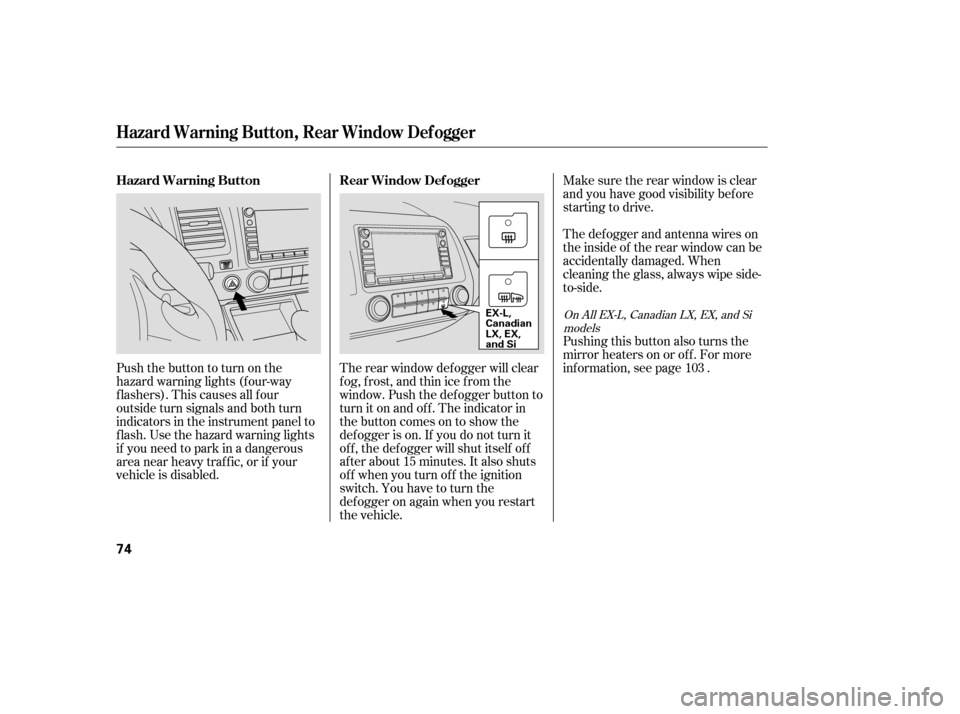
The rear window def ogger will clear
fog, frost, and thin ice from the
window. Push the def ogger button to
turn it on and off. The indicator in
the button comes on to show the
def ogger is on. If you do not turn it
of f , the def ogger will shut itself of f
af ter about 15 minutes. It also shuts
of f when you turn of f the ignition
switch. You have to turn the
def ogger on again when you restart
the vehicle.
Pushthebuttontoturnonthe
hazard warning lights (f our-way
flashers). This causes all four
outside turn signals and both turn
indicators in the instrument panel to
f lash. Use the hazard warning lights
if you need to park in a dangerous
area near heavy traffic, or if your
vehicle is disabled.
Pushing this button also turns the
mirror heaters on or of f . For more
inf ormation, see page .
103
On All EX-L, Canadian LX, EX, and Si
models
Hazard Warning Button, Rear Window Def ogger
Rear Window Def ogger
Hazard Warning Button
74
EX-L,
Canadian
LX, EX,
and Si
�����—�����—�����y�
�������������y���
�(�#���������y���������y
Page 170 of 413
�µ�µ
�µ
�µ
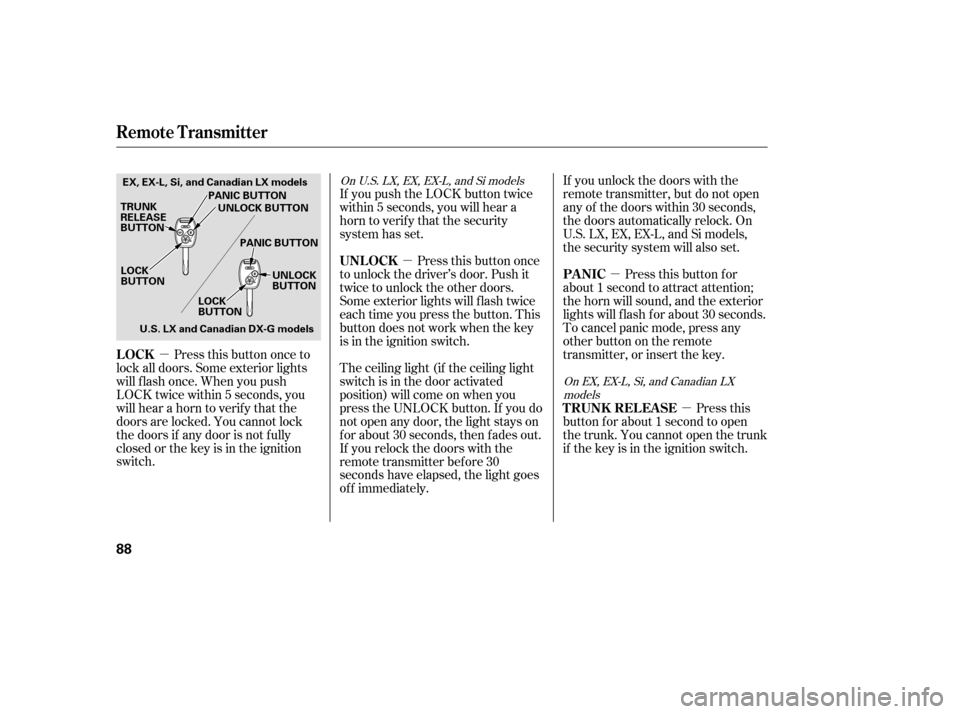
Press this button once to
lock all doors. Some exterior lights
will f lash once. When you push
LOCK twice within 5 seconds, you
will hear a horn to verif y that the
doors are locked. You cannot lock
the doors if any door is not f ully
closed or the key is in the ignition
switch. Pressthisbuttonfor
about 1 second to attract attention;
the horn will sound, and the exterior
lights will f lash f or about 30 seconds.
To cancel panic mode, press any
other button on the remote
transmitter, or insert the key.
The ceiling light (if the ceiling light
switch is in the door activated
position) will come on when you
press the UNLOCK button. If you do
not open any door, the light stays on
f or about 30 seconds, then f ades out.
If you relock the doors with the
remote transmitter before 30
seconds have elapsed, the light goes
of f immediately. Press this button once
to unlock the driver’s door. Push it
twice to unlock the other doors.
Some exterior lights will f lash twice
each time you press the button. This
button does not work when the key
is in the ignition switch.
If you push the LOCK button twice
within 5 seconds, you will hear a
horn to verify that the security
system has set.
Press this
button f or about 1 second to open
the trunk. You cannot open the trunk
if the key is in the ignition switch.
If you unlock the doors with the
remote transmitter, but do not open
any of the doors within 30 seconds,
the doors automatically relock. On
U.S. LX, EX, EX-L, and Si models,
the security system will also set.
On EX, EX-L, Si, and Canadian LX
models
On U.S. LX, EX, EX-L, and Si models
LOCK
PA NIC
UNL OCK
T RUNK REL EA SE
Remote Transmitter
88
LOCK
BUTTON
TRUNK
RELEASE
BUTTON
PANIC BUTTON
PANIC BUTTON UNLOCK
BUTTON
LOCK
BUTTON
EX, EX-L, Si, and Canadian LX models
UNLOCK BUTTON
U.S. LX and Canadian DX-G models
�����—�����—�����y�������������
�y���
�(�#���������y���������y
Page 185 of 413
Push the appropriate edge of the
adjustment switch to move the
mirrorright,left,up,ordown.
When you f inish, move the
selector switch to the center (off)
position. This turns the
adjustment switch of f to keep your
settings.
Keeptheinsideandoutsidemirrors
clean and adjusted f or best visibility.
Be sure to adjust the mirrors bef ore
you start driving.
The inside mirror has day and night
positions. The night position reduces
glare f rom headlights behind you.
Flip the tab on the bottom edge of
the mirror to select the day or night
position.
Turn the ignition switch to the ON
(II) position.
Move the selector switch to L
(driver’s side) or R (passenger’s
side).
2. 3. 4.
1.On all models except U.S. DX
A djusting the Power Mirrors
Mirrors
102
SELECTOR SWITCH
ADJUSTMENT SWITCH
TAB
�����—�����—�����y���������������y���
�(�#���������y���
�����y
Page 188 of 413
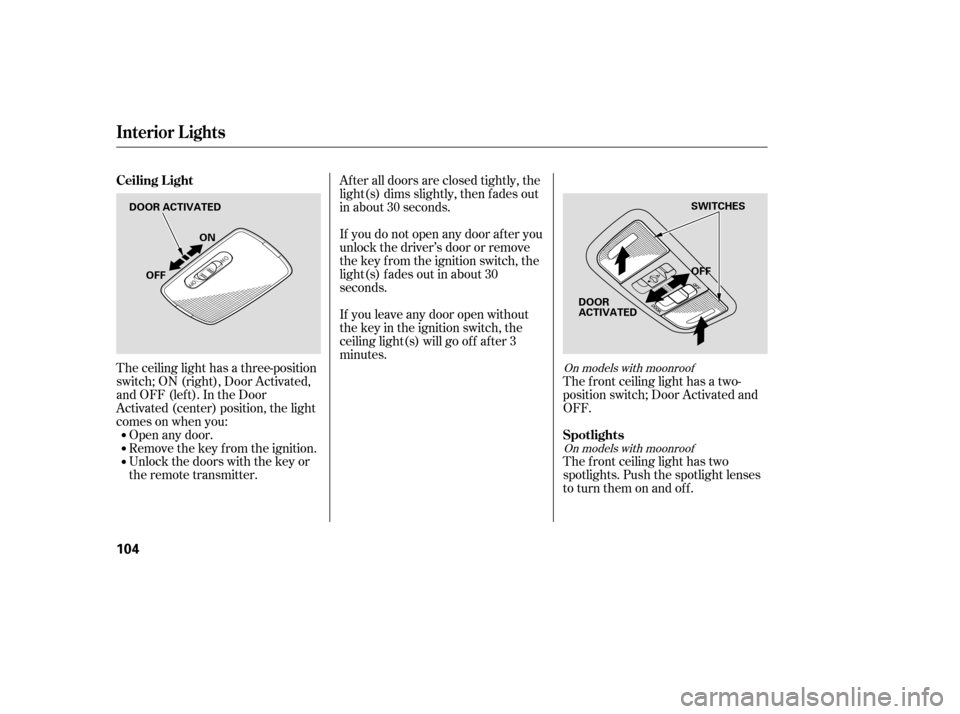
The ceiling light has a three-position
switch;ON(right),DoorActivated,
andOFF(left).IntheDoor
Activated (center) position, the light
comesonwhenyou:Open any door.
Remove the key from the ignition.
Unlock the doors with the key or
the remote transmitter. The f ront ceiling light has a two-
position switch; Door Activated and
OFF.
The f ront ceiling light has two
spotlights. Push the spotlight lenses
to turn them on and off.
After all doors are closed tightly, the
light(s) dims slightly, then f ades out
in about 30 seconds.
If you do not open any door af ter you
unlock the driver’s door or remove
the key from the ignition switch, the
light(s) f ades out in about 30
seconds.
If you leave any door open without
the key in the ignition switch, the
ceiling light(s) will go of f af ter 3
minutes.On models with moonroof
On models with moonroof
Ceiling L ight
Spotlights
Interior Lights
104
DOOR ACTIVATED OFF
OFF ON
SWITCHES
DOOR
ACTIVATED
�����—�����—�����y���������������y���
�(�#���������y���
�����y