Page 179 of 300

If the hood latch handle moves
stif f ly, or if you can open the hood
without lifting the handle, the
mechanism should be cleaned and
lubricated.
Put your f ingers under the f ront
edge of the hood near the center.
Slide your hand to the lef t until
you f eel the hood latch handle.
Push this handle up to release it.
Lif t up the hood.
Push the f uel f ill door closed until
it latches.
Screw the fuel fill cap back on
until it clicks at least once. If you
do not properly tighten the cap,
the malf unction indicator lamp
maycomeon(seepage).You
will also see a ‘‘CHECK FUEL
CAP’’ message on the inf ormation
display.
Holding the grip, pull the support
rod out of its clip. Insert the end
into the designated hole in the
hood.
Park the vehicle, and set the
parking brake. Pull the hood
release handle located under the
lower lef t corner of the dashboard.
The hood will pop up slightly.
2.
1.
3.
5.
6.
255
Service Station Procedures
Opening and Closing the Hood
176
LATCH
HOOD RELEASE HANDLE
�\f���—�\f���—�\f���y�
����
�
��\f���y���
�(�#�������\f�y�\f�
���
�y
2008 Civic Hybrid
Page 185 of 300

Your dealer has Honda accessories
that allow you to personalize your
vehicle. These accessories have
been designed and approved f or your
vehicle, and are covered by warranty.Bef ore installing any accessory:
Make sure the accessory does not
obscure any lights, or interf ere
with proper vehicle operation or
perf ormance.
Modif ying your vehicle, or installing
some non-Honda accessories, can
make it unsaf e. Bef ore you make any
modif ications or add any accessories,
be sure to read the f ollowing
inf ormation.
Although non-Honda accessories
may f it on your vehicle, they may not
meet f actory specif ications, and
could adversely af f ect your vehicle’s
handling and stability. Be sure electronic accessories do
not overload electrical circuits
(see page ) or interf ere with
the proper operation of your
vehicle.
Do not install accessories on the
side pillars or across the rear
windows. Accessories installed in
theseareasmayinterferewith
proper operation of the side
curtain airbags.
Bef ore installing any electronic
accessory, have the installer
contact your dealer for assistance.
If possible, have your dealer
inspect the f inal installation.
When properly installed, cellular
phones, alarms, two-way radios, and
low-powered audio systems should
not interf ere with your vehicle’s
computer controlled systems, such
as your airbags, anti-lock brakes, and
tire pressure monitoring system (if
equipped). 257
A ccessories
A ccessories and Modif ications
182
Improper accessories or
modifications can affect your
vehicle’s handling, stability, and
performance, and cause a
crash in which you can be hurt
or killed.
Follow all instructions in this
owner’s manual regarding
accessories and modifications.
�\f���—�\f���—�\f���y�
����
����\f�
�y���
�(�#�������\f�y�\f�
�����y
2008 Civic Hybrid
Page 186 of 300

�Î
�Î
Some examples are:
Removing parts f rom your vehicle,
or replacing components with
non-Honda components could
seriously af f ect your vehicle’s
handling, stability, and reliability.
If you plan to modif y your vehicle,
consult your dealer.Modif ying your steering wheel or
any other part of your vehicle’s
safety features can make the
systems inef f ective.
Larger or smaller wheels and tires
can interf ere with the operation of
your vehicle’s anti-lock brakes and
other systems.
Non-Honda wheels, because they
are a universal design, can cause
excessive stress on suspension
components and will not be
compatible with the tire pressure
monitoring system (TPMS) .
Raising your vehicle with a
non-Honda suspension kit can
af f ect the handling and stability.
Lowering your vehicle with a
non-Honda suspension kit that
signif icantly reduces ground
clearance can allow the
undercarriage to hit speed bumps
or other raised objects, which
could cause the airbags to deploy. If equipped
:
Modif ying Your Vehicle
A ccessories and Modif ications
Bef ore Driving
183
�\f���—�\f���—�\f���y�
����
����\f���y���
�(�#�������\f�y�\f�
�����y
2008 Civic Hybrid
Page 192 of 300
This section gives you tips on
starting the engine under various
conditions, and how to operate the
automatic transmissions (CVT). It
also includes important inf ormation
on parking your vehicle, the braking
system and the tire pressure
monitoring system (TPMS).........................
Preparing to Drive .190
.......................
Starting the Engine .191
.
Automatic Transmission (CVT) .192
...........................................
Parking .198
.............................
Braking System .199
...............
Anti-lock Brakes (ABS) .200
...........................
Towing a Trailer .201
Tire Pressure Monitoring System
......................................
(TPMS) .202
Driving
Driving
189
�\f���—�\f���—�\f���y�
����
��������y���
�(�#�������\f�y�\f�
�����y
2008 Civic Hybrid
Page 194 of 300

Apply the parking brake.
In cold weather, turn of f all
electrical accessories to reduce
the drain on the battery.If the engine does not start within
15 seconds, or starts but stalls
right away, repeat step 4 with the
accelerator pedal pressed halfway
down. If the engine starts, release
pressure on the accelerator pedal
so the engine does not race.
If the engine fails to start, press
the accelerator pedal all the way
down, and hold it there while
starting to clear flooding. If the
engine still does not start, return
to step 5.In cold weather, conventional starter
is used instead of the IMA system
starter. This is normal.
Make sure the shif t lever is in
Park. Press on the brake pedal.
Without touching the accelerator
pedal, turn the ignition key to the
START (III) position. Do not hold
the key in the START (III)
position f or more than 15 seconds
at a time. If the engine does not
start right away, pause for at least
10 seconds bef ore trying again.
1.
2.
3.
4.
5.
6.
Starting the Engine
Starting in Cold Weather
Driving
191
The engine is harder to start in cold
weather. Also, the thinner air f ound at
altitudes above 8,000 f eet (2,400
meters) adds to this problem.
T he immobilizer system protects your
vehicle f rom thef t. If an improperly-
coded key (or other device) is used, the
engine’s f uel system is disabled. For
more inf ormation, see page .
78
�\f���—�\f���—�\f���y�
����
����
���y���
�(�#�������\f�y�\f�
�����y
2008 Civic Hybrid
Page 196 of 300
�µ
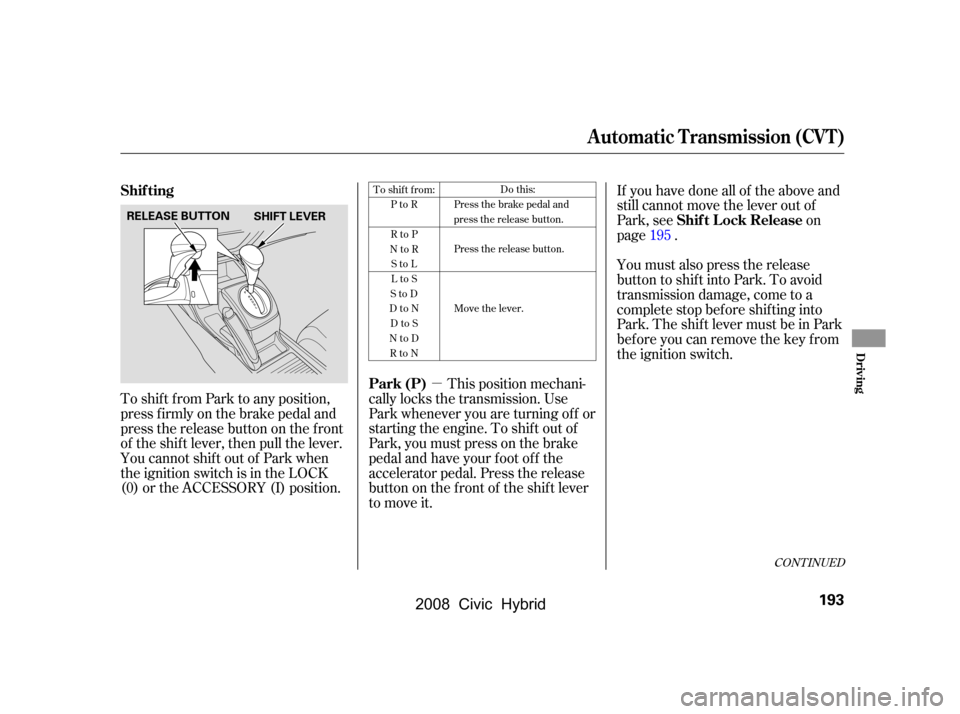
To shif t f rom Park to any position,
press firmly on the brake pedal and
pressthereleasebuttononthefront
of the shif t lever, then pull the lever.
YoucannotshiftoutofParkwhen
the ignition switch is in the LOCK
(0) or the ACCESSORY (I) position. This position mechani-
cally locks the transmission. Use
Park whenever you are turning of f or
starting the engine. To shif t out of
Park, you must press on the brake
pedal and have your f oot of f the
accelerator pedal. Press the release
buttononthefrontof theshiftlever
to move it. If you have done all of the above and
still cannot move the lever out of
Park, see on
page .
You must also press the release
button to shift into Park. To avoid
transmission damage, come to a
complete stop bef ore shif ting into
Park. The shif t lever must be in Park
bef ore you can remove the key f rom
the ignition switch.
195
To shift from:
PtoR
RtoP
NtoR StoL
LtoS
StoD
DtoN DtoS
NtoD RtoN Do this:
Press the brake pedal and
press the release button.
Press the release button.
Move the lever.
CONT INUED
Park (P) Shif t L ock Release
Shif ting
Automatic Transmission (CVT)
Driving
193
SHIFT LEVER
RELEASE BUTTON
�\f���—�\f���—�\f���y�
����
��������y���
�(�#�������\f�y�\f�
�����y
2008 Civic Hybrid
Page 197 of 300

�µ
�µ �µ
�µ
�µ When the vehicle reaches the
maximum speed in any shif t position,
you may f eel the engine cut in and
out. This is caused by a limiter (112
mph, 180 km/h) in the engine’s
computer controls. The engine will
run normally when you reduce the
speed to below the maximum.
Press the brake
pedal and press the release button
on the f ront of the shif t lever to shif t
f rom Park to reverse. To shif t f rom
reverse to neutral, come to a
completestop,andthenshift.Press
the release button bef ore shif ting
into reverse f rom neutral.
Use this position f or
your normal driving. The
transmission automatically adjusts to
keep the engine at the best speed f or
driving conditions. To help the
engine warm up f aster, the
transmission will select ratios that allow the engine to run at higher
speedswhenitiscold.
Use neutral if you
need to restart a stalled engine, or if
it is necessary to stop brief ly with
the engine idling. Shif t to the Park
position if you need to leave your
vehicle for any reason. Press on the
brake pedal when you are moving
the shift lever from neutral to
another gear. Selecting Second
shifts the transmission into a lower
range of ratios for better
acceleration and increased engine
braking. Use Second when you are
going down a steep hill.
To shif t to Low, press
the release button on the front of the
shif t lever. Use Low to get more
power when climbing, and f or
maximum engine braking when
going down steep hills.
ForfasteraccelerationwheninD,S
or L, the transmission will
automatically ‘‘kick down’’ to a lower
range of ratios by pushing the
accelerator pedal to the floor. Engine Speed L imiter
Reverse (R)
Drive (D)
Neutral (N) Second (S)
Low (L)
Automatic Transmission (CVT)
194
�\f���—�\f���—�\f���y�
����
��������y���
�(�#�������\f�y�\f�
�����y
2008 Civic Hybrid
Page 198 of 300
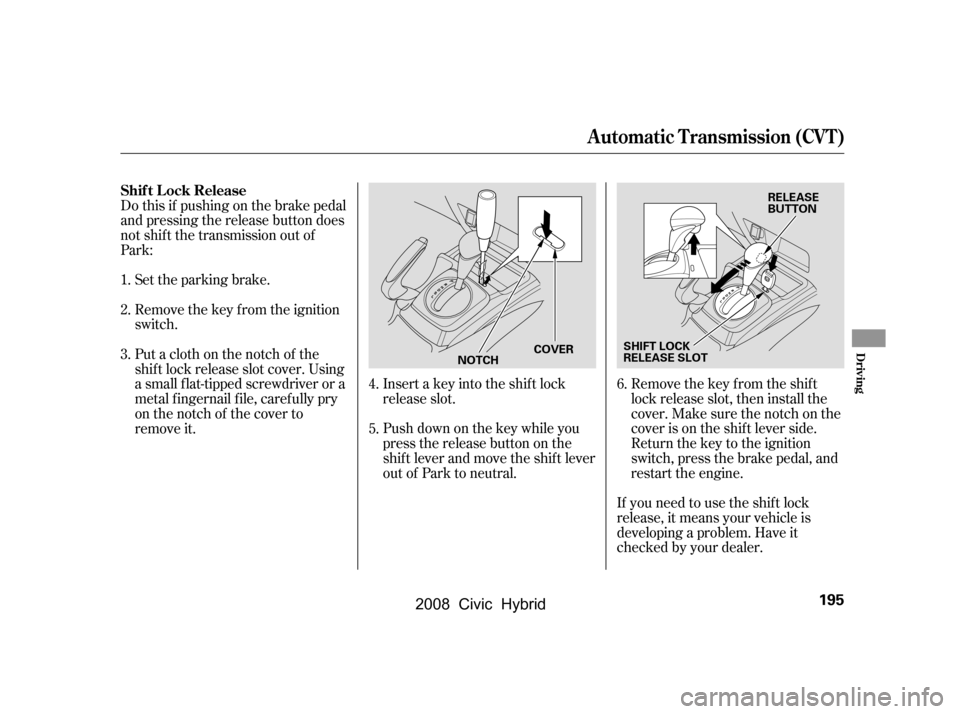
Remove the key from the ignition
switch.
Set the parking brake.Remove the key from the shift
lock release slot, then install the
cover. Make sure the notch on the
cover is on the shif t lever side.
Return the key to the ignition
switch, press the brake pedal, and
restart the engine.
If you need to use the shif t lock
release, it means your vehicle is
developing a problem. Have it
checked by your dealer.
Putaclothonthenotchof the
shif t lock release slot cover. Using
a small f lat-tipped screwdriver or a
metal f ingernail f ile, caref ully pry
on the notch of the cover to
remove it.
Do this if pushing on the brake pedal
and pressing the release button does
not shif t the transmission out of
Park:
Insert a key into the shift lock
release slot.
Push down on the key while you
pressthereleasebuttononthe
shif t lever and move the shif t lever
out of Park to neutral.
1.
2.
3.
4.
5.6.
Shif t L ock Release
Automatic Transmission (CVT)
Driving
195
SHIFT LOCK
RELEASE SLOT RELEASE
BUTTON
NOTCH COVER
�\f���—�\f���—�\f���y�
����
��������y���
�(�#�������\f�y�\f���\f�\f�y
2008 Civic Hybrid
