Page 127 of 303

Error
Message Solution
Cause
Thechartontherightexplainsthe
error messages you may see in the
display while playing a disc.
If you see an error message in the
display while playing a disc, press
the eject button. After ejecting the
disc, check it for damage or
deformation. If there is no damage,
insert the disc again.
For the additional information on
damaged discs, see page .
If there is still a problem, the error
message will appear again. Press the
eject button, and pull out the disc.
Insert a dif f erent disc. If the new
disc plays, there is a problem with
the f irst disc. If the error message
cycle repeats and you cannot clear it,
take your vehicle to a dealer. 175
Press the magazine eject button, and pull the
magazine out. If the message does not
disappear or the magazine cannot be pulled out,
see your dealer.
Insert disc.
Press the magazine eject button, pull the
magazine out, check for an error message, then
insert the magazine again. If the message does
not disappear, or the magazine cannot be pulled
out, see your dealer.
Insert disc magazine.
Will disappear when the temperature returns to
normal.
FOCUS Error
No disc in the disc magazine
Mechanical Error
No disc magazine in the
disc changer
High Temperature
Optional Disc Changer Error
Messages
Audio System (Models without navigation system)
Features
137
�����—�����—�
�
�y�
���������
���y���
�(�+���������y���
�����y
Page 143 of 303
�Û�Ý
Load the desired discs in the
magazine, and load the magazine in
the changer according to the
instructions that came with the unit.
To select the disc changer, press the
CD/AUX button. The disc and track
numbers will be displayed. To select
a dif f erent disc, use either side of the
TUNE bar. To select the previous
disc, press the side. To select the
next disc, press the side.
If you select an empty slot in the
magazine, the changer will search
f or the next available disc to load and
play. For inf ormation on how to handle
and protect discs, see page .
An optional six or eight disc changer
is available f or your vehicle. This
disc changer uses the same controls
used f or the in-dash disc player or
the radio. 174
Operating the Optional Disc
Changer
Protecting Discs
Audio System (Models with navigation system)
Features
157
�����—�����—�
�
�y�
�������������y���
�(�+���������y���
�����y
Page 161 of 303
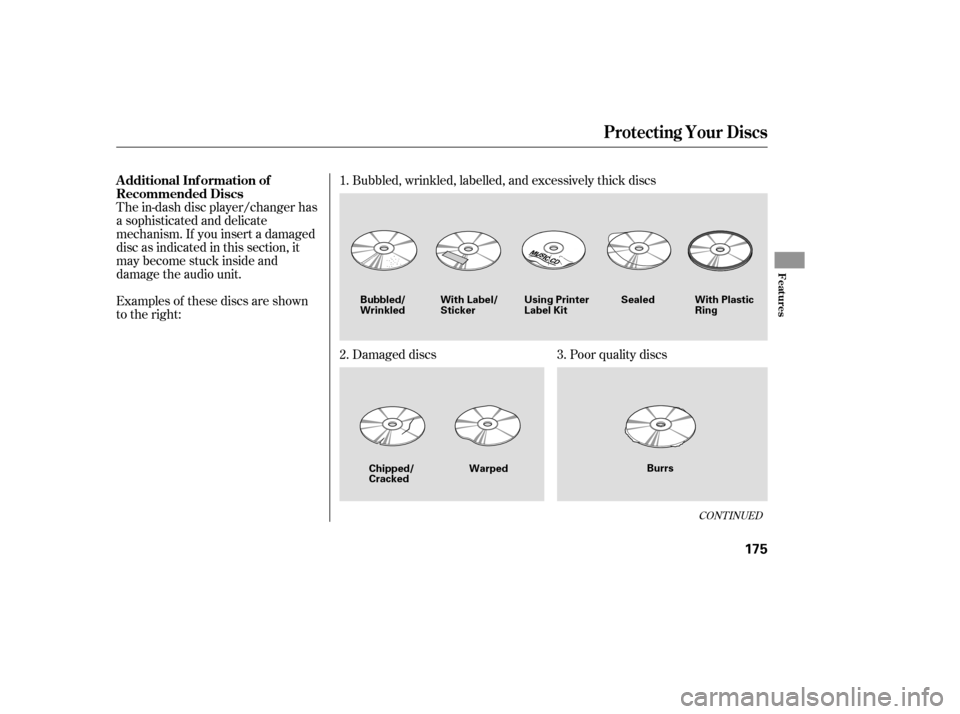
The in-dash disc player/changer has
a sophisticated and delicate
mechanism. If you insert a damaged
disc as indicated in this section, it
maybecomestuckinsideand
damage the audio unit.
Examples of these discs are shown
to the right:Bubbled, wrinkled, labelled, and excessively thick discs
Damaged discs Poor quality discs
1.
2. 3.
CONT INUED
Additional Inf ormation of
Recommended Discs
Protecting Your Discs
Features
175
Sealed
Warped Burrs
Chipped/ Cracked
Bubbled/
Wrinkled
With Label/Sticker Using Printer
Label Kit With Plastic
Ring
�����—�����—�
�
�y�
���������
���y���
�(�+���������y���
�����y
Page 294 of 303

..............
CAUTION, Explanation of . ii
.........................................
CD Care . 174
..........................
CD Changer . 135, 157
.....
CD Changer Error Messages . 137
..............................
CD Player . 130, 150
.
CD Player Error Messages . 136, 158
..................................
Ceiling Light . 111
........................
Certif ication Label . 294
.................................
Chains, Tires . 263
....................
Changing a Flat Tire . 271
Changing Oil
........................................
How to . 236
......................................
When to . 225
...
Charging System Indicator . 57, 281
..............
Check Fuel Cap Message . 68
............
Checklist, Bef ore Driving . 203
.....................................
Child Saf ety . 32
..............................
Booster Seats . 47
...................................
Child Seats . 39
Important Saf ety
.........................
Reminders . 32, 35
..........................................
Inf ants . 37
............................
Large Children . 46
.........................................
LATCH . 41
......................
Risks with Airbags . 33
.............................
Small Children . 38 .........................................
Tethers . 45
...........................
Warning Labels . 51
.........
Where Should a Child Sit? . 33
Child Seats ......................................
Installing . 40
...........................
Lower Anchors . 41
......................................
Selecting . 39
................
Tether Anchor Points . 45
Cleaning ...................................
Seat Belts . 251
..............................................
Clock . 180
...................................
Clutch Fluid . 245
........................
CO in the Exhaust . 305
......................................
Coat Hook . 108
............
Cold Weather, Starting in . 204
......................
Compact Spare Tire . 270
.................
Console Compartment . 107
.................
Consumer Inf ormation . 312
.............
Controls, Instruments and . 53
Coolant
........................................
Adding . 238
....................................
Checking . 191
.........................
Proper Solution . 238
...................
Temperature Gauge . 68
Crankcase Emissions Control ........................................
System . 305 ................
Cruise Control Indicator . 62
............
Cruise Control Operation . 182
...................................
Cup Holders . 107
....
Customer Service Inf ormation . 312
................
DANGER, Explanation of . ii
...................................
Dashboard . 3, 54
................
Daytime Running Lights . 73
Daytime Running Lights
.......................................
Indicator . 63
.................................
Dead Battery . 277
............
Def ects, Reporting Saf ety . 314
................
Def ogger, Rear Window . 74
..............
Def rosting the Windows . 118
....................................
Dimensions . 296
...............
Dimming the Headlights . 72
Dipstick
..........
Automatic Transmission . 242
..................................
Engine Oil . 189
..........................
Directional Signals . 72
........
Disc Brake Wear Indicators . 213
.......................................
Disc Care . 174
............................
Disc Player . 130, 150
..................
Display Change Button . 66
Index
D
II
�����—�����—�
�
�y�
�������������y���
�(�+���������y���������y