Page 79 of 303
Turn the ignition switch to the ON
(II) position, and open the driver’s
door.Pushandholdtherearof the
master door lock switch on the
driver’s door. You will hear a click,
and after about 5 seconds, you will
hear another click.
Release the switch, and within 5
seconds, turn the ignition switch
to the LOCK (0) position.
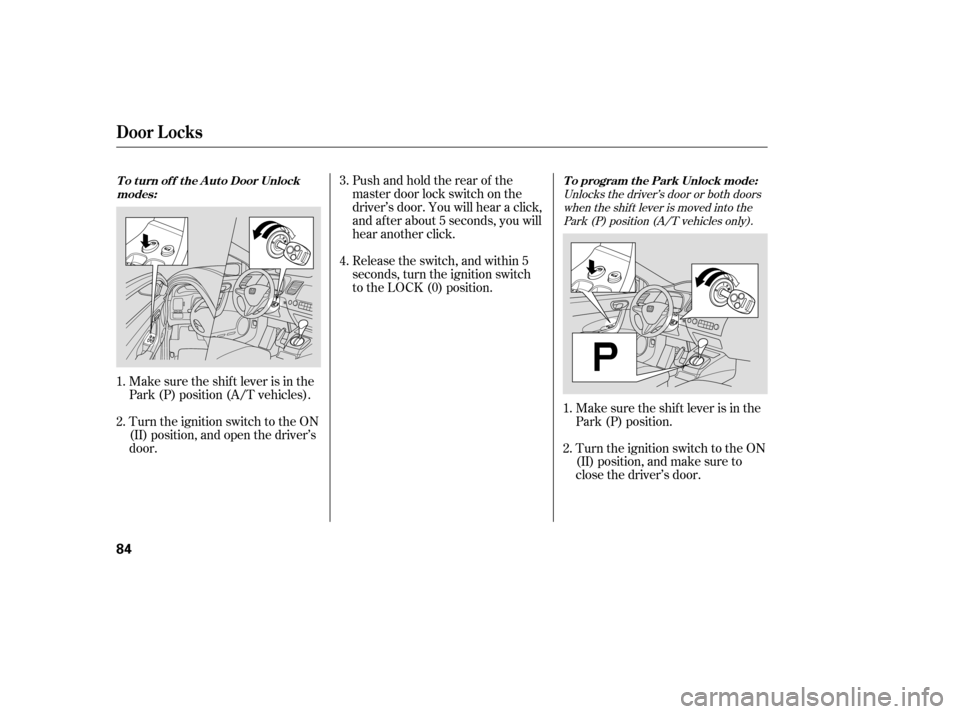
Make sure the shif t lever is in the
Park (P) position (A/T vehicles). Make sure the shif t lever is in the
Park (P) position.
Turn the ignition switch to the ON
(II) position, and make sure to
close the driver’s door.
1. 2. 3. 4.
1. 2.
Unlocks the driver’s door or both doorswhen the shif t lever is moved into thePark (P) position (A/T vehicles only).
T o t urn of f t he A ut o Door Unlock
modes: To program the Park Unlock mode:
Door L ocks
84
�����—�����—�
�
�y�
����
��������y���
�(�+���������y���������y
Page 80 of 303
CONT INUED
Or, until you hear two more
clicks (af ter about 10 seconds)
to activate.
Release the switch, and within 5
seconds, turn the ignition switch
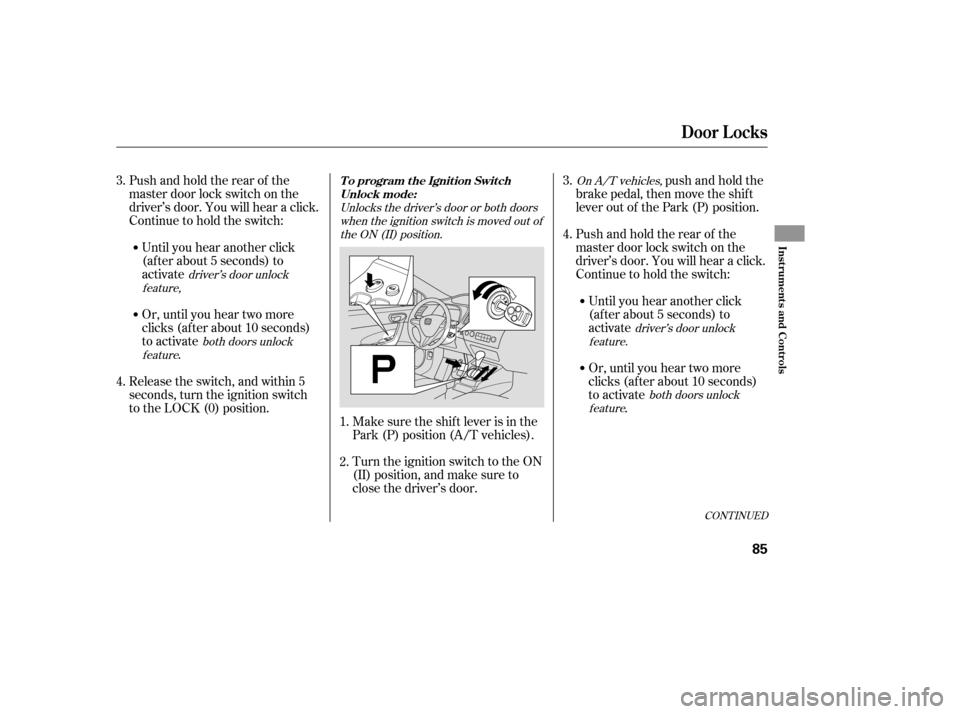
to the LOCK (0) position. Make sure the shif t lever is in the
Park (P) position (A/T vehicles).
Turn the ignition switch to the ON
(II) position, and make sure to
close the driver’s door.
Pushandholdtherearof the
master door lock switch on the
driver’s door. You will hear a click.
Continue to hold the switch:
push and hold the
brake pedal, then move the shift
lever out of the Park (P) position.
Until you hear another click
(af ter about 5 seconds) to
activate Pushandholdtherearof the
master door lock switch on the
driver’s door. You will hear a click.
Continue to hold the switch:
Until you hear another click
(af ter about 5 seconds) to
activate
Or, until you hear two more
clicks (af ter about 10 seconds)
to activate .
1. 2.
3. 4.
3. 4.
both doors unlock
feature Unlocks the driver’s door or both doors
when the ignition switch is moved out of
the ON (II) position. On A/T vehicles,
driver’s door unlock
feature,
driver’s door unlock
feature.
both doors unlock
feature
Door L ocks
T o program t he Ignit ion Swit ch Unlock mode:
Inst rument s and Cont rols
85
�����—�����—�
�
�y�
����
��������y���
�(�+���������y���������y
Page 81 of 303
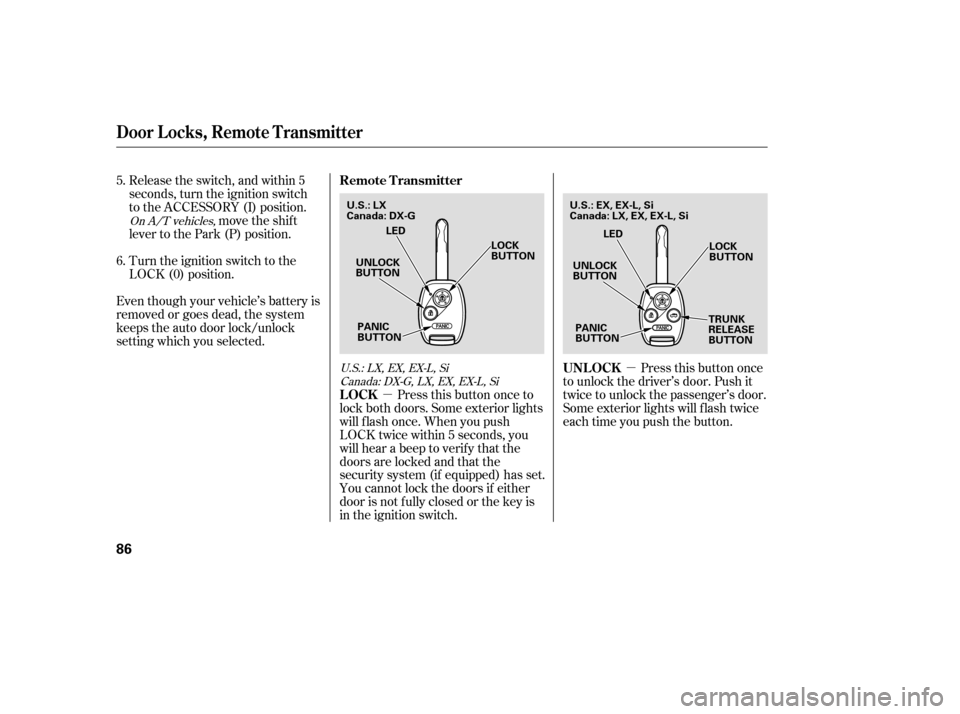
�µ
�µ Pressthisbuttononce
to unlock the driver’s door. Push it
twice to unlock the passenger’s door.
Some exterior lights will f lash twice
each time you push the button.
Release the switch, and within 5
seconds, turn the ignition switch
to the ACCESSORY (I) position.
move the shif t
lever to the Park (P) position.
Turn the ignition switch to the
LOCK (0) position.
Even though your vehicle’s battery is
removed or goes dead, the system
keeps the auto door lock/unlock
setting which you selected.
Press this button once to
lock both doors. Some exterior lights
will f lash once. When you push
LOCK twice within 5 seconds, you
will hear a beep to verify that the
doors are locked and that the
security system (if equipped) has set.
You cannot lock the doors if either
door is not f ully closed or the key is
in the ignition switch.
5. 6.
On A/T vehicles,
U.S.:LX,EX,EX-L,SiCanada:DX-G,LX,EX,EX-L,Si
Door Locks, Remote Transmitter
UNL OCK
LOCK
Remote Transmitter
86
UNLOCK
BUTTON
LOCK
BUTTON
TRUNK
RELEASE
BUTTON
PANIC
BUTTON LED
UNLOCK
BUTTON LOCK
BUTTON
PANIC
BUTTON LED
U.S.: LX
Canada: DX-G
U.S.: EX, EX-L, Si
Canada: LX, EX, EX-L, Si
�����—�����—�
�
�y�
����
����
���y���
�(�+���������y�������
�y
Page 82 of 303
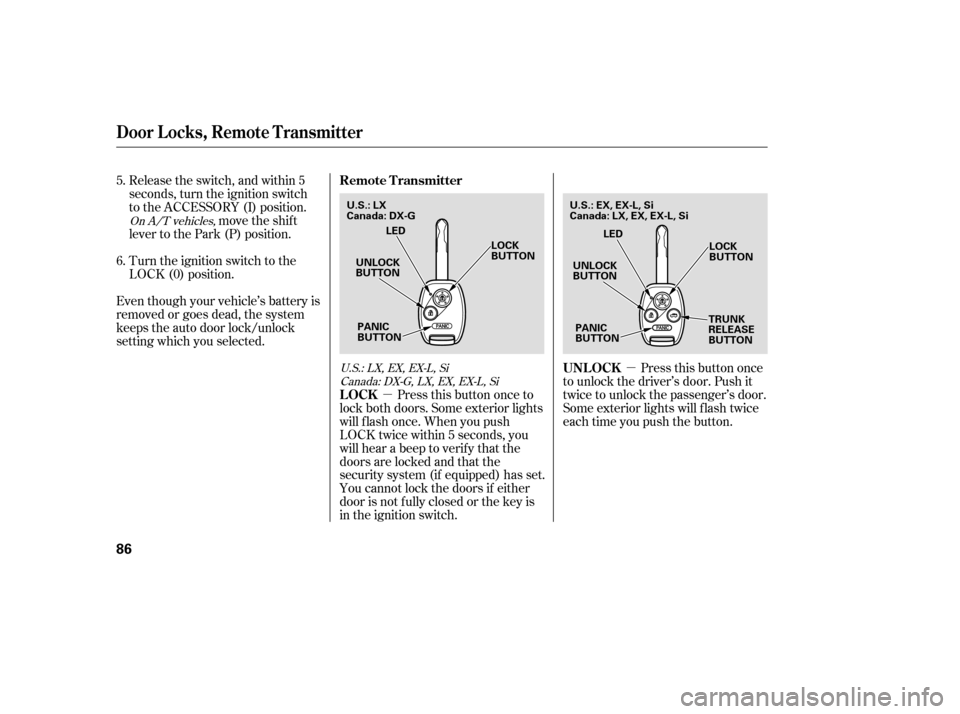
�µ
�µ Pressthisbuttononce
to unlock the driver’s door. Push it
twice to unlock the passenger’s door.
Some exterior lights will f lash twice
each time you push the button.
Release the switch, and within 5
seconds, turn the ignition switch
to the ACCESSORY (I) position.
move the shif t
lever to the Park (P) position.
Turn the ignition switch to the
LOCK (0) position.
Even though your vehicle’s battery is
removed or goes dead, the system
keeps the auto door lock/unlock
setting which you selected.
Press this button once to
lock both doors. Some exterior lights
will f lash once. When you push
LOCK twice within 5 seconds, you
will hear a beep to verify that the
doors are locked and that the
security system (if equipped) has set.
You cannot lock the doors if either
door is not f ully closed or the key is
in the ignition switch.
5. 6.
On A/T vehicles,
U.S.:LX,EX,EX-L,SiCanada:DX-G,LX,EX,EX-L,Si
Door Locks, Remote Transmitter
UNL OCK
LOCK
Remote Transmitter
86
UNLOCK
BUTTON
LOCK
BUTTON
TRUNK
RELEASE
BUTTON
PANIC
BUTTON LED
UNLOCK
BUTTON LOCK
BUTTON
PANIC
BUTTON LED
U.S.: LX
Canada: DX-G
U.S.: EX, EX-L, Si
Canada: LX, EX, EX-L, Si
�����—�����—�
�
�y�
����
����
���y���
�(�+���������y�������
�y
Page 83 of 303

�µ
�µ
CONT INUED
Avoid dropping or throwing the
transmitter.
Protect the transmitter from
extreme temperature.
Do not immerse the transmitter in
any liquid.
If you lose a transmitter, the
replacement needs to be
reprogrammed by your dealer.
The ceiling light and the door
activated spotlights (if equipped)
come on when you press the
UNLOCK button if the lights are in
the door activated position. If you do
not open either door within 30
seconds, the light(s) will f ade out. If
you relock the doors with the remote
transmitter before 30 seconds have
elapsed, the light(s) will go of f
immediately.
If you do not open either door within
30 seconds, the doors automatically
relock, and the security system (if
equipped) sets. You cannot unlock it
if the key is in the ignition switch. Press this
button f or about 1 second to open
the trunk. You cannot open the trunk
if the key is in the ignition switch.
Press and hold this
button for about 2 seconds to attract
attention: the horn will sound and
the exterior lights will f lash f or about
30 seconds. To cancel panic mode,
press any other button on the remote
transmitter, or turn the ignition
switch to the ON (II) position.
EX, EX-L, Si and Canadian LX models Remote Transmitter Care
Remote Transmitter
T RUNK REL EA SE
PA NIC
Inst rument s and Cont rols
87
�����—�����—�
�
�y�
����
��������y���
�(�+���������y���������y
Page 84 of 303
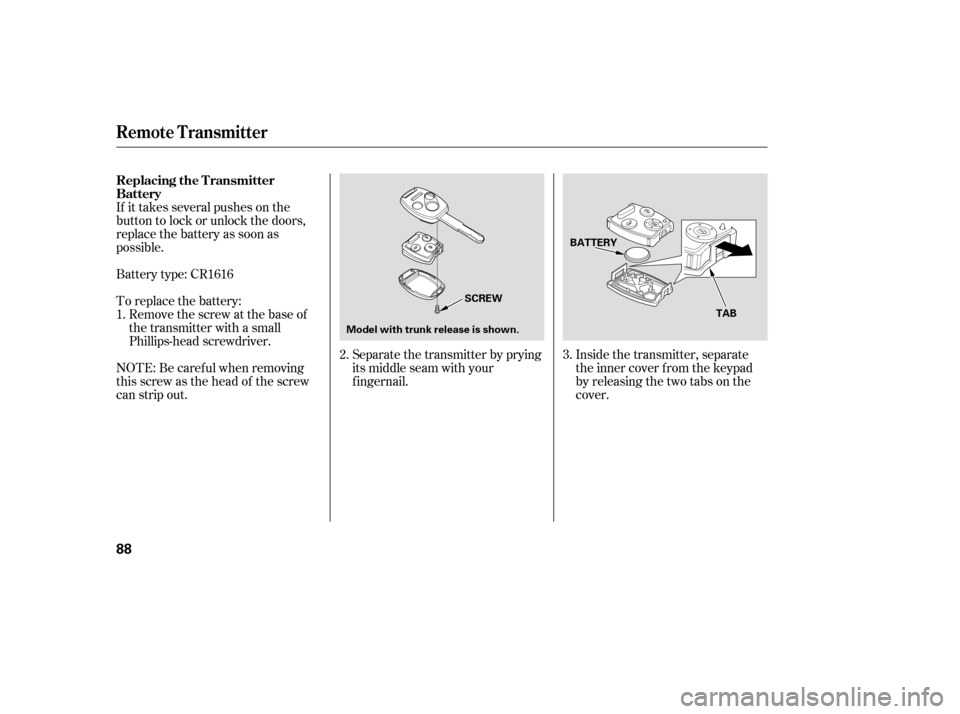
If it takes several pushes on the
button to lock or unlock the doors,
replace the battery as soon as
possible.
Battery type: CR1616Inside the transmitter, separate
the inner cover f rom the keypad
by releasing the two tabs on the
cover.
To replace the battery:
Remove the screw at the base of
the transmitter with a small
Phillips-head screwdriver. Separate the transmitter by prying
its middle seam with your
f ingernail.
NOTE: Be caref ul when removing
this screw as the head of the screw
can strip out.
1.
2.3.
Remote Transmitter
Replacing the Transmitter
Battery
88
SCREW
Model with trunk release is shown. BATTERY
TAB
�����—�����—�
�
�y�
����
��������y���
�(�+���������y���������y
Page 111 of 303
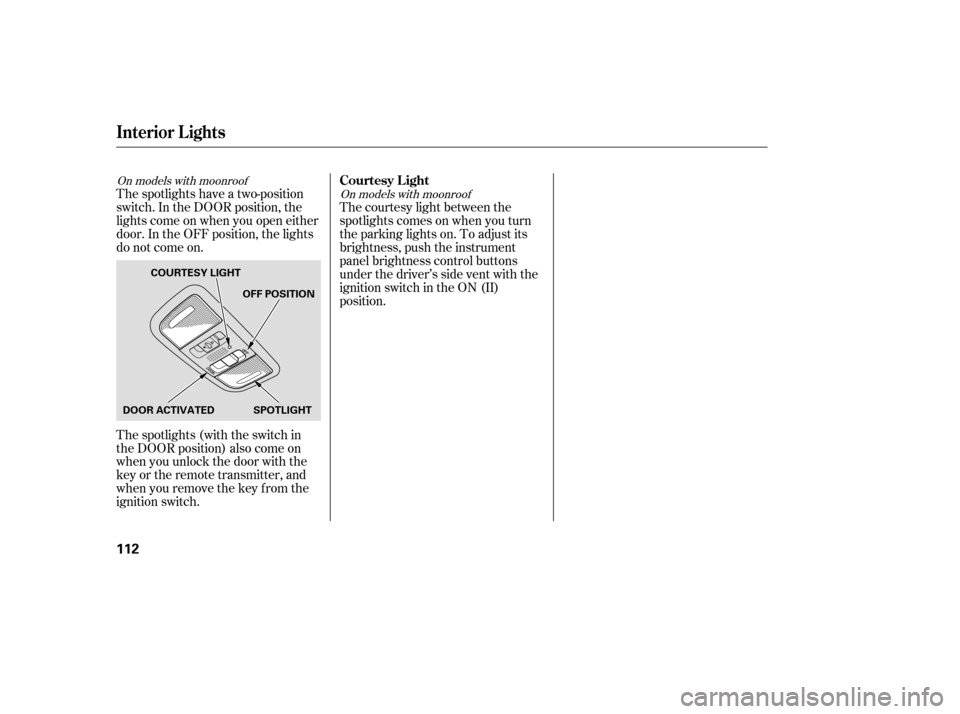
The spotlights have a two-position
switch. In the DOOR position, the
lights come on when you open either
door. In the OFF position, the lights
do not come on.
The spotlights (with the switch in
the DOOR position) also come on
when you unlock the door with the
key or the remote transmitter, and
when you remove the key f rom the
ignition switch.The courtesy light between the
spotlights comes on when you turn
the parking lights on. To adjust its
brightness, push the instrument
panel brightness control buttons
under the driver’s side vent with the
ignition switch in the ON (II)
position.
On models with moonroof
On models with moonroofCourtesy L ight
Interior Lights
112
DOOR ACTIVATEDOFF POSITION
SPOTLIGHT
COURTESY LIGHT
�����—�����—�
�
�y�
�������������y���
�(�+���������y���
�
���y
Page 168 of 303

Once the security system is set,
opening either door without using
the key or the remote transmitter,
the hood, or the trunk will cause the
system to alarm. It also alarms if the
audio unit is removed f rom the
dashboard or the wiring is cut.
The security system helps to protect
your vehicle and valuables f rom thef t.
The horn sounds and a combination
of headlights, parking lights, side
marker lights, and taillights f lashes if
someone attempts to break into your
vehicleorremovetheradio.This
alarm continues f or 2 minutes, then
the system resets. To reset an
alarming system bef ore the 2
minutes have elapsed, unlock the
driver’s door with the key or the
remote transmitter.
The security system automatically
sets 15 seconds after you lock the
doors, hood, and trunk. For the
system to activate, you must lock the
doors f rom the outside with the key,
lock tab, door lock switch, or remote
transmitter. The security system
indicator on the instrument panel
starts blinking immediately to show
you the system is setting itself . The security system will not set if
the hood, trunk, or either door is not
f ully closed. If the system will not set,
check the door and trunk open
indicators on the instrument panel
(see page ), to see if the doors
and the trunk are f ully closed. Since
it is not part of the monitor display,
manually check the hood.
Use the remote transmitter
to quickly check that the hood, the
trunk, and both doors are closed.
Push the lock button twice within 5
seconds. There should be an audible
conf irmation beep.
Do not attempt to alter this system
or add other devices to it.
With the system set, you can still
open the trunk with the master key
(U.S. LX model) or the remote
transmitter (U.S. EX, EX-L and Si
models) without triggering the alarm. The alarm will sound if the trunk
lock is f orced, or the trunk is opened
with the trunk release handle or the
emergency trunk opener.
64
If equipped
Security System
Features
181
NOTE:
SECURITY SYSTEM INDICATOR
Except Si Si
�����—�����—�
�
�y�
�������������y���
�(�+���������y���
�����y