Page 211 of 435
The XM satellites are in orbit over
the equator; therefore, objects south
of the vehicle may cause satellite
reception interruptions. To help
compensate f or this, ground-based
repeaters are placed in major
metropolitan areas.
Satellite signals are more likely to be
blocked by tall buildings and
mountains the f arther north you
travel from the equator.
Depending on where you drive, you
may experience reception problems.
Interf erence can be caused by any of
these conditions:Driving on the north side of an
east/west mountain road.
Driving in tunnels.
Driving on the north side of a
large commercial truck on an
east/west road.
Playing t he XMSatellite Radio (Models with navigation system)
192
Signal may be blocked by
mountains or large obstacles to
the south.
Signal weaker in
these areas.
SATELLITE GROUND REPEATER
�����—�����—�
���y�
�
�����������y���
�)�����������y���
�����y
Page 234 of 435

To set the time, press the CLOCK
button until you hear a beep. The
displayed time begins to blink.
Change the hours by pressing the H
(hour) button until the numbers
advance to the desired time. Change
the minutes by pressing the M
(minute) button until the numbers
advance to the desired time.
Press the CLOCK button again to
enter the set time.
You can quickly set the time to the
nearest hour. If the displayed time is
bef ore the half hour, press and hold
the CLOCK button, then press the R
button to set the time back to the
previous hour. If the displayed time
is af ter the half hour, the same
procedure sets the time f orward to
the beginning of the next hour.The navigation system receives
signals f rom the global positioning
system (GPS), and the displayed
time is updated automatically by the
GPS. Ref er to the navigation system
manual f or how to adjust the time.
1:06 would RESET to 1:00.
1:52 would RESET to 2:00.
For example:
On models with navigation system
On models without navigation system
Setting the Clock
214
On models without navigation system
MINUTE BUTTON
(PRESET 5)
EX-L is shown. CLOCK BUTTON
RESET BUTTON
(PRESET 6)
HOUR BUTTON
(PRESET 4)
�����—�����—�
���y�
�
���������
�y���
�)�����������y�����
���y
Page 235 of 435
�Ú
You can also adjust the clock and
switch the clock display between 24-
hours and 12-hours in the menu
mode.
To adjust the clock setting:
Press and release the MENU
button. The display shows you the
menu items.
You can adjust the clock setting
with the ignition switch in the
ACCESSORY (I) or ON (II)
position. Turn the selector knob to select
‘‘CLOCK ADJUST.’’
Press the selector knob to enter
your selection. The display
changes to the clock adjusting
display.Turn the selector knob to select
the item which you want to adjust.
Turning the knob will change the
selected item between the clock
display setting, hours, minutes,
and SET. The selected item is
indicated with in the display.
1.
2. 3.4.
CONT INUED
EX, EX-L and all V6 models without
navigation systemAdjusting the Clock with MENU
Button
Setting the Clock
Features
215
�����—�����—�
���y�
�
���������
�y���
�)�����������y���������y
Page 236 of 435
To set the time, turn the selector
knob and select the hours or the
minutes, then press the knob to
enter your selection. The display
changes to the setting display.
Turn the selector knob up or down
to count the numbers up or down.
Press the selector knob to enter
your selection. The display will
return to the clock adjusting
display.While setting, pressing the
RETURN button will go back to
the previous display.
Pressing the MENU button again
will cancel this setting mode.
Turn the selector knob to change
the setting between 12H and 24H.
Press the selector knob to enter
your selection. The display will
return to the clock adjusting
display. To enter the clock setting, turn
the selector knob to select ‘‘SET,’’
then press the knob. The display
will return to the menu item
display.
Press either of the RETURN or
MENUbuttontogobacktothe
normal display.
5. 6.
7. 8. 9.10. 11.
Setting the Clock
216
MINUTE S
ETTING
�����—�����—�
���y�
�
�����������y���
�)�����������y�������
�y
Page 237 of 435

With the system set, you can still
open the trunk with the remote
transmitter without triggering the
alarm. The alarm will sound if the
trunk lock is f orced, or the trunk is
opened with the trunk release lever
or the emergency trunk opener.
The security system helps to protect
your vehicle and valuables f rom thef t.
The horn sounds and a combination
of headlights, parking lights, side
marker lights and taillights f lashes if
someone attempts to break into your
vehicle or remove the audio unit.
This alarm continues for two
minutes, then the system resets. To
reset an alarming system bef ore the
two minutes have elapsed, unlock
the driver’s door with the key or the
remote transmitter.
The security system automatically
sets 15 seconds after you lock the
doors, hood, and trunk. For the
system to activate, you must lock the
doors f rom the outside with the key,
driver’s lock tab, door lock master
switch, or remote transmitter. The
security system indicator on the
instrument panel starts blinking
immediately to show you the system
is setting itself . Once the security system is set,
opening any door (without using the
key or the remote transmitter), the
hood, or the trunk will cause the
system to alarm. It also alarms if the
audio unit is removed f rom the
dashboard or the wiring is cut.
The security system will not set if
the hood, trunk, or any door is not
f ully closed. If the system will not set,
check the door and trunk open
indicators on the instrument panel
(see page ) to see if the doors and
trunk are f ully closed. Since it is not
part of the monitor display, manually
check the hood.
60
CONT INUED
Except LX
Security System
Features
217
SECURITY SYSTEM INDICATOR
�����—�����—�����y�����������
���y���
�)�����������y���������y
Page 238 of 435
Use the remote transmitter
to quickly check that the hood, the
trunk, and all doors are closed. Push
the lock button twice within 5
seconds. There should be an audible
conf irmation beep.
Do not attempt to alter this system
or add other devices to it.
Security System
218
NOTE:
�����—�����—�
���y�
�
�������
���y���
�)�����������y���������y
Page 247 of 435
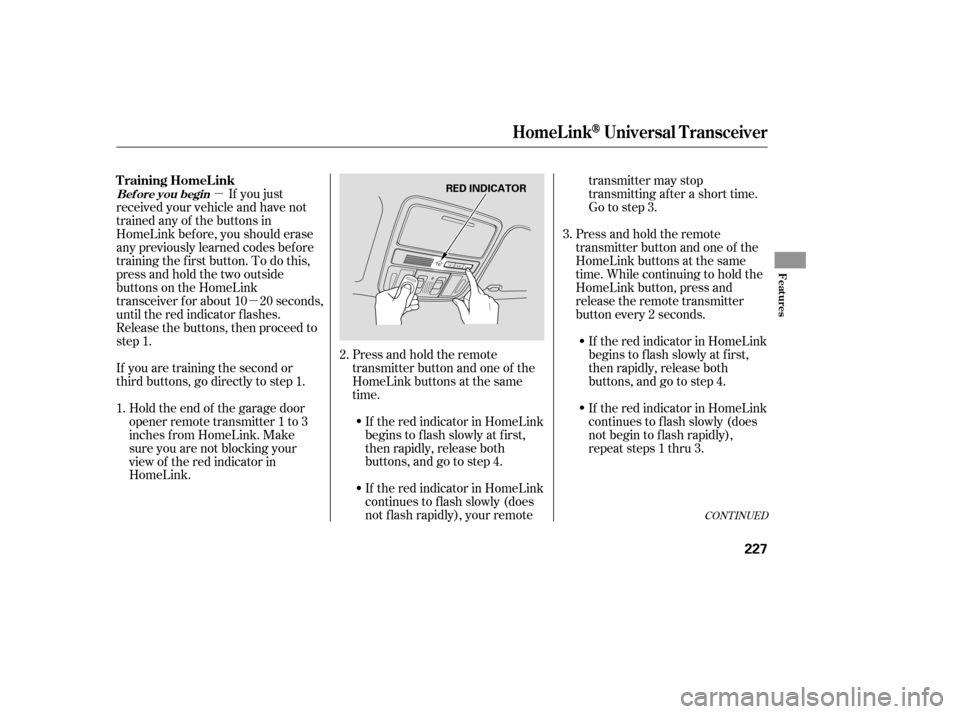
�µ�µ
CONT INUED
Press and hold the remote
transmitter button and one of the
HomeLink buttons at the same
time. While continuing to hold the
HomeLink button, press and
release the remote transmitter
button every 2 seconds.
If the red indicator in HomeLink
begins to f lash slowly at f irst,
then rapidly, release both
buttons, and go to step 4.
If the red indicator in HomeLink
continues to f lash slowly (does
not f lash rapidly), your remote transmitter may stop
transmitting after a short time.
Go to step 3.
Press and hold the remote
transmitter button and one of the
HomeLink buttons at the same
time.
If you just
received your vehicle and have not
trained any of the buttons in
HomeLink bef ore, you should erase
any previously learned codes bef ore
training the f irst button. To do this,
press and hold the two outside
buttons on the HomeLink
transceiver for about 10 20 seconds,
until the red indicator f lashes.
Release the buttons, then proceed to
step 1.
If you are training the second or
third buttons, go directly to step 1.
Holdtheendof thegaragedoor
opener remote transmitter 1 to 3
inches f rom HomeLink. Make
sure you are not blocking your
view of the red indicator in
HomeLink. If the red indicator in HomeLink
continues to f lash slowly (does
not begin to f lash rapidly),
repeat steps 1 thru 3.
If the red indicator in HomeLink
begins to f lash slowly at f irst,
then rapidly, release both
buttons, and go to step 4.
2.
1. 3.
HomeL inkUniversal T ransceiver
T raining HomeL ink
Bef ore you begin
Features
227
RED INDICATOR
�����—�����—�
���y�
���������
���y���
�)�����������y���������y
Page 255 of 435

Many commands can be spoken
together. For example, you can
say, ‘‘Dial 123-456-7891.’’
To enter a string of numbers in a
Call or Dial command, you can say
them all at once, or you can
separate them in blocks of 3, 4, 7,
10, and 11.
To skip a voice prompt, press the
Talk button while the HFL is
speaking. The HFL will then begin
listening f or your next command.To go back one step in a command
process, say, ‘‘Go back,’’ or press
the Back button.
If nothing is said while the HFL is
listening f or a command, the HFL
will time out and stop its voice
recognition. The next time you
press the Talk button, the HFL
begins listening f rom the point at
which it timed out.
To end a command sequence at
any time, press and hold the Back
button, or press and release the
Talk button, wait f or the beep, and
say, ‘‘Cancel.’’ The next time you
press the Talk button, the HFL
begins f rom its main menu.
When you f inish a command
sequence, the HFL goes back to
its main menu. For example, when
you store the name, ‘‘Eric,’’ the
HFL response is, ‘‘Eric has been
stored.’’ The next time you press
the Talk button, you will be at the
main menu.
To hear a list of available options
at any time, press the Talk button,
wait f or the beep, and say, ‘‘Hands
f ree help.’’
Bluet oot hHandsFreeL ink
Features
235
�����—�����—�
���y�
�
�����������y���
�)�����������y���������y