2008 GMC SIERRA cooling
[x] Cancel search: coolingPage 99 of 578

Battery Replacement
Replace the battery if the REPLACE BATTERY IN
REMOTE KEY message displays in the DIC. See
“REPLACE BATTERY IN REMOTE KEY” underDIC
Warnings and Messages on page 3-63for additional
information.
Notice:When replacing the battery, use care not to
touch any of the circuitry. Static from your body
transferred to these surfaces may damage the
transmitter.To replace the battery in the RKE transmitter:
1. Separate the halves of the transmitter with a at,
thin object inserted into the notch on the side.
2. Remove the old battery. Do not use a metal object.
3. Insert the new battery, positive side facing down.
Replace with a CR2032 or equivalent battery.
4. Put the transmitter back together tightly.
Remote Vehicle Start
Your vehicle may have a remote starting feature. This
feature allows you to start the engine from outside of the
vehicle. It may also start up the vehicle’s heating or
air conditioning systems and rear window defogger.
Normal operation of the system will return after the key
is turned to the ON/RUN position.
If your vehicle has an automatic climate control system,
the climate control system will default to a heating or
cooling mode depending on the outside temperatures. If
your vehicle does not have an automatic climate control
system, the system will turn on at the setting the vehicle
was set to when the vehicle was last turned off.
2-7
Page 126 of 578
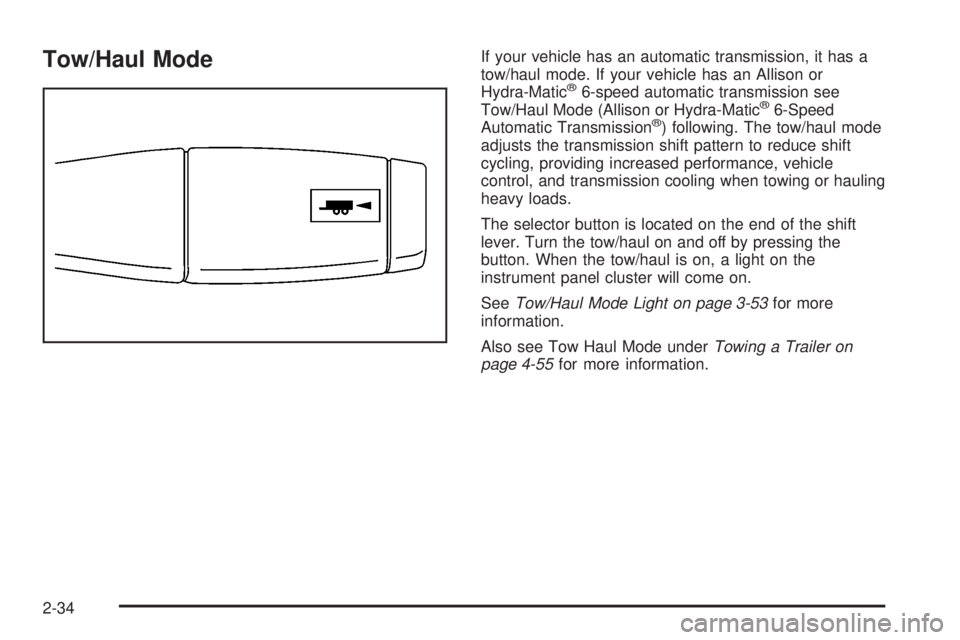
Tow/Haul ModeIf your vehicle has an automatic transmission, it has a
tow/haul mode. If your vehicle has an Allison or
Hydra-Matic
®6-speed automatic transmission see
Tow/Haul Mode (Allison or Hydra-Matic®6-Speed
Automatic Transmission®) following. The tow/haul mode
adjusts the transmission shift pattern to reduce shift
cycling, providing increased performance, vehicle
control, and transmission cooling when towing or hauling
heavy loads.
The selector button is located on the end of the shift
lever. Turn the tow/haul on and off by pressing the
button. When the tow/haul is on, a light on the
instrument panel cluster will come on.
SeeTow/Haul Mode Light on page 3-53for more
information.
Also see Tow Haul Mode underTowing a Trailer on
page 4-55for more information.
2-34
Page 127 of 578
Tow/Haul Mode (Allison Transmission®
or Hydra-Matic®6-Speed Automatic
Transmission)
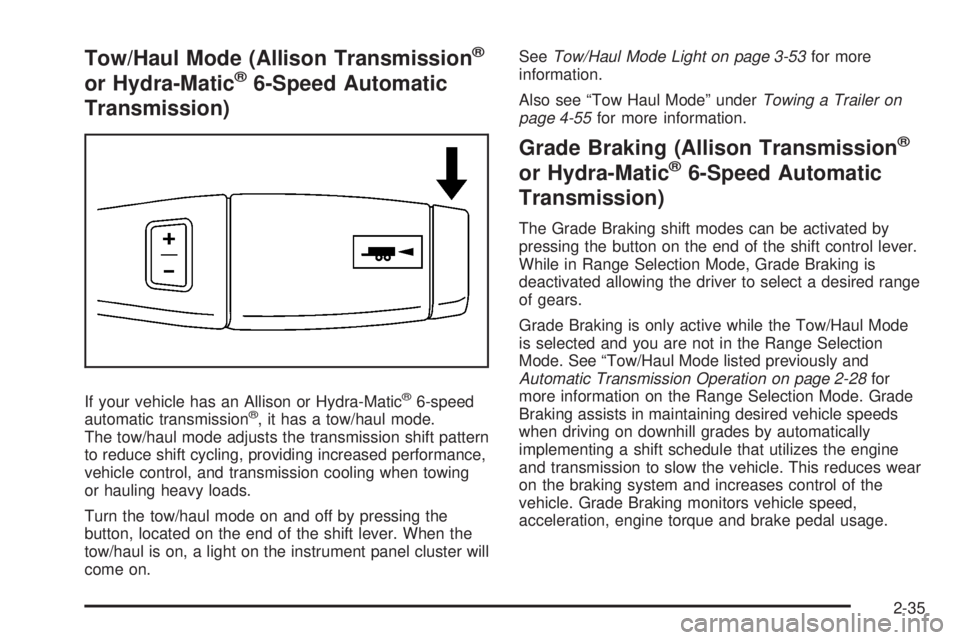
If your vehicle has an Allison or Hydra-Matic®6-speed
automatic transmission®, it has a tow/haul mode.
The tow/haul mode adjusts the transmission shift pattern
to reduce shift cycling, providing increased performance,
vehicle control, and transmission cooling when towing
or hauling heavy loads.
Turn the tow/haul mode on and off by pressing the
button, located on the end of the shift lever. When the
tow/haul is on, a light on the instrument panel cluster will
come on.SeeTow/Haul Mode Light on page 3-53for more
information.
Also see “Tow Haul Mode” underTowing a Trailer on
page 4-55for more information.
Grade Braking (Allison Transmission®
or Hydra-Matic®6-Speed Automatic
Transmission)
The Grade Braking shift modes can be activated by
pressing the button on the end of the shift control lever.
While in Range Selection Mode, Grade Braking is
deactivated allowing the driver to select a desired range
of gears.
Grade Braking is only active while the Tow/Haul Mode
is selected and you are not in the Range Selection
Mode. See “Tow/Haul Mode listed previously and
Automatic Transmission Operation on page 2-28for
more information on the Range Selection Mode. Grade
Braking assists in maintaining desired vehicle speeds
when driving on downhill grades by automatically
implementing a shift schedule that utilizes the engine
and transmission to slow the vehicle. This reduces wear
on the braking system and increases control of the
vehicle. Grade Braking monitors vehicle speed,
acceleration, engine torque and brake pedal usage.
2-35
Page 194 of 578

Reading Lamps
If your vehicle has reading lamps they are located on
the overhead console.
To turn on the reading lamps, press the button
located next to each lamp. To turn them off, press the
button again.
Your vehicle may also have reading lamps in other
locations. To turn the lamps on or off, press the button
located next to the lamp.
If your vehicle has a DVD Rear Seat Entertainment
(RSE) system, press the lamp lenses to turn the lamps
on or off.
The lamps are xed and cannot be adjusted.
Cargo Lamp
The cargo lamps come on by turning the instrument
panel brightness control knob to the farthest clockwise
position. This knob is located on the instrument
panel and also turns on the dome lamps.
The cargo lamp can be used if more light is needed in
the cargo area of the vehicle or in the top-box
storage units.
Electric Power Management
The vehicle has Electric Power Management (EPM) that
estimates the battery’s temperature and state of
charge. It then adjusts the voltage for best performance
and extended life of the battery.
When the battery’s state of charge is low, the voltage is
raised slightly to quickly put the charge back in. When
the state of charge is high, the voltage is lowered slightly
to prevent overcharging. If the vehicle has a voltmeter
gage or a voltage display on the Driver Information
Center (DIC), you may see the voltage move up
or down. This is normal. If there is a problem, an alert
will be displayed.
The battery can be discharged at idle if the electrical
loads are very high. This is true for all vehicles. This is
because the generator (alternator) may not be
spinning fast enough at idle to produce all the power
that is needed for very high electrical loads.
A high electrical load occurs when several of the
following loads are on: headlamps, high beams, fog
lamps, rear window defogger, climate control fan at high
speed, heated seats, engine cooling fans, trailer
loads, and loads plugged into accessory power outlets.
3-22
Page 197 of 578
Climate Controls
Climate Control System (With Air
Conditioning)
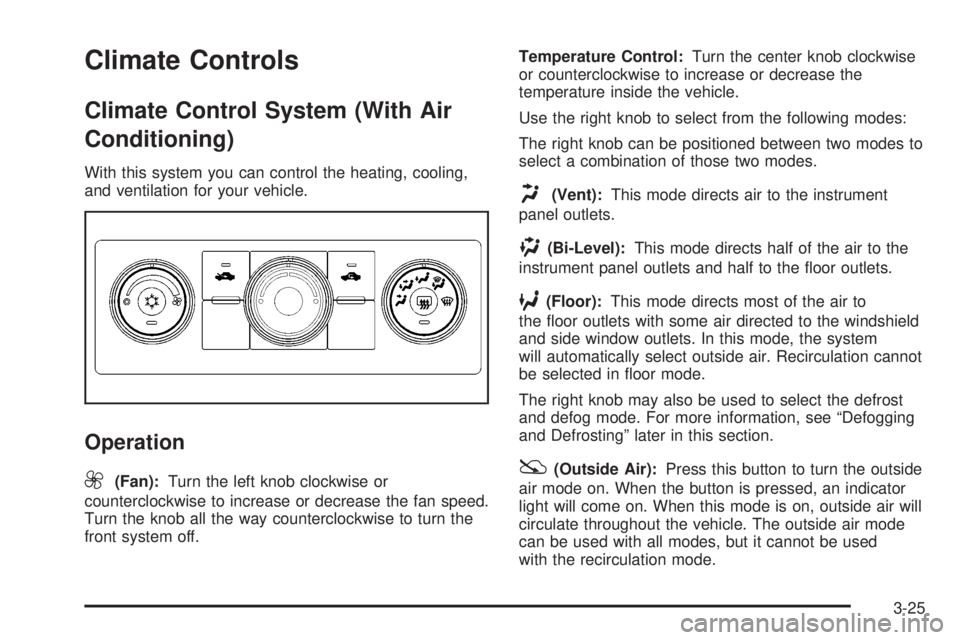
With this system you can control the heating, cooling,
and ventilation for your vehicle.
Operation
9
(Fan):Turn the left knob clockwise or
counterclockwise to increase or decrease the fan speed.
Turn the knob all the way counterclockwise to turn the
front system off.Temperature Control:Turn the center knob clockwise
or counterclockwise to increase or decrease the
temperature inside the vehicle.
Use the right knob to select from the following modes:
The right knob can be positioned between two modes to
select a combination of those two modes.
H(Vent):This mode directs air to the instrument
panel outlets.
)(Bi-Level):This mode directs half of the air to the
instrument panel outlets and half to the oor outlets.
6(Floor):This mode directs most of the air to
the oor outlets with some air directed to the windshield
and side window outlets. In this mode, the system
will automatically select outside air. Recirculation cannot
be selected in oor mode.
The right knob may also be used to select the defrost
and defog mode. For more information, see “Defogging
and Defrosting” later in this section.
:(Outside Air):Press this button to turn the outside
air mode on. When the button is pressed, an indicator
light will come on. When this mode is on, outside air will
circulate throughout the vehicle. The outside air mode
can be used with all modes, but it cannot be used
with the recirculation mode.
3-25
Page 200 of 578
Use the right knob to select from the following modes:
The right knob can be positioned between two modes to
select a combination of those two modes.
H(Vent):This mode directs air to the instrument
panel outlets.
)(Bi-Level):This mode directs half of the air to the
instrument panel outlets and to the oor outlets.
6(Floor):This mode directs most of the air to the
oor outlets with some air directed to the windshield,
side window outlets, and second row oor outlets. In this
mode, the system will automatically select outside air.
Defogging and Defrosting
Fog or frost on the inside of windows is a result of high
humidity (moisture) condensing on the cool window
glass. This can be minimized if the climate control
system is used properly.
Turn the right knob to select the defog or defrost mode.
-(Defog):This mode clears the windows of fog or
moisture and warm the passengers. The air is directed to
the windshield, oor outlets, and side window vents.
0(Defrost):This mode removes fog or frost from the
windshield more quickly. A portion of the air is directed
to the windshield and the side window vents, with someair directed to the oor vents. The system will
automatically force outside air into the vehicle.
Do not drive the vehicle until all the windows are clear.
Dual Automatic Climate Control
System
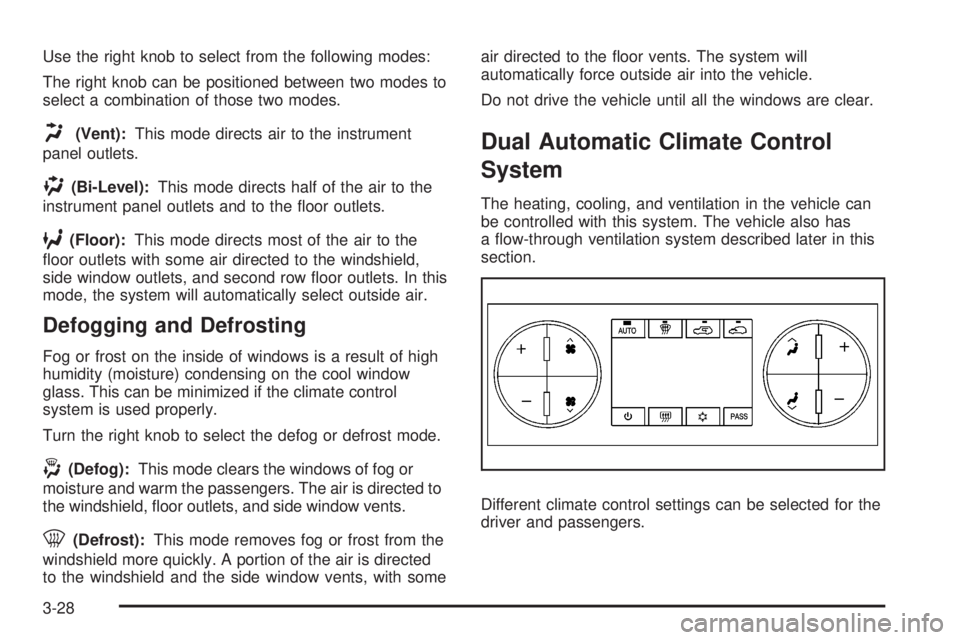
The heating, cooling, and ventilation in the vehicle can
be controlled with this system. The vehicle also has
a ow-through ventilation system described later in this
section.
Different climate control settings can be selected for the
driver and passengers.
3-28
Page 201 of 578

Driver and Passenger Side Temperature
Controls
The driver and passenger side temperature buttons are
used to adjust the temperature of the air coming
through the system on the driver or passenger’s side of
the vehicle. The temperature can be adjusted even if
the system is turned off. This is possible since outside
air always ows through the system as the vehicle
is moving forward unless it is set to recirculation mode.
See “Recirculation” later in this section.
Press the + or−buttons to increase or decrease the
cabin temperature. The driver side or passenger
side temperature display shows the temperature setting
decreasing or increasing.
The passenger’s temperature setting can be set to
match the driver’s temperature setting by pressing the
PASS button and turning off the PASS indicator.
When the passenger’s temperature setting is set
different than the driver’s setting, the indicator on the
PASS button illuminates and both the driver’s side and
passenger’s side temperature displays are shown.
Automatic Operation
AUTO (Automatic):When automatic operation is
active the system controls the inside temperature, the
air delivery, and the fan speed.Use the steps below to place the entire system in
automatic mode:
1. Press the AUTO button.
When AUTO is selected, the display changes to
show the current temperature(s) and AUTO is lit on
the display. The current air delivery mode and
fan speed are also displayed for about 5 seconds.
When AUTO is selected, the air conditioning
operation and air inlet are automatically controlled.
The air conditioning compressor may run when
the outside temperature is above freezing. The air
inlet will normally be set to outside air. If it is
hot outside, the air inlet may automatically switch to
the recirculate mode to help quickly cool down
the air inside the vehicle. The light on the button
comes on in recirculation.
2. Set the driver’s and passenger’s temperature.
To nd your comfort setting, start with a 74°F (23°C)
temperature setting and allow about 20 minutes
for the system to regulate. Use the driver’s or
passenger’s temperature buttons to adjust the
temperature setting as necessary. If you choose the
temperature setting of 60°F (15°C), the system
remains at the maximum cooling setting. If
you choose the temperature setting of 90°F (32°C),
the system remains at the maximum heat setting.
Choosing either maximum setting will not cause the
vehicle to heat or cool any faster.
3-29
Page 218 of 578
StabiliTrak®Indicator Light
If equipped, this warning
light should come on
briey when the engine
is started.
If the warning light does not come on then, have it xed
so it will be ready to warn you if there is a problem. If
it stays on, or comes on when you are driving, there may
be a problem with your StabiliTrak
®system and your
vehicle may need service. When this warning light is on,
the system is off and will not limit wheel spin. Adjust
your driving accordingly.
This light will also ash when the StabiliTrak
®system is
active.
If the StabiliTrak
®system warning light comes on and
stays on for an extended period of time when the system
is turned on, your vehicle needs service. See
StabiliTrak
®System on page 4-6for more information.
Engine Coolant Temperature Gage
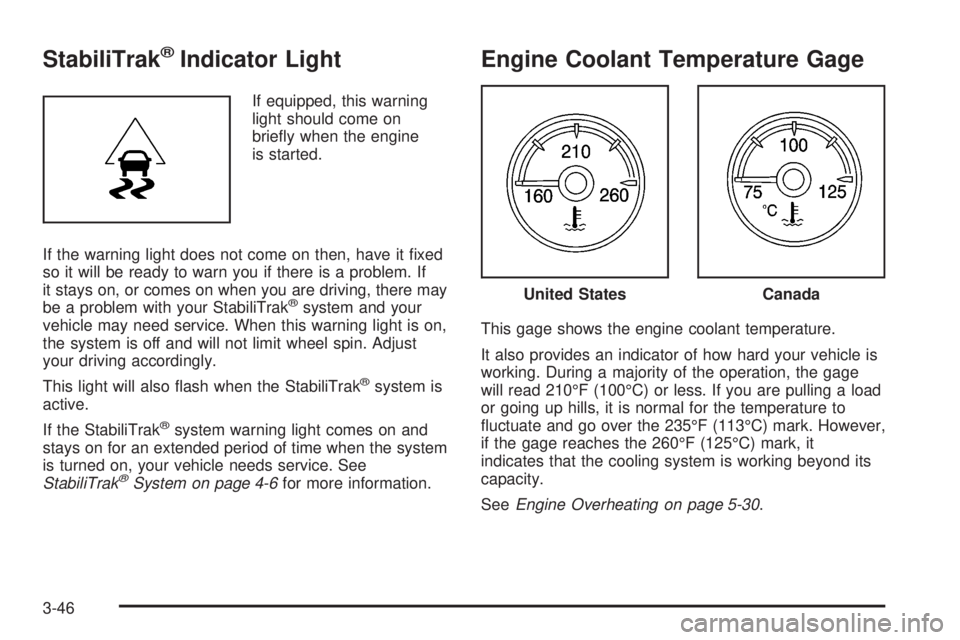
This gage shows the engine coolant temperature.
It also provides an indicator of how hard your vehicle is
working. During a majority of the operation, the gage
will read 210°F (100°C) or less. If you are pulling a load
or going up hills, it is normal for the temperature to
uctuate and go over the 235°F (113°C) mark. However,
if the gage reaches the 260°F (125°C) mark, it
indicates that the cooling system is working beyond its
capacity.
SeeEngine Overheating on page 5-30.
United StatesCanada
3-46