2008 GMC ENVOY roof
[x] Cancel search: roofPage 226 of 468

y(Main DVD Menu):Press to access the DVD menu.
The DVD menu is different on every DVD. Use the
navigation arrows to move the cursor around the DVD
menu. After making a selection press the enter button.
This button only operates when playing a DVD.
z(Set-up Menu):Press to adjust the color, tint,
brightness, contrast, display mode, and dynamic range
compression. The dynamic range compression feature
can be used to reduce loud audio and increase low audio
produced by some DVDs.
To change a feature back to the factory default setting,
press this button to display the feature, then press and
hold until the default setting displays.
While playing an Audio or DVD disc, press and hold
this button to display and to remove the track and time
information.
n,q,p,o(Menu Navigation Arrows):Use the
arrows to navigate through a menu.
r(Enter):Press to select the choices that are
highlighted in any menu.
DVD Player Buttons (With Sunroof)
s(Play/Pause):Press to start play of a DVD or CD.
Press while a DVD or CD is playing to pause it. Press
again to continue the play of the DVD or CD.
c/X(Stop/Eject):Press to stop playing,
rewinding, or fast forwarding a DVD or CD. Press this
button twice to return to the beginning of the DVD.
Press and hold this button for more than three seconds
to eject a DVD or CD.
3-92
Page 227 of 468

Playing a Disc
To play a disc, gently insert the disc with the label side
up into the loading slot. The DVD player continues
loading the disc and the player automatically starts,
if the vehicle is in ON/RUN, ACC/ACCESSORY,
or when RAP is active.
If a disc is already in the player, press the play/pause
button on the DVD player faceplate or on the remote
control.
Some DVDs do not allow fast forwarding or skipping
of the copyright information or the previews. Some
DVDs begin playing after the previews have nished.
If the DVD does not begin to play the main title, refer
to the on-screen instructions.
Stopping and Resuming Playback
To stop playing a disc, press and release the stop
button on the DVD player faceplate or the remote
control.
To resume playback, press the play/pause button on the
DVD player faceplate or the remote control. The movie
should resume play from where it was last stopped, if the
disc has not been ejected and the stop button has not
been pressed twice. If the disc has been ejected or if the
stop button has been pressed twice, the disc resumes
play at the beginning.
Ejecting a Disc (DVD Player without
Sunroof)
Press thec/Xbutton on the DVD player faceplate
to eject the disc. There is not an eject button on the
remote control.
If a disc is ejected from the player, but is not removed,
the DVD player reloads the disc after a short period
of time. The disc is stored in the DVD player. The DVD
player does not resume play of the disc automatically.
Ejecting a Disc (DVD Player with Sunroof)
Press and hold thec/Xbutton for more than
two seconds on the DVD player faceplate to eject the
disc. There is not an eject button on the remote control.
If a disc is ejected from the player, but is not removed,
the DVD player reloads the disc after a short period
of time. The disc is stored in the DVD player. The DVD
player does not resume play of the disc automatically.
3-93
Page 237 of 468
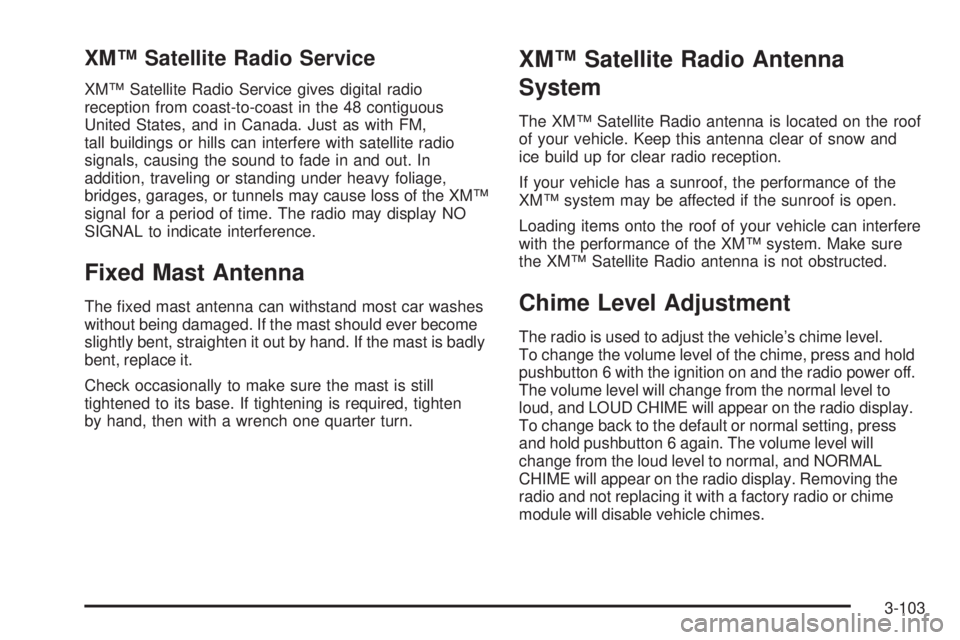
XM™ Satellite Radio Service
XM™ Satellite Radio Service gives digital radio
reception from coast-to-coast in the 48 contiguous
United States, and in Canada. Just as with FM,
tall buildings or hills can interfere with satellite radio
signals, causing the sound to fade in and out. In
addition, traveling or standing under heavy foliage,
bridges, garages, or tunnels may cause loss of the XM™
signal for a period of time. The radio may display NO
SIGNAL to indicate interference.
Fixed Mast Antenna
The xed mast antenna can withstand most car washes
without being damaged. If the mast should ever become
slightly bent, straighten it out by hand. If the mast is badly
bent, replace it.
Check occasionally to make sure the mast is still
tightened to its base. If tightening is required, tighten
by hand, then with a wrench one quarter turn.
XM™ Satellite Radio Antenna
System
The XM™ Satellite Radio antenna is located on the roof
of your vehicle. Keep this antenna clear of snow and
ice build up for clear radio reception.
If your vehicle has a sunroof, the performance of the
XM™ system may be affected if the sunroof is open.
Loading items onto the roof of your vehicle can interfere
with the performance of the XM™ system. Make sure
the XM™ Satellite Radio antenna is not obstructed.
Chime Level Adjustment
The radio is used to adjust the vehicle’s chime level.
To change the volume level of the chime, press and hold
pushbutton 6 with the ignition on and the radio power off.
The volume level will change from the normal level to
loud, and LOUD CHIME will appear on the radio display.
To change back to the default or normal setting, press
and hold pushbutton 6 again. The volume level will
change from the loud level to normal, and NORMAL
CHIME will appear on the radio display. Removing the
radio and not replacing it with a factory radio or chime
module will disable vehicle chimes.
3-103
Page 252 of 468

“Off-roading” means you have left the great North
American road system behind. Traffic lanes are
not marked. Curves are not banked. There are no
road signs. Surfaces can be slippery, rough, uphill, or
downhill. In short, you have gone right back to nature.
Off-road driving involves some new skills. And that
is why it is very important that you read this guide.
You will nd many driving tips and suggestions. These
will help make your off-road driving safer and more
enjoyable.
Before You Go Off-Roading
There are some things to do before you go out.
For example, be sure to have all necessary maintenance
and service work done. Check to make sure all
underbody shields, if the vehicle has them, are
properly attached.
Be sure you read all the information about your
four-wheel-drive vehicle in this manual.
Is there enough fuel? Is the spare tire fully inated?
Are the uid levels up where they should be? What
are the local laws that apply to off-roading where you will
be driving? If you do not know, you should check with
law enforcement people in the area. Will you be on
someone’s private land? If so, be sure to get the
necessary permission.
Loading Your Vehicle for Off-Road
Driving
{CAUTION:
Cargo on the load oor piled higher than
the seatbacks can be thrown forward during
a sudden stop. You or your passengers
could be injured. Keep cargo below the
top of the seatbacks.
Unsecured cargo on the load oor can be
tossed about when driving over rough
terrain. You or your passengers can be
struck by ying objects. Secure the cargo
properly.
Heavy loads on the roof raise the vehicle’s
center of gravity, making it more likely to
roll over. You can be seriously or fatally
injured if the vehicle rolls over. Put heavy
loads inside the cargo area, not on the roof.
Keep cargo in the cargo area as far forward
and low as possible.
4-14
Page 412 of 468
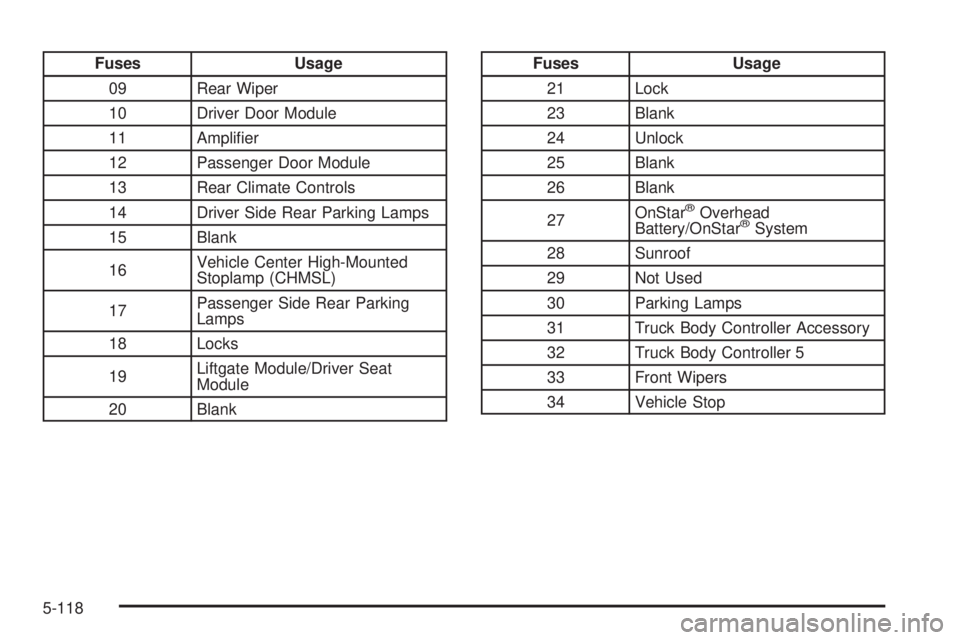
Fuses Usage
09 Rear Wiper
10 Driver Door Module
11 Amplier
12 Passenger Door Module
13 Rear Climate Controls
14 Driver Side Rear Parking Lamps
15 Blank
16Vehicle Center High-Mounted
Stoplamp (CHMSL)
17Passenger Side Rear Parking
Lamps
18 Locks
19Liftgate Module/Driver Seat
Module
20 BlankFuses Usage
21 Lock
23 Blank
24 Unlock
25 Blank
26 Blank
27OnStar
®Overhead
Battery/OnStar®System
28 Sunroof
29 Not Used
30 Parking Lamps
31 Truck Body Controller Accessory
32 Truck Body Controller 5
33 Front Wipers
34 Vehicle Stop
5-118
Page 466 of 468

Service (cont.)
Four-Wheel-Drive Warning Light.....................3-47
Publications Ordering Information...................7-16
Service, Scheduling Appointments.....................7-10
Servicing Your Airbag-Equipped Vehicle..............1-66
Sheet Metal Damage.....................................5-106
Shifting Into Park (P).......................................2-34
Shifting Out of Park (P)...................................2-36
Signals, Turn and Lane-Change.......................... 3-7
Snow Plow....................................................4-40
Spare Tire.....................................................5-99
Installing....................................................5-87
Removing...................................................5-84
Storing.......................................................5-96
Specications, Capacities...............................5-120
Speedometer..................................................3-32
StabiliTrak
®System.......................................... 4-6
StabiliTrak®Indicator Light................................3-40
StabiliTrak®Service Light.................................3-39
Starting the Engine.........................................2-22
Steering........................................................4-10
Steering Wheel Controls, Audio.......................3-101
Steering Wheel, Tilt Wheel................................. 3-6
Storage Areas
Center Console Storage Area........................2-57
Convenience Net.........................................2-59Storage Areas (cont.)
Glove Box..................................................2-57
Luggage Carrier..........................................2-58
Overhead Console.......................................2-57
Rear Floor Storage Lid.................................2-59
Stuck in Sand, Mud, Ice, or Snow.....................4-33
Sun Visors.....................................................2-15
Sunroof.........................................................2-60
T
Tachometer....................................................3-32
Taillamps
Turn Signal, and Stoplamps..........................5-51
Theft-Deterrent, Radio....................................3-101
Theft-Deterrent Systems...................................2-16
Content Theft-Deterrent................................2-16
PASS-Key
®III+...........................................2-18
PASS-Key®III+ Operation.............................2-18
Passlock®...................................................2-17
Tilt Wheel........................................................ 3-6
Time, Setting..................................................3-66
Tire
Pressure Light.............................................3-41
12