2008 GMC ENVOY DENALI mirror
[x] Cancel search: mirrorPage 120 of 468
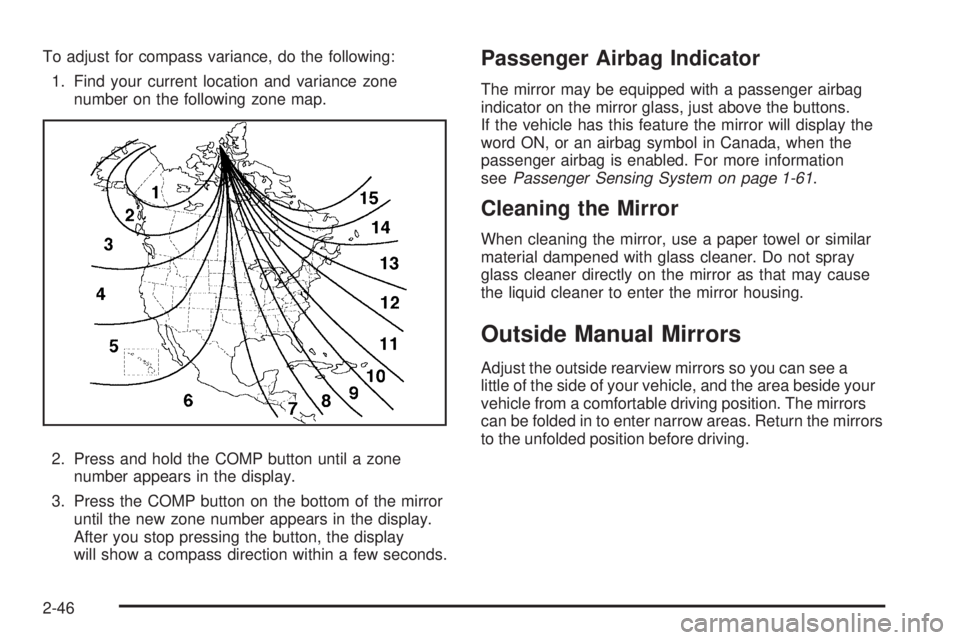
To adjust for compass variance, do the following:
1. Find your current location and variance zone
number on the following zone map.
2. Press and hold the COMP button until a zone
number appears in the display.
3. Press the COMP button on the bottom of the mirror
until the new zone number appears in the display.
After you stop pressing the button, the display
will show a compass direction within a few seconds.Passenger Airbag Indicator
The mirror may be equipped with a passenger airbag
indicator on the mirror glass, just above the buttons.
If the vehicle has this feature the mirror will display the
word ON, or an airbag symbol in Canada, when the
passenger airbag is enabled. For more information
seePassenger Sensing System on page 1-61.
Cleaning the Mirror
When cleaning the mirror, use a paper towel or similar
material dampened with glass cleaner. Do not spray
glass cleaner directly on the mirror as that may cause
the liquid cleaner to enter the mirror housing.
Outside Manual Mirrors
Adjust the outside rearview mirrors so you can see a
little of the side of your vehicle, and the area beside your
vehicle from a comfortable driving position. The mirrors
can be folded in to enter narrow areas. Return the mirrors
to the unfolded position before driving.
2-46
Page 121 of 468
Outside Power Mirrors
Your vehicle may have this feature. The power mirror
control is located on the driver’s door.
Turn the control knob left or right to select the desired
mirror. Then move the control knob to the left or right or
up or down to position the mirror so that you can see
a little of the outside of the vehicle. After adjusting
the position of the mirrors, turn the knob to the center
off position so that the mirrors do not move.
If the travel position in any direction of the mirror is
reached, it will enter a ratcheting mode. This action is
harmless. It is a warning that the mirror can go no further.
To stop this action, back the mirror up by moving the
knob in the opposite direction.
The mirrors can be manually folded inward to prevent
damage when going through an automatic car wash.
To fold, push the mirror toward the vehicle. To return the
mirror to its original position, push outward. Be sure
to return both mirrors to their original unfolded position
before driving.
Outside Curb View Assist Mirror
If the vehicle has this feature, the passenger’s outside
mirror will adjust to a preset tilt position while the vehicle
is in REVERSE (R) gear. Curb view assist may be useful
when you are parallel parking. The mirror will return
to normal position when the vehicle is shifted out of
REVERSE (R) gear. Automatic mirror movement in
either direction will follow a short delay.
You may be able to turn this feature on or off through
the Driver Information Center (DIC). SeeDIC Vehicle
Customization on page 3-58.
2-47
Page 122 of 468
Outside Convex Mirror
{CAUTION:
A convex mirror can make things (like other
vehicles) look farther away than they really are.
If you cut too sharply into the right lane, you
could hit a vehicle on your right. Check your
inside mirror or glance over your shoulder
before changing lanes.
The passenger side mirror is convex. A convex mirror’s
surface is curved so more can be seen from the
driver seat. It also makes things, like other vehicles,
look farther away than they really are.
Outside Heated Mirrors
Your vehicle may have this feature. When you operate
the rear window defogger, the defogger also warms the
heated driver’s and passenger’s outside rearview mirrors
to help clear them of ice, snow and condensation.
OnStar®System
OnStar uses several innovative technologies and live
advisors to provide you with a wide range of safety,
security, information, and convenience services. If your
airbags deploy, the system is designed to make an
automatic call to OnStar Emergency advisors who can
request emergency services be sent to your location.
If you lock your keys in the vehicle, call OnStar at
1-888-4-ONSTAR and they can send a signal to unlock
your doors. If you need roadside assistance, press
the OnStar button and they can contact Roadside
Service for you.
2-48
Page 157 of 468
Rear Window Defogger
If your vehicle has the rear window defogger a warming
grid is used to remove fog on the rear window.
<(Rear):Press this button to turn the rear window
defogger on or off. An indicator light in the button
will come on to let you know that the rear window
defogger is active. The rear window defogger will
automatically turn off approximately ten minutes
after the button is pressed.
If your vehicle has heated mirrors, this button will
activate them.
Notice:Do not use anything sharp on the inside of
the rear window. If you do, you could cut or damage
the warming grid, and the repairs would not be
covered by your warranty. Do not attach a temporary
vehicle license, tape, a decal or anything similar to
the defogger grid.
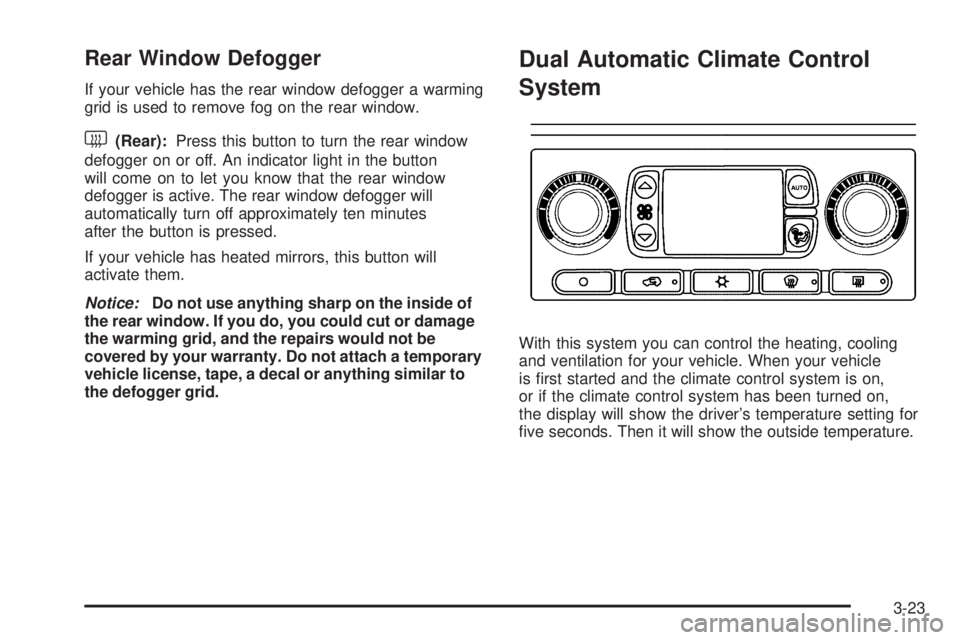
Dual Automatic Climate Control
System
With this system you can control the heating, cooling
and ventilation for your vehicle. When your vehicle
is rst started and the climate control system is on,
or if the climate control system has been turned on,
the display will show the driver’s temperature setting for
ve seconds. Then it will show the outside temperature.
3-23
Page 161 of 468
Defogging and Defrosting
Fog on the inside of the windows is a result of moisture
condensing on the cool window glass. This can be
reduced if the climate control system is used properly.
You can use either defog or front defrost to clear
fog or frost from your windshield.
-(Defog):Use this setting to clear the windows of
fog or moisture. This setting will deliver air to the
oor and windshield outlets.
0(Front Defrost):Press the front defrost button to
clear the windshield and side windows of frost or fog
quickly. The system will automatically control the fan
speed if you select defrost from AUTO mode. If the
outside temperature is 40°F (4°C) or warmer, your air
conditioning compressor will automatically run to help
dehumidify the air and dry the windshield. Do not drive
the vehicle until all the windows are clear.
Rear Window Defogger
If your vehicle has the rear window defogger a warming
grid is used to remove fog from the rear window.
<(Rear):Press this button to turn the rear window
defogger on or off.
An indicator light in the button will come on to let you
know that the rear window defogger is activated.
The rear window defogger will turn off approximately
10 minutes after the button is pressed. If you need
additional warming time, press the button again.
If your vehicle has heated mirrors, they will come on
when this button is pressed.
Notice:Do not use a razor blade or sharp object to
clear the inside rear window. Do not adhere anything
to the defogger grid lines in the rear glass. These
actions may damage the rear defogger. Repairs
would not be covered by your warranty.
3-27
Page 168 of 468

If the airbag readiness light stays on after you start the
vehicle or comes on when you are driving, your airbag
system may not work properly. Have your vehicle
serviced right away.
{CAUTION:
If the airbag readiness light stays on after you
start your vehicle, it means the airbag system
may not be working properly. The airbags in
your vehicle may not inate in a crash, or they
could even inate without a crash. To help avoid
injury to yourself or others, have your vehicle
serviced right away if the airbag readiness light
stays on after you start your vehicle.
The airbag readiness light should ash for a few
seconds when you start the engine. If the light does
not come on then, have it xed immediately. If there
is a problem with the airbag system, an airbag Driver
Information Center (DIC) message may also come
on. SeeDIC Warnings and Messages on page 3-53for
more information.
Passenger Airbag Status Indicator
Your vehicle has the passenger sensing system.
Your rearview mirror has a passenger airbag status
indicator.
When you start the vehicle, the passenger airbag status
indicator will light ON and OFF, or the symbol for on
and off, for several seconds as a system check.United States
Canada
3-34
Page 188 of 468

CHECK TIRE PRESSURE
This message displays when the pressure in one or
more of the vehicle’s tires needs to be checked. If a tire
pressure message appears on the DIC, stop as soon
as you can. Have the tire pressures checked and set to
those shown on the Tire Loading Information label.
SeeTires on page 5-57,Loading Your Vehicle on
page 4-34, andInflation - Tire Pressure on page 5-64.
The DIC also shows the tire pressure values. See
DIC Operation and Displays on page 3-50. If the tire
pressure is low, the low tire pressure warning light
comes on. SeeTire Pressure Light on page 3-41.
CHECK WASHER FLUID
This message displays if the washer uid level is low.
Adding washer uid to the windshield washer uid
reservoir clears this message. SeeWindshield Washer
Fluid on page 5-37. This message clears itself after
10 seconds, or you can manually clear it from the
DIC display.
CURB VIEW ACTIVATED
This message displays when the passenger outside
rearview mirror moves into the curb view position.
SeeOutside Curb View Assist Mirror on page 2-47
for more information.
DRIVER DOOR AJAR
This message displays and a chime sounds if the driver
door is not fully closed. Stop and turn off the vehicle,
check the door for obstructions, and close the door again.
Check to see if the message still appears on the DIC.
ENGINE COOLANT HOT/ENGINE
OVERHEATED
Notice:If you drive your vehicle while the engine
is overheating, severe engine damage may occur.
If an overheat warning appears on the instrument
panel cluster and/or DIC, stop the vehicle as soon as
possible. Do not increase the engine speed above
normal idling speed. SeeEngine Overheating
on page 5-28for more information.
This message displays and a chime sounds if the
cooling system temperature gets hot. SeeEngine
Overheating on page 5-28for the proper course of
action. This message clears when the coolant
temperature drops to a safe operating temperature.
FUEL LEVEL LOW
This message displays and a chime sounds if the fuel
level is low. Refuel as soon as possible. SeeLow
Fuel Warning Light on page 3-49,Filling the Tank on
page 5-8, andFuel on page 5-5for more information.
3-54
Page 196 of 468
Easy Exit Seat
Press the customization button until EASY EXIT SEAT:
OFF appears in the display. To select your preference
for seat position exit, press the select button while EASY
EXIT SEAT: OFF is displayed on the DIC. Pressing
the select button will scroll through the following settings:
EASY EXIT SEAT: OFF (default):No seat exit recall
will occur.
EASY EXIT SEAT: ON:The driver’s seat will move to
the exit position when the key is removed from the
ignition.
To select a setting and move on to the next feature,
press the customization button while the desired setting
is displayed on the DIC.
See “Easy Exit Seat” underMemory Seat, Mirrors, and
Pedals on page 1-5for more information.
Seat Recall
Press the customization button until SEAT RECALL:
OFF appears in the display. To select your preference
for recall of the driver’s memory seat and adjustable
pedals, if your vehicle has this feature, press the select
button while SEAT RECALL: OFF is displayed on
the DIC. Pressing the select button will scroll through
the following settings:
SEAT RECALL: OFF (default):The driver’s memory
seat and adjustable pedals position you saved will
only be recalled when the memory button 1 or 2
is pressed.
SEAT RECALL: AT KEY IN:The driver’s memory
seat and adjustable pedals position you saved will
be recalled when you put the key in the ignition.
SEAT RECALL: ON REMOTE:The driver’s memory
seat and adjustable pedals position you saved will
be recalled when you unlock the vehicle with the
Remote Keyless Entry (RKE) transmitter.
To select a setting and move on to the next feature,
press the customization button while the desired setting
is displayed on the DIC.
SeeMemory Seat, Mirrors, and Pedals on page 1-5for
more information.
3-62