Page 1 of 368
Introduction 4
Instrument Cluster 12
Warning lights and chimes 12
Gauges 18
Entertainment Systems 22
AM/FM stereo 22
AM/FM stereo with CD 24
AM/FM stereo with in-dash six CD 30
Auxiliary input jack 36
Satellite radio information 40
Navigation system 43
Family entertainment system 43
Climate Controls 71
Heater only 71
Manual heating and air conditioning 72
Dual automatic temperature control 75
Lights 80
Headlamps 80
Turn signal control 85
Bulb replacement 85
Driver Controls 94
Windshield wiper/washer control 94
Steering wheel adjustment 95
Power windows 98
Mirrors 99
Speed control 104
Upfitter controls 109
Moon roof 110
Message center 116
Tailgate 131
Table of Contents
1
2008 F-250/350/450/550(f23)
Owners Guide (post-2002-fmt)
USA(fus)
Page 2 of 368
Locks and Security 136
Keys 136
Locks 136
Anti-theft system 148
Seating and Safety Restraints 151
Seating 151
Safety restraints 158
Airbags 171
Child restraints 180
Tires, Wheels and Loading 192
Tire information 195
Tire inflation 196
Vehicle loading 212
Trailer towing 219
Trailer brake controller-integrated 223
Recreational towing 230
Driving 231
Starting 231
Brakes 235
Traction Control™ 237
Transmission operation 240
Roadside Emergencies 265
Getting roadside assistance 265
Hazard flasher switch 267
Fuel pump shut-off switch 267
Fuses and relays 268
Changing tires 277
Lug nut torque 289
Jump starting 290
Wrecker towing 296
Table of Contents
2
2008 F-250/350/450/550(f23)
Owners Guide (post-2002-fmt)
USA(fus)
Page 5 of 368

SAFETY AND ENVIRONMENT PROTECTION
Warning symbols in this guide
How can you reduce the risk of personal injury to yourself or others? In
this guide, answers to such questions are contained in comments
highlighted by the warning triangle symbol. These comments should be
read and observed.
Warning symbols on your vehicle
When you see this symbol, it is
imperative that you consult the
relevant section of this guide before
touching or attempting adjustment
of any kind.
Protecting the environment
We must all play our part in
protecting the environment. Correct
vehicle usage and the authorized
disposal of waste, cleaning and
lubrication materials are significant
steps towards this aim. Information in this respect is highlighted in this
guide with the tree symbol.
BREAKING-IN YOUR VEHICLE
During the first 1,000 miles (1,600 km) of driving, maintain speeds below
70 mph (112 km/h) and vary speeds frequently. This is recommended to
give the moving parts a chance to break-in.
Do not tow a trailer or use your vehicle to snowplow until it has been
driven at least 500 miles (800 km). Refer toTrailer towingin theTires,
Wheels and Loadingchapter for more information on towing a trailer
andSnowplowingin theDrivingchapter.
Do not add friction modifier compounds or special break-in oils during
the first few thousand miles (kilometers) of operation, since these
additives may prevent piston ring seating. SeeEngine oilin the
Maintenance and Specificationschapter for more information on oil
usage.
2008 F-250/350/450/550(f23)
Owners Guide (post-2002-fmt)
USA(fus)
Introduction
5
Page 6 of 368

SPECIAL NOTICES
New Vehicle Limited Warranty
For a detailed description of what is covered and what is not covered by
your vehicle’s New Vehicle Limited Warranty, refer to theWarranty
Guidethat is provided to you along with yourOwner’s Guide.
Service Data Recording
Service data recorders in your vehicle are capable of collecting and
storing diagnostic information about your vehicle. This potentially
includes information about the performance or status of various systems
and modules in the vehicle, such as engine, throttle, steering or brake
systems. In order to properly diagnose and service your vehicle, Ford
Motor Company, Ford of Canada, Ford Motor Company, S.A. de C.V. and
service and repair facilities may access vehicle diagnostic information
through a direct connection to your vehicle when diagnosing or servicing
your vehicle.
Event Data Recording
Other modules in your vehicle — event data recorders — are capable of
collecting and storing data during a crash or near crash event. The
recorded information may assist in the investigation of such an event.
The modules may record information about both the vehicle and the
occupants, potentially including information such as:
•how various systems in your vehicle were operating;
•whether or not the driver and passenger seatbelts were buckled;
•how far (if at all) the driver was depressing the accelerator and/or the
brake pedal;
•how fast the vehicle was traveling; and
•where the driver was positioning the steering wheel.
To access this information, special equipment must be directly connected
to the recording modules. Ford Motor Company, Ford of Canada and
Ford Motor Company, S.A. de C.V. do not access event data recorder
information without obtaining consent, unless pursuant to court order or
where required by law enforcement, other government authorities or
other third parties acting with lawful authority. Other parties may seek to
access the information independently of Ford Motor Company, Ford of
Canada and Ford Motor Company, S.A. de C.V.
2008 F-250/350/450/550(f23)
Owners Guide (post-2002-fmt)
USA(fus)
Introduction
6
Page 16 of 368

Transmission Tow/Haul Feature
(automatic transmission)
(if equipped):The Tow Haul light
remains illuminated as long as the
Tow/Haul feature is activated. Refer to theDrivingchapter for
transmission function and operation. If the light remains illuminated and
will not cancel using the Tow/Haul switch located on the end of the gear
shift lever, have the system serviced immediately or damage to the
transmission could occur.
Four wheel drive low
(if equipped):Illuminates when
four-wheel drive low is engaged.
Four wheel drive high
(if equipped):Illuminates when
four-wheel drive high is engaged.
Anti-theft:Flashes when the
SecuriLock�Passive Anti-Theft
System has been activated.
Speed control (if equipped):
Illuminates when the speed control
is activated. Turns off when the
speed control system is deactivated.
Turn signal:Illuminates when the
left or right turn signal or the
hazard lights are turned on. If the
indicators stay on or flash faster, check for a burned out bulb.
High beams:Illuminates when the
high beam headlamps are turned on.
If your vehicle is equipped with a diesel engine, it has some unique
warning lights; refer toInstrument Clusterin your6.0/6.4 Liter Power
Stroke Direct Injection Turbo Diesel Owner’s Guide Supplementfor
detailed information on their function.
4x4
LOW
4x4
HIGH
2008 F-250/350/450/550(f23)
Owners Guide (post-2002-fmt)
USA(fus)
Instrument Cluster
16
Page 86 of 368
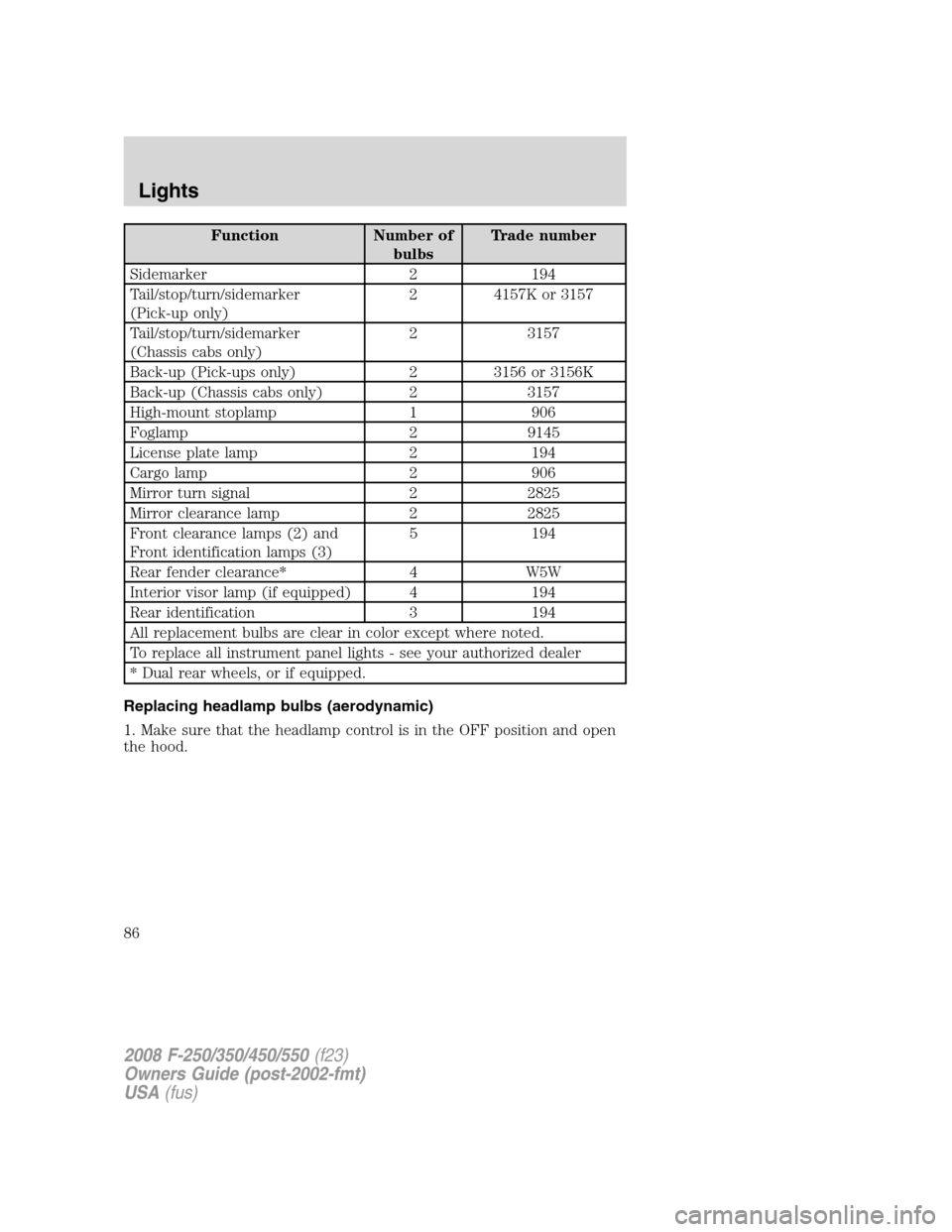
Function Number of
bulbsTrade number
Sidemarker 2 194
Tail/stop/turn/sidemarker
(Pick-up only)2 4157K or 3157
Tail/stop/turn/sidemarker
(Chassis cabs only)2 3157
Back-up (Pick-ups only) 2 3156 or 3156K
Back-up (Chassis cabs only) 2 3157
High-mount stoplamp 1 906
Foglamp 2 9145
License plate lamp 2 194
Cargo lamp 2 906
Mirror turn signal 2 2825
Mirror clearance lamp 2 2825
Front clearance lamps (2) and
Front identification lamps (3)5 194
Rear fender clearance* 4 W5W
Interior visor lamp (if equipped) 4 194
Rear identification 3 194
All replacement bulbs are clear in color except where noted.
To replace all instrument panel lights - see your authorized dealer
* Dual rear wheels, or if equipped.
Replacing headlamp bulbs (aerodynamic)
1. Make sure that the headlamp control is in the OFF position and open
the hood.
2008 F-250/350/450/550(f23)
Owners Guide (post-2002-fmt)
USA(fus)
Lights
86
Page 95 of 368
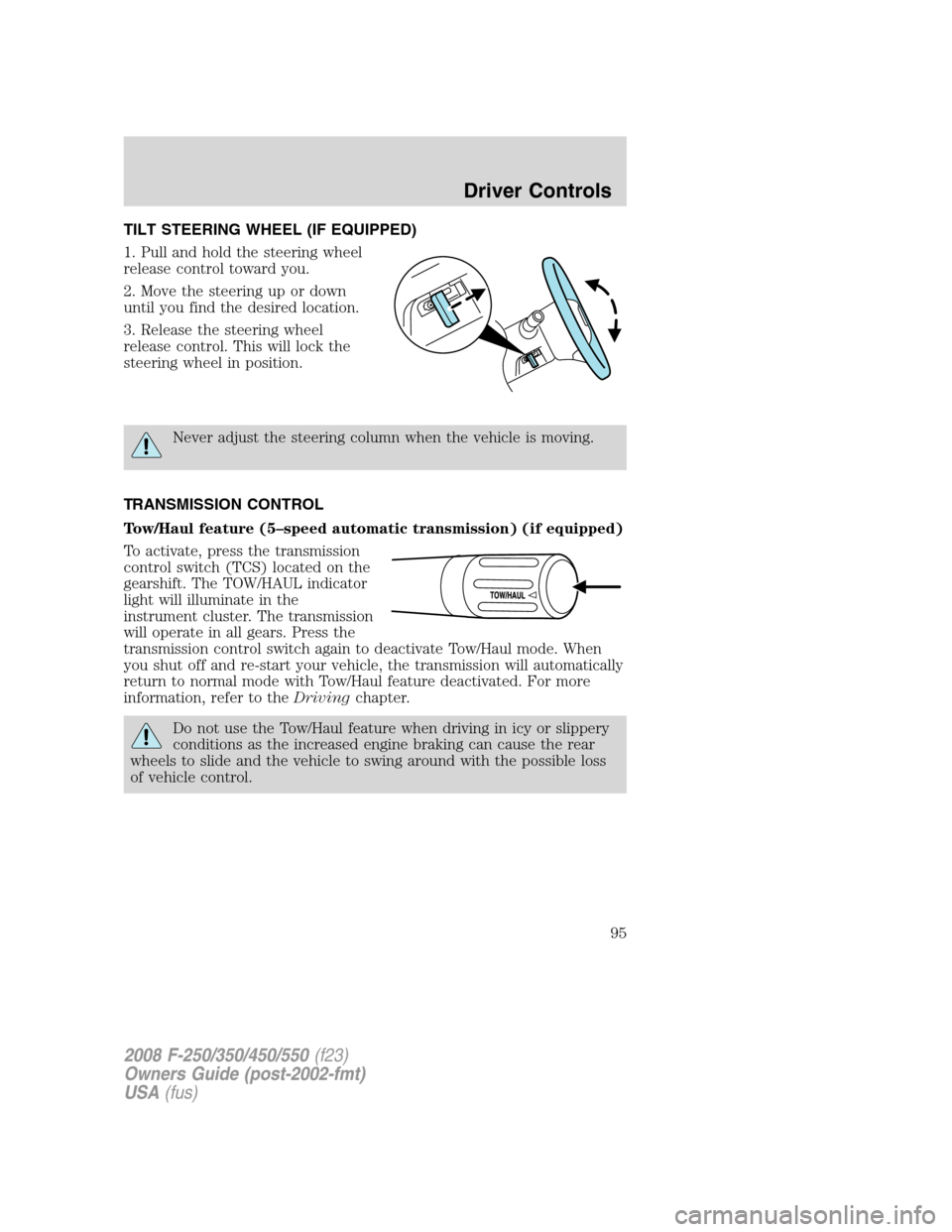
TILT STEERING WHEEL (IF EQUIPPED)
1. Pull and hold the steering wheel
release control toward you.
2. Move the steering up or down
until you find the desired location.
3. Release the steering wheel
release control. This will lock the
steering wheel in position.
Never adjust the steering column when the vehicle is moving.
TRANSMISSION CONTROL
Tow/Haul feature (5–speed automatic transmission) (if equipped)
To activate, press the transmission
control switch (TCS) located on the
gearshift. The TOW/HAUL indicator
light will illuminate in the
instrument cluster. The transmission
will operate in all gears. Press the
transmission control switch again to deactivate Tow/Haul mode. When
you shut off and re-start your vehicle, the transmission will automatically
return to normal mode with Tow/Haul feature deactivated. For more
information, refer to theDrivingchapter.
Do not use the Tow/Haul feature when driving in icy or slippery
conditions as the increased engine braking can cause the rear
wheels to slide and the vehicle to swing around with the possible loss
of vehicle control.
2008 F-250/350/450/550(f23)
Owners Guide (post-2002-fmt)
USA(fus)
Driver Controls
95
Page 105 of 368
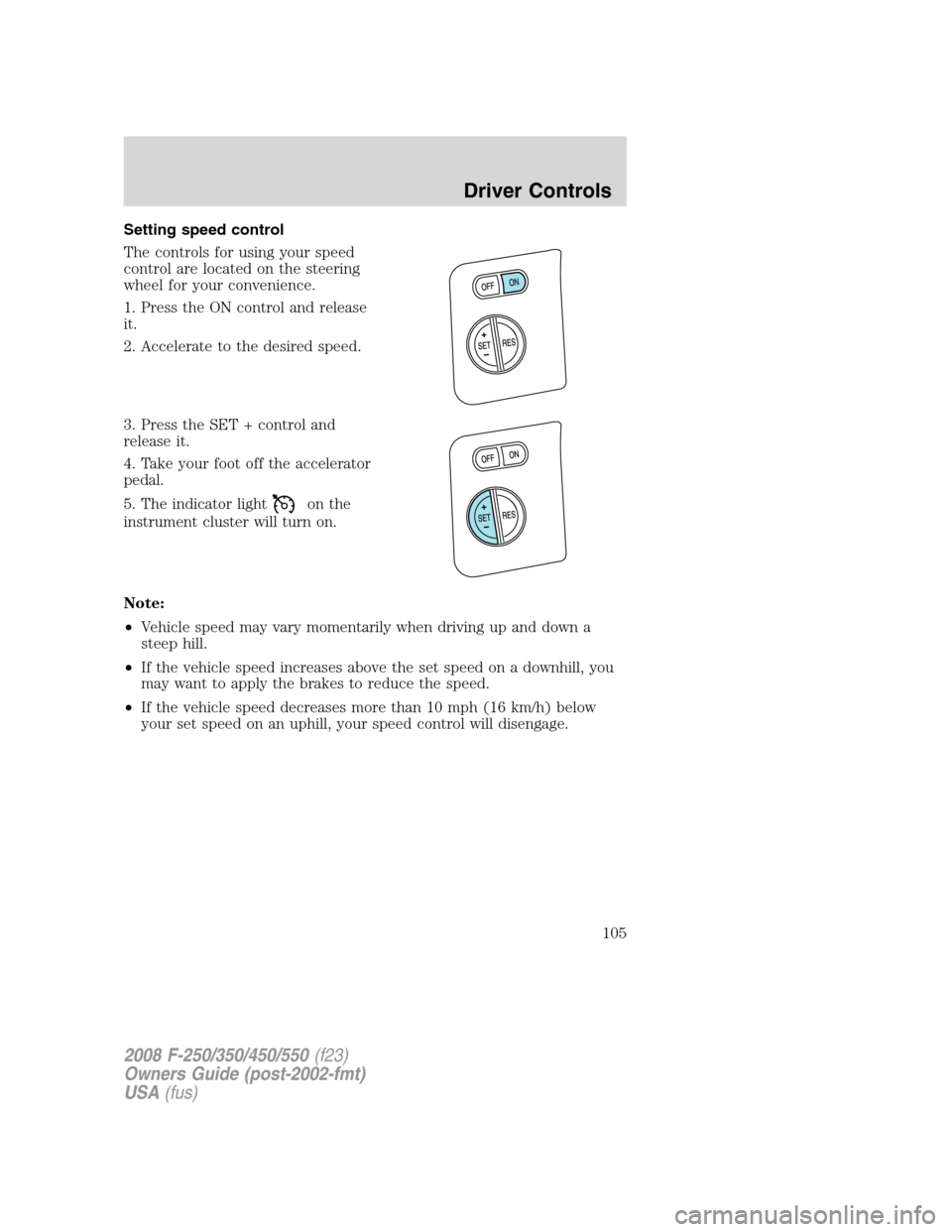
Setting speed control
The controls for using your speed
control are located on the steering
wheel for your convenience.
1. Press the ON control and release
it.
2. Accelerate to the desired speed.
3. Press the SET + control and
release it.
4. Take your foot off the accelerator
pedal.
5. The indicator light
on the
instrument cluster will turn on.
Note:
•Vehicle speed may vary momentarily when driving up and down a
steep hill.
•If the vehicle speed increases above the set speed on a downhill, you
may want to apply the brakes to reduce the speed.
•If the vehicle speed decreases more than 10 mph (16 km/h) below
your set speed on an uphill, your speed control will disengage.
2008 F-250/350/450/550(f23)
Owners Guide (post-2002-fmt)
USA(fus)
Driver Controls
105