2008 FORD MUSTANG service
[x] Cancel search: servicePage 39 of 280
Satellite radio reception factors:To receive the satellite signal, your
vehicle has been equipped with a satellite radio antenna. Like AM/FM,
there are several factors that can affect satellite radio reception
performance:
•Antenna Obstructions: For optimal reception performance, keep the
antenna clear of snow and ice build-up and keep luggage and any
material as far away from the antenna as possible.
•Terrain: Hills, mountains, tall buildings, bridges, tunnels, freeway
overpasses, parking garages, dense tree foliage and thunderstorms can
interfere with your reception.
•Station overload: When you pass a ground based broadcast repeating
tower, a stronger signal may overtake a weaker one and result in an
audio mute.
Unlike AM/FM audible static, you will hear an audio mute when there is
a satellite radio signal interference. Your radio display may display NO
SIGNAL to indicate the interference.
SIRIUS satellite radio service:SIRIUS Satellite Radio is a subscription
based satellite radio service that broadcasts music, sports, news and
entertainment programming. A service fee is required in order to receive
SIRIUS service. Vehicles that are equipped with a factory installed
SIRIUS Satellite Radio system include:
•Hardware and limited subscription term, which begins on the date of
sale or lease of the vehicle.
•Online media player providing access to all 65 SIRIUS music channels
over the internet (U.S. customers only).
For information on extended subscription terms, contact SIRIUS at
1–888–539–7474.
Note:SIRIUS reserves the unrestricted right to change, rearrange, add
or delete programming including canceling, moving or adding particular
channels, and its prices, at any time, with or without notice to you. Ford
Motor Company shall not be responsible for any such programming
changes.
Satellite Radio Electronic Serial Number (ESN):This 12 digit
Satellite Serial Number is needed to activate, modify or track your
satellite radio account. You will need this number when communicating
with SIRIUS. While in Satellite Radio mode, you can view this number on
the radio display by pressing AUX and Preset 1 control simultaneously.
2008 05+ Mustang(197)
Owners Guide (post-2002-fmt)
USA(fus)
Entertainment Systems
39
Page 40 of 280
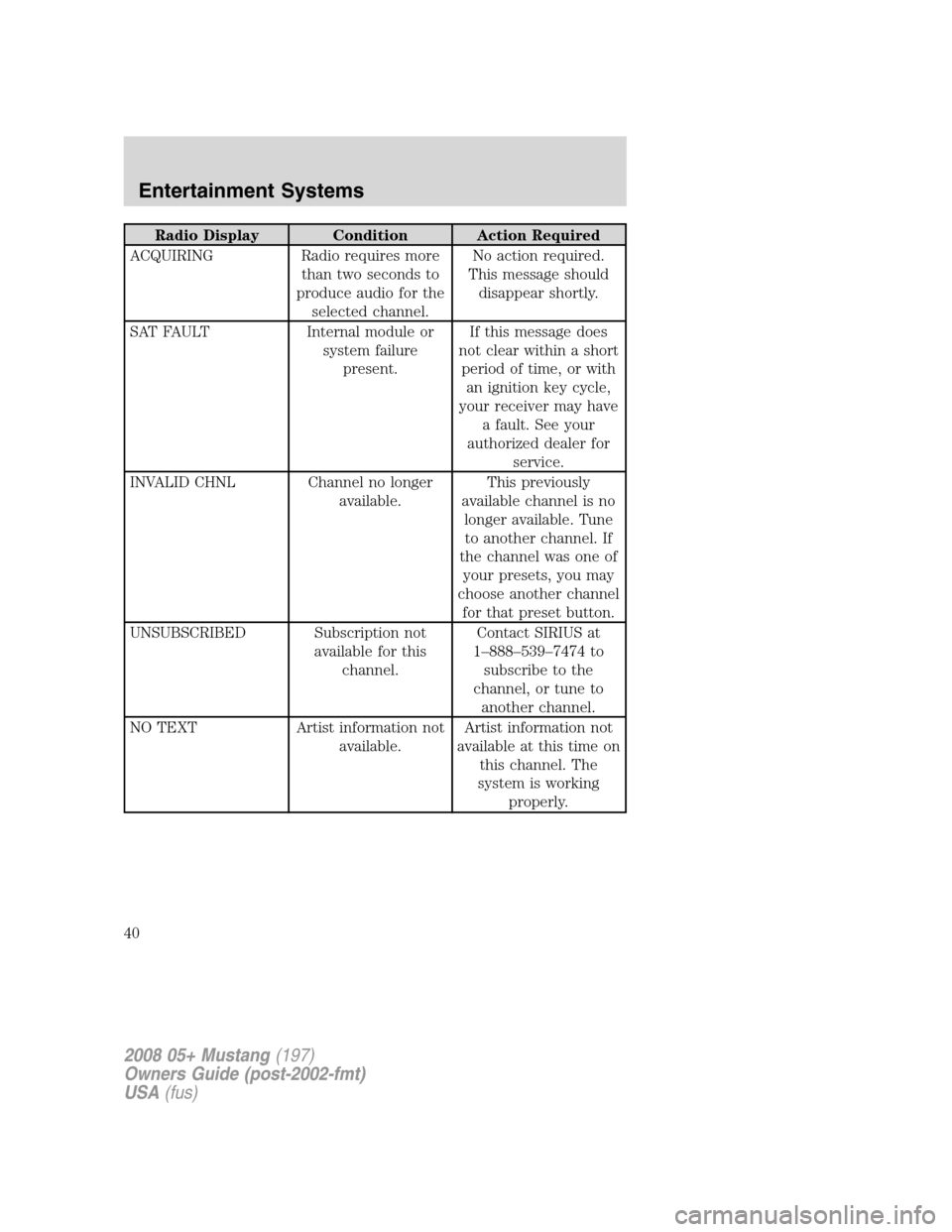
Radio Display Condition Action Required
ACQUIRING Radio requires more
than two seconds to
produce audio for the
selected channel.No action required.
This message should
disappear shortly.
SAT FAULT Internal module or
system failure
present.If this message does
not clear within a short
period of time, or with
an ignition key cycle,
your receiver may have
a fault. See your
authorized dealer for
service.
INVALID CHNL Channel no longer
available.This previously
available channel is no
longer available. Tune
to another channel. If
the channel was one of
your presets, you may
choose another channel
for that preset button.
UNSUBSCRIBED Subscription not
available for this
channel.Contact SIRIUS at
1–888–539–7474 to
subscribe to the
channel, or tune to
another channel.
NO TEXT Artist information not
available.Artist information not
available at this time on
this channel. The
system is working
properly.
2008 05+ Mustang(197)
Owners Guide (post-2002-fmt)
USA(fus)
Entertainment Systems
40
Page 41 of 280
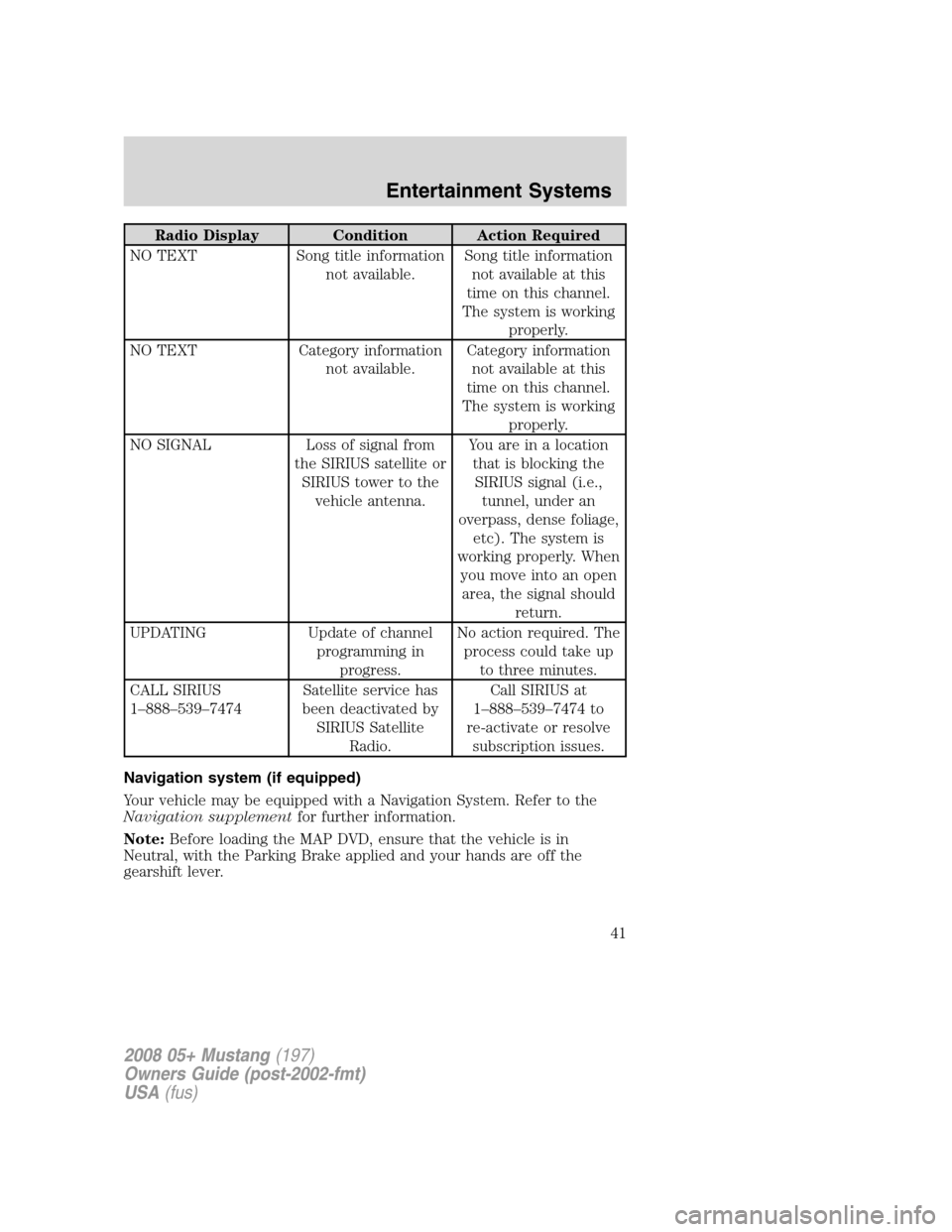
Radio Display Condition Action Required
NO TEXT Song title information
not available.Song title information
not available at this
time on this channel.
The system is working
properly.
NO TEXT Category information
not available.Category information
not available at this
time on this channel.
The system is working
properly.
NO SIGNAL Loss of signal from
the SIRIUS satellite or
SIRIUS tower to the
vehicle antenna.You are in a location
that is blocking the
SIRIUS signal (i.e.,
tunnel, under an
overpass, dense foliage,
etc). The system is
working properly. When
you move into an open
area, the signal should
return.
UPDATING Update of channel
programming in
progress.No action required. The
process could take up
to three minutes.
CALL SIRIUS
1–888–539–7474Satellite service has
been deactivated by
SIRIUS Satellite
Radio.Call SIRIUS at
1–888–539–7474 to
re-activate or resolve
subscription issues.
Navigation system (if equipped)
Your vehicle may be equipped with a Navigation System. Refer to the
Navigation supplementfor further information.
Note:Before loading the MAP DVD, ensure that the vehicle is in
Neutral, with the Parking Brake applied and your hands are off the
gearshift lever.
2008 05+ Mustang(197)
Owners Guide (post-2002-fmt)
USA(fus)
Entertainment Systems
41
Page 74 of 280
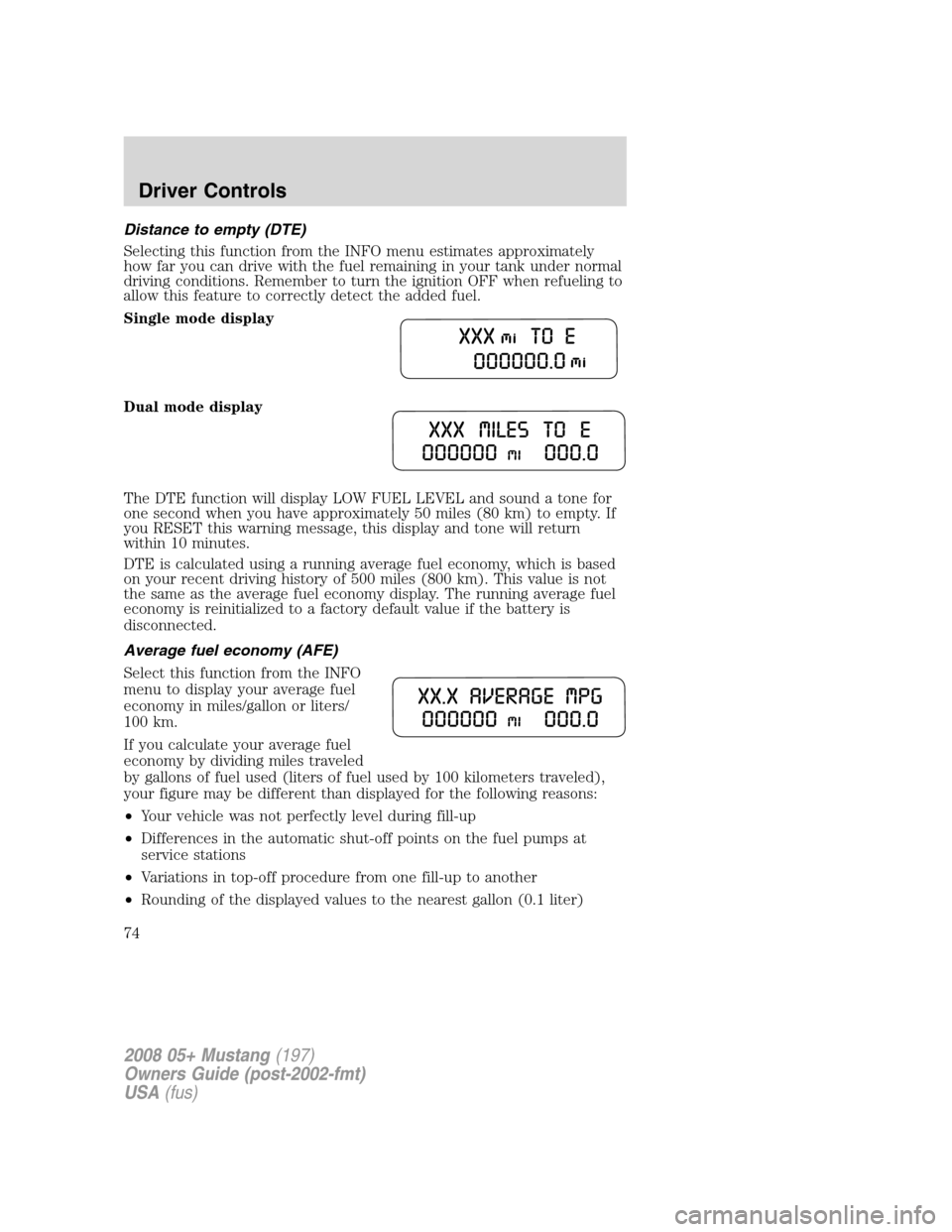
Distance to empty (DTE)
Selecting this function from the INFO menu estimates approximately
how far you can drive with the fuel remaining in your tank under normal
driving conditions. Remember to turn the ignition OFF when refueling to
allow this feature to correctly detect the added fuel.
Single mode display
Dual mode display
The DTE function will display LOW FUEL LEVEL and sound a tone for
one second when you have approximately 50 miles (80 km) to empty. If
you RESET this warning message, this display and tone will return
within 10 minutes.
DTE is calculated using a running average fuel economy, which is based
on your recent driving history of 500 miles (800 km). This value is not
the same as the average fuel economy display. The running average fuel
economy is reinitialized to a factory default value if the battery is
disconnected.
Average fuel economy (AFE)
Select this function from the INFO
menu to display your average fuel
economy in miles/gallon or liters/
100 km.
If you calculate your average fuel
economy by dividing miles traveled
by gallons of fuel used (liters of fuel used by 100 kilometers traveled),
your figure may be different than displayed for the following reasons:
•Your vehicle was not perfectly level during fill-up
•Differences in the automatic shut-off points on the fuel pumps at
service stations
•Variations in top-off procedure from one fill-up to another
•Rounding of the displayed values to the nearest gallon (0.1 liter)
2008 05+ Mustang(197)
Owners Guide (post-2002-fmt)
USA(fus)
Driver Controls
74
Page 77 of 280

Warning display Status
Check brake system Warning returns after the ignition key
is turned from OFF to ON.
Low tire pressure
Tire pressure monitor fault
Tire pressure sensor fault
Security event occurred
Low brake fluid level
DRIVER’S DOOR AJAR.Displayed when the driver’s door is not
completely closed.
PASSENGER DOOR AJAR.Displayed when the passenger side door is
not completely closed.
LOW OIL PRESSURE.Displayed when the engine oil pressure is low. If
this warning message is displayed, check the level of the engine oil.
Refer toEngine oilin theMaintenance and Specificationschapter for
information about adding engine oil. If the oil level is OK and this
warning persists, shut down the engine immediately and contact your
authorized dealer for service.
CHECK CHARGING SYSTEM.Displayed when the electrical system is
not maintaining proper voltage. If you are operating electrical accessories
when the engine is idling at a low speed, turn off as many of the
electrical loads as soon as possible. If the warning stays on or comes on
when the engine is operating at normal speeds, have the electrical
system checked as soon as possible.
CHECK TRACTION CONTROL™.Displayed when the Traction
Control™ system is not operating properly. If this message is displayed
on the message center the Traction Control™ system will be partially
operable. If this warning stays on, contact your authorized dealer for
service as soon as possible. For further information, refer toTraction
control™in theDrivingchapter.
CHECK FUEL CAP.Displayed when the fuel filler cap is not properly
installed. Check the fuel filler cap for proper installation. Refer toFuel
filler capunder theFuel Information sectionin theMaintenance and
Specificationschapter.
LOW FUEL LEVEL.Displayed as an early reminder of a low fuel
condition.
CHECK BRAKE SYSTEM.Displayed when the braking system is not
operating properly. If the warning stays on or continues to come on,
contact your authorized dealer as soon as possible.
2008 05+ Mustang(197)
Owners Guide (post-2002-fmt)
USA(fus)
Driver Controls
77
Page 87 of 280
Illuminated entry
The interior lamps illuminate when the remote entry system is used to
unlock the door(s).
The illuminated entry system will turn off the interior lights if:
•the ignition switch is turned to the 3 (ON) position, or
•the remote transmitter lock control is pressed, or
•after 25 seconds of illumination.
The dome lamp control mustnotbe set to the off position for the
illuminated entry system to operate.
The inside lights will not turn off if:
•they have been turned on with the dimmer control, or
•any door is open.
The battery saver will shut off the interior lamps 10 minutes after the
ignition has been turned to the 1 (OFF/LOCK) position and a door is left
open, and in 30 minutes if the dome lamp control is left on and the
ignition has been turned to the 1 (OFF/LOCK) position. The battery
saver will also shut off the trunk lamps in 30 minutes if the trunk is left
open.
Perimeter lighting feature (if equipped)
The perimeter lighting feature illuminates the exterior of the vehicle in
order to provide better visibility to the user while he or she approaches
and enters the vehicle.
The perimeter lighting feature activates the head lamps, park lamps and
side marker lamps when:
•the user activates an unlock feature by using the remote keyless
transmitter or
•when the vehicle is unlocked, by using the driver’s door key lock
cylinder.
The perimeter lighting feature will turn off if:
•the vehicle is locked using the remote entry transmitter, or
•the ignition is turned to the 3 (ON) position, or
•after 25 seconds of illumination.
Enabling/disabling the perimeter lighting feature
Your vehicle comes with the perimeter lighting feature enabled. You may
enable/disable this feature by having your vehicle serviced by your
authorized dealer.
2008 05+ Mustang(197)
Owners Guide (post-2002-fmt)
USA(fus)
Locks and Security
87
Page 89 of 280
Note:Large metallic objects, electronic devices that are used to
purchase gasoline or similar items, or a second coded key on the same
key chain may cause vehicle starting issues. You need to prevent these
objects from touching the coded key while starting the engine. These
objects will not cause damage to the coded key, but may cause a
momentary issue if they are too close to the key when starting the
engine. If a problem occurs, turn the ignition off, remove all objects on
the key chain away from the coded key and restart the engine.
Anti-theft indicator
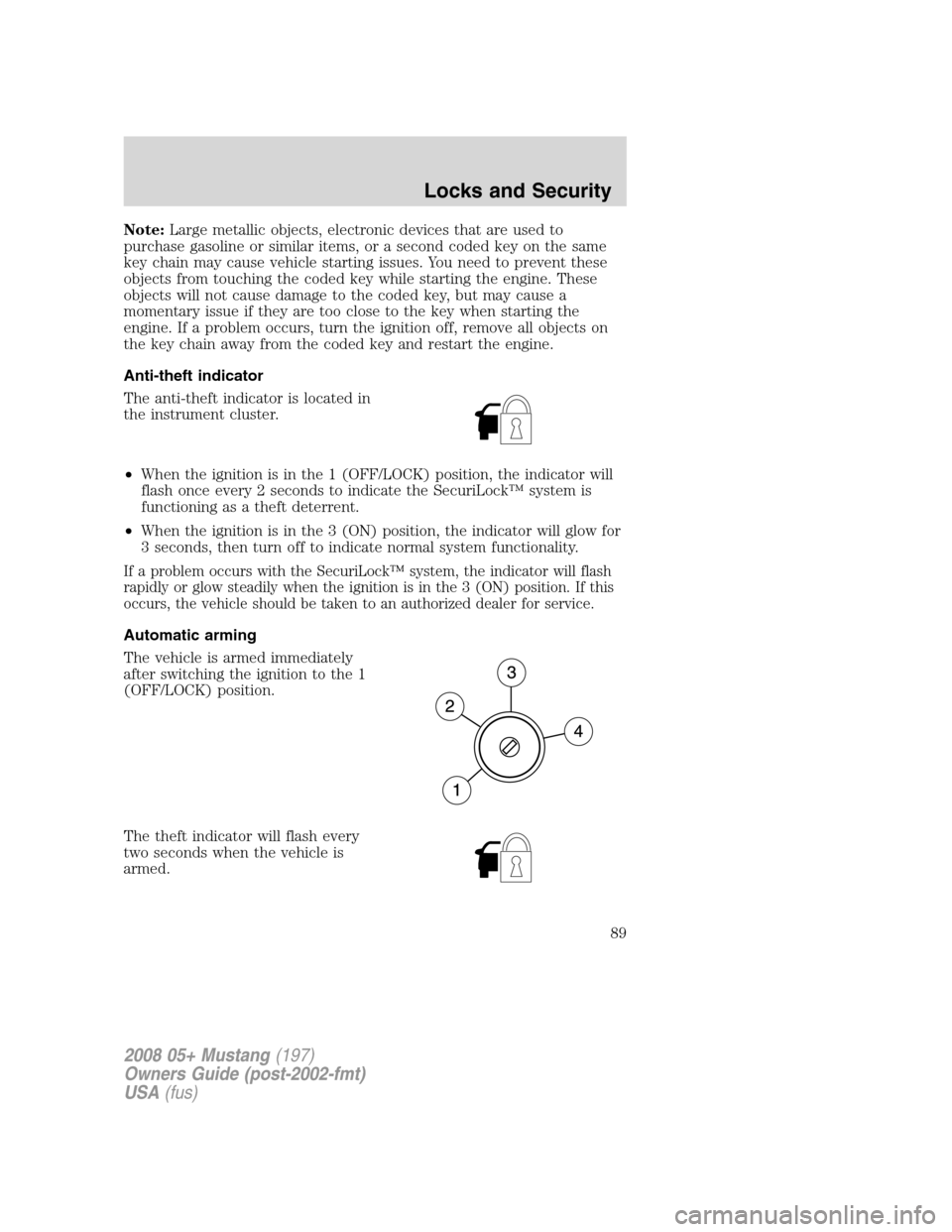
The anti-theft indicator is located in
the instrument cluster.
•When the ignition is in the 1 (OFF/LOCK) position, the indicator will
flash once every 2 seconds to indicate the SecuriLock™ system is
functioning as a theft deterrent.
•When the ignition is in the 3 (ON) position, the indicator will glow for
3 seconds, then turn off to indicate normal system functionality.
If a problem occurs with the SecuriLock™ system, the indicator will flash
rapidly or glow steadily when the ignition is in the 3 (ON) position. If this
occurs, the vehicle should be taken to an authorized dealer for service.
Automatic arming
The vehicle is armed immediately
after switching the ignition to the 1
(OFF/LOCK) position.
The theft indicator will flash every
two seconds when the vehicle is
armed.
2008 05+ Mustang(197)
Owners Guide (post-2002-fmt)
USA(fus)
Locks and Security
89
Page 90 of 280
Automatic disarming
Switching the ignition to the 3 (ON) position with acoded keydisarms
the vehicle.
•The theft indicator will illuminate
for three seconds and then go
out.
•If the theft indicator stays on for
an extended period of time or flashes rapidly, have the system
serviced by your authorized dealer.
Replacement keys
If your keys are lost or stolen and you don’t have an extra coded key,
you will need to have your vehicle towed to an authorized dealer. The
key codes need to be erased from your vehicle and new coded keys will
need to be programmed.
Replacing coded keys can be very costly. Store an extra programmed key
away from the vehicle in a safe place to help prevent any
inconveniences. Please visit an authorized dealer to purchase additional
spare or replacement keys.
Programming spare keys
You can program your own coded keys to your vehicle. Please read and
understand the entire procedure before you begin.
Tips:
•A maximum of eight keys can be coded to your vehicle.
•Only use SecuriLock™ keys.
•You must have two previously programmed coded keys (keys that
already operate your vehicle’s engine) and the new unprogrammed
key(s) readily accessible.
•If no previously programmed coded keys are available, you must take
your vehicle to your authorized dealer to have the spare key(s)
programmed.
2008 05+ Mustang(197)
Owners Guide (post-2002-fmt)
USA(fus)
Locks and Security
90