2008 FORD FREESTYLE mirror
[x] Cancel search: mirrorPage 144 of 352
4. Press the power door unlock control on the door panel three times.
5. Turn the ignition back to the 3 (RUN) position. The horn will chirp
one time to confirm programming mode has been entered and is active.
6. Press the power door unlock control twice within 5 seconds.Note:
The horn will chirp once to indicate the perimeter lighting feature has
been deactivated. The horn will chirp once and honk once (one short
and one long) to indicate the perimeter lighting feature has been
activated.
7. Turn the ignition to the 1 (LOCK) position to exit the procedure.
Note:The horn will chirp once to confirm the procedure is complete.
Illuminated exit
•When all vehicle doors are closed and the key is removed from the
ignition, the interior dome lamps (and the exterior mirror puddle
lamps, if equipped) will illuminate.
The lights will turn off if all the doors remain closed and
•25 seconds elapse, or
•the key is inserted in the ignition.
Battery saver
The battery saver will shut off the interior lamps 10 minutes after the
ignition has been turned to the 1 (LOCK) position.
•If the dome lamps were turned on using the panel dimmer control, the
battery saver will shut them off 10 minutes after the ignition has been
turned to the 1 (LOCK) position.
•If the courtesy lamps were turned on because one of the vehicle doors
or the liftgate was opened, the battery saver will shut off them off 10
minutes after the ignition has been turned to the 1 (LOCK) position.
•The battery saver will shut off the headlamps 10 minutes after the
ignition has been turned to the 1 (LOCK) position.
2008 Taurus X(219)
Owners Guide (post-2002-fmt)
USA(fus)
Locks and Security
144
ProCarManuals.com
Page 145 of 352

KEYLESS ENTRY SYSTEM
You can use the keyless entry
keypad to:
•lock or unlock the doors without
using a key.
•recall memory seat, power
mirrors, and adjustable pedals (if
equipped).
The keypad can be operated with
the factory set 5–digit entry code;
this code is located on the owner’s
wallet card in the glove box and is
available from your authorized
dealer. You can also create up to
three of your own 5–digit personal
entry codes.
When pressing the controls on the keypad, press the middle of the
controls to ensure a good activation.
Programming a personal entry code and keypad association to
memory seats, mirrors, and adjustable pedals (if equipped)
To create your own personal entry code:
1. Enter the factory set code.
2. Within five seconds press the 1•2 on the keypad.
3. Enter your personal 5-digit code. Each number must be entered
within five seconds of each other.
4. To associate the entry code with a memory setting, enter a sixth digit
to indicate which driver should be set in a memory recalled by the
personal entry code:
•Pressing 1•2 recalls Driver 1 settings.
•Pressing 3•4 recalls Driver 2 settings.
•Pressing other keypad buttons or not pressing a keypad button as a
sixth digit does not set a driver and will not recall a memory setting.
Note:The factory-set code cannot be associated with a memory
setting.
5. The doors will lock then unlock to confirm that your personal keycode
has been programmed to the module.
2008 Taurus X(219)
Owners Guide (post-2002-fmt)
USA(fus)
Locks and Security
145
ProCarManuals.com
Page 157 of 352
The indicator light on the control will illuminate when activated. For low
heat, one light will be lit; for high heat, both lights will be lit.
Memory seats/power mirrors/adjustable pedals (if equipped)
This system allows automatic
positioning of the driver seat, power
mirrors, and adjustable pedals to
two programmable positions.
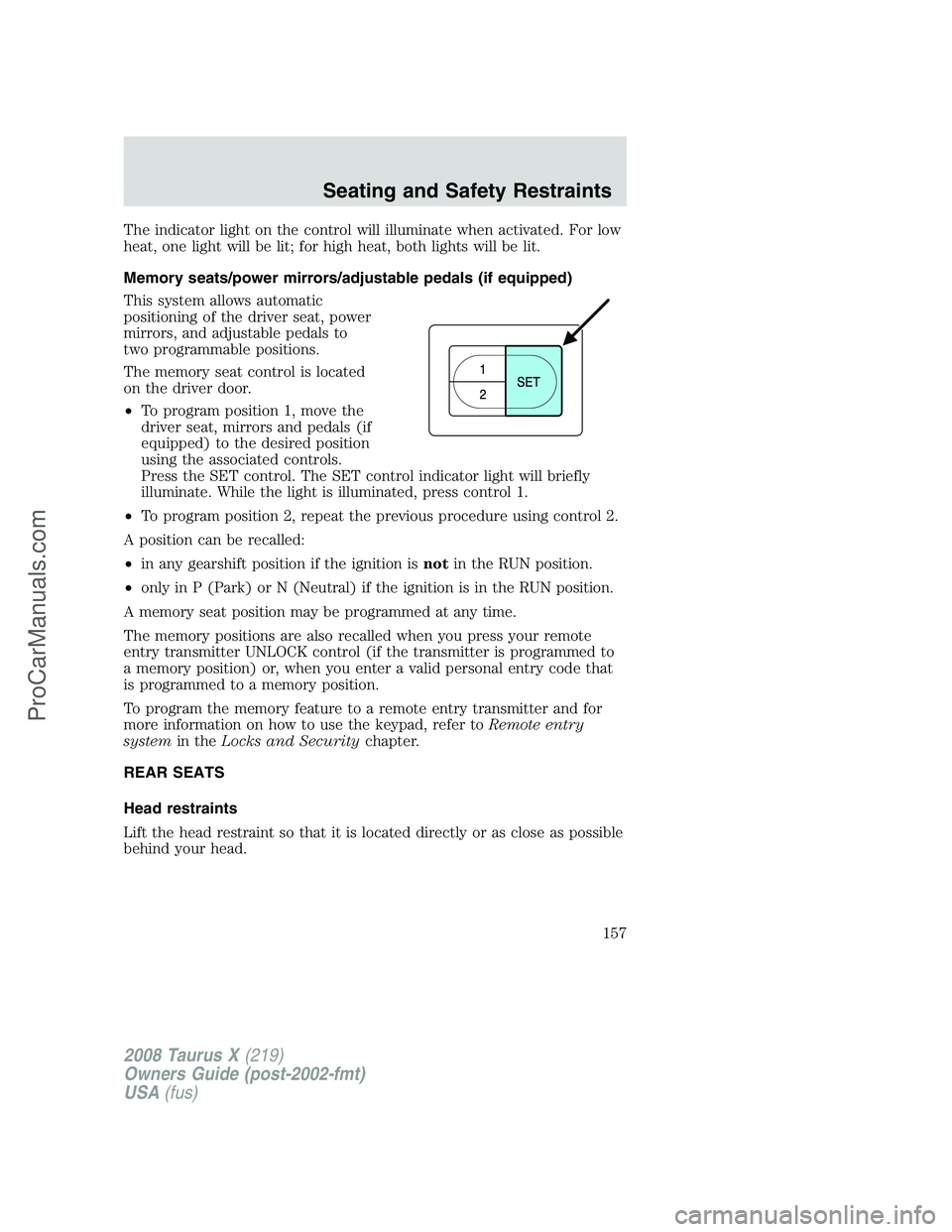
The memory seat control is located
on the driver door.
•To program position 1, move the
driver seat, mirrors and pedals (if
equipped) to the desired position
using the associated controls.
Press the SET control. The SET control indicator light will briefly
illuminate. While the light is illuminated, press control 1.
•To program position 2, repeat the previous procedure using control 2.
A position can be recalled:
•in any gearshift position if the ignition isnotin the RUN position.
•only in P (Park) or N (Neutral) if the ignition is in the RUN position.
A memory seat position may be programmed at any time.
The memory positions are also recalled when you press your remote
entry transmitter UNLOCK control (if the transmitter is programmed to
a memory position) or, when you enter a valid personal entry code that
is programmed to a memory position.
To program the memory feature to a remote entry transmitter and for
more information on how to use the keypad, refer toRemote entry
systemin theLocks and Securitychapter.
REAR SEATS
Head restraints
Lift the head restraint so that it is located directly or as close as possible
behind your head.
2008 Taurus X(219)
Owners Guide (post-2002-fmt)
USA(fus)
Seating and Safety Restraints
157
ProCarManuals.com
Page 269 of 352

Fuse/Relay
LocationFuse Amp
RatingPassenger Compartment Fuse
Panel Description
8 10A Low beam headlamps (right)
9 15A Interior lights, Cargo lamps
10 15A Backlighting, Puddle lamps
11 10A All wheel drive
12 7. 5A Memory seat/mirror switches,
Memory module
13 5A FEPS module
14 10A Power liftgate module
15 10A Climate control
16 15A Spare
17 20A All power lock motor feeds,
Liftgate release
18 20A 2nd row power seat
19 25A Moon roof
20 15A OBDII connector
21 15A Fog lamps
22 15A Park lamps, License lamps
23 15A High beam headlamps
24 20A Horn relay
25 10A Demand lamps/Interior lamps
26 10A Instrument panel cluster
27 20A Adjustable pedal switch
28 5A Radio, Radio start signal
29 5A Instrument panel cluster
30 5A Overdrive cancel switch
31 10A Compass, Automatic dimming rear
view mirror
32 10A Restraint control module
33 10A Spare
34 5A AWD module
2008 Taurus X(219)
Owners Guide (post-2002-fmt)
USA(fus)
Roadside Emergencies
269
ProCarManuals.com
Page 270 of 352

Fuse/Relay
LocationFuse Amp
RatingPassenger Compartment Fuse
Panel Description
35 10A Steering rotation sensor, FEPS,
Rear park assist, Heated seat
modules
36 5A PATS module
37 10A Climate control
38 20A Subwoofer (Audiophile radio)
39 20A Radio
40 20A Spare
41 15A Mic mirror, Moon roof, Front lock
switches, Radio
42 10A Spare
43 10A Spare
44 10A Spare
45 5A Relay coils: PDB, Auxiliary A/C,
Front and rear wipers, Front
blower motor
46 7.5A Occupant Classification Sensor
(OCS), Passenger Airbag
Deactivation Indicator (PADI)
47 30A Circuit
BreakerPower windows
48 — Delayed accessory relay
Power distribution box
The power distribution box is located in the engine compartment. The
power distribution box contains high-current fuses that protect your
vehicle’s main electrical systems from overloads.
Always disconnect the battery before servicing high current
fuses.
To reduce risk of electrical shock, always replace the cover to
the Power Distribution Box before reconnecting the battery or
refilling fluid reservoirs.
2008 Taurus X(219)
Owners Guide (post-2002-fmt)
USA(fus)
Roadside Emergencies
270
ProCarManuals.com
Page 273 of 352
Fuse/Relay
LocationFuse Amp
RatingPower Distribution Box
Description
42 G8VA relay Fuel pump
43 G8VA relay Backup
44 G8VA relay Rear wiper
45 10A** Speed control deactivate switch,
Mass air flow sensor, Inline
module VPWR2
46 10A** A/C clutch relay, VPWR3
47 15A** PCM VPWR1
48 15A** PCM VPWR4
49 15A** Heated mirrors
50 Full ISO relay PCM relay
51 — Not used
52 — Not used
53 Full ISO relay Rear defrost relay
54 Full ISO relay Blower motor relay
55 Full ISO relay Starter relay
56 — Not used
57 Full ISO relay Front wiper relay
58 — Not used
* Cartridge Fuses ** Mini Fuses
CHANGING THE TIRES
If you get a flat tire while driving:
•do not brake heavily.
•gradually decrease the vehicle’s speed.
•hold the steering wheel firmly.
•slowly move to a safe place on the side of the road.
Note:The tire pressure monitoring system (TPMS) indicator light will
illuminate when the spare is in use. To restore the full functionality of
the monitoring system, all road wheels equipped with tire pressure
monitoring sensors must be mounted on the vehicle.
Have a flat serviced by an authorized dealer in order to prevent damage
to the TPMS sensor, refer toChanging tires with TPMSin theTires,
Wheels and Loadingchapter. Replace the spare tire with a road tire as
soon as possible.
2008 Taurus X(219)
Owners Guide (post-2002-fmt)
USA(fus)
Roadside Emergencies
273
ProCarManuals.com
Page 297 of 352
WAXING
Applying Motorcraft Paint Sealant (ZC-45) to your vehicle every six
months will assist in reducing minor scratches and paint damage.
•Wash the vehicle first.
•Do not use waxes that contain abrasives; use Motorcraft Premium
Liquid Wax (ZC-53-A), which is available from your authorized dealer,
or an equivalent quality product.
•Do not allow paint sealant to come in contact with any non-body
(low-gloss black) colored trim, such as grained door handles, roof
racks, bumpers, side moldings, mirror housings or the windshield cowl
area. The paint sealant will “gray” or stain the parts over time.
PAINT CHIPS
Your authorized dealer has touch-up paint to match your vehicle’s color.
Take your color code (printed on a sticker in the driver’s door jamb) to
your authorized dealer to ensure you get the correct color.
•Remove particles such as bird droppings, tree sap, insect deposits, tar
spots, road salt and industrial fallout before repairing paint chips.
•Always read the instructions before using the products.
ALUMINUM WHEELS AND WHEEL COVERS
Aluminum wheels and wheel covers are coated with a clearcoat paint
finish. In order to maintain their shine:
•Clean weekly with Motorcraft Wheel and Tire Cleaner (ZC-37-A),
which is available from your authorized dealer. Heavy dirt and brake
dust accumulation may require agitation with a sponge. Rinse
thoroughly with a strong stream of water.
•Never apply any cleaning chemical to hot or warm wheel rims or
covers.
•Some automatic car washes may cause damage to the finish on your
wheel rims or covers. Chemical-strength cleaners, or cleaning
chemicals, in combination with brush agitation to remove brake dust
and dirt, could wear away the clearcoat finish over time.
•Do not use hydrofluoric acid-based or high caustic-based wheel
cleaners, steel wool, fuels or strong household detergent.
•To remove tar and grease, use Motorcraft Bug and Tar Remover
(ZC-42), available from your authorized dealer.
2008 Taurus X(219)
Owners Guide (post-2002-fmt)
USA(fus)
Cleaning
297
ProCarManuals.com
Page 339 of 352
GENUINE FORD ACCESSORIES FOR YOUR VEHICLE
A wide selection of Genuine Ford Accessories are available for your
vehicle through your local Ford or Ford of Canada dealer. These quality
accessories have been specifically engineered to fulfill your automotive
needs; they are custom designed to complement the style and
aerodynamic appearance of your vehicle. In addition, each accessory is
made from high quality materials and meets or exceeds Ford’s rigorous
engineering and safety specifications. Ford Motor Company will repair or
replace any properly dealer-installed Genuine Ford Accessories found to
be defective in factory-supplied materials or workmanship during the
warranty period, as well as any component damaged by the defective
accessories. The accessories will be warranted for whichever provides
you the greatest benefit:
•12 months or 12,000 miles (20,000 km) (whichever occurs first), or
•the remainder of your new vehicle limited warranty.
Contact your dealer for details and a copy of the warranty.
The following is a list of several Genuine Ford Accessories. Not all
accessories are available for all models. For a complete listing of the
accessories that are available for your vehicle, please contact your dealer
or visit our online store at: www.fordaccessoriesstore.com.
Exterior style
Bug shields
Moonroof deflector
Side window deflector
Splash guards
Interior style
All weather floor mats
Electrochromatic compass/temperature interior mirrors
Carpeted floor mats
Lifestyle
Ash cup / smoker’s package
Cargo organization and management
TripTunes™ Advanced portable audio connection
2008 Taurus X(219)
Owners Guide (post-2002-fmt)
USA(fus)
Accessories
339
ProCarManuals.com