Page 43 of 273

22.Scan:Press SCAN to hear a
brief sampling of radio stations or
CD/MP3 tracks. Press again to stop.
23.Disc/Tune:Press
orto
manually tune down/up the radio
frequency band, or to listen to the
previous/next CD.
CAT (Category):CAT is only available when equipped with Satellite
Radio. Your Audiophile radio comes equipped with Satellite ready
capability. The kit to enable Satellite reception is available through your
dealer. Detailed Satellite instructions are included with the dealer
installed kit.Dealer installed satellite kit only available in the
continental United States.
For information regarding SIRIUS Satellite Radio, please call toll-free
888-539-SIRIUS (888-539-7474) or visit the SIRIUS website at
www.siriusradio.com
24.CD slot:Insert a CD, label side up.
GENERAL AUDIO INFORMATION
Radio frequencies
AM and FM frequencies are established by the Federal Communications
Commission (FCC) and the Canadian Radio and Telecommunications
Commission (CRTC). Those frequencies are:
AM - 530, 540–1700, 1710 kHz
FM- 87.7, 87.9–107.7, 107.9 MHz
Radio reception factors
There are three factors that can effect radio reception:
•Distance/Strength: The further you travel from an FM station, the
weaker the signal and the weaker the reception.
•Terrain: Hills, mountains, tall buildings, power lines, electric fences,
traffic lights and thunderstorms can interfere with your reception.
•Station overload: When you pass a broadcast tower, a stronger signal
may overtake a weaker one and play while the weak station frequency
is displayed.
2008 F-650/750(f67)
Supplement
USA(fus)
Entertainment Systems
42
Page 44 of 273

CD/CD player care
Do:
•Handle discs by their edges only. Never touch the playing surface.
•Inspect discs before playing. Clean only with an approved CD cleaner
and wipe from the center out.
Don’t:
•Expose discs to direct sunlight or heat sources for extended periods
of time.
•Insert more than one disc into each slot of the CD changer magazine.
•Clean using a circular motion.
CD units are designed to play commercially pressed 4.75 inch
(12 cm) audio compact discs only. Due to technical
incompatibility, certain recordable and re-recordable compact
discs may not function correctly when used in Ford CD players.
Irregular shaped CDs, CDs with a scratch protection film
attached, and CDs with homemade paper (adhesive) labels should
not be inserted into the CD player. The label may peel and cause
the CD to become jammed. It is recommended that homemade
CDs be identified with permanent felt tip marker rather than
adhesive labels. Ball point pens may damage CDs. Please contact
your dealer for further information.
Audio system warranty and service
Refer to theWarranty Guidefor audio system warranty information. If
service is necessary, see your dealer or qualified technician.
2008 F-650/750(f67)
Supplement
USA(fus)
Entertainment Systems
43
Page 48 of 273
HEADLAMP CONTROL
Turns the lamps off.
Turns on the parking lamps,
instrument panel lamps, license
plate lamps and tail lamps.
Turns the headlamps on.
High beams/Flash-to-pass
Push the lever toward the
instrument panel to activate the
high beams. Pull the lever towards
you to deactivate.
Pull toward you slightly to activate
flash-to-pass. Release to deactivate.
Daytime Running Lamps (DRL) (if equipped)
Turns the headlamps on with a reduced output.
To activate:
•the ignition must be in the ON position and
•the headlamp control is in the OFF, parking lamp or autolamp
position.
Always remember to turn on your headlamps at dusk or during
inclement weather. The Daytime Running Lamp (DRL) system
does not activate your tail lamps and generally may not provide
adequate lighting during these conditions. Failure to activate your
headlamps under these conditions may result in a collision.
2008 F-650/750(f67)
Supplement
USA(fus)
Lights
47
Page 49 of 273
PANEL DIMMER CONTROL
Use to adjust the brightness of the
instrument panel and all applicable
switches in the vehicle during
headlamp and parklamp operation.
Rotate the control to the full up
position, past the detent, to turn on
the interior lamps.
Rotate the control to the full down
position, past the detent, to prevent
the interior lights from illuminating when the doors are opened.
AIMING THE HEADLAMPS
The headlamps on your vehicle are properly aimed at the assembly plant.
If your vehicle has been in an accident the alignment of your headlamps
should be checked by a qualified service technician.
TURN SIGNAL CONTROL
•Push down to activate the left
turn signal.
•Push up to activate the right turn
signal.
If your vehicle is a tractor, the turn signals may not shut off when a turn
is completed; this is normal. Please see your dealer if there are any
questions on the options your vehicle has been equipped with.
2008 F-650/750(f67)
Supplement
USA(fus)
Lights
48
Page 50 of 273
INTERIOR LAMPS
Map lamps (if equipped)
To turn on the map lamps, press the
control next to each lamp.
EXTERIOR BULBS
Bulb inspection
It is a good safety practice to check operation of headlamps, parking
lamps, turn signals, clearance and marker lamps, instrument panel and
control lamps each day.
Using the right bulbs
Function Number of
bulbsTrade number
Headlamps 2 H6054
Front turn signal lamps 2 1157
Front sidemarker/Park lamps 2 (amber) 194
Brake/Tail/Stop/Rear turn
signal/License lamps1 bulb each side 1157
Back-up lamps 2 1156
Front clearance and identification
lamps5 168
Dome lamp 1 105
To replace all instrument panel lights - see your dealer
2008 F-650/750(f67)
Supplement
USA(fus)
Lights
49
Page 51 of 273
Bulb replacement
Replacing headlamp bulbs
To remove the headlamp bulbs:
1. Make sure the headlamp control is in the
position.
2. Remove the four screws and
move the parking lamp assembly
away from the headlamp bulb.
3. Remove the four screws and the
retaining bracket from the headlamp
bulb.
4. Pull the headlamp bulb out of the
housing, disconnect the electrical
connector and remove the headlamp
bulb.
5. To complete installation, follow
the removal procedure in reverse
order.
Replacing front parking lamp/turn signal/side marker bulbs
To remove the parking lamp/turn signal bulbs:
1. Make sure the headlamp control is in the
position and the turn
signals are off.
2008 F-650/750(f67)
Supplement
USA(fus)
Lights
50
Page 52 of 273

2. Remove the four screws from the
lamp assembly.
3. Carefully lower the lamp assembly
and pull the bulb socket straight out
of the lamp assembly.
4. Carefully pull the bulb straight
out of the socket and push in the
new bulb.
5. To complete installation, follow
the removal procedure in reverse order.
Replacing front clearance and identification lamp bulbs
To change the cab marker bulbs:
1. Make sure the headlamp control
is in the
position, then remove
the screw and lens from the lamp
assembly.
2. Carefully pull the bulb straight
out of the socket and push in the
new bulb.
3. Install the lens on lamp assembly
with screw.
Replacing brake/tail/rear turn signal/back-up/license plate lamp
bulbs
The brake/tail/turn
signal/back-up/license plate lamp
bulbs are located in the same
portion of the tail lamp assembly.
Follow the same steps to replace
any of these bulbs:
1. Make sure the headlamp control
is in the
position and the turn
signals are off, then remove the four
screws and the lamp lens from lamp
assembly.
2. Carefully pull the bulb straight out of the socket and push in the new
bulb.
3. Install the lens on the lamp assembly with the four screws.
2008 F-650/750(f67)
Supplement
USA(fus)
Lights
51
Page 54 of 273
Never adjust the steering wheel when the vehicle is moving.
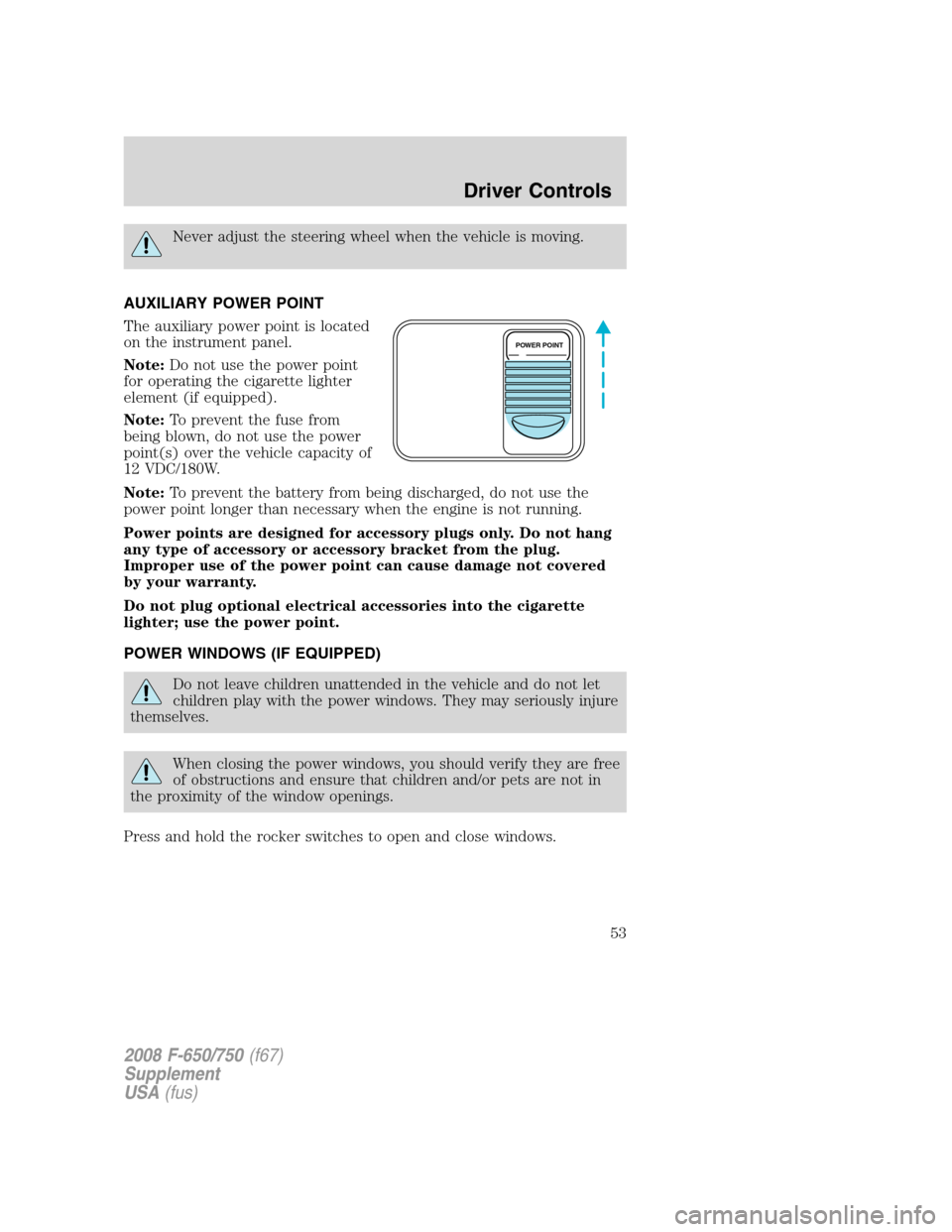
AUXILIARY POWER POINT
The auxiliary power point is located
on the instrument panel.
Note:Do not use the power point
for operating the cigarette lighter
element (if equipped).
Note:To prevent the fuse from
being blown, do not use the power
point(s) over the vehicle capacity of
12 VDC/180W.
Note:To prevent the battery from being discharged, do not use the
power point longer than necessary when the engine is not running.
Power points are designed for accessory plugs only. Do not hang
any type of accessory or accessory bracket from the plug.
Improper use of the power point can cause damage not covered
by your warranty.
Do not plug optional electrical accessories into the cigarette
lighter; use the power point.
POWER WINDOWS (IF EQUIPPED)
Do not leave children unattended in the vehicle and do not let
children play with the power windows. They may seriously injure
themselves.
When closing the power windows, you should verify they are free
of obstructions and ensure that children and/or pets are not in
the proximity of the window openings.
Press and hold the rocker switches to open and close windows.
POWER POINT
2008 F-650/750(f67)
Supplement
USA(fus)
Driver Controls
53


