2008 FORD F250 ESP
[x] Cancel search: ESPPage 72 of 400
Safety information
Driving while distracted can result in loss of vehicle control,
accident and injury. Ford strongly recommends that drivers use
extreme caution when using any device that may take their focus off
the road. The drivers primary responsibility is the safe operation of
their vehicle. Only use cell phones and other devices not essential to
the driving task when it is safe to do so.
Read all of the safety and operating instructions before operating the
system and retain for future reference.
Do not attempt to service, repair or modify the Family Entertainment
System (FES). See your dealer.
Do not insert foreign objects into the DVD compartment.
Do not leave children unattended in the vehicle and do not let
children operate the system while unsupervised. If wired
headphones or auxiliary systems are used, children may become
entangled in the cords and seriously injure themselves.
The front glass on the liquid crystal display (LCD) flip-down
screen may break when hit with a hard surface. If the glass
breaks, do not touch the liquid crystalline material. In case of contact
with skin, wash immediately with soap and water.
The driver should not attempt to operate any function of the
DVD system while the vehicle is in motion. Give full attention to
driving and to the road. Pull off the road in a safe place before
inserting or extracting DVDs from the system. A remote control is
included in the system to allow the rear seat occupants to operate the
FES functions without distracting the driver.
Do not expose the liquid crystal display (LCD) flip-down screen
to direct sunlight or intensive ultraviolet rays for extensive
periods of time. Ultraviolet rays deteriorate the liquid crystal.
Be sure to review User Manuals for video games and video game
equipment when used as auxiliary inputs for your Family Entertainment
System (FES).
2008 F-250/350/450/550(f23)
Owners Guide (post-2002-fmt)
USA(fus)
Entertainment Systems
72
Page 74 of 400
Temperature extremes
When the vehicle is parked under direct sunlight or in an extremely cold
place for a long period of time, wait until the cabin temperature of the
vehicle is at normal temperature before operating the system.
Humidity and moisture condensation
Moisture in the air will condense in the DVD player under extremely humid
conditions or when moving from a cold place to a warm one. Moisture
condensation may cause damage to the DVD and/or player. If moisture
condensation occurs, do not insert a CD or DVD into the player. If one is
already in the player, remove it. Turn the DVD player ON to dry the
moisture before inserting a DVD. This could take an hour or more.
Foreign substances
Exercise care to prevent dirt and foreign objects from entering the DVD
player compartment. Be especially careful not to spill liquids of any kind
onto the media controls or into the system. If liquid is accidentally
spilled onto the system, immediately turn the system OFF and consult a
qualified service technician.
Cleaning the liquid crystal display (LCD) flip-down screen
Clean the display screen by applying a small amount of water or any
ammonia-based household glass cleaner directly to a soft cloth. Rub the
screen gently until the dust, dirt or fingerprints are removed. Do not
spray the screen directly with water or glass cleaning solvents. Overspray
from these fluids could drip down into the internal electronics of the
screen and cause damage. Do not apply excessive pressure while
cleaning the screen.
Cleaning DVD and CD discs
Inspect all discs for contamination before playing. If necessary, clean
discs only with an approved DVD and CD cleaner and wipe from the
center out to the edge. Do not use circular motion.
Compatibility with aftermarket audio systems (headphone only mode)
When the Family Entertainment System (FES) detects that the original
radio supplied by Ford Motor Company has been removed from the
vehicle, the FES will work in a state referred to as “Headphone Only
Mode.” This mode allows the FES to operate as a standalone system,
without interface to the radio.
2008 F-250/350/450/550(f23)
Owners Guide (post-2002-fmt)
USA(fus)
Entertainment Systems
74
Page 89 of 400

5. Locate the vertical adjuster (2)
for each headlamp. Adjust the aim
by turning the adjuster control
either clockwise (to adjust up) or
counterclockwise (to adjust down).
6. In addition to the horizontal line
marked in step 2, a pair of vertical
lines (5) must be marked at the
center line of the headlamps on the
wall or screen.
7. On the wall or screen, locate the high intensity area of the beam
pattern. The left edge of the high intensity area should be even with the
vertical line corresponding to the headlamp under adjustment. If the left
edge of the high intensity area is not even with the vertical line, follow
the next step to adjust it.
8. Locate the horizontal adjuster (1) for each headlamp. Turn it
clockwise or counterclockwise, to place the left edge of the high
intensity area even with the vertical line corresponding to the headlamp
under adjustment.
Vertical aim adjustment (aerodynamic headlamps)
The headlamps on your vehicle can only be vertically adjusted. Your
vehicle does not require horizontal aim adjustments.
To adjust the headlamps:
1. Park the vehicle directly in front of a wall or screen on a level surface,
approximately 25 feet (7.6 meters) away.
•(1) 8 feet (2.4 meters)
•(2) Center height of lamp to ground
•(3) 25 feet (7.6 meters)
2008 F-250/350/450/550(f23)
Owners Guide (post-2002-fmt)
USA(fus)
Lights
89
Page 107 of 400
Note:If the power fold/telescope mirror glass appears loose or vibrates
when driving, it is possible that the mirrors have been manually folded or
telescoped. To minimize the vibration, ensure that the mirrors are
electronically folded and telescoped in/out with the switches on the door
trim panel.
Telescoping mirrors (if equipped)
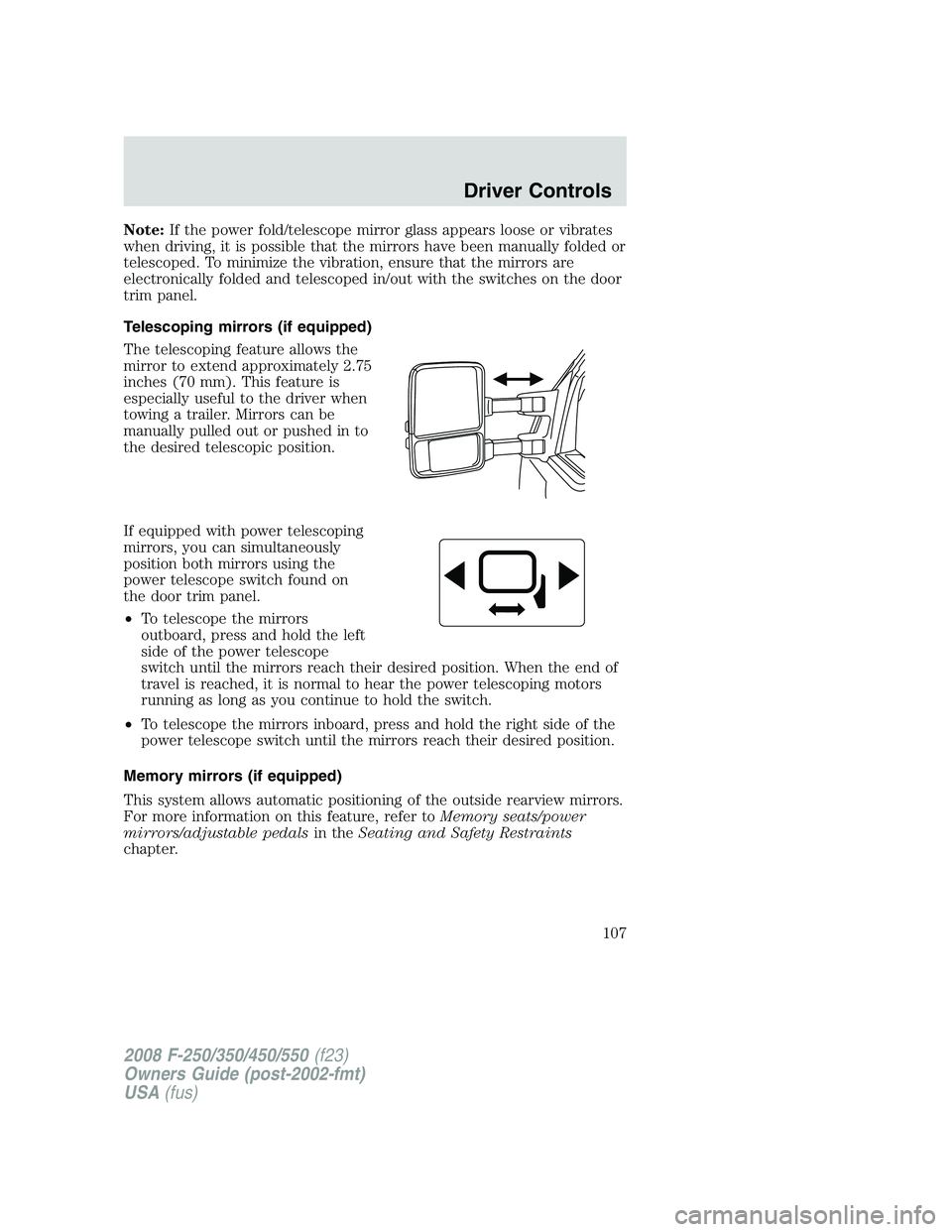
The telescoping feature allows the
mirror to extend approximately 2.75
inches (70 mm). This feature is
especially useful to the driver when
towing a trailer. Mirrors can be
manually pulled out or pushed in to
the desired telescopic position.
If equipped with power telescoping
mirrors, you can simultaneously
position both mirrors using the
power telescope switch found on
the door trim panel.
•To telescope the mirrors
outboard, press and hold the left
side of the power telescope
switch until the mirrors reach their desired position. When the end of
travel is reached, it is normal to hear the power telescoping motors
running as long as you continue to hold the switch.
•To telescope the mirrors inboard, press and hold the right side of the
power telescope switch until the mirrors reach their desired position.
Memory mirrors (if equipped)
This system allows automatic positioning of the outside rearview mirrors.
For more information on this feature, refer toMemory seats/power
mirrors/adjustable pedalsin theSeating and Safety Restraints
chapter.
2008 F-250/350/450/550(f23)
Owners Guide (post-2002-fmt)
USA(fus)
Driver Controls
107
Page 112 of 400
STEERING WHEEL CONTROLS (IF EQUIPPED)
These controls allow you to operate some radio and climate control features.
Driving while distracted can result in loss of vehicle control,
accident and injury. Ford strongly recommends that drivers use
extreme caution when using any device that may take their focus off
the road. The drivers primary responsibility is the safe operation of
their vehicle. Only use cell phones and other devices not essential to
the driving task when it is safe to do so.
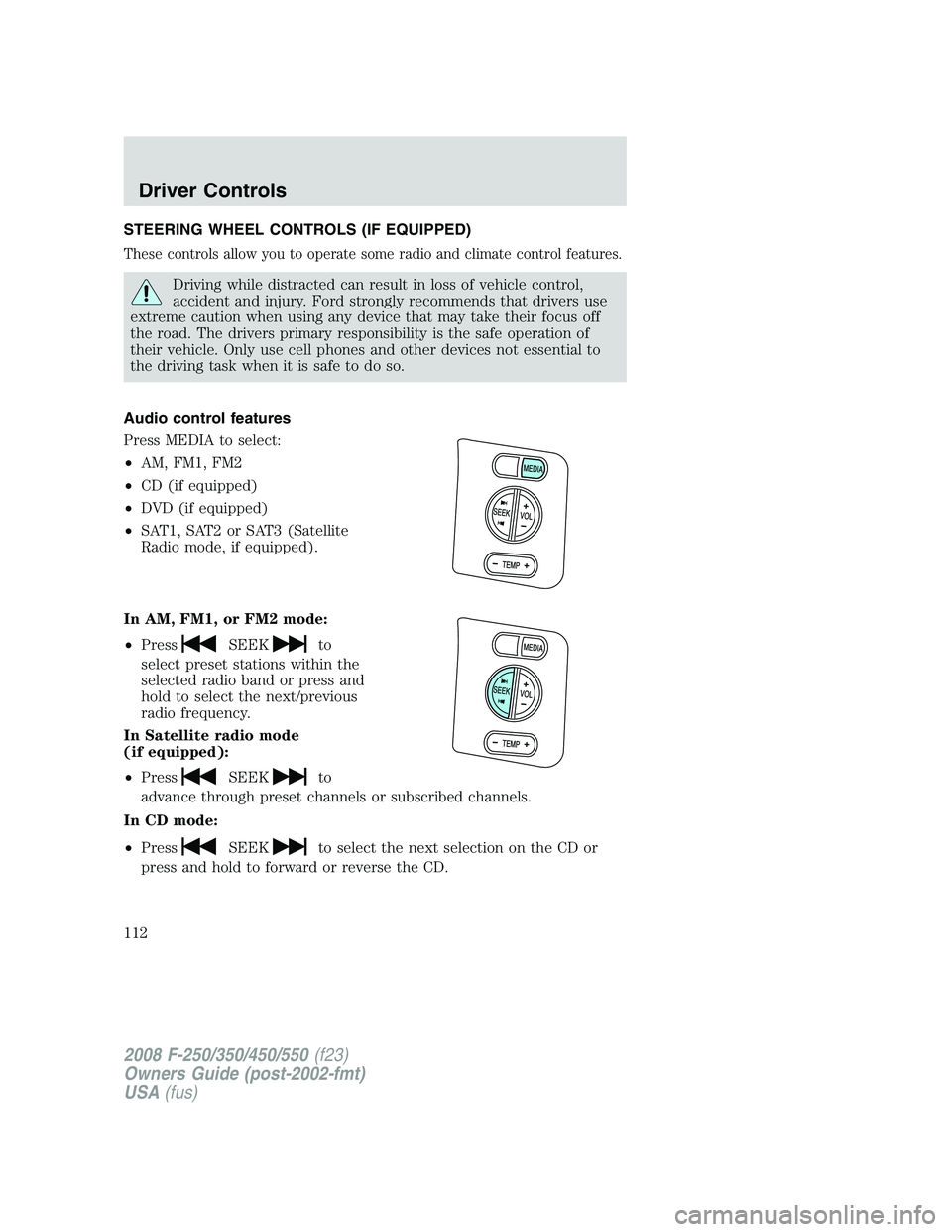
Audio control features
Press MEDIA to select:
•AM, FM1, FM2
•CD (if equipped)
•DVD (if equipped)
•SAT1, SAT2 or SAT3 (Satellite
Radio mode, if equipped).
In AM, FM1, or FM2 mode:
•Press
SEEKto
select preset stations within the
selected radio band or press and
hold to select the next/previous
radio frequency.
In Satellite radio mode
(if equipped):
•Press
SEEKto
advance through preset channels or subscribed channels.
In CD mode:
•Press
SEEKto select the next selection on the CD or
press and hold to forward or reverse the CD.
2008 F-250/350/450/550(f23)
Owners Guide (post-2002-fmt)
USA(fus)
Driver Controls
112
Page 126 of 400
CHECK BRAKE SYSTEMDisplayed when a fault has been detected by
the ABS module.
DRIVER DOOR AJARDisplayed when the driver’s door is not
completely closed.
PASSENGER DOOR AJARDisplayed when the passenger’s door is not
completely closed.
REAR LEFT DOOR AJARDisplayed when the rear left door is not
completely closed.
REAR RIGHT DOOR AJARDisplayed when the rear right door is not
completely closed.
LOW FUEL LEVELDisplayed as an early reminder of a low fuel
condition.
TRAILER FAULT (if equipped):Displayed if there is a short circuit on
the electric brake output wire or the trailer brakes are drawing too much
current. Refer toIntegrated trailer brake controllerin theTires,
Wheels and Loadingchapter for more information.
TBC FAULT (if equipped):Displayed in response to faults sensed by
the trailer brake controller (TBC). In the event this message is seen,
please take your vehicle to an authorized dealer for diagnosis and repair.
Refer toIntegrated trailer brake controllerin theTires, Wheels and
Loadingchapter for more information.
TRAILER DISCONNECTED (if equipped):Displayed when a trailer
connection becomes disconnected, either intentionally or unintentionally,
and has been sensed during a given ignition cycle. Refer toIntegrated
trailer brake controllerin theTires, Wheels and Loadingchapter for
more information.
LOW BRAKE FLUID LEVELIndicates the brake fluid level is low and
the brake system should be inspected immediately. Refer toBrake fluid
in theMaintenance and Specificationschapter.
LOW TIRE PRESSURE (if equipped):Displayed when one or more
tires on your vehicle have low tire pressure. Refer toInflating Your
Tiresin theTires, Wheels and Loadingchapter.
TIRE PRESSURE MONITOR FAULT (if equipped):Displayed when
the Tire Pressure Monitoring System is malfunctioning. If the warning
stays on or continues to come on, have the system inspected by your
authorized dealer.
2008 F-250/350/450/550(f23)
Owners Guide (post-2002-fmt)
USA(fus)
Driver Controls
126
Page 127 of 400

TIRE PRESSURE SENSOR FAULT (if equipped):Displayed when a
tire pressure sensor is malfunctioning, or your spare tire is in use. For
more information on how the system operates under these conditions,
refer toUnderstanding Your Tire Pressure Monitoring System
(TPMS)in theTires, Wheels and Loadingchapter. If the warning stays
on or continues to come on, have the system inspected by your
authorized dealer.
CHECK AIR FILTER (Diesel engine only):Refer toInstrument
Clusterin your6.0 and 6.4 Liter Power Stroke Direct Injection Turbo
Diesel Owner’s Guide Supplement.
DRAIN WATER SEPARATOR (Diesel engine only)Displayed when
the water separator has reached a predetermined capacity and needs to
be drained. Refer to your6.0 and 6.4 Liter Power Stroke Direct
Injection Turbo Diesel Owner’s Guide Supplementfor more
information.
STOP SAFELY NOW (Diesel engine only)Displayed when the
vehicle exhaust system temperature exceeds intended operating range. If
this warning occurs, the engine power is reduced and the engine will
shutdown when the vehicle speed is below 3 mph (5 km/h).Stop the
vehicle as soon as safely possibleand contact your authorized dealer.
Depending on the severity of the over-temperature condition, the vehicle
may or may not restart after cycling the ignition off. If the vehicle
restarts, there may be limited power, or there could be full function. If
the exhaust over-temperature condition reoccurs the message center will
display, STOP SAFELY NOW, the chime will sound, the engine power will
be reduced again and shut down below 3 mph (5km/h).
ENGINE TURNS OFF IN XX (Diesel engine only).Displayed when
the vehicle is in the final 30 seconds of a countdown to where the engine
will intentionally be turned off by the PCM. The diesel engine shutdown
is a (Regulatory) requirement which may be required of a particular
diesel vehicle for sale in States requiring this feature.
ENGINE TURNED OFF (Diesel engine only).Displayed after the 30
second countdown.
ENGINE WARMING PLEASE WAIT XX (Diesel engine only).
Displayed in extremely cold weather; typically around –15°F (–26°C).
The accelerator pedal will not respond to pressing; this is done so the
engine oil can be properly circulated to avoid engine damage from lack
of lubrication. A timer will begin a countdown from 30 seconds, then OK
TO DRIVE will display once the counter has reached 0 (zero) and the
accelerator pedal will respond to pressing.
2008 F-250/350/450/550(f23)
Owners Guide (post-2002-fmt)
USA(fus)
Driver Controls
127
Page 138 of 400

REAR LEFT DOOR AJAR.Displayed when the rear left door is not
completely closed.
REAR RIGHT DOOR AJAR.Displayed when the rear right door is not
completely closed.
LOW FUEL LEVEL.Displayed as an early reminder of a low fuel
condition.
TRAILER FAULT (if equipped).Displayed if there is a short circuit on
the electric brake output wire or the trailer brakes are drawing too much
current. Refer toIntegrated trailer brake controllerin theTires,
Wheels and Loadingchapter for more information.
TBC FAULT (if equipped).Displayed in response to faults sensed by
the trailer brake controller (TBC). In the event this message is seen,
please take your vehicle to an authorized dealer for diagnosis and repair.
Refer toIntegrated trailer brake controllerin theTires, Wheels and
Loadingchapter for more information.
TRAILER DISCONNECTED (if equipped).Displayed when a trailer
connection becomes disconnected, either intentionally or unintentionally,
and has been sensed during a given ignition cycle. Refer toIntegrated
trailer brake controllerin theTires, Wheels and Loadingchapter for
more information.
LOW BRAKE FLUID LEVEL.Indicates the brake fluid level is low and
the brake system should be inspected immediately. Refer toBrake fluid
in theMaintenance and Specificationschapter.
LOW TIRE PRESSURE (if equipped).Displayed when one or more
tires on your vehicle have low tire pressure. Refer toInflating Your
Tiresin theTires, Wheels and Loadingchapter.
TIRE PRESSURE MONITOR FAULT (if equipped).Displayed when
the Tire Pressure Monitoring System is malfunctioning. If the warning
stays on or continues to come on, have the system inspected by your
authorized dealer.
TIRE PRESSURE SENSOR FAULT (if equipped).Displayed when a
tire pressure sensor is malfunctioning, or your spare tire is in use. For
more information on how the system operates under these conditions,
refer toUnderstanding Your Tire Pressure Monitoring System
(TPMS)in theTires, Wheels and Loadingchapter. If the warning stays
on or continues to come on, have the system inspected by your
authorized dealer.
CHECK AIR FILTER (Diesel engine only).Refer toInstrument
Clusterin your6.0 and 6.4 Liter Power Stroke Direct Injection Turbo
Diesel Owner’s Guide Supplement.
2008 F-250/350/450/550(f23)
Owners Guide (post-2002-fmt)
USA(fus)
Driver Controls
138