Page 1 of 368
Introduction 4
Instrument Cluster 12
Warning lights and chimes 12
Gauges 19
Entertainment Systems 22
How to get going 22
AM/FM stereo with CD 26
AM/FM stereo with in-dash six CD 34
Auxiliary input jack (Line in) 42
USB port 44
Satellite radio information 47
Family entertainment system 50
Navigation system 77
Climate Controls 78
Manual heating and air conditioning 78
Automatic temperature control 80
Lights 85
Driver Controls 95
Windshield wiper/washer control 95
Steering wheel adjustment 96
Power windows 100
Mirrors 104
Speed control 107
Moon roof 112
Message center 113
Locks and Security 146
Keys 146
Locks 146
Anti-theft system 158
Table of Contents
1
2008 07+ Explorer Sport Trac(esp)
Owners Guide (post-2002-fmt)
USA(fus)
Page 18 of 368

Low washer fluid (if equipped):
Illuminates when the windshield
washer fluid is low.
Turn signal:Illuminates when the
left or right turn signal or the
hazard lights are turned on. If the
indicators stay on or flash faster, check for a burned out bulb.
High beams:Illuminates when the
high beam headlamps are turned on.
Key-in-ignition warning chime:Sounds when the key is left in the
ignition in the OFF/LOCK or ACCESSORY position and the driver’s door
is opened.
Headlamps on warning chime:Sounds when the headlamps or parking
lamps are on, the ignition is off (the key is not in the ignition) and the
driver’s door is opened.
Turn signal warning chime:Sounds when the turn signal lever has
been activated to signal a turn and not turned off after the vehicle is
driven more than 2 miles (3.2 km).
Parking brake ON warning chime:Sounds when the parking brake is
set, the engine is running and the vehicle is driven more than 3 mph (5
km/h).
Message center activation chime:Sounds when the following
warnings; DOOR AJAR, LOW FUEL LEVEL or LOW TIRE PRESSURE
appear in the message center display for the first time.
2008 07+ Explorer Sport Trac(esp)
Owners Guide (post-2002-fmt)
USA(fus)
Instrument Cluster
18
Page 49 of 368
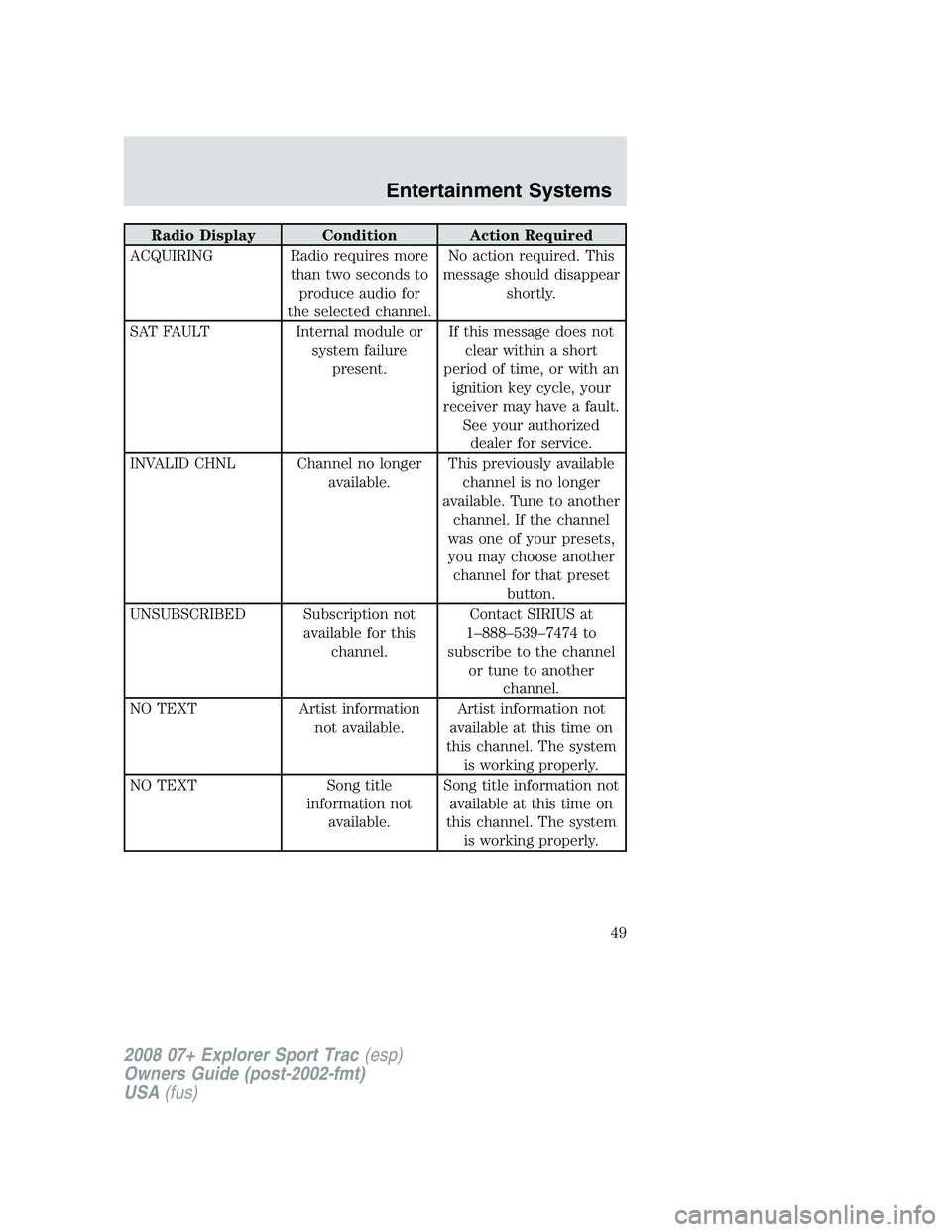
Radio Display Condition Action Required
ACQUIRING Radio requires more
than two seconds to
produce audio for
the selected channel.No action required. This
message should disappear
shortly.
SAT FAULT Internal module or
system failure
present.If this message does not
clear within a short
period of time, or with an
ignition key cycle, your
receiver may have a fault.
See your authorized
dealer for service.
INVALID CHNL Channel no longer
available.This previously available
channel is no longer
available. Tune to another
channel. If the channel
was one of your presets,
you may choose another
channel for that preset
button.
UNSUBSCRIBED Subscription not
available for this
channel.Contact SIRIUS at
1–888–539–7474 to
subscribe to the channel
or tune to another
channel.
NO TEXT Artist information
not available.Artist information not
available at this time on
this channel. The system
is working properly.
NO TEXT Song title
information not
available.Song title information not
available at this time on
this channel. The system
is working properly.
2008 07+ Explorer Sport Trac(esp)
Owners Guide (post-2002-fmt)
USA(fus)
Entertainment Systems
49
Page 59 of 368

4.RETURN:Press to return to the previous menu screen.
5.ANGLE(DVD dependent): Press to select the angle to view the
scene.
6.Channel A/B:Press to select either A or B headphones and then use
the MEDIA control to select the desired playing media for the
headphones.
7.VOL (Volume):When in Single Play, press to increase (
)or
decrease (
) the volume over all speakers. When in Dual Play, press to
increase (
) or decrease () the volume for the wired headphones.
(Wireless headphone volume is controlled with the rotary dial on the
right ear piece.)
8.Fast Forward/Next:In DVD mode, press and hold for a quick
advance within the DVD. Press and release to advance to the next
chapter. In CD/MP3 mode, press to access the next track.
9.Play/Pause:Press to play or pause a DVD.
10.SHUFFLE:Press to play all tracks on the current CD/MP3 disc in
random order.
11.STOP:Press to stop the current DVD or CD/MP3.
12.
/Speaker/Headphone(Single/Dual Play): Press to toggle
between Single Play (same media playing through all speakers) and Dual
Play (headphone mode — the rear speakers are muted). You can also
press the 2 and 4 memory presets on the audio system at the same time
to perform the same function.
13.Keypad:Use the numeric controls to enter in a specific CD/MP3
track or DVD chapter to be played.
14.C (Cancel):Press to cancel/clear the numeric input (i.e. chapter
number).
15.MEDIA:Press to cycle through the possible media sources: AM,
FM1, FM2, SAT (if equipped), CD, DVD, LINE IN (if equipped),
DVD-AUX.
Channel B can only access DVD and AUX sources.
16.VIDEO:Press to cycle through video states: DVD-DISC, DVD-AUX,
NON-DVD, Off.
17.EJECT:Press to eject a disc from the FES.
18.Fast reverse/Previous:When a DVD is playing, press and hold for a
quick reverse within the DVD. Press and release for the previous
2008 07+ Explorer Sport Trac(esp)
Owners Guide (post-2002-fmt)
USA(fus)
Entertainment Systems
59
Page 85 of 368
HEADLAMP CONTROL
Turns the lamps off.
Turns on the parking lamps,
instrument panel lamps, license
plate lamps and tail lamps.
Turns the headlamps on.
Autolamp Control
(if equipped)
The autolamp control sets the
headlamps to turn on and off
automatically. The autolamp control,
located on the headlamp control,
may be set to:
•turn on the lamps automatically
at night
•turn off the lamps automatically
during the daylight
•keep the lamps on for up to three minutes after the key is turned to
OFF.
To turn the autolamps on, rotate the control counterclockwise to
.
Fog lamp control
The fog lamps can be turned on
only when the headlamp control is
in the
,orposition and
the high beams are not turned on.
Pull headlamp control towards you
to turn fog lamps on. The fog lamp
indicator light below the
icon
will illuminate when fog lamp is
activated.
AP
2008 07+ Explorer Sport Trac(esp)
Owners Guide (post-2002-fmt)
USA(fus)
Lights
85
Page 121 of 368

Warning messages are divided into four categories:
•They cannot be cleared until the condition is corrected.
•They will reappear on the display ten minutes from the reset if the
condition has not been corrected.
•They will not reappear until an ignition OFF-ON cycle has been
completed.
•They reappear if the condition clears then reoccurs within the same
ignition ON-OFF cycle.
This acts as a reminder that these warning conditions still exist within
the vehicle.
Warning display Status
Door ajar Warning cannot be reset
Fuel level low Warning returns after 10
minutes
Park brake engaged
Check brake system
Check park aid (if equipped) Warning returns only after
the ignition key is turned
from OFF to ON. Brake fluid level low
Check headlamp
Check highbeam lamp
Check turn lamp
Washer fluid level low
Oil change required
Engine oil change soon
Clear objects by pass seat Warning returns after the
condition has cleared then
reoccurs within the same
ignition ON-OFF cycle. Check charging system
Low tire pressure
Tire monitor fault
Tire sensor fault
For 4x4 low stop vehicle (if equipped) Temporary alert
For 4x4 low shift to N (if equipped)
To exit 4x4 low stop vehicle (if equipped)
To exit 4x4 low shift to N (if equipped)
DOOR AJAR.Displayed when a door is not completely closed.
2008 07+ Explorer Sport Trac(esp)
Owners Guide (post-2002-fmt)
USA(fus)
Driver Controls
121
Page 134 of 368

Warning messages are divided into four categories:
•They cannot be cleared until the condition is corrected.
•They will reappear on the display ten minutes from the reset if the
condition has not been corrected.
•They will not reappear until an ignition OFF-ON cycle has been
completed.
•They reappear if the condition clears then reoccurs within the same
ignition ON-OFF cycle.
This acts as a reminder that these warning conditions still exist within
the vehicle.
Warning display Status
Door ajar Warning cannot be reset
Fuel level low Warning returns after 10
minutes
Park brake engaged
Check brake system
Check park aid (if equipped) Warning returns only after
the ignition key is turned
from OFF to ON. Brake fluid level low
Check headlamp
Check highbeam lamp
Check turn lamp
Washer fluid level low
Oil change required
Engine oil change soon
Clear objects by pass seat Warning returns after the
condition has cleared then
reoccurs within the same
ignition ON-OFF cycle. Check charging system
Low tire pressure
Tire monitor fault
Tire sensor fault
For 4x4 low stop vehicle (if equipped) Temporary alert
For 4x4 low shift to N (if equipped)
To exit 4x4 low stop vehicle (if equipped)
To exit 4x4 low shift to N (if equipped)
DOOR AJAR.Displayed when a door is not completely closed.
2008 07+ Explorer Sport Trac(esp)
Owners Guide (post-2002-fmt)
USA(fus)
Driver Controls
134
Page 137 of 368

POSITIVE RETENTION FLOOR MAT
Do not install additional floor mats on top of the factory installed
floor mats as they may interfere with the accelerator or the
brake pedals.
Position the driver floor mat so that
the eyelet is over the pointed end of
the retention post and rotate
forward to lock in. Make sure that
the mat does not interfere with the
operation of the accelerator or the
brake pedal. To remove the floor
mat, reverse the installation
procedure.
TAILGATE LOCK
The tailgate lock is designed to help
prevent theft of the tailgate.
•Insert ignition key and turn to the
right to lock.
•Turn ignition key to the left to
unlock.
Tailgate removal
Vehicles equipped with a cap, keep passengers and pets out of
the pickup box area when vehicle is running to prevent exhaust
fumes from being drawn into the vehicle. Exhaust fumes contain
carbon monoxide which can injure your lungs and cause drowsiness
and even death.
2008 07+ Explorer Sport Trac(esp)
Owners Guide (post-2002-fmt)
USA(fus)
Driver Controls
137

