Page 17 of 384
O/D off:Illuminates when the
overdrive function of the
transmission has been turned off,
refer to theDrivingchapter.
AdvanceTrac�:Flashes when the
AdvanceTrac�with RSC system is
active. Illuminates solid when the
system has been disabled (by the
driver or as a result of a system
failure), refer to theDriving
chapter for more information.
If “SERVICE RSC NOW” is displayed in the message center, refer to
Message centerin theDriver Controlschapter for more information.
Four wheel drive low (if
equipped):Illuminates when
four-wheel drive low is engaged. If
the light fails to illuminate when the
ignition is turned ON, or remains on, have the system serviced
immediately by your authorized dealer.
Four wheel drive high (if
equipped):Illuminates when
four-wheel drive is engaged. If the
light fails to illuminate when the ignition is turned ON, or remains on,
have the system serviced immediately by your authorized dealer.
Door ajar:Illuminates when the
ignition is in the ON position and
any door, liftgate or the liftgate glass
is open.
Low fuel (if equipped):
Illuminates when the fuel level in
the fuel tank is at or near empty
(refer toFuel gaugein this
chapter).O/D
OFF
4x4
LOW
4x4
2008 Explorer(exp)
Owners Guide (post-2002-fmt)
USA(fus)
Instrument Cluster
17
Page 18 of 384

Low washer fluid (if equipped):
Illuminates when the windshield
washer fluid is low.
Turn signal:Illuminates when the
left or right turn signal or the
hazard lights are turned on. If the
indicators stay on or flash faster, check for a burned out bulb.
High beams:Illuminates when the
high beam headlamps are turned on.
Key-in-ignition warning chime:Sounds when the key is left in the
ignition in the OFF/LOCK or ACCESSORY position and the driver’s door
is opened.
Headlamps on warning chime:Sounds when the headlamps or parking
lamps are on, the ignition is off (the key is not in the ignition) and the
driver’s door is opened.
Turn signal warning chime:Sounds when the turn signal lever has
been activated to signal a turn and not turned off after the vehicle is
driven more than 2 miles (3.2 km).
Parking brake ON warning chime:Sounds when the parking brake is
set, the engine is running and the vehicle is driven more than 3 mph (5
km/h).
Message center activation chime:Sounds when the following
warnings DOOR AJAR, LOW FUEL LEVEL or LOW TIRE PRESSURE
appear in the message center display for the first time.
2008 Explorer(exp)
Owners Guide (post-2002-fmt)
USA(fus)
Instrument Cluster
18
Page 21 of 384
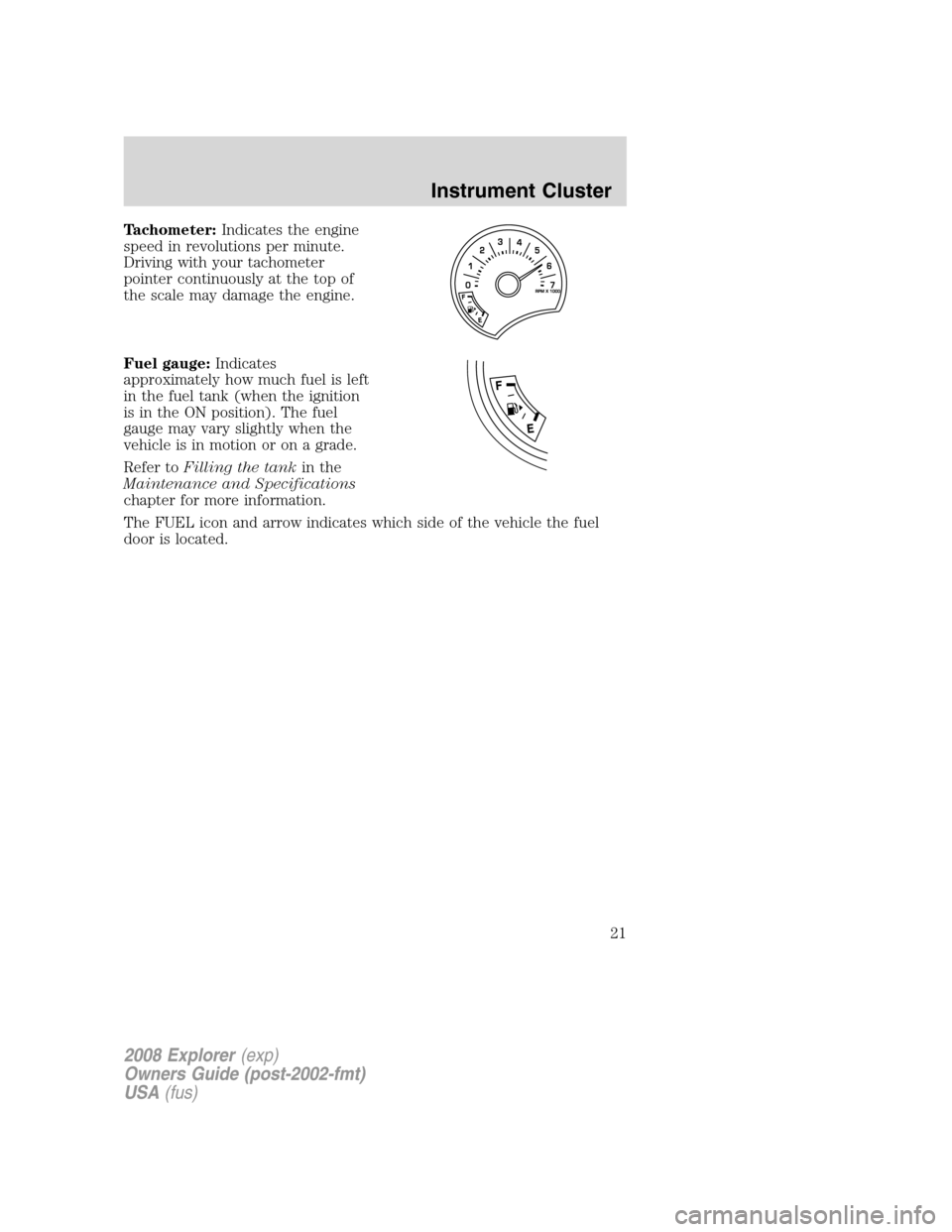
Tachometer:Indicates the engine
speed in revolutions per minute.
Driving with your tachometer
pointer continuously at the top of
the scale may damage the engine.
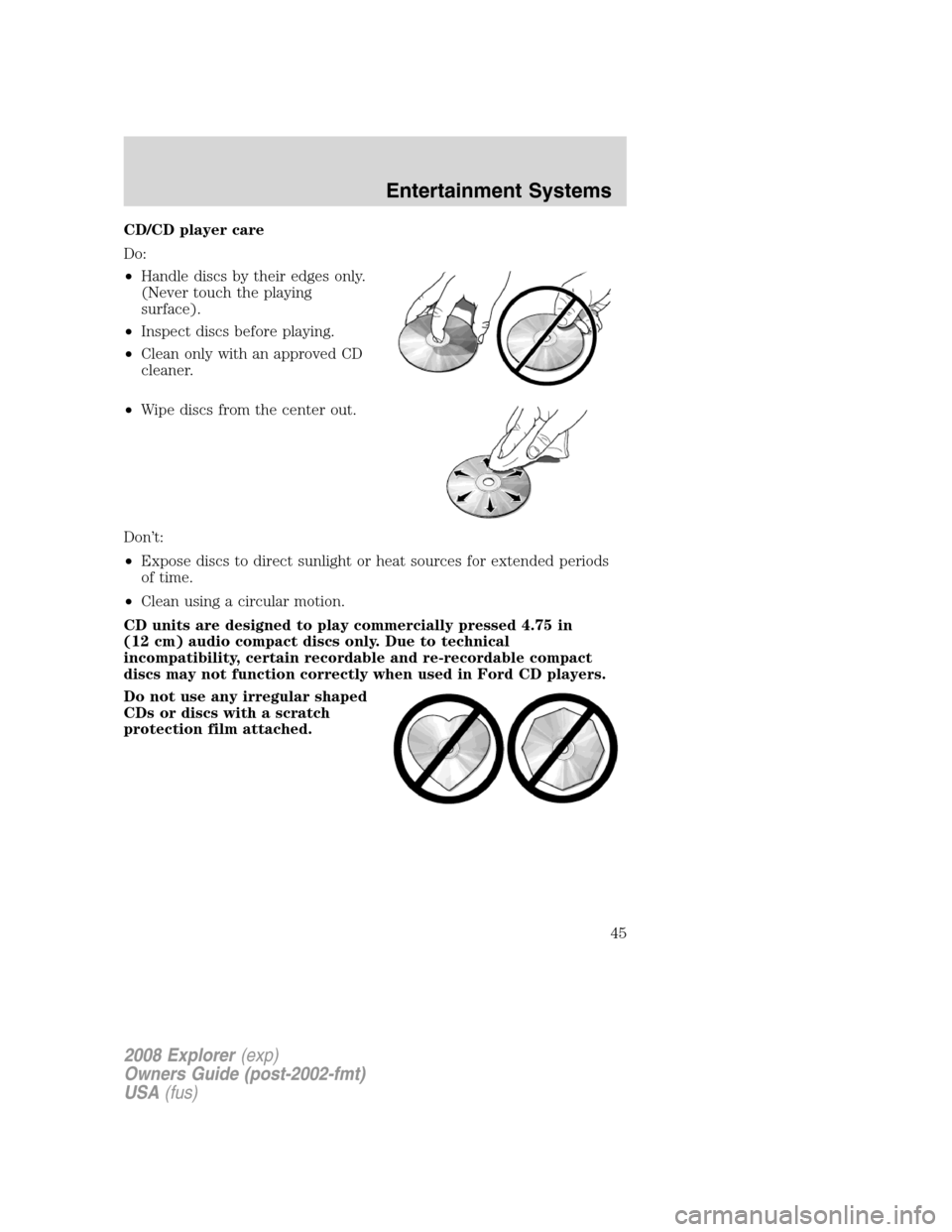
Fuel gauge:Indicates
approximately how much fuel is left
in the fuel tank (when the ignition
is in the ON position). The fuel
gauge may vary slightly when the
vehicle is in motion or on a grade.
Refer toFilling the tankin the
Maintenance and Specifications
chapter for more information.
The FUEL icon and arrow indicates which side of the vehicle the fuel
door is located.
2008 Explorer(exp)
Owners Guide (post-2002-fmt)
USA(fus)
Instrument Cluster
21
Page 29 of 384

To activate,press MENU repeatedly until RBDS (ON/OFF) appears in
the display. Use
//SEEKto toggle RBDS ON/OFF. When
RBDS is OFF, you will not be able to search for RBDS equipped stations
or view the station name or type. Press OK to close and return to the
main menu.
To search for specific RBDS music categories:When the desired
category appears in the display, press
/to find the desired type,
then press and release
SEEK, SEEKor press and hold SCAN to
begin the search.
To view the station name or type:When the desired category appears
in the display, press TEXT/SCAN to toggle between displaying the station
type (COUNTRY, ROCK, etc.) or the station name (WYCD, WXYT, etc.).
BASS:Press MENU to reach the bass setting. Use
/to adjust.
Press OK to close and return to the main menu.
TREB (Treble):Press MENU to reach the treble setting. Use
/to
adjust. Press OK to close and return to the main menu. Press OK to
close and return to the main menu.
BAL (Balance):Press MENU to reach the balance setting. Use
/
to adjust the audio between the left (L) and right (R) speakers. Press
OK to close and return to the main menu.
FADE:Press MENU to reach the fade setting. Use
/to adjust the
audio between the back (B) and front (F) speakers. Press OK to close
and return to the main menu.
SPEED VOL (Speed sensitive volume, if equipped):Press MENU to
reach the SPEEDVOL setting. Radio volume automatically gets louder
with increasing vehicle speed to compensate for road and wind noise.
Use
/to adjust. Press OK to close and return to the main menu.
The default setting isoff;increasing your vehicle speed will not change
the volume level.
Adjust1–7:Increasing this setting from 1 (lowest setting) to 7 (highest
setting) allows the radio volume to automatically change slightly with
vehicle speed to compensate for road and wind noise.
Recommended level is1–3;SPEED OFF turns the feature off and level 7
is the maximum setting.
2008 Explorer(exp)
Owners Guide (post-2002-fmt)
USA(fus)
Entertainment Systems
29
Page 37 of 384

RBDS: Available only in FM mode. This feature allows you to search
RBDS-equipped stations for a certain category of music format:
CLASSIC, COUNTRY, INFORM, JAZZ/RB, ROCK, etc.
To activate,press MENU repeatedly until RBDS (ON/OFF) appears in
the display. Use
//SEEKto toggle RBDS ON/OFF. When
RBDS is OFF, you will not be able to search for RBDS equipped stations
or view the station name or type. Press OK to close and return to the
main menu.
To search for specific RBDS music categories:When the desired
category appears in the display, press
/to find the desired type,
then press and release
SEEK, SEEKor press and hold SCAN to
begin the search.
To view the station name or type:When the desired category appears
in the display, press TEXT/SCAN to toggle between displaying the station
type (COUNTRY, ROCK, etc.) or the station name (WYCD, WXYT, etc.).
BASS:Press MENU to reach the bass setting. Use
/to adjust.
Press OK to close and return to the main menu.
TREB (Treble):Press MENU to reach the treble setting. Use
/to
adjust. Press OK to close and return to the main menu.
BAL (Balance):Press MENU to reach the balance setting. Use
/
to adjust the audio between the left (L) and right (R) speakers. Press
OK to close and return to the main menu.
FADE:Press MENU to reach the fade setting. Use
/to adjust the
audio between the back (B) and front (F) speakers. Press OK to close
and return to the main menu.
SPEED VOL (Speed sensitive volume, if equipped):Press MENU to
reach the SPEEDVOL setting. Radio volume automatically gets louder
with increasing vehicle speed to compensate for road and wind noise.
Use
/to adjust. Press OK to close and return to the main menu.
The default setting isoff;increasing your vehicle speed will not change
the volume level.
Adjust1–7:Increasing this setting from 1 (lowest setting) to 7 (highest
setting) allows the radio volume to automatically change slightly with
vehicle speed to compensate for road and wind noise.
2008 Explorer(exp)
Owners Guide (post-2002-fmt)
USA(fus)
Entertainment Systems
37
Page 44 of 384

USB port (if equipped)
Driving while distracted can result in loss of vehicle control,
accident and injury. Ford strongly recommends that drivers use
extreme caution when using any device that may take their focus off
the road. The drivers primary responsibility is the safe operation of
their vehicle. Only use cell phones and other devices not essential to
the driving task when it is safe to do so.
Your vehicle may be equipped with a
USB port inside your center console.
This feature allows you to plug in
media playing devices, memory
sticks, and also to charge devices.
For further information on this
feature, refer toUsing your USB
portin theSYNC supplement.
GENERAL AUDIO INFORMATION
Radio frequencies:
AM and FM frequencies are established by the Federal Communications
Commission (FCC) and the Canadian Radio and Telecommunications
Commission (CRTC). Those frequencies are:
AM: 530, 540–1700, 1710 kHz
FM: 87.7, 87.9–107.7, 107.9 MHz
Radio reception factors:
There are three factors that can affect radio reception:
•Distance/strength: The further you travel from an FM station, the
weaker the signal and the weaker the reception.
•Terrain: Hills, mountains, tall buildings, power lines, electric fences,
traffic lights and thunderstorms can interfere with your reception.
•Station overload: When you pass a broadcast tower, a stronger signal
may overtake a weaker one and play while the weak station frequency
is displayed.
2008 Explorer(exp)
Owners Guide (post-2002-fmt)
USA(fus)
Entertainment Systems
44
Page 45 of 384
CD/CD player care
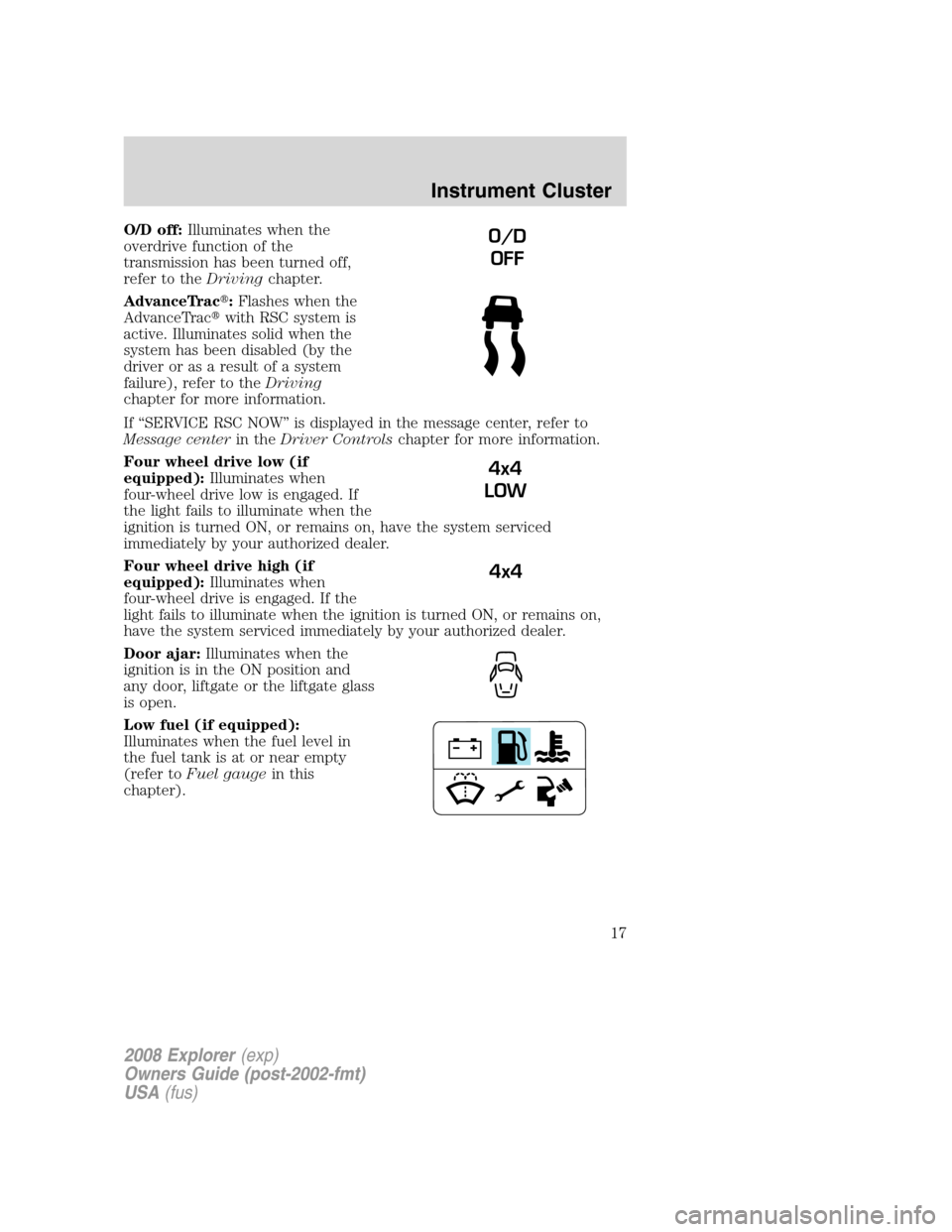
Do:
•Handle discs by their edges only.
(Never touch the playing
surface).
•Inspect discs before playing.
•Clean only with an approved CD
cleaner.
•Wipe discs from the center out.
Don’t:
•Expose discs to direct sunlight or heat sources for extended periods
of time.
•Clean using a circular motion.
CD units are designed to play commercially pressed 4.75 in
(12 cm) audio compact discs only. Due to technical
incompatibility, certain recordable and re-recordable compact
discs may not function correctly when used in Ford CD players.
Do not use any irregular shaped
CDs or discs with a scratch
protection film attached.
2008 Explorer(exp)
Owners Guide (post-2002-fmt)
USA(fus)
Entertainment Systems
45
Page 52 of 384

3. Press the power button on the
DVD player, then press Play (
)
to begin to play the disc.
If a DVD is already loaded into the
system, press PLAY on the DVD
player.
Note:If sound can be heard, but no video is present, press VIDEO to
select the video source (DVD or aux-inputs).
Press VIDEO to change the source
displayed on the screen. Press
repeatedly to cycle through:
DVD-DISC, DVD-AUX, NON-DVD,
OFF.
Press the power button to turn the
system OFF. The indicator light will
turn off indicating the system is off.
Note:The audio from the DVD system will play over all vehicle speakers
and can be adjusted by the radio volume control.
To play a CD in the DVD system:
The DVD system can play audio CDs, CD-R and CD-R/W, CD-ROM and
video CDs. To ensure proper disc operation, check the disc for finger
prints and scratches. Clean the disc with a soft cloth, wiping from the
center to the edge.
1. Ensure that the vehicle ignition is in the RUN or ACCESSORY
position.
2. Insert a CD into the system,
label-side up to turn on the DVD
system. It will load and
automatically begin to play. If there
is already a CD in the system, press
PLAY on the DVD player.
2008 Explorer(exp)
Owners Guide (post-2002-fmt)
USA(fus)
Entertainment Systems
52