2008 FORD EXPLORER Tire
[x] Cancel search: TirePage 138 of 384

Warning display Status
Door ajar Warning cannot be reset
Fuel level low Warning returns after 10 minutes
Park brake engaged
Check brake system
Check park aid (if equipped) Warning returns only after the ignition
key is turned from OFF to ON.
Brake fluid level low
Check headlamp
Check highbeam lamp
Check turn lamp
Washer fluid level low
Oil change required
Engine oil change soon
Liftgate/glass ajar Warning returns after the condition
has cleared then reoccurs within the
same ignition ON-OFF cycle. Clear objects by pass seat
Check charging system
Low tire pressure
Tire monitor fault
Tire sensor fault
For 4x4 low stop vehicle (if
equipped)Temporary alert
For 4x4 low shift to N (if
equipped)
To exit 4x4 low stop vehicle (if
equipped)
To exit 4x4 low shift to N (if
equipped)
DOOR AJAR.Displayed when a door is not completely closed.
CLEAR OBJECTS BY PASS SEAT.Displayed when objects are by the
passenger seat. After the objects are moved away from the seat, if the
warning stays on or continues to come on contact your authorized
dealer.
CHECK CHARGING SYSTEM.Displayed when the electrical system is
not maintaining proper voltage. If you are operating electrical accessories
when the engine is idling at a low speed, turn off as many of the
2008 Explorer(exp)
Owners Guide (post-2002-fmt)
USA(fus)
Driver Controls
138
Page 139 of 384

electrical loads as soon as possible. If the warning stays on or comes on
when the engine is operating at normal speeds, have the electrical
system checked as soon as possible.
FUEL LEVEL LOW.Displayed as an early reminder of a low fuel
condition.
PARK BRAKE ENGAGED.Displayed when the manual park brake is
set, the engine is running and the vehicle is driven more than 3 mph (5
km/h). If the warning stays on after the park brake is released, contact
your authorized dealer as soon as possible.
CHECK BRAKE SYSTEM.Displayed when the braking system is not
operating properly. If the warning stays on or continues to come on,
contact your authorized dealer as soon as possible.
CHECK PARK AID (if equipped).Displayed when the transmission is
in R (Reverse) and the Reverse Sensing System (Park Aid) is disabled.
Refer toReverse Sensing System (Park Aid)in this section to enable.
LOW TIRE PRESSURE.Displayed when one or more tires on your
vehicle have low tire pressure. Refer toInflating your tiresin theTires,
Wheels and Loadingchapter.
TIRE MONITOR FAULT.Displayed when the Tire Pressure Monitoring
System is malfunctioning. If the warning stays on or continues to come
on, have the system inspected by your authorized dealer.
TIRE SENSOR FAULT.Displayed when a tire pressure sensor is
malfunctioning, or your spare tire is in use. For more information on how
the system operates under these conditions, refer toUnderstanding
your Tire Pressure Monitoring Systemin theTires, Wheels and
Loadingchapter. If the warning stays on or continues to come on, have
the system inspected by your authorized dealer.
BRAKE FLUID LEVEL LOW.Indicates the brake fluid level is low and
the brake system should be inspected immediately. Refer toBrake fluid
reservoirin theMaintenance and Specificationschapter.
CHECK HEADLAMP.Displayed when the headlamps are activated and
at least one bulb is burned out. Check the lamps as soon as possible and
have the burned out lamp replaced. Refer toReplacing headlamp bulbs
in theLightschapter.
CHECK HIGHBEAM LAMP.Displayed when the highbeam lamps are
activated and at least one bulb is burned out. Check the lamps as soon
as possible and have the burned out lamp replaced. Refer toReplacing
headlamp bulbsin theLightschapter.
2008 Explorer(exp)
Owners Guide (post-2002-fmt)
USA(fus)
Driver Controls
139
Page 142 of 384
Note:Do not use the running boards, front and rear hinge assemblies,
running board motors, or the running board under body mounts to lift
the vehicle with the jack, refer toChanging tiresin theRoadside
Emergencieschapter.
In extreme climates, excessive ice buildup may occur, causing
the running boards not to deploy. Be sure that the running
boards have deployed, and have finished moving before attempting to
step on them. Note: The running boards will resume normal function
once the blockage is cleared.
Turn off the running boards before working under the vehicle,
jacking, or placing any object under the vehicle. Never place
your hand in the hinge assemblies. A moving running board may cause
injury
POSITIVE RETENTION FLOOR MAT
Do not install additional floor mats on top of the factory installed
floor mats as they may interfere with the accelerator or the
brake pedals.
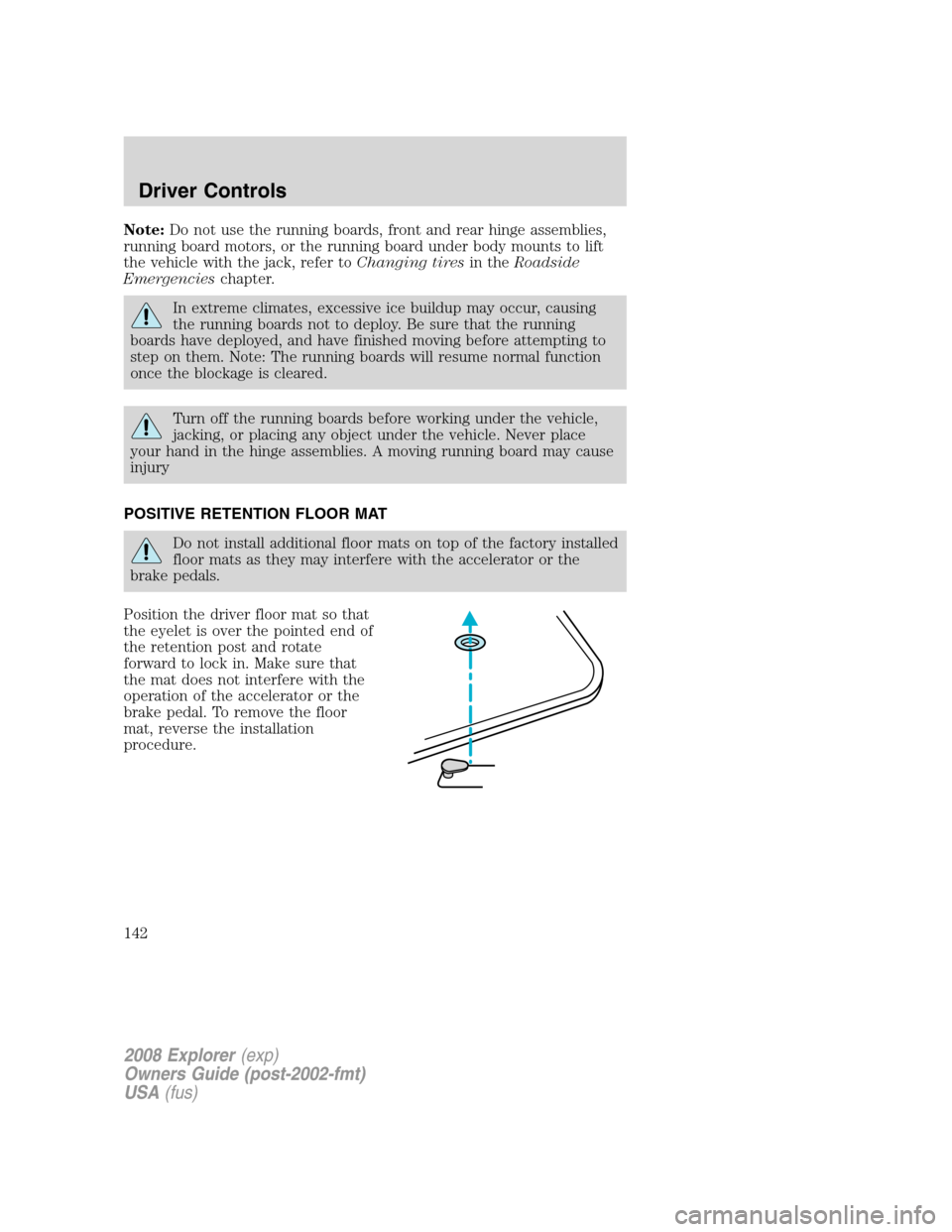
Position the driver floor mat so that
the eyelet is over the pointed end of
the retention post and rotate
forward to lock in. Make sure that
the mat does not interfere with the
operation of the accelerator or the
brake pedal. To remove the floor
mat, reverse the installation
procedure.
2008 Explorer(exp)
Owners Guide (post-2002-fmt)
USA(fus)
Driver Controls
142
Page 161 of 384

Programming spare keys
You can program your own coded keys to your vehicle.
Tips:
•A maximum of eight keys can be coded to your vehicle.
•Only use SecuriLock™ keys.
•You must have two previously programmed coded keys (keys that
already operate your vehicle’s engine) and the new unprogrammed
key(s) readily accessible.
•If two previously programmed coded keys are not available, you must
take your vehicle to your authorized dealer to have the spare key(s)
programmed.
Please read and understand the
entire procedure before you begin.
1. Insert the first previously
programmedcoded keyinto the
ignition.
2. Turn the ignition from the 1 (OFF/LOCK) position to the 3 (ON)
position. Keep the ignition in the 3 (ON) position for at least three
seconds, but no more than 10 seconds.
3. Turn the ignition to the 1 (OFF/LOCK) position and remove the first
coded keyfrom the ignition.
4. Within ten seconds of turning the ignition to the 1 (OFF/LOCK)
position, insert the second previouslycoded keyinto the ignition.
5. Turn the ignition from the 1 (OFF/LOCK) position to the 3 (ON)
position. Keep the ignition in the 3 (ON) position for at least three
seconds, but no more than 10 seconds.
6. Turn the ignition to the 1 (OFF/LOCK) position and remove the
second previously programmedcoded keyfrom the ignition.
7. Within twenty seconds of turning the ignition to the 1 (OFF/LOCK)
position and removing the previously programmedcoded key,insert the
new unprogrammed key (new key/valet key) into the ignition.
2008 Explorer(exp)
Owners Guide (post-2002-fmt)
USA(fus)
Locks and Security
161
Page 174 of 384

4. Lift up on the head restraint until
it locks into its original position.
Before returning the seatback to its original position, make sure
that cargo or any objects are not trapped behind the seatback.
After returning the seatback to its original position, pull on the
seatback to ensure that it has fully latched. An unlatched seat may
become dangerous in the event of a sudden stop or collision.
Note: In vehicles equipped with 3rd row seats, the 2nd row
recline/unlatch handle on the outboard sides of both 60% and 40% seats
should not be used as a grab handle to raise the entire seat up from
cargo mode (kneeling position), or to lower it from its tumbled position.
This handle is there only to recline the seat back and to unlatch the rear
seat/floor attachment, in order to tumble the seat in the forward
direction. To raise the seat up from the cargo mode (kneeling position),
the entire seat should be lifted up using the seat back or the seat
cushion area as a grabbing surface.
Exiting the 3rd row
1. Lower the head restraints. See
Folding down the 2nd row 60/40
seats and buckets seatsearlier in
this section.
2. Pull on the lever/strap (as
equipped) located at the bottom
right of the seat back to release the
seat from the floor, and rotate the
seat up towards the front seat.
3. Follow the directions above to
return the seatback from the load floor and to the upright position.
2008 Explorer(exp)
Owners Guide (post-2002-fmt)
USA(fus)
Seating and Safety Restraints
174
Page 183 of 384
Automatic locking mode
When to use the automatic locking mode
In this mode, the shoulder belt is automatically pre-locked. The belt will
still retract to remove any slack in the shoulder belt. The automatic
locking mode is not available on the driver safety belt.
This mode should be usedany timea child safety seat, except a
booster, is installed in passenger front or rear seating positions. Children
12 years old and under should be properly restrained in the rear seat
whenever possible. Refer toSafety restraints for childrenorSafety
seats for childrenlater in this chapter.
How to use the automatic locking mode
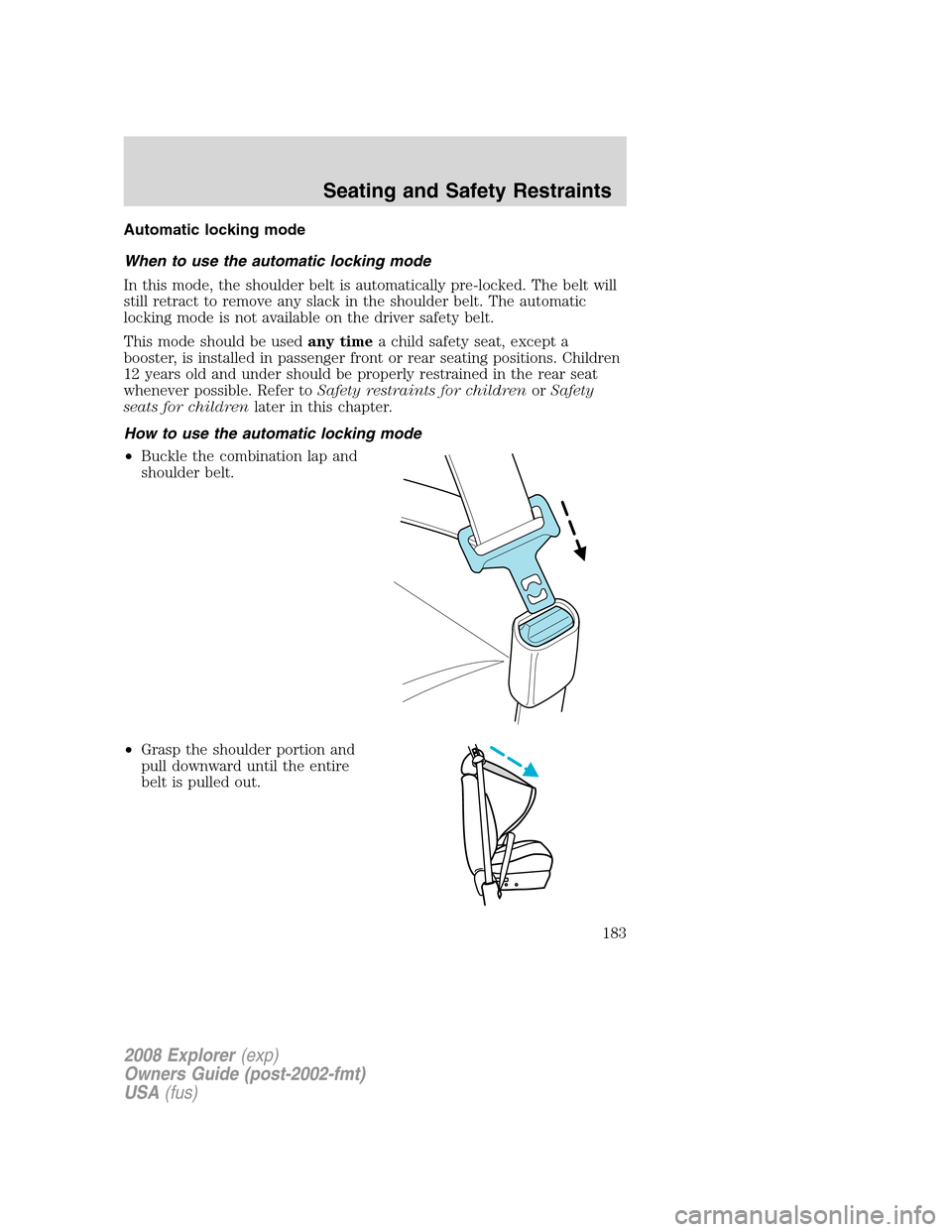
•Buckle the combination lap and
shoulder belt.
•Grasp the shoulder portion and
pull downward until the entire
belt is pulled out.
2008 Explorer(exp)
Owners Guide (post-2002-fmt)
USA(fus)
Seating and Safety Restraints
183
Page 220 of 384
NOTICE TO UTILITY VEHICLE AND TRUCK OWNERS
Utility vehicles and trucks handle
differently than passenger cars in
the various driving conditions that
are encountered on streets,
highways and off-road. Utility
vehicles and trucks are not designed
for cornering at speeds as high as
passenger cars any more than
low-slung sports cars are designed
to perform satisfactorily under
off-road conditions.
Utility vehicles have a significantly higher rollover rate than
other types of vehicles. To reduce the risk of serious injury or
death from a rollover or other crash you must:
•Avoid sharp turns and abrupt maneuvers;
•Drive at safe speeds for the conditions;
•Keep tires properly inflated;
•Never overload or improperly load your vehicle; and
•Make sure every passenger is properly restrained.
In a rollover crash, an unbelted person is significantly more likely
to die than a person wearing a seat belt. All occupants must
wear seat belts and children/infants must use appropriate restraints to
minimize the risk of injury or ejection.
Study yourOwner’s Guideand any supplements for specific information
about equipment features, instructions for safe driving and additional
precautions to reduce the risk of an accident or serious injury.
VEHICLE CHARACTERISTICS
4WD and AWD Systems (if equipped)
A vehicle equipped with AWD or 4WD (when selected) has the ability to
use all four wheels to power itself. This increases traction which may
enable you to safely drive over terrain and road conditions that a
conventional two-wheel drive vehicle cannot.
2008 Explorer(exp)
Owners Guide (post-2002-fmt)
USA(fus)
Tires, Wheels and Loading
220
Page 221 of 384

Power is supplied to all four wheels through a transfer case or power
transfer unit. 4WD vehicles allow you to select different drive modes as
necessary. Information on transfer case operation and shifting procedures
can be found in theDrivingchapter. Information on transfer case
maintenance can be found in theMaintenance and Specifications
chapter. You should become thoroughly familiar with this information
before you operate your vehicle.
On some 4WD models, the initial shift from two-wheel drive to 4WD
while the vehicle is moving can cause a momentary clunk and ratcheting
sound. These sounds are normal as the front drivetrain comes up to
speed and is not cause for concern.
Do not become overconfident in the ability of 4WD and AWD
vehicles. Although a 4WD or AWD vehicle may accelerate better
than two-wheel drive vehicle in low traction situations, it won’t stop
any faster than two-wheel drive vehicles. Always drive at a safe speed.
How your vehicle differs from other vehicles
SUV and trucks can differ from
some other vehicles in a few
noticeable ways. Your vehicle may
be:
•Higher – to allow higher load
carrying capacity and to allow it
to travel over rough terrain
without getting hung up or
damaging underbody components.
•Shorter – to give it the capability
to approach inclines and drive
over the crest of a hill without
getting hung up or damaging
underbody components. All other
things held equal, a shorter
wheelbase may make your vehicle
quicker to respond to steering inputs than a vehicle with a longer
wheelbase.
2008 Explorer(exp)
Owners Guide (post-2002-fmt)
USA(fus)
Tires, Wheels and Loading
221