2008 FORD EDGE warning
[x] Cancel search: warningPage 115 of 336

•Power Liftgate (if equipped)
•Easy entry/exit seat (if equipped)
•Reverse sensing system (Park Assist) (if equipped)
•Language
System check
Selecting this function from the
SETUP menu causes the message
center to cycle through each of the
systems being monitored. For each
of the monitored systems, the
message center will indicate either an OK message or a warning message
for two to four seconds.
Pressing the RESET control cycles the message center through each of
the systems being monitored.
The sequence of the system check report is as follows:
1. DOORS CLOSED
2. ENGINE TEMPERATURE
3. OIL PRESSURE
4. BRAKE FLUID LEVEL
5. WASHER FLUID LEVEL
6. FUEL LEVEL
7. DISTANCE TO EMPTY
Units (English/Metric)
1. Select this function from the
SETUP menu for the current units
to be displayed.
2. Press the RESET control to
change from English to Metric.
Autolamp delay
This feature keeps your headlights on for up to three minutes after the
ignition is switched off.
2008 Edge(edg)
Owners Guide (post-2002-fmt)
USA(fus)
Driver Controls
115
Page 117 of 336

Power Liftgate (if equipped)
This feature allows users to open/close the rear liftgate at the touch of a
button.
1. To disable/enable the power
liftgate feature, select this function
from the SETUP control for the
current display mode.
2. Press the RESET control to turn
the power liftgate ON or OFF.
Reverse Sensing System (Park aid) (if equipped)
This feature sounds a warning tone to warn the driver of obstacles near
the rear bumper, and functions only when R (Reverse) gear is selected.
1. To disable/enable the reverse
sensing system feature, select this
function from the SETUP menu or
put the vehicle in R (Reverse).
2. Press the RESET control to turn
the rear park aid OFF or ON.
Language
1. Select this function from the
SETUP menu for the current
language to be displayed.
2. Pressing the RESET control
cycles the message center through
each of the language choices.
Selectable languages are English, Spanish and French.
3. Press and hold the RESET
control for 2 seconds to set the
language choice.
System warnings
System warnings alert you to possible problems or malfunctions in your
vehicle’s operating systems.
2008 Edge(edg)
Owners Guide (post-2002-fmt)
USA(fus)
Driver Controls
117
Page 118 of 336
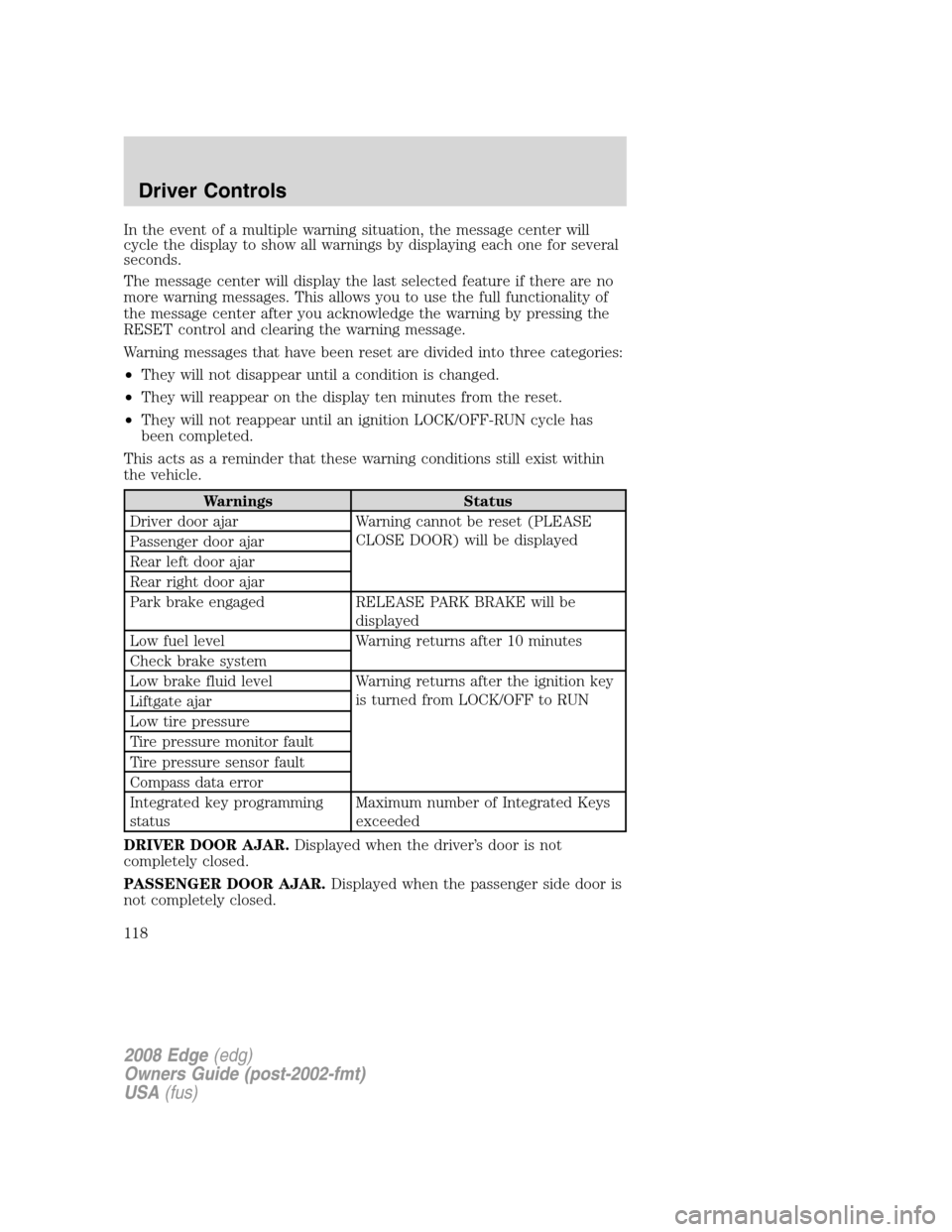
In the event of a multiple warning situation, the message center will
cycle the display to show all warnings by displaying each one for several
seconds.
The message center will display the last selected feature if there are no
more warning messages. This allows you to use the full functionality of
the message center after you acknowledge the warning by pressing the
RESET control and clearing the warning message.
Warning messages that have been reset are divided into three categories:
•They will not disappear until a condition is changed.
•They will reappear on the display ten minutes from the reset.
•They will not reappear until an ignition LOCK/OFF-RUN cycle has
been completed.
This acts as a reminder that these warning conditions still exist within
the vehicle.
Warnings Status
Driver door ajar Warning cannot be reset (PLEASE
CLOSE DOOR) will be displayed
Passenger door ajar
Rear left door ajar
Rear right door ajar
Park brake engaged RELEASE PARK BRAKE will be
displayed
Low fuel level Warning returns after 10 minutes
Check brake system
Low brake fluid level Warning returns after the ignition key
is turned from LOCK/OFF to RUN
Liftgate ajar
Low tire pressure
Tire pressure monitor fault
Tire pressure sensor fault
Compass data error
Integrated key programming
statusMaximum number of Integrated Keys
exceeded
DRIVER DOOR AJAR.Displayed when the driver’s door is not
completely closed.
PASSENGER DOOR AJAR.Displayed when the passenger side door is
not completely closed.
2008 Edge(edg)
Owners Guide (post-2002-fmt)
USA(fus)
Driver Controls
118
Page 119 of 336

REAR LEFT DOOR AJAR.Displayed when the rear left door is not
completely closed.
REAR RIGHT DOOR AJAR.Displayed when the rear right door is not
completely closed.
PARK BRAKE ENGAGED.Displayed when the manual park brake is
set, the engine is running and the vehicle is driven more than 3 mph (5
km). If the warning stays on after the park brake is released, contact
your authorized dealer as soon as possible.
LOW FUEL LEVEL.Displayed as an early reminder of a low fuel
condition.
CHECK BRAKE SYSTEM.Displayed when the brake system needs
servicing. If the warning stays on or continues to come on, contact your
authorized dealer as soon as possible.
LOW BRAKE FLUID LEVEL.Indicates the brake fluid level is low and
the brake system should be inspected immediately. Refer toBrake fluid
reservoirin theMaintenance and Specificationschapter.
LIFTGATE AJAR.Displayed when the liftgate is not completely closed.
LOW TIRE PRESSURE.Displayed when one or more tires on your
vehicle have low tire pressure. Refer toInflating your tiresin theTires,
Wheels and Loadingchapter.
TIRE PRESSURE MONITOR FAULT.Displayed when the Tire
Pressure Monitoring System is malfunctioning. If the warning stays on or
continues to come on, have the system inspected by your authorized
dealer.
TIRE PRESSURE SENSOR FAULT.Displayed when a tire pressure
sensor is malfunctioning, or your spare tire is in use. For more
information on how the system operates under these conditions, refer to
Tire pressure monitoring systemin theTires, Wheels and Loading
chapter. If the warning stays on or continues to come on, have the
system inspected by your authorized dealer.
COMPASS DATA ERROR (if equipped).Displayed when the compass
is not operating properly. If the warning stays on or continues to come
on, contact your authorized dealer as soon as possible.
INTEGRATED KEY PROGRAMMING STATUS.Displayed when an
attempt is made to program a fifth Integrated Key to the Remote Key
Entry System. For more information on Integrated Key, refer toLocks
and Securitychapter in this manual.
2008 Edge(edg)
Owners Guide (post-2002-fmt)
USA(fus)
Driver Controls
119
Page 121 of 336

Make sure that the liftgate is closed to prevent exhaust fumes
from being drawn into the vehicle. This will also prevent
passengers and cargo from falling out. If you must drive with the
liftgate door open, keep the vehicle well ventilated so outside air
comes into the vehicle.
Liftgate ajar signal
If the liftgate is not fully latched, you will receive a “LIFTGATE AJAR”
message on the instrument panel. If you see this message, check the
liftgate door to ensure it is fully latched.
POWER LIFTGATE (PLG) (IF EQUIPPED)
You can power open or close the liftgate with the following controls.
•instrument panel control button
•integrated keyhead transmitter button
•outside liftgate control button
•control button in the rear cargo area
Opening and Closing the power liftgate:
WARNING: Make sure all persons are clear of the power liftgate
area before using the power liftgate control.
Keep keys out of reach of children. Do not allow children to play
near an open or moving power liftgate.
The liftgate will only operate with the vehicle in P (Park).
When the liftgate is being power closed, a chime will sound three times
as the liftgate begins to power close. A single chime indicates a problem
with the close request, caused by:
•the ignition is in Run and the transmission is not in Park
•or the Battery Voltage is below the minimum operating voltage
•or the vehicle speed is at or above 3 mph (5 kph)
A fast continuous chime during power closing indicates there is an
excessive load on the liftgate (snow, bike rack, etc.) or a possible strut
malfunction. If any excessive load is removed and you still have a faster
chime, have the system serviced immediately by your authorized dealer.
2008 Edge(edg)
Owners Guide (post-2002-fmt)
USA(fus)
Driver Controls
121
Page 123 of 336

To power open the liftgate with
outside liftgate control button:
1. To open, unlock the liftgate with
the integrated keyhead transmitter
or power door unlock control.
2. Push the control button located
above the liftgate outside handle to
unlatch and power open the liftgate.
Note:For the best performance
allow the power system to open the
liftgate after pushing the control. Manually pushing or pulling the liftgate
may activate the system’s obstacle detection feature and stop the power
system.
To power close the liftgate with
the rear cargo area control
button:
Press and release the control on the
left rear quarter panel to close the
liftgate.
Note:The rear cargo area control
button is disabled when the liftgate
is latched.
Warning, keep clear of the liftgate when activating the rear
switch.
Note:The liftgate movement direction can be reversed with a second
press of the instrument panel, or the rear cargo area control button, or a
second double press of the integrated keyhead transmitter button.
To manually operate the liftgate:
1. Disable the liftgate power function. Refer to theMessage Centerin
this chapter.
2. Open and close the liftgate as you would a standard liftgate. Refer to
theManual liftgatein this chapter.
Note:In case of operation in extreme cold -40° F (-40° C), or on
extreme inclines, manual operation of the liftgate is suggested.
2008 Edge(edg)
Owners Guide (post-2002-fmt)
USA(fus)
Driver Controls
123
Page 156 of 336

SAFETY RESTRAINTS
Personal Safety System™
The Personal Safety System™ provides an improved overall level of
frontal crash protection to front seat occupants and is designed to help
further reduce the risk of airbag-related injuries. The system is able to
analyze different occupant conditions and crash severity before activating
the appropriate safety devices to help better protect a range of
occupants in a variety of frontal crash situations.
Your vehicle’s Personal Safety System™ consists of:
•Driver and passenger dual-stage airbag supplemental restraints.
•Front outboard safety belts with pretensioners, energy management
retractors (first row only), and safety belt usage sensors.
•Driver’s seat position sensor.
•Front passenger sensing system
•“Passenger airbag off” or “pass airbag off” indicator lamp
•Front crash severity sensors.
•Restraints Control Module (RCM) with impact and safing sensors.
•Restraint system warning light and back-up tone.
•The electrical wiring for the airbags, crash sensor(s), safety belt
pretensioners, front safety belt usage sensors, driver seat position
sensor, front passenger sensing system, and indicator lights.
How does the Personal Safety System™ work?
The Personal Safety System™ can adapt the deployment strategy of your
vehicle’s safety devices according to crash severity and occupant
conditions. A collection of crash and occupant sensors provides
information to the Restraints Control Module (RCM). During a crash, the
RCM may activate the safety belt pretensioners and/or either one or both
stages of the dual-stage airbag supplemental restraints based on crash
severity and occupant conditions.
The fact that the pretensioners or airbags did not activate for both front
seat occupants in a collision does not mean that something is wrong with
the system. Rather, it means the Personal Safety System™ determined
the accident conditions (crash severity, belt usage, etc.) were not
appropriate to activate these safety devices. Front airbags are designed
to activate only in frontal and near-frontal collisions (not rollovers, side
impacts or rear impacts) unless the collision causes sufficient
longitudinal deceleration. The pretensioners are designed to activate in
frontal and near-frontal collisions, and in rollovers and side collisions
when the Safety Canopy is activated.
2008 Edge(edg)
Owners Guide (post-2002-fmt)
USA(fus)
Seating and Safety Restraints
156
Page 158 of 336

The front passenger sensing system can automatically turn off the front
passenger airbag and passenger seat-mounted side airbag. The system is
designed to help protect small (child size) occupants from frontal airbag
deployments when they are seated or restrained in the front passenger seat
contrary to proper child-seating or restraint usage recommendations. Even
with this technology, parents areSTRONGLYencouraged to always properly
restrain children in the rear seat. The sensor also turns off the passenger
front airbag and passenger seat-mounted side airbag (if equipped) when the
passenger seat is empty and the safety belt is unbuckled.
Front safety belt usage sensors
The front safety belt usage sensors detect whether or not the driver and
front outboard passenger safety belts are fastened. This information
allows your Personal Safety System™ to tailor the airbag deployment
and safety belt pretensioner activation depending upon safety belt usage.
Refer toSafety beltsection in this chapter.
Front safety belt pretensioners
The safety belt pretensioners at the front outboard seating positions are
designed to tighten the safety belts firmly against the occupant’s body
during frontal collisions, and in rollover and side collisions when the
Safety Canopy is activated. This helps increase the effectiveness of the
safety belts. In frontal collisions, the safety belt pretensioners can be
activated alone or, if the collision is of sufficient severity, together with
the front airbags.
Front safety belt energy management retractors
The front outboard safety belt energy management retractors allow
webbing to be pulled out of the retractor in a gradual and controlled
manner in response to the occupant’s forward momentum. This helps
reduce the risk of force-related injuries to the occupant’s chest by
limiting the load on the occupant. Refer toEnergy management feature
section in this chapter.
Determining if the Personal Safety System™ is operational
The Personal Safety System™ uses a warning light in the instrument
cluster or a back-up tone to indicate the condition of the system. Refer
to theWarning lightsection in theInstrument Clusterchapter.
Routine maintenance of the Personal Safety System™ is not required.
The Restraints Control Module (RCM) monitors its own internal circuits
and the circuits for the airbag supplemental restraints, crash sensor(s),
safety belt pretensioners, front safety belt buckle sensors, driver seat
2008 Edge(edg)
Owners Guide (post-2002-fmt)
USA(fus)
Seating and Safety Restraints
158