2008 FORD C MAX mobile phone
[x] Cancel search: mobile phonePage 47 of 278

Downloaded from www.Manualslib.com manuals search engine Note:If the door handles are pulledrepeatedly during a short period oftime without the presence of a validpassive key, the system mightbecome inoperable for a certain time.
To unlock or lock the vehicle, thepassive key must be located withinone of the three external detectionranges. These are locatedapproximately one and a half metresfrom the driver’s and frontpassenger’s door handles and thetailgate.
Passive key
WARNING
Do not store the passive keywith metal objects or electronicdevices such as mobile phones asthis could cause interference with thekey free system.
The vehicle is operated by means ofa passive key See Type approvals(page 255). . The passive key can alsobe used as a remote control. SeeLocking and unlocking (page40).
Spare key
A spare key is provided for thefollowing situations:
•If the passive key frequencies arejammed.
•If the passive key battery is flat.
•If the key free function has beendeactivated using the informationdisplay.
•When the vehicle is being towed.
•To reactivate a deactivatedpassive key.
The spare key can be used in thefollowing ways:
•To open the bonnet. SeeOpening and closing thebonnet (page 189).
•To lock and unlock the vehicle.
•To start the engine. SeeStarting the engine (page 141).
45
LocksE78276 E78277
Page 147 of 278
Downloaded from www.Manualslib.com manuals search engine At temperatures below -15 ºC it maybe necessary to operate the starterfor up to 30 seconds. If theseweather conditions persist, an engineblock heater is recommended.
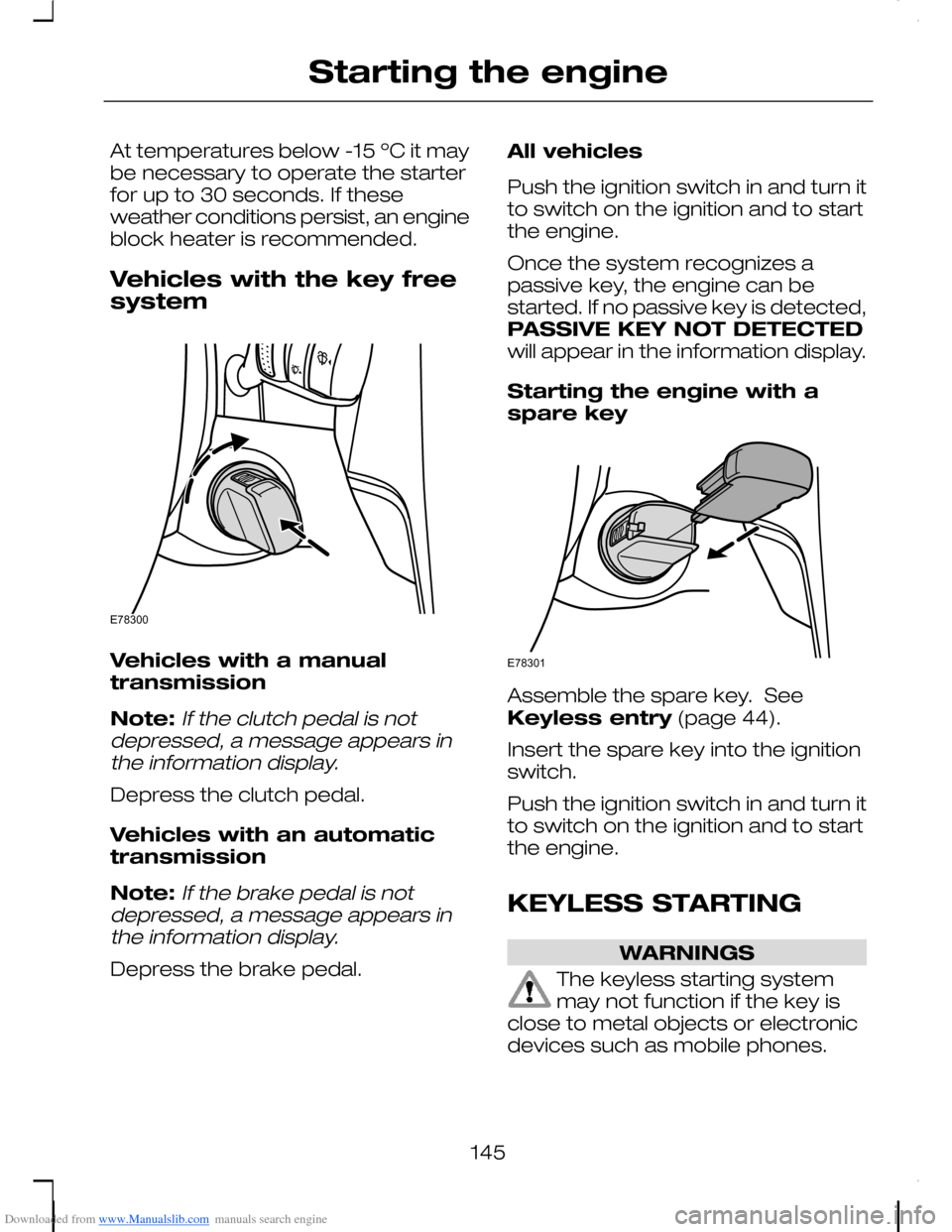
Vehicles with the key freesystem
Vehicles with a manualtransmission
Note:If the clutch pedal is notdepressed, a message appears inthe information display.
Depress the clutch pedal.
Vehicles with an automatictransmission
Note:If the brake pedal is notdepressed, a message appears inthe information display.
Depress the brake pedal.
All vehicles
Push the ignition switch in and turn itto switch on the ignition and to startthe engine.
Once the system recognizes apassive key, the engine can bestarted. If no passive key is detected,PASSIVE KEY NOT DETECTEDwill appear in the information display.
Starting the engine with aspare key
Assemble the spare key. SeeKeyless entry (page 44).
Insert the spare key into the ignitionswitch.
Push the ignition switch in and turn itto switch on the ignition and to startthe engine.
KEYLESS STARTING
WARNINGS
The keyless starting systemmay not function if the key isclose to metal objects or electronicdevices such as mobile phones.
145
Starting the engineE78300 E78301
Page 233 of 278

Downloaded from www.Manualslib.com manuals search engine GENERAL INFORMATION
This section describes the functionsand features of the Bluetooth mobilephone and voice control system.
The section covers the followingvariations:
•a mobile phone with a mobilephone cradle without voicecontrol
•a Bluetooth and voice controlsystem with a mobile phonecradle
•a Bluetooth and voice controlsystem without a mobile phonecradle.
The Bluetooth mobile phone part ofthe system provides interaction withthe audio or navigation system andyour mobile phone. It allows you touse the audio or navigation systemto make and receive calls withouthaving to use your mobile phone.
The voice control part of the systemcan be used to control:
•mobile phone calls
•audio system functions
•vehicle climate control functions.
Note:The mobile phone does notswitch off immediately after theignition key is turned off: the powerdown delay is preset to 10 minutes.The time period can be adjusted tobetween 0 and 60 minutes. This,depending on your mobile phone,can be achieved by creating aphonebook entry on your mobilephone with the name Timer and therequired delay as it's number.
If the Bluetooth and voice control isused for an extended period of timewhen the vehicle is stationary, makesure that the engine is running toavoid draining the battery
TELEPHONE SETUP
Requirements for cradleconnection
Your phone must be fitted in a mobilephone holder before it can be usedas a cradle phone with yourhandsfree/voice control system. Youwill be able to purchase the correctholder for your phone from yourdealer.
Placing your phone in thecradle
Note:Your phone must be fitted ina mobile phone holder to allow youto connect the phone to the cradle.
Connect your phone to the cradle.
1.Place the base of the phone in thecradle connection.
Note:Make sure that the phone ispushed fully rearwards in the cradle.
231
Telephone
Page 234 of 278

Downloaded from www.Manualslib.com manuals search engine 2.Push the phone downwards untila click is heard.
Note:The connection to the systemwill be displayed on your phone.
Phonebook
After start up access to thephonebook can be delayed for up totwo minutes.
Phonebook categories
Depending on your phonebook entry,different categories can be displayedin the audio or navigation unit.
For example:
MobileM
OfficeO
HomeH
FaxF
Note:Entries may be displayedwithout a category attachment.
The category can also be indicatedas an icon:
Phone
Mobile
Home
Office
Fax
Making a phone an activephone
When using the system for the firsttime, no phone is connected to thesystem.
After switching on the ignition thecradle phone and the Bluetoothphone are recognized differently bythe system.
Bluetooth phone
After bonding a Bluetooth phone tothe system, this becomes the activephone. For further information referto the phone menu.
However, in some cases theBluetooth phone has to be activatedby pressing the appropriate stationbutton on the audio or navigationunit.
Turning the ignition back on again,the last active phone is picked up bythe system.
232
Telephone21E87688
Page 235 of 278

Downloaded from www.Manualslib.com manuals search engine Bond another Bluetoothphone
Note:Before another Bluetoothphone can be bonded, the existingactive Bluetooth connection has tobe deactivated by the mobile phone.
Bond a new Bluetooth phone asdescribed in the requirements for aBluetooth connection.
Phones stored in the system areaccessible by using the phone list onthe audio or navigation unit.
Note:If six (five Bluetooth phonesfor cradle phone system) Bluetoothphones have been bonded, one ofthese has to be deleted in order tobond a new phone.
Cradle phone
With your phone fitted in the mobilephone cradle this does notautomatically become the activephone.
In these cases refer to Changingthe active phone in theappropriate section which describesthe system fitted to your vehicle.
BLUETOOTH SETUP
Before you can use your telephonewith your vehicle it must be bondedto the vehicle telephone system.
Handling of phones
A phone can be connected to thevehicle system by using either acradle connection or a Bluetoothconnection.
On vehicles with a mobile phonecradle, up to five Bluetooth phonescan be bonded to the vehicle system.
On vehicles without a mobile phonecradle, up to six Bluetooth phonescan be bonded to the vehicle system.
Note:If there is an ongoing callwhen the phone in use is selected asthe new active phone, the call istransferred to the vehicle audiosystem.
Note:Even if connected to the carsystem, your phone can still be usedin the usual way.
Requirements for Bluetoothconnection
The following are required before aBluetooth phone connection can bemade.
1.The Bluetooth feature must beactivated on the phone and onthe audio unit. For additionalinformation, refer to your phoneuser guide
2.The private mode must not beactivated on the Bluetooth phone.
3.Search for audio device.
4.Select Ford Audio.
5.The Bluetooth PIN number 0000must be entered on the phonekeypad.
233
Telephone
Page 236 of 278

Downloaded from www.Manualslib.com manuals search engine Note:A phone call will bedisconnected if the audio/navigationsystem is switched off. If the ignitionkey is turned to the off position thephone call will remain in progress.
Compatibility of phones
CAUTION
As no common agreementexists, mobile phonemanufacturers are able to implementa variety of profiles in their Bluetoothdevices. Because of this, anincompatibility can occur betweenthe phone and hands-free system,which in some cases may significantlydegrade the system performance.To avoid this situation, onlyrecommended phones should beused. Please contact your dealer formore details regarding the currentcompatibility list.
Phones with Symbianoperating system
Note:Certain phones require aspecial file to be installed to enablefull phonebook access via Bluetooth.This is referred to as a SIS file and willbe available via the Ford website.Please consult your dealer for fulldetails.
TELEPHONE CONTROLS
Ending or rejecting calls
By pressing one of several functionbuttons on the audio or navigationunit (example: AM/FM,CD/AUX)active calls can be ended or incomingcalls can be rejected.
Remote control
One of several different types ofremote control may be fitted to yourvehicle:
Voice and mode button
Voice button1
Mode button2
Incoming calls can be accepted bypressing the MODE button once orended by pressing twice.
234
Telephone12E87661
Page 240 of 278

Downloaded from www.Manualslib.com manuals search engine Using the audio unit menu
1.Press the PHONE or call acceptbutton.
2.Press the MENU button on theaudio unit.
3.Select the ACTIVE PHONEoption on the audio unit.
4.Scroll through the different storedphones by using the seek buttonsto display the bonded phones.
5.Press the MENU button to selectthe phone which is to be theactive phone.
Note:After bonding a Bluetoothphone to the system, this becomesthe active phone.
Debonding a bonded phone
A bonded phone can be deletedfrom the system at any time, unlessa phone call is in progress.
1.Press the PHONE or call acceptbutton.
2.Press the MENU button on theaudio unit.
3.Select the DEBOND option onthe audio unit.
4.Scroll through the differentphones by using the seek buttonsand display the phone to bedebonded.
5.Press the MENU button to selectthe phone which is to bedebonded.
USING THE TELEPHONE
- TRAVEL PILOT EX
This chapter describes the phonefunctions of the Navigation SystemTravelPilot EX.
Note:Refer to your NavigationSystem TravelPilot EX guide fordetails of the controls.
An active phone must be present.
Even if connected to the NavigationSystem TravelPilot EX, your phonecan still be used in the usual way.
Making a call
Dialling a number - cradlephone
Using the cradle phone allows you toaccess your mobile phone addressbook. The entries will appear in theTravelPilot EX display.
1.Press the PHONE button on theaudio unit.
2.Using the PHONEBOOK optionin the menu.
3.Choose one of the letter areas.
4.Turning the right rotary entrycontrol, select the desired phonenumber.
5.By pressing the INFO button thedetails of the phonebook entrycan be displayed.
6.Press the right rotary entry controlbutton.
238
Telephone
Page 244 of 278

Downloaded from www.Manualslib.com manuals search engine •Store up to 20 name tags perfunction.
•The average recording time foreach name tag is approximately2-3 seconds.
USING VOICE CONTROL
System operation
The order and content of the voicecontrols are given in the followinglists. The tables show the sequenceof user voice commands and systemresponses for each available function.
<> indicates a number or storedname tag to be inserted by the user.
Short cuts
There are a number of voicecommand short cuts available, whichallow you to control some vehiclefeatures without having to follow thecomplete command menu. Theseare:
•phone: "MOBILE NAME"1, "DIAL
NUMBER", "DIAL NAME" and"REDIAL"
•CD player: "DISC" and "TRACK"
•climate control: "TEMPERATURE","FAN", "AUTO MODE","DEFROSTING/DEMISTING ON"and "DEFROSTING/DEMISTINGOFF"
•radio: "TUNE NAME"
•navigation: "ZOOM" and "ROUTESETTING".
1) Only when the mobile phone isfitted with Bluetooth and voicecontrol
Start communicating with thesystem
Before you can start talking to thesystem you first have to press theVOICE or MODE button for eachoperation and wait until the systemanswers with a beep.
AUDIO UNIT COMMANDS
CD Player/CD Changer
You can choose a disc or trackdirectly by voice control.
242
Voice controlE87665