2008 FIAT CROMA lock
[x] Cancel search: lockPage 18 of 258

17
SAFETY
DEVICES
CORRECT USE
OF THE CAR
WARNING
LIGHTS AND
MESSAGES
IN AN
EMERGENCY
CAR
MAINTENANCE
TECHNICAL
SPECIFICATIONS
INDEX
DASHBOARD
AND CONTROLS
Device activation fig. 16
The device is automatically activated on
every door in the following cases:
❒pressing twice button
Áof the key
with remote control
fig. 16F0L0100m
Device deactivation
The device is deactivated automatically on
every door in the following cases:
❒when unlocking the doors by the re-
mote control;
❒when unlocking only the driver’s door
by the remote control;
❒when turning the ignition key to ON. Device activation is signalled by three
flashes of the direction indicators and
flashing of the led on the driver door pan-
el (see the table on next page).
Should one of the doors be not perfectly
closed, the dead lock device is not acti-
vated, thus preventing that a person get-
ting into the car from the open door re-
mains blocked inside the passenger’s com-
partment when he/she closes the door.
001-038 Croma TRW GB 28-05-2008 16:30 Pagina 17
Page 19 of 258

18
SAFETY
DEVICES
CORRECT USE
OF THE CAR
WARNING
LIGHTS AND
MESSAGES
IN AN
EMERGENCY
CAR
MAINTENANCE
TECHNICAL
SPECIFICATIONS
INDEX
DASHBOARD
AND CONTROLS
The main functions that can be activated with the keys or with the emergency metals insert are the following:
Key with
remote control
Emergency
metal
insert
Direction
indicators
flashing (only
with key with
remote control)
LED on door lock
button
IMPORTANT The emergency metal insert will unlock only the door.
IMPORTANT Window opening operation is a consequence of a door unlocking control; window closing operation is a consequence
of a door locking control.
Door opening
and fuel
filler cap
unlocking
Press briefly
button
Ë
Turn the key in a
counter clockwise
direction
(driver's side)
2 flashings
Turning off
deterrence ledDoor closing
and fuel
filler cap
locking
Pressing briefly
button Á
Turn the key
in a clockwise
direction
(driver's side)
1 flashing
Turning on fixed
for about 3
seconds, followed
by deterrence
led flashingWindow
opening
Prolonged
pressing
(over 2 seconds)
on button Ë
–
2 flashings
Turning off
deterrence ledWindow
closing
Prolonged
pressing
(over 2 seconds)
on button Á
–
1 flashing
Deterrence led
flashingDead lock
(where
provided)
Double pressing
on button Á
–
3 flashings
Double flashing,
followed by
deterrence led
flashingTailgate
opening
Pressing on
button R
–
2 flashings
–
001-038 Croma TRW GB 28-05-2008 16:30 Pagina 18
Page 20 of 258
19
SAFETY
DEVICES
CORRECT USE
OF THE CAR
WARNING
LIGHTS AND
MESSAGES
IN AN
EMERGENCY
CAR
MAINTENANCE
TECHNICAL
SPECIFICATIONS
INDEX
DASHBOARD
AND CONTROLS
IGNITION SWITCH
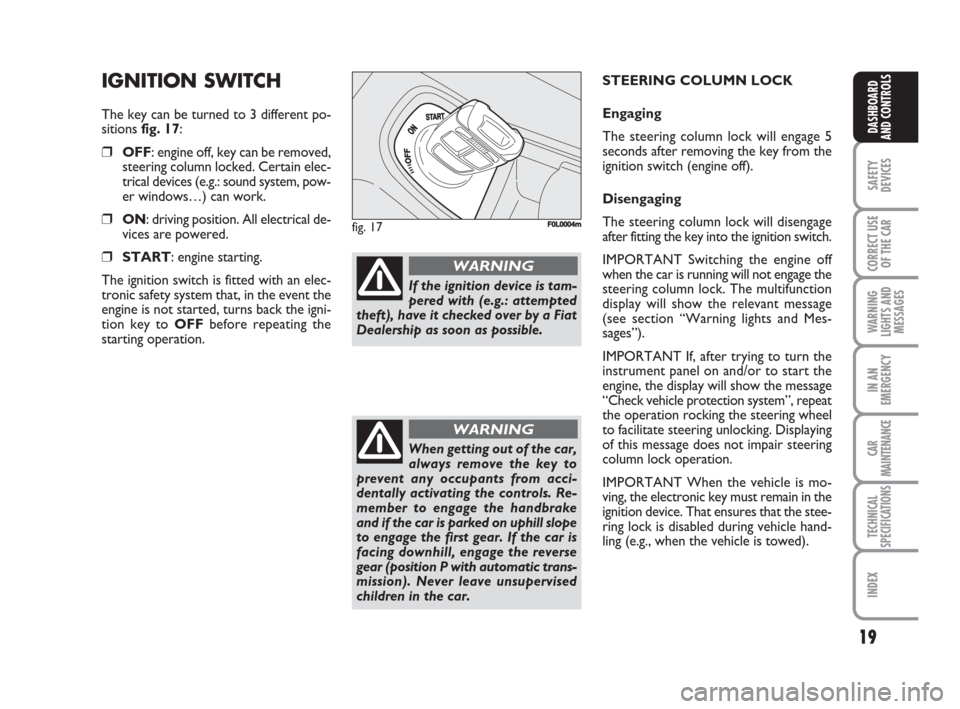
The key can be turned to 3 different po-
sitions fig. 17:
❒OFF: engine off, key can be removed,
steering column locked. Certain elec-
trical devices (e.g.: sound system, pow-
er windows…) can work.
❒ON: driving position. All electrical de-
vices are powered.
❒START: engine starting.
The ignition switch is fitted with an elec-
tronic safety system that, in the event the
engine is not started, turns back the igni-
tion key to OFFbefore repeating the
starting operation.
fig. 17F0L0004m
If the ignition device is tam-
pered with (e.g.: attempted
theft), have it checked over by a Fiat
Dealership as soon as possible.
WARNING
When getting out of the car,
always remove the key to
prevent any occupants from acci-
dentally activating the controls. Re-
member to engage the handbrake
and if the car is parked on uphill slope
to engage the first gear. If the car is
facing downhill, engage the reverse
gear (position P with automatic trans-
mission). Never leave unsupervised
children in the car.
WARNING
STEERING COLUMN LOCK
Engaging
The steering column lock will engage 5
seconds after removing the key from the
ignition switch (engine off).
Disengaging
The steering column lock will disengage
after fitting the key into the ignition switch.
IMPORTANT Switching the engine off
when the car is running will not engage the
steering column lock. The multifunction
display will show the relevant message
(see section “Warning lights and Mes-
sages”).
IMPORTANT If, after trying to turn the
instrument panel on and/or to start the
engine, the display will show the message
“Check vehicle protection system”, repeat
the operation rocking the steering wheel
to facilitate steering unlocking. Displaying
of this message does not impair steering
column lock operation.
IMPORTANT When the vehicle is mo-
ving, the electronic key must remain in the
ignition device. That ensures that the stee-
ring lock is disabled during vehicle hand-
ling (e.g., when the vehicle is towed).
001-038 Croma TRW GB 28-05-2008 16:30 Pagina 19
Page 23 of 258

22
SAFETY
DEVICES
CORRECT USE
OF THE CAR
WARNING
LIGHTS AND
MESSAGES
IN AN
EMERGENCY
CAR
MAINTENANCE
TECHNICAL
SPECIFICATIONS
INDEX
DASHBOARD
AND CONTROLS
MULTIFUNCTION
DISPLAY
(where provided)
The vehicle may have a multifunctional dis-
play that provides the user with useful in-
formation, based on what was previously
set, while driving.
“STANDARD” SCREEN fig. 22
The standard screen shows the following
indications:
ADate
BOdometer (covered km or miles)
CClock
DExternal temperature
EHeadlight aiming position (only with
dipped beam headlights on).
NoteWhen opening one of the front
doors, the display will turn on and show
for a few seconds the clock and the km or
mi covered.CONTROL BUTTONS fig. 23
+To scroll the displayed menu and the
related options upwards or to increase
the value displayed.
MODEBrief press to open the menu
and/or to move to next screen
or to confirm the option re-
quired.
Long press to go back to the
standard screen.
–To scroll the displayed menu and the
related options downwards or to de-
crease the value displayed.NoteButtons +and –activate different
functions according to the following situ-
ations:
To adjust light inside the passenger
compartment
– to adjust instrument panel, sound sys-
tem and automatic climate control system
display brightness when standard screen
is active.
Setup menu
– to scroll the menu options upwards and
downwards;
– to increase or decrease values during set-
tings.
F0L0029mfig. 23 fig. 22F0L0071m
001-038 Croma TRW GB 28-05-2008 16:30 Pagina 22
Page 24 of 258

23
SAFETY
DEVICES
CORRECT USE
OF THE CAR
WARNING
LIGHTS AND
MESSAGES
IN AN
EMERGENCY
CAR
MAINTENANCE
TECHNICAL
SPECIFICATIONS
INDEX
DASHBOARD
AND CONTROLS
SETUP MENU fig. 24
The menu comprises a series of functions
arranged in a “circular fashion” which can
be selected through buttons +and –to
access the different select operations and
settings (setup) given in the following para-
graphs.
The setup menu can be activated by press-
ing briefly button MODE, only with the
car turned on (with car off, only the re-
duced menu can be displayed).
Single presses on buttons +or –will scroll
the setup menu options.
Handling modes differ with each other ac-
cording to the characteristic of the option
selected.
NOTE If the car is equipped with the Ra-
dionavigation System, the only functions
that can be adjusted/set through the in-
strument panel display are the following:
“Speed limit”, “Automatic headlight day-
light sensor” (where provided) and “S.B.R.
(Seat Belt Reminder) buzzer reactivation”
(where provided). The other functions are
displayed by and can be adjusted/set
through the Radionavigation System dis-
play.Selecting a menu option
– press briefly button MODEto select
the menu option to set;
– press buttons +or –(by single press-
es) to select the new setting;
– press briefly button MODEto store the
new setting and to go back to the previ-
ously selected menu option.
Selecting “Date” and “Set Clock”:
– briefly press button MODEto select
the first value to change (e.g. hours /min-
utes or year / month / day);
– press buttons +or –(by single press-
es) to select the new setting;
– briefly press button MODEto store the
new setting and to go to the next setup
menu option, if this is the last one you will
go back to the previously selected option of
the main menu.Press button MODE for long:
– to quit the setup menu and to save on-
ly the settings stored yet by the user (and
confirmed by pressing briefly button
MODE).
The setup menu displaying is timed; when
quitting the menu due to timing expiry,
only settings stored yet by the user (and
confirmed by pressing briefly button
MODE) will be saved.
001-038 Croma TRW GB 28-05-2008 16:30 Pagina 23
Page 26 of 258

25
SAFETY
DEVICES
CORRECT USE
OF THE CAR
WARNING
LIGHTS AND
MESSAGES
IN AN
EMERGENCY
CAR
MAINTENANCE
TECHNICAL
SPECIFICATIONS
INDEX
DASHBOARD
AND CONTROLS
RECONFIGURABLE
MULTIFUNCTION
DISPLAY
(where provided)
The car can be provided with the recon-
figurable multifunction display that shows
useful information, according to the pre-
vious settings made, necessary when dri-
ving.
“STANDARD” SCREEN fig. 25
The standard screen shows the following
indications:
ATime
BDate
COdometer (displays the kilometres, or
miles, covered)
DVehicle status signals (ex. doors open
or the presence of ice on the road,
etc.)
EHeadlamp stability position (only with
low beams on)
FExternal temperature
NoteWhen opening one of the front
doors, the display will turn on and show
for a few seconds the clock and the km or
mi covered.CONTROL BUTTONS fig. 26
+To scroll the displayed menu and the
related options upwards or to increase
the value displayed.
MODEBrief press to open the menu
and/or to move to next screen or to con-
firm the option required.
Long press to go back to the standard
screen.
–To scroll the displayed menu and the
related options downwards or to de-
crease the value displayed.NoteButtons +and –activate different
functions according to the following situ-
ations:
– to adjust instrument panel, sound sys-
tem and automatic climate control sys-
tem display brightness when standard
screen is active;
– to scroll the menu options upwards and
downwards;
– to increase or decrease values during set-
tings.
F0L0029mfig. 26 fig. 25
EF
DC A
B
F0L0518m
001-038 Croma TRW GB 28-05-2008 16:30 Pagina 25
Page 30 of 258

29
SAFETY
DEVICES
CORRECT USE
OF THE CAR
WARNING
LIGHTS AND
MESSAGES
IN AN
EMERGENCY
CAR
MAINTENANCE
TECHNICAL
SPECIFICATIONS
INDEX
DASHBOARD
AND CONTROLS
Headlamp sensor
(Automatic headlight sensor
sensitivity adjustment)
(where provided)
With this function it is possible to adjust
the light sensor sensitivity according to 3
levels (level 1 = min. level, level 2 = av-
erage level, level 3 = max. level); the high-
er the sensitivity is, the lower is the ex-
ternal light intensity required to switch on
the lights.
To set the light level required, proceed as
follows:
– briefly press button MODE, the previ-
ously set level will flash on the display;
– press button +or –to select the re-
quired level;
– briefly press button MODEto go back
to the menu screen or press the button
for long to go back to the standard screen
without storing settings.Trip B data (Trip On/Off)
Through this option it is possible to acti-
vate (On) or deactivate (Off) the Trip B
(partial trip).
For further information see “Trip com-
puter”.
For activation / deactivation, proceed as
follows:
– briefly press button MODE: On or Off
will flash on the display according to pre-
vious setting;
– press button +or –to select the re-
quired level;
– briefly press button MODEto go back
to the menu screen or press the button
for long to go back to the standard screen
without storing settings.Set time (Setting the clock)
This function enables to set the clock
through two sub-menus: “Time” and
“Mode”.
Proceed as follows:
– briefly press button MODE, the display
will show the two submenus “Time” and
“Mode”;
– press button +or –to scroll the two
submenus;
– select the required submenu and then
press briefly MODE;
– if selecting “Time”: briefly press button
MODE, “hours” will flash on the display;
– press button +or –for setting;
– press button MODE, “minutes” will
flash on the display;
– press button +or –for setting.
001-038 Croma TRW GB 28-05-2008 16:30 Pagina 29
Page 32 of 258

31
SAFETY
DEVICES
CORRECT USE
OF THE CAR
WARNING
LIGHTS AND
MESSAGES
IN AN
EMERGENCY
CAR
MAINTENANCE
TECHNICAL
SPECIFICATIONS
INDEX
DASHBOARD
AND CONTROLS
Key
With this function it is possible to decide
the door opening mode by selecting one
of the following options:
– open doors: to unlock all doors, except
the tailgate
– open driver’s door (op. drv. door): to
unlock just the driver’s door (where pro-
vided)
– open all: to unlock every door includ-
ing the tailgate
The car is delivered with this function in
“Open all” mode.
Proceed as follows:
– briefly press button MODE, the previ-
ous setting will flash on the display;
– press button +or –for setting;
– briefly press button MODEto go back
to the menu screen or press the button
for long to go back to the standard screen
without storing settings.Autoclose (Automatic central
door locking when travelling)
When activated (On), this function locks
automatically the doors when the car
speed exceeds 20 km/h.
To activate or to deactivate this function
proceed as follows:
– briefly press button MODEto display
the submenu;
– briefly press button MODE: On or Off
will flash on the display according to pre-
vious setting;
– press button +or –to select the re-
quired level;
– briefly press button MODEto go back
to the menu screen or press the button
for long to go back to the standard screen
without storing settings;
– Press again button MODEfor long to
go back to the standard screen or to the
main menu according to the current menu
level.Units (Setting units)
With this function it is possible to set the
units through the submenu: “Distances”,
“Consumption” and “Temperature”
(where provided).
To set the required unit proceed as fol-
lows:
– briefly press button MODE, the display
will show the submenus;
– press button +or –to scroll the sub-
menus;
– select the required submenu and then
press briefly button MODE;
– if selecting “Distances”: pressing button
MODEbriefly, the display will show “km”
or “mi” according to previous setting;
– press button +or –to select the re-
quired level;
– if selecting “Consumption”: briefly press
button MODEthe display will show
“km/l”, “l/100km” or “mpg” according to
previous setting;
001-038 Croma TRW GB 28-05-2008 16:30 Pagina 31