Page 122 of 504
Reclining Seats
The recliner handle is on the outside of the seat cushion.
Pull up on the handle to release the seat back and adjust
for comfort.WARNING!
You can be seriously, even fatally injured riding in a
seat with the seatback reclined. Do not ride with the
seatback reclined so that the shoulder belt is no
longer resting against your chest. If you ride in this
position, the shoulder harness will no longer be
restraining you. In a collision you could slide under
the seat belt and receive serious or fatal injuries.
Recline in a seat only when the vehicle is parked.
Adjustable Head Restraints
Head restraints can reduce the risk of whiplash injury in
the event of impact from the rear. Pull up or push down
on the restraints so that the upper edge is as high as
practical, at least to the level of the ears.
To lower the head restraint, push in the button and then
push down on the head restraint.
122 UNDERSTANDING THE FEATURES OF YOUR VEHICLE
Page 126 of 504

Each heated seat switch has two settings (HI and LOW).
Press the switch once to obtain High heat level, then
press the switch again to obtain Low heat level. Pressing
the switch a third time will turn the heated seats OFF. If
you do not purposefully turn the switch OFF, the seat
heating level will automatically change to the next lower
level, or OFF. The High heat level operates for 30 minutes
(approximate), the Low heat level operates for 30 min-
utes (approximate). The seat heat will also turn OFF
when the ignition is turned OFF. Both of the indicators
ON identifies High heat level. The lower indicator On
only, identifies Low heat level. Flashing indicator lights
on the switch indicate that the Heated Seat System needs
servicing.WARNING!
Persons who are unable to feel pain to the skin
because of advanced age, chronic illness, diabetes,
spinal cord injury, medication, alcohol use, exhaus-
tion or other physical condition must exercise care
when using the seat heater. It may cause burns even
at low temperatures, especially if used for long
periods of time.
Do not place anything on the seat that insulates
against heat, such as a blanket or cushion. This may
cause the seat heater to overheat.
126 UNDERSTANDING THE FEATURES OF YOUR VEHICLE
Page 128 of 504
WARNING!
If the hood is not fully latched, it could fly up when
the vehicle is moving and block your forward vision.
Be sure all hood latches are latched fully before
driving.
LIGHTS
Headlight Switch Location
128 UNDERSTANDING THE FEATURES OF YOUR VEHICLE
Page 136 of 504
WARNING!
Sudden loss of visibility through the windshield
could lead to an accident. You might not see other
vehicles or other obstacles. To avoid sudden icing of
the windshield during freezing weather, warm the
windshield with defroster before and during wind-
shield washer use.
Windshield Washers
To use the washer, push in on the washer knob on the end
of the multifunction control lever and hold while spray is
desired. If the washer knob is depressed while in the
delay range, the wiper will operate for several seconds
after the washer knob is released. It will then resume the
intermittent interval previously selected. If the washer
knob is pushed, for a period greater than 1 second, while
in the OFF position, the wiper will wipe approximately
three wipes, after the wash knob is released.
To prevent freeze-up of your windshield washer system
in cold weather, select a solution or mixture that meets or
exceeds the temperature range of your climate. This
rating information can be found on most washer fluid
containers.
136 UNDERSTANDING THE FEATURES OF YOUR VEHICLE
Page 137 of 504
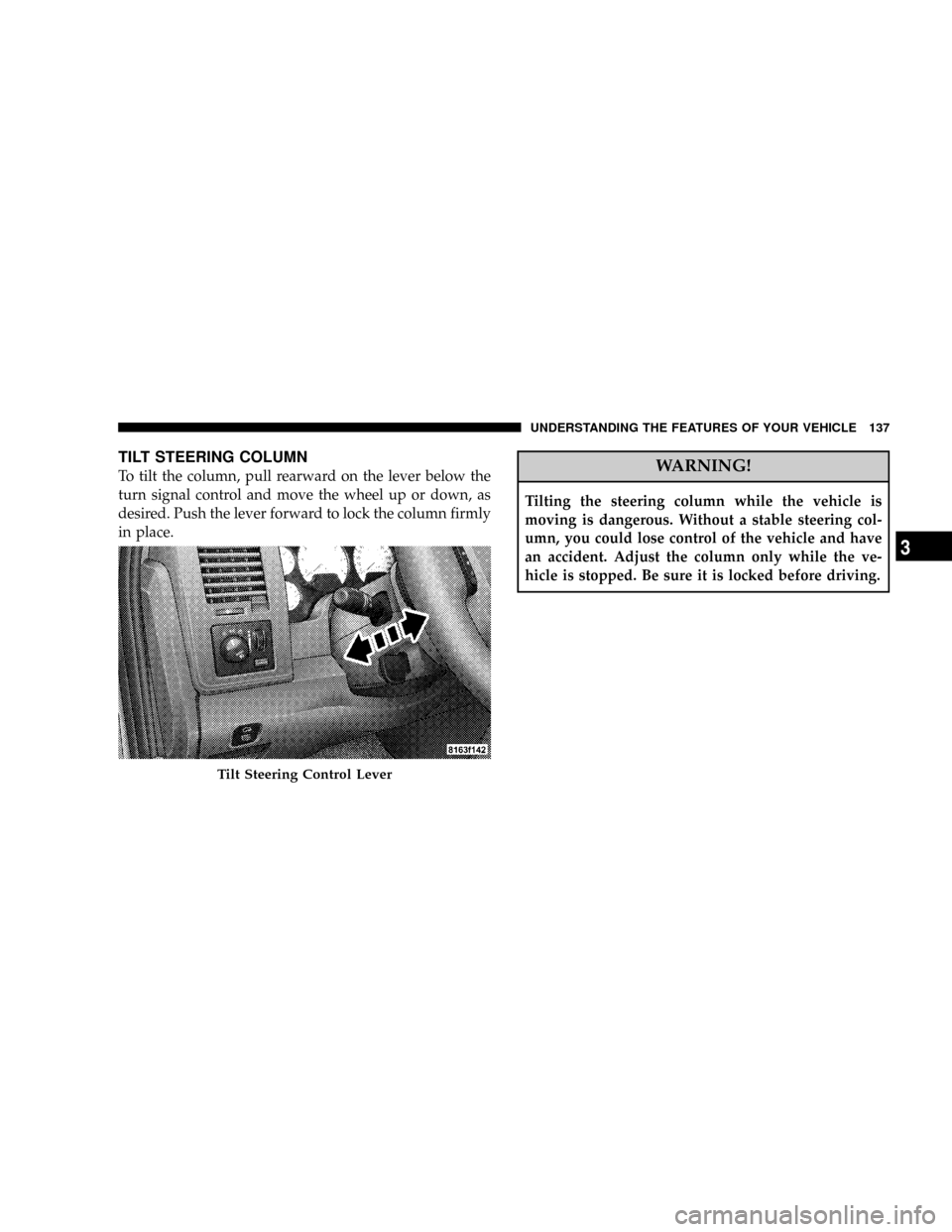
TILT STEERING COLUMN
To tilt the column, pull rearward on the lever below the
turn signal control and move the wheel up or down, as
desired. Push the lever forward to lock the column firmly
in place.WARNING!
Tilting the steering column while the vehicle is
moving is dangerous. Without a stable steering col-
umn, you could lose control of the vehicle and have
an accident. Adjust the column only while the ve-
hicle is stopped. Be sure it is locked before driving.
Tilt Steering Control Lever
UNDERSTANDING THE FEATURES OF YOUR VEHICLE 137
3
Page 139 of 504
To Deactivate
A soft tap on the brake pedal, normal braking, clutch
pressure while slowing the vehicle, or pressing the CAN-
CEL button will deactivate speed control without erasing
the memory. Pushing the ON/OFF button to the OFF
position or turning off the ignition erases the memory.
WARNING!
Leaving the Speed Control ON when not in use is
dangerous. You could accidentally set the system to
cause it to go faster than you want. You could lose
control and have an accident. Always leave the sys-
tem OFF when you aren't using it.
To Resume Speed
To resume a previously set speed, push and release the
RESUME button. Resume can be used at any speed above
(refer to the table below for the speed for your specific
engine).
To Vary The Speed Setting
When the speed control is on, speed can be increased by
pressing and holding the ACCEL button. When the
button is released, a new set speed will be established.
Tapping the ACCEL button once will result in a speed
increase (refer to the table below for the speed for your
specific engine). Each time the button is tapped, speed
increases so that tapping the button three times will
increase speed by three increments.
UNDERSTANDING THE FEATURES OF YOUR VEHICLE 139
3
Page 141 of 504

To Accelerate For Passing
Depress the accelerator as you would normally. When the
pedal is released, the vehicle will return to the set speed.
NOTE:When driving uphill, at elevations above 2,000
feet (610 meters), or when the vehicle is heavily loaded
(especially when towing) the vehicle may slow below the
SET speed. If the vehicle speed drops below (refer to the
table below for the speed for your specific engine), the
speed control will automatically disengage. If this hap-
pens, you can push down on the accelerator pedal to
maintain the desired speed.
Vehicles equipped with a 5±speed-manual transmission
should be operated in 4th gear or lower under the above
conditions.Vehicles equipped with a Automatic transmission may
exhibit several downshifts under the above conditions.
To reduce the frequency of the downshifts and to im-
prove vehicle performance, it is advisable to lock out
overdrive by pressing the ªTOW/HAULº button located
at the end of the gear shifter.
WARNING!
Speed Control can be dangerous where the system
can't maintain a constant speed. Your vehicle could
go too fast for the conditions, and you could lose
control. An accident could be the result. Don't use
Speed Control in heavy traffic or on roads that are
winding, icy, snow-covered, or slippery.
UNDERSTANDING THE FEATURES OF YOUR VEHICLE 141
3
Page 146 of 504
NOTE:It is possible for DTE to display ªLO FUELº
before the low fuel warning light turns on in the instru-
ment cluster. This could occur because low fuel warning
is set to a specified fuel tank volume and DTE is an
estimated distance calculation based on fuel economy
and remaining fuel tank volume.
Ram fuel tank volumes are as follows:
²34 gallons - short box models
²35 gallons - long box models
Trip Odometer (ODO)
NOTE:The maximum value is approximately 6000
miles. Then the trip odometer must be reset in order to
update the trip odometer miles.
This display shows the distance traveled since the last
reset. Resetting of this screen will cause the trip odometer
to change to Zero.
Elapsed Time (ET)
This display shows the accumulated ignition ON time
since the last reset. Resetting the Elapsed Time will cause
the display to change to Zero.
146 UNDERSTANDING THE FEATURES OF YOUR VEHICLE