Page 36 of 531
Lock Doors Automatically Ð If Equipped
If the Lock Doors Automatically feature is enabled, your
door locks will lock automatically when the vehicle's
speed exceeds 15 mph (24 km/h).
The Lock Doors Automatically feature is enabled when
your vehicle is shipped from the assembly plant and can
be disabled by using the following procedure:
²On Electronic Vehicle Information Center (EVIC)
equipped vehicles, refer to9Personal Settings9in the
EVIC section of this manual.
²On non EVIC-equipped vehicles perform the follow-
ing steps:
1. Enter your vehicle and close all doors.
2. Fasten your seat belt. (Fastening the seat belt will
cancel any chiming that may confuse you during this
programming procedure.)3. Place the key into the ignition.
4. Within 15 seconds cycle the ignition key from the OFF
position to the ON/RUN position a minimum of four
times, ending in the OFF position(do not start the
engine).
5. Within 30 seconds, press the driver's door lock switch
in the lock direction.
6. A single chime will be heard to indicate the feature has
been disabled.
7. To reactivate this feature, repeat the above steps.
8. If a chime is not heard, the program mode was
canceled before the feature could be disabled. If neces-
sary, repeat the above procedure.
34 THINGS TO KNOW BEFORE STARTING YOUR VEHICLE
Page 37 of 531
The Lock Doors Automatically at 15 mph (24 km/h)
feature can be reactivated by repeating the above men-
tioned procedure or by performing the procedure in the
EVIC, Customer Programmable Features section on ve-
hicles so equipped.
Unlock Doors Automatically On Exit Ð If
Equipped
The Unlock Doors Automatically On Exit feature unlocks
all of the doors of the vehicle when any door is opened.
This will occur only after the gear selector lever has been
shifted into the PARK position after the vehicle has been
driven (the gear selector lever has been shifted out of
PARK and all doors closed).
The Unlock Doors Automatically On Exit feature will not
operate if there is any manual operation of the power
door locks (lock or unlock).The Unlock Doors Automatically On Exit feature can be
enabled or disabled by performing the following proce-
dure:
1. Enter your vehicle and close all doors.
2. Fasten your seat belt. (Fastening the seat belt will
cancel any chimes that may be confusing during this
programming procedure.)
3. Insert the key into the ignition switch.
4. Within 15 seconds, cycle the ignition key from the OFF
position to the ON/RUN position a minimum of four
times ending in the OFF position(Do not start the
engine).
5. Within 30 seconds, press the driver's door lock switch
in the unlock direction.
6. A single chime will sound to indicate the feature has
been changed.
THINGS TO KNOW BEFORE STARTING YOUR VEHICLE 35
2
Page 39 of 531
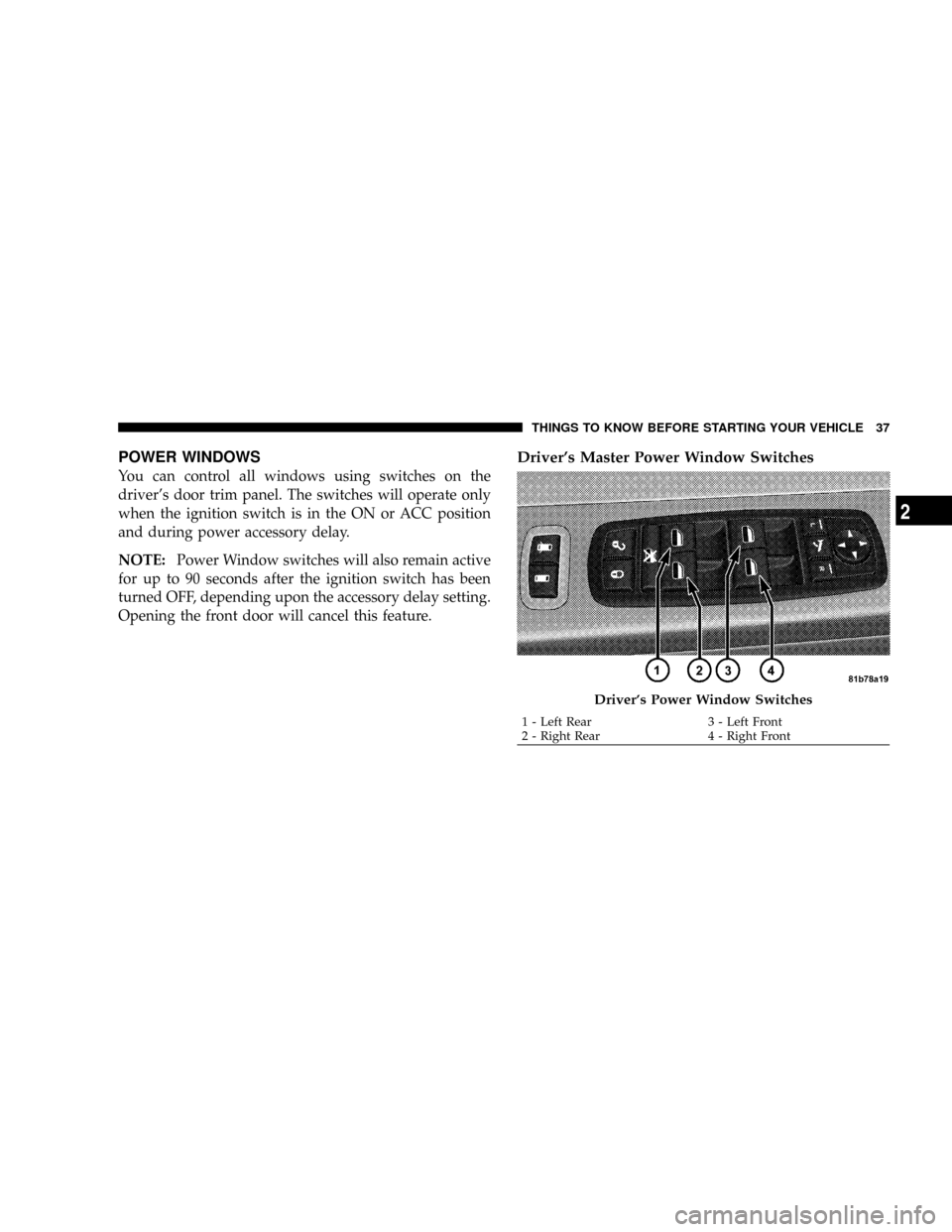
POWER WINDOWS
You can control all windows using switches on the
driver's door trim panel. The switches will operate only
when the ignition switch is in the ON or ACC position
and during power accessory delay.
NOTE:Power Window switches will also remain active
for up to 90 seconds after the ignition switch has been
turned OFF, depending upon the accessory delay setting.
Opening the front door will cancel this feature.
Driver's Master Power Window Switches
Driver's Power Window Switches
1 - Left Rear 3 - Left Front
2 - Right Rear 4 - Right FrontTHINGS TO KNOW BEFORE STARTING YOUR VEHICLE 37
2
Page 40 of 531
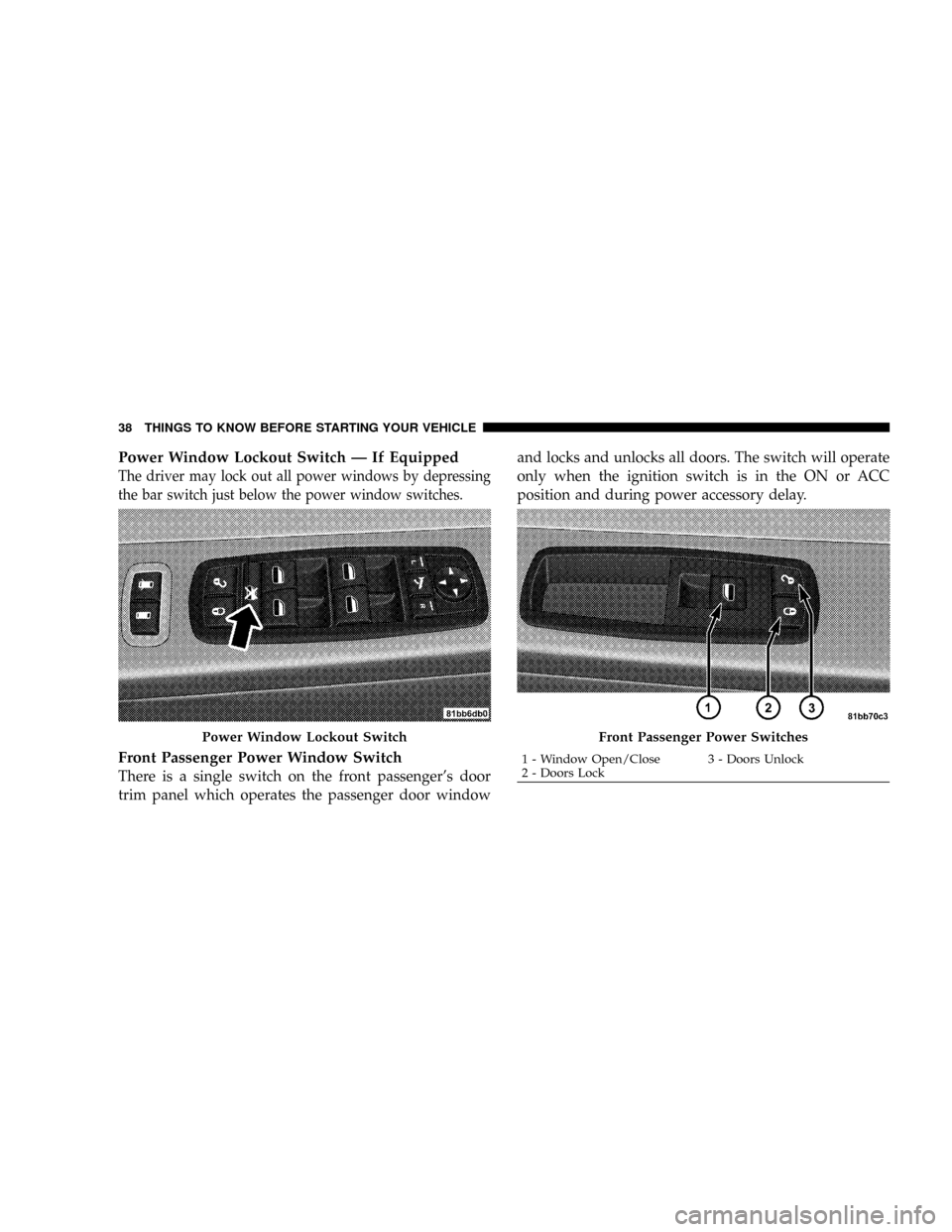
Power Window Lockout Switch Ð If Equipped
The driver may lock out all power windows by depressing
the bar switch just below the power window switches.
Front Passenger Power Window Switch
There is a single switch on the front passenger's door
trim panel which operates the passenger door windowand locks and unlocks all doors. The switch will operate
only when the ignition switch is in the ON or ACC
position and during power accessory delay.
Power Window Lockout SwitchFront Passenger Power Switches
1 - Window Open/Close 3 - Doors Unlock
2 - Doors Lock 38 THINGS TO KNOW BEFORE STARTING YOUR VEHICLE
Page 41 of 531
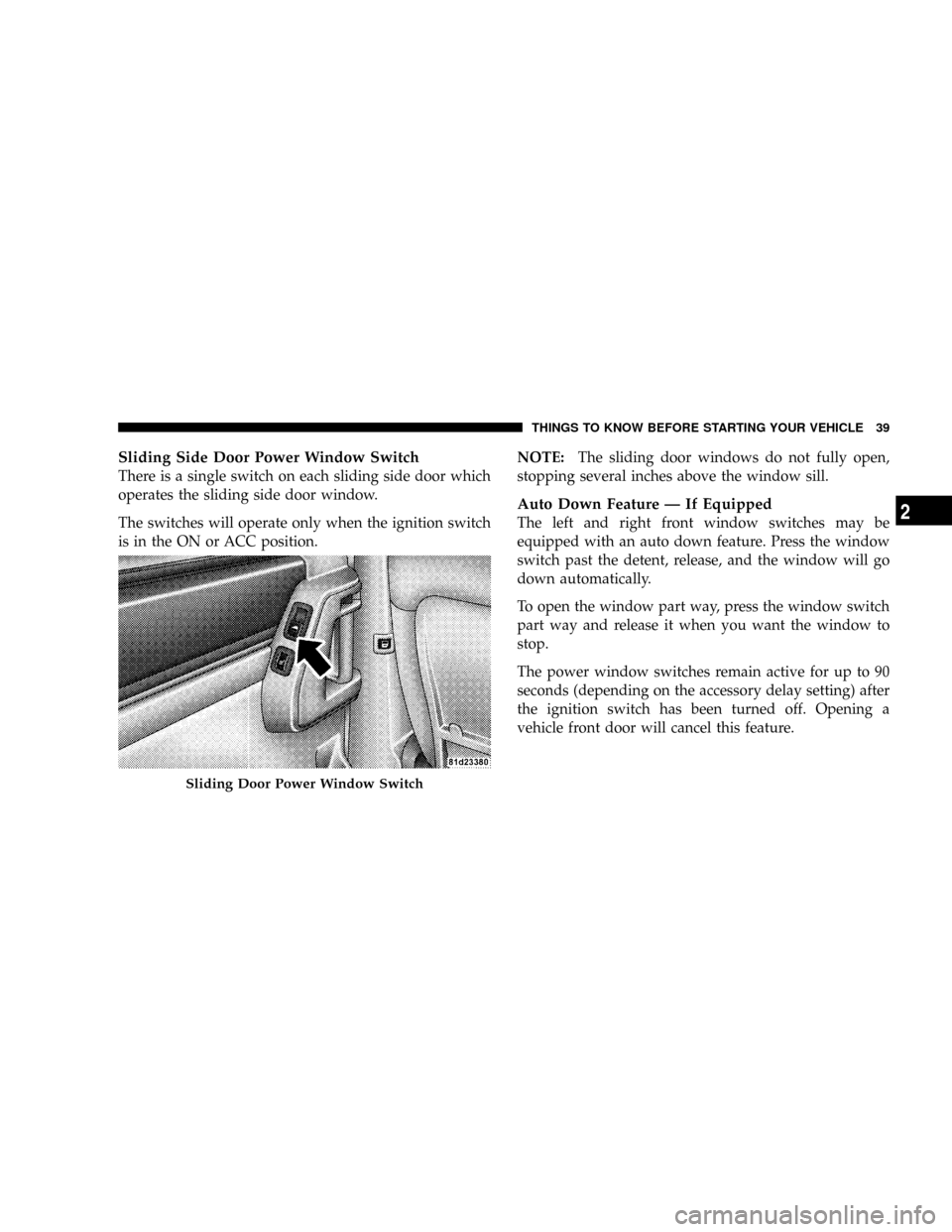
Sliding Side Door Power Window Switch
There is a single switch on each sliding side door which
operates the sliding side door window.
The switches will operate only when the ignition switch
is in the ON or ACC position.NOTE:The sliding door windows do not fully open,
stopping several inches above the window sill.
Auto Down Feature Ð If Equipped
The left and right front window switches may be
equipped with an auto down feature. Press the window
switch past the detent, release, and the window will go
down automatically.
To open the window part way, press the window switch
part way and release it when you want the window to
stop.
The power window switches remain active for up to 90
seconds (depending on the accessory delay setting) after
the ignition switch has been turned off. Opening a
vehicle front door will cancel this feature.
Sliding Door Power Window Switch
THINGS TO KNOW BEFORE STARTING YOUR VEHICLE 39
2
Page 46 of 531
²If the power sliding side door is not in the full open or
close position, it will fully open when a power sliding
door switch is pressed. To close the door, wait until it
is fully open and then press the switch again.
²The power sliding side door switches will not operate
if the transmission gear selector lever is in gear or the
vehicle speed is above 0 mph (0 km/h).
²If the power sliding door encounters multiple obstruc-
tions within the same cycle, the system will automati-
cally stop and must be opened or closed manually.
WARNING!
You, or others, could be injured if caught in the path
of the sliding door. Make sure the door path is clear
before closing the door.
Power Sliding Side Door Open Flash
The left and right exterior hazard lights will flash for 12
seconds when either sliding door is opened. This will
alert other drivers in the area that passenger(s) could be
entering or exiting the vehicle.
The Sliding Side Door Open Flash can be enabled or
disabled by performing the following procedure:
1. Place the key in the ignition switch.
2. Cycle the ignition switch ON/OFF four times ending
in the OFF position.(Do not start the engine).
3. Within 10 seconds of the final cycle, press the hazard
switch.
4. A single chime will sound to signify that you have
successfully completed the programming.
44 THINGS TO KNOW BEFORE STARTING YOUR VEHICLE
Page 67 of 531
NOTE:The following steps must occur within the first
60 seconds of the ignition switch being turned to the ON
or START position. DaimlerChrysler does not recom-
mend deactivating BeltAlertt.
1. With all doors closed and the ignition switch in any
position except ON or START, buckle the driver's seat
belt.
2. Turn the ignition switch to the ON position (engine
does not need to be running), and wait for the Seat Belt
Warning Light to turn off.
3. Within 60 seconds of turning the ignition switch to the
ON/RUN position, unbuckle and then re-buckle the
driver's seat belt at least three times within 60 seconds,
ending with the seat belt buckled.
NOTE:Watch for the Seat Belt Warning Light to turn on
while unbuckling and off while re-buckling the seat belt.4. Turn the ignition switch to the OFF position. A single
chime will sound to signify that you have successfully
completed the programming.
BeltAlerttcan be reactivated by repeating this procedure.
NOTE:Although BeltAlertthas been deactivated, the
Seat Belt Warning Light will continue to illuminate while
the driver's seat belt remains unbuckled.
Seat Belts and Pregnant Women
We recommend that pregnant women use the seat belts
throughout their pregnancies. Keeping the mother safe is
the best way to keep the baby safe.
Pregnant women should wear the lap part of the belt
across the thighs and as snug across the hips as possible.
Keep the belt low so that it does not come across the
abdomen. That way the strong bones of the hips will take
the force if there is a collision.
THINGS TO KNOW BEFORE STARTING YOUR VEHICLE 65
2
Page 75 of 531
impact sensors signals, a central electronic ORC deploys
the front airbags, side inflatable airbag curtains, side seat
thorax airbags, and front seat belt pretensioners as re-
quired for each type of impact.
The ORC monitors the readiness of the electronic parts of
the system whenever the ignition switch is in the START
or ON position. These include all of the components
listed above except the steering wheel and column,
instrument panel, and seat belt reminder light. If the key
is in the OFF position, in the ACC position, or not in the
ignition, the airbags are not on and will not inflate.
The ORC contains a backup power supply system that
will deploy the airbags even if the battery loses power or
it becomes disconnected prior to deployment.
Also, the ORC turns on the AIRBAG warning
light in the instrument panel for approximately
four to six seconds for a self-check when the
ignition is first turned on. After the self-check,the AIRBAG warning light will turn off. If the ORC
detects a malfunction in any part of the system, it turns
on the AIRBAG warning light, either momentarily or
continuously. A single chime will sound if the light comes
on again after initial start up.
It also includes diagnostics that will illuminate the instru-
ment cluster AIRBAG warning light if a malfunction is
noted. The diagnostics also record the nature of the
malfunction.
WARNING!
Ignoring the AIRBAG light in your instrument panel
could mean you won't have the airbags to protect you
in a collision. If the light does not come on, stays on
after you start the vehicle, or if it comes on as you
drive, have the airbag system checked right away.
THINGS TO KNOW BEFORE STARTING YOUR VEHICLE 73
2