Page 104 of 426
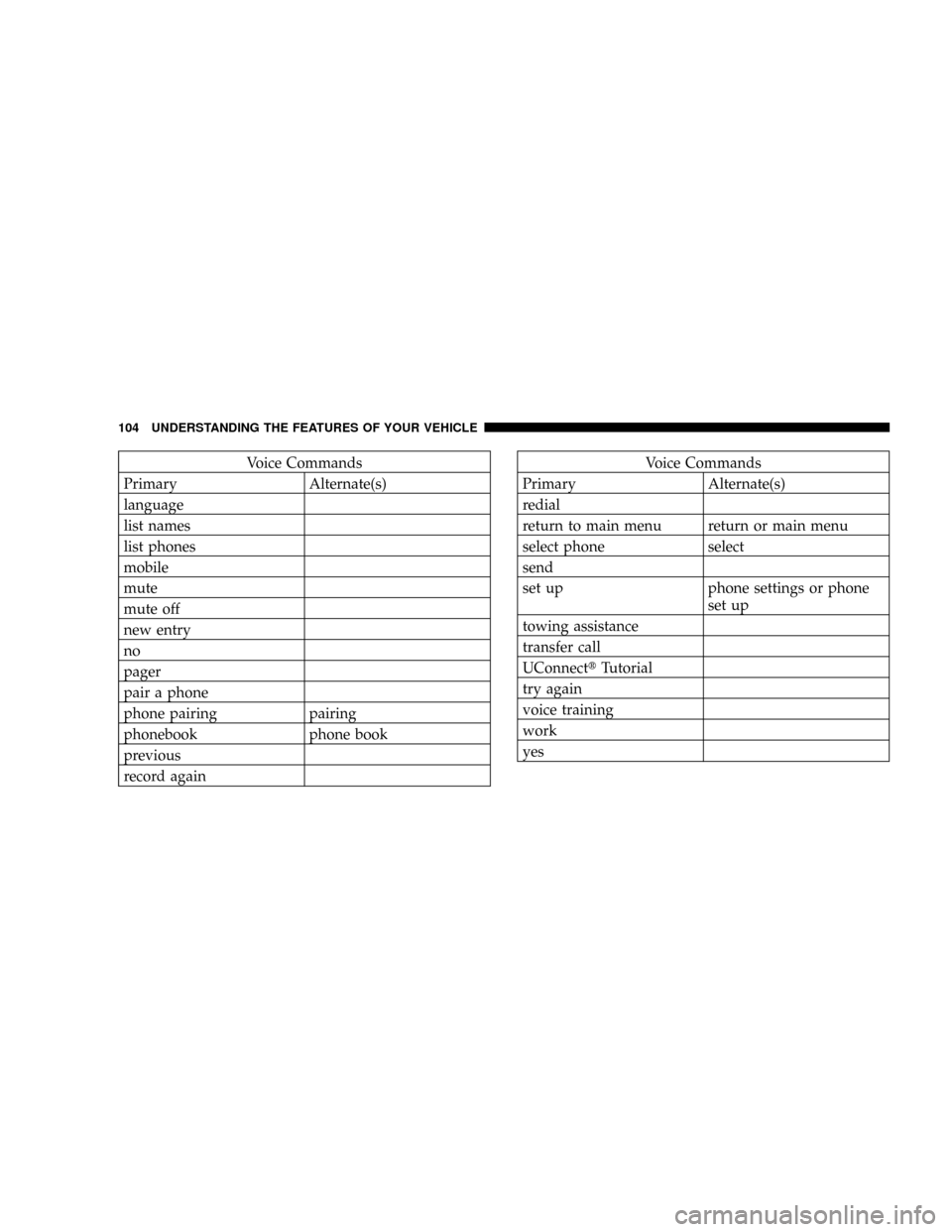
Voice Commands
Primary Alternate(s)
language
list names
list phones
mobile
mute
mute off
new entry
no
pager
pair a phone
phone pairing pairing
phonebook phone book
previous
record againVoice Commands
Primary Alternate(s)
redial
return to main menu return or main menu
select phone select
send
set up phone settings or phone
set up
towing assistance
transfer call
UConnecttTutorial
try again
voice training
work
yes
104 UNDERSTANDING THE FEATURES OF YOUR VEHICLE
Page 139 of 426
pops out automatically when ready for use.To preserve
the heating element, do not hold the lighter in the
heating position.
The instrument panel outlet can be reconfigured by the
customer to operate only when the ignition is On (switch
battery fed) or with the ignition switch On/Off (battery
fed) to allow for cellular phone charging and/or opera-
tion while the ignition is Off. This can be done by moving
the power outlet (switchable) fuse (fuse #22) from the
inboard position to the outboard position.
NOTE:All accessories connected to these outlets should
be removed or turned OFF when the vehicle is not in use
to protect the battery against discharge (unless the cus-
tomer has reconfigured the fuse block to switched battery
feed).Electrical Outlet Use With Engine OFF
(Battery Fed Configuration)
CAUTION!
²Many accessories that can be plugged in draw
power from the vehicle's battery, even when not in
use (i.e. cellular phones, etc.). Eventually, if
plugged in long enough, the vehicle's battery will
discharge sufficiently to degrade battery life
and/or prevent engine starting.
²Accessories that draw higher power (i.e. coolers,
vacuum cleaners, lights, etc.), will discharge the
battery even more quickly. Use these only inter-
mittently and with greater caution.
²After the use of high power draw accessories, or
long periods of the vehicle not being started (with
accessories still plugged in), the vehicle must be
driven a sufficient length of time to allow the
generator to recharge the vehicle's battery.
UNDERSTANDING THE FEATURES OF YOUR VEHICLE 139
3
Page 140 of 426

FLOOR CONSOLE Ð IF EQUIPPED
Floor Console Features
The Floor Console between the driver's and front pas-
senger's seat has the following features:
²Miscellaneous storage compartments
²3 cup holders (2 are removable)
²iPod/Phone storage bin
²12 Volt power outlet inside storage compartment
²Side open armrest lid
²Tissue holder & 2 pen holders
²Coin slots
The coin slots are located under the instrument panel
center stack.
Storage Compartments
Some miscellaneous storage compartments and cup
holders are both removable and dishwasher safe for
cleaning purposes (upper rack of dishwasher only). Vari-
ous storage compartments provide versatile and useful
storage. A coin holder is also provided inside the driver
side storage bin.
Power Outlet and Portable Phone Storage
The console is equipped with a power outlet and an
iPod/ phone storage bin. The phone storage bin can be
used when easy access to the phone is needed. Also, the
power outlet inside console compartment can be used to
charge the phone while it is being stored in the bin. The
power outlet may be used for any portable item with a
standard 12 volt power plug.
Side Open Armrest Lid
Pressing the button on the left side of the console opens
the console armrest lid. The armrest lid will remain open
140 UNDERSTANDING THE FEATURES OF YOUR VEHICLE
Page 154 of 426

mSales Code REQ Ð AM/FM Stereo Radio
And 6±Disc CD/DVD Changer
(MP3/WMA AUX Jack)..................182
NOperating Instructions - Radio Mode.......183
NOperation Instructions - (Disc Mode For CD
And MP3/WMA Audio Play, DVD-Video)....190
NNotes On Playing MP3/WMA Files........192
NList Button (Disc Mode For
MP3/WMA Play).....................195
NInfo Button (Disc Mode For
MP3/WMA Play).....................195
mSales Code RER Ð Multimedia System Ð If
Equipped............................197
NOperating Instructions Ð Satellite Radio.....199NOperating Instructions Ð Hands-Free
Communication (UConnectŸ) (If Equipped) . . 199
NClock Setting Procedure.................199
mSatellite Radio (RSC) Ð If Equipped
(RER/REQ/REN Radios Only).............201
NSystem Activation.....................201
NElectronic Serial Number/Sirius Identification
Number (ENS/SID)....................202
NSelecting Satellite Mode.................202
NSatellite Antenna......................202
NReception Quality.....................203
NOperating Instructions - Satellite Mode......203
NOperating Instructions - Hands Free Phone
(If Equipped)........................205
154 INSTRUMENT PANEL AND CONTROLS
Page 155 of 426
NOperating Instructions - Video Entertainment
System (VESŸ) (If Equipped).............206
mRemote Sound System Controls Ð If Equipped . . 206
NRadio Operation......................207
NCD Player..........................207
mCompact Disc Maintenance................207
mSound Box Operation....................208mRadio Operation And Cellular Phones........209
mClimate Controls.......................209
NAir Conditioning And Heater.............210
NOperating Tips.......................213
NOperation Tips Chart...................215
INSTRUMENT PANEL AND CONTROLS 155
4
Page 171 of 426

to seek up and the left switch to seek down. The radio
will remain tuned to the new station until you make
another selection. Holding either button will bypass
stations without stopping until you release it.
SCAN Button
Pressing the SCAN button causes the tuner to search for
the next listenable station in AM or FM frequencies,
pausing for 5 seconds at each listenable station before
continuing to the next. To stop the search, press the
SCAN button a second time.
Voice Recognition Button (UConnectŸ Hands Free
Phone) Ð If Equipped
Press this button to operate the Hand Free Phone
(UConnectŸ) feature (if equipped). Refer to ªHands-Free
Communication (UConnectŸ)º in Section 3 for more
information.If your vehicle is not equipped with or this feature is not
available on your vehicle, a ªNot Equipped With
UConnectº message will display on the radio screen.
Phone Button (UConnectŸ Hands Free Phone) Ð
If Equipped
Press this button to operate the Hand Free Phone
(UConnectŸ) feature (if equipped). Refer to ªHands-Free
Communication (UConnectŸ)º in Section 3 for more
information.
If your vehicle is not equipped with or this feature is not
available on your vehicle, a ªNot Equipped With
UConnectº message will display on the radio screen.
TIME Button
Press the TIME button and the time of day will display. In
AM or FM mode, pressing the TIME button will switch
between the time and frequency displays.
INSTRUMENT PANEL AND CONTROLS 171
4
Page 182 of 426
TIME Button (Auxiliary Mode)
Press this button to change the display to time of day. The
time of day will display for 5 seconds (when ignition is
off).
Operating Instructions - Hands Free Phone
(UConnectŸ) (If Equipped)
Refer to ªHands-Free Communication (UConnectŸ)º in
Section 3 of this manual.
Operating Instructions - Satellite Radio Mode (If
Equipped)
Refer to ªSatellite Radioº in this section.
Operating Instructions - Video Entertainment
System (VESt) (If Equipped)
Refer to separate ªVideo Entertainment System (VESt)
Guide.º
SALES CODE REQ Ð AM/FM STEREO RADIO
AND 6±DISC CD/DVD CHANGER (MP3/WMA AUX
JACK)
NOTE:The radio sales code is located on the lower right
side of your radio faceplate.
REQ Radio
182 INSTRUMENT PANEL AND CONTROLS
Page 183 of 426

Operating Instructions - Radio Mode
NOTE:The ignition switch must be in the ON or ACC
position to operate the radio.
Power Switch/Volume Control (Rotary)
Press the ON/VOL control to turn the radio ON. Press
the ON/VOL a second time to turn OFF the radio.
Electronic Volume Control
The electronic volume control turns continuously (360
degrees) in either direction without stopping. Turning the
volume control to the right increases the volume and to
the left decreases it.
When the audio system is turned on, the sound will be
set at the same volume level as last played.
SEEK Buttons (Radio Mode)
Press and release the SEEK buttons to search for the next
listenable station in AM/FM mode. Press the right switch
to seek up and the left switch to seek down. The radiowill remain tuned to the new station until you make
another selection. Holding either button will bypass
stations without stopping until you release it.
SCAN Button (Radio Mode)
Pressing the SCAN button causes the tuner to search for
the next listenable station, in AM, FM or Satellite (if
equipped) frequencies, pausing for 5 seconds at each
listenable station before continuing to the next. To stop
the search, press the SCAN button a second time.
Voice Recognition Button (UConnectŸ Hands Free
Phone) Ð If Equipped
Press this button to operate the Hand Free Phone
(UConnectŸ) feature (if equipped). Refer to ªHands-Free
Communication (UConnectŸ)º in Section 3 for more
information.
If your vehicle is not equipped with or this feature is not
available on your vehicle, a ªUConnectŸ System Not
Availableº message will display on the radio screen.
INSTRUMENT PANEL AND CONTROLS 183
4