Page 193 of 442

“Remote Key Unlock”
WhenDriver Door 1st Pressis selected, only the driver’s
door will unlock on the first press of the Remote Keyless
Entry (RKE) UNLOCK button. When Driver Door 1st
Press is selected, you must press the RKE UNLOCK
button twice to unlock the passenger’s doors. WhenAll
Doors 1st Pressis selected, all of the doors will unlock on
the first press of the RKE UNLOCK button. To make your
selection, press and release the FUNCTION SELECT
button until “Driver Door 1st Press” or “All Doors 1st
Press” appears.
“Sound Horn with Remote Key Lock”
When ON is selected, a short horn sound will occur when
the RKE LOCK button is pressed. This feature may be
selected with or without the flash lights on lock/unlock
feature. To make your selection, press and release the
FUNCTION SELECT button until “ON” or “OFF” ap-
pears.
“Flash Lights with Remote Key Lock”
When ON is selected, the front and rear turn signals will
flash when the doors are locked or unlocked with the
RKE transmitter. This feature may be selected with or
without the sound horn on lock feature selected. To make
your selection, press and release the FUNCTION SE-
LECT button until “ON” or “OFF” appears.
“Headlights On with Wipers” (Available with Auto
Headlights Only)
When ON is selected, and the HEADLIGHT switch is in
the AUTO position, the headlights will turn on approxi-
mately 10 seconds after the wipers are turned on. The
headlights will also turn off when the wipers are turned
off if they were turned on by this feature. To make your
selection, press and release the FUNCTION SELECT
button until “ON” or “OFF” appears.
UNDERSTANDING YOUR INSTRUMENT PANEL 191
4
Page 194 of 442

NOTE:Turning the headlights on during the daytime
causes the instrument panel lights to dim. To increase the
brightness, refer to “Lights” in Section 3.
“Delay Turning Headlights Off”
When this feature is selected, the driver can choose to
have the headlights remain on for 0, 30, 60, or 90 seconds
when exiting the vehicle. To make your selection, press
and release the FUNCTION SELECT button until “0,”
“30,” “60,” or “90” appears.
“Turn Headlights On with Remote Key Unlock”
When this feature is selected, the headlights will activate
and remain on for up to 90 seconds when the doors are
unlocked with the RKE transmitter. To make your selec-
tion, press and release the FUNCTION SELECT button
until “OFF,” “30 sec.,” “60 sec.,” or “90 sec.” appears.
“Delay Power Off to Accessories Until Exit”
When this feature is selected, the power WINDOW
switches, radio, hands-free system (if equipped), DVD
video system (if equipped), power sunroof (if equipped),
and power outlets will remain active for up to 60 minutes
after the ignition switch is turned OFF. Opening a vehicle
door will cancel this feature. To make your selection,
press and release the FUNCTION SELECT button until
“Off,” “45 sec.,” “5 min.,” “10 min.,” “30 min.,” or “60
min.” appears.
“Confirmation of Voice Commands” — If
Equipped
When ON is selected, all voice commands from the
UConnect�system are confirmed. To make your selec-
tion, press and release the FUNCTION SELECT button
until “ON” or “OFF” appears.
192 UNDERSTANDING YOUR INSTRUMENT PANEL
Page 381 of 442

Cleaning Headlights
Your vehicle has plastic headlights that are lighter and
less susceptible to stone breakage than glass headlights.
Plastic is not as scratch resistant as glass and therefore
different lens cleaning procedures must be followed.
To minimize the possibility of scratching the lenses and
reducing light output, avoid wiping with a dry cloth. To
remove road dirt, wash with a mild soap solution fol-
lowed by rinsing.
Do not use abrasive cleaning components, solvents, steel
wool or other aggressive material to clean the lenses.
Glass Surfaces
All glass surfaces should be cleaned on a regular basis
with Mopar�Glass Cleaner or any commercial
household-type glass cleaner. Never use an abrasive type
cleaner. Use caution when cleaning the inside rear win-
dow equipped with electric defrosters or the right rearquarter window equipped with the radio antenna. Do
not use scrapers or other sharp instrument that may
scratch the elements.
When cleaning the rear view mirror, spray cleaner on the
towel or rag that you are using. Do not spray cleaner
directly on the mirror.
Cleaning Plastic Instrument Cluster Lenses
The lenses in front of the instruments in this vehicle are
molded in clear plastic. When cleaning the lenses, care
must be taken to avoid scratching the plastic.
1. Clean with a wet soft rag or micro-fiber towel. A mild
soap solution may be used, but do not use high alcohol
content or abrasive cleaners. If soap is used, wipe clean
with a clean damp rag.
2. Dry with a soft tissue.
MAINTAINING YOUR VEHICLE 379
7
Page 387 of 442
Cavity Car-
tridge
FuseMini-
FuseDescription
8 — 15 Amp
BlueDiagnostic Link Connec-
tor (DLC)/Wireless Con-
trol Module (WCM)/
Wireless Ignition Node
(WIN)
9 — 20 Amp
YellowPower Outlet
10 — — —
11*———
12*———
13*———
14 — 10 Amp
RedAC Heater Control/
Cluster/Security Mod-
ule - if equipped
15 — — —
16 — — —Cavity Car-
tridge
FuseMini-
FuseDescription
17 — 20 Amp
YellowCluster
18 — 20 Amp
YellowSelectable Power Outlet
19 — 10 Amp
RedStop Lights
20 — — —
21 — — —
22 — — —
23 — — —
24 — — —
25 — — —
26 — — —
27 — 10 Amp
RedOccupant Restraint Con-
troller (ORC)
MAINTAINING YOUR VEHICLE 385
7
Page 389 of 442

Cavity Car-
tridge
FuseMini-
FuseDescription
40 — 5 Amp
OrangeAuto Inside Rearview
Mirror/Heated Seats - if
equipped/Switch Bank
41 — 10 Amp
RedAC Heater Control/
Headlights/Tire Pres-
sure Monitoring - if
equipped
42 30 Amp
Pink— Front Blower Motor
43 30 Amp
Pink— Rear Window Defroster
44 20 Amp
Blue— Amplifier - if equipped/
Sunroof - if equipped
*Cavities 11, 12, and 13 contain self-resetting fuses
(circuit breakers) that are only serviceable by an autho-
rized dealer. The cluster and the driver SEAT switch arefused by the 25-amp circuit breaker in cavity 11. The
passenger SEAT switch is fused by the 25-amp circuit
breaker in cavity 12. The door modules, the driver power
WINDOW switch, and the passenger power WINDOW
switch are fused by the 25-amp circuit breaker in cavity
13. If you experience temporary or permanent loss of
these systems, see your authorized dealer for service.
VEHICLE STORAGE
If you are leaving your vehicle dormant for more than 21 days,
you may want to take these steps to protect your battery.
•Disconnect the negative cable from the battery.
•Anytime you store your vehicle, or keep it out of
service (i.e., vacation) for two weeks or more, run the
air conditioning system at idle for about five minutes
in the fresh air and high blower setting. This will
ensure adequate system lubrication to minimize the
possibility of compressor damage when the system is
started again.
MAINTAINING YOUR VEHICLE 387
7
Page 390 of 442

REPLACEMENT LIGHT BULBS
LIGHT BULBS — Interior Bulb Number
Rear Courtesy/Reading Lights.............. W5W
Rear Compartment (Trunk) Light............. 562
Overhead Console Reading Lights............. 578
Visor Vanity Lights.....................A6220
Glove Box Light......................... 194
Door Courtesy.......................... 562
Shift Indicator Light................. JKLE14140
Optional Door Map Pocket / Cupholder
Lighting.............................. LED
(Serviced at Authorized Dealer)
NOTE:For lighted switches, see your authorized dealer
for replacement instructions.
All of the interior bulbs are glass wedge base or glass
cartridge types. Aluminum base bulbs are not approved
and should not be used for replacement.LIGHT BULBS — Exterior Bulb Number
Low Beam Headlight.....................9006
High Beam Headlight.....................9005
Front Park/Turn Light...................3157A
Front Fog Light — if equipped...........9145/H10
(Serviced at Authorized Dealer)
Front Side Marker........................ 194
(Serviced at Authorized Dealer)
Tail/Stop Light.........................3057
Tail/Turn Light.........................3057
Rear Side Marker........................ 168
Backup Light........................... 921
Center High-Mount Stop Light
(CHMSL)............................. LED
(Serviced at Authorized Dealer)
License................................ 168
388 MAINTAINING YOUR VEHICLE
Page 403 of 442
At Each Stop for Fuel
•Check the engine oil level. Refer to “Engine Oil” under
“Maintenance Procedures” in Section 7.
•Check the windshield washer solvent and add if
required.
Once a Month
•Check tire pressure and look for unusual wear or
damage.
•Inspect the battery, and clean and tighten the terminals
as required.
•Check the fluid levels of coolant reservoir and brake
master cylinder, and add as needed.
•Check all lights and other electrical items for correct
operation.
At Each Oil Change
•Change the engine oil filter.
•Inspect the brake hoses and lines.
CAUTION!
Failure to perform the required maintenance items
may result in damage to the vehicle.
MAINTENANCE SCHEDULES 401
8
M
A
I
N
T
E
N
A
N
C
E
S
C
H
E
D
U
L
E
S
Page 421 of 442
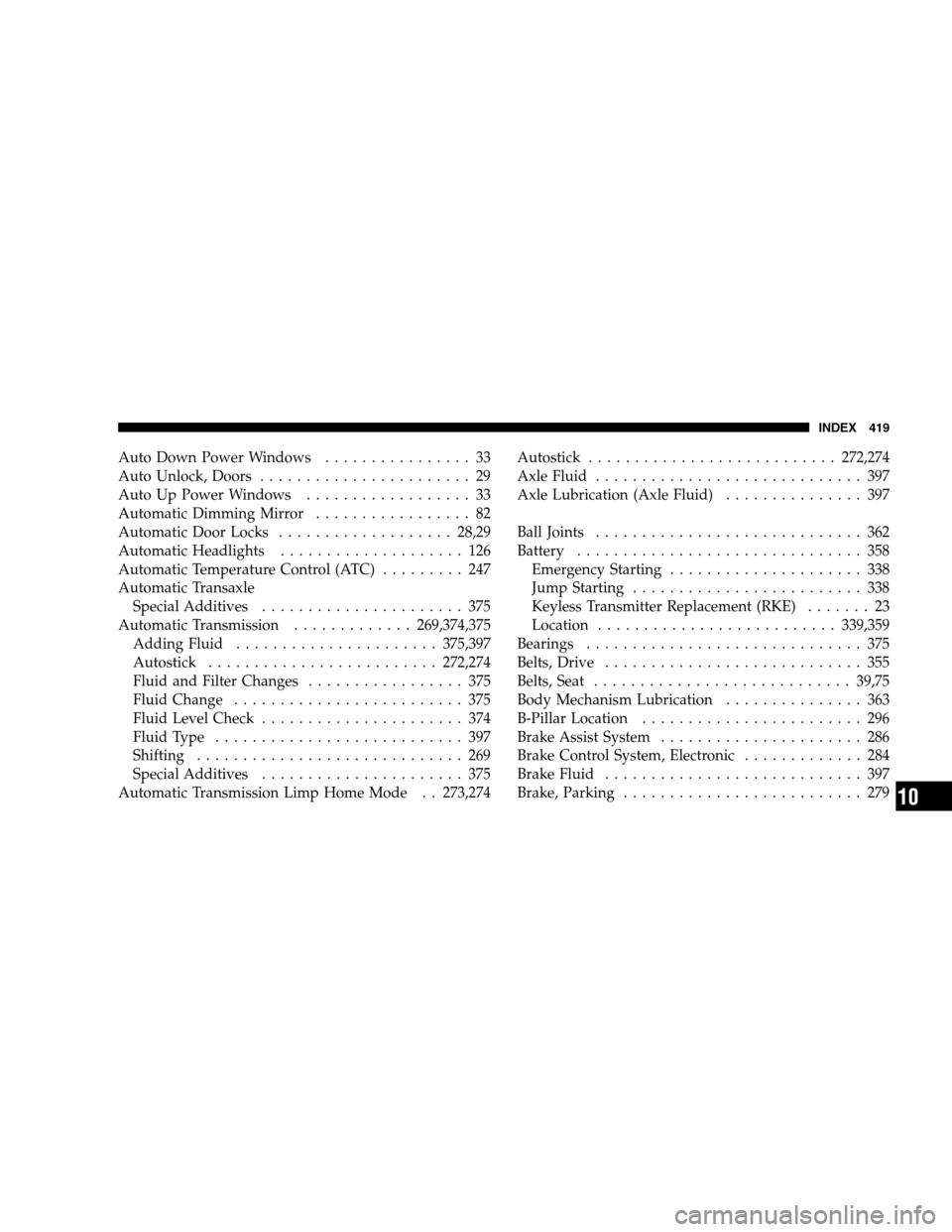
Auto Down Power Windows................ 33
Auto Unlock, Doors....................... 29
Auto Up Power Windows.................. 33
Automatic Dimming Mirror................. 82
Automatic Door Locks................... 28,29
Automatic Headlights.................... 126
Automatic Temperature Control (ATC)......... 247
Automatic Transaxle
Special Additives...................... 375
Automatic Transmission.............269,374,375
Adding Fluid......................375,397
Autostick.........................272,274
Fluid and Filter Changes................. 375
Fluid Change......................... 375
Fluid Level Check...................... 374
FluidType ........................... 397
Shifting ............................. 269
Special Additives...................... 375
Automatic Transmission Limp Home Mode . . 273,274Autostick ...........................272,274
AxleFluid ............................. 397
Axle Lubrication (Axle Fluid)............... 397
BallJoints ............................. 362
Battery............................... 358
Emergency Starting..................... 338
Jump Starting......................... 338
Keyless Transmitter Replacement (RKE)....... 23
Location..........................339,359
Bearings.............................. 375
Belts,Drive ............................ 355
Belts, Seat............................ 39,75
Body Mechanism Lubrication............... 363
B-Pillar Location........................ 296
Brake Assist System...................... 286
Brake Control System, Electronic............. 284
Brake Fluid............................ 397
Brake, Parking.......................... 279
INDEX 419
10

