Page 230 of 442

LIST Button (CD Mode for MP3 Play)
Pressing the LIST button will bring up a list of all folders
on the disc. Scrolling up or down the list is done by
turning the TUNE/SCROLL control knob. Selecting a
folder by pressing the TUNE/SCROLL control knob will
begin playing the files contained in that folder (or the
next folder in sequence if the selection does not contain
playable files).
The folder list will time out after five seconds.
INFO Button (CD Mode for MP3 Play)
Pressing the INFO button repeatedly will scroll through
the following TAG information: Song Title, Artist, File
Name, and Folder Name (if available).
Press the INFO button once more to return to�elapsed
time�priority mode.
Press and hold the INFO button for three seconds or
more and the radio will display song titles for each file.Press and hold the INFO button again for three seconds
to return to�elapsed time�display.
Operation Instructions - Auxiliary Mode
The auxiliary (AUX) jack is an audio input jack, which
allows the user to plug in a portable device such as an
MP3 player, or cassette player, and utilize the vehicle’s
audio system to amplify the source and play through the
vehicle speakers.
Pressing the AUX button will change the mode to auxil-
iary device if the AUX jack is connected.
NOTE:The AUX device must be turned on and the
device’s volume set to proper level. If the AUX audio is
not loud enough, turn the device’s volume up. If the AUX
audio sounds distorted, turn the device’s volume down.
228 UNDERSTANDING YOUR INSTRUMENT PANEL
Page 231 of 442

TIME Button (Auxiliary Mode)
Press this button to change the display to time of day. The
time of day will display for five seconds (when ignition is
OFF).
Operating Instructions - Hands-Free Phone
(UConnect�) (If Equipped)
Refer to “Hands-Free Communication (UConnect�)” in
Section 3.
Operating Instructions - Satellite Radio Mode (If
Equipped)
Refer to “Satellite Radio” in this section.
Operating Instructions - Video Entertainment
System™ (VES™) (If Equipped)
Refer to separate “Video Entertainment System™
(VES™) Guide.”
SATELLITE RADIO (RSC) — IF EQUIPPED
(RER/REQ/REN RADIOS ONLY)
Satellite radio uses direct satellite-to-receiver broadcast-
ing technology to provide clear digital sound, coast to
coast. The subscription service provider is Sirius Satellite
Radio. This service offers over 130 channels of music,
sports, news, entertainment, and programming for chil-
dren, directly from its satellites and broadcasting studios.
NOTE:Sirius service is not available in Hawaii and has
limited coverage in Alaska.
System Activation
Sirius Satellite Radio service is pre-activated, and you
may begin listening immediately to the one year of audio
service that is included with the factory-installed satellite
radio system in your vehicle. Sirius will contact you to
supply a welcome kit and to confirm subscription infor-
mation, including the setup of your on-line listening
account at no additional charge. For further information,
UNDERSTANDING YOUR INSTRUMENT PANEL 229
4
Page 238 of 442
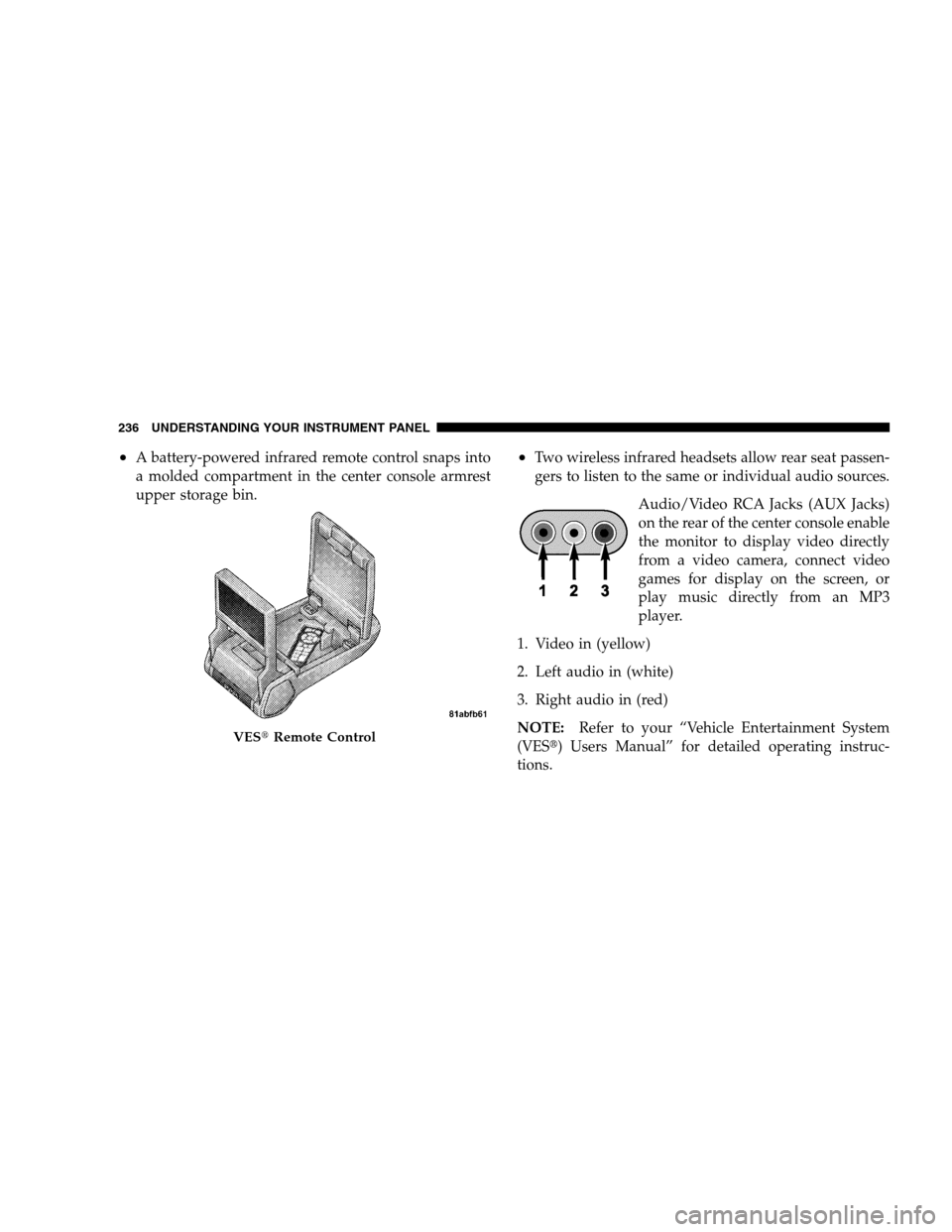
•A battery-powered infrared remote control snaps into
a molded compartment in the center console armrest
upper storage bin.•Two wireless infrared headsets allow rear seat passen-
gers to listen to the same or individual audio sources.
Audio/Video RCA Jacks (AUX Jacks)
on the rear of the center console enable
the monitor to display video directly
from a video camera, connect video
games for display on the screen, or
play music directly from an MP3
player.
1. Video in (yellow)
2. Left audio in (white)
3. Right audio in (red)
NOTE:Refer to your “Vehicle Entertainment System
(VES�) Users Manual” for detailed operating instruc-
tions.
VES�Remote Control
236 UNDERSTANDING YOUR INSTRUMENT PANEL
Page 239 of 442

Kicker�13-speaker High Performance Sound
System with Driver-Selectable Surround (DSS) –
If Equipped
Your vehicle is equipped with a state of the art audio
amplifier that provides 5.1-channel surround sound from
any stereo audio source. A new feature of the Kicker�
audio system offers the ability to choose surround sound
for any audio source or video source.
“Video Surround” is optimized for rear-seat passengers
watching a video, and “Audio Surround” is optimized
for front-seat passengers for any audio source. This
surround effect is available for audio from any source –
AM/FM/CD/ Satellite Radio or Video / Video / AUX –
and is activated through the Electronic Vehicle Informa-
tion Center (EVIC). Refer to “Driver-Selectable Surround
Sound (DSS)” under “Electronic Vehicle Information
Center (EVIC)” in Section 4.DSS modes for audio sources are “Stereo” and “Audio
Surround,” which is surround sound equalized for the
front seat occupants. The “Video Surround” mode is
described under “Kicker�Mobile Surround (KMS1).�”
Please note that DSS effects are dependent on the mix of
the original recording. Some audio will sound better in
DSS modes, others in Stereo mode.
When in “Audio Surround” mode, balance is set auto-
matically. Fader control is available to add more sur-
round audio if desired.
Kicker�Mobile Surround (KMS1)�– If Equipped
The VES�for this vehicle comes equipped with Kicker
Mobile Surround (KMS1).�This feature offers the ulti-
mate movie experience by providing surround sound
uniquely equalized for the interior space of your vehicle.
UNDERSTANDING YOUR INSTRUMENT PANEL 237
4
Page 241 of 442

Controlling The iPod�Using Radio Buttons
To get into the UCI (iPod�) mode and access a connected
iPod�, press the AUX button on the radio faceplate. Once
in the UCI (iPod�) mode, the iPod�audio track (if
available from iPod�) will start playing over the vehicle
audio system.
Play Mode
When switched to UCI mode the iPod�will be in Play
mode. In Play mode, you may use the following buttons
on the radio faceplate to control the iPod�and display
data:
TUNE/SCROLL Knob
Use the TUNE/SCROLL knob to go to the next or
previous track.
The TUNE/SCROLL knob functions similar to the scroll
wheel on the iPod�mobile digital device.Turning it clockwise (forward) by one click while playing
a track skips to the next track.
Turning it counterclockwise (backward) by one click
during the first two seconds of the track will jump to the
previous track in the list and turning this button at any
other time in the track will jump to the beginning of the
current track.
RW (Rewind) Button
Press and hold the RW button to move backward in the
current track. Holding the RW button long enough will
take you back to the beginning of the current track.
Pressing and releasing the RW button will go back five
seconds of the current track.
FF (Fast Forward) Button
Press and hold the FF button to move forward in the
current track.
UNDERSTANDING YOUR INSTRUMENT PANEL 239
4
Page 433 of 442

Phone, Hands-Free (UConnect™)........ 85,213,214
Placard, Tire and Loading Information......... 296
Port
Universal Serial Bus (USB).............194,213
USB .............................194,213
Power
Brakes.............................. 281
Deck Lid Release....................... 36
Distribution Center (Fuses)............... 380
Door Locks........................... 28
Mirrors .............................. 84
Outlet (Auxiliary Electrical Outlet).......... 151
Seats............................... 117
Steering............................. 283
Steering, Checking..................... 362
Sunroof............................. 148
Windows............................. 32
Power Steering Fluid..................362,397
Pregnant Women and Seat Belts.............. 47Pretensioners
Seat Belts............................. 44
Programmable Electronic Features............ 190
Programming Transmitters (Remote Keyless
Entry) ................................. 20
Radial Ply Tires......................... 303
Radiator Cap (Coolant Pressure Cap).......... 368
Radio Broadcast Signals................... 193
Radio, Navigation....................... 213
Radio Operation...................195,214,244
Radio Remote Controls.................... 242
Radio, Satellite............194,195,213,214,229,234
Radio (Sound Systems).................194,213
Rear Cup Holder........................ 154
Rear Seat, Folding....................... 122
Rear Wheel Bearings..................... 375
Rear Window Defroster................... 256
Rear Window Features.................... 256
INDEX 431
10