Page 113 of 466
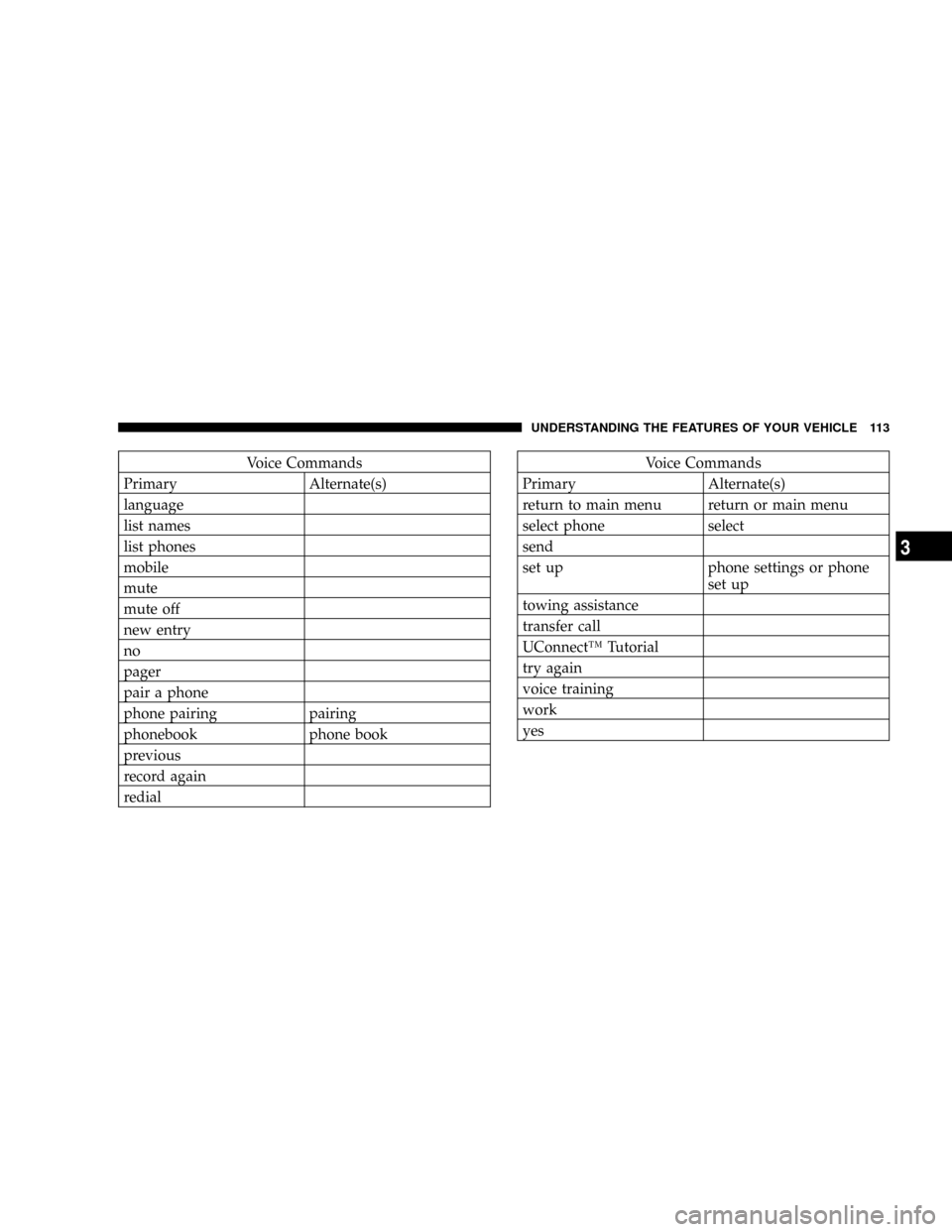
Voice Commands
Primary Alternate(s)
language
list names
list phones
mobile
mute
mute off
new entry
no
pager
pair a phone
phone pairing pairing
phonebook phone book
previous
record again
redialVoice Commands
Primary Alternate(s)
return to main menu return or main menu
select phone select
send
set up phone settings or phone
set up
towing assistance
transfer call
UConnectŸ Tutorial
try again
voice training
work
yes
UNDERSTANDING THE FEATURES OF YOUR VEHICLE 113
3
Page 150 of 466

The center console outlet is powered directly from the
battery (power available at all times). Items plugged into
this outlet may discharge the battery and/or prevent
engine starting.Electrical Outlet Use With Engine Off
CAUTION!
²Many accessories that can be plugged in draw power from
the vehicle's battery, even when not in use (i.e. cellular
phones, etc.). Eventually, if plugged in long enough, the
vehicle's battery will discharge sufficiently to degrade
battery life and/or prevent engine starting.
²Accessories that draw higher power (i.e. coolers, vacuum
cleaners, lights, etc.); will degrade the battery even more
quickly. Only use these intermittently and with greater
caution.
²After the use of high power draw accessories, or long
periods of the vehicle not being started (with accessories
still plugged in), the vehicle must be driven a sufficient
length of time to allow the alternator to recharge the
vehicle's battery.
²Power outlets are designed for accessory plugs only. Do
not hang any type of accessory or accessory bracket from
the plug. Improper use of the power outlet can cause
damage.
Center Console Power Outlet
150 UNDERSTANDING THE FEATURES OF YOUR VEHICLE
Page 154 of 466

The top compartment holds small items, such as a pen
and note pad, while the larger bottom compartment will
hold CDs and alike. The bottom compartment also con-
tains a 12-volt power outlet and a molded-in coin holder
(designed to hold various size coins). A slot in the left and
right side of the top compartment provides clearance for
power cords to pass conveniently out of the bin with the
lid closed. This feature is ideal for games, laptops, cell
phones, or other electrical equipment. The console's front
opening lid allows for easy access to these compartments.
With Vehicle Entertainment System (VES)
The center console contains a large storage compartment.
The storage compartment contains a 12-volt power outlet
and a molded-in coin holder (designed to hold various
size coins). A slot in the top left and right side of the
storage compartment provides clearance for power cords
to pass conveniently out of the compartment with the lid
closed. This feature is ideal for games, laptops, cell
phones, or other electrical equipment. The console'sfront-opening lid allows for easy access to the storage
compartment for the both the driver and the front
passenger.
Cargo Area
The 60/40 split-folding rear seat provides cargo-carrying
versatility. The seatbacks fold down easily by pulling
nylon tabs between the seatbacks and the bolsters. When
the seats are folded down, they provide a continuous,
nearly flat extension of the load floor.
When the seatback is folded to the upright position, make
sure it is latched by strongly pulling on the top of the
seatback above the seat strap.
154 UNDERSTANDING THE FEATURES OF YOUR VEHICLE
Page 157 of 466
UNDERSTANDING YOUR INSTRUMENT PANEL
CONTENTS
mInstrument Panel And Controls.............161
mBase Instrument Cluster..................162
mPremium Instrument Cluster Ð If Equipped....163
mInstrument Cluster Descriptions............164
mElectronic Vehicle Information Center (EVIC) ±
If Equipped...........................175
NElectronic Vehicle Information Center (EVIC)
Displays............................177
NOil Change Required...................178
NTrip Functions.......................178NCompass Display.....................181
NTelephone Ð If Equipped...............183
NNavigation Ð If Equipped...............185
NPersonal Settings (Customer Programmable
Features)...........................186
mRadio General Information................190
NRadio Broadcast Signals.................190
NTwo Types Of Signals..................190
NElectrical Disturbances..................1904
Page 159 of 466

NOperation Instructions - CD Mode For CD
And MP3 Audio Play..................219
NNotes On Playing MP3 Files.............222
NList Button (CD Mode For MP3 Play).......224
NInfo Button (CD Mode For MP3 Play).......224
mSatellite Radio (RSC) Ð If Equipped (REQ And
RES Radios Only)......................226
NSystem Activation.....................226
NElectronic Serial Number/Sirius Identification
Number (ENS/SID)....................226
NSelecting Satellite Mode.................227
NSatellite Antenna......................227
NReception Quality.....................227
NOperating Instructions - Satellite Mode......227NOperating Instructions - Hands Free Phone
(If Equipped)........................230
NOperating Instructions - Video Entertainment
System (VESt) (If Equipped).............230
mVideo Entertainment System Ð If Equipped....230
mUniversal Consumer Interface (UCI) Ð
If Equipped...........................232
NConnecting The iPodt..................233
NControlling The iPodtUsing Radio Buttons . . . 233
NPlay Mode..........................233
NList Or Browse Mode..................235
mRemote Sound System Controls.............237
mCD/DVD Disc Maintenance...............238
mRadio Operation And Cellular Phones........239
UNDERSTANDING YOUR INSTRUMENT PANEL 159
4
Page 176 of 466

The system allows the driver to select information by
pressing the following buttons mounted on the steering
wheel:
Press and release the MENU button and the
mode displayed will change between Trip
Functions, Navigation (if equipped), System
Status, Personal Settings, and Telephone (if
equipped).
Press the FUNCTION SELECT button to accept
a selection. The FUNCTION SELECT button
also functions as a remote sound system con-
trol. For details, refer to ªRemote Sound Sys-
tem Controlsº in this section.Press the SCROLL button to scroll through Trip
Functions, Navigation (if equipped), System
Status Messages, and Personal Settings (Cus-
tomer Programmable Features). The SCROLL
button also functions as a remote sound system
control. For details, refer to ªRemote Sound
System Controlsº in this section.
Press the AUDIO MODE button to select the
Compass/Temp/Audio screen. Along with
compass reading and outside temperature, this
screen will display radio and media mode
information depending on which radio is in the
vehicle. For details, refer to ªRemote Sound
System Controlsº in this section.
MENU
Button
FUNC-
TION
SELECT
Button
SCROLL
Button
AUDIO
MODE
Button
176 UNDERSTANDING YOUR INSTRUMENT PANEL
Page 183 of 466
1. Turn the ignition switch ON.
2. Press and hold the compass button for approximately
2 seconds.
3. Press the SCROLL button until ªCompass Varianceº
message and the last variance zone number displays in
the EVIC.
4. Press and release FUNCTION SELECT button until
the proper variance zone is selected according to the
map.
5. Press and release the compass button to exit.
Telephone Ð If Equipped
Press and release the MENU button until ªTelephoneº
displays in the EVIC.
When the appropriate conditions exist, the EVIC pro-
vides the following telephone information:
UNDERSTANDING YOUR INSTRUMENT PANEL 183
4
Page 184 of 466
²Phone status: idle, voice mail, roaming, battery
strength, and signal strength in increments of 20
percent.
²Call status: Incoming call, connecting, connected, air
time in minutes and seconds, call ended, call failed,
roaming, and no phone connection.
²UConnect Active.
²Caller ID phone number display.
When the appropriate conditions exist, and if supported
by the cell phone, the EVIC will display the following
telephone symbols:
The EVIC displays this symbol to indicate the
signal strength of the UConnectŸ phone. The
number of horizontal bars increases as the
strength of the UConnectŸ phone signal in-
creases.The EVIC displays this symbol to indicate an
incoming call.
The EVIC displays this symbol to indicate that
the UConnectŸ phone is currently in analog
mode.
The EVIC displays this symbol to indicate that
the UConnectŸ phone is currently roaming.
Signal
Strength
Incom-
ing Call
Analog
Roam-
ing
184 UNDERSTANDING YOUR INSTRUMENT PANEL