Page 171 of 385

Compass Display
COMPASS ButtonThe compass readings indicate the direction
the vehicle is facing. Press and release the
COMPASS button to display one of eight com-
pass readings and the outside temperature.
Automatic Compass Calibration
This compass is self-calibrating, which eliminates the
need to set the compass manually. When the vehicle is
new, the compass may appear erratic and the EVIC will
display “CAL” until the compass is calibrated. You may
also calibrate the compass by completing one or more 360
degree turns (in an area free from large metal or metallic
objects) until the “CAL” message displayed in the EVIC
turns off. The compass will now function normally.
Manual Compass Calibration
If the compass appears erratic and the “CAL” message
does not appear in the EVIC display, you must put the
compass into the Calibration Mode manually as follows:
1. Turn the ignition switch ON.
2. Press and hold the COMPASS button for approxi-
mately two seconds.
3. Press the SCROLL button until “Calibrate Compass”
displays in the EVIC.
4. Press and release the FUNCTION SELECT button to
start the calibration. The message “CAL” will display in
the EVIC.
5. Complete one or more 360 degree turns (in an area free
from large metal or metallic objects) until the “CAL”
message turns off. The compass will now function nor-
mally.
UNDERSTANDING YOUR INSTRUMENT PANEL 169
4
ProCarManuals.com
Page 173 of 385

1. Turn the ignition switch ON.
2. Press and hold the COMPASS button for approxi-
mately two seconds.
3. Press the SCROLL button until “Compass Variance”
message and the last variance zone number displays in
the EVIC.
4.
Press and release FUNCTION SELECT button until the
proper variance zone is selected according to the map.
5. Press and release the COMPASS button to exit.
Driver-Selectable Surround Sound (DSS) – If
Equipped
Press and release the MENU button until “Surround
Sound” displays in the EVIC. The EVIC provides infor-
mation on the current surround mode.
•Stereo
•Audio Surround While in the Surround Sound menu, press the FUNC-
TION SELECT button to change surround modes.
System Warnings (Customer Information
Features)
Press and release the MENU button until “SYSTEM
WARNINGS” displays in the EVIC. Then, press the
SCROLL button to display anyone of the following
choices.
•Oil Temperature
Shows the actual oil temperature.
•Oil Pressure
Shows the actual oil pressure.
•Tire Pressure
Shows the actual tire pressure for each tire (EXCLUDING
THE SPARE TIRE).
UNDERSTANDING YOUR INSTRUMENT PANEL 171
4
ProCarManuals.com
Page 174 of 385

Personal Settings (Customer Programmable
Features)
Personal Settings allows the driver to set and recall
features when the transmission is in PARK.
Press and release the MENU button until Personal Set-
tings displays in the EVIC.
Use the SCROLL button to display one of the following
choices.
Language
When in this display you may select one of three languages
for all display nomenclature, including the trip functions
and the navigation system (if equipped). Press the FUNC-
TION SELECT button while in this display to select En-
glish, Espanol, or Francais. Then, as you continue, the
information will display in the selected language.
NOTE:The EVIC will not change the UConnect �lan-
guage selection. Refer to “Language Selection” under
“Hands-Free Communication (UConnect �)” in Section 3.
Lock Doors Automatically at 15 mph (24 km/h)
When ON is selected, both doors will lock automatically
when the vehicle reaches a speed of 15 mph (24 km/h).
To make your selection, press and release the FUNC-
TION SELECT button until “ON” or “OFF” appears.
Unlock Doors Automatically on Exit
When ON is selected, both doors will unlock when the
vehicle is stopped and the transmission is in the PARK or
NEUTRAL position and the driver’s door is opened. To
make your selection, press and release the FUNCTION
SELECT button until “ON” or “OFF” appears.
Remote Key Unlock
When Driver Door 1st Press is selected, only the driver’s
door will unlock on the first press of the Remote Keyless
Entry (RKE) UNLOCK button. When Driver Door 1st
Press is selected, you must press the RKE UNLOCK
button twice to unlock the passenger door. When All
Doors 1st Press is selected, both of the doors will unlock
172 UNDERSTANDING YOUR INSTRUMENT PANEL
ProCarManuals.com
Page 176 of 385

Turn Headlights On with Remote Key Unlock
When this feature is selected, the headlights will activate
and remain on for up to 90 seconds when the doors are
unlocked with the RKE transmitter. To make your selec-
tion, press and release the FUNCTION SELECT button
until “OFF,” “30 sec.,” “60 sec.,” or “90 sec.” appears.
Delay Power Off to Accessories Until Exit
When this feature is selected, the power window
switches, radio, hands-free system (if equipped), power
sunroof (if equipped), and ignition-powered power out-
lets will remain active for up to 60 minutes after the
ignition switch is turned OFF. Opening a vehicle door
will cancel this feature. To make your selection, press and
release the FUNCTION SELECT button until “Off,” “45
sec.,” “5 min.,” “10 min.,” “30 min.,” or “60 min.”
appears.
Turn-by-Turn Navigation — If Equipped
When ON is selected, the Turn-by-Turn directions will
appear in the display as the vehicle approaches a desig-
nated turn within a programmed route. To make your
selection, press and release the FUNCTION SELECT
button until “ON” or “OFF” appears.
Display Units of Measure In
The EVIC, odometer, and navigation system (if
equipped) can be changed between English and Metric
units of measure. To make your selection, press and
release the FUNCTION SELECT button until “US” or
“METRIC” appears.
174 UNDERSTANDING YOUR INSTRUMENT PANEL
ProCarManuals.com
Page 179 of 385
Operating Instructions - Radio Mode
NOTE:The ignition switch must be in the ON or ACC
position to operate the radio.
Power Switch/Volume Control (Rotary)
Push the ON/VOLUME control knob to turn on the
radio. Press the ON/VOLUME control knob a second
time to turn off the radio.
Electronic Volume Control
The electronic volume control turns continuously (360
degrees) in either direction without stopping. Turning the
ON/VOLUME control knob to the right increases the
volume and to the left decreases it.
When the audio system is turned ON, the sound will be
set at the same volume level as last played.
SEEK Buttons
Press and release the SEEK buttons to search for the next
listenable station in AM/FM mode. Press the right switch to seek up and the left switch to seek down. The radio
will remain tuned to the new station until you make
another selection. Holding either button will bypass
stations without stopping until you release it.
SCAN Button
Pressing the SCAN button causes the tuner to search for
the next listenable station, in AM, FM or Satellite (if
equipped) frequencies, pausing for five seconds at each
listenable station before continuing to the next. To stop
the search, press the SCAN button a second time.
Voice Recognition Button (UConnect
�Hands-Free
Phone) — If Equipped
Press this button to operate the Hands-Free Phone
(UConnect �) feature (if equipped). Refer to “Hands-Free
Communication (UConnect �)” in Section 3.
If your vehicle is not equipped with or this feature is not
available on your vehicle, a “Not Equipped With
UConnect” message will display on the radio screen.
UNDERSTANDING YOUR INSTRUMENT PANEL 177
4
ProCarManuals.com
Page 180 of 385
Phone Button (UConnect�Hands-Free Phone) — If
Equipped
Press this button to operate the Hands-Free Phone
(UConnect �) feature (if equipped). Refer to “Hands-Free
Communication (UConnect �)” in Section 3.
If your vehicle is not equipped with or this feature is not
available on your vehicle, a “Not Equipped With
UConnect” message will display on the radio screen.
TIME Button
Press the TIME button and the time of day will display. In
AM or FM mode, pressing the TIME button will switch
between the time and frequency displays.
Clock Setting Procedure
1. Press and hold the TIME button until the hours blink.
2. Adjust the hours by turning the right side TUNE/
SCROLL control knob. 3. After adjusting the hours, press the right side TUNE/
SCROLL control knob to set the minutes. The minutes
will begin to blink.
4. Adjust the minutes using the right side TUNE/
SCROLL control knob. Press the TUNE/SCROLL control
knob to save the time change.
5. To exit, press any button/knob or wait five seconds.
The clock can also be set by pressing the SETUP button
and selecting the “SET HOME CLOCK” entry. Once in
this display follow the above procedure, starting at step
2.
INFO Button
Press the INFO button for an RDS station (one with call
letters displayed). The radio will return a Radio Text
message broadcast from an FM station (FM mode only).
178 UNDERSTANDING YOUR INSTRUMENT PANEL
ProCarManuals.com
Page 181 of 385
RW/FF
Pressing the RW (Rewind) or FF (Fast Forward) buttons
causes the tuner to search for the next frequency in the
direction of the arrows. This feature operates in AM, FM
or Satellite (if equipped) frequencies.
TUNE Control
Turn the rotary TUNE/SCROLL control knob clockwise
to increase or counterclockwise to decrease the frequency.
Setting the Tone, Balance, and Fade
Push the rotary TUNE/SCROLL control knob and BASS
will display. Turn the TUNE/SCROLL control knob to
the right or left to increase or decrease the bass tones.
Push the rotary TUNE/SCROLL control knob a second
time and MID will display. Turn the TUNE/SCROLL
control knob to the right or left to increase or decrease the
mid-range tones.Push the rotary TUNE/SCROLL control knob a third
time and TREBLE will display. Turn the TUNE/SCROLL
control knob to the right or left to increase or decrease the
treble tones.
Push the rotary TUNE/SCROLL control knob a fourth
time and BALANCE will display. Turn the TUNE/
SCROLL control knob to the right or left to adjust the
sound level from the right or left side speakers.
Push the rotary TUNE/SCROLL control knob a fifth time
and FADE will display. Turn the TUNE/SCROLL control
knob to the left or right to adjust the sound level between
the front and rear speakers.
Push the rotary TUNE/SCROLL control knob again to
exit setting tone, balance, and fade.
UNDERSTANDING YOUR INSTRUMENT PANEL 179
4
ProCarManuals.com
Page 182 of 385
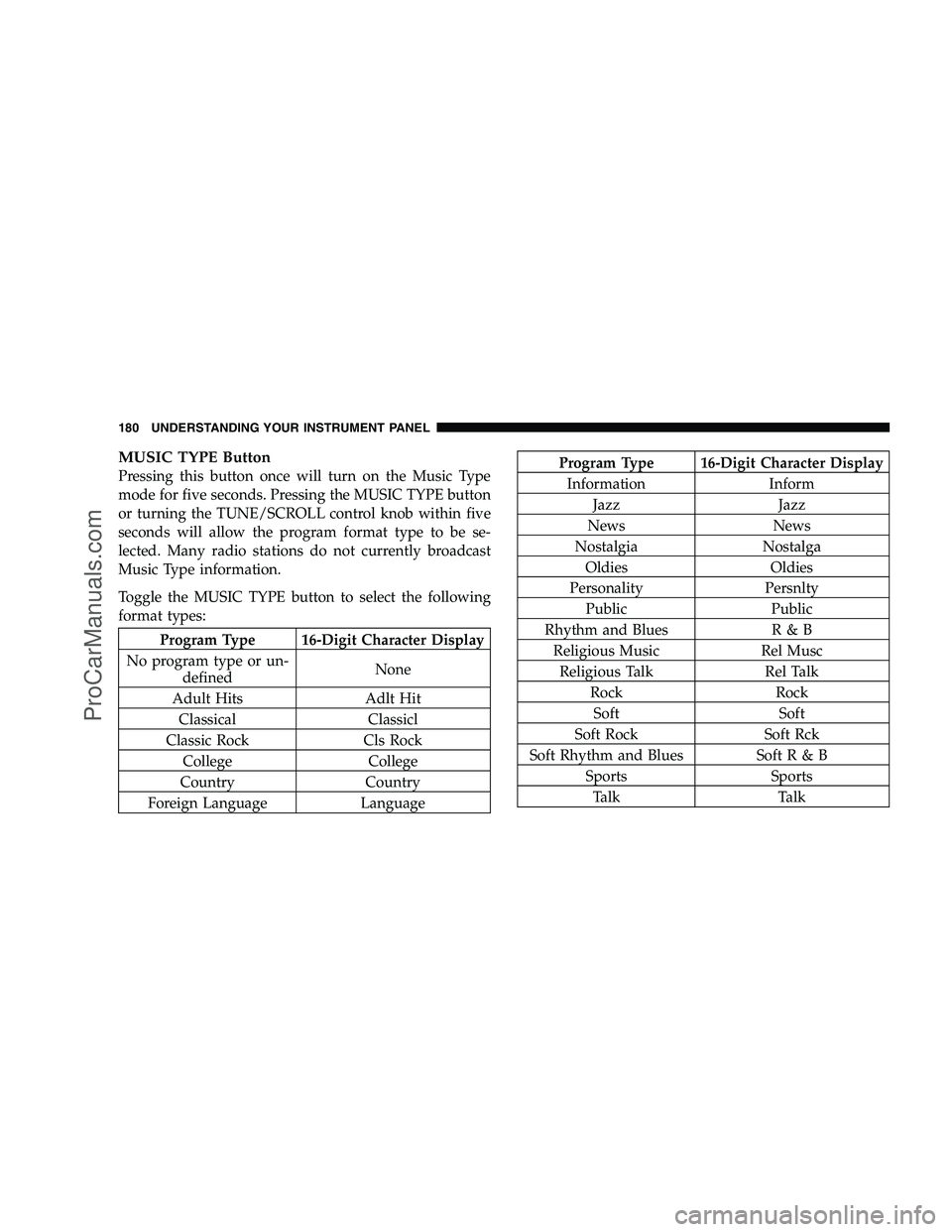
MUSIC TYPE Button
Pressing this button once will turn on the Music Type
mode for five seconds. Pressing the MUSIC TYPE button
or turning the TUNE/SCROLL control knob within five
seconds will allow the program format type to be se-
lected. Many radio stations do not currently broadcast
Music Type information.
Toggle the MUSIC TYPE button to select the following
format types:
Program Type 16-Digit Character Display
No program type or un- defined None
Adult Hits Adlt Hit Classical Classicl
Classic Rock Cls Rock College College
Country Country
Foreign Language Language
Program Type 16-Digit Character Display Information Inform Jazz Jazz
News News
Nostalgia Nostalga Oldies Oldies
Personality Persnlty Public Public
Rhythm and Blues R & B Religious Music Rel MuscReligious Talk Rel Talk Rock RockSoft Soft
Soft Rock Soft Rck
Soft Rhythm and Blues Soft R & B Sports SportsTa l k Ta l k
180 UNDERSTANDING YOUR INSTRUMENT PANEL
ProCarManuals.com