Page 43 of 163
45
3
ERGONOMICS AND COMFORT
Cancelling the programmed speed
When the vehicle stops, after the ignition is
switched off, the system no longer stores
any speed. Good practice
When changing the programmed reference
speed by pressing and holding the control,
take care as the speed may increase or
decrease rapidly.
Do not use the cruise control on slippery
roads or in heavy traffic.
On a steep gradient, the cruise control will
not be able to prevent the vehicle from
exceeding the programmed speed.
The cruise control cannot, in any
circumstances, replace the need to comply
with speed limits nor can it replace the need
for vigilance and responsibility on the part
of driver.
It is advisable to leave your feet near the
pedals.
To prevent the mat from becoming caught
under the pedals:
- ensure that the mat is positioned
correctly,
- never fit one mat on top of another.
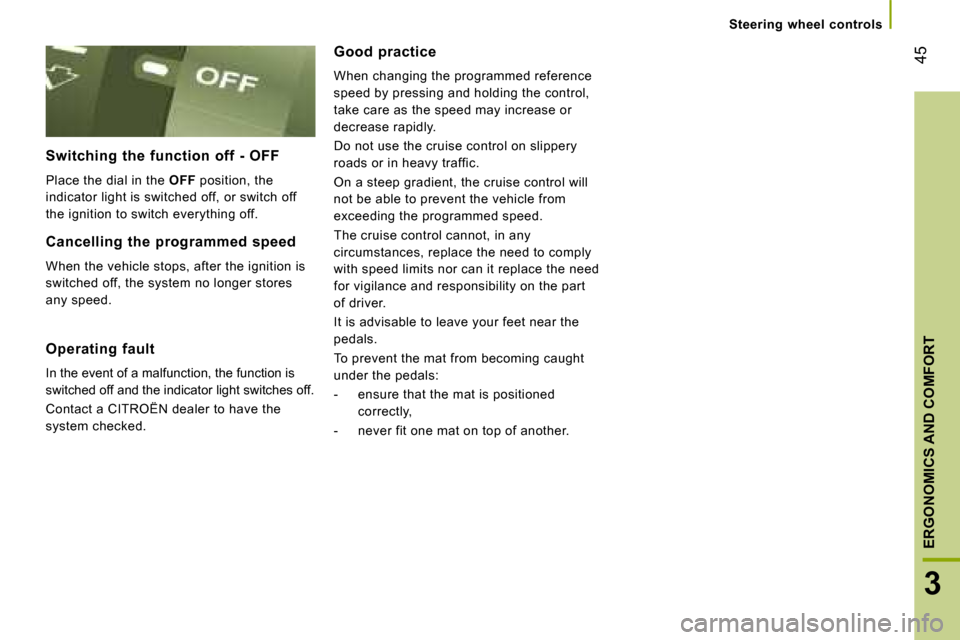
Switching the function off - OFF
Place the dial in the
OFF position, the
indicator light is switched off, or switch off
the ignition to switch everything off.
Operating fault
In the event of a malfunction, the function is
switched off and the indicator light switches off.
Contact a CITROËN dealer to have the
system checked. Steering wheel controls
Page 64 of 163
66
Practical information Courtesy light
This is a double courtesy light located in
the centre of the roof. It can be activated by
means of:
- the switches located on the courtesy light, with the ignition on - RUNNING
position,
- opening or closing one of the front doors,
- locking/unlocking the vehicle.
It switches off automatically:
- if the switch is not pressed to the right or to the left,
- in all cases after 15 minutes, if the doors remain open or when the ignition is
switched on. Reading lights
These are controlled by the switches.
The driver's switch controls both reading
lights simultaneously.
The passenger switch controls either the
driver's reading light or the passenger
reading light.
Layout/storage compartment in the
door trays
Page 68 of 163
A
B
70
Mirrors and windows
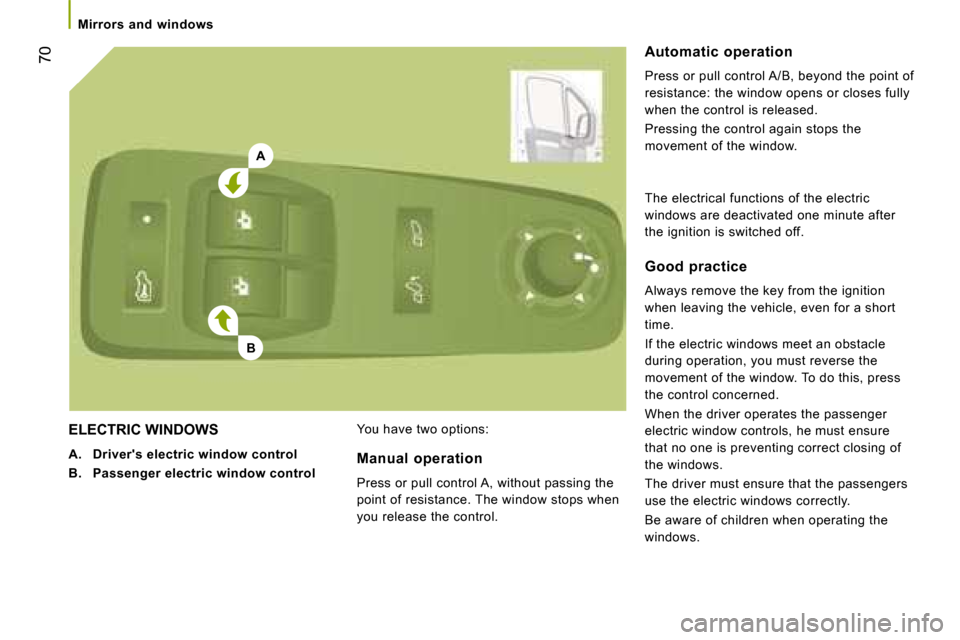
ELECTRIC WINDOWS
A. Driver's electric window control
B. Passenger electric window control You have two options: Automatic operation
Press or pull control A/B, beyond the point of
resistance: the window opens or closes fully
when the control is released.
Pressing the control again stops the
movement of the window.
Manual operation
Press or pull control A, without passing the
point of resistance. The window stops when
you release the control. Good practice
Always remove the key from the ignition
when leaving the vehicle, even for a short
time.
If the electric windows meet an obstacle
during operation, you must reverse the
movement of the window. To do this, press
the control concerned.
When the driver operates the passenger
electric window controls, he must ensure
that no one is preventing correct closing of
the windows.
The driver must ensure that the passengers
use the electric windows correctly.
Be aware of children when operating the
windows.
The electrical functions of the electric
windows are deactivated one minute after
the ignition is switched off.
Page 70 of 163

72
Mode
MODE
Configuration-Personalisation
If your vehicle is fitted with the control pad
located to the left of the steering wheel, this
provides access to menus which permit the
personalisation of some of your equipment.
Seven languages are offered: Italian,
English, German, French, Spanish,
Portuguese, Dutch.
As a safety precaution, some menus can
only be accessed when the ignition is off.
This MODE button enables you to:
- access the menus and sub-menus,
- confirm your selections, within a menu,
- exit from the menus.
A long press enables you to return to the welcome
screen.
This button enables you to:
- scroll up through a menu,
- increase a value.
This button enables you to:
- scroll down through a menu,
- decrease a value.
Menu... Press... Sub-menu… Press... Select…
Confirm
and exit
Enables you to...
1 Bleep Speed
ON Increase
Activate/deactivate the audible
signal indicating exceeding of the
programmed speed and select the
speed.
Decrease
OFF
2 Headlamps
sensor
Increase
Set the sensitivity of the brightness
sensor (1 to 3).
Decrease
3 Activation
Trip B Activate
Display a second distance "Trip B".
Deactivate
Page 82 of 163
Audio equipment
83
4
IN-CAR TECHNOLOGY
Scroll the
display
Sélectionner
Display
Select
Display
Select
Display
Select
Display
Enables you
to…
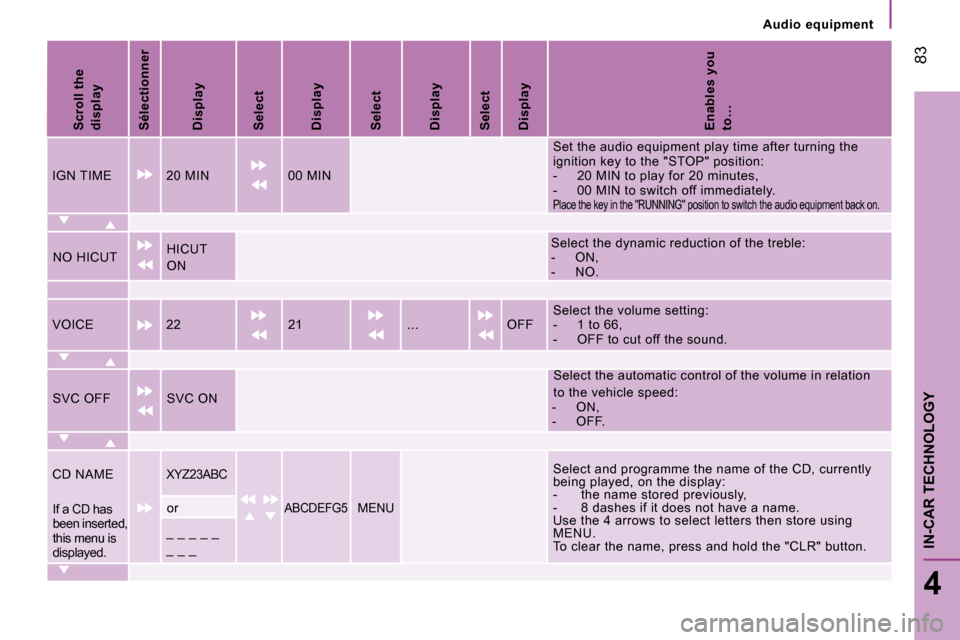
IGN TIME 20 MIN 00 MIN Set the audio equipment play time after turning th
e
ignition key to the "STOP" position:
- 20 MIN to play for 20 minutes,
- 00 MIN to switch off immediately.
Place the key in the "RUNNING" position to switch the audio equipment back on.
NO HICUT HICUT
ON Select the dynamic reduction of the treble:
- ON,
- NO.
VOICE 22 21 ... OFF Select the volume setting:
- 1 to 66,
- OFF to cut off the sound.
SVC OFF SVC ON Select the automatic control of the volume in rela
tion
to the vehicle speed:
- ON,
- OFF.
CD NAME
XYZ23ABC Select and programme the name of the CD, currently
being played, on the display:
- the name stored previously,
- 8 dashes if it does not have a name.
Use the 4 arrows to select letters then store usin g
MENU.
To clear the name, press and hold the "CLR" button .
If a CD has
been inserted,
this menu is
displayed. or ABCDEFG5 MENU
_ _ _ _ _
_ _ _
Page 89 of 163

90
Mobile telephone with hands-free function When prompted by the telephone, enter the
PIN displayed on the instrument panel.
If the pairing has been successful, the
system announces "Connecting".
The name of the telephone identified
appears on the instrument panel display,
pairing is confirmed.
Blue indicator light on
"Settings"\wait for a response\
"Pairing".
PIN
Pairing/matching a mobile
telephone
The matching consists of setting your
vehicle's Bluetooth
®
system to recognise
your mobile telephone.
The pairing stores your mobile telephone so
that it can be recognised instantly.
MOBILE TELEPHONE WITH HANDS-FREE FUNCTION
With the key in the MAR position,
activate the main menu.
Select SETTINGS.
Confirm.
Select PAIRING.
Confirm. This number, which permits
recognition of your mobile
telephone, is generated
randomly by the system.
It is communicated by the display on the
instrument panel and is repeated verbally by
the system.
This PIN is independent of your SIM card
and your mobile's access code.
Once your handset has been paired, there is
no need to keep a trace of this number.
If you change your mobile telephone, you
must repeat the matching procedure as you
will be given a new PIN. Look for the option which permits
displaying of the Bluetooth ®
system
detected by your telephone.
When the system has been
identified, a message appears on
your telephone (My car, ...). This indicates a good connection
between the telephone and the
system.
It is important to wait until the name of
the telephone is displayed.
Pressing MAIN or ESC during the pairing
phase may cancel the procedure.
If the pairing fails, an error message will
appear; in this case, repeat the procedure.
For further information regarding the
ignition switch MAR position, refer to
the "Starting and stopping" part of section 2.
Page 92 of 163
Mobile telephone with hands-free function
93
4
IN-CAR TECHNOLOGY
Transferring an active call
There are 2 options:
1 - From the mobile telephone to the hands-
free system
Turning the key to the ignition switch MAR
position activates the recognition connection
between the mobile telephone and the
vehicle's audio equipment.
Confirm this recognition using the keypad on
the mobile telephone.
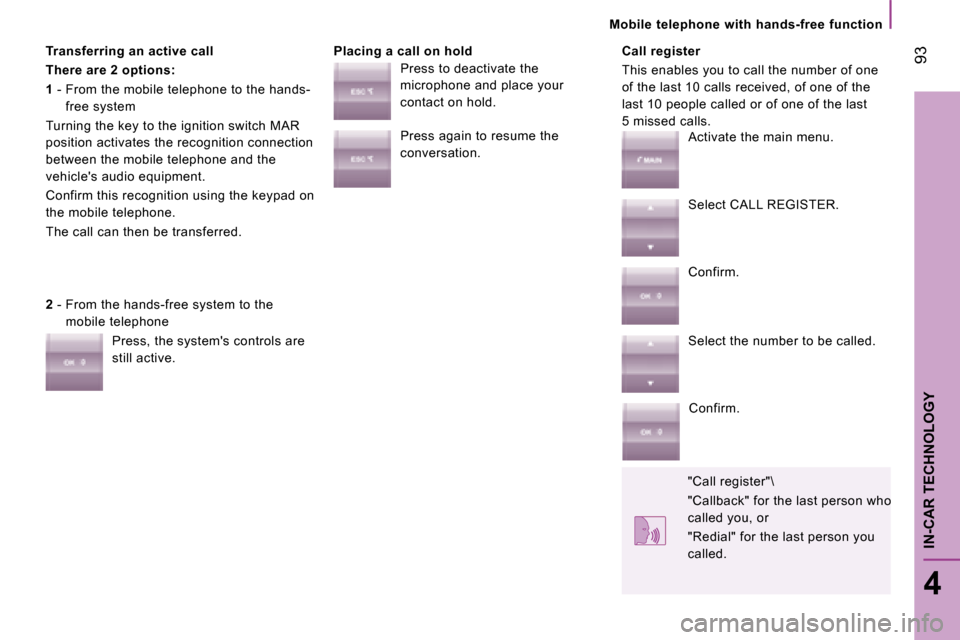
The call can then be transferred. Placing a call on hold Call register
This enables you to call the number of one
of the last 10 calls received, of one of the
last 10 people called or of one of the last
5 missed calls.
2 - From the hands-free system to the
mobile telephone
Press, the system's controls are
still active. Press to deactivate the
microphone and place your
contact on hold.
Press again to resume the
conversation.
Activate the main menu.
Select CALL REGISTER.
Confirm.
Select the number to be called.
Confirm.
"Call register"\
"Callback" for the last person who
called you, or
"Redial" for the last person you
called.
Page 93 of 163

94
Portable equipment audio player
Audio files in .mp3, .wma, .wav format
and for the lists of files (library) with the
extensions .wpl, .m3u are recognised by
the system. Selecting files
PORTABLE EQUIPMENT AUDIO PLAYER
Autoplay
USB socket Connect the equipment to the
socket directly or using an
appropriate cable (not provided).
Turning the key to the ignition switch MAR
position:
- activates the recognition connection and automatically opens a library of files,
- or activates play automatically if the system is programmed to autoplay.
Otherwise, select the file to be
played via the MENU.
For further information regarding the
ignition switch MAR position, refer to
the "Starting and stopping" part of section 2. Activate the main menu.
Select SETTINGS then MEDIA
PLAYER then AUTOPLAY.
Confirm.
Select ON or OFF.
Confirm.
Activate the main menu.
Select MEDIA PLAYER.
Confirm.
Choose one of the selection modes:
FOLDERS, ARTISTS, GENRES,
ALBUMS, PLAYLISTS, PLAY
ANYTHING (random playing of
the files in the library).
"Folders", "Artists", ...
The PLAY ALL function enables you
to listen to the entire content of a
selection mode (folders, artists, ...).
