Page 155 of 216

158
VI
It is imperative not to exceed a speed of 80 km / h (50 mph) on the spare wheel.
The wheel bolts are specifi c to the type of wheel.
If the type of wheel is changed, check with your CITROËN dealer that the wheel bolts are compatible with the new wheels.
Note: take care to note down the code number engrav ed on the head of the anti-theft bolt socket. This will enable you to obtain replacement anti-theft bolt sockets from a dealership.
WHEEL FOR TEMPORARY USE
If your vehicle is equipped with a spare wheel for temporary use only, when fi tting it it is normal to observe that the wheel bolts do not come to bear on the wheel rim.
The spare wheel is secured by the conical tapering of the wheel bolt’s shaft. See illustration.
When refi tting the original wheel, ensure that the wheel bolt contact surfaces are clean and in good condition.
REFITTING A WHEEL1. Fit the wheel on the hub, using the centring guide. Make sure that the contact surface between the hub and the wheel is clean.2. Screw in the bolts but do not fully tighten them.3. Lower the jack and remove it.4. Tighten the wheel bolts, using the wheelbrace.5. Refi t the embellisher.6. Return the ground clearance to the normal position. See "Adjusting ground clearance".7. Ensure the tyre pressure is correct (see "Vehicle identifi cation") and have the balancing checked.
WHEEL EQUIPPED WITH DEFLATION DETECTION SENSOR
Such wheels have tyre pressure sensors. It is essential to have repairs carried out by a CITROËN dealer.
ANTI-THEFT BOLTS
Each wheel is equipped with one anti-theft bolt.
To remove it1. Remove the protector that is covering it by means of the tool 4 for "removing anti-theft protectors".2. Use the anti-theft socket with the handle.
C H A N G I N G A W H E E L
Page 156 of 216
159
VI
T O W I N G – L I F T I N G
TOWING WITH WHEELS ON THE GROUND
Towing eyes can be used at the front and at the rear of the vehicle.
Detach the cover:For the front cover, lever with a screwdriver at the top of the cover.
For the rear cover, press on the right hand side.
The ignition key must be in position M to retain steering.
Use a bar with attachments to the towing eyes as above.
The towing eye is removable, to be stowed in the jack protect ion box inside the spare wheel.
Page 171 of 216

111111
Ij
e
abc
fgh
d
i
N A V I G A T I O N / G U I D A N C E
Head-up Display (according to model)This facility projects in the driver's fi eld of vision all the important types of information, notably the navigation instructions j.when navigation is in operation, direction arrows will fl ash.See vehicle handbook.
The Multifunction screenDuring a guidance, you have access to the following types of information:
a Manœuvre to be made, or direction to be taken.b Distance to the next manoeuvre.c Next manoeuvre to be made.d N ex t r o a d t o b e t a ke n a n d n a m e o f town.e Symbol concerning Traffi c information or the services that are in proximity.f Road you are currently on, name of the town.g Estimated time of arrival at destination (based on fl owing traffi c).h Distance to fi nal destination.i Altitude.
Apart from on the screen, the manœuvres t o b e m a d e a r e a n n o u n c e d by a vo i c e synthesiser.
Repeating the last piece of voice infor-mationA few seconds after enunciation of a guid-ance voice instruction, you have the pos-sibility of hearing it again.Keep the end of the lighting control stalk pressed.
How to adjust the volume for the voice instructions ?During enunciation of a voice instruction, press on the volume adjustment but tons either on the control panel or at the steer-ing wheel.Adjustment is also possible in the “Confi gu-ration” menu.
DESCRIPTION OF THE TYPES OF INFORMATION DISPLAYED DURING NAVIGATIONTHE VOICE SYNTHESIS
Depending on the situation of the vehicle and the reception of the GPS information, this information may temporarily be absent from the screen.
Page 187 of 216

272727
IVAB
C
D
Selection of a pre- defi ned musical ambiance automatically adjusts bass and treble. Select the musical ambiance “None” to personalise your adjustment of bass and treble.Adjustments of loudness, bass and treble (when they are available) are specifi c to each source.The sound volume is automatically corrected as a function of vehicle speed, provided the facility has been activated.
Press on the SOURCE button or on the con-trol at the steering wheel (A) to choose radio source, CD source or Jukebox source
or
Rotate the control or use the buttons at the steering (B) and (C) to increase or decrease the volume.
How to stop the sound momentarily ?Press on the controls at the steering wheel (B) and (C) simultaneously.The sound of the Audio source currently being listened to is cut. The guidance instruc-tions remain activated. To restore sound, press on any of the NaviDrive buttons or on one of the controls at the steering wheel.
or
Press on button (D) to select:the pre-defi ned musical ambiances,bass,treble,loudness,front /rear and left /right balanceautomatic correction of the volume as a function of vehicle speed.Rotate the control to modify the value of the parameter displayed.The value is automatically taken into account without the need for validation.
Page 191 of 216

313131
IV
J
K
Press on the TA / PT Y but ton to activate automatic broadcasting of traffi c announcem-nts.
During broadcasting of traf fi c announce -ments, the sound volume can be adjusted independent ly of t he gener al r adio vol -ume.Rotate the control or press on the controls at the steering wheel J and K to increase or decrease the volume.
The “TA” function lets you switch automati-TATAcally on a temporary basis to an FM station broadcasting road information.The radio station, or the audio source being listened to at that moment, is paused. Once the traffi c information is fi nished, the system switches back to the radio station or audio source initially being listened to.
Press on the TA /PTY button to stop listening to a message being broadcast.
CONDITIONS FOR RECEIVING TRAFFIC ANNOUNCEMENTS
You have to be in FM.The station you are tuned to must confi rm through the RDS system that it broadcasts road information.Stations organised in a network (EON) have regional transmitters sending their own programmes. While listening to one of these stations you can switch to any station on the network that is broadcasting traffi c information messages.
Page 194 of 216
343434
IVABC
D
E
BC
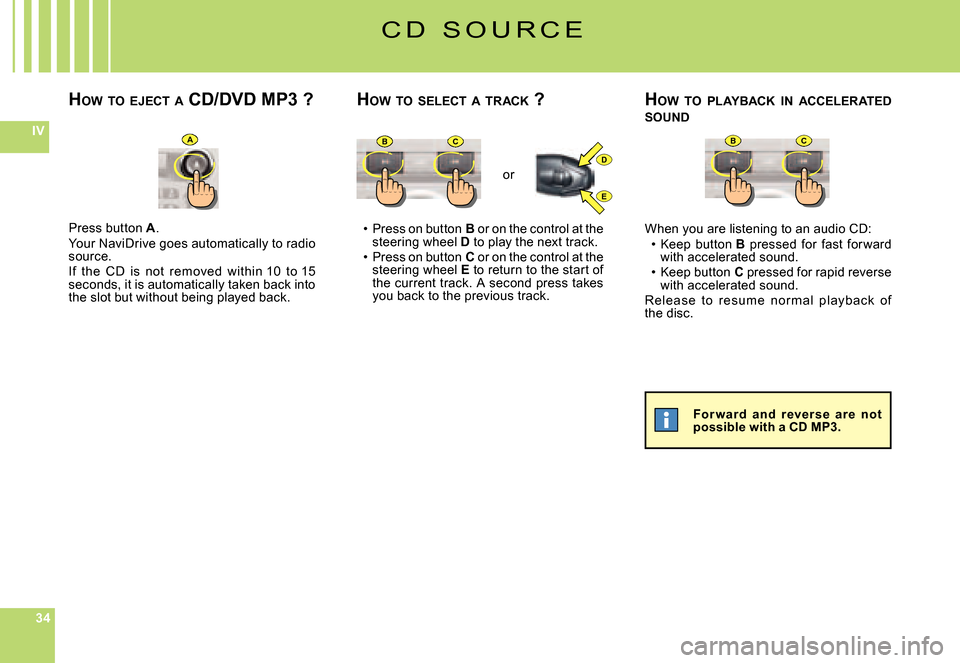
Press on button B or on the control at the steering wheel D to play the next track.Press on button C or on the control at the steering wheel E to return to the start of the current track. A second press takes you back to the previous track.
Page 203 of 216

4343
V
T E L E P H O N E
The telephone function consists of a GSM telephone incorporated in NaviDrive.It has a “Hands-free” function, provided by a microphone located in the front interior lamp and controls at the steering wheel for accessing the majority of operations.
As wit h any mobil e t el ephone, t his t el ep hon e op er at e s t hanks to b ot h cellular and terrestrial networks. For this reason, it cannot guarantee a con-nection in all cases.
Do not allow yourself to be distracted while you are driving.I t i s e s s e n t i a l t o c o m p l y w i t h t h e national legislation in force.Stop the vehicle if you wish to pursue a telephone conversation or proceed w i t h c e r t a i n a c t i o n s (c o m p o si n g a number for example).
Apart from during a communication, it indi-cates to you:the presence of voice messages or text messages (S M S) that have not been read,the communication time since the last update,the level of reception of the networks.
Dur ing a c ommunic ation, it indic ates to you:the time elapsed since the star t of the communication,the number (provided the option and the service are available),the name of your correspondant (if this is recorded in the directory),the level of reception of the network.
Page 207 of 216
4747
V
A
BC
T E L E P H O N E
M A K I N G A C A L L
HOW TO MAKE A CALL ?
HOW TO ACCEPT /REFUSE A CALL ?
Press on the “Pick up” button or at the end of the cont rol at the steering wheel.
in the Telephone menu:Rotate the control to select the menu (A).Press on the control to validate.
Page:
< prev 1-8 9-16 17-24