2008 Citroen C4 radio
[x] Cancel search: radioPage 183 of 257

171
XIII
A U D I O
CD SOURCE
Selecting CD source
After inserting a CD, with the printed side facing upwards, the player will start playing the CD automatically.To change manually to CD source (CD already inserted), press button D until you obtain the source you require.
Ejecting a CD
Press button B to eject the CD, the audio system will automatically switch to radio source.If the CD is not removed within 10 to 15 seconds of being ejected, it will automatically be taken back into the CD player, although it will not be played.
Selecting a track
Press button K once to play the next track.Press button N once to return to the beginning of the track currently being played, press a second time to go back to the start of the previous track.Press the buttons successively to skip several tracks at a time.This can also be done via the control G. As the list of tracks is displayed on the screen, select the desired track using buttons J or M, then validate using button L.You can also do this by means of control 2 at the steering wheel.
Fast forward and rewind with accelerated sound
To move swiftly through the CD, press and keep pressed button Kor N, respectively for fast forward or rewind with accelerated sound.Play resumes as normal when the button is released.
Menu
This menu allows activation/deactivation of two options:- Playback of the fi rst 7 seconds (approx.) of each track of the CD.
- Random playback of the CD tracks.
This can be accessed in two ways:
- Either by pressing button O and proceeding as for Search of Stations RDS – for screen C, the sub-menu corresponds to the Audio Preferences.
- Or, provided you are in CD source, by pressing on button L. You can then access the Audio menu (for screen C only).
Note:
If one of these options is active, it remains active for CD changer source.
Safety precautions
For safety, do not use a CD player if the cabin temperature is higher than +60 °C or lower than -10° C.If the temperature becomes too high, an automatic safety device will prevent the CD player from working until an acceptable temperature is restored.
Handling compact discs
Do not drop them. Store the CDs so that they are kept of dust. Avoid touching the disc surface as any scratches may adversely affect the sound quality. Do not attach any stickers to the discs. Do not use damaged or deformed discs. Do not expose them to heat or direct sunlight.If the surface of the compact disc is dirty, it can be wiped with a soft, clean cloth. Always wipe from the centre of the disc outwards.
Page 186 of 257

174
XIII
A U D I O
HANDS-FREE TELEPHONE
Your audio system may be Bluetooth®
compatible. It allows you to connect a mobile telephone for "hands free" use and even to use its directory.
It permits you to twin up to four telephones, to be able then to connect whichever one you choose.The Bluetooth® functions available and the content of the display are dependent on the type of mobile telephone, its settings and the type of contract you have. For this reason it is advisable to make enquiries with your telephone provider.Prior to any operation:- Your display should be lit up (key in position M).
- Your telephone’s Bluetooth®
system must be activated.
Twinning a telephone
Twinning a telephone consists of having it recognised by the Bluetooth® system on your vehicle. This then permits an instantaneous connection.Twinning can only be performed with ignition switched on, display illuminated, engine stopped. No other telephone should be connected.- The twinning must be performed with the telephone and its Bluetooth® system activated.®
Note:
Refer to the user instructions to familiarise yourself with the features of twinning.- The telephone detects the Bluetooth® system on your vehicle. ®
"C4" displays on your telephone.
You should then select "C4" on your telephone controls. Next you must choose whether or not to accept this twinning then select, on screen Cusing J, M or 8, one of the 4memories. Validate with a press on button L or 7.
Note:
You can select a memory already attributed, although the telephone twinned to this location will no longer be.- Next the telephone asks you to enter an identifi cation code: 1234.
- Validate.
Note:
This entry may be demanded earlier in the twinning sequence.The telephone is now twinned to your Bluetooth® system. For ®
immediate access to the Bluetooth®
functions, it may be necessary to make a connection (see following page "Confi guration: Connecting a twinned mobile telephone").Once the twinning is fi nished, you will be able to connect your telephone via the "Main menu".
Connecting a twinned telephone
Each time you enter the vehicle, after switching on the audio system, your telephone is detected automatically. If more than one telephone is present, the last telephone to have been connected is the fi rst to be recognised.Note:Disconnections may occur. You may have to make a new connection (see following page, "Confi guration: Connecting a twinned mobile telephone").Remarks:- In the event of a problem, it is recommended to switch your telephone off and then on again.- If you switch off your telephone within the fi eld of reception of the Bluetooth® system on your vehicle, the next connection will not be automatic. To restore automatic connection, you will have to connect your telephone manually (see following page, "Confi guration: Connecting a twinned mobile telephone").- If you are already in telephone communication when the audio system is turned on, the latter detects the telephone.- To avoid interference, you are advised not to place your mobile telephone close to your radio.
To accept an incoming call
Using button L or control 7 at the steering wheel.
Page 189 of 257

177
XIII
A U D I O
JBL HI-FI SYSTEM
Your vehicle may be equipped with a JBL Hi-Fi system,specially designed to fi t in with your cabin interior.
Adjustment in CD or radio mode
The basic functions remain the same as those for the radio.
No extra adjustment is necessary.
However, to profi t fully from your JBL audio system, you are recommended to adjust the audio functions: bass (Bass), treble (Treb), front/rear balance (Fad), left/right balance (Bal) to position O, Loudness (Loud) to position ON for listening to a CD and position OFF for listening to the radio.
Page 190 of 257

178
XIII
A U D I O
FREQUENTLY-ASKED QUESTIONS
The table below provides answers to the questions that are asked the most frequently.
QUESTIONANSWERSOLUTION
There is a discrepancy in sound quality between the different audio sources (radio, CD, CD changer etc.).
To achieve an optimum listening quality, the audio adjustments (Volume, Bass, Treble, Ambiance, Loudness) can be adapted to each of the different sound sources, which can produce audible shifts when you change the source (radio, CD, CD changer etc.).
Check that the audio adjustments (Volume, Bass, Treble, Ambiance, Loudness) are adapted to the sources being listened to. It is recommended that you should adjust the AUDIO functions (Bass, Treble, Front-Rear balance, Left-Right balance) to the mid position, select the musical ambiance "None", adjust the loudness correction to the position "Active" in CD mode and to the position "Inactive" in radio mode.
The CD immediately ejects or does not play back.
The CD is the wrong way up, is unplayable, does not contain audio data or contains an audio format that the radio cannot play back.
The CD is protected by an anti-pirating protection system unrecognised by the radio.
- Check that you have inserted the CD the right way up in the CD player.- Check that you have inserted theve ins
- Check the condition of the CD: the CD cannot be played back if it is too damaged.- Check the contents if it is a burnt CD: refer to the advice given in the chapter on Audio System.- The radio’s CD player cannot play back DVDs.- For reasons of poor quality, some burnt CDs will not be played back by the audio system.- The CD changer does not play back MP3 CDs.- The CD chahe CD
The CD player sound is downgraded.
The CD being used is scratched or of poor quality.Insert only CDs of good quality and keep them in good condition.
The radio adjustments (bass, treble, ambiances) are unsuitable.Return the treble and bass levels to 0, without selecting any ambiance.
Page 191 of 257

179
XIII
A U D I O
QUESTIONANSWERSOLUTION
The pre-set stations do not work (no sound, 87.5 Mhz is displayed, etc.).
The waveband selected is not the correct one.Press on the button BAND AST to retrieve the wave band (AM, FM1, FM2, FMAST) where the stations have been memorised.
Traffi c Announcements (TA) is displayed, but I do not receive any road information.
The particular radio station is not in the regional traffi c information network.Change to a radio station which does broadcast traffi c information.
The reception quality of the radio station being listened to gradually deteriorates or the pre-set stations do not work (no sound, 87.5 Mhz displayed, etc.).
The vehicle is too distant from the transmitter of the station being listened to, or no transmitter is present in the geographical area you are passing through.
Activate the RDS function to allow the system to check whether a more powerful transmitter is to be found in the geographical area.
The environment (hills, high buildings, tunnels, underground car parks, etc.) is blocking reception, even in RDS mode.
This phenomenon is normal and does not imply anything wrong with the radio.
The aerial is absent or has been damaged (for example after going through a car wash or in an underground car park).
Have the aerial checked by a CITROËN dealer.Have the aerial checked by a Have the aerial checked by a
Cutting of sound for 1 or 2 seconds in radio mode.
The RDS system during this brief sound cut-off is searching for a better frequency that might offer improved reception of the station.
Deactivate the RDS function if the phenomenon occurs too frequently and always on the same journey.
When the engine is not running, the radio stops after a few minutes.
When the engine is switched off, the working time for the radio depends on the vehicle n the engine is switched off, the working n the engine is switched of
battery charge.
The interruption is normal: the radio goes into economy mode, cutting off in order to save the erruption is normal: the radio goes into erruption is normal: the radio goes into
vehicle’s battery.
You have to start the engine so as to increase the battery charge.
The message "the audio system is overheating" appears on the screen.
In order to protect the audio equipment in excessive ambient temperatures, the radio goes into an automatic thermic protection mode which results in a reduction in sound volume or stopping of the CD player.
Switch off the audio system for a few minutes in order to allow the system to cool down.
Page 193 of 257

2
1
5
10
01
2
346
14
12
9
1516
781311
1.
On/Off.
CD/SD card pause, mute for the radio.
Long press: reinitialisation of the system.
2. Volume adjustment.
3. Selection of the RADIO source. Displaying of the l ist of
stations. Access to the RADIO menu.
4. Selection of the MUSIC source. Displaying of the t racks (CD)
or of the folders (SD card). Access to the MUSIC me nu.6.
Opening of the PHONE menu and displaying of the ca ll list.
7. Selection of the successive displaying of:
RADIO, Map, NAV (if navigation is in progress),
Telephone (if a conversation is in progress),
Trip Computer.
Long press: displaying of a black screen (DARK).
8. Opening of the NAVIGATION menu and displaying
of the last destinations.
9. Opening of the TRAFFIC menu and displaying of the current
trafic alerts.
10. Abandon the operation in progress.
11. Navigation through the menus, selection and conirm ation.
Access to the short-cut menus.
Map zoom on Map or NAV display. 12.
CD eject.
13. Selection of the previous/next radio station from the list.
Selection of the previous/next CD.
Selection of the previous/next MP3 directory.
Selection of the previous/next page of a list.
14. Selection of the previous/next radio station.
Selection of the previous/next CD or MP3 track.
Selection of the previous/next line of a list.
15. Buttons 1 to 6:
Selection of the stored radio station.
Selection of the CD in the CD changer.
Long press: storing of the current radio station.
16. SD card reader.
FIRST STEPS
MY WAY CONTROL PANEL
3 - 4 Long press: access to the sound option settings (f ront/rear
and left/right balance, bass/treble, equalizer, lou dness,
automatic volume adjustment, initialise the setting s).
5. Opening of the SETUP menu.
Long press: access to the GPS coverage and the demonstration mode.
Page 195 of 257

4
02
1
2
3
3
2
1
1
1
3
2
1
1
1
1
1
1
1
1
1
1
1
1
2
2
2
2
1
1
2
1
2
2
2
2
2
2
2
1
1
1
1
1
1
GENERAL OPERATION
A press on the OK dial to permits access
to short-cut menus according to the
display on the screen. TRIP COMPUTER:
alert log
status of functions
MUSIC MEDIA PLAYERS: TA
play options
normal
random track
repeat folder
track intro
select music
NAV:
abort guidance
repeat advice
block road
route info
show dest.
trip info
route type
avoidance criteria
satellites
zoom/scroll voice advice
route options RADIO:
in FM modeTA
RDS
radiotext
regional prog. (REG)
AM
in AM mode TA
refresh AM list
FM
MAP:
abort/resume guidance
set destination
POIs nearby
position info
map settings
zoom/scroll
PHONE:
end call
hold call
dial
dtmf tones
private mode
micro off
SHORT-CUT MENUS
Page 204 of 257
13
11
2
3
05
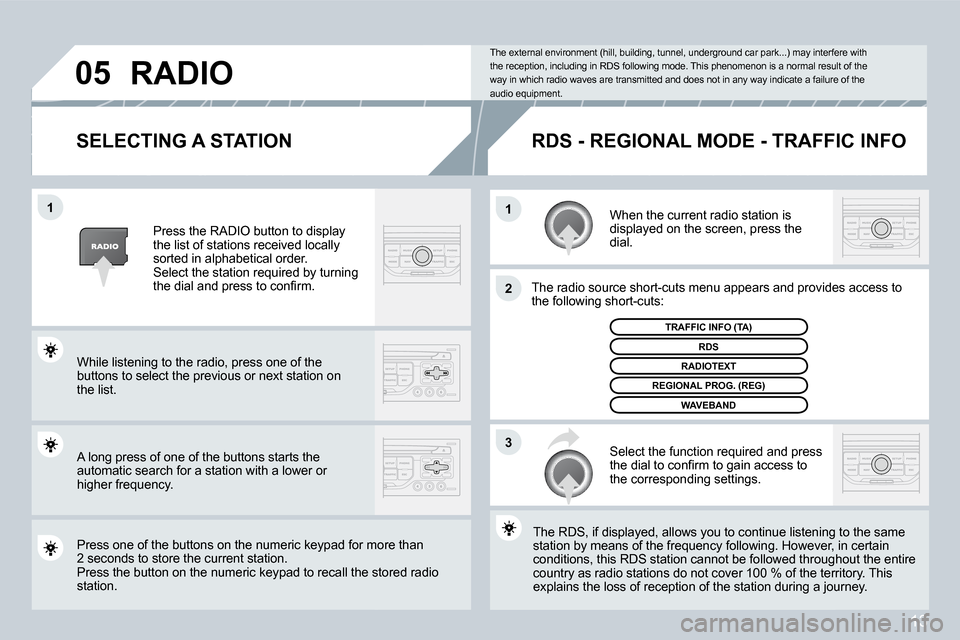
SELECTING A STATIONWhen the current radio station is
displayed on the screen, press the
dial.
The radio source short-cuts menu appears and provid es access to
the following short-cuts:
Select the function required and press
the dial to conirm to gain access to
the corresponding settings.
TRAFFIC INFO (TA)
The RDS, if displayed, allows you to continue liste ning to the same
station by means of the frequency following. Howeve r, in certain
conditions, this RDS station cannot be followed thr oughout the entire
country as radio stations do not cover 100 % of the territory. This
explains the loss of reception of the station durin g a journey.
The external environment (hill, building, tunnel, u
nderground car park...) may interfere with
the reception, including in RDS following mode. Thi s phenomenon is a normal result of the
way in which radio waves are transmitted and does n ot in any way indicate a failure of the
audio equipment.
RDS - REGIONAL MODE - TRAFFIC INFO
Press the RADIO button to display
the list of stations received locally
sorted in alphabetical order.
Select the station required by turning
the dial and press to conirm.
While listening to the radio, press one of the
buttons to select the previous or next station on
the list.
Press one of the buttons on the numeric keypad for more than
2 seconds to store the current station.
Press the button on the numeric keypad to recall th e stored radio
station.
RDS
RADIOTEXT
REGIONAL PROG. (REG)
WAVEBAND
RADIO
A long press of one of the buttons starts the
automatic search for a station with a lower or
higher frequency.