Page 232 of 494

•the iPod�battery charges when plugged into the UCI
connector.
Connecting The iPod�Device
Use the optional connection cable to connect an iPod�to
the vehicle’s UCI connector (which is located in the glove
box on some vehicles. This location may vary with
vehicle). Once the iPod�is connected and synchronized
to the vehicle system (this may take a few seconds to
connect), the vehicle brand logo appears on the iPod�
display, and it starts charging and is ready for use by
pressing radio switches as described below.
Controlling The iPod�Using Radio Buttons
To get into the UCI (iPod�) mode and access a connected
iPod�, press the AUX button on the radio faceplate. Once
in the UCI (iPod�) mode, the iPod�audio track (if
available from iPod�) will start playing over the vehicle
audio system.
Play Mode
When switched to UCI mode the iPod�will be in Play
mode. In Play mode, you may use the following buttons
on the radio faceplate to control the iPod�and display
data:
TUNE/SCROLL Knob
Use the TUNE/SCROLL knob to go to the next or
previous track.
The TUNE/SCROLL knob functions similar to the scroll
wheel on the iPod�mobile digital device.
Turning it clockwise (forward) by one click while playing
a track skips to the next track.
Turning it counterclockwise (backward) by one click
during the first two seconds of the track will jump to the
previous track in the list and turning this button at any
other time in the track will jump to the beginning of the
current track.
230 UNDERSTANDING YOUR INSTRUMENT PANEL
Page 234 of 494

SCAN Button
Pressing the SCAN button will play the first five seconds
of each track in the current list and then forward to the
next song. To stop the SCAN mode and start playing the
desired track, press the SCAN button again.
During the SCAN mode, you can also press the SEEK
button to the left or right to go to the previous or next
tracks.
RND (Random) Button (RES Radios Only)
Pressing the RND button will switch between the shuffle
on and shuffle off modes of the iPod�. If the RND icon is
showing on the radio display then the shuffle mode is on.
List or Browse Mode
During Play mode, pressing any of the following buttons
will take you to List mode. List mode enables you to
scroll through the list of menus and tracks on the iPod�
device.TUNE/SCROLL Knob
In the List mode, the TUNE/SCROLL knob functions in
a similar manner as the scroll wheel on the iPod�.
Turning the TUNE/SCROLL knob clockwise (forward)
and counterclockwise (backward) scrolls through lists,
displaying the track detail on the radio display. Once you
have the track to be played highlighted on the radio
display, press the TUNE/SCROLL knob to select and
start playing the track. By turning the TUNE/SCROLL
knob fast, you can jump through the list faster. During
fast scroll, you may notice a slight delay in updating the
information on the radio display.
During all List modes, the iPod�will display all lists in
“wrap-around” mode. So if the track you wish to select is
at the bottom of the list, you just turn the TUNE/
SCROLL knob backward (counterclockwise) to get to the
track faster.
232 UNDERSTANDING YOUR INSTRUMENT PANEL
Page 238 of 494
Operating Instructions - Satellite Mode
NOTE:The ignition switch must be in the ON or ACC
position to operate the radio.
SEEK Buttons
Press and release the SEEK buttons to search for the next
channel in Satellite mode. Press the right switch to seek
up and the left switch to seek down. The radio will
remain tuned to the new channel until you make another
selection. Holding either button will bypass channels
without stopping until you release it.
SCAN Button
Pressing the SCAN button causes the tuner to search for
the next channel, pausing for eight seconds before con-
tinuing to the next. To stop the search, press the SCAN
button a second time.
INFO Button
Pressing the INFO button will cycle between Artist, Song
Title, and Composer (if available) information. Also,
pressing and holding the INFO button for an additional
three seconds will make the radio display the Song Title
all of the time (press and hold again to return to normal
display).
RW/FF
Pressing the RW (Rewind) or FF (Fast Forward) buttons
causes the tuner to search for the next channel in the
direction of the arrows.
TUNE Control (Rotary)
Turn the rotary TUNE/SCROLL control knob clockwise
to increase or counterclockwise to decrease the channel.
MUSIC TYPE Button
Pressing this button once will turn on the Music Type
mode for five seconds. Pressing the MUSIC TYPE button
236 UNDERSTANDING YOUR INSTRUMENT PANEL
Page 416 of 494
CavityCartridge
FuseMini Fuse Description
14 —10 Amp
RedIgnition Off Draw
(IOD) — Cabin Com-
partment Node
(CCN)/ Interior Light-
ing
1540 Amp
Green—Battery Feed — Radia-
tor Fan Relay
16 —15 Amp
Lt. BlueIGN Run/ACC — Ci-
gar Lighter/PWR Sun-
roof Mod
17 —10 Amp
RedIgnition Off Draw
(IOD) — Wireless Con-
trol Module (WCM)/
Clock/Steering Control
Module (SCM)
1840 Amp
Green—Battery Feed — Auto
Shutdown (ASD) RelayCavityCartridge
FuseMini Fuse Description
19 —20 Amp
YellowIgnition Off Draw
(IOD) — Power Amp
Feed2-ifequipped
20 —15 Amp
Lt. BlueIgnition Off Draw
(IOD) — Radio
21 —10 Amp
Red—
22 —10 Amp
RedIgnition Run — Cli-
mate Controls/Hot
Cup Holder - if
equipped
23 —15 Amp
Lt. BlueAuto Shutdown (ASD)
Relay Feed 3
24 —25 Amp
ClearBattery Feed — PWR
Sunroof Feed
25 —10 Amp
RedIgnition Run — Heated
Mirrors - If Equipped
414 MAINTAINING YOUR VEHICLE
Page 422 of 494
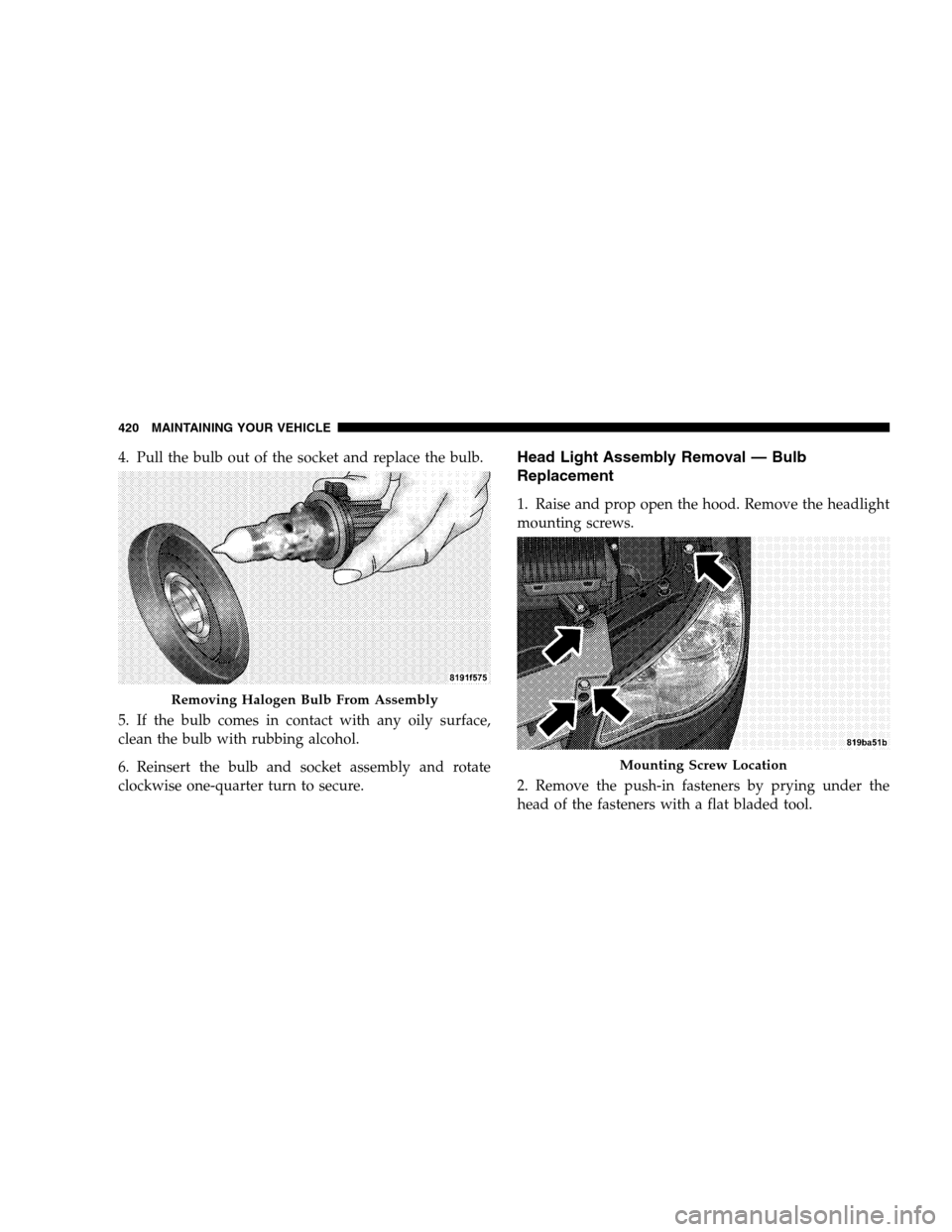
4. Pull the bulb out of the socket and replace the bulb.
5. If the bulb comes in contact with any oily surface,
clean the bulb with rubbing alcohol.
6. Reinsert the bulb and socket assembly and rotate
clockwise one-quarter turn to secure.Head Light Assembly Removal — Bulb
Replacement
1. Raise and prop open the hood. Remove the headlight
mounting screws.
2. Remove the push-in fasteners by prying under the
head of the fasteners with a flat bladed tool.
Removing Halogen Bulb From Assembly
Mounting Screw Location
420 MAINTAINING YOUR VEHICLE
Page 424 of 494
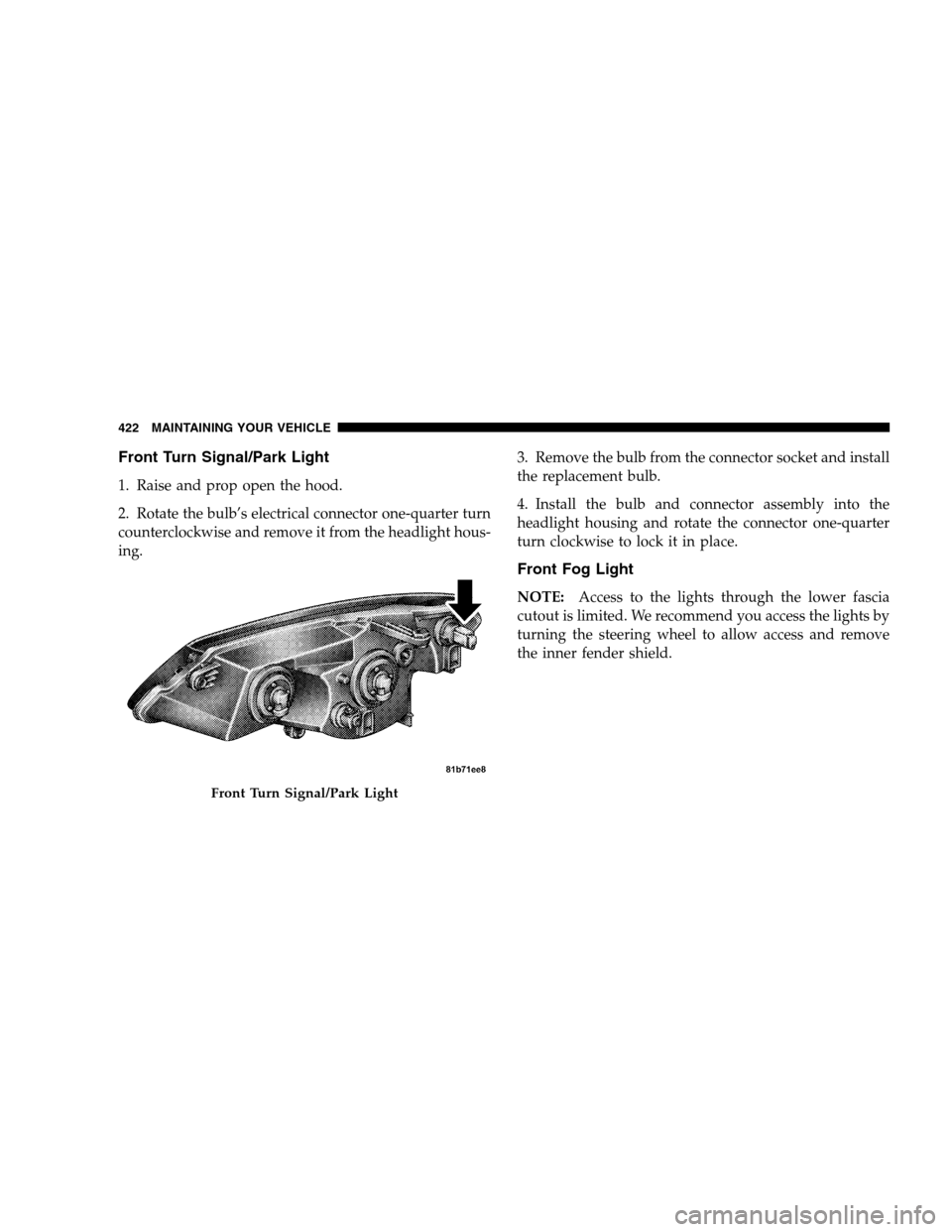
Front Turn Signal/Park Light
1. Raise and prop open the hood.
2. Rotate the bulb’s electrical connector one-quarter turn
counterclockwise and remove it from the headlight hous-
ing.3. Remove the bulb from the connector socket and install
the replacement bulb.
4. Install the bulb and connector assembly into the
headlight housing and rotate the connector one-quarter
turn clockwise to lock it in place.
Front Fog Light
NOTE:Access to the lights through the lower fascia
cutout is limited. We recommend you access the lights by
turning the steering wheel to allow access and remove
the inner fender shield.
Front Turn Signal/Park Light
422 MAINTAINING YOUR VEHICLE
Page 425 of 494
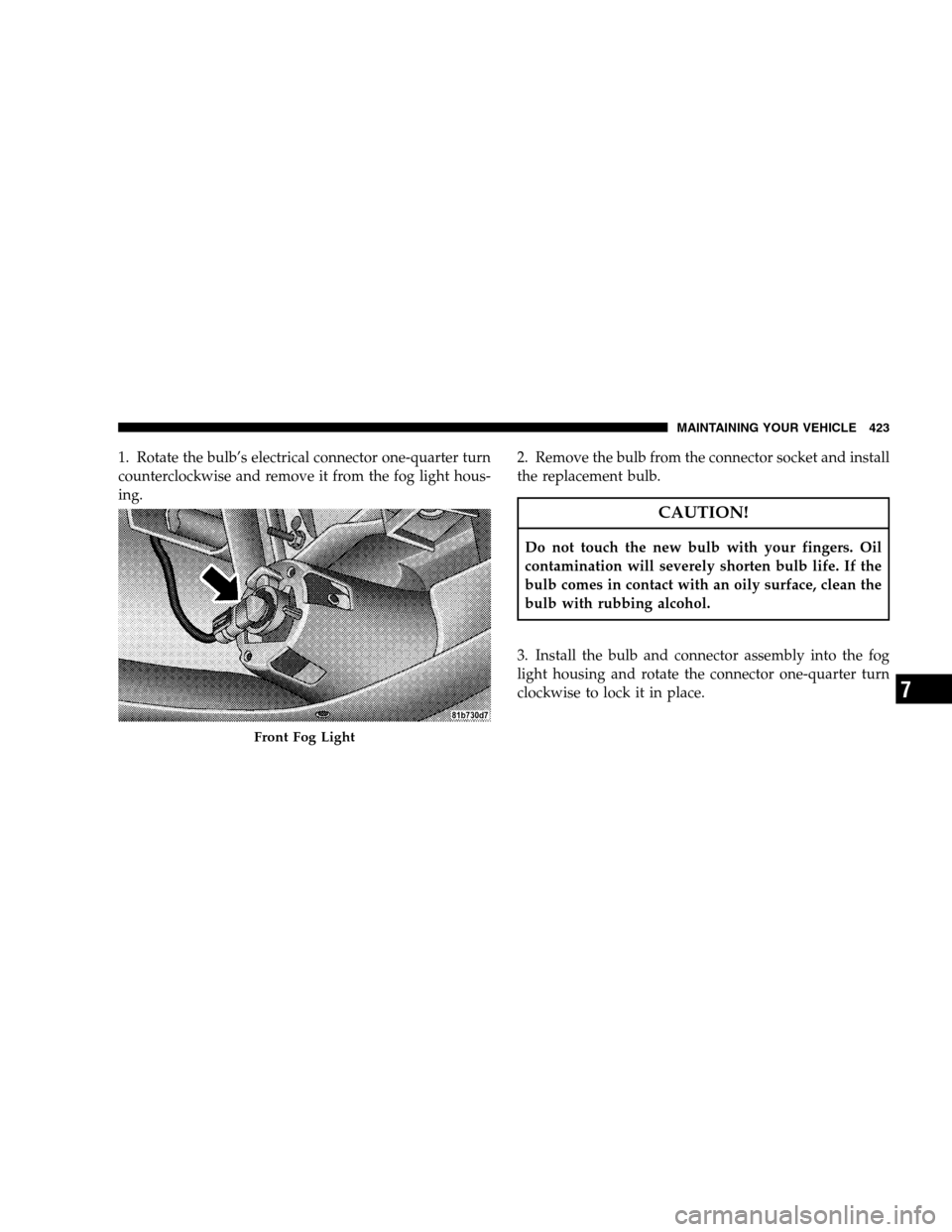
1. Rotate the bulb’s electrical connector one-quarter turn
counterclockwise and remove it from the fog light hous-
ing.2. Remove the bulb from the connector socket and install
the replacement bulb.
CAUTION!
Do not touch the new bulb with your fingers. Oil
contamination will severely shorten bulb life. If the
bulb comes in contact with an oily surface, clean the
bulb with rubbing alcohol.
3. Install the bulb and connector assembly into the fog
light housing and rotate the connector one-quarter turn
clockwise to lock it in place.
Front Fog Light
MAINTAINING YOUR VEHICLE 423
7
Page 427 of 494
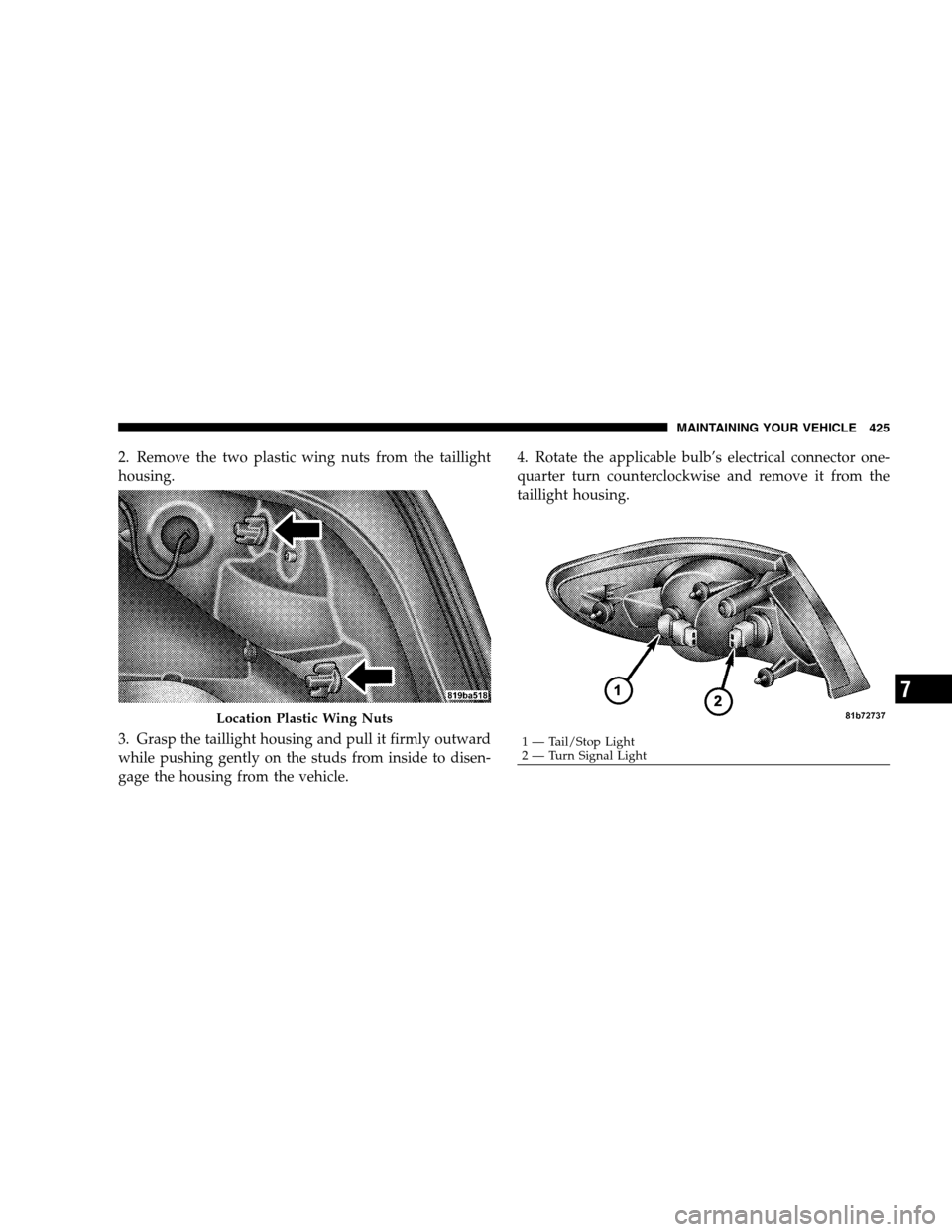
2. Remove the two plastic wing nuts from the taillight
housing.
3. Grasp the taillight housing and pull it firmly outward
while pushing gently on the studs from inside to disen-
gage the housing from the vehicle.4. Rotate the applicable bulb’s electrical connector one-
quarter turn counterclockwise and remove it from the
taillight housing.
Location Plastic Wing Nuts
1 — Tail/Stop Light
2 — Turn Signal LightMAINTAINING YOUR VEHICLE 425
7