Page 221 of 479

3. Touch the screen where the words ªSet Time Zoneº are
displayed. The time zone selection menu will appear on
the screen.
4. Select a time zone by touching the screen where your
selection appears. If you do not see a time zone that you
want to select, touch the screen where the word ªPageº is
displayed to view additional time zones in the menu.
5. Touch the screen where the word ªSaveº is displayed.
SALES CODE RER Ð MULTIMEDIA SYSTEM Ð IF
EQUIPPED
NOTE:The sales code is located on the lower right side
of the unit's faceplate.
The RER Multimedia system contains a radio, Sirius
Satellite Radio player, navigation system, CD/DVD
player, USB port, 20-gigabyte hard drive (HDD), and the
UConnecttHands-Free Bluetoothtcellular system.NOTE:If your vehicle is not equipped with UConnectt,
the unit will respond with a ªFeature Not Availableº
message when selecting controls related to this feature.
A 6.5-in (16.5 cm) touch screen allows easy menu selec-
tion, while the Advanced Voice Dialog System recognizes
more than 1,000 words for audio, navigation, entertain-
ment, and hands-free mobile phone use.
The satellite navigation capability combines a Global-
Positioning System (GPS)-based navigation system with
an integrated color screen to provide maps, turn identi-
fication, selection menus, and instructions for selecting a
variety of destinations and routes.
A shared HDD for the navigation system, the database,
and other radio features allows uploads of music and
photos from CDs or through the USB port. The Gracenote
database finds the artist, track, and title for the music.
220 INSTRUMENT PANEL AND CONTROLS
Page 229 of 479
Toggle the MUSIC TYPE button to select the following
format types:
Program Type16-Digit Character
Display
No program type or un-
definedNone
Adult Hits Adlt Hit
Classical Classicl
Classic Rock Cls Rock
College College
Country Country
Foreign Language Language
Information Inform
Jazz Jazz
News News
Nostalgia Nostalga
Oldies Oldies
Program Type16-Digit Character
Display
Personality Persnlty
Public Public
Rhythm and Blues R & B
Religious Music Rel Musc
Religious Talk Rel Talk
Rock Rock
Soft Soft
Soft Rock Soft Rck
Soft Rhythm and Blues Soft R&B
Sports Sports
Talk Talk
Top 40 Top 40
Weather Weather
228 INSTRUMENT PANEL AND CONTROLS
Page 253 of 479
NOTE:The air conditioning compressor operates in
both Mix and Defrost or a blend of these modes, even if
the A/C button has not been pressed. This dehumidifies
the air to help dry the windshield.
Temperature Control
The temperature of the air is controlled by a slide located
on the top center of the control panel. Move the slide left
or right to change the temperature. The blue area of the
scale indicates cooler temperatures while the red area
indicates warmer temperatures.
Manual Temperature Control
252 INSTRUMENT PANEL AND CONTROLS
Page 261 of 479

The rear compartment control uses two rotary knobs: one
for the temperature control and the other for the fan
speed control. The mode for the rear air conditioning and
heating system is always controlled by the front control
unit. Fan and temperature can be controlled from the
front control unit or the rear control unit.
Rear Rotary Blower Control
The second row seat occupants have control of the rear
blower speed only when the front control unit is in the
ªREAR CONTROLº position or ªCONTROL IN REAR
for ATC.9
The rear blower switch has an OFF position and a range
of blower speeds. Rotating the rear blower control clock-
wise will increase the blower speed.
Rear Rotary Temperature Control
The second row seat occupants have control of the rear
temperature only when the front control unit is in the
9REAR CONTROL9position.
To change the temperature in the rear of the vehicle,
rotate the temperature control knob to the right or left.
The blue area indicates cooler temperatures while the red
area indicates warmer temperatures.
NOTE:For best operation, make sure that ventilation
grilles located in the rear storage area are not obstructed
by stowed articles.
260 INSTRUMENT PANEL AND CONTROLS
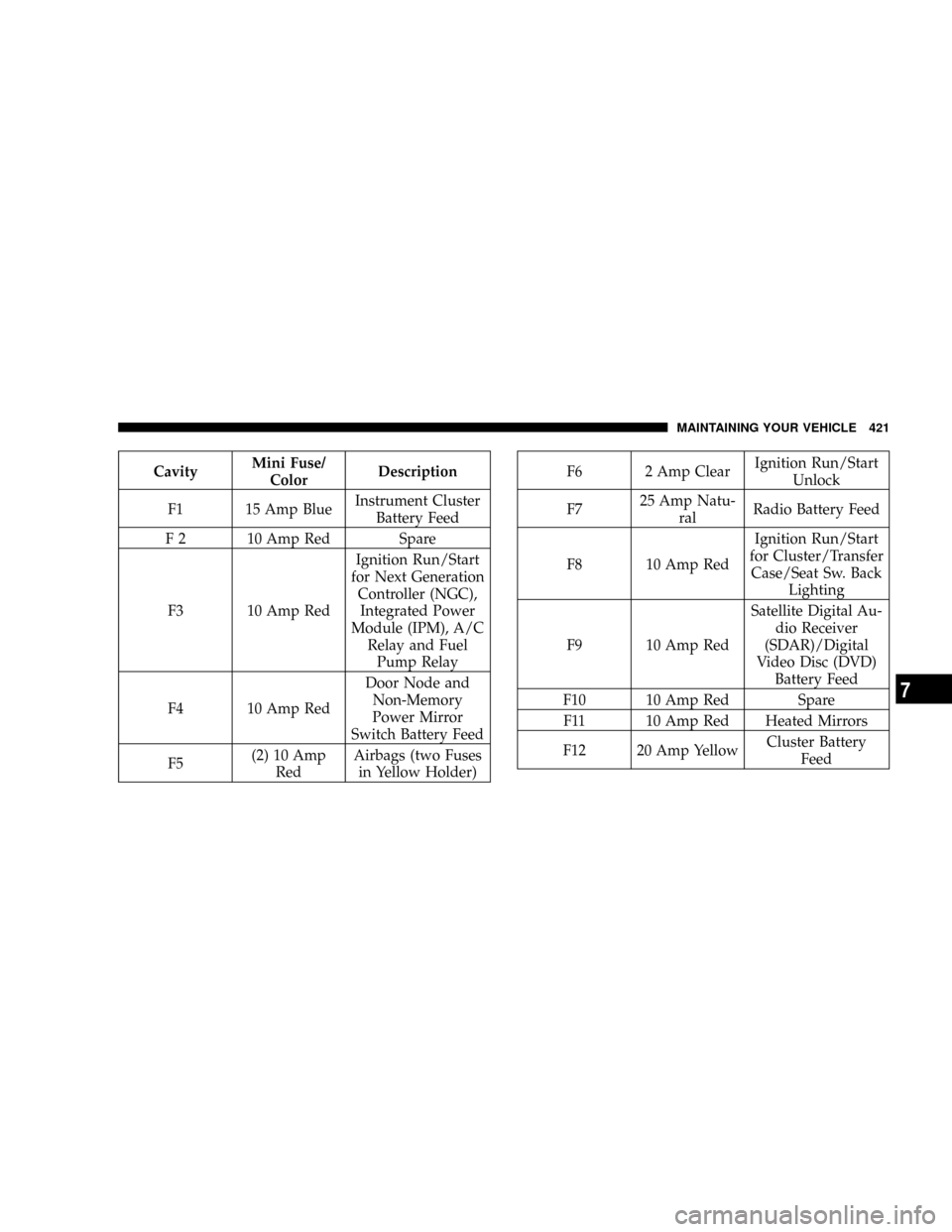
Page 422 of 479
CavityMini Fuse/
ColorDescription
F1 15 Amp BlueInstrument Cluster
Battery Feed
F 2 10 Amp Red Spare
F3 10 Amp RedIgnition Run/Start
for Next Generation
Controller (NGC),
Integrated Power
Module (IPM), A/C
Relay and Fuel
Pump Relay
F4 10 Amp RedDoor Node and
Non-Memory
Power Mirror
Switch Battery Feed
F5(2) 10 Amp
RedAirbags (two Fuses
in Yellow Holder)F6 2 Amp ClearIgnition Run/Start
Unlock
F725 Amp Natu-
ralRadio Battery Feed
F8 10 Amp RedIgnition Run/Start
for Cluster/Transfer
Case/Seat Sw. Back
Lighting
F9 10 Amp RedSatellite Digital Au-
dio Receiver
(SDAR)/Digital
Video Disc (DVD)
Battery Feed
F10 10 Amp Red Spare
F11 10 Amp Red Heated Mirrors
F12 20 Amp YellowCluster Battery
Feed
MAINTAINING YOUR VEHICLE 421
7
Page 423 of 479
F13 10 Amp RedIgnition Run HVAC
Module/Heated
Rear Glass (EBL)
Relay
F14 10 Amp RedABS Module Igni-
tion Run
F15 15 Amp BlueBattery Feed
Bluetootht,
Compass/Trip
Computer (CMTC),
Sentry KeytDiag-
nostics
F16 20 Amp YellowReconfigurable
Power Outlets
F17 20 Amp YellowIgnition Run / Rear
Park Assist / Sec-
ond Row Heated
Seats
F18 20 Amp YellowCigar Lighter Igni-
tion
F19 10 Amp Red Spare Fuse
F20 15 Amp BlueHeating & Air Con-
ditioning w/ATC
Only Battery Feed
F2125 Amp Natu-
ralAmplifier Battery
Feed
422 MAINTAINING YOUR VEHICLE
Page 426 of 479
CavityCartridge
Fuse /
RelayMini
FuseDescription
23 20 Amp
YellowTrailer Tow
24 15 Amp
BlueA/C Clutch
25 15 Amp
BlueStop Lamp Switch
26 Spare
27 20 Amp
YellowRun/Start Relay Feed
28 Spare
29 Relay Run Start
30 Relay Run Remote
31 Spare
32 Relay StarterCavityCartridge
Fuse /
RelayMini
FuseDescription
33 Relay Electronic Automatic
Transaxle (EATX)
34 Relay AC Clutch
35 Relay Fuel Pump Rly
36 Spare
37 Relay Stop Lamp Switch
38 Spare
39 Relay Blower Motor
40 Relay Auto Shut Down
(ASD) Rly
MAINTAINING YOUR VEHICLE 425
7